
TVM 是一个开源深度学习编译器,可适用于各类 CPUs, GPUs 及其他专用加速器。它的目标是使得我们能够在任何硬件上优化和运行自己的模型。不同于深度学习框架关注模型生产力,TVM 更关注模型在硬件上的性能和效率。
本文只简单介绍 TVM 的编译流程,及如何自动调优自己的模型。更深入了解,可见 TVM 官方内容:
编译流程
TVM 文档 Design and Architecture 讲述了实例编译流程、逻辑结构组件、设备目标实现等。其中流程见下图:
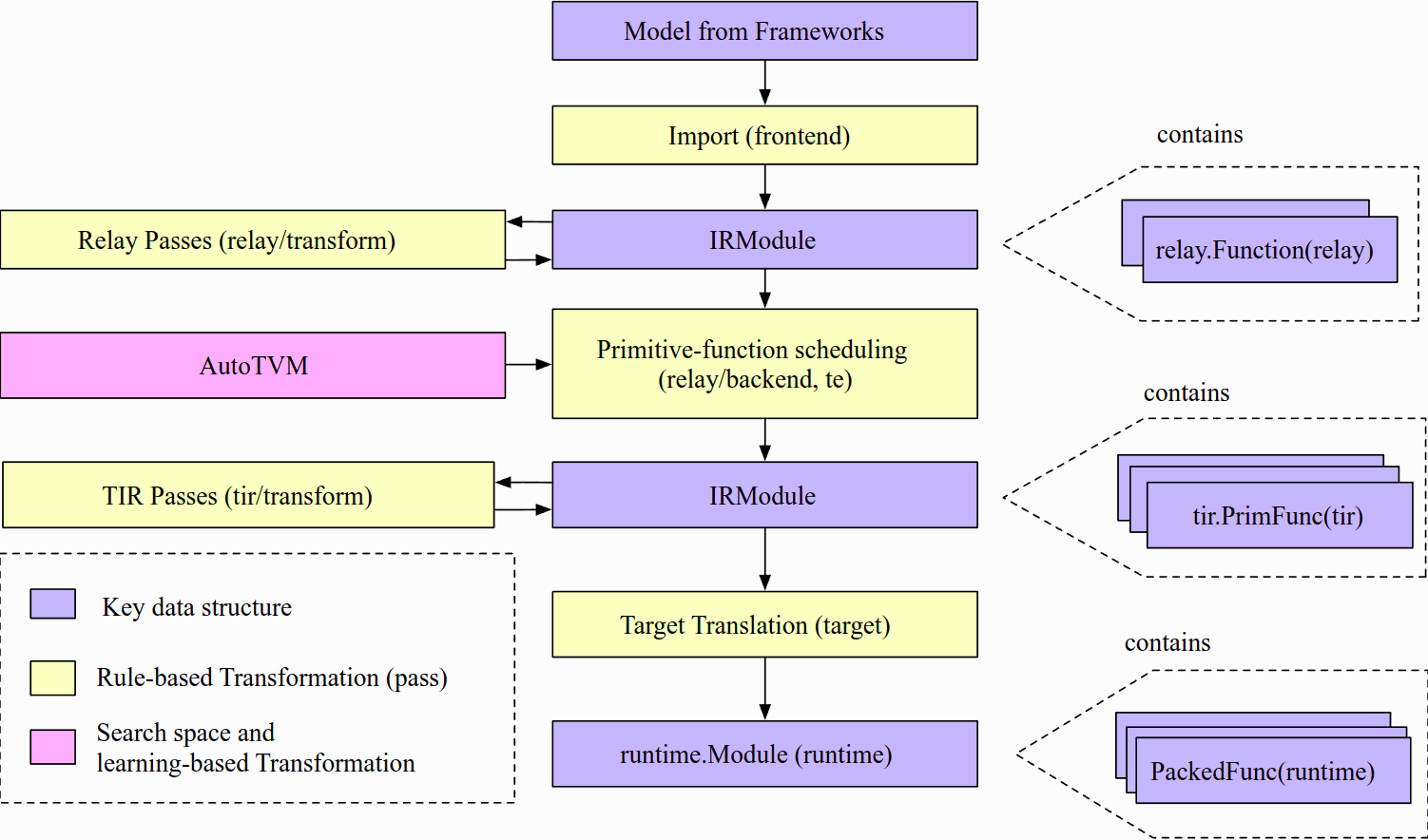
从高层次上看,包含了如下步骤:
- 导入(Import):前端组件将模型提取进 IRModule,其是模型内部表示(IR)的函数集合。
- 转换(Transformation):编译器将 IRModule 转换为另一个功能等效或近似等效(如量化情况下)的 IRModule。大多转换都是独立于目标(后端)的。TVM 也允许目标影响转换通道的配置。
- 目标翻译(Target Translation):编译器翻译(代码生成) IRModule 到目标上的可执行格式。目标翻译结果被封装为 runtime.Module,可以在目标运行时环境中导出、加载和执行。
- 运行时执行(Runtime Execution):用户加载一个 runtime.Module 并在支持的运行时环境中运行编译好的函数。
调优模型
TVM 文档 User Tutorial 从怎么编译优化模型开始,逐步深入到 TE, TensorIR, Relay 等更底层的逻辑结构组件。
这里只讲下如何用 AutoTVM 自动调优模型,实际了解 TVM 编译、调优、运行模型的过程。原文见 Compiling and Optimizing a Model with the Python Interface (AutoTVM)。
准备 TVM
首先,安装 TVM。可见文档 Installing TVM,或笔记「TVM 安装」。
之后,即可通过 TVM Python API 来调优模型。我们先导入如下依赖:
1import onnx
2from tvm.contrib.download import download_testdata
3from PIL import Image
4import numpy as np
5import tvm.relay as relay
6import tvm
7from tvm.contrib import graph_executor
准备模型,并加载
获取预训练的 ResNet-50 v2 ONNX 模型,并加载:
1model_url = "".join(
2    [
3        "https://github.com/onnx/models/raw/",
4        "main/vision/classification/resnet/model/",
5        "resnet50-v2-7.onnx",
6    ]
7)
8
9model_path = download_testdata(model_url, "resnet50-v2-7.onnx", module="onnx")
10onnx_model = onnx.load(model_path)
准备图片,并前处理
获取一张测试图片,并前处理成 224x224 NCHW 格式:
1img_url = "https://s3.amazonaws.com/model-server/inputs/kitten.jpg"
2img_path = download_testdata(img_url, "imagenet_cat.png", module="data")
3
4# Resize it to 224x224
5resized_image = Image.open(img_path).resize((224, 224))
6img_data = np.asarray(resized_image).astype("float32")
7
8# Our input image is in HWC layout while ONNX expects CHW input, so convert the array
9img_data = np.transpose(img_data, (2, 0, 1))
10
11# Normalize according to the ImageNet input specification
12imagenet_mean = np.array([0.485, 0.456, 0.406]).reshape((3, 1, 1))
13imagenet_stddev = np.array([0.229, 0.224, 0.225]).reshape((3, 1, 1))
14norm_img_data = (img_data / 255 - imagenet_mean) / imagenet_stddev
15
16# Add the batch dimension, as we are expecting 4-dimensional input: NCHW.
17img_data = np.expand_dims(norm_img_data, axis=0)
编译模型,用 TVM Relay
TVM 导入 ONNX 模型成 Relay,并创建 TVM 图模型:
1target = input("target [llvm]: ")
2if not target:
3    target = "llvm"
4    # target = "llvm -mcpu=core-avx2"
5    # target = "llvm -mcpu=skylake-avx512"
6
7# The input name may vary across model types. You can use a tool
8# like Netron to check input names
9input_name = "data"
10shape_dict = {input_name: img_data.shape}
11
12mod, params = relay.frontend.from_onnx(onnx_model, shape_dict)
13
14with tvm.transform.PassContext(opt_level=3):
15    lib = relay.build(mod, target=target, params=params)
16
17dev = tvm.device(str(target), 0)
18module = graph_executor.GraphModule(lib["default"](dev))
其中 target 是目标硬件平台。llvm 指用 CPU,建议指明架构指令集,可更优化性能。如下命令可查看 CPU:
1$ llc --version | grep CPU
2  Host CPU: skylake
3$ lscpu
或直接上厂商网站(如 Intel® Products)查看产品参数。
运行模型,用 TVM Runtime
用 TVM Runtime 运行模型,进行预测:
1dtype = "float32"
2module.set_input(input_name, img_data)
3module.run()
4output_shape = (1, 1000)
5tvm_output = module.get_output(0, tvm.nd.empty(output_shape)).numpy()
收集优化前的性能数据
收集优化前的性能数据:
1import timeit
2
3timing_number = 10
4timing_repeat = 10
5unoptimized = (
6    np.array(timeit.Timer(lambda: module.run()).repeat(repeat=timing_repeat, number=timing_number))
7    * 1000
8    / timing_number
9)
10unoptimized = {
11    "mean": np.mean(unoptimized),
12    "median": np.median(unoptimized),
13    "std": np.std(unoptimized),
14}
15
16print(unoptimized)
之后,用以对比优化后的性能。
后处理输出,得知预测结果
输出的预测结果,后处理成可读的分类结果:
1from scipy.special import softmax
2
3# Download a list of labels
4labels_url = "https://s3.amazonaws.com/onnx-model-zoo/synset.txt"
5labels_path = download_testdata(labels_url, "synset.txt", module="data")
6
7with open(labels_path, "r") as f:
8    labels = [l.rstrip() for l in f]
9
10# Open the output and read the output tensor
11scores = softmax(tvm_output)
12scores = np.squeeze(scores)
13ranks = np.argsort(scores)[::-1]
14for rank in ranks[0:5]:
15    print("class='%s' with probability=%f" % (labels[rank], scores[rank]))
调优模型,获取调优数据
于目标硬件平台,用 AutoTVM 自动调优,获取调优数据:
1import tvm.auto_scheduler as auto_scheduler
2from tvm.autotvm.tuner import XGBTuner
3from tvm import autotvm
4
5number = 10
6repeat = 1
7min_repeat_ms = 0  # since we're tuning on a CPU, can be set to 0
8timeout = 10  # in seconds
9
10# create a TVM runner
11runner = autotvm.LocalRunner(
12    number=number,
13    repeat=repeat,
14    timeout=timeout,
15    min_repeat_ms=min_repeat_ms,
16    enable_cpu_cache_flush=True,
17)
18
19tuning_option = {
20    "tuner": "xgb",
21    "trials": 10,
22    "early_stopping": 100,
23    "measure_option": autotvm.measure_option(
24        builder=autotvm.LocalBuilder(build_func="default"), runner=runner
25    ),
26    "tuning_records": "resnet-50-v2-autotuning.json",
27}
28
29# begin by extracting the tasks from the onnx model
30tasks = autotvm.task.extract_from_program(mod["main"], target=target, params=params)
31
32# Tune the extracted tasks sequentially.
33for i, task in enumerate(tasks):
34    prefix = "[Task %2d/%2d] " % (i + 1, len(tasks))
35    tuner_obj = XGBTuner(task, loss_type="rank")
36    tuner_obj.tune(
37        n_trial=min(tuning_option["trials"], len(task.config_space)),
38        early_stopping=tuning_option["early_stopping"],
39        measure_option=tuning_option["measure_option"],
40        callbacks=[
41            autotvm.callback.progress_bar(tuning_option["trials"], prefix=prefix),
42            autotvm.callback.log_to_file(tuning_option["tuning_records"]),
43        ],
44    )
上述 tuning_option 选用的 XGBoost Grid 算法进行优化搜索,数据记录进 tuning_records。
重编译模型,用调优数据
重新编译出一个优化模型,依据调优数据:
1with autotvm.apply_history_best(tuning_option["tuning_records"]):
2    with tvm.transform.PassContext(opt_level=3, config={}):
3        lib = relay.build(mod, target=target, params=params)
4
5dev = tvm.device(str(target), 0)
6module = graph_executor.GraphModule(lib["default"](dev))
7
8
9# Verify that the optimized model runs and produces the same results
10
11dtype = "float32"
12module.set_input(input_name, img_data)
13module.run()
14output_shape = (1, 1000)
15tvm_output = module.get_output(0, tvm.nd.empty(output_shape)).numpy()
16
17scores = softmax(tvm_output)
18scores = np.squeeze(scores)
19ranks = np.argsort(scores)[::-1]
20for rank in ranks[0:5]:
21    print("class='%s' with probability=%f" % (labels[rank], scores[rank]))
对比调优与非调优模型
收集优化后的性能数据,与优化前的对比:
1import timeit
2
3timing_number = 10
4timing_repeat = 10
5optimized = (
6    np.array(timeit.Timer(lambda: module.run()).repeat(repeat=timing_repeat, number=timing_number))
7    * 1000
8    / timing_number
9)
10optimized = {"mean": np.mean(optimized), "median": np.median(optimized), "std": np.std(optimized)}
11
12print("optimized: %s" % (optimized))
13print("unoptimized: %s" % (unoptimized))
调优模型,整个过程的运行结果,如下:
1$ time python autotvm_tune.py
2# TVM 编译运行模型
3## Downloading and Loading the ONNX Model
4## Downloading, Preprocessing, and Loading the Test Image
5## Compile the Model With Relay
6target [llvm]: llvm -mcpu=core-avx2
7One or more operators have not been tuned. Please tune your model for better performance. Use DEBUG logging level to see more details.
8## Execute on the TVM Runtime
9## Collect Basic Performance Data
10{'mean': 44.97057118016528, 'median': 42.52320024970686, 'std': 6.870915251002107}
11## Postprocess the output
12class='n02123045 tabby, tabby cat' with probability=0.621104
13class='n02123159 tiger cat' with probability=0.356378
14class='n02124075 Egyptian cat' with probability=0.019712
15class='n02129604 tiger, Panthera tigris' with probability=0.001215
16class='n04040759 radiator' with probability=0.000262
17# AutoTVM 调优模型 [Y/n]
18## Tune the model
19[Task  1/25]  Current/Best:  156.96/ 353.76 GFLOPS | Progress: (10/10) | 4.78 s Done.
20[Task  2/25]  Current/Best:   54.66/ 241.25 GFLOPS | Progress: (10/10) | 2.88 s Done.
21[Task  3/25]  Current/Best:  116.71/ 241.30 GFLOPS | Progress: (10/10) | 3.48 s Done.
22[Task  4/25]  Current/Best:  119.92/ 184.18 GFLOPS | Progress: (10/10) | 3.48 s Done.
23[Task  5/25]  Current/Best:   48.92/ 158.38 GFLOPS | Progress: (10/10) | 3.13 s Done.
24[Task  6/25]  Current/Best:  156.89/ 230.95 GFLOPS | Progress: (10/10) | 2.82 s Done.
25[Task  7/25]  Current/Best:   92.33/ 241.99 GFLOPS | Progress: (10/10) | 2.40 s Done.
26[Task  8/25]  Current/Best:   50.04/ 331.82 GFLOPS | Progress: (10/10) | 2.64 s Done.
27[Task  9/25]  Current/Best:  188.47/ 409.93 GFLOPS | Progress: (10/10) | 4.44 s Done.
28[Task 10/25]  Current/Best:   44.81/ 181.67 GFLOPS | Progress: (10/10) | 2.32 s Done.
29[Task 11/25]  Current/Best:   83.74/ 312.66 GFLOPS | Progress: (10/10) | 2.74 s Done.
30[Task 12/25]  Current/Best:   96.48/ 294.40 GFLOPS | Progress: (10/10) | 2.82 s Done.
31[Task 13/25]  Current/Best:  123.74/ 354.34 GFLOPS | Progress: (10/10) | 2.62 s Done.
32[Task 14/25]  Current/Best:   23.76/ 178.71 GFLOPS | Progress: (10/10) | 2.90 s Done.
33[Task 15/25]  Current/Best:  119.18/ 534.63 GFLOPS | Progress: (10/10) | 2.49 s Done.
34[Task 16/25]  Current/Best:  101.24/ 172.92 GFLOPS | Progress: (10/10) | 2.49 s Done.
35[Task 17/25]  Current/Best:  309.85/ 309.85 GFLOPS | Progress: (10/10) | 2.69 s Done.
36[Task 18/25]  Current/Best:   54.45/ 368.31 GFLOPS | Progress: (10/10) | 2.46 s Done.
37[Task 19/25]  Current/Best:   78.69/ 162.43 GFLOPS | Progress: (10/10) | 3.29 s Done.
38[Task 20/25]  Current/Best:   40.78/ 317.50 GFLOPS | Progress: (10/10) | 4.52 s Done.
39[Task 21/25]  Current/Best:  169.03/ 296.36 GFLOPS | Progress: (10/10) | 3.95 s Done.
40[Task 22/25]  Current/Best:   90.96/ 210.43 GFLOPS | Progress: (10/10) | 2.28 s Done.
41[Task 23/25]  Current/Best:   48.93/ 217.36 GFLOPS | Progress: (10/10) | 2.87 s Done.
42[Task 25/25]  Current/Best:    0.00/   0.00 GFLOPS | Progress: (0/10) | 0.00 s Done.
43[Task 25/25]  Current/Best:   25.50/  33.86 GFLOPS | Progress: (10/10) | 9.28 s Done.
44## Compiling an Optimized Model with Tuning Data
45class='n02123045 tabby, tabby cat' with probability=0.621104
46class='n02123159 tiger cat' with probability=0.356378
47class='n02124075 Egyptian cat' with probability=0.019712
48class='n02129604 tiger, Panthera tigris' with probability=0.001215
49class='n04040759 radiator' with probability=0.000262
50## Comparing the Tuned and Untuned Models
51optimized: {'mean': 34.736288779822644, 'median': 34.547542000655085, 'std': 0.5144378649382363}
52unoptimized: {'mean': 44.97057118016528, 'median': 42.52320024970686, 'std': 6.870915251002107}
53
54real    3m23.904s
55user    5m2.900s
56sys     5m37.099s
对比性能数据,可以发现:调优模型的运行速度更快、更平稳。
参考
- 笔记: start-ai-compiler
- 资料:
GoCoding 个人实践的经验分享,可关注公众号!