
SoftRas 是目前主流三角网格可微渲染器之一。
可微渲染通过计算渲染过程的导数,使得从单张图片学习三维结构逐渐成为现实。可微渲染目前被广泛地应用于三维重建,特别是人体重建、人脸重建和三维属性估计等应用中。
安装
conda 安装 PyTorch 环境:
1conda create -n torch python=3.8 -y
2conda activate torch
3
4conda install pytorch torchvision torchaudio cudatoolkit=11.1 -c pytorch -c nvidia -y
5
6conda activate torch
7python - <<-EOF
8import platform
9import torch
10print(f"Python : {platform.python_version()}")
11print(f"PyTorch: {torch.__version__}")
12print(f"  CUDA : {torch.version.cuda}")
13EOF
14
15Python : 3.8.10
16PyTorch: 1.9.0
17  CUDA : 11.1
获取代码并安装:
1git clone https://github.com/ShichenLiu/SoftRas.git
2cd SoftRas
3python setup.py install
可设 setup.py 镜像源:
1cat <<-EOF > ~/.pydistutils.cfg
2[easy_install]
3index_url = http://mirrors.aliyun.com/pypi/simple
4EOF
应用
安装模型查看工具:
1snap install ogre-meshviewer
2# 或
3snap install meshlab
渲染物体
渲染测试:
1CUDA_VISIBLE_DEVICES=0 python examples/demo_render.py
渲染结果:
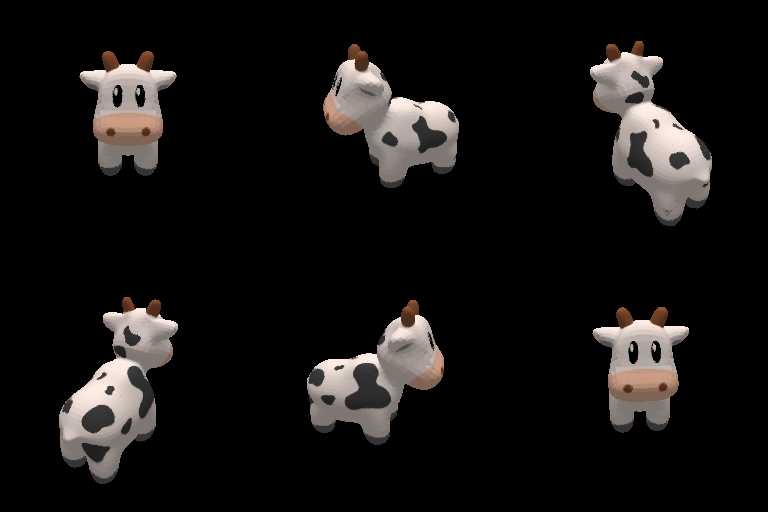
对比前后模型:
1ogre-meshviewer data/obj/spot/spot_triangulated.obj
2
3ogre-meshviewer data/results/output_render/saved_spot.obj
Mesh 重建
下载数据集:
1bash examples/recon/download_dataset.sh
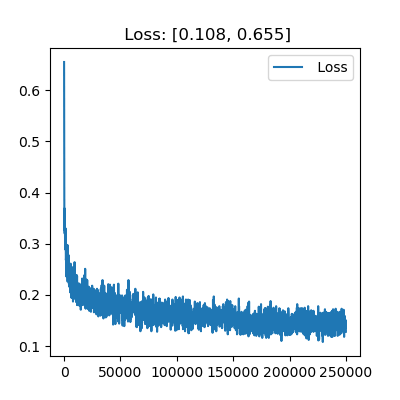
训练模型:
1$ CUDA_VISIBLE_DEVICES=0 python examples/recon/train.py -eid recon
2Loading dataset: 100%|██████████████████████████| 13/13 [00:35<00:00,  2.74s/it]
3Iter: [0/250000]	Time 1.189	Loss 0.655	lr 0.000100	sv 0.000100
4Iter: [100/250000]	Time 0.464	Loss 0.405	lr 0.000100	sv 0.000100
5...
6Iter: [250000/250000]	Time 0.450	Loss 0.128	lr 0.000030	sv 0.000030
测试模型:
1$ CUDA_VISIBLE_DEVICES=0 python examples/recon/test.py -eid recon \
2    -d 'data/results/models/recon/checkpoint_0250000.pth.tar'
3Loading dataset: 100%|██████████████████████████| 13/13 [00:03<00:00,  3.25it/s]
4Iter: [0/97]    Time 0.419      IoU 0.697
5=================================
6Mean IoU: 65.586 for class Airplane
7
8Iter: [0/43]    Time 0.095      IoU 0.587
9=================================
10Mean IoU: 49.798 for class Bench
11
12Iter: [0/37]    Time 0.089      IoU 0.621
13=================================
14Mean IoU: 68.975 for class Cabinet
15
16Iter: [0/179]   Time 0.088      IoU 0.741
17Iter: [100/179] Time 0.083      IoU 0.772
18=================================
19Mean IoU: 74.224 for class Car
20
21Iter: [0/162]   Time 0.086      IoU 0.565
22Iter: [100/162] Time 0.085      IoU 0.522
23=================================
24Mean IoU: 52.933 for class Chair
25
26Iter: [0/26]    Time 0.094      IoU 0.681
27=================================
28Mean IoU: 60.553 for class Display
29
30Iter: [0/55]    Time 0.087      IoU 0.526
31=================================
32Mean IoU: 45.751 for class Lamp
33
34Iter: [0/38]    Time 0.086      IoU 0.580
35=================================
36Mean IoU: 65.626 for class Loudspeaker
37
38Iter: [0/56]    Time 0.090      IoU 0.783
39=================================
40Mean IoU: 68.683 for class Rifle
41
42Iter: [0/76]    Time 0.092      IoU 0.647
43=================================
44Mean IoU: 68.111 for class Sofa
45
46Iter: [0/204]   Time 0.090      IoU 0.405
47Iter: [100/204] Time 0.087      IoU 0.435
48Iter: [200/204] Time 0.086      IoU 0.567
49=================================
50Mean IoU: 46.206 for class Table
51
52Iter: [0/25]    Time 0.097      IoU 0.901
53=================================
54Mean IoU: 82.261 for class Telephone
55
56Iter: [0/46]    Time 0.087      IoU 0.503
57=================================
58Mean IoU: 61.019 for class Watercraft
59
60=================================
61Mean IoU: 62.287 for all classes
Mesh 重建:
1# 获取 `softras_recon.py` 进 `examples/recon/`
2#   https://github.com/ikuokuo/start-3d-recon/blob/master/samples/softras_recon.py
3# 注释 `iou` 直接返回 0,位于 `examples/recon/models.py` `evaluate_iou()`
4
5# 2D 图像重构 3D Mesh
6CUDA_VISIBLE_DEVICES=0 python examples/recon/softras_recon.py \
7    -s '.' \
8    -d 'data/results/models/recon/checkpoint_0250000.pth.tar' \
9    -img 'data/car_64x64.png'
10
11ogre-meshviewer data/car_64x64.obj
重建图像:

重建结果:
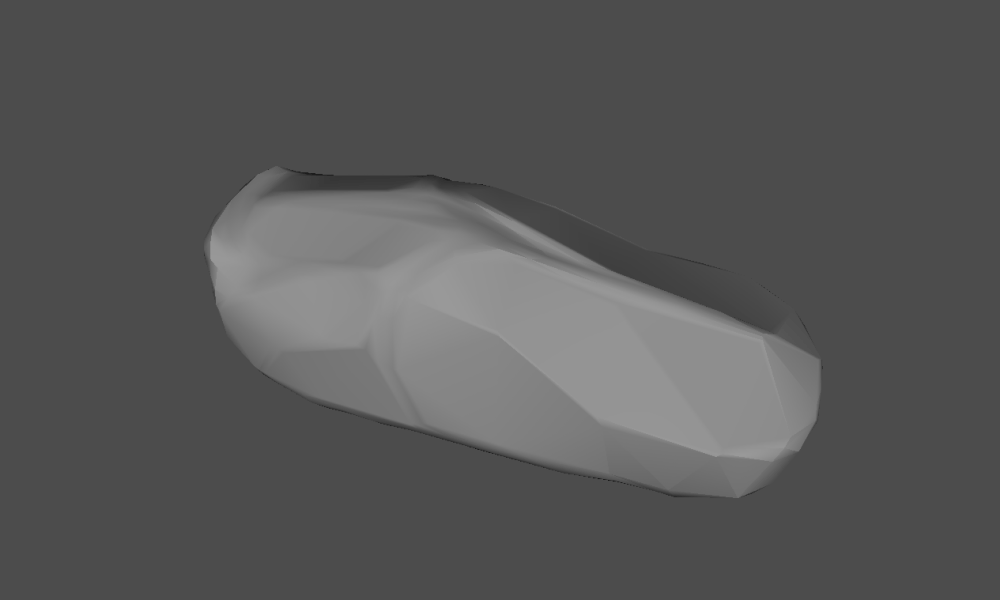
或重建 ShapeNet 数据集内图像:
1# mesh recon images of ShapeNet dataset
2CUDA_VISIBLE_DEVICES=0 python examples/recon/softras_recon.py \
3    -s '.' \
4    -d 'data/results/models/recon/checkpoint_0250000.pth.tar' \
5    -imgs 'data/datasets/02958343_test_images.npz'
或使用 SoftRas 训练好的模型:
- SoftRas trained with silhouettes supervision (62+ IoU): google drive
- SoftRas trained with shading supervision (64+ IoU, test with
--shading-modelarg): google drive - SoftRas reconstructed meshes with color (random sampled): google drive
更多
GoCoding 个人实践的经验分享,可关注公众号!