
小编目前在做毕业设计,主题为“高考志愿信息交流平台”,面向高中生和大学生,辛苦各位读者大佬朋友们填下问卷,点击链接https://www.wjx.cn/jq/98944127.aspx或扫描二维码、微信小程序码均可,希望各位能提供一些调查数据,先在这里谢过各位了(*^_^*)

1.限制input 输入框只能输入纯数字、限制长度、默认显示文字
加入oninput事件oninput = "value=value.replace(/[^\d]/g,'')"
代码示例:
1<!DOCTYPE html>
2<html lang="en">
3<head>
4    <meta charset="UTF-8" />
5    <title>input</title>
6</head>
7<body>
8    只能输入纯数字的输入框:<input type="text" maxlength="5" name="" οninput="value=value.replace(/[^\d]/g,'')" placeholder="请输入编号">
9</body>
10</html>
2.input输入框自动获取焦点
在该input标签后添加autofocus="autofocus"。 例如
1<html>
2    <head></head>
3    <body>
4        用户名:<input type="text" id="username" name="username" autofocus="autofocus"/><br/>
5        密码:<input type="text" id="password" name="password"/><br/>
6        <input type="submit" name="submitBtn" value="提交"/>
7    </body>
8</html>
3.用CSS让背景有透明度文字不变
(1)背景为纯色背景非图片
用background:rgba(x,x,x,x)来让背景带有透明度
四个参数的值是指:
red红色;green绿色;blue蓝色;alpha透明度
rgb三个参数有正整数值和百分数值2两个取值范围:
正整数值的取值范围为:0 - 255;
百分数值的取值范围为:0.0% - 100.0%。
a取值范围在:0~1(数值越小,越透明)。
HTML代码:
1<body>
2    <div class="纯色背景div"></div>
3</body>
CSS代码:
1.纯色背景div{
2    background:rgba(0,0,0,.6);
(2)背景为图片背景
用opacity(x)来设置背景的透明度。
x指的是alpha透明度,取值范围也在 0~1(数值越小,越透明)。
css的opacity属性可以让很多元素都变透明,这里要让背景变透明而文字不变透明需要一点小技巧:将背景取出来单独放个div再把这个div和原来的div重叠。
HTML代码:
1<body>
2    <div class="背景"></div>
3    <div class="其他内容">可得解脱处,唯神佛前,与山水间</div>
4</body>
CSS代码:
1.背景{
2    background:url("bg.jpg") no-repeat;
3    background-size: 100% 100%;
4    height: 800px;
5    position: absolute;
6    opacity:0.6;
7}
8
9.其他内容{
10    height: 800px;
11    background-size: 100% 100%;
12    color:white;
13}
完整代码:
1<!DOCTYPE html>
2<html>
3<head>
4    <title></title>
5    <style type="text/css">
6
7        *{
8            width: 100%;
9            padding:0;
10            margin: 0 auto;
11            text-align: center;
12        }
13
14        .bg{
15            height: 800px;
16            background: url("bg.jpg") no-repeat;
17            background-size: 100% 100%;
18            position: absolute;
19            opacity:0.6;
20        }
21
22        .box{
23            height: 800px;
24            background-size: 100% 100%;
25        }
26
27        p{
28            width: 300px;
29            line-height: 50px;
30            position:relative;
31            top: 50%;
32            font-size: 30px;
33            background: yellow;
34            color: #000000;
35            font:bold 50px Verdana, Geneva, sans-serif;
36        }
37    </style>
38</head>
39<body>
40<div class="bg"></div>
41<div class="box">
42    <p>可得解脱处,唯神佛前,与山水间</p>
43</div>
44</body>
45</html>
4.a标签禁止点击
在a标签的样式加上以下属性:
1<a style="pointer-events: none;"/>
pointer-events是CSS3的一个属性,支持的值非常多,其中大部分都是和SVG有关;
pointer-events: none;可以让鼠标事件失效(链接、点击等事件),阻止用户的点击动作产生任何效果,不仅在a标签中可以用,在img标签等元素中也可以使用、阻止鼠标点击事件。
5.文字两种居中对齐
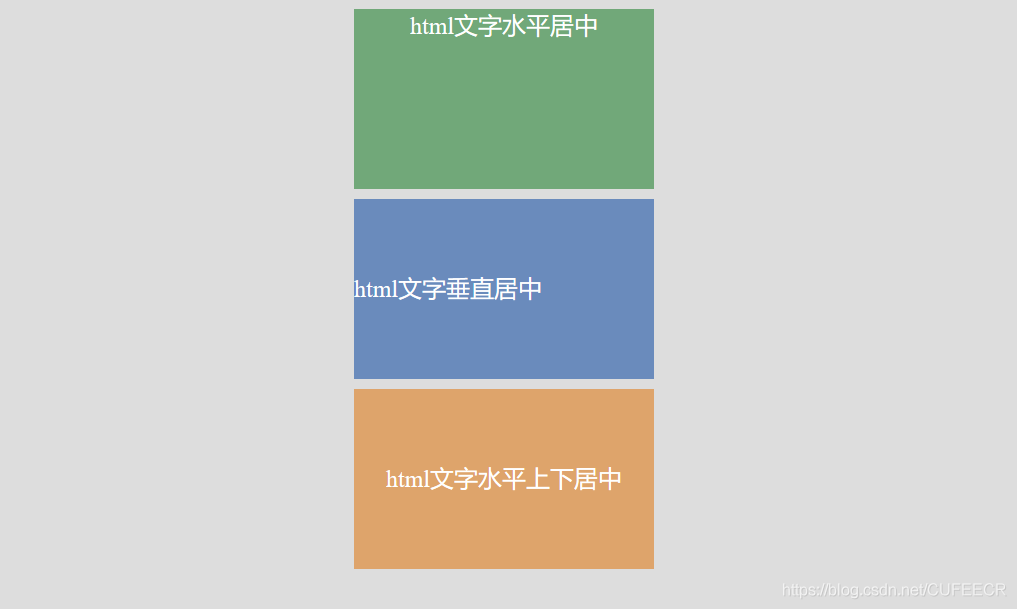
(1)平水居中:text-align:center;
text-align 属性规定元素中的文本的水平对齐方式。
该属性通过指定行框与哪个点对齐,从而设置块级元素内文本的水平对齐方式。通过允许用户代理调整行内容中字母和字之间的间隔,可以支持值 justify;不同用户代理可能会得到不同的结果。
(2)垂直居中:line-height:height;
line-height 属性设置行间的距离(行高),不允许使用负值。
具体示例:
1<!DOCTYPE HTML>
2
3<html lang="en">
4
5<head>
6
7    <title>html文字居中测试</title>
8
9    <meta charset="UTF-8">
10
11    <style type="text/css">
12
13        body{background: #ddd;}
14
15        div{width:300px;height:180px;margin:10px auto;color:#fff;font-size:24px;}
16
17        .box1{background: #71a879;text-align: center;}
18
19        .box2{background: #6a8bbc;line-height: 200px;}
20
21        .box3{background: #dea46b;text-align: center;line-height: 180px;}
22
23    </style>
24
25</head>
26
27<body>
28
29<div  class="box1">html文字水平居中</div>
30
31<div  class="box2">html文字垂直居中</div>
32
33<div  class="box3">html文字水平上下居中</div>
34
35</body>
36
37</html>
效果:
6.设置一个元素一直在页面的最底部:
1position:fixed; bottom:0px; left:0px;
本文原文首发来自博客专栏前端开发,由本人转发至https://www.helloworld.net/p/6wGTrDTw9Ig9,其他平台均属侵权,可点击https://blog.csdn.net/CUFEECR/article/details/104030161查看原文,也可点击https://blog.csdn.net/CUFEECR浏览更多优质原创内容。