
前言
uni-app 是一个基于 Vue.js 开发所有前端应用的框架,开发者编写一套代码,可发布到iOS、Android、Web(响应式)、以及各种小程序(微信/支付宝/百度/头条/QQ/钉钉/淘宝)、快应用等多个平台。 在开发过程中可能会遇到一些异常,这些异常及其解决办法总结如下。
1.调用微信开发者工具报错IDE service port disabled
在HBuilderX下开发好项目后,要使用小程序模拟器进行运行调试时,控制台报错如下:
121:48:18.851 [微信小程序开发者工具] [error] IDE service port disabled. To use CLI Call, please enter y to confirm enabling CLI capability, or manually open IDE -> Settings -> Security Settings, and set Service Port On.
221:48:18.859 [微信小程序开发者工具] For more details see: https://developers.weixin.qq.com/miniprogram/en/dev/devtools/cli.html
321:48:18.859 [微信小程序开发者工具] [error] 工具的服务端口已关闭。要使用命令行调用工具,请在下方输入 y 以确认开启,或手动打开工具 -> 设置 -> 安全设置,将服务端口开启。
421:48:18.866 [微信小程序开发者工具] 详细信息: https://developers.weixin.qq.com/miniprogram/dev/devtools/cli.html
5
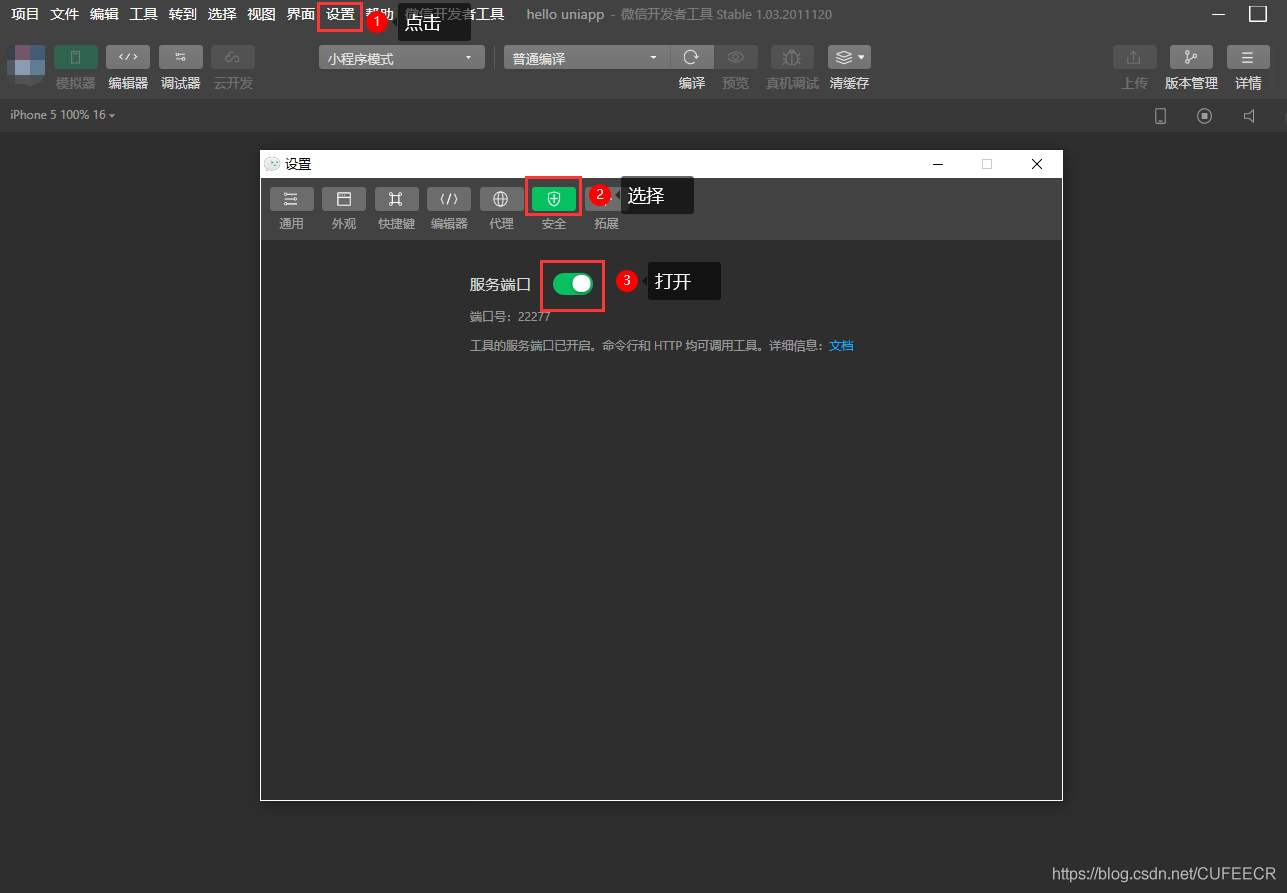
此时是因为微信开发者工具未打开服务端口,根据提示,打开微信开发者工具 -> 设置 -> 安全设置 -> 开启服务端口即可,如下:
2.@import导入外部样式失效
有时候在进行uni-app开发时,需要在App.vue或者某个页面的style块中导入外部已写好的样式,但是导入后可能会发现样式无效,如下:
1<style>
2	/*每个页面公共css */
3	.red {
4		color: #ff0000;
5	}
6
7	/* 引入自定义图标库 */
8	@import './static/font/iconfont.css';
9</style>
这是因为通过@import导入外部样式需要将其放于style块的最前面,而不能放到中间或后面位置,这样会失效,同时应该在导入语句后加上分号;,这样才会生效。
3.v-for列表渲染指定:key属性报错Duplicate keys detected
uni-app提倡在进行列表渲染,即v-for循环遍历列表时添加:key属性来指定列表中项目的唯一的标识符,以确保使组件保持自身的状态、并提高列表渲染效率。
但是有时候会出现警告,例如:
1<template>
2	<view>
3		<!-- 话题信息 -->
4		<topic-info :info="info"></topic-info>
5		<divider></divider>
6		<!-- 精华帖 -->
7		<block v-for="(item, index) in hotList" :key="index">
8			<view class="p-2 flex align-center border-bottom" hover-class="bg-light">
9				<text class="iconfont icon-zhiding text-main"></text>
10				<text class="font text-dark text-ellipsis">{{item.title}}</text>
11			</view>
12		</block>
13		<divider></divider>
14		<!-- 标签栏 -->
15		<view class="flex align-center py-2">
16			<view class="flex-1 font-lg font-weight-bold text-main flex align-center justify-center">默认</view>
17			<view class="flex-1 font-md  flex align-center justify-center">最新</view>
18		</view>
19		<!-- 列表 -->
20		<block v-for="(item, index) in list1" :key="index">
21			<common-list :item="item" :index="index"></common-list>
22		</block>
23	</view>
24</template>
警告信息如下:
116:42:29.421 [Vue warn]: Duplicate keys detected: '0_0'. This may cause an update error.
216:42:29.463 (found at pages/topic-detail/topic-detail.vue:1)
316:42:29.484 [Vue warn]: Duplicate keys detected: '1_0'. This may cause an update error.
416:42:29.524 (found at pages/topic-detail/topic-detail.vue:1)
这是因为一个template中有两个或多个v-for,它们的:key值都为index、出现冲突,此时只需给不同循环的:key值拼接不同的前缀或者后缀即可。
修改如下即可:
1<template>
2	<view>
3		<!-- 话题信息 -->
4		<topic-info :info="info"></topic-info>
5		<divider></divider>
6		<!-- 精华帖 -->
7		<block v-for="(item, index) in hotList" :key="'hot'+index">
8			<view class="p-2 flex align-center border-bottom" hover-class="bg-light">
9				<text class="iconfont icon-zhiding text-main"></text>
10				<text class="font text-dark text-ellipsis">{{item.title}}</text>
11			</view>
12		</block>
13		<divider></divider>
14		<!-- 标签栏 -->
15		<view class="flex align-center py-2">
16			<view class="flex-1 font-lg font-weight-bold text-main flex align-center justify-center">默认</view>
17			<view class="flex-1 font-md  flex align-center justify-center">最新</view>
18		</view>
19		<!-- 列表 -->
20		<block v-for="(item, index) in list1" :key="index">
21			<common-list :item="item" :index="index"></common-list>
22		</block>
23	</view>
24</template>
此时便不会出现警告信息。
本文原文首发来自博客专栏移动应用开发,由本人转发至https://www.helloworld.net/p/RR47tYrfzaF5Y,其他平台均属侵权,可点击https://blog.csdn.net/CUFEECR/article/details/111086113查看原文,也可点击https://blog.csdn.net/CUFEECR浏览更多优质原创内容。