
前言
本文主要介绍了APP开发的两大基本功能,即第三方登录登录和分享:包括登录通用配置,微信小程序和APP的第三方登录方式,和分享到聊天和朋友圈,使用uni-app实现有不同的接口和实现方式。
一、通用配置
因为小程序和APP登录接口不同,需要在前端进行跨端兼容处理,同时微信等平台的小程序一般只支持所属宿主程序的第三方登录,而无法包括其他的常见第三方登录方式,如微博、QQ等,因此需要与APP分开。
1.微信小程序端配置
微信小程序端必须配置appid,需要申请小程序开发者并获取appid及相关秘钥,支持个人开发者。
获取appid后编辑manifest.json,可以选择微信小程序配置完成,也可以选择源码视图填充,示意如下:
1"mp-weixin" : {
2    "appid" : "appid"
3}
可点击https://developers.weixin.qq.com/miniprogram/dev/api/open-api/user-info/wx.getUserInfo.html查看微信官方文档。
在使用HBuilder提供的测试AppID可能会报错,例如Cannot read property 'forceUpdate' of undefined,此时可以在微信公众平台https://developers.weixin.qq.com/community/welogin?redirect_url=%2Fsandbox中申请沙箱环境测试号的AppID和AppSecret信息,并用于项目测试,就不会再输出错误。
2.APP端配置
APP端支持微信、QQ、微博等多种第三方登录方式,都需要申请对应的开发者并获取对应的appid。
获取对应的appid后,编辑manifest.json,进行可视化操作,选择App模块配置,进行OAuth鉴权配置,选择所需要的登录方式,如QQ、微信等,如下:
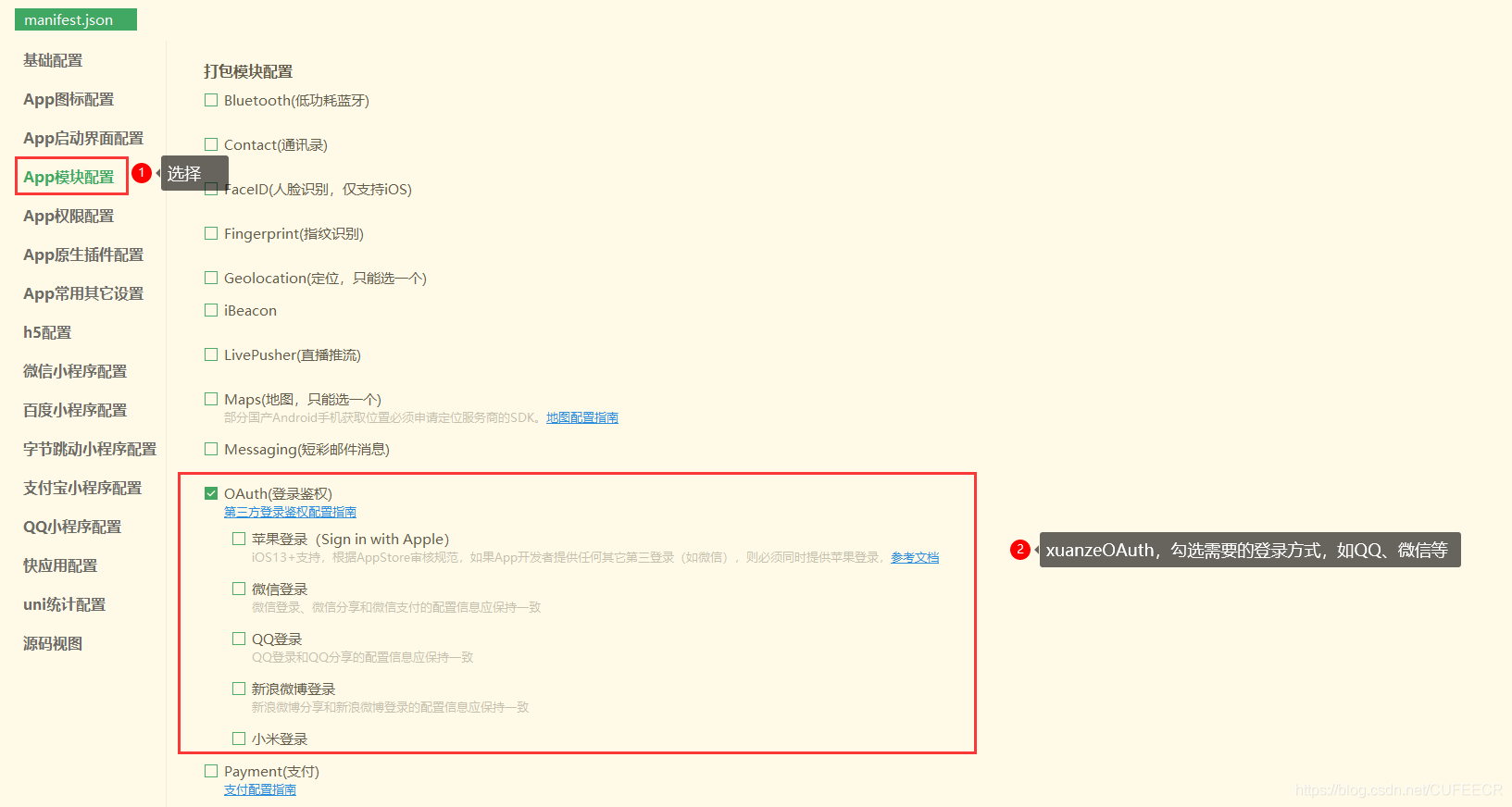
选择对应的登录方式后需要填写AppID等信息。
二、微信小程序第三方登录
1.判断是否登录
在微信小程序登录前需要判断是否登录,此时可以在App.vue中定义,因为App.vue中定义的变量和方法为全局变量和方法,可以在其他页面中可以调用,只需要用global关键字声明即可。
登录的一般原理为: 从本地缓存根据键获取到用户id和随机码等信息,再向服务端请求验证识别是否存在该用户。 随机码是为了提高数据接口的安全性建立的,除此之外也可以使用Redis、MemCache等实现安全保证。
先在App.vue中定义全局的判断是否登录的方法,如下:
1<script>
2	export default {
3		onLaunch: function() {
4			console.log('App Launch')
5		},
6		onShow: function() {
7			console.log('App Show')
8		},
9		onHide: function() {
10			console.log('App Hide')
11		}
12	}
13	global.isLogin = function() {
14		try{
15			var suid = uni.getStorageSync('suid');
16			var srand = uni.getStorageSync('srand');
17		}catch(e){
18			//TODO handle the exception
19		}
20		if(suid == '' || srand == ''){
21			return false;
22		}
23		else{
24			return [suid, srand];
25		}
26	}
27</script>
28
29<style>
30	/*每个页面公共css */
31	.red{
32		color:#ff0000;
33	}
34</style>
35
再在index.vue中调用全局方法,如下:
1<template>
2	<view>
3		Index...
4	</view>
5</template>
6
7<script>
8	export default {
9		data() {
10			return {
11			}
12		},
13		onLoad() {
14			var res = global.isLogin();
15			if(!res){
16				uni.showModal({
17					title: '登录提醒',
18					content: '请登录',
19					success:function(){
20						uni.navigateTo({
21							url: '/pages/login'
22						})
23					}
24				})
25			}
26		},
27		onShow() {
28		},
29		onHide() {
30		},
31		methods: {
32		}
33	}
34</script>
35
36<style>
37
38</style>
39
同时在pages目录下新建login.vue页面,如下:
1<template>
2	<view>
3		login...
4	</view>
5</template>
6
7<script>
8	export default {
9		data() {
10			return {
11			}
12		},
13		onLoad() {
14		},
15		onShow() {
16		},
17		onHide() {
18		},
19		methods: {
20		}
21	}
22</script>
23
24<style>
25
26</style>
27
并将其添加进pages.json中,如下:
1{
2	"pages": [ //pages数组中第一项表示应用启动页,参考:https://uniapp.dcloud.io/collocation/pages
3		{
4			"path": "pages/index/index",
5			"style": {
6				"navigationBarTitleText": "Uni Index",
7				"backgroundColor": "#F0AD4E",
8				"navigationBarTextStyle":"black"
9			}
10		},
11		{
12			"path": "pages/about/about",
13			"style": {
14				"navigationBarTitleText": "Uni About"
15			}
16		},
17		{
18			"path": "pages/news",
19			"style": {
20				"navigationBarTitleText": "Uni News",
21				"navigationBarBackgroundColor":"#DD524D"
22			}
23		},
24		{
25			"path": "pages/login",
26			"style": {
27				"navigationBarTitleText": "Uni Login",
28				"navigationBarBackgroundColor":"#00aaff"
29			}
30		}
31	],
32	"globalStyle": {
33		"navigationBarTextStyle": "white",
34		"navigationBarTitleText": "hello uniapp",
35		"navigationBarBackgroundColor": "#ff557f",
36		"backgroundColor": "#fffae8"
37	},
38	"tabBar": {
39		"color":"#F0AD4E",
40		"selectedColor":"#007AFF",
41		"backgroundColor":"#FFFFFF",
42		"list": [
43			{
44				"pagePath":"pages/index/index",
45				"iconPath":"static/imgs/index_0.png",
46				"selectedIconPath":"static/imgs/index_1.png",
47				"text": "首页"
48			},
49			{
50				"pagePath":"pages/about/about",
51				"iconPath":"static/imgs/about_0.png",
52				"selectedIconPath":"static/imgs/about_1.png",
53				"text":"关于我们"
54			}
55		]
56	},
57	"condition": { //模式配置,仅开发期间生效
58	    "current": 0, //当前激活的模式(list 的索引项)
59	    "list": [{
60	            "name": "index", //模式名称
61	            "path": "pages/index/index", //启动页面,必选
62	            "query": "interval=4000&autoplay=false" //启动参数,在页面的onLoad函数里面得到。
63	        },
64	        {
65	            "name": "about", //模式名称
66	            "path": "pages/about/about", //启动页面,必选
67	            "query": "interval=4000&autoplay=false" //启动参数,在页面的onLoad函数里面得到。
68	        }
69	    ]
70	}
71}
72
显示:
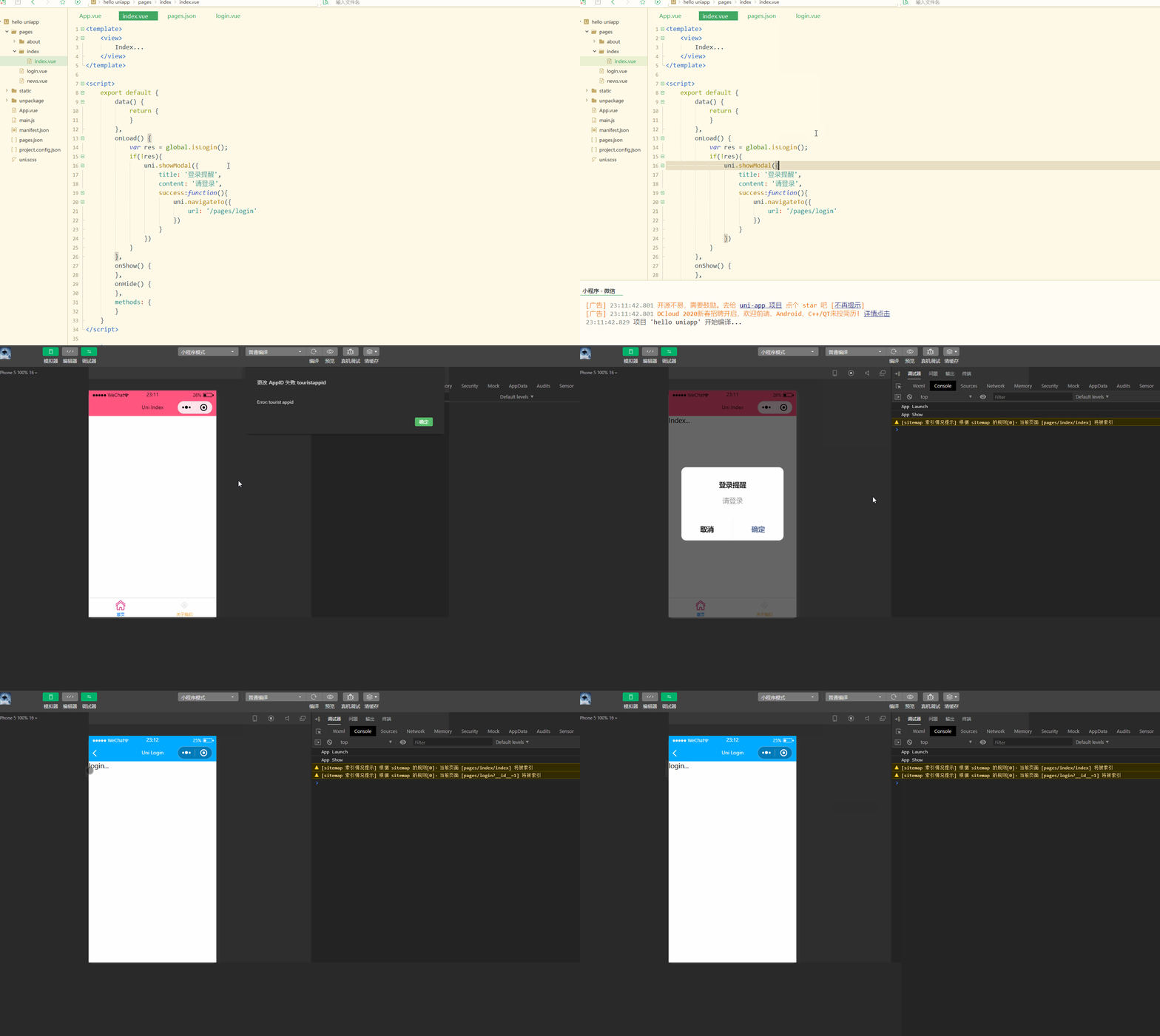
显然,获取到了未登录的状态后,跳转到了登录页。
2.登录页面开发
登录需要判断所在平台、进行跨端开发,因此需要进行条件编译,login.vue如下:
1<template>
2	<view>
3		<!-- #ifdef MP-WEIXIN -->
4		<button type="primary" open-type="getUserInfo" @getuserinfo="getuserinfo" withCredentials="true">微信登录</button>
5		<!-- #endif -->
6	</view>
7</template>
8
9<script>
10	export default {
11		data() {
12			return {}
13		},
14		onLoad() {},
15		onShow() {},
16		onHide() {},
17		methods: {
18			getuserinfo: function(res){
19				console.log(res)
20			}
21		}
22	}
23</script>
24
25<style>
26
27</style>
28
显示:
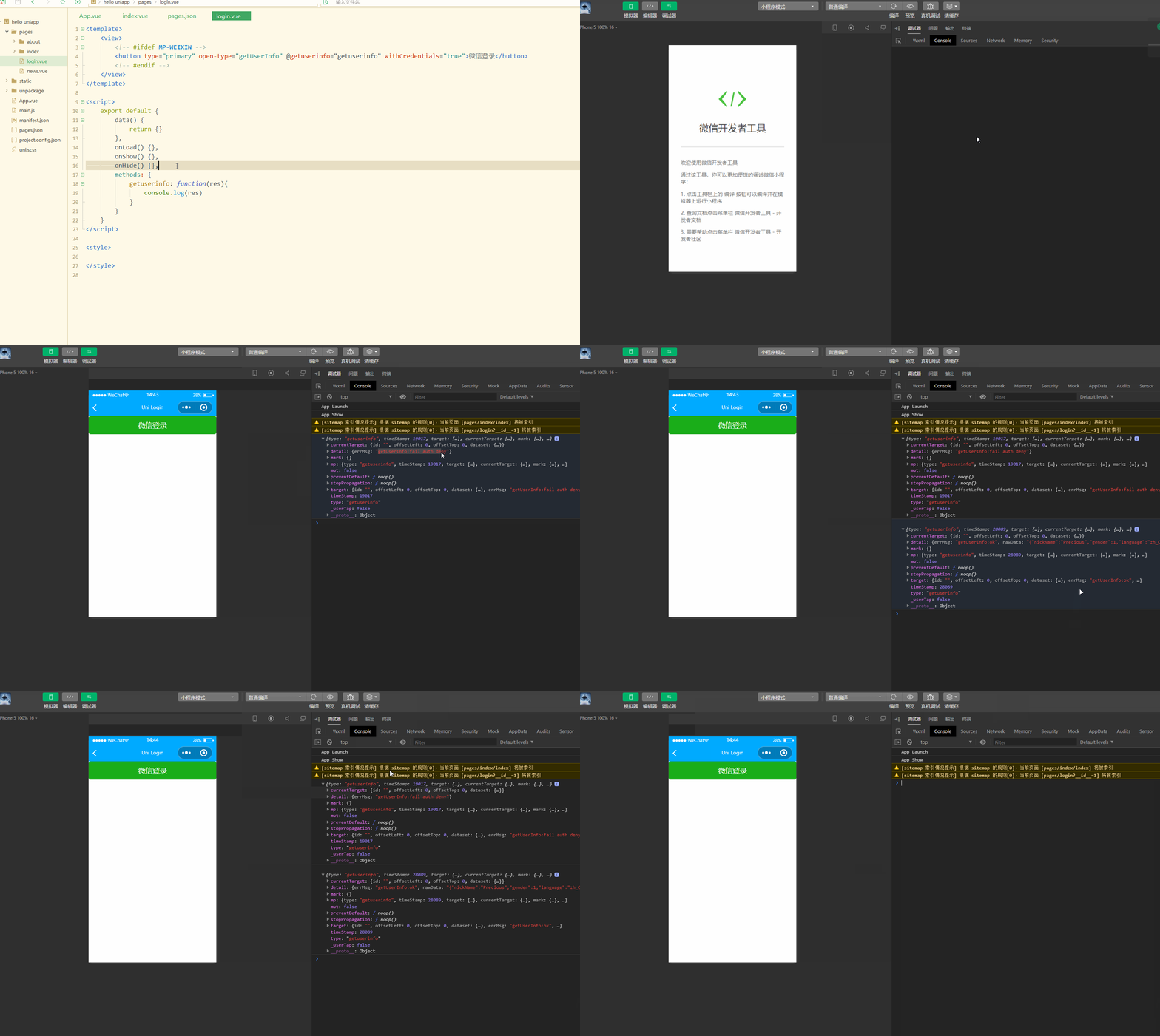
可以看到,在成功登录后,会返回用户的相关信息; 在清除缓存并重新编译后,之前的登录状态不存在,需要重新登录。
登录后查看返回值res包含了一些不加密的基础信息,detail属性下面有iv属性,是加密算法的初始向量,可以解密得到信息,还可以作为是否授权登录的判断标准;
rawData,不包括敏感信息的原始数据字符串,用于计算签名。
其中不包含openid和session_key等信息,需要进一步获取:
先通过uni.login(OBJECT)获取到code,即用户登录凭证;
再携带code,通过uni.request(OBJECT)获取到openid和session_key。
login.vue如下:
1<template>
2	<view>
3		<!-- #ifdef MP-WEIXIN -->
4		<button type="primary" open-type="getUserInfo" @getuserinfo="getuserinfo" withCredentials="true">微信登录</button>
5		<!-- #endif -->
6	</view>
7</template>
8
9<script>
10	export default {
11		data() {
12			return {}
13		},
14		onLoad() {},
15		onShow() {},
16		onHide() {},
17		methods: {
18			getuserinfo: function(res1) {
19				console.log(res1)
20				if (!res1.detail.iv) {
21					uni.showToast({
22						title: '您已取消授权,登录失败',
23						icon: "none"
24					})
25					return false;
26				}
27				uni.login({
28					provider: 'weixin',
29					success: function(res2) {
30						console.log(res2);
31						uni.request({
32							url: 'https://api.weixin.qq.com/sns/jscode2session?appid=wxd3d4ee5ed8017903&secret=83c0d5efdfca99fc0509ff0d8956b830&js_code='+res2.code+'&grant_type=authorization_code',
33							success:function(res3){
34								// get the openid and seesion key
35								console.log(res3)
36							},
37							fail:function(res4){
38								console.log(re4)
39							}
40						})
41					},
42					fail:function(r){
43						console.log(r)
44					}
45				});
46			}
47		}
48	}
49</script>
50
51<style>
52
53</style>
54
显示:
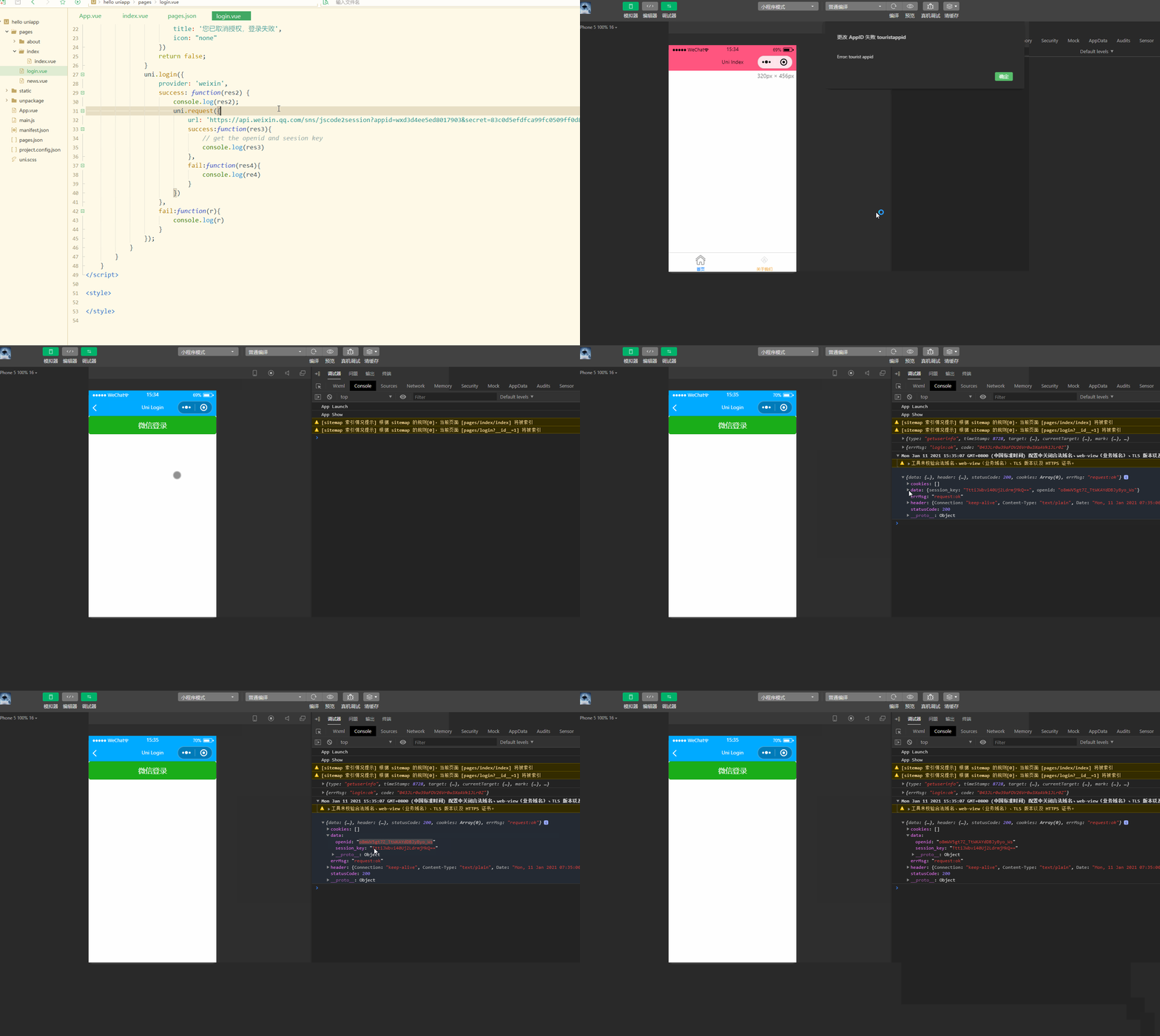
显然,此时获取到了openid和session key。
此外还可以获取unionid,其在满一定条件的情况下才会返回。
获取到了openid和session key后,可以解密iv。
通过微信官方提供的SDK进行解密,可以实现解密的接口,如下:
login.vue如下:
1<template>
2	<view>
3		<!-- #ifdef MP-WEIXIN -->
4		<button type="primary" open-type="getUserInfo" @getuserinfo="getuserinfo" withCredentials="true">微信登录</button>
5		<!-- #endif -->
6	</view>
7</template>
8
9<script>
10	export default {
11		data() {
12			return {}
13		},
14		onLoad() {},
15		onShow() {},
16		onHide() {},
17		methods: {
18			getuserinfo: function(res1) {
19				console.log(res1)
20				if (!res1.detail.iv) {
21					uni.showToast({
22						title: '您已取消授权,登录失败',
23						icon: "none"
24					})
25					return false;
26				}
27				uni.login({
28					provider: 'weixin',
29					success: function(res2) {
30						console.log(res2);
31						uni.request({
32							url: 'https://api.weixin.qq.com/sns/jscode2session?appid=wxd3d4ee5ed8017903&secret=83c0d5efdfca99fc0509ff0d8956b830&js_code='+res2.code+'&grant_type=authorization_code',
33							success:function(res3){
34								// get the openid and seesion key
35								console.log(res3)
36								// decrypt
37								uni.request({
38									method: 'POST',
39									url: 'https://hoa.hcoder.net/xcxencode/',
40									header: {'content-type':'application/x-www-form-urlencoded'},
41									data: {
42										appid: 'wxd3d4ee5ed8017903',
43										sessionKey: res3.data.session_key,
44										iv: res1.detail.iv,
45										encryptedData: res1.detail.encryptedData
46									},
47									success:function(res4){
48										console.log(res4)
49									}
50								})
51							},
52							fail:function(res5){
53								console.log(re5)
54							}
55						})
56					},
57					fail:function(r){
58						console.log(r)
59					}
60				});
61			}
62		}
63	}
64</script>
65
66<style>
67
68</style>
69
小程序登录时,可以设置选择携带手机号。
从之前button组件的open-type属性中可以发现,getPhoneNumber属性可以获取用户手机号,可以从@getphonenumber回调中获取到用户信息。
三、APP第三方登录
实现APP登录也是通过条件编译实现。
login.vue如下:
1<template>
2	<view>
3		<!-- #ifdef MP-WEIXIN -->
4		<button type="primary" open-type="getUserInfo" @getuserinfo="getuserinfo" withCredentials="true">微信登录</button>
5		<!-- #endif -->
6		<!-- #ifdef APP-PLUS -->
7		<button type="primary" @click="appWxLoin" withCredentials="true">用微信登录</button>
8		<!-- #endif -->
9		<button style="margin-top:50px;">手机号码登录</button>
10	</view>
11</template>
12
13<script>
14	export default {
15		data() {
16			return {}
17		},
18		onLoad() {},
19		onShow() {},
20		onHide() {},
21		methods: {
22			// miniprogram
23			getuserinfo: function(res1) {
24				console.log(res1)
25				if (!res1.detail.iv) {
26					uni.showToast({
27						title: '您已取消授权,登录失败',
28						icon: "none"
29					})
30					return false;
31				}
32				uni.login({
33					provider: 'weixin',
34					success: function(res2) {
35						console.log(res2);
36						uni.request({
37							url: 'https://api.weixin.qq.com/sns/jscode2session?appid=wxd3d4ee5ed8017903&secret=83c0d5efdfca99fc0509ff0d8956b830&js_code=' +
38								res2.code + '&grant_type=authorization_code',
39							success: function(res3) {
40								// get the openid and seesion key
41								console.log(res3)
42								// decrypt
43								uni.request({
44									method: 'POST',
45									url: 'https://hoa.hcoder.net/xcxencode/',
46									header: {
47										'content-type': 'application/x-www-form-urlencoded'
48									},
49									data: {
50										appid: 'wxd3d4ee5ed8017903',
51										sessionKey: res3.data.session_key,
52										iv: res1.detail.iv,
53										encryptedData: res1.detail.encryptedData
54									},
55									success: function(res4) {
56										console.log(res4)
57									}
58								})
59							},
60							fail: function(res5) {
61								console.log(re5)
62							}
63						})
64					},
65					fail: function(r) {
66						console.log(r)
67					}
68				});
69			},
70			appWxLoin: function(){
71				console.log('login...')
72			}
73		}
74	}
75</script>
76
77<style>
78
79</style>
80
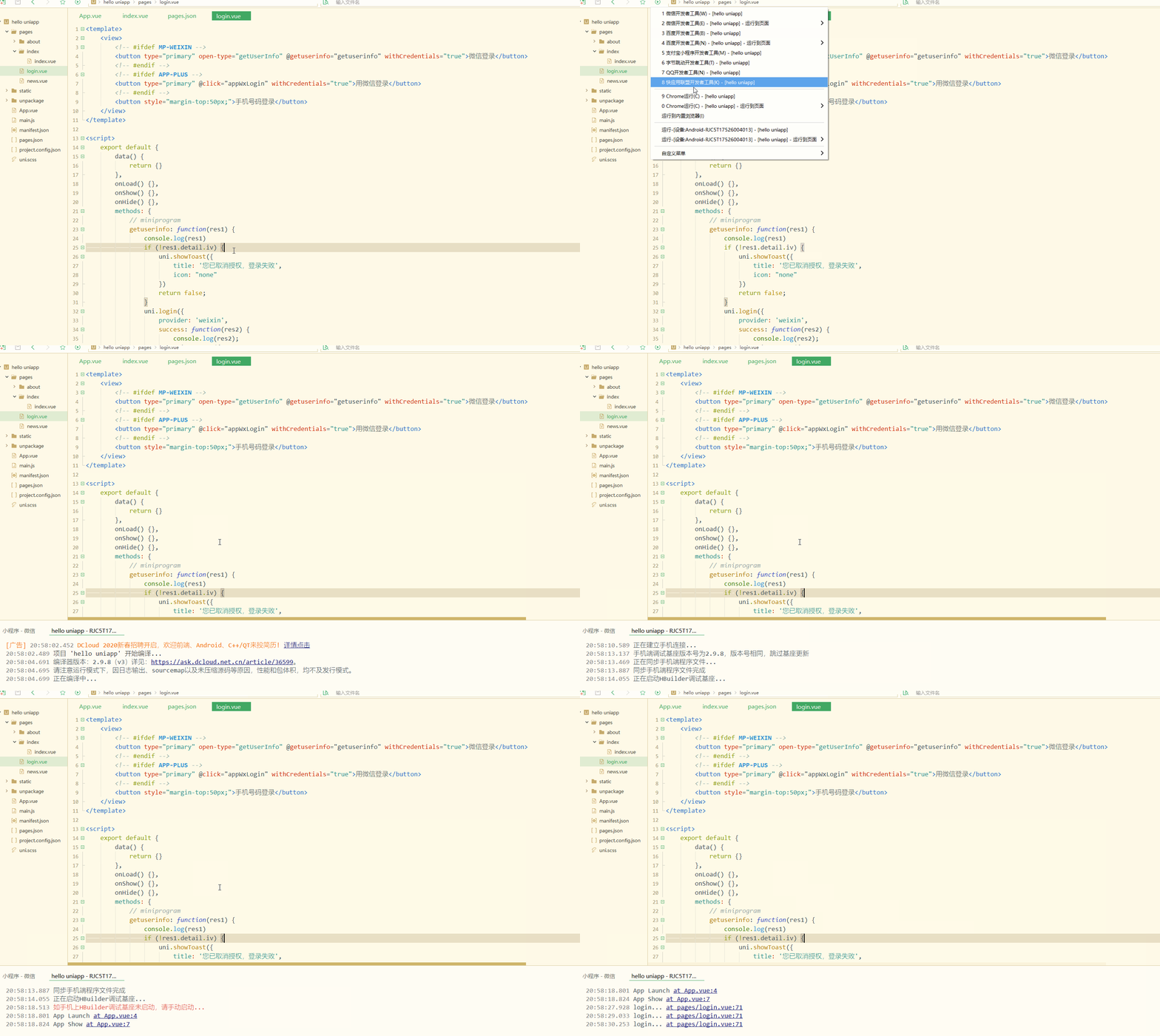
此时不需要open-type等属性,只需要进行事件绑定就可以。
显示:
手机端显示:

显然,此时实现了条件编译,在不同的设备显示不同的按钮; 同时手机端点击时,控制台也输出信息。
先实现登录,需要获取服务商,判断是否安装微信,如果已安装则申请登录验证,如下:
1<template>
2	<view>
3		<!-- #ifdef MP-WEIXIN -->
4		<button type="primary" open-type="getUserInfo" @getuserinfo="getuserinfo" withCredentials="true">微信登录</button>
5		<!-- #endif -->
6		<!-- #ifdef APP-PLUS -->
7		<button type="primary" @click="appWxLogin" withCredentials="true">用微信登录</button>
8		<!-- #endif -->
9		<button style="margin-top:50px;">手机号码登录</button>
10	</view>
11</template>
12
13<script>
14	export default {
15		data() {
16			return {}
17		},
18		onLoad() {},
19		onShow() {},
20		onHide() {},
21		methods: {
22			// miniprogram
23			getuserinfo: function(res1) {
24				console.log(res1)
25				if (!res1.detail.iv) {
26					uni.showToast({
27						title: '您已取消授权,登录失败',
28						icon: "none"
29					})
30					return false;
31				}
32				uni.login({
33					provider: 'weixin',
34					success: function(res2) {
35						console.log(res2);
36						uni.request({
37							url: 'https://api.weixin.qq.com/sns/jscode2session?appid=wxd3d4ee5ed8017903&secret=83c0d5efdfca99fc0509ff0d8956b830&js_code=' +
38								res2.code + '&grant_type=authorization_code',
39							success: function(res3) {
40								// get the openid and seesion key
41								console.log(res3)
42								// decrypt
43								uni.request({
44									method: 'POST',
45									url: 'https://hoa.hcoder.net/xcxencode/',
46									header: {
47										'content-type': 'application/x-www-form-urlencoded'
48									},
49									data: {
50										appid: 'wxd3d4ee5ed8017903',
51										sessionKey: res3.data.session_key,
52										iv: res1.detail.iv,
53										encryptedData: res1.detail.encryptedData
54									},
55									success: function(res4) {
56										console.log(res4)
57									}
58								})
59							},
60							fail: function(res5) {
61								console.log(re5)
62							}
63						})
64					},
65					fail: function(r) {
66						console.log(r)
67					}
68				});
69			},
70			appWxLogin: function() {
71				console.log('login...');
72				uni.getProvider({
73					service: 'oauth',
74					success: function(res) {
75						console.log(res.provider)
76						if (~res.provider.indexOf('weixin')) {
77							uni.login({
78								provider: 'weixin',
79								success: function(loginRes) {
80									console.log(JSON.stringify(loginRes));
81									uni.getUserInfo({
82										provider: 'weixin',
83										success: function(infoRes) {
84											console.log(JSON.stringify(infoRes));
85											console.log('用户昵称为:' + infoRes.userInfo.nickName);
86										}
87									});
88								}
89							});
90						}
91					}
92				});
93			}
94		}
95	}
96</script>
97
98<style>
99
100</style>
101
显示:

手机端显示:
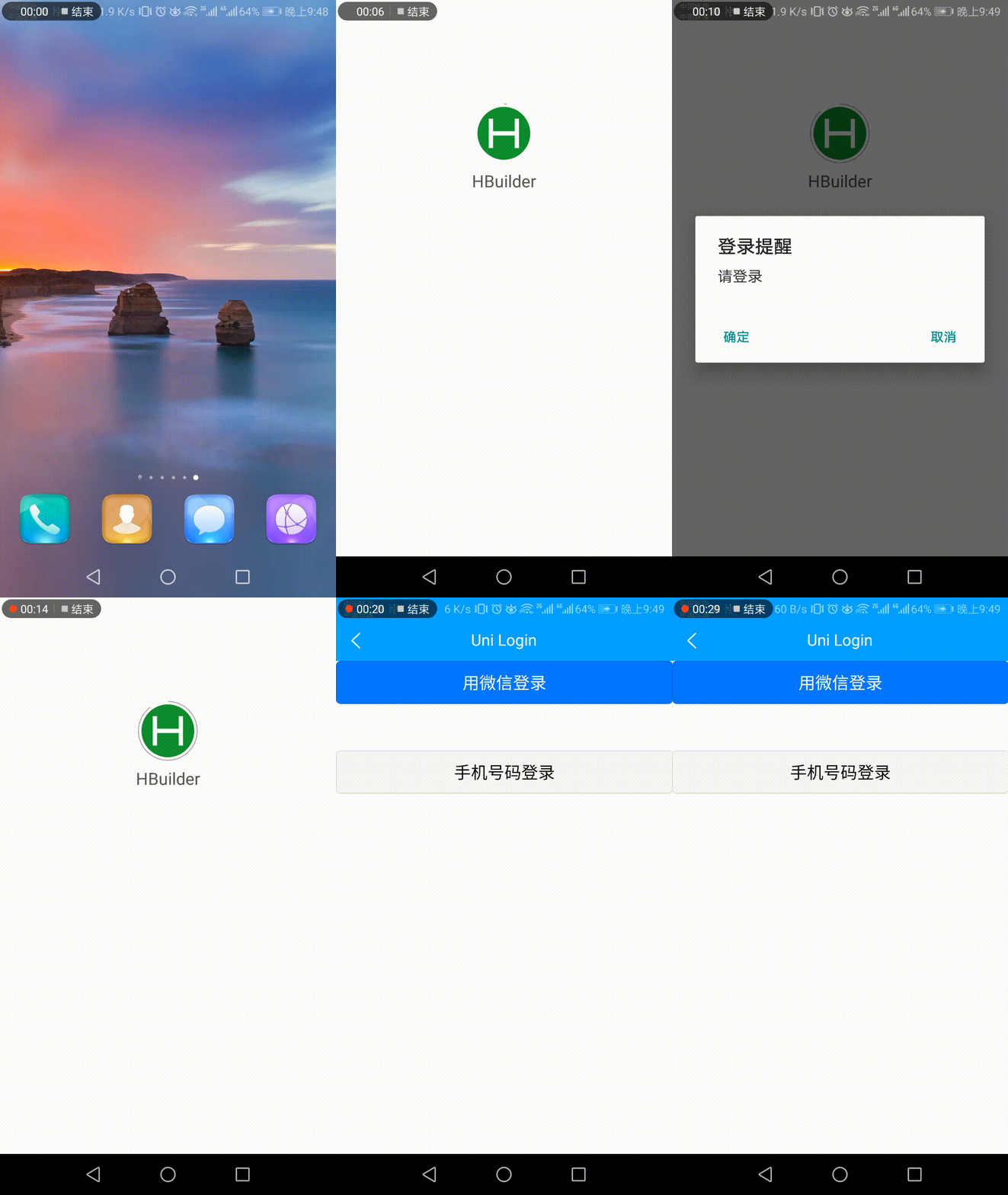
显然,实现了在APP端调用微信登录; 登录后,输出了相应的信息。
四、分享接口
分享是一个很重要的功能。
1.小程序分享
小程序只支持分享到聊天界面(包括微信好友和微信群),不支持分享到朋友圈,是使用onShareAppMessage生命周期实现的。
index.vue如下:
1<template>
2	<view>
3		Index...
4	</view>
5</template>
6
7<script>
8	export default {
9		data() {
10			return {
11			}
12		},
13		onLoad() {
14			var res = global.isLogin();
15			if(!res){
16				uni.showModal({
17					title: '登录提醒',
18					content: '请登录',
19					success:function(){
20						uni.navigateTo({
21							url: '/pages/login'
22						})
23					}
24				})
25			}
26		},
27		onShow() {
28		},
29		onHide() {
30		},
31		onShareAppMessage:function(){
32			return {
33				title: 'Share test...',
34				path: 'pages/index/index'
35			}
36		},
37		methods: {
38		}
39	}
40</script>
41
42<style>
43
44</style>
45
显示:
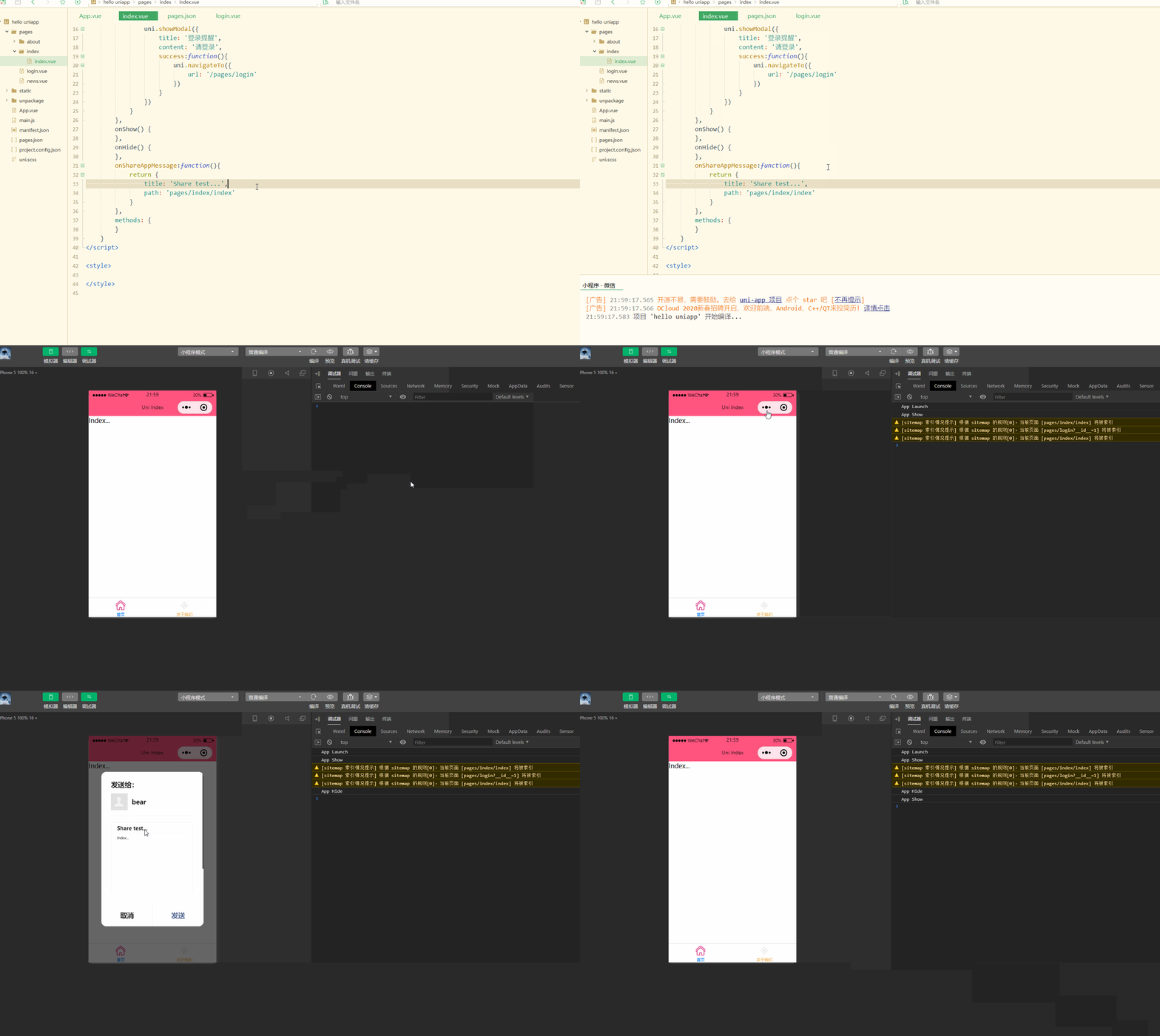
可以看到,实现了分享功能。
2.APP分享
APP中要实现分享,需要在manifest.json中进行配置,如下:
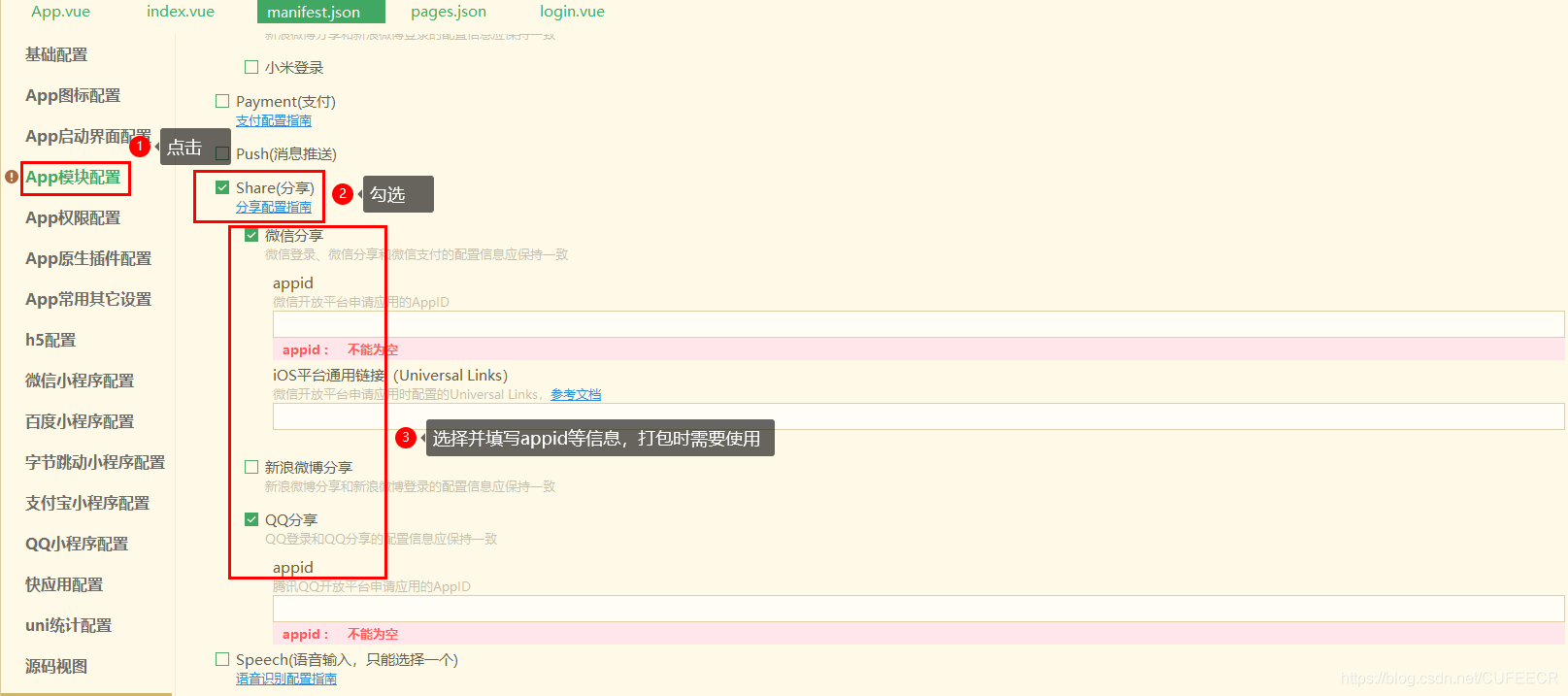
先实现分享纯文字,index.vue如下:
1<template>
2	<view>
3		<!-- #ifdef APP-PLUS -->
4		<button type="primary" @click="share">点击分享</button>
5		<!-- #endif -->
6	</view>
7</template>
8
9<script>
10	export default {
11		data() {
12			return {
13			}
14		},
15		onLoad() {
16		},
17		onShow() {
18		},
19		onHide() {
20		},
21		onShareAppMessage:function(){
22			return {
23				title: 'Share test...',
24				path: 'pages/index/index'
25			}
26		},
27		methods: {
28			share: function(){
29				uni.share({
30				    provider: "weixin",
31				    scene: "WXSceneSession",
32				    type: 1,
33				    summary: "我正在参加CSDN年度博客之星活动,请点击链接 https://bss.csdn.net/m/topic/blog_star2020/detail?username=cufeecr 投一票吧,先在此谢过啦!!",
34				    success: function (res) {
35				        console.log("success:" + JSON.stringify(res));
36				    },
37				    fail: function (err) {
38				        console.log("fail:" + JSON.stringify(err));
39				    }
40				});
41			}
42		}
43	}
44</script>
45
46<style>
47
48</style>
49
显示:
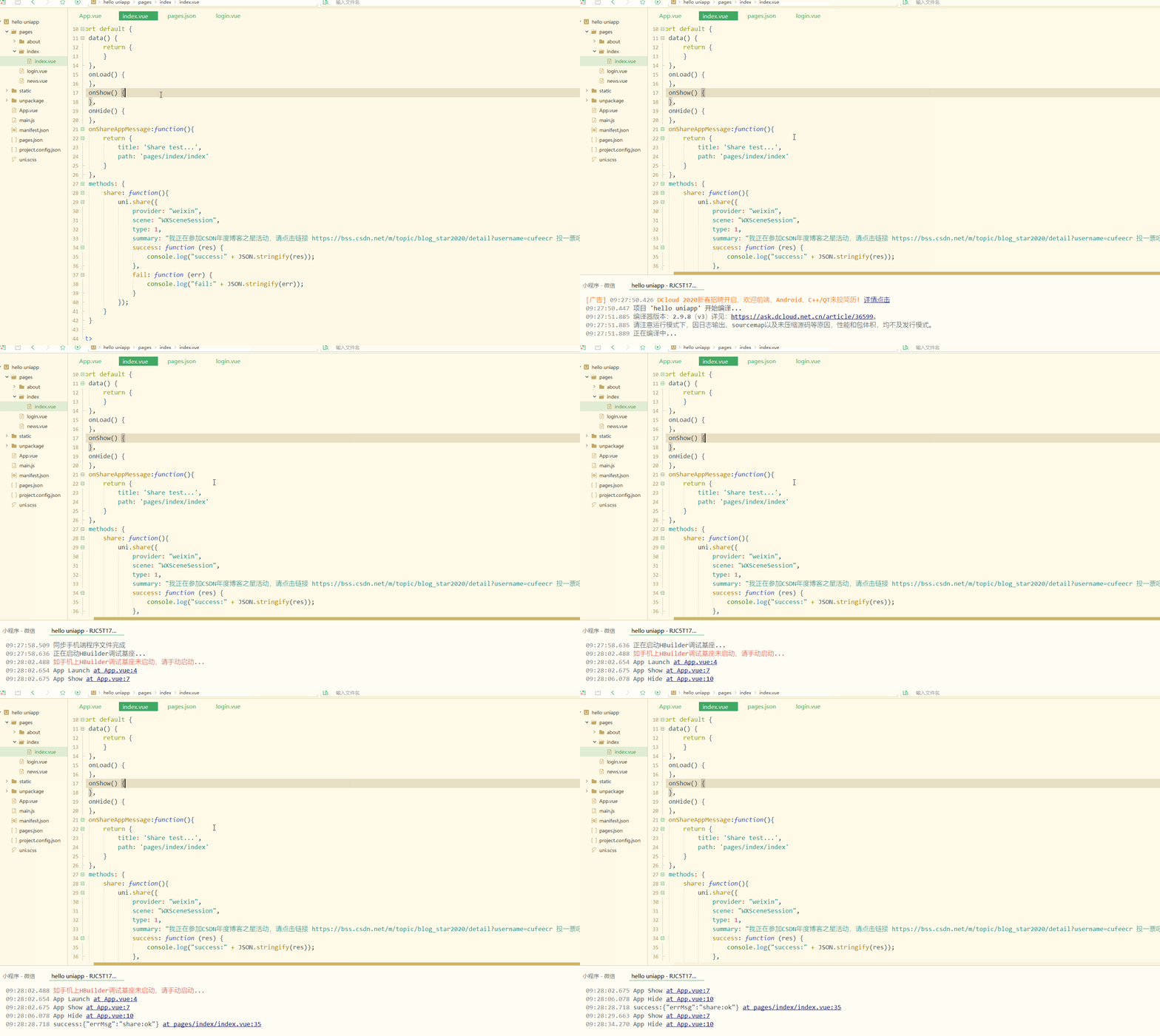
手机端显示:
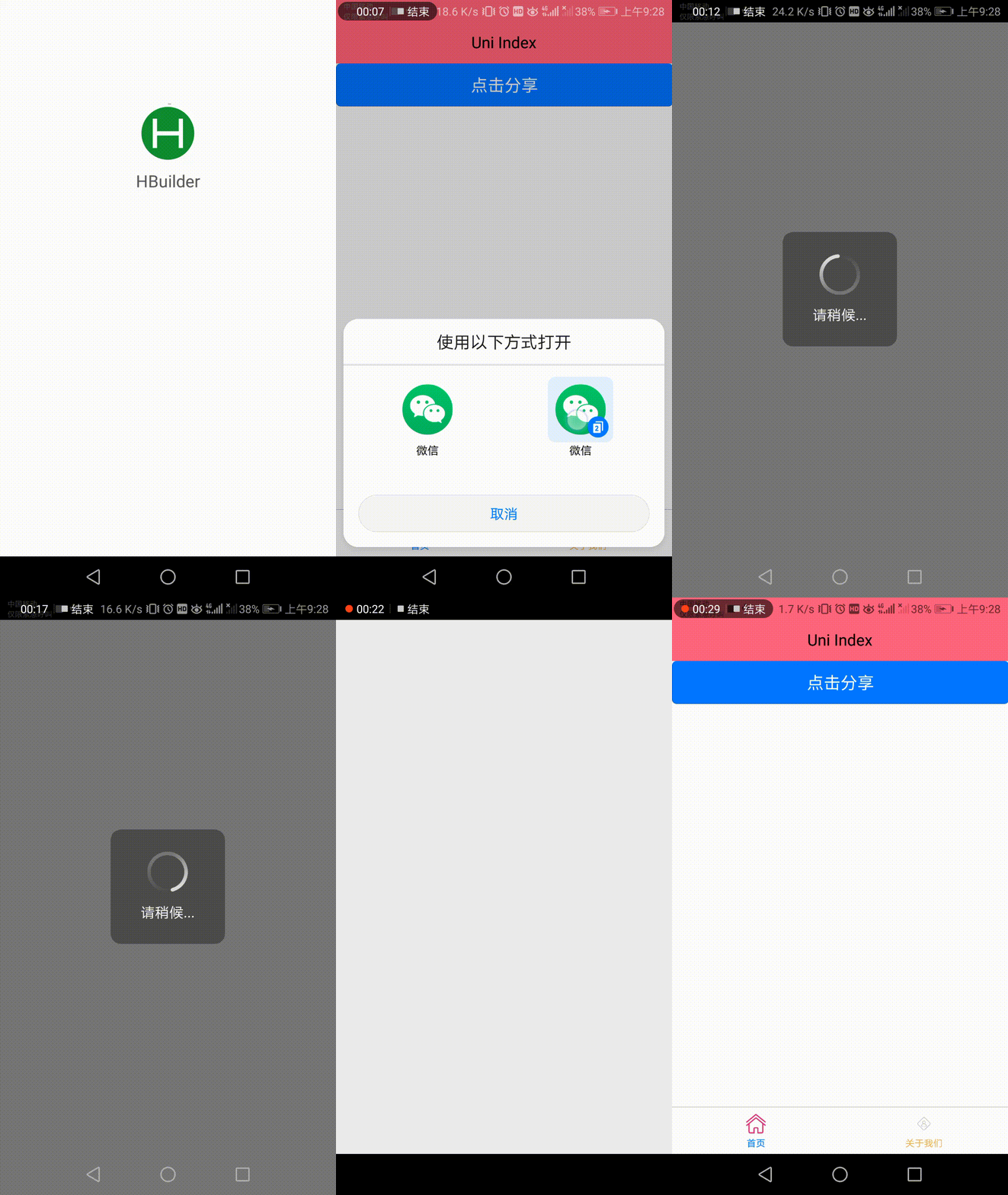
显然,控制台输出了分享成功的信息; 同时,APP成功调用了微信分享。
再实现分享图文,如下:
1<template>
2	<view>
3		<!-- #ifdef APP-PLUS -->
4		<button type="primary" @click="share">点击分享</button>
5		<!-- #endif -->
6	</view>
7</template>
8
9<script>
10	export default {
11		data() {
12			return {
13			}
14		},
15		onLoad() {
16		},
17		onShow() {
18		},
19		onHide() {
20		},
21		onShareAppMessage:function(){
22			return {
23				title: 'Share test...',
24				path: 'pages/index/index'
25			}
26		},
27		methods: {
28			share: function(){
29				uni.share({
30				    provider: "weixin",
31				    scene: "WXSceneSession",
32				    type: 0,
33				    href: "https://bss.csdn.net/m/topic/blog_star2020/detail?username=cufeecr",
34				    title: "cufeecr年度博客之星评选",
35				    summary: "我正在参加CSDN年度博客之星活动,请点击链接 https://bss.csdn.net/m/topic/blog_star2020/detail?username=cufeecr 投一票吧,先在此谢过啦!!",
36				    imageUrl: "https://img-blog.csdnimg.cn/20210112093810423.png",
37				    success: function (res) {
38				        console.log("success:" + JSON.stringify(res));
39				    },
40				    fail: function (err) {
41				        console.log("fail:" + JSON.stringify(err));
42				    }
43				});
44			}
45		}
46	}
47</script>
48
49<style>
50
51</style>
52
显示:
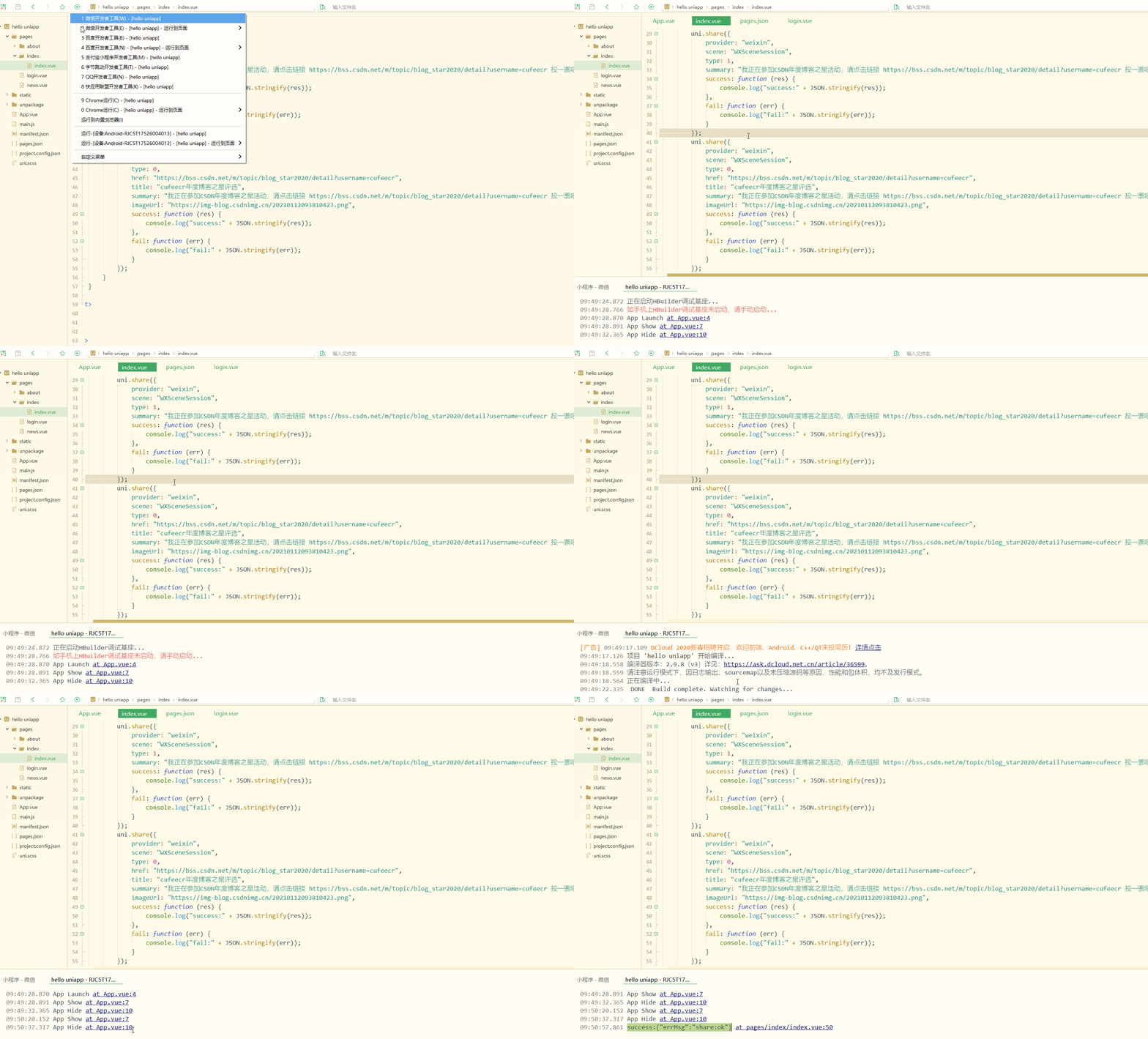
手机端显示:
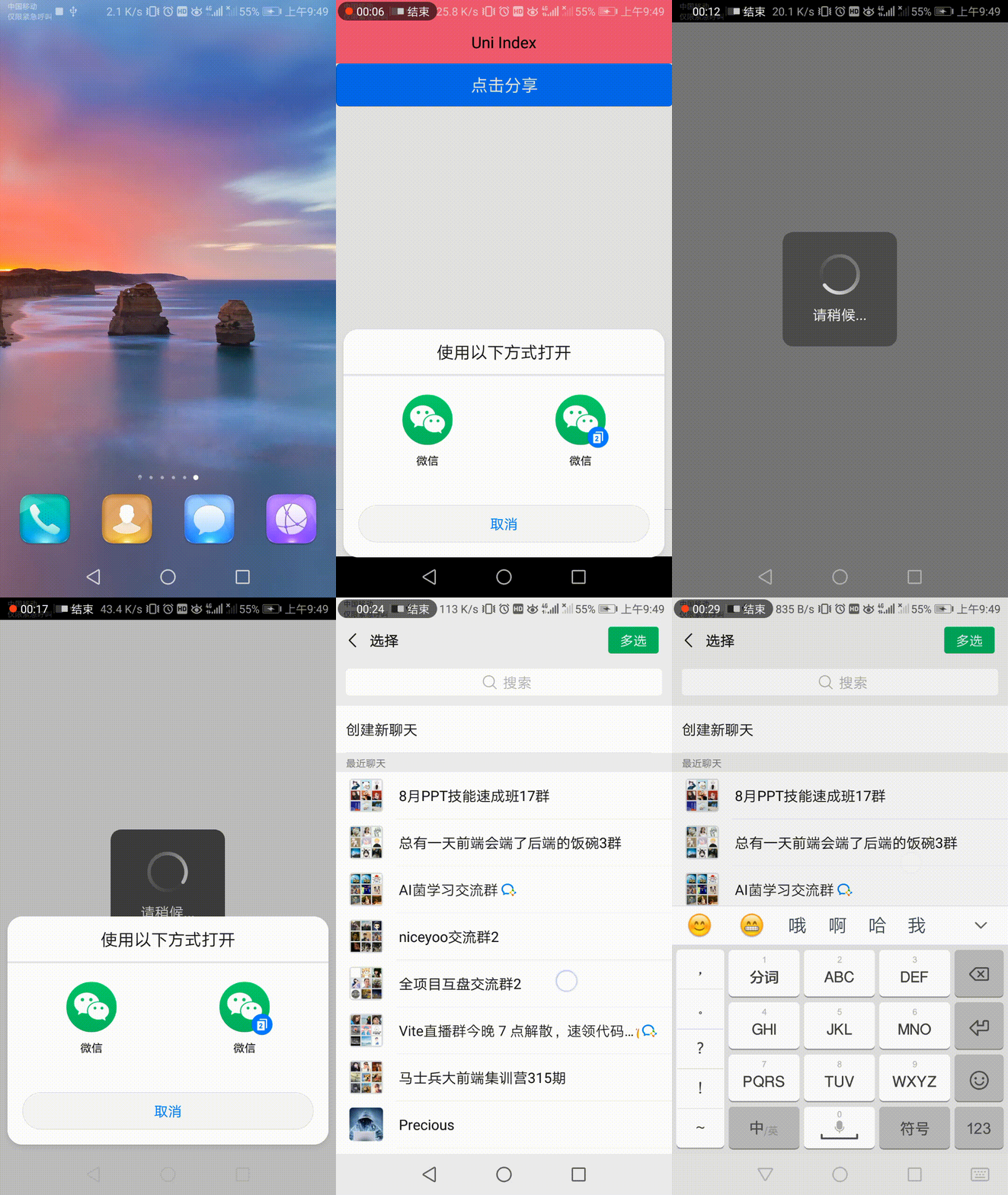
显然,实现了分享图文到微信好友或微信群。
还可以分享到微信朋友圈,如下:
1<template>
2	<view>
3		<!-- #ifdef APP-PLUS -->
4		<button type="primary" @click="share">点击分享</button>
5		<!-- #endif -->
6	</view>
7</template>
8
9<script>
10	export default {
11		data() {
12			return {
13			}
14		},
15		onLoad() {
16		},
17		onShow() {
18		},
19		onHide() {
20		},
21		onShareAppMessage:function(){
22			return {
23				title: 'Share test...',
24				path: 'pages/index/index'
25			}
26		},
27		methods: {
28			share: function(){
29				uni.share({
30				    provider: "weixin",
31					scene: "WXSenceTimeline",
32					type: 2,
33					imageUrl: "https://img-blog.csdnimg.cn/20210112093810423.png",
34					success: function (res) {
35						console.log("success:" + JSON.stringify(res));
36					},
37					fail: function (err) {
38						console.log("fail:" + JSON.stringify(err));
39					}
40				});
41			}
42		}
43	}
44</script>
45
46<style>
47
48</style>
49
显示:

手机端显示:
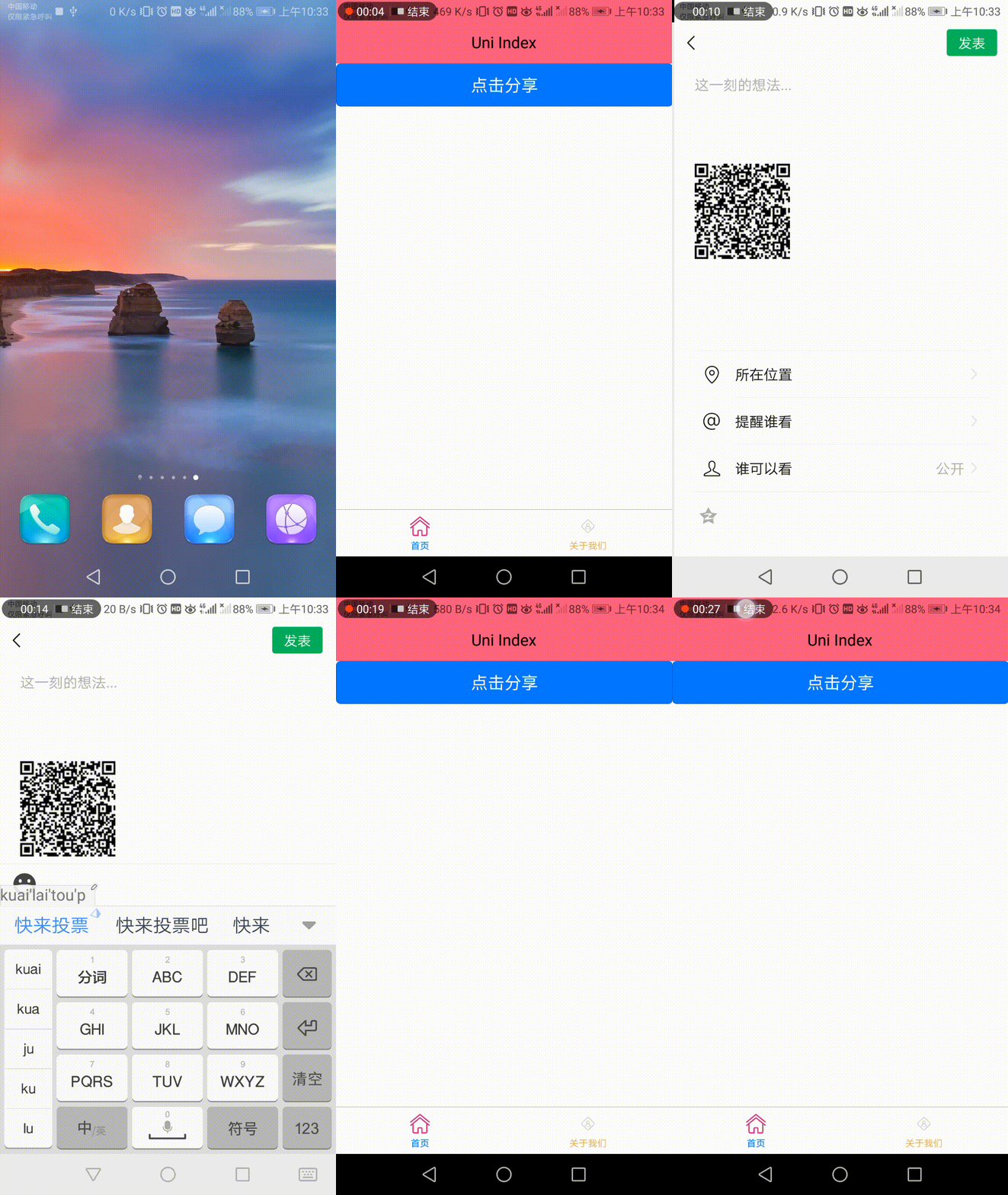
已经实现了分享消息到朋友圈。
总结
第三方登录和分享是APP和小程序的基本功能,对于APP和小程序有不同的实现方式,相比较而言,APP实现更简单,都是其他功能的基础和起步。
本文原文首发来自博客专栏移动应用开发,由本人转发至https://www.helloworld.net/p/JRolioRhkoCbB,其他平台均属侵权,可点击https://blog.csdn.net/CUFEECR/article/details/112537377查看原文,也可点击https://blog.csdn.net/CUFEECR浏览更多优质原创内容。