
@[toc]
前言
本文主要讲Python最常见的应用之一——网络数据获取,即爬虫: 先介绍了网页和网络的基础知识,为从网页中获取数据打好基础;接下来以两个案例介绍从网络中获取数据和处理数据的不同方式,以进一步认识Python爬虫和数据处理。
一、网络和网页基础知识
1.数据来源
数据源有很多,可以从数据库中获取,可以从文件中获取,也可以从网络中获取,也可以直接获取裸数据。
数据库数据来源有很多,比如RDBMS,即关系数据库管理系统,属于结构化数据,具体包括MySQL、PostgreSQL、SQLServer、Oracle、SQLite等数据库类型。
数据文件包括:
-
Excel 最常见,最有问题。
-
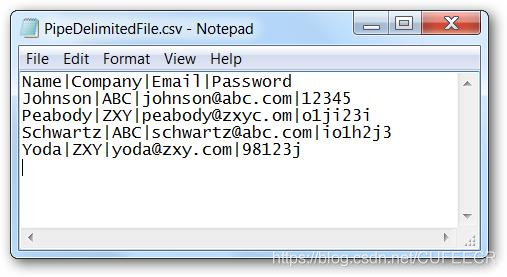
分隔格式 最常见、最受欢迎。 包括逗号分隔符(csv)、制表符分隔符(tsv)、|分隔符等形式。 问题包括数据字段中的分隔、编码等。 如下:
-
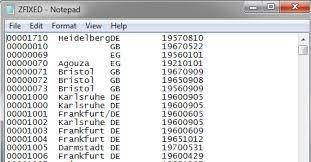
固定长度 每一列都有固定长度。 问题:列过大。 如下:
-
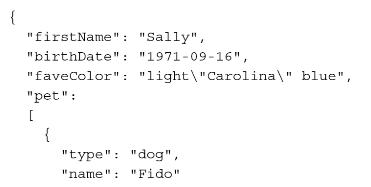
JSON 即JavaScript Object Notation(JavaScript对象表示法)的简写,属于半结构化数据。 属性位于冒号的左侧,数值位于冒号右侧,属性用逗号分隔,多值属性作为层次值。 如下:
-
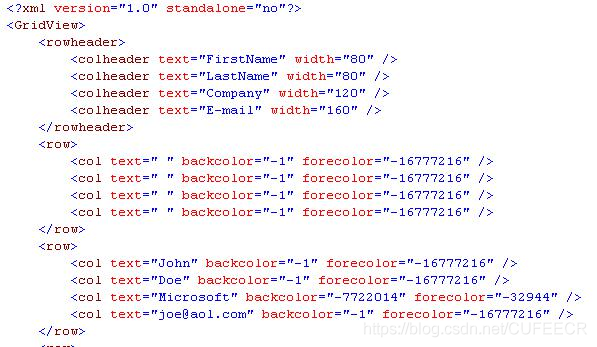
XML Extensible Markup Language(可扩展标记语言)的简写,属于半结构化数据,也是最常见的数据交换。 如下:
-
Parquet 列存储,Spark。 如下:
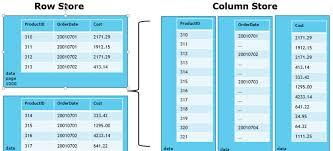
网络数据:
主要为HTML,为非结构化数据。
如下:
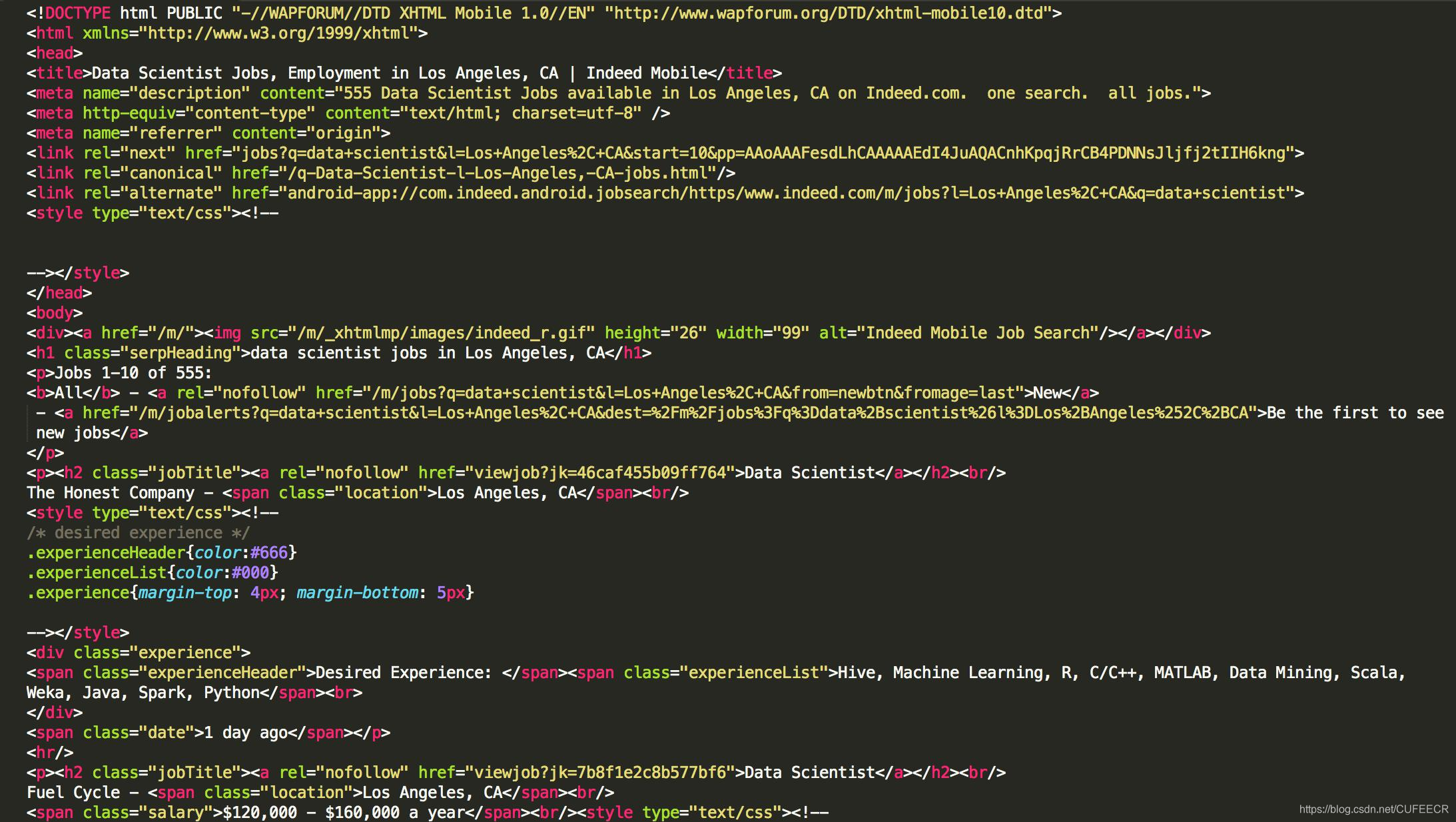
2.网络基础知识
网络数据传输,一般是先请求、再响应,中间可能经过很多次层转发,计算机理论的OSI模型如下:
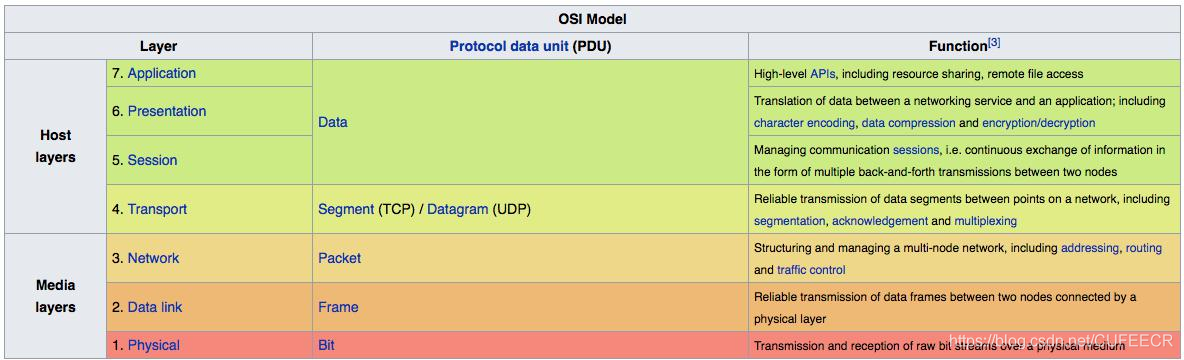
每一层的过程可能如下:
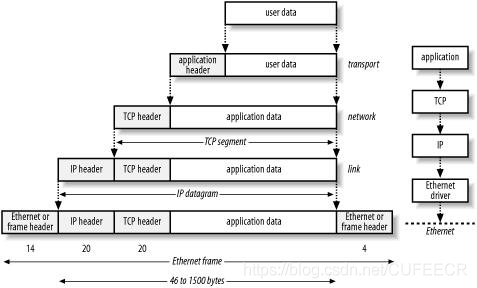 现在一般的网站模式为客户端/服务器,客户端一般即为自己所使用的浏览器,服务器是存储网站资源、管理网络请求的平台。
一般的请求过程如下: (1)用户输入URL; (2)客户端发送请求Request; (3)服务器接收请求Request; (4)服务器返回响应Response Back; (5)客户端接收并解析Response。
对于一个url,如https://127.0.0.1:8000/hello,http表示协议,127.0.0.1表示主机号,8000是端口号,/hello是路径,从而可以精确定位到要访问的信息。
使用浏览器访问网站的基本操作如下:
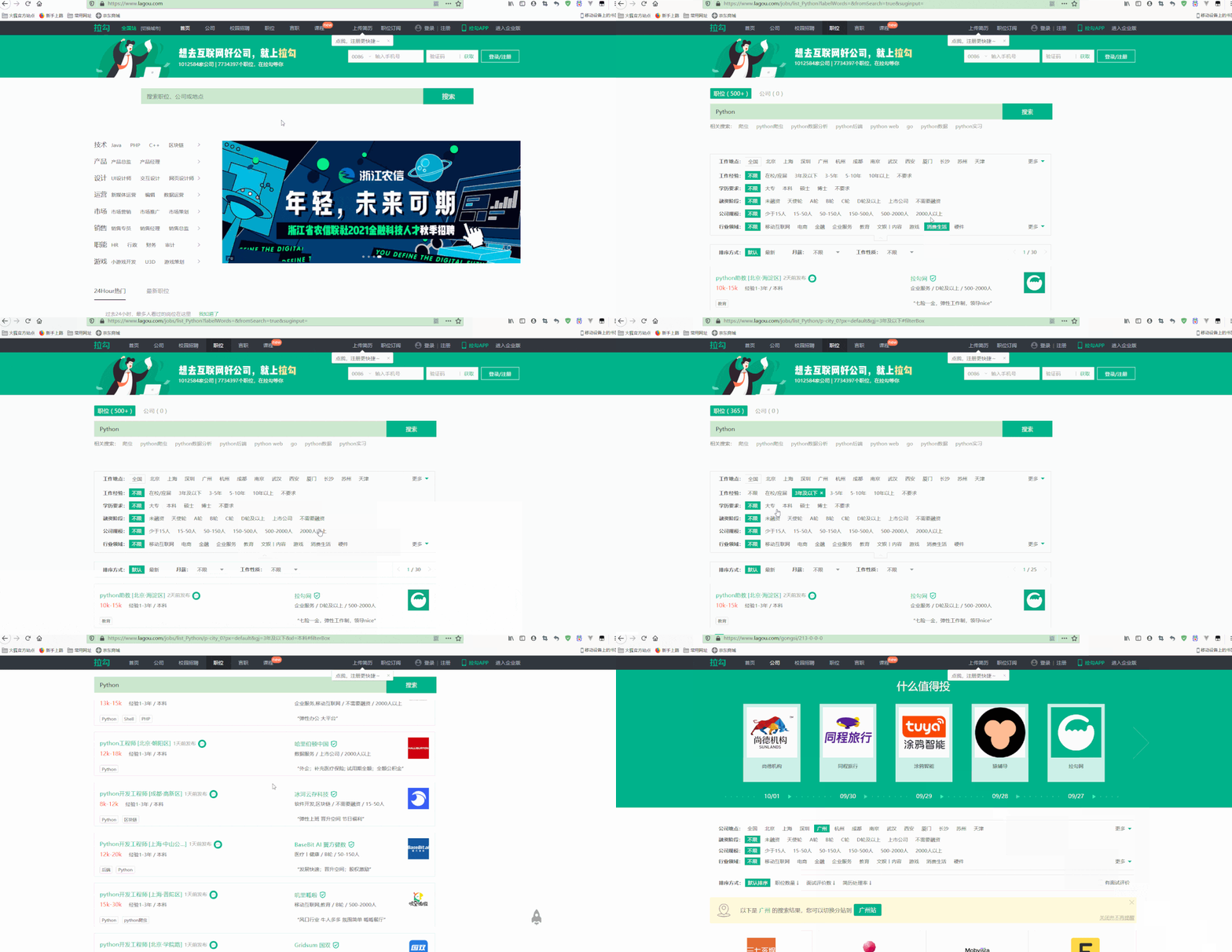
可以看到,在进行搜索和筛选时,链接也会有所变化,以向浏览器请求不同的内容。
还可以使用浏览器的审计工具,可以查看页面元素、网络请求、样式等。
如下:
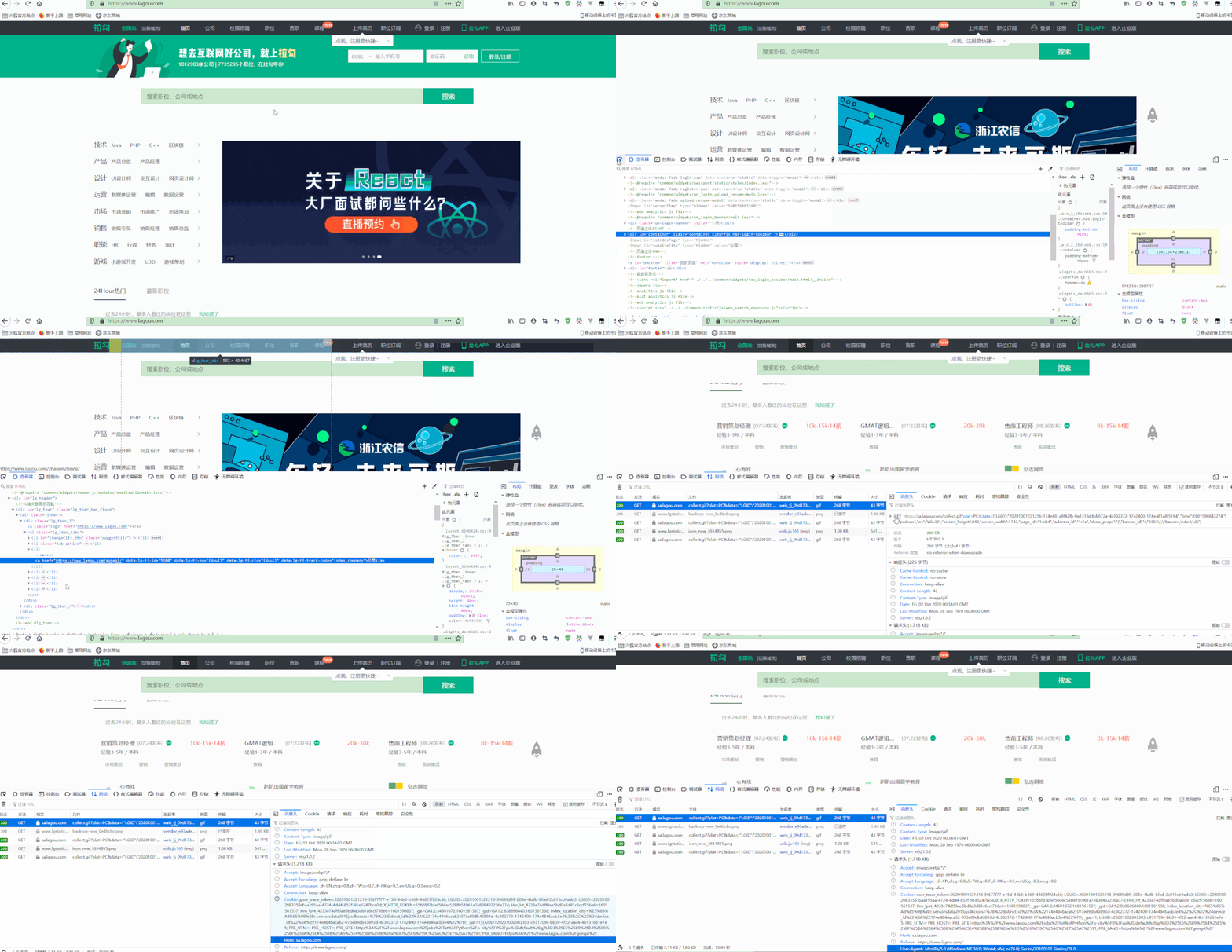
可以看到,页面中的内容都是通过很多标签和样式组织起来的,这就是HTML代码; 同时在请求和相应的时候,都携带了很多参数。
进一步使用审计工具如下:
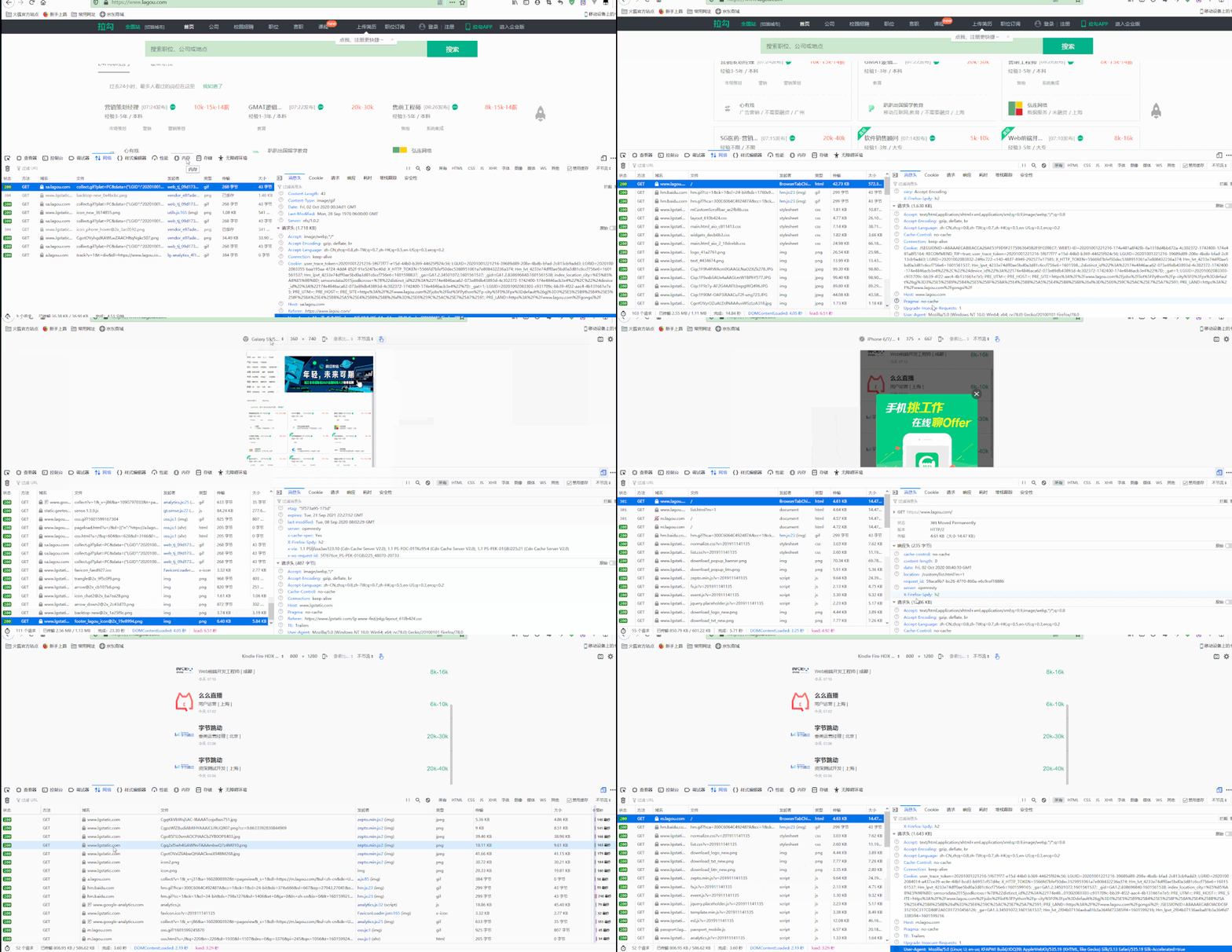
可以看到,可以通过设置实现模拟不同的设备进行请求,此时请求参数的User-Agent参数也随之变化。
一个HTTP请求包括请求方法、请求路径和HTTP版本,一个HTTP响应包括HTTP版本、状态码和响应体。
3.HTML、CSS和网页数据抓取方式
网页是由HTML代码组成的,信息一般包含在这些代码中; CSS是一些样式文件,对于获取数据影响不大; JavaScript代码可以执行一些更复杂的逻辑,对获取数据的影响可能比较大。
一个简单的HTML代码如下:
1<!DOCTYPE html>
2<html lang="en">
3<head>
4    <meta charset="UTF-8">
5    <title>Title</title>
6</head>
7<body>
8    <h1>首页</h1>
9    <form action="" method="post">
10        <table>
11            <tr>
12                <td><input type="text" name="name"></td>
13                <td><input type="submit" value="提交"></td>
14            </tr>
15        </table>
16    </form>
17</body>
18</html>
网页抓取一般有两种方式:
-
逐行扫描Line by Line 包括简单字符串处理和正则表达式方式等。 正则表达式是一个特殊的字符序列,它能方便检查一个字符串是否与某种模式匹配,Python中的re模块使Python拥有全部的正则表达式功能,其中,正则表达式的原理如下:
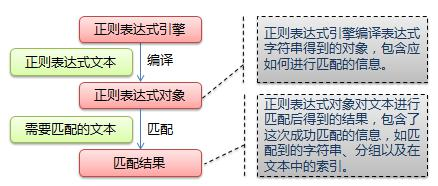
具体使用可参考https://www.runoob.com/python/python-reg-expressions.html。
-
树形模型Tree Model 利用HTML的树形结构来获取HTML中的信息,包括BeautifulSoup、lxml等库支持该功能。 网络请求HTML并展示为树形结构的过程如下:
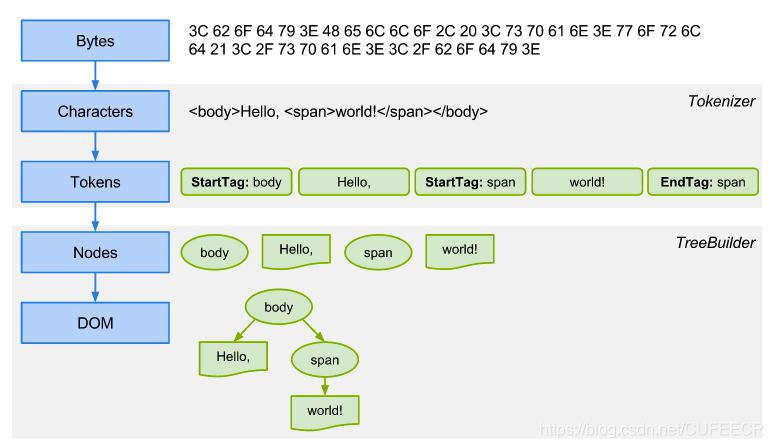
例如,对于以下案例代码:
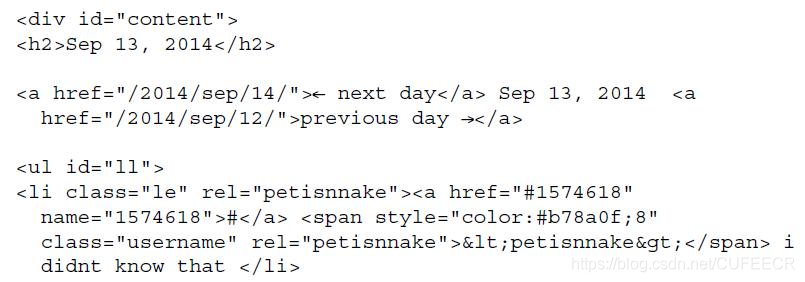
其中,date数据为Sep 13, 2014,message数据为i didnt know that。
如果使用正则表达式提取这两个数据,方式为<h2>(.+)<\/h2>和<\/span>(.+)<\/li>;
而使用属性模型如BeautifulSoup提取数据,会建立如下的结构:
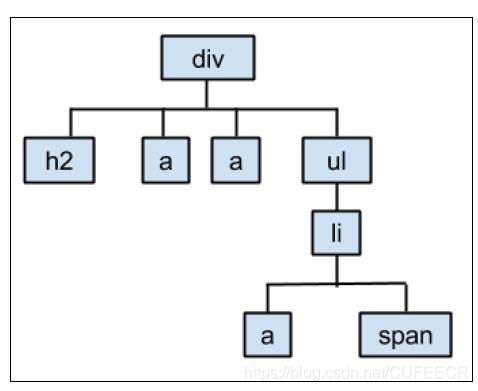
从而,提取数据的方式为div.h2.text和div.ul.li.text。
二、BOSS直聘数据抓取案例
1.网站预览
以BOSS直聘https://www.zhipin.com/为例,实现较完整的网络数据抓取的过程。
网站预览如下:
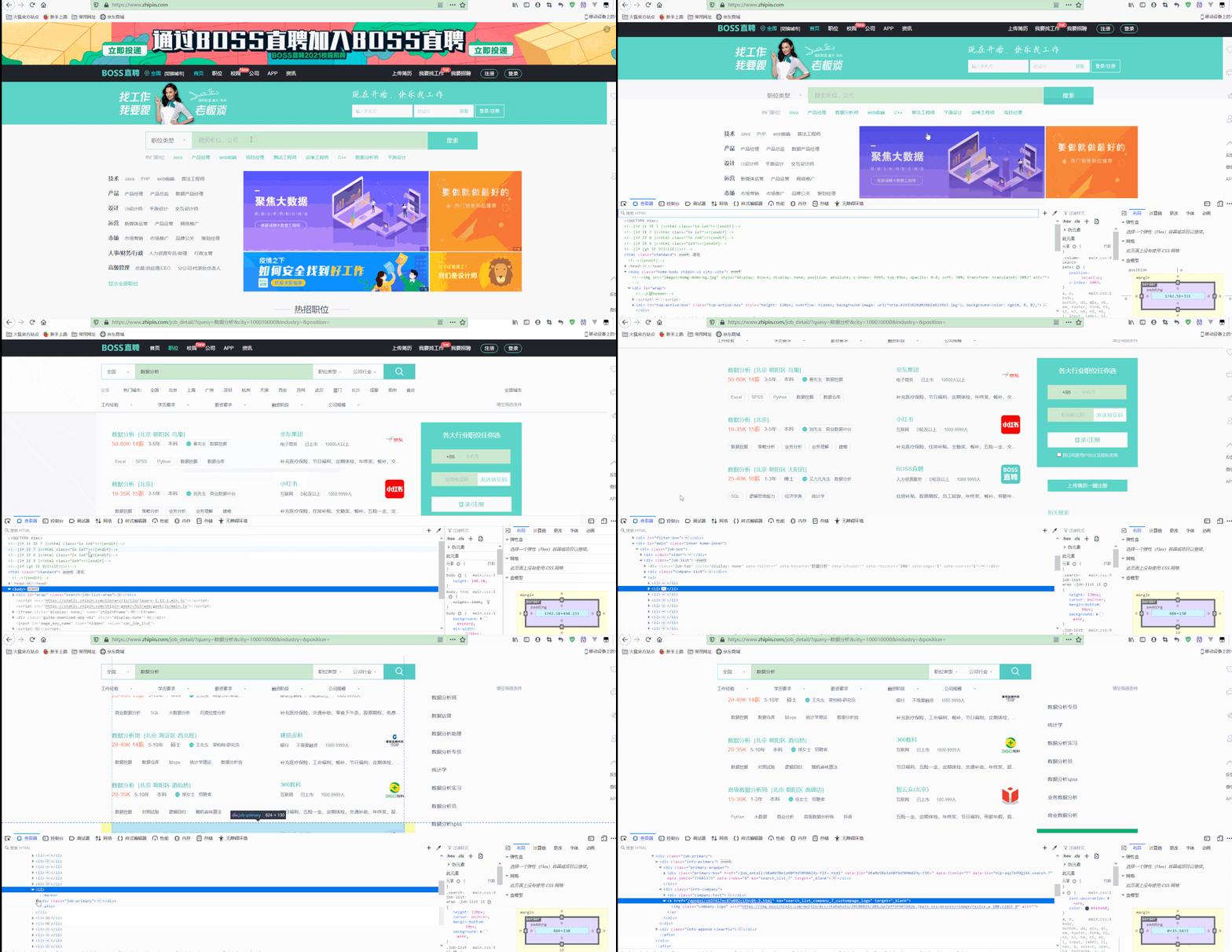
可以看到,在查看器中选择一定的HTML代码区域,页面中也会有相应的高亮显示,说明需要获取的数据也就在这些对应的HTML代码中; 每一条结果的位置为class为job-list的div下面的ul下面的li下面的class为job-primary的div,有多少条职位信息就有多少个li,其中一个li的内容如下:
1<li> 2 <div class="job-primary"> 3 4 <div class="info-primary"> 5 <div class="primary-wrapper"> 6 <div class="primary-box" href="/job_detail/7271f2f28169375a1nR42t-6GFpQ.html" 7 data-jid="7271f2f28169375a1nR42t-6GFpQ" data-itemid="1" data-lid="nlp-aqyTkPDQjXA.search.1" 8 data-jobid="102127880" data-index="0" ka="search_list_1" target="_blank"> 9 <div class="job-title"> 10 <span class="job-name"><a href="/job_detail/7271f2f28169375a1nR42t-6GFpQ.html" title="数据分析" 11 target="_blank" ka="search_list_jname_1" data-jid="7271f2f28169375a1nR42t-6GFpQ" 12 data-itemid="1" data-lid="nlp-aqyTkPDQjXA.search.1" data-jobid="102127880" 13 data-index="0">数据分析</a></span> 14 <span class="job-area-wrapper"> 15 <span class="job-area">北京·朝阳区·鸟巢</span> 16 </span> 17 <span class="job-pub-time"></span> 18 </div> 19 <div class="job-limit clearfix"> 20 <span class="red">50-80K·14薪</span> 21 <p>3-5年<em class="vline"></em>本科</p> 22 <div class="info-publis"> 23 <h3 class="name"><img class="icon-chat" 24 src="https://z.zhipin.com/web/geek/resource/icon-chat-v2.png">曹先生<em 25 class="vline"></em>数据挖掘</h3> 26 </div> 27 <button class="btn btn-startchat" href="javascript:;" 28 data-url="/wapi/zpgeek/friend/add.json?jobId=7271f2f28169375a1nR42t-6GFpQ&lid=nlp-aqyTkPDQjXA.search.1" 29 redirect-url="/web/geek/chat?id=495f7159c0c8664a1nFz39m8EA~~"> 30 <img class="icon-chat icon-chat-hover" 31 src="https://z.zhipin.com/web/geek/resource/icon-chat-hover-v2.png" alt=""> 32 <span>立即沟通</span> 33 </button> 34 </div> 35 <div class="info-detail" style="top: 0px;"></div> 36 </div> 37 </div> 38 <div class="info-company"> 39 <div class="company-text"> 40 <h3 class="name"><a href="/gongsi/33e052361693f8371nF-3d25.html" title="京东集团招聘" 41 ka="search_list_company_1_custompage" target="_blank">京东集团</a></h3> 42 <p><a href="/i100001/" class="false-link" target="_blank" 43 ka="search_list_company_industry_1_custompage" title="电子商务行业招聘信息">电子商务</a><em 44 class="vline"></em>已上市<em class="vline"></em>10000人以上</p> 45 </div> 46 <a href="/gongsi/33e052361693f8371nF-3d25.html" ka="search_list_company_1_custompage_logo" 47 target="_blank"><img class="company-logo" 48 src="https://img.bosszhipin.com/beijin/mcs/bar/20191129/3cdf5ba2149e309b38868b62ae9c22cabe1bd4a3bd2a63f070bdbdada9aad826.jpg?x-oss-process=image/resize,w_100,limit_0" 49 alt=""></a> 50 </div> 51 </div> 52 <div class="info-append clearfix"> 53 <div class="tags"> 54 <span class="tag-item">Excel</span> 55 <span class="tag-item">SPSS</span> 56 <span class="tag-item">Python</span> 57 <span class="tag-item">数据挖掘</span> 58 <span class="tag-item">数据仓库</span> 59 </div> 60 <div class="info-desc">补充医疗保险,节日福利,定期体检,年终奖,餐补,交通补助,免费班车,包吃,股票期权,员工旅游,零食下午茶,五险一金,带薪年假</div> 61 </div> 62 </div> 63</li>
可以看到,所需要的信息都在这些代码中。
还可以在页面中获取职位描述,如下:
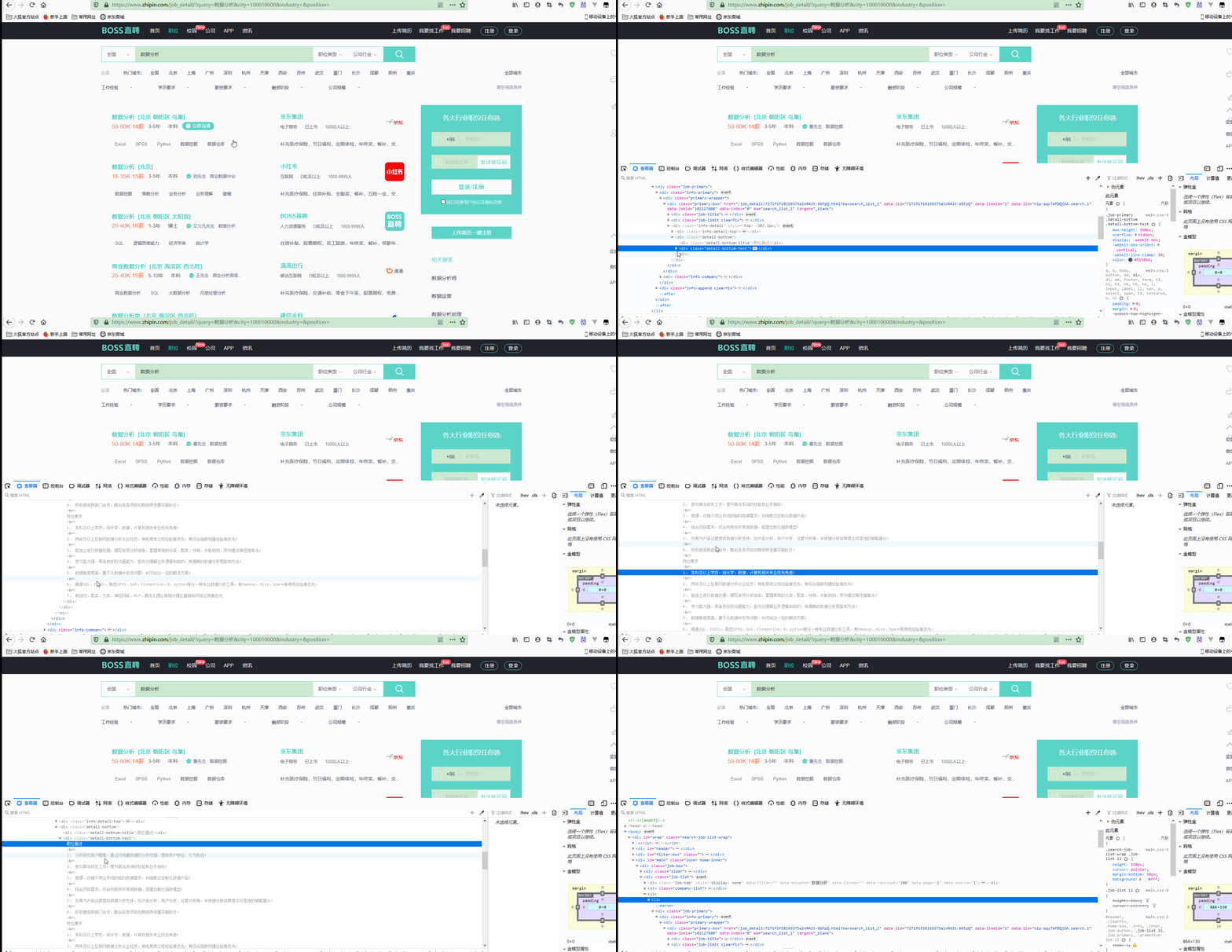
并且进一步获取到完整的HTML代码如下:
1<li> 2 3 <div class="job-primary"> 4 5 6 <div class="info-primary"> 7 <div class="primary-wrapper"> 8 <div class="primary-box" href="/job_detail/7271f2f28169375a1nR42t-6GFpQ.html?ka=search_list_1" 9 data-jid="7271f2f28169375a1nR42t-6GFpQ" data-itemid="1" data-lid="nlp-aqyTkPDQjXA.search.1" 10 data-jobid="102127880" data-index="0" ka="search_list_1" target="_blank"> 11 <div class="job-title"> 12 <span class="job-name"><a href="/job_detail/7271f2f28169375a1nR42t-6GFpQ.html" title="数据分析" 13 target="_blank" ka="search_list_jname_1" data-jid="7271f2f28169375a1nR42t-6GFpQ" 14 data-itemid="1" data-lid="nlp-aqyTkPDQjXA.search.1" data-jobid="102127880" 15 data-index="0">数据分析</a></span> 16 <span class="job-area-wrapper"> 17 <span class="job-area">北京·朝阳区·鸟巢</span> 18 </span> 19 <span class="job-pub-time"></span> 20 </div> 21 <div class="job-limit clearfix"> 22 <span class="red">50-80K·14薪</span> 23 <p>3-5年<em class="vline"></em>本科</p> 24 <div class="info-publis"> 25 <h3 class="name"><img class="icon-chat" 26 src="https://z.zhipin.com/web/geek/resource/icon-chat-v2.png">曹先生<em 27 class="vline"></em>数据挖掘</h3> 28 </div> 29 <button class="btn btn-startchat" href="javascript:;" 30 data-url="/wapi/zpgeek/friend/add.json?jobId=7271f2f28169375a1nR42t-6GFpQ&lid=nlp-aqyTkPDQjXA.search.1" 31 redirect-url="/web/geek/chat?id=495f7159c0c8664a1nFz39m8EA~~"> 32 <img class="icon-chat icon-chat-hover" 33 src="https://z.zhipin.com/web/geek/resource/icon-chat-hover-v2.png" alt=""> 34 <span>立即沟通</span> 35 </button> 36 </div> 37 <div class="info-detail" style="top: -307.1px;"> 38 <div class="info-detail-top"> 39 <div class="detail-top-left"> 40 <div class="detail-top-title">数据分析</div> 41 <div class="detail-top-text">京东集团 · 数据挖掘: 曹先生</div> 42 <a href="javascript:;" ka="popjob_interest_tosign_7271f2f28169375a1nR42t-6GFpQ" 43 data-url="/geek/tag/jobtagupdate.json?jobId=7271f2f28169375a1nR42t-6GFpQ&expectId=&tag=4&lid=nlp-aqyTkPDQjXA.search.1" 44 class="link-like " job-id="495f7159c0c8664a1nFz39m8EA~~">感兴趣</a> 45 </div> 46 <div class="detail-top-right detail-top-right2"> 47 <div class="code-des">扫一扫,随时与BOSS开聊</div> 48 <div class="code-icon"></div> 49 </div> 50 </div> 51 <div class="detail-bottom"> 52 <div class="detail-bottom-title">职位描述</div> 53 <div class="detail-bottom-text"> 54 职位描述<br>1、 分析研究用户画像,通过对海量数据的分析挖掘,提取用户特征、行为轨迹;<br>2、 参与算法研发工作,提升算法系统的性能和业务指标;<br>3、 55 梳理、对接不同业务线的临时数据需求,并抽象出定制化数据产品; <br>4、 结合项目需求,综合利用京东商城数据,搭建定制化指数模型;<br>5、 56 负责为产品运营提供数据分析支持,如产品分析、用户分析、运营分析等,并根据分析结果提出可落地的策略建议;<br>6、 57 积极推进跨部门合作,配合各类项目如期保质保量实施执行。<br>岗位要求<br>1、 本科及以上学历,统计学、数据、计算机相关专业优先考虑;<br>2、 58 两年及以上互联网数据分析从业经历,有电商类公司经验者优先,有综合指数构建经验者优先;<br>3、 59 能独立进行数据处理,撰写专项分析报告,掌握常用的分类、聚类、预测、关联规则、序列模式等挖掘算法;<br>4、 60 学习能力强,具备良好的沟通能力,能充分理解业务逻辑和目的,有清晰的数据分析思路和方法;<br>5、 61 数据敏感度高,善于从数据中发现问题,并可给出一定的解决方案;<br>6、 62 精通SQL、EXCEL,熟悉SPSS、SAS、Clementine、R、python等任一种专业数据分析工具,有Hadoop、Hive、Spark等使用经验者优先。<br>7、 63 有回归、聚类、分类、神经网络、NLP、最优化理论等相关理论基础和项目应用者优先 64 </div> 65 </div> 66 </div> 67 </div> 68 </div> 69 <div class="info-company"> 70 <div class="company-text"> 71 <h3 class="name"><a href="/gongsi/33e052361693f8371nF-3d25.html" title="京东集团招聘" 72 ka="search_list_company_1_custompage" target="_blank">京东集团</a></h3> 73 <p><a href="/i100001/" class="false-link" target="_blank" 74 ka="search_list_company_industry_1_custompage" title="电子商务行业招聘信息">电子商务</a><em 75 class="vline"></em>已上市<em class="vline"></em>10000人以上</p> 76 </div> 77 <a href="/gongsi/33e052361693f8371nF-3d25.html" ka="search_list_company_1_custompage_logo" 78 target="_blank"><img class="company-logo" 79 src="https://img.bosszhipin.com/beijin/mcs/bar/20191129/3cdf5ba2149e309b38868b62ae9c22cabe1bd4a3bd2a63f070bdbdada9aad826.jpg?x-oss-process=image/resize,w_100,limit_0" 80 alt=""></a> 81 </div> 82 </div> 83 <div class="info-append clearfix"> 84 <div class="tags"> 85 <span class="tag-item">Excel</span> 86 <span class="tag-item">SPSS</span> 87 <span class="tag-item">Python</span> 88 <span class="tag-item">数据挖掘</span> 89 <span class="tag-item">数据仓库</span> 90 </div> 91 <div class="info-desc">补充医疗保险,节日福利,定期体检,年终奖,餐补,交通补助,免费班车,包吃,股票期权,员工旅游,零食下午茶,五险一金,带薪年假</div> 92 </div> 93 </div> 94 95</li>
还可以进一步访问职位详情如下:
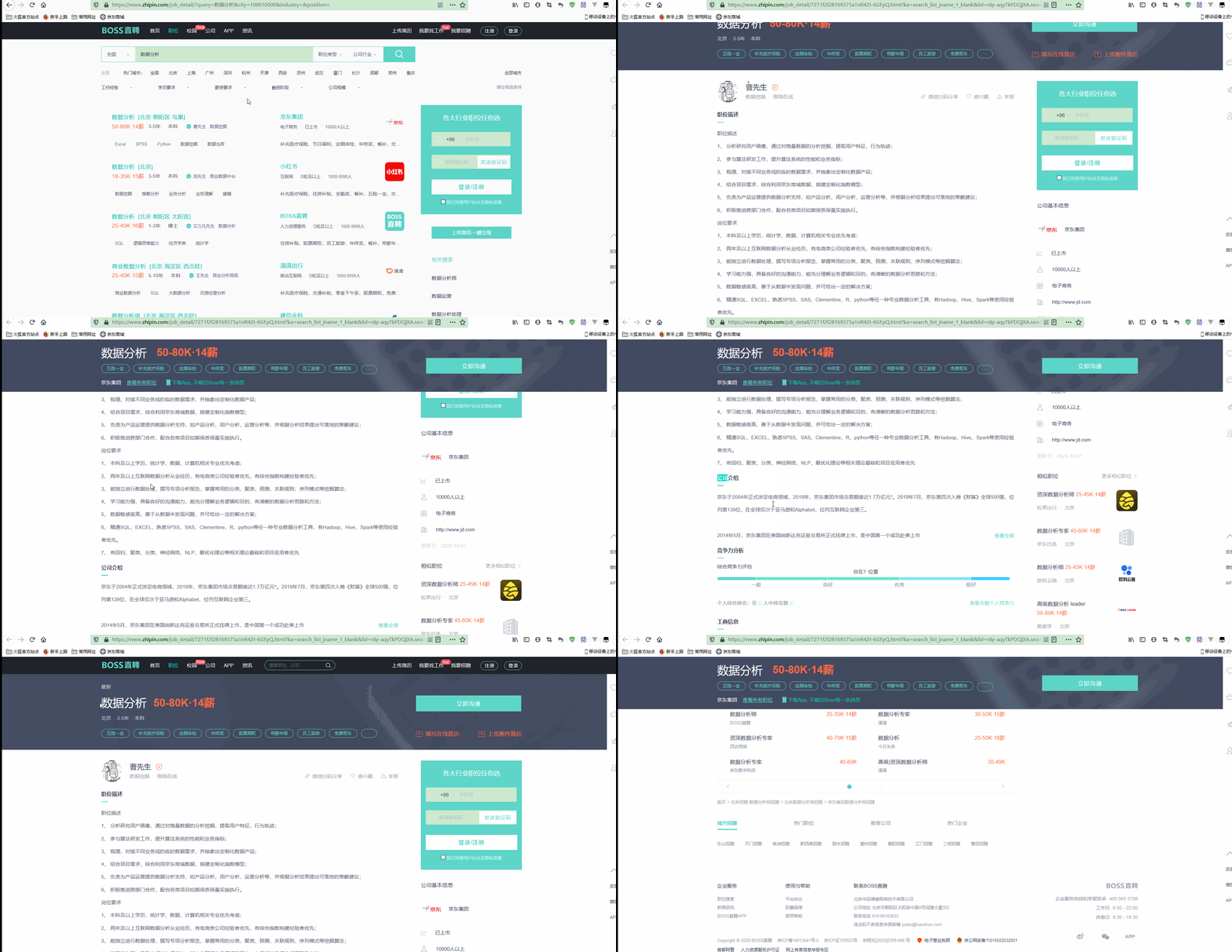
2.数据获取
先导入所需要的库,如下:
1## Import the necessary packages
2from bs4 import BeautifulSoup as bs
3import urllib
4import re
5import pandas as pd
6import requests
如需本节同步
ipynb和数据文件,可以直接点击加QQ群 <a target="_blank" href="https://qm.qq.com/cgi-bin/qm/qr?k=rgE7cwG7OGHgfEucpRIQoSlYCTOEkmEr&jump_from=webapi"><img border="0" src="https://pub.idqqimg.com/wpa/images/group.png" alt="Python极客部落" title="Python极客部落">963624318</a> 在群文件夹商业数据分析从入门到入职中下载即可。
使用requests库模拟请求:
1response = requests.get('https://www.zhipin.com/job_detail/?query=%E6%95%B0%E6%8D%AE%E5%88%86%E6%9E%90&city=100010000&industry=&position=')
获取返回的相应内容,如下:
1display(response.content[:300], response.text, response.encoding)
输出:
1b'<!DOCTYPE html>\n<html>\n    <head>\n        <meta charset="utf-8" />\n        <meta http-equiv="X-UA-Compatible" content="IE=edge,chrome=1" />\n        <meta name="viewport" content="width=device-width, initial-scale=1.0, maximum-scale=1.0, minimum-scale=1.0, user-scalable=no" />\n        <title>\xe8\xaf\xb7\xe7\xa8\x8d\xe5\x90'
2
3'<!DOCTYPE html>\n<html>\n    <head>\n        <meta charset="utf-8" />\n        <meta http-equiv="X-UA-Compatible" content="IE=edge,chrome=1" />\n        <meta name="viewport" content="width=device-width, initial-scale=1.0, maximum-scale=1.0, minimum-scale=1.0, user-scalable=no" />\n        <title>请ç¨\x8då\x90\x8e</title>\n        <style>\n            html,\n            body {\n                margin: 0;\n                width: 100%;\n                height: 100%;\n            }\n            @keyframes bossLoading {\n                0% {\n                    transform: translate3d(0, 0, 0);\n                }\n                50% {\n                    transform: translate3d(0, -10px, 0);\n                }\n            }\n            .data-tips {\n                text-align: center;\n                height: 100%;\n                position: relative;\n                background: #fff;\n                top: 50%;\n                margin-top: -37px;\n            }\n            .data-tips .boss-loading {\n                width: 100%;\n            }\n            .data-tips .boss-loading p {\n                margin-top: 10px;\n                color: #9fa3b0;\n            }\n            .boss-loading .component-b,\n            .boss-loading .component-s1,\n            .boss-loading .component-o,\n            .boss-loading .component-s2 {\n                display: inline-block;\n                width: 40px;\n                height: 42px;\n                line-height: 42px;\n                font-family: Helvetica Neue,Helvetica,Arial,Hiragino Sans GB,Hiragino Sans GB W3,Microsoft YaHei UI,Microsoft YaHei,WenQuanYi Micro Hei,sans-serif;\n                font-weight: bolder;\n                font-size: 40px;\n                color: #eceef2;\n                vertical-align: top;\n                -webkit-animation-fill-mode: both;\n                -webkit-animation: bossLoading 0.6s infinite linear alternate;\n                -moz-animation: bossLoading 0.6s infinite linear alternate;\n                animation: bossLoading 0.6s infinite linear alternate;\n            }\n            .boss-loading .component-o {\n                -webkit-animation-delay: 0.1s;\n                -moz-animation-delay: 0.1s;\n                animation-delay: 0.1s;\n            }\n            .boss-loading .component-s1 {\n                -webkit-animation-delay: 0.2s;\n                -moz-animation-delay: 0.2s;\n                animation-delay: 0.2s;\n            }\n            .boss-loading .component-s2 {\n                -webkit-animation-delay: 0.3s;\n                -moz-animation-delay: 0.3s;\n                animation-delay: 0.3s;\n            }\n        </style>\n    </head>\n    <body>\n        <div class="data-tips">\n            <div class="tip-inner">\n                <div class="boss-loading">\n                    <span class="component-b">B</span><span class="component-o">O</span><span class="component-s1">S</span><span class="component-s2">S</span>\n                    <p class="gray">æ\xad£å\x9c¨å\x8a\xa0è½½ä¸\xad...</p>\n                </div>\n            </div>\n        </div>\n        <script>\n            var securityPageName="securityCheck";!function(){var a=new Image;a.src="https://t.zhipin.com/f.gif?pk="+securityPageName+"&r="+document.referrer}(),function(){function e(c){var l,m,n,o,p,q,r,e=function(){var a=location.hostname;return"localhost"===a||/^(\\d+\\.){3}\\d+$/.test(a)?a:"."+a.split(".").slice(-2).join(".")}(),f=function(a,b){var f=document.createElement("script");f.setAttribute("type","text/javascript"),f.setAttribute("charset","UTF-8"),f.onload=f.onreadystatechange=function(){d&&"loaded"!=this.readyState&&"complete"!=this.readyState||b()},f.setAttribute("src",a),"IFRAME"!=c.tagName?c.appendChild(f):c.contentDocument?c.contentDocument.body?c.contentDocument.body.appendChild(f):c.contentDocument.documentElement.appendChild(f):c.document&&(c.document.body?c.document.body.appendChild(f):c.document.documentElement.appendChild(f))},g=function(a){var b=new RegExp("(^|&)"+a+"=([^&]*)(&|$)"),c=window.location.search.substr(1).match(b);return null!=c?unescape(c[2]):null},h={get:function(a){var b,c=new RegExp("(^| )"+a+"=([^;]*)(;|$)");return(b=document.cookie.match(c))?unescape(b[2]):null},set:function(a,b,c,d,e){var g,f=a+"="+encodeURIComponent(b);c&&(g=new Date(c).toGMTString(),f+=";expires="+g),f=d?f+";domain="+d:f,f=e?f+";path="+e:f,document.cookie=f}},i=function(a){window.location.replace(a)},j=function(a,c){c||a.indexOf("security-check.html")>-1?i(c):i(a);var d=new Image;d.src="https://t.zhipin.com/f.gif?pk="+securityPageName+"&ca=securityCheckJump_"+Math.round(((new Date).getTime()-b)/1e3)+"&r="+document.referrer};window.location.href,l=g("seed")||"",m=g("ts"),n=g("name"),o=g("callbackUrl"),p=g("srcReferer")||"","null"!==n&&l&&n&&o||(q=new Image,q.src="https://t.zhipin.com/f.gif?pk="+securityPageName+"&ca=securityCheckUrlFile&url="+window.location.href),l&&m&&n&&(r=setInterval(function(){a++,a>5&&clearInterval(r);var c=new Image;c.src="https://t.zhipin.com/f.gif?pk="+securityPageName+"&ca=securityCheckTimer_"+Math.round(((new Date).getTime()-b)/1e3)+"&r="+document.referrer},1e4),f("security-js/"+n+".js",function(){var n,a=(new Date).getTime()+2304e5,d="",f={},g=window.ABC||c.contentWindow.ABC;try{d=(new g).z(l,parseInt(m)+1e3*60*(480+(new Date).getTimezoneOffset()))}catch(k){}d&&o?(h.set("__zp_stoken__",d,a,e,"/"),"undefined"!=typeof window.wst&&"function"==typeof wst.postMessage&&(f={name:"setWKCookie",params:{url:e,name:"__zp_stoken__",value:encodeURIComponent(d),expiredate:a,path:"/"}},window.wst.postMessage(JSON.stringify(f))),j(p,o)):(n=new Image,n.src="https://t.zhipin.com/f.gif?pk="+securityPageName+"&ca=securityCheckNoCode_"+Math.round(((new Date).getTime()-b)/1e3)+"&r="+document.referrer,i("/"))}))}function j(a){if(!f&&!g&&document.addEventListener)return document.addEventListener("DOMContentLoaded",a,!1);if(!(h.push(a)>1))if(f)!function(){try{document.documentElement.doScroll("left"),i()}catch(a){setTimeout(arguments.callee,0)}}();else if(g)var b=setInterval(function(){/^(loaded|complete)$/.test(document.readyState)&&(clearInterval(b),i())},0)}var d,f,g,h,i,a=0,b=(new Date).getTime(),c=window.navigator.userAgent;c.indexOf("MSIE ")>-1&&(d=!0),f=!(!window.attachEvent||window.opera),g=/webkit\\/(\\d+)/i.test(navigator.userAgent)&&RegExp.$1<525,h=[],i=function(){for(var a=0;a<h.length;a++)h[a]()},j(function(){var b,a=window.navigator.userAgent.toLowerCase();return"micromessenger"==a.match(/micromessenger/i)||"wkwebview"==a.match(/wkwebview/i)?(e(document.getElementsByTagName("head").item(0)),void 0):(b=document.createElement("iframe"),b.style.height=0,b.style.width=0,b.style.margin=0,b.style.padding=0,b.style.border="0 none",b.name="zhipinFrame",b.src="about:blank",b.attachEvent?b.attachEvent("onload",function(){e(b)}):b.onload=function(){e(b)},(document.body||document.documentElement).appendChild(b),void 0)})}();\n\n            var _hmt = _hmt || [];\n            (function() {\n                var hm = document.createElement("script");\n                hm.src = "https://hm.baidu.com/hm.js?194df3105ad7148dcf2b98a91b5e727a";\n                var s = document.getElementsByTagName("script")[0];\n                s.parentNode.insertBefore(hm, s);\n            })();\n        </script>\n    </body>\n</html>\n'
4
5'ISO-8859-1'
其中,response.content用来获取相应的原始内容,response.text用来获取经过编码渲染后的内容,response. encoding是用于获取编码方式的。
但是显然,页面信息并没有显示完整,这是因为一般请求并不只是传入链接,还有一些其他的请求信息,如User-Agent、Referer、Cookie等。 如下:
1header = {
2    'Cookie': 'lastCity=100010000; __g=-; Hm_lvt_194df3105ad7148dcf2b98a91b5e727a=1601602464; Hm_lpvt_194df3105ad7148dcf2b98a91b5e727a=1601603899; __zp_stoken__=cb83bGgJhaiViDXQAITlxUxFkf1pCNVEpEwUhZztsI15sAmVWQCkEKnUxcRpDISgGPFcSd0wHd11lKGM1Pn80J0RbEhEvayU6GXYcUwQVSThRFWM6IQ4gLwRCG2wAHE59OgYYZFcOBlsQA3VWJQ%3D%3D; __c=1601602461; __l=l=%2Fwww.zhipin.com%2F&r=&g=&friend_source=0&friend_source=0; __a=80430348.1601602461..1601602461.7.1.7.7',
3    'Host': 'www.zhipin.com',
4    'Referer': 'https://www.zhipin.com/job_detail/?query=%E6%95%B0%E6%8D%AE%E5%88%86%E6%9E%90&city=100010000&industry=&position=',
5    'User-Agent': 'Mozilla/5.0 (Windows NT 10.0; Win64; x64; rv:78.0) Gecko/20100101 Firefox/78.0'
6}
7res = requests.get('https://www.zhipin.com/job_detail/?query=%E6%95%B0%E6%8D%AE%E5%88%86%E6%9E%90&city=100010000&industry=&position=', headers=header)
8res.text
此时输出的信息更加完整。
同时还可以将请求到的内容保存到文件中,如下:
1html_file = open('bosspage.html','w', encoding='utf-8')
2html_file.write(res.text)
3html_file.close()
运行后,可以看到当前目录下已经多了一个文件bosspage.html,也可以在浏览器中打开该文件,页面是和之前的页面一样的效果,所需要的信息也保存在HTML代码中。
3.提取列表信息
有了网页代码之后,就可以提取信息了,之前是用字符串方式提取字符串的,现在选择BeautifulSoup来选择所需要的信息。
简单使用如下:
1html = """
2<html><head><title>The Dormouse's title</title></head>
3<body>
4<p class="title" name="dromouse"><b>The Dormouse's story</b></p>
5<p class="story">Once upon a time there were three little sisters; and their names were
6<a href="http://example.com/elsie" class="sister" id="link1"><!-- Elsie --></a>,
7<a href="http://example.com/lacie" class="sister" id="link2">Lacie</a> and
8<a href="http://example.com/tillie" class="sister" id="link3">Tillie</a>;
9and they lived at the bottom of a well.</p>
10<p class="story">...</p>
11</body>
12</html>
13"""
14
15soup_first = bs(html, 'html.parser')
16soup_first.prettify()
输出:
1'<html>\n <head>\n <title>\n The Dormouse\'s title\n </title>\n </head>\n <body>\n <p class="title" name="dromouse">\n <b>\n The Dormouse\'s story\n </b>\n </p>\n <p class="story">\n Once upon a time there were three little sisters; and their names were\n <a class="sister" href="http://example.com/elsie" id="link1">\n <!-- Elsie -->\n </a>\n ,\n <a class="sister" href="http://example.com/lacie" id="link2">\n Lacie\n </a>\n and\n <a class="sister" href="http://example.com/tillie" id="link3">\n Tillie\n </a>\n ;\nand they lived at the bottom of a well.\n </p>\n <p class="story">\n ...\n </p>\n </body>\n</html>\n'
可以获取标签中所有的文本,如下:
1soup_first.text
输出:
1"\nThe Dormouse's title\n\nThe Dormouse's story\nOnce upon a time there were three little sisters; and their names were\n,\nLacie and\nTillie;\nand they lived at the bottom of a well.\n...\n\n\n"
也可以获取标签的属性,如下:
1all_a = soup_first.find_all("a")
2all_a[0]["href"]
输出:
1'http://example.com/elsie'
可以看到,获取到了a标签的href属性,即链接。
还可以获取所有链接,如下:
1[a['href'] for a in soup_first.find_all("a")]
输出:
1['http://example.com/elsie',
2 'http://example.com/lacie',
3 'http://example.com/tillie']
还有其他一些用法:
1display(soup_first.title,soup_first.head,soup_first.a,soup_first.p.string,soup_first.find_all("a"))
输出:
1<title>The Dormouse's title</title>
2
3<head><title>The Dormouse's title</title></head>
4
5<a class="sister" href="http://example.com/elsie" id="link1"><!-- Elsie --></a>
6
7"The Dormouse's story"
8
9[<a class="sister" href="http://example.com/elsie" id="link1"><!-- Elsie --></a>,
10 <a class="sister" href="http://example.com/lacie" id="link2">Lacie</a>,
11 <a class="sister" href="http://example.com/tillie" id="link3">Tillie</a>]
使用BOSS直聘页面对BeautifulSoup进行初始化:
1soup = bs(res.text, 'lxml')
2soup.prettify()
定位到所需要的信息,如下:
1all_jobs = soup.find_all("div", class_="job-primary")
2all_jobs[0]
输出:
1<div class="job-primary"> 2<div class="info-primary"> 3<div class="primary-wrapper"> 4<div class="primary-box" data-index="0" data-itemid="1" data-jid="7271f2f28169375a1nR42t-6GFpQ" data-jobid="102127880" data-lid="nlp-arJU8s0LBOW.search.1" href="/job_detail/7271f2f28169375a1nR42t-6GFpQ.html" ka="search_list_1" target="_blank"> 5<div class="job-title"> 6<span class="job-name"><a data-index="0" data-itemid="1" data-jid="7271f2f28169375a1nR42t-6GFpQ" data-jobid="102127880" data-lid="nlp-arJU8s0LBOW.search.1" href="/job_detail/7271f2f28169375a1nR42t-6GFpQ.html" ka="search_list_jname_1" target="_blank" title="数据分析">数据分析</a></span> 7<span class="job-area-wrapper"> 8<span class="job-area">北京·朝阳区·鸟巢</span> 9</span> 10<span class="job-pub-time"></span> 11</div> 12<div class="job-limit clearfix"> 13<span class="red">50-80K·14薪</span> 14<p>3-5年<em class="vline"></em>本科</p> 15<div class="info-publis"> 16<h3 class="name"><img class="icon-chat" src="https://z.zhipin.com/web/geek/resource/icon-chat-v2.png"/>曹先生<em class="vline"></em>数据挖掘</h3> 17</div> 18<button class="btn btn-startchat" data-url="/wapi/zpgeek/friend/add.json?jobId=7271f2f28169375a1nR42t-6GFpQ&lid=nlp-arJU8s0LBOW.search.1" href="javascript:;" redirect-url="/web/geek/chat?id=495f7159c0c8664a1nFz39m8EA~~"> 19<img alt="" class="icon-chat icon-chat-hover" src="https://z.zhipin.com/web/geek/resource/icon-chat-hover-v2.png"/> 20<span>立即沟通</span> 21</button> 22</div> 23<div class="info-detail"></div> 24</div> 25</div> 26<div class="info-company"> 27<div class="company-text"> 28<h3 class="name"><a href="/gongsi/33e052361693f8371nF-3d25.html" ka="search_list_company_1_custompage" target="_blank" title="京东集团招聘">京东集团</a></h3> 29<p><a class="false-link" href="/i100001/" ka="search_list_company_industry_1_custompage" target="_blank" title="电子商务行业招聘信息">电子商务</a><em class="vline"></em>已上市<em class="vline"></em>10000人以上</p> 30</div> 31<a href="/gongsi/33e052361693f8371nF-3d25.html" ka="search_list_company_1_custompage_logo" target="_blank"><img alt="" class="company-logo" src="https://img.bosszhipin.com/beijin/mcs/bar/20191129/3cdf5ba2149e309b38868b62ae9c22cabe1bd4a3bd2a63f070bdbdada9aad826.jpg?x-oss-process=image/resize,w_100,limit_0"/></a> 32</div> 33</div> 34<div class="info-append clearfix"> 35<div class="tags"> 36<span class="tag-item">Excel</span> 37<span class="tag-item">SPSS</span> 38<span class="tag-item">Python</span> 39<span class="tag-item">数据挖掘</span> 40<span class="tag-item">数据仓库</span> 41</div> 42<div class="info-desc">补充医疗保险,节日福利,定期体检,年终奖,餐补,交通补助,免费班车,包吃,股票期权,员工旅游,零食下午茶,五险一金,带薪年假</div> 43</div> 44</div> 45
可以看到,这是一条职位的详细信息。
先对一条职位信息进行提取:
1base_boss_url ="https://www.zhipin.com"
2job_link= base_boss_url + all_jobs[0].a["href"]
3job_title = all_jobs[0].a.text
4job_salary = all_jobs[0].find('span',class_='red').text
5other_detail = all_jobs[0].find("div", class_="info-detail").text
6company_url = base_boss_url + all_jobs[0].select(".info-company")[0].a["href"]
7company = all_jobs[0].select(".info-company")[0].a.text
8company_info = all_jobs[0].select(".info-company")[0].p.text
9publish_info = all_jobs[0].find("div",class_="info-publis").h3.text
10
11"{}-{}-{}-{}-{}-{}-{}-{}".format(job_link,job_title,job_salary,other_detail,company_url,company,company_info,publish_info)
输出:
1'https://www.zhipin.com/job_detail/7271f2f28169375a1nR42t-6GFpQ.html-数据分析-50-80K·14薪--https://www.zhipin.com/gongsi/33e052361693f8371nF-3d25.html-京东集团-电子商务已上市10000人以上-曹先生数据挖掘'
显然,已经提取出1个职位的详情信息。
进一步通过for循环提取当前页中所有职位的信息,如下:
1jobs_index = []
2for job_ in all_jobs:
3    job_link= base_boss_url + job_.a["href"]
4    job_title = job_.a.text
5    job_salary = job_.find('span',class_='red').text
6    other_detail = job_.find("div", class_="info-detail").text
7    company_url = base_boss_url + job_.select(".info-company")[0].a["href"]
8    company = job_.select(".info-company")[0].a.text
9    company_info = job_.select(".info-company")[0].p.text
10    publish_info = job_.find("div",class_="info-publis").h3.text
11    jobs_index.append([job_link,job_title,job_salary,other_detail,company_url,company,company_info,publish_info])
12
13jobs_index
输出:
1[['https://www.zhipin.com/job_detail/7271f2f28169375a1nR42t-6GFpQ.html',
2  '数据分析',
3  '50-80K·14薪',
4  '',
5  'https://www.zhipin.com/gongsi/33e052361693f8371nF-3d25.html',
6  '京东集团',
7  '电子商务已上市10000人以上',
8  '曹先生数据挖掘'],
9 ['https://www.zhipin.com/job_detail/1fe1d55e100e19d43nR509m-E1Q~.html',
10  '数据分析',
11  '18-35K·15薪',
12  '',
13  'https://www.zhipin.com/gongsi/918159f26789c3891nV53dQ~.html',
14  '小红书',
15  '互联网D轮及以上1000-9999人',
16  '刘先生商业数据中台'],
17 ['https://www.zhipin.com/job_detail/4423d7c2eda602351nR-09u0EVs~.html',
18  '数据分析',
19  '25-40K·16薪',
20  '',
21  'https://www.zhipin.com/gongsi/fa2f92669c66eee31Hc~.html',
22  'BOSS直聘',
23  '人力资源服务D轮及以上1000-9999人',
24  '艾力凡先生数据分析'],
25 ['https://www.zhipin.com/job_detail/9c2e41ed166d74bd03J-29u0F1s~.html',
26  '商业数据分析',
27  '25-40K·15薪',
28  '',
29  'https://www.zhipin.com/gongsi/980f48937a13792b1nd63d0~.html',
30  '滴滴出行',
31  '移动互联网D轮及以上1000-9999人',
32  '王先生商业分析高级经理'],
33 ['https://www.zhipin.com/job_detail/27d069780b8cc5c53nV62dS8EFE~.html',
34  '数据分析岗',
35  '20-40K·14薪',
36  '',
37  'https://www.zhipin.com/gongsi/6e19637143bd80ad1HV_3N26GQ~~.html',
38  '建信金科',
39  '银行不需要融资1000-9999人',
40  '王先生架构师/研究员'],
41 ...
42 ['https://www.zhipin.com/job_detail/4c408eec4076e9d80nV73NW5FVU~.html',
43  '数据分析师',
44  '30-50K·16薪',
45  '',
46  'https://www.zhipin.com/gongsi/ea9c5680f57d53d71HV90ty5.html',
47  '拼多多',
48  '移动互联网已上市1000-9999人',
49  '王女士商业化部数据团队leader'],
50 ['https://www.zhipin.com/job_detail/9f44d60c7097321033142tu4FVI~.html',
51  '业务数据分析',
52  '20-30K',
53  '',
54  'https://www.zhipin.com/gongsi/92674acda23901841nd_292-EQ~~.html',
55  '车好多集团',
56  '互联网D轮及以上10000人以上',
57  '李女士HR'],
58 ['https://www.zhipin.com/job_detail/a6df576d9539ad810HN439i7Flo~.html',
59  '数据分析师',
60  '30-50K·14薪',
61  '',
62  'https://www.zhipin.com/gongsi/48e6b3630a48ccdb03N-2di9.html',
63  '分享动力',
64  '互联网不需要融资500-999人',
65  '陈女士招聘者'],
66 ['https://www.zhipin.com/job_detail/89713a5a1647e44e0XF63dW8F1Y~.html',
67  '数据分析师',
68  '20-30K·13薪',
69  '',
70  'https://www.zhipin.com/gongsi/d6f0653b1a4d44740XB_29W0.html',
71  '猿辅导',
72  '在线教育D轮及以上1000-9999人',
73  '毛女士hrbp高级经理'],
74 ['https://www.zhipin.com/job_detail/7585af83791f132833F639u7Flo~.html',
75  '数据分析师',
76  '15-25K',
77  '',
78  'https://www.zhipin.com/gongsi/f12428f4426b92a033V52tU~.html',
79  '360',
80  '移动互联网已上市1000-9999人',
81  '张女士HRBP']]
82
显然,此时提取出的都是有用的信息。
由于有多页,因此需要翻页获取每一页的信息,此时需要获取到页面中的下一页链接,如下:
1next_page = base_boss_url + soup.find("a", class_="next")['href']
2next_page
输出:
1'https://www.zhipin.com/c100010000/?query=%E6%95%B0%E6%8D%AE%E5%88%86%E6%9E%90&page=2'
显然,获取到了下一页的链接。
进一步用函数的形式实现:
1def extract_jobs(page):
2    page_soup = bs(page, 'lxml')
3    all_jobs = page_soup.find_all("div", class_="job-primary")
4    jobs_index = []
5    print("parseing page ",page_soup.title.text)
6    for job_ in all_jobs:
7        job_link= base_boss_url + job_.a["href"]
8        job_title = job_.a.text
9        job_salary = job_.find('span',class_='red').text
10        other_detail = job_.find("div", class_="info-detail").text
11        company_url = base_boss_url + job_.select(".info-company")[0].a["href"]
12        company = job_.select(".info-company")[0].a.text
13        company_info = job_.select(".info-company")[0].p.text
14        publish_info = job_.find("div",class_="info-publis").h3.text
15        jobs_index.append([job_link,job_title,job_salary,other_detail,company_url,company,company_info,publish_info])
16
17    next_page = base_boss_url + soup.find("a", class_="next")['href']
18    print("next page is ",next_page)
19    return jobs_index, next_page
再循环实现爬取多页:
1next_page = "https://www.zhipin.com/job_detail/?query=数据分析&city=100010000&industry=&position="
2header = {
3    'Cookie': 'Hm_lvt_194df3105ad7148dcf2b98a91b5e727a=1601622554; lastCity=100010000; __g=-; toUrl=https%3A%2F%2Fwww.zhipin.com%2Fc100010000%2F%3Fquery%3D%25E6%2595%25B0%25E6%258D%25AE%25E5%2588%2586%25E6%259E%2590%26page%3D2%26ka%3Dpage-2; t=CPzVdSehDMWYI0ch; wt=CPzVdSehDMWYI0ch; _bl_uid=70kkOfndrz2x09b2wqjXvwRw7CXh; __c=1601622556; __l=l=%2Fwww.zhipin.com%2Fjob_detail%2F%3Fquery%3D%25E6%2595%25B0%25E6%258D%25AE%25E5%2588%2586%25E6%259E%2590%26city%3D100010000%26industry%3D%26position%3D&r=&g=&friend_source=0&friend_source=0; __a=10559958.1598103978.1598103978.1601622556.20.2.19.20; Hm_lpvt_194df3105ad7148dcf2b98a91b5e727a=1601625518; __zp_stoken__=cb83bGmgSGWkpKCwDKD94UGNacAUEGlI0IiUsTFEZOkpsdHcVUH9dZWN0U3hoOykGPFcSd0wHeyVlID01OwRMXh5NPCtDNBRnZXAZTAIVSThRFWM6IQ86BGZgXnpPRRhtOgYYZFcOBlsQA3VWJQ%3D%3D',
4    'Host': 'www.zhipin.com',
5    'Referer': 'https://www.zhipin.com/',
6    'User-Agent': 'Mozilla/5.0 (Windows NT 10.0; WOW64) AppleWebKit/537.36 (KHTML, like Gecko) Chrome/80.0.3987.163 Safari/537.36',
7}
8counter = 0
9all_jobs = []
10while next_page != "javascript:;":
11    print("start to fecth url ",next_page)
12    boss_response = requests.get(next_page, headers=header)
13    jobs, next_page = extract_jobs(boss_response.text)
14    counter +=1
15
16    if len(jobs) > 0:
17        all_jobs = all_jobs + jobs
18
19    if counter > 3:
20        break
21    time.sleep(random.randint(5,12))
输出如下:
1start to fecth url  https://www.zhipin.com/job_detail/?query=数据分析&city=100010000&industry=&position=
2parseing page  「全国数据分析招聘」-2020年全国数据分析最新人才招聘信息 - BOSS直聘
3start to fecth url  https://www.zhipin.com/c100010000/?query=%E6%95%B0%E6%8D%AE%E5%88%86%E6%9E%90&page=2
4parseing page  「全国数据分析招聘」-2020年全国数据分析最新人才招聘信息 - BOSS直聘
5start to fecth url  https://www.zhipin.com/c100010000/?query=%E6%95%B0%E6%8D%AE%E5%88%86%E6%9E%90&page=3
6parseing page  「全国数据分析招聘」-2020年全国数据分析最新人才招聘信息 - BOSS直聘
7start to fecth url  https://www.zhipin.com/c100010000/?query=%E6%95%B0%E6%8D%AE%E5%88%86%E6%9E%90&page=4
8parseing page  「全国数据分析招聘」-2020年全国数据分析最新人才招聘信息 - BOSS直聘
由于现在BOSS直聘的反爬措施比较严厉,因此必须在请求头中加入Cookie信息(这是验证一个用户的基本信息),在浏览器中Cookie的获取方法如下:
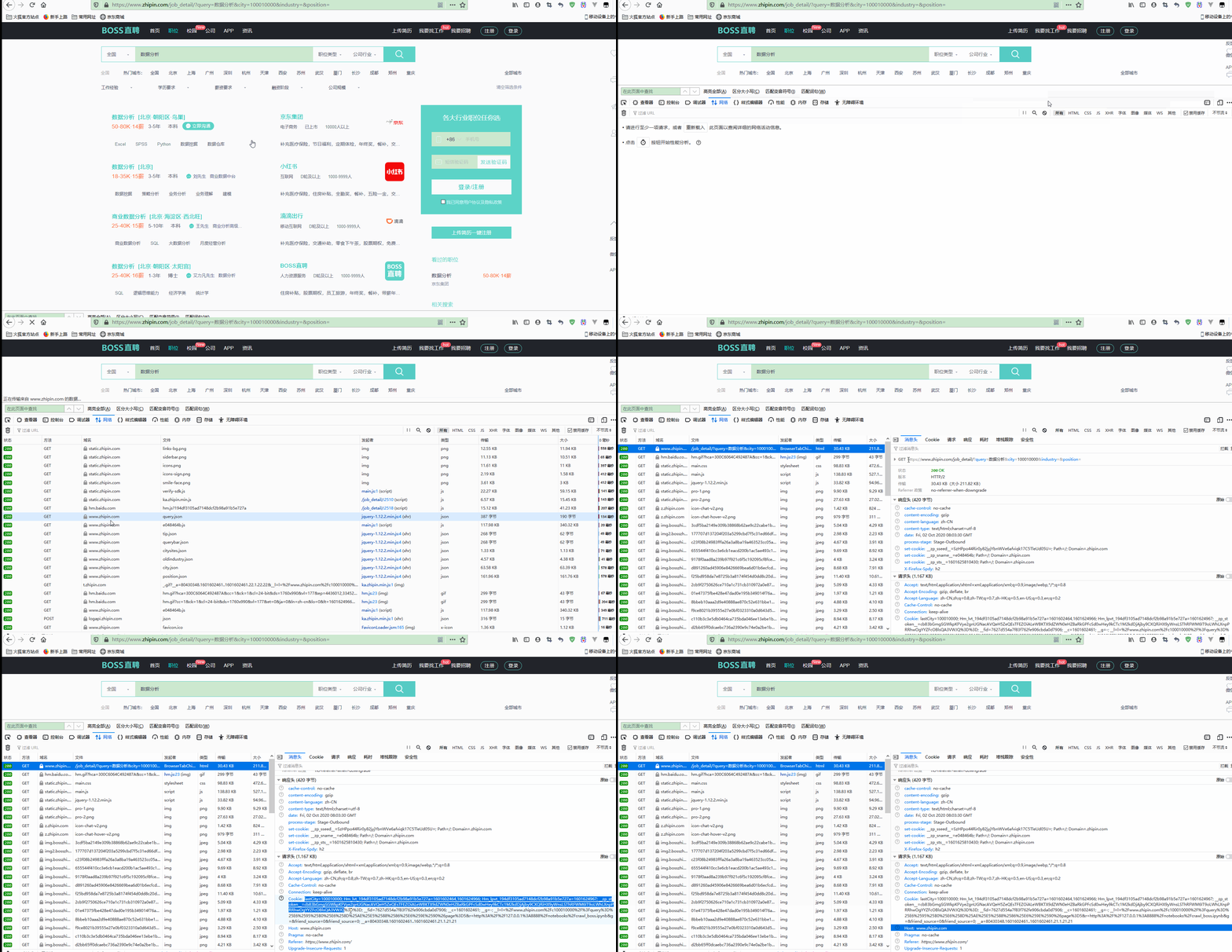
注意,需要获取第一条网络请求(即类似于https://www.zhipin.com/job_detail/?query=数据分析&city=100010000&industry=&position=的请求)对应的Cookie,因为不同的请求对应的Cookie可能会有所不同;
并且,一个Cookie一般只能用一次,因此爬取一次应该重新获取Cookie,最好是注册用户之后再获取Cookie、这样更有效。
同时为了控制访问频率,每执行一次翻页循环后,都通过time.sleep()方法暂停执行。
此时查看获取到的数据,如下:
1all_jobs
输出:
1[['https://www.zhipin.com/job_detail/e1bde0976de53e081nR43dm5EFRU.html',
2  '数据分析师(实习)',
3  '200-300元/天',
4  '',
5  'https://www.zhipin.com/gongsi/2e64a887a110ea9f1nRz.html',
6  '腾讯',
7  '互联网已上市10000人以上',
8  '黄女士HRBP'],
9 ['https://www.zhipin.com/job_detail/062a0a30e8b663103nJy2N65E1E~.html',
10  '【校招】数据分析师',
11  '20-30K·16薪',
12  '',
13  'https://www.zhipin.com/gongsi/fa2f92669c66eee31Hc~.html',
14  'BOSS直聘',
15  '人力资源服务D轮及以上1000-9999人',
16  'BOSS直聘校招校园招聘'],
17 ['https://www.zhipin.com/job_detail/5b132f8291af536d3nN42di7F1Y~.html',
18  '周末双休 数据分析',
19  '7-12K',
20  '',
21  'https://www.zhipin.com/gongsi/aa07960c21a559c61nV_3N24GFs~.html',
22  '北京磐程',
23  '电子商务100-499人',
24  '王女士人事经理'],
25...
26 ['https://www.zhipin.com/job_detail/3bcf1023eea94e363nN_3d65GFM~.html',
27  '数据分析师',
28  '7-8K',
29  '',
30  'https://www.zhipin.com/gongsi/c58313ff6a0317b10HN83d-0.html',
31  '坚果动力',
32  '游戏A轮100-499人',
33  '李强制作人'],
34 ['https://www.zhipin.com/job_detail/0cf98b59a339fd4603R90tS5FlQ~.html',
35  '数据分析师',
36  '8-10K',
37  '',
38  'https://www.zhipin.com/gongsi/90ffbb07580a82d203d73d-5Fw~~.html',
39  '北京立言创新科技...',
40  '学术/科研未融资0-20人',
41  '高晓玲设计师']]
显然,已经获取到了需要的数据。
还可以进一步保存到文件中,如下:
1fout = open('job_data.csv', 'wt')
2for info in all_jobs:
3    fout.write(",".join(info)+"\n")
4fout.close()
执行成功后,列表中会多出一个文件job_data.csv。
4.获取职位详情数据
获取职位详情时,可以利用之前获取到的详情链接,通过requests模拟请求并使用BeautifulSoup解析。
先以一个商品详情链接为例进行探究。
查看网页如下:
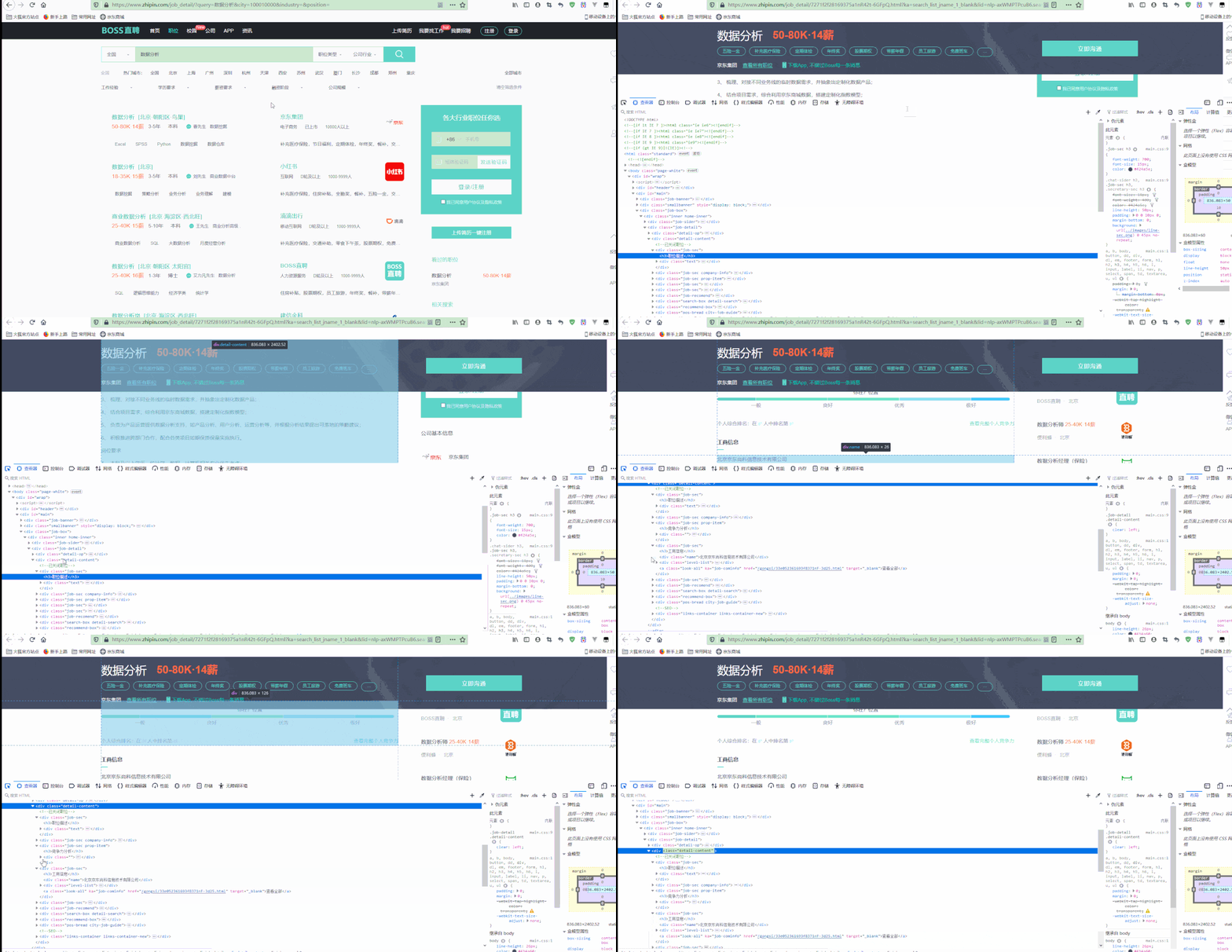
可以看到,职位详情都在class为detail-content的div中。
获取一个职位详情页的详情信息,如下:
1detail_link = all_jobs[0][0]
2header = {
3    'Cookie': 'lastCity=100010000; Hm_lvt_194df3105ad7148dcf2b98a91b5e727a=1601602464,1601624966; Hm_lpvt_194df3105ad7148dcf2b98a91b5e727a=1601627370; __zp_stoken__=cb83bGmgSGWkpKFVye2gnUGNacAVQeH5ZeQEsTFEZOiALeWBKTX9dZWN0eHZBaRkGPFcSd0wHey9kCTc1M2kdDjAjby9CXQRiHX9yWnsLSThRFWM6IT9oLWhLXnpPRRhwOgYYZFcOBlsQA3VWJQ%3D%3D; __fid=7627d554a7f83f762fe906cbda0d7906; __g=-; __c=1601602461; __l=l=%2Fwww.zhipin.com%2Fc100010000%2F%3Fquery%3D%25E6%2595%25B0%25E6%258D%25AE%25E5%2588%2586%25E6%259E%2590%26page%3D5&r=http%3A%2F%2F127.0.0.1%3A8888%2Fnotebooks%2Fcrawl_boss.ipynb&g=&friend_source=0&friend_source=0; __a=80430348.1601602461..1601602461.23.1.23.23',
4    'Host': 'www.zhipin.com',
5    'Referer': 'https://www.zhipin.com/',
6    'User-Agent': 'Mozilla/5.0 (Windows NT 10.0; WOW64) AppleWebKit/537.36 (KHTML, like Gecko) Chrome/80.0.3987.163 Safari/537.36',
7}
8job_detail = requests.request("GET", detail_link,headers=header)
9job_soup = bs(job_detail.text,"lxml")
10detail_text = job_soup.find("div",class_="job-sec")
11
12detail_text.text
输出:
1'\n职位描述\n\n 【腾讯视频号】数据分析-日常实习生【仅接受985/211或海外大学对口专业简历】岗位职责负责微信视频号产品的各项数据分析相关工作岗位要求1. 数据科学/统计/数学专业/信管/计算机等相关专业本科及以上学历;2. 良好的数据结构和算法基础,优秀的编码能力;3.数据驱动,熟练使用sql、excel,能高效利用数据指导并优化方案,Python 或 R(必须),SQL(必须),Tableau(加分,建议)Excel(必须)具有海量数据处理经验;4. 具有良好的沟通能力、坦诚直接、重视团队合作;5.有才艺其他兴趣爱好,互联网公司同样实习经历,自我经营账号的优先6. 一周实习4天以上,能够立即到岗,实习3个月以上7. 必须是有学籍的在校生,优先考虑2021届和2021届以后毕业同学。其他:1.地点:北京线下;2.待遇:高额薪水,差旅交通报销,免费三餐,大空间,团队氛围nice\n \n'
对文本进行进一步的处理:
1detail_text = detail_text.text.replace("\n","").replace(" ","")
2detail_text
输出:
1'职位描述【腾讯视频号】数据分析-日常实习生【仅接受985/211或海外大学对口专业简历】岗位职责负责微信视频号产品的各项数据分析相关工作岗位要求1.数据科学/统计/数学专业/信管/计算机等相关专业本科及以上学历;2.良好的数据结构和算法基础,优秀的编码能力;3.数据驱动,熟练使用sql、excel,能高效利用数据指导并优化方案,Python或R(必须),SQL(必须),Tableau(加分,建议)Excel(必须)具有海量数据处理经验;4.具有良好的沟通能力、坦诚直接、重视团队合作;5.有才艺其他兴趣爱好,互联网公司同样实习经历,自我经营账号的优先6.一周实习4天以上,能够立即到岗,实习3个月以上7.必须是有学籍的在校生,优先考虑2021届和2021届以后毕业同学。其他:1.地点:北京线下;2.待遇:高额薪水,差旅交通报销,免费三餐,大空间,团队氛围nice'
显然,页面美观了很多。
进一步通过循环获取多个详情链接的详情信息:
1job_desc=[]
2header = {
3    'Cookie': 'Cookie: lastCity=100010000; Hm_lvt_194df3105ad7148dcf2b98a91b5e727a=1601602464,1601624966; Hm_lpvt_194df3105ad7148dcf2b98a91b5e727a=1601628313; __zp_stoken__=cb83bGmgSGWkpKF9eQW0WUGNacAVVDB9sNDssTFEZOlIDHXcKU39dZWN0enMzK2IGPFcSd0wHeyAzIGM1LHd1KFU0Y1BHPxZtbHF0XH4cSThRFWM6IUQqX21JXnpPRRhuOgYYZFcOBlsQA3VWJQ%3D%3D; __fid=7627d554a7f83f762fe906cbda0d7906; __g=-; ___gtid=729532789; __c=1601602461; __l=l=%2Fwww.zhipin.com%2Fjob_detail%2F7271f2f28169375a1nR42t-6GFpQ.html%3Fka%3Dsearch_list_jname_1_blank%26lid%3Dnlp-axWMPTPcuB6.search.1&r=http%3A%2F%2F127.0.0.1%3A8888%2Fnotebooks%2Fcrawl_boss.ipynb&g=&friend_source=0&friend_source=0; __a=80430348.1601602461..1601602461.28.1.28.28',
4    'Host': 'www.zhipin.com',
5    'Referer': 'https://www.zhipin.com/',
6    'User-Agent': 'Mozilla/5.0 (Windows NT 10.0; WOW64) AppleWebKit/537.36 (KHTML, like Gecko) Chrome/80.0.3987.163 Safari/537.36',
7}
8for job in all_jobs[:4]:
9    print(".",end="")
10    job_detail = requests.request("GET", job[0], headers=header)
11    job_soup = bs(job_detail.text,"lxml")
12    detail_text = job_soup.find("div",class_="job-sec").text.replace("\n","").replace(" ","")
13    job_desc.append([job[0],detail_text])
14    time.sleep(random.random()*3)
15
16job_desc
输出:
1[['https://www.zhipin.com/job_detail/e1bde0976de53e081nR43dm5EFRU.html',
2  '职位描述【腾讯视频号】数据分析-日常实习生【仅接受985/211或海外大学对口专业简历】岗位职责负责微信视频号产品的各项数据分析相关工作岗位要求1.数据科学/统计/数学专业/信管/计算机等相关专业本科及以上学历;2.良好的数据结构和算法基础,优秀的编码能力;3.数据驱动,熟练使用sql、excel,能高效利用数据指导并优化方案,Python或R(必须),SQL(必须),Tableau(加分,建议)Excel(必须)具有海量数据处理经验;4.具有良好的沟通能力、坦诚直接、重视团队合作;5.有才艺其他兴趣爱好,互联网公司同样实习经历,自我经营账号的优先6.一周实习4天以上,能够立即到岗,实习3个月以上7.必须是有学籍的在校生,优先考虑2021届和2021届以后毕业同学。其他:1.地点:北京线下;2.待遇:高额薪水,差旅交通报销,免费三餐,大空间,团队氛围nice'],
3 ['https://www.zhipin.com/job_detail/062a0a30e8b663103nJy2N65E1E~.html',
4  '职位描述我们的日常工作:1、撰写code(包括SQL/Shell/Python/R等),提取、加工相关的业务数据2、应用Excel/Python以及一些可视化工具进行数据可视化的相关分析3、撰写分析报告,给出相关的分析结论。主要分为几个方面:产品业务优化迭代的效果评估,业务假设的数据验证,业务优化的实施策略的制定,业务可能存在的问题的研究定位,业务发展的战略方向探索4、与产品、市场、运营、销售、设计等各个部门进行业务分析结论的沟通,使得数据分析的发现能够驱动业务的相关优化我们眼中的你:1、这个岗位需要撰写大量的代码,所以希望你不是一个害怕跟代码打交道的人。2、这个岗位需要进行数据分析,会需要掌握很多数学相关的知识,所以希望你不是一个从小不喜欢学习数学的人。3、这个岗位涉及大量的与人沟通的工作,所以希望你不是一个过于腼腆的人。4、这个岗位的目的是通过数据分析以理解用户的行为的内在机理,所以我们希望你是有较好的同理心的人,平时是乐于去理解、并能够照顾别人感受的人。5、为了能够更好的理解业务,我们会需要进行广泛地学习,如经济学、心理学、系统论、信息论等等,所以希望你是一个能够不断挑战自己,对所有的未知都抱有足够的好奇心的人。6、知识可以学习、能力可以锻炼、心智可以培养,最终还是需要你是一个有足够的事业追求的人。'],
5 ['https://www.zhipin.com/job_detail/5b132f8291af536d3nN42di7F1Y~.html',
6  '职位描述技能要求:数据分析,数据仓库1、搜集行业相关信息,为相关需求者提供更准确的数据信息;2、丰富市场分析能力,做出每日分析计划,熟练掌握各种分析技术;3、对市场、行业、公司运营等提供数据分析计划,为战略决策提供支持;4、发表研究成果或分析评论,配合公司的推广及培训等工作。5、协助部门经理完善部门管理制度;'],
7 ['https://www.zhipin.com/job_detail/b8f8a877b20685010XF62Nm1FVs~.html',
8  '职位描述【岗位职责】\u20281、参与原始数据、数据抽取、治理、统计分析到报表展示的全部流程2、深入理解业务,发现业务特征,进行衍生数据价值挖掘\u2028【任职条件】1、计算机等相关专业者优先;2、熟悉SQL,有使用HIVESQL或者SPARKSQL经验者,熟练使用java,python或者scala优先;3、思路开阔且灵活,对数字敏感,善于从数据中发现问题并抓住重点;4,具备良好的数据敏感度、良好的逻辑思维,能及时发现和分析数据中隐含的变化和问题;5、良好的逻辑思维能力,能够从海量数据中发现有价值的规律6、了解spark生态,有大数据处理经验的优先7、实习期至少6个月。']]
进一步保存数据如下:
1fout = open('job_desc.csv', 'wt', encoding='gbk')
2for info in job_desc:
3    fout.write("{},\"{}\"\n".format(info[0],info[1].encode('gbk', 'ignore').decode('gbk', 'ignore')))
4fout.close()
再查看当前目录,多了文件为job_desc.csv。
5.词频统计和词云展示
对于中文详情的描述,需要先进行分词,即将文段分成较短的词语,使用jieba库分词,使用前需要先通过命令conda install -c conda-forge jieba进行安装。
jieba库的简单使用如下:
1import jieba
2
3fenci = jieba.cut("我在北京上大学,我上的是比清华好的北京大学",cut_all=True)
4'/'.join(fenci)
输出:
1'我/在/北京/上/大学///我/上/的/是/比/清华/好/的/北京/北京大学/大学'
进一步使用如下:
1fenci = jieba.cut("我在北京读大学,我读的是比清华好的北京大学",cut_all=False)
2print("/ ".join(fenci))
3
4fenci = jieba.cut("我爱北京天安门,五环比六环少一环,学好python就不是低端劳动力了,呜呜",cut_all=False)
5print("/ ".join(fenci))
6
7jieba.suggest_freq("六环", tune=True)
8fenci = jieba.cut("我爱北京天安门,五环比六环多一环,学好python就不是低端劳动力了,呜呜",cut_all=False)
9print("/ ".join(fenci))
输出:
1我/ 在/ 北京/ 读/ 大学/ ,/ 我读/ 的/ 是/ 比/ 清华/ 好/ 的/ 北京大学
2我/ 爱/ 北京/ 天安门/ ,/ 五环/ 比六环少/ 一环/ ,/ 学好/ python/ 就/ 不是/ 低端/ 劳动力/ 了/ ,/ 呜呜
3我/ 爱/ 北京/ 天安门/ ,/ 五环/ 比/ 六环/ 多一环/ ,/ 学好/ python/ 就/ 不是/ 低端/ 劳动力/ 了/ ,/ 呜呜
对job_desc进行处理如下:
1combined_job_desc = " ".join([j[1] for j in job_desc])
2fenci_job_desc = jieba.cut(combined_job_desc,cut_all=False)
3space = " ".join(fenci_job_desc)
4space
在使用词云之前,需要通过命令conda install -c conda-forge wordcloud安装wordcloud库。
生成词云对象如下:
1# 生成WordCloud对象
2wc = WordCloud(
3#    width=800,
4#    height=600,
5    background_color="white",  # 设置背景颜色
6    max_words=200,  # 词的最大数(默认为200)
7    colormap='viridis',  # string or matplotlib colormap, default="viridis"
8    random_state=10,  # 设置有多少种随机生成状态,即有多少种配色方案
9    font_path='STLITI.TTF' # 设置字体路径
10)
11##comments
12my_wordcloud = wc.generate(space)
注意: 再进行初始化时,如果是中文词,需要指定font_path,即字体路径,并且需要在路径下有对应的字体文件。
如需获取字体文件进行测试,可以直接点击加QQ群 <a target="_blank" href="https://qm.qq.com/cgi-bin/qm/qr?k=rgE7cwG7OGHgfEucpRIQoSlYCTOEkmEr&jump_from=webapi"><img border="0" src="https://pub.idqqimg.com/wpa/images/group.png" alt="Python极客部落" title="Python极客部落">963624318</a> ,在群文件夹商业数据分析从入门到入职中下载即可,Windows系统也可以在C:\Windows\Fonts中选择支持中文的字体复制到项目路径下。
展示词云:
1import matplotlib.pyplot as plt
2%matplotlib inline
3
4plt.imshow(wc, interpolation="bilinear")
5plt.axis("off")
6plt.figure()
显示:

可以看到,根据出现关键字的次数权重而区分词语的大小,形成有区分度的词云统计。
但是还可以进一步优化,去掉一些重复的、没有意义的词语,可以在初始化WordCloud对象时使用stopwords参数忽略掉这些词。
如下:
1wc = WordCloud(
2#    width=800,
3#    height=600,
4    background_color="white",  # 设置背景颜色
5#    max_words=200,  # 词的最大数(默认为200)
6    colormap='viridis',  # string or matplotlib colormap, default="viridis"
7    random_state=10,  # 设置有多少种随机生成状态,即有多少种配色方案
8    font_path='STKAITI.TTF',
9    stopwords=('数据','数据分析','职位描述','工作','工作内容','职责','工作职责','任职要求','职位','描述','产品','经验','熟练',
10              '进行','运营','相关','以上学历','使用','工具','本科','提供','负责','业务','熟悉','分析','优先','能力','策略',
11              '任职','熟悉','开发','项目','公司','需求','支持','岗位职责','行业','问题','研究','逻辑','具有','搭建','能够',
12              '决策','完成','技术','监控','客户','基于','方法','设计','了解','良好','部门','日常','通过','团队','互联网','根据'
13            ,'建立','以及','具备','发现','应用','业务部门','制定','掌握','要求','平台','基础','以上','推动','体系','管理'
14               ,'较强','学习','管理','资格','建议','专业','落地','协助','执行','价值','方案','提出','解决','快速','优秀','参与',
15              '方向','改进','建设','评估','研发','信息','提取','深入','常用','包括','岗位','理解','用户')
16)
17
18my_wordcloud = wc.generate(space)
19
20plt.imshow(wc, interpolation="bilinear")
21plt.axis("off")
22plt.figure()
显示:

可以看到,相对于之前,有更好的说服力。
还可以进一步统计词频,如下:
1from jieba import analyse
2keywords = analyse.extract_tags(combined_job_desc, topK=300, withWeight=True, allowPOS=('n',))
3keywords
输出:
1[('数据', 0.3934027646776582),
2 ('业务', 0.35639458308689875),
3 ('岗位', 0.19911889163164556),
4 ('职位', 0.19509550027518988),
5 ('能力', 0.1561817429800633),
6...
7 ('全部', 0.03118962121886076),
8 ('条件', 0.030984291967974684),
9 ('基础', 0.030147029148860763),
10 ('技术', 0.0298699821428481),
11 ('方面', 0.026981713165253163)]
因为很多技能都是用英文表示的,如MySQL、Python等,因此可以进一步去掉中文,再进行分析。 示意如下:
1import re
2
3s = 'hi新手oh'
4remove_chinese = re.compile(r'[\u4e00-\u9fa5]') #[\u4e00-\u9fa5]是匹配所有中文的正则表达式
5remove_chinese.split(s)
输出:
1['hi', '', 'oh']
可以看到,去掉了字符串中的中文。 对职位要求详情去中文如下:
1all_english = ''.join(remove_chinese.split(combined_job_desc))
2all_english
输出:
1'【】-【985/211】1.////;2.,;3.,sql、excel,,PythonR(),SQL(),Tableau(,)Excel();4.、、;5.,,6.4,,37.,20212021。:1.:;2.:,,,,nice :1、code(SQL/Shell/Python/R),、2、Excel/Python3、,。:,,,,4、、、、、,:1、,。2、,,。3、,。4、,,、。5、,,、、、,,。6、、、,。 :,1、,;2、,,;3、、、,;4、,。5、; 【】\u20281、、、、2、,,\u2028【】1、;2、SQL,HIVESQLSPARKSQL,java,pythonscala;3、,,;4,、,;5、,6、spark,7、6。'
同时,很多英文因为大小写等原因,其实也是表达的同一个意思,如SQL和sql,意思一样,只是大小写不同,可以合并统计:
1combined_job_desc.count("SQL") + combined_job_desc.count("sql")
输出:
16
分析词频如下:
1keywords = jieba.analyse.extract_tags(all_english, topK=300, withWeight=True, allowPOS=())
2keywords
输出:
1[('SQL', 1.5593175003782607),
2 ('Excel', 1.0395450002521738),
3 ('985', 0.5197725001260869),
4 ('211', 0.5197725001260869),
5 ('sql', 0.5197725001260869),
6 ('excel', 0.5197725001260869),
7 ('PythonR', 0.5197725001260869),
8 ('Tableau', 0.5197725001260869),
9 ('6.4', 0.5197725001260869),
10 ('37', 0.5197725001260869),
11 ('20212021', 0.5197725001260869),
12 ('nice', 0.5197725001260869),
13 ('code', 0.5197725001260869),
14 ('Shell', 0.5197725001260869),
15 ('Python', 0.5197725001260869),
16 ('Python3', 0.5197725001260869),
17 ('HIVESQLSPARKSQL', 0.5197725001260869),
18 ('java', 0.5197725001260869),
19 ('pythonscala', 0.5197725001260869),
20 ('spark', 0.5197725001260869)]
此时,词频有很大变化。
再画词云如下:
1eng_job_desc = jieba.cut(all_english,cut_all=False)
2en_space = " ".join(eng_job_desc)
3
4wc_eng = WordCloud(
5#    width=1600,
6#    height=800,
7    background_color="white",  # 设置背景颜色
8    max_words=300,  # 词的最大数(默认为200)
9    colormap='viridis',  # string or matplotlib colormap, default="viridis"
10    random_state=10,  # 设置有多少种随机生成状态,即有多少种配色方案
11#     font_path='./fonts/cn/msyh.ttc'
12)
13##comments
14my_wordcloud = wc_eng.generate(en_space)
15
16plt.imshow(wc_eng, interpolation="bilinear")
17plt.axis("off")
18plt.figure()
显示:

三、王者荣耀列表整合案例
王者荣耀英雄列表网页为https://pvp.qq.com/web201605/herolist.shtml,展示了英雄的基本信息。
前面是从网页中大量数据中找出有用的信息,但是对于有的网站来说还有更简单的方式,如有的网站提供了数据API,即通过JSON形式提供数据到前端再渲染显示,显然,直接从JSON API中获取数据更简单高效。
如王者荣耀英雄列表网页就使用了JSON数据,如下:
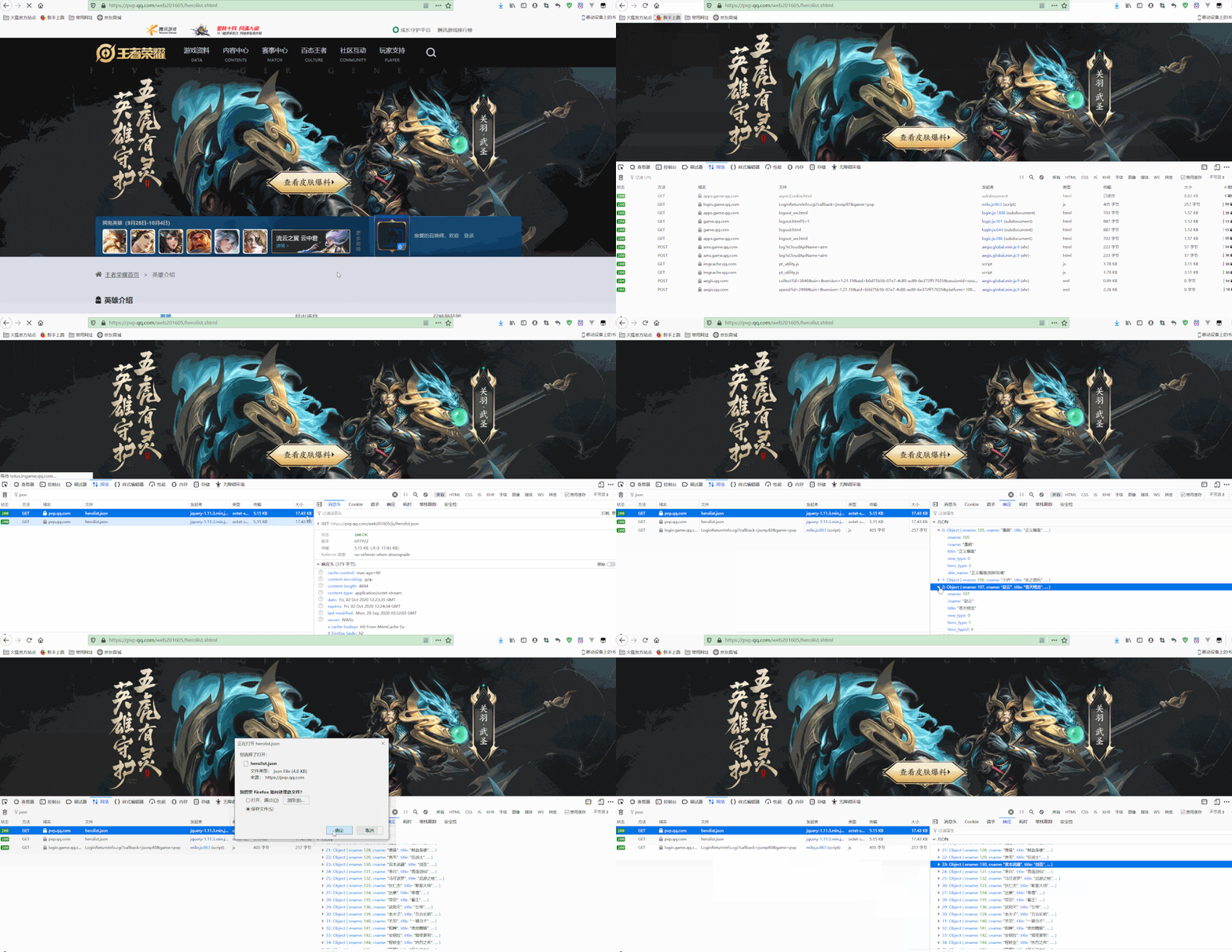
可以看到,其地址为https://pvp.qq.com/web201605/js/herolist.json,包含了所有英雄的基本信息,可以下载该JSON文件,然后就可以直接从文件中获取信息,而不需要再从网页中解析了,并将这些信息与网页中的信息进行整合、形成更加完善的信息,并实现可以通过关键字查询相关英雄的信息。
1.获取JSON数据
先导入所需要的库并获取到JSON数据,如下:
1import json
2import requests
3from bs4 import BeautifulSoup as bs
4
5rongyao_response = requests.request("GET", "https://pvp.qq.com/web201605/js/herolist.json")
6rongyao_response.text
将其保存到本地文件,如下:
1r = requests.get('https://pvp.qq.com/web201605/js/herolist.json', stream=True)
2
3with open("herolist.json", 'wb') as fd:
4    for chunk in r.iter_content(chunk_size=128):
5        fd.write(chunk)
对JSON对象的操作可以有json库实现。 将JSON对象转化为字典如下:
1json_obj = """
2{   "zoo_animal": "Lion",
3    "food": ["Meat", "Veggies", "Honey"],
4    "fur": "Golden",
5    "clothes": null,
6    "diet": [{"zoo_animal": "Gazelle", "food":"grass", "fur": "Brown"}]
7}
8"""
9
10data = json.loads(json_obj)
11data
输出:
1{'zoo_animal': 'Lion',
2 'food': ['Meat', 'Veggies', 'Honey'],
3 'fur': 'Golden',
4 'clothes': None,
5 'diet': [{'zoo_animal': 'Gazelle', 'food': 'grass', 'fur': 'Brown'}]}
也可以将字典转化为JSON对象,如下:
1json.dumps(data)
输出:
1'{"zoo_animal": "Lion", "food": ["Meat", "Veggies", "Honey"], "fur": "Golden", "clothes": null, "diet": [{"zoo_animal": "Gazelle", "food": "grass", "fur": "Brown"}]}'
也可以读取JSON文件转化为字典,如下:
1hero_list = None
2with open('herolist.json','rb') as json_data:
3    hero_list = json.load(json_data)
4    print(hero_list[:5])
输出:
1[{'ename': 105, 'cname': '廉颇', 'title': '正义爆轰', 'new_type': 0, 'hero_type': 3, 'skin_name': '正义爆轰|地狱岩魂'}, {'ename': 106, 'cname': '小乔', 'title': '恋之微风', 'new_type': 0, 'hero_type': 2, 'skin_name': '恋之微风|万圣前夜|天鹅之梦|纯白花嫁|缤纷独角兽'}, {'ename': 107, 'cname': '赵云', 'title': '苍天翔龙', 'new_type': 0, 'hero_type': 1, 'hero_type2': 4, 'skin_name': '苍天翔龙|忍●炎影|未来纪元|皇家上将|嘻哈天王|白执事|引擎之心'}, {'ename': 108, 'cname': '墨子', 'title': '和平守望', 'new_type': 0, 'hero_type': 2, 'hero_type2': 1, 'skin_name': '和平守望|金属风暴|龙骑士|进击墨子号'}, {'ename': 109, 'cname': '妲己', 'title': '魅力之狐', 'pay_type': 11, 'new_type': 0, 'hero_type': 2, 'skin_name': '魅惑之狐|女仆咖啡|魅力维加斯|仙境爱丽丝|少女阿狸|热情桑巴'}]
打印了前5个文件的信息。
获取每个英雄的类型,如下:
1hero_type = ["全部","战士","法师","坦克","刺客","射手","辅助"]
2
3for hero in hero_list:
4    combine_type = []
5    if "hero_type" in hero:
6        combine_type.append(hero_type[hero["hero_type"]])
7    if "new_type" in hero:
8        combine_type.append(hero_type[hero["new_type"]])
9    if "hero_type2" in hero:
10        combine_type.append(hero_type[hero["hero_type2"]])
11    print(hero["cname"] +" "+('|').join(combine_type))
输出:
1廉颇 坦克|全部
2小乔 法师|全部
3赵云 战士|全部|刺客
4墨子 法师|全部|战士
5妲己 法师|全部
6...
7蒙犽 射手|全部
8镜 刺客|全部
9蒙恬 战士|全部
10阿古朵 坦克|全部
11夏洛特 战士|战士
2.获取网页英雄信息
此时再获取https://pvp.qq.com/web201605/herolist.shtml中的信息,包括图片链接等。 尝试如下:
1html_hero_response = requests.request("GET", "https://pvp.qq.com/web201605/herolist.shtml")
2html_hero_response.content.decode('gbk')
从输出中可以看到,输出中的英雄列表并不完整,与网页中实际现实的不一致,这可能是因为一部分信息是通过JavaScript等方式渲染到网页中的,网页源代码中没有,因此也未请求到。
此时可以使用selenium库来模拟访问浏览器,像人为一样操作浏览器,进而获取到英雄完整列表。
在使用前需要安装selenium库,直接通过conda install -c conda-forge selenium命令即可安装;
还需要下载驱动,Chrome和FIrefox驱动均可,以Chrome为例,在下载前需要下载Chrome浏览器的版本,方式如下:
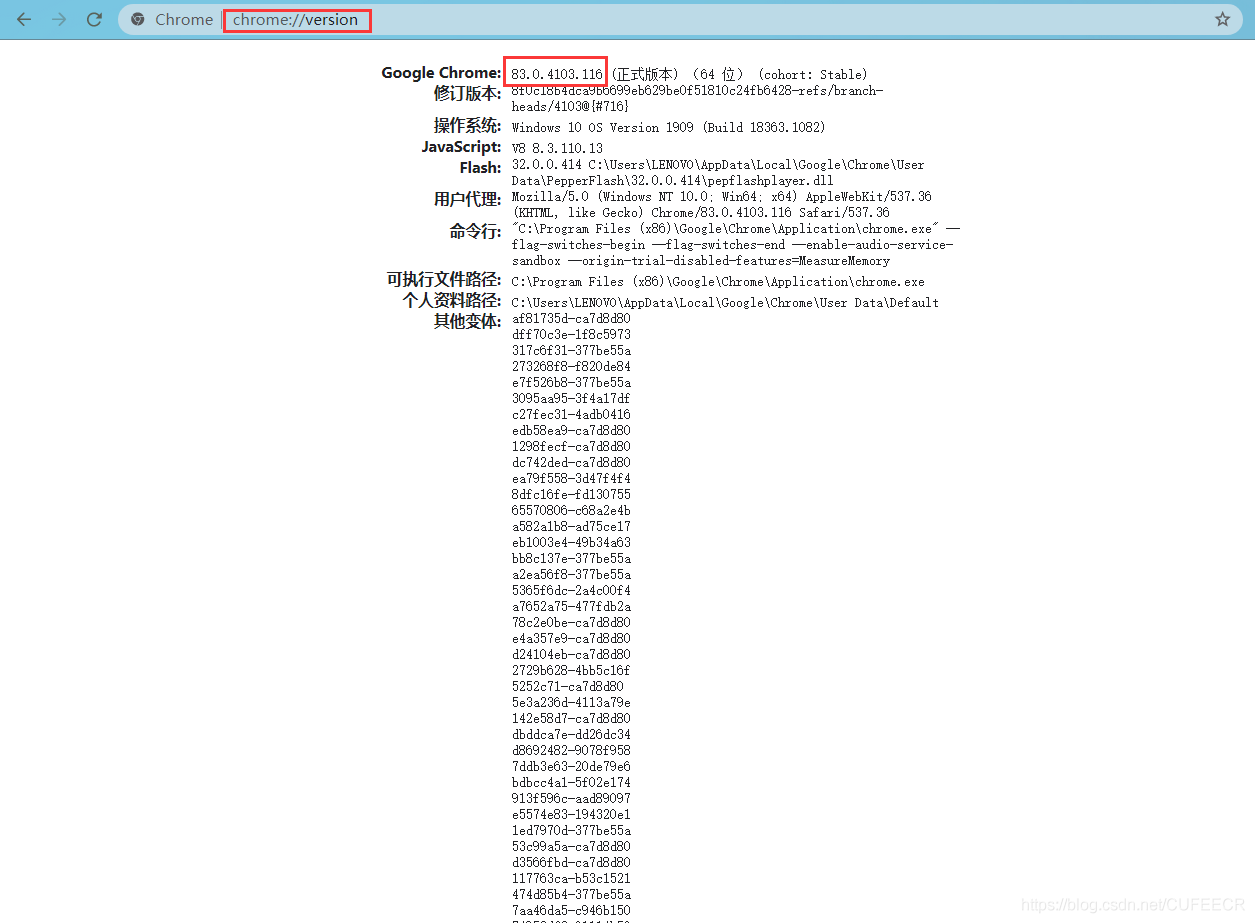
获取到版本后,再到http://chromedriver.storage.googleapis.com/index.html中选择与Chrome版本相近的驱动版本,如83.0.4103.14,点击后在当前版本下选择chromedriver_win32.zip下载,下载解压后获取到chromedriver.exe文件,将其移动到Anaconda安装目录下的Scripts目录下,如E:\Anaconda3\Scripts,如果不是使用的Anaconda,而是普通的Python环境,则移动到Python安装目录下的Scripts目录下,如E:\Python\Python38-32\Scripts目录下,此时就可以使用selenium进行模拟访问了。
由于官网下载很缓慢,因此我已经将Chrome83.0.4103.14版本对应的驱动下载整理好了,可以直接点击加QQ群 <a target="_blank" href="https://qm.qq.com/cgi-bin/qm/qr?k=rgE7cwG7OGHgfEucpRIQoSlYCTOEkmEr&jump_from=webapi"><img border="0" src="https://pub.idqqimg.com/wpa/images/group.png" alt="Python极客部落" title="Python极客部落">963624318</a> 在群文件夹Python相关安装包中下载即可,如需其他版本也可以在群里向群主提出。
模拟访问如下:
1from selenium import webdriver
2
3browser = webdriver.Chrome()
4browser.get("https://pvp.qq.com/web201605/herolist.shtml")
5html = browser.page_source
6browser.quit()
执行,如下:
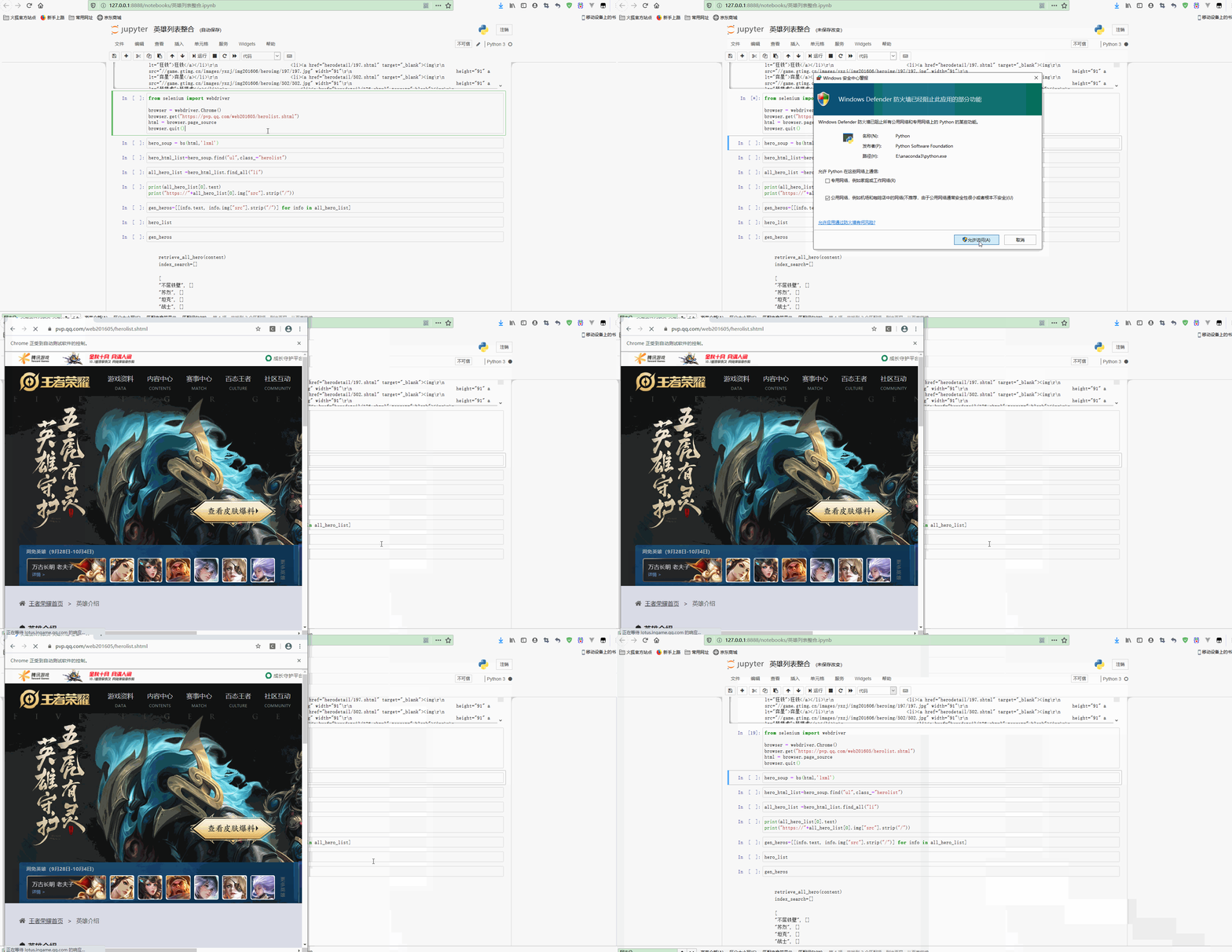
可以看到,有一个Chrome浏览器弹出并访问网站,获取到信息后自动关闭。
现在使用BeautifulSoup进行解析,获取英雄列表:
1hero_soup = bs(html,'lxml')
2hero_html_list=hero_soup.find("ul",class_="herolist")
3all_hero_list =hero_html_list.find_all("li")
4print(all_hero_list[0].text)
5print("https://"+all_hero_list[0].img["src"].strip("/"))
输出:
1夏洛特
2https://game.gtimg.cn/images/yxzj/img201606/heroimg/536/536.jpg
显然,获取到了基本信息。
进一步整合,获取所有英雄名称和图片链接列表:
1gen_heros=[[info.text, "https://"+info.img["src"].strip("/")] for info in all_hero_list]
2gen_heros
输出L:
1[['夏洛特', 'https://game.gtimg.cn/images/yxzj/img201606/heroimg/536/536.jpg'],
2 ['阿古朵', 'https://game.gtimg.cn/images/yxzj/img201606/heroimg/533/533.jpg'],
3 ['蒙恬', 'https://game.gtimg.cn/images/yxzj/img201606/heroimg/527/527.jpg'],
4 ['镜', 'https://game.gtimg.cn/images/yxzj/img201606/heroimg/531/531.jpg'],
5 ['蒙犽', 'https://game.gtimg.cn/images/yxzj/img201606/heroimg/524/524.jpg'],
6...
7 ['妲己', 'https://game.gtimg.cn/images/yxzj/img201606/heroimg/109/109.jpg'],
8 ['墨子', 'https://game.gtimg.cn/images/yxzj/img201606/heroimg/108/108.jpg'],
9 ['赵云', 'https://game.gtimg.cn/images/yxzj/img201606/heroimg/107/107.jpg'],
10 ['小乔', 'https://game.gtimg.cn/images/yxzj/img201606/heroimg/106/106.jpg'],
11 ['廉颇', 'https://game.gtimg.cn/images/yxzj/img201606/heroimg/105/105.jpg']]
3.数据整合
现在需要将hero_list和gen_heros两个列表中的数据进行整合,并且实现根据关键字检索。
先实现给hero_list中的英雄定义英雄类型和根据英雄名在hero_list检索是否存在的函数,如下:
1def build_hero_type(hero):
2    combine_type = []
3    if "hero_type" in hero:
4        combine_type.append(hero_type[hero["hero_type"]])
5    if "new_type" in hero:
6        combine_type.append(hero_type[hero["new_type"]])
7    if "hero_type2" in hero:
8        combine_type.append(hero_type[hero["hero_type2"]])
9    return(('|').join(combine_type))
10
11def search_for_hero_info(name=None):
12    for hero in hero_list:
13        if "cname" in hero:
14            if hero["cname"] == name:
15                return hero
16    return None
这两个函数的简单使用如下:
1su_lie=search_for_hero_info("苏烈")
2print(su_lie)
3
4hero_detail = search_for_hero_info(gen_heros[0][0])
5print(hero_detail)
6
7hero_detail["skin_name"].strip("
'")
8build_hero_type(hero_detail)
输出如下:
1{'ename': 194, 'cname': '苏烈', 'title': '不屈铁壁', 'pay_type': 10, 'new_type': 0, 'hero_type': 3, 'hero_type2': 1, 'skin_name': '不屈铁壁|爱与和平|坚韧之力|玄武志'}
2{'ename': 536, 'cname': '夏洛特', 'title': '玫瑰剑士', 'new_type': 1, 'hero_type': 1, 'skin_name': '玫瑰剑士'}
3
4'战士|战士'
现实现合并两个列表的函数:
1def merge_hero_info(hero_html, hero_json):
2    all_heros = []
3    for hero in hero_html:
4        hero_detail = search_for_hero_info(hero[0])
5        all_heros.append([hero[0],build_hero_type(hero_detail),hero_detail.get("skin_name",'').strip("
'"),hero[1]])
6    return all_heros
使用该函数合并两个列表如下:
1combined_heros=[]
2combined_heros = merge_hero_info(gen_heros, hero_list)
3combined_heros[:5]
输出:
1[['夏洛特',
2  '战士|战士',
3  '玫瑰剑士',
4  'https://game.gtimg.cn/images/yxzj/img201606/heroimg/536/536.jpg'],
5 ['阿古朵',
6  '坦克|全部',
7  '山林之子',
8  'https://game.gtimg.cn/images/yxzj/img201606/heroimg/533/533.jpg'],
9 ['蒙恬',
10  '战士|全部',
11  '秩序统将|秩序猎龙将',
12  'https://game.gtimg.cn/images/yxzj/img201606/heroimg/527/527.jpg'],
13 ['镜',
14  '刺客|全部',
15  '破镜之刃|冰刃幻境',
16  'https://game.gtimg.cn/images/yxzj/img201606/heroimg/531/531.jpg'],
17 ['蒙犽',
18  '射手|全部',
19  '烈炮小子|归虚梦演',
20  'https://game.gtimg.cn/images/yxzj/img201606/heroimg/524/524.jpg']]
4.建立索引
现在进一步实现建立索引实现快速查找,实现根据英雄名、英雄类型、英雄皮肤。 要实现输入一个keyword为苏烈,可以返回下面这样的结果:
1['苏烈',
2  [['苏烈',
3    '坦克|战士|战士',
4    '不屈铁壁|爱与和平',
5    'http://game.gtimg.cn/images/yxzj/img201606/heroimg/194/194.jpg']]],
6 ['坦克',
7  [['苏烈',
8    '坦克|战士|战士',
9    '不屈铁壁|爱与和平',
10    'http://game.gtimg.cn/images/yxzj/img201606/heroimg/194/194.jpg'],
11    ['铠',
12    '战士|全部|坦克',
13    '破灭刃锋|龙域领主',
14    'http://game.gtimg.cn/images/yxzj/img201606/heroimg/193/193.jpg']
15    ]
16    ]
17  ]
18]
先实现根据英雄信息生成关键字列表:
1# 根据英雄信息,生成keyword的列表
2def get_keywords_array(hero):
3    keywords =[]
4    if hero[0]:
5        keywords.append(hero[0])
6    if hero[1]:
7        keywords += hero[1].split('|')
8    if hero[2]:
9        keywords +=hero[2].split('|')
10    return keywords
11
12get_keywords_array(combined_heros[12])
输出:
1['猪八戒', '坦克', '全部', '无忧猛士', '年年有余']
再实现添加索引和创建搜索列表的函数:
1# 添加索引到搜索数据列表中
2def add_to_index(index, keyword, info):
3    for entry in index:
4        if entry[0] == keyword:
5            entry[1].append(info)
6            return
7    #not find
8    index.append([keyword,[info]])
9
10# 创建搜索数据列表
11def build_up_index(index_array):
12    for hero_info in combined_heros:
13        keywords = get_keywords_array(hero_info)
14        for key in keywords:
15            add_to_index(index_array,key,hero_info)
最后实现根据关键字检索信息的函数:
1# 根据关键词在列表中搜索
2def lookup(index,keyword):
3    for entry in index:
4        if entry[0] == keyword:
5            return entry[1]
6    #not find
7    return entry[0]
检索测试如下:
1search_index=[]
2build_up_index(search_index)
3lookup(search_index,"刺客")
输出:
1[['镜',
2  '刺客|全部',
3  '破镜之刃|冰刃幻境',
4  'https://game.gtimg.cn/images/yxzj/img201606/heroimg/531/531.jpg'],
5 ['马超',
6  '战士|全部|刺客',
7  '',
8  'https://game.gtimg.cn/images/yxzj/img201606/heroimg/518/518.jpg'],
9 ['云中君',
10  '刺客|全部|战士',
11  '荷鲁斯之眼',
12  'https://game.gtimg.cn/images/yxzj/img201606/heroimg/506/506.jpg'],
13 ['上官婉儿',
14  '法师|全部|刺客',
15  '惊鸿之笔|修竹墨客',
16  'https://game.gtimg.cn/images/yxzj/img201606/heroimg/513/513.jpg'],
17 ['司马懿',
18  '刺客|全部|法师',
19  '寂灭之心|魇语军师',
20  'https://game.gtimg.cn/images/yxzj/img201606/heroimg/137/137.jpg'],
21 ...
22 ['韩信',
23  '刺客|全部',
24  '国士无双|街头霸王|教廷特使|白龙吟|逐梦之影',
25  'https://game.gtimg.cn/images/yxzj/img201606/heroimg/150/150.jpg'],
26 ['貂蝉',
27  '法师|全部|刺客',
28  '绝世舞姬|异域舞娘|圣诞恋歌|逐梦之音|仲夏夜之梦',
29  'https://game.gtimg.cn/images/yxzj/img201606/heroimg/141/141.jpg'],
30 ['李白',
31  '刺客|全部',
32  '青莲剑仙|范海辛|千年之狐|凤求凰|敏锐之力',
33  'https://game.gtimg.cn/images/yxzj/img201606/heroimg/131/131.jpg'],
34 ['阿轲',
35  '刺客|全部',
36  '信念之刃|爱心护理|暗夜猫娘|致命风华|节奏热浪',
37  'https://game.gtimg.cn/images/yxzj/img201606/heroimg/116/116.jpg'],
38 ['赵云',
39  '战士|全部|刺客',
40  '苍天翔龙|忍●炎影|未来纪元|皇家上将|嘻哈天王|白执事|引擎之心',
41  'https://game.gtimg.cn/images/yxzj/img201606/heroimg/107/107.jpg']]
可以看到,在英雄名、英雄类型和皮肤为刺客的数据都被检索出来。
此时再查看建立索引后的数据结构:
1display(len(search_index),search_index[4])
输出:
1446
2
3['坦克',
4 [['阿古朵',
5   '坦克|全部',
6   '山林之子',
7   'https://game.gtimg.cn/images/yxzj/img201606/heroimg/533/533.jpg'],
8  ['猪八戒',
9   '坦克|全部',
10   '无忧猛士|年年有余',
11   'https://game.gtimg.cn/images/yxzj/img201606/heroimg/511/511.jpg'],
12  ['嫦娥',
13   '法师|全部|坦克',
14   '寒月公主|露花倒影',
15   'https://game.gtimg.cn/images/yxzj/img201606/heroimg/515/515.jpg'],
16  ['孙策',
17   '坦克|全部|战士',
18   '光明之海|海之征途|猫狗日记',
19   'https://game.gtimg.cn/images/yxzj/img201606/heroimg/510/510.jpg'],
20  ['梦奇',
21   '坦克|全部',
22   '入梦之灵|美梦成真|胖达荣荣',
23   'https://game.gtimg.cn/images/yxzj/img201606/heroimg/198/198.jpg'],
24 ...
25  ['白起',
26   '坦克|全部',
27   '最终兵器|白色死神|狰|星夜王子',
28   'https://game.gtimg.cn/images/yxzj/img201606/heroimg/120/120.jpg'],
29  ['钟无艳',
30   '战士|全部|坦克',
31   '野蛮之锤|生化警戒|王者之锤|海滩丽影',
32   'https://game.gtimg.cn/images/yxzj/img201606/heroimg/117/117.jpg'],
33  ['刘禅',
34   '辅助|全部|坦克',
35   '暴走机关|英喵野望|绅士熊喵|天才门将',
36   'https://game.gtimg.cn/images/yxzj/img201606/heroimg/114/114.jpg'],
37  ['庄周',
38   '辅助|全部|坦克',
39   '逍遥幻梦|鲤鱼之梦|蜃楼王|云端筑梦师',
40   'https://game.gtimg.cn/images/yxzj/img201606/heroimg/113/113.jpg'],
41  ['廉颇',
42   '坦克|全部',
43   '正义爆轰|地狱岩魂',
44   'https://game.gtimg.cn/images/yxzj/img201606/heroimg/105/105.jpg']]]
可以看到,为所有关键字都建立了索引,因此长度比英雄数量要多得多。
总结
爬虫是Python最广泛的应用之一,可以从网页中快速获取大量数据。Python为我们提供了大量获取网络数据、提取网络数据和处理网络数据的库,如requests、selenium、BeautifulSoup、re、jieba、wordcloud等,合理灵活使用这些工具可以进行高效的爬虫开发。
本文原文首发来自博客专栏数据分析,由本人转发至https://www.helloworld.net/p/8kovtpmS6wF8X,其他平台均属侵权,可点击https://blog.csdn.net/CUFEECR/article/details/108907733查看原文,也可点击https://blog.csdn.net/CUFEECR浏览更多优质原创内容。