使用腾讯云SCF构建小型服务端并结合uni-app()小程序
我们这里手写了一个nodejs环境下的用户体系 使用了之前写的一个数据库连接插件dmhq-mysql-pool比较垃圾 凑合用 文档地址为 https://github.com/dmhsq/dmhsq-mysql-pool/blob/main/README.md 也使用了md5 npm install js-md5
这里使用邮箱发送验证码 先在本地写好 再上传云函数
配置数据库连接
安装 npm install dmhsq-mysql-pool
新建一个文件db.js
1const database = require("dmhsq-mysql-pool");
2const configs = {
3	host: 'xxxx',
4	port: 'xxxx',
5	user: 'xxxx',
6	password: 'xxxx',
7	database: "xxxx"
8}
9let user = new database(configs).table("user")
10let codes = new database(configs).table("email")
11module.exports = {
12	user,
13	codes
14};
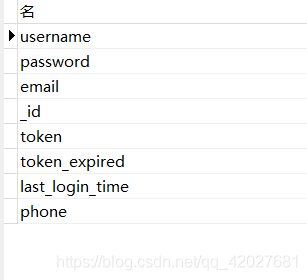
用户数据表名 user
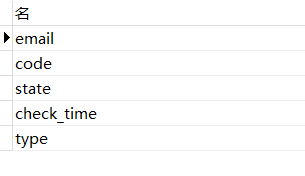
验证码表 名email 由于只用到邮箱验证码
配置邮箱发送模块
这里的user 和 pass 为STMP获取 在各大邮箱的设置可以找到 邮箱转发服务 npm install nodemailer nodemailer文档
1const nodemailer = require('nodemailer')
2
3const transporter = nodemailer.createTransport({
4	service: 'qq', // no need to set host or port etc.
5	auth: {
6		user: 'xxxxx@qq.com',
7		pass: 'xxxxxxx'
8	}
9});
10
11const sendCode = async (email,code,time) => {
12	let message = {
13		from: "验证码<xxxxx@qq.com>",
14		to: email,
15		subject: "验证码服务",
16		html: `<html>
17					<head>
18						<meta charset="utf-8">
19						<title></title>
20					</head>
21					<body>
22						<div>
23							<p style="font-size: 20px;">欢迎您使用,您的验证码为
24							<span style="color: blue;font-size: 30px;font-weight: 800;">${code}</span> ,有效时间为${time/60}分钟, 请勿泄露并及时验证</p>
25
26							<div style="margin-top: 50px;"></div>
27							<p style="color: red;font-size: 25px;">请勿回复</p>
28						</div>
29					</body>
30				</html>`
31	};
32	await transporter.sendMail(message)
33	return {
34			code:0,
35			msg:"邮件已发送,如果没有收到,请检查邮箱"
36		}
37}
38
39module.exports = {sendCode};
40
编写简单用户体系
1const {
2	user,
3	codes
4} = require("./db.js");
5const {
6	sendCode
7} = require("./email.js");
8const md5 = require("js-md5")
9
10//注册模块
11const sign = async (username, password) => {
12	const dfp = password
13	password = md5(password);
14	let isH = await user.where({username}).get();
15	if(isH.data.length>0){
16		return {
17			code: 5742,
18			msg: "用户名已被占用",
19		}
20	}
21	const _id = md5(Math.random().toString(36)).substr(0, 10);
22	let res = await user.add({
23		username,
24		password,
25		_id
26	}).get();
27	let rsp = {
28		code: 5741,
29		msg: "注册失败",
30	}
31	if (res.code == 0) {
32		let userRes = await login(username, dfp);
33		rsp = {
34			code: 0,
35			msg: "注册成功"
36		}
37		if (userRes.code == 0) {
38			rsp.data = userRes.userInfo
39		}
40	}
41	return rsp;
42}
43
44//登陆模块
45const login = async (username, password) => {
46	password = md5(password)
47
48	let res = await user.where({
49		username,
50		password
51	}).get()
52	if (!res.data.length) {
53		return {
54			code: 9001,
55			msg: "用户名或者密码错误"
56		}
57	} else {
58		let token = md5(md5(Math.random().toString(36)) + md5(Math.random().toString(36)));
59		const tokenExpired = parseInt(Date.parse(new Date()).toString().substr(0, 10)) + 72000;
60		const last_login_time = parseInt(Date.parse(new Date()).toString().substr(0, 10));
61		let qres = await user.updata({
62			token_expired: tokenExpired,
63			token,
64			last_login_time
65		}).where({username}).get();
66		if (qres.code == 0) {
67			return {
68				code: 0,
69				userInfo: {
70					token,
71					tokenExpired,
72					username
73				}
74			}
75		} else {
76			return {
77				code: 9002,
78				msg: "登陆失败",
79				data: qres
80			}
81		}
82
83	}
84}
85
86//邮箱发送模块
87const sendEmailCode = async (email, type) => {
88	const randomStr = '00000' + Math.floor(Math.random() * 1000000)
89	const code = randomStr.substring(randomStr.length - 6);
90	let time = 3600
91	const check_time = parseInt(Date.parse(new Date()).toString().substr(0, 10)) + time;
92	let res = {}
93	res = await sendCode(email, code, time)
94	if (res.code == 0) {
95		await codes.add({
96			email,
97			code,
98			check_time,
99			state: 0,
100			type
101		}).get();
102	} else {
103		res = {
104			code: 4046,
105			msg: "发送失败"
106		}
107	}
108	return res
109}
110
111
112//验证码校验
113const checkCode = async (email, code, type) => {
114	let result = await codes.where({
115		email,
116		code,
117		type
118	}).sort({
119		check_time: "DESC"
120	}).get();
121	let data = result.data;
122	let res = {}
123	if (data.length == 0) {
124		res = {
125			code: 4048,
126			msg: "验证码错误"
127		}
128	} else {
129		data = data[0]
130		const check_times = parseInt(Date.parse(new Date()).toString().substr(0, 10));
131		if (data.state == 0 & data.check_time > check_times) {
132			await codes.updata({
133				state: 1
134			}).where({
135				email
136			}).get()
137			res = {
138				code: 0,
139				msg: "验证通过"
140			}
141		} else if (data.check_time < check_times) {
142			res = {
143				code: 4044,
144				msg: "验证码失效"
145			}
146		} else if (data.state == 1) {
147			res = {
148				code: 4045,
149				msg: "验证码已经验证"
150			}
151		} else {
152			res = {
153				code: 4048,
154				msg: "验证码错误"
155			}
156		}
157	}
158	return res;
159}
160
161
162//邮箱绑定
163const bind = async (username, email, code) => {
164	const check_code = await checkCode(email, code, "bind");
165	const check_user = await user.where({
166		username,
167		email
168	}).get();
169	let res = {}
170	if (check_user.data.length > 0) {
171		res = {
172			code: 74174,
173			msg: "用户已经绑定邮箱"
174		}
175	} else {
176		if (check_code.code == 0) {
177			const datas = await user.updata({
178					email
179				}).
180				where({
181					username
182				}).get();
183			if (datas.code == 0) {
184				res = {
185					code: 0,
186					msg: "绑定成功"
187				}
188			}
189		}else{
190			res = check_code
191		}
192	}
193	return res;
194}
195
196//邮箱解除绑定
197const unbind = async (username, email, code) => {
198	const check_code = await checkCode(email, code, "unbind");
199	const check_user = await user.where({
200		username,
201		email
202	}).get();
203	let res = {}
204	if (check_user.data.length == 0) {
205		res = {
206			code: 74175,
207			msg: "用户还未绑定邮箱"
208		}
209	} else {
210		if (check_code.code == 0) {
211			const datas = await user.updata({
212					email: ""
213				}).
214				where({
215					username
216				}).get();
217			if (datas.code == 0) {
218				res = {
219					code: 0,
220					msg: "解除绑定成功"
221				}
222			}
223		}else{
224			res = check_code
225		}
226	}
227	return res;
228}
229
230//邮箱校检登录
231const checkCodeLogin = async (email, code) => {
232	const ress = await checkCode(email, code, "login")
233	const isH = await user.where({email}).get();
234	if(isH.data.length==0){
235		return {
236			code:9003,
237			msg:"非法邮箱(邮箱未绑定用户)"
238		}
239	}
240	if (ress.code == 0) {
241		let token = md5(md5(Math.random().toString(36)) + md5(Math.random().toString(36)));
242		const tokenExpired = parseInt(Date.parse(new Date()).toString().substr(0, 10)) + 72000;
243		const last_login_time = parseInt(Date.parse(new Date()).toString().substr(0, 10));
244		let qres = await user.updata({
245			token_expired: tokenExpired,
246			token,
247			last_login_time
248		}).where({
249			email
250		}).get();
251		if (qres.code == 0) {
252			res = {
253				code: 0,
254				userInfo: {
255					token,
256					tokenExpired,
257					email
258				}
259			}
260		} else {
261			res = {
262				code: 9002,
263				msg: "登陆失败",
264				data: qres
265			}
266		}
267	}
268	return res;
269}
270
271//token校检
272const checkToken = async (token) => {
273	const reqs = await user.where({
274		token
275	}).get();
276	let res = {}
277	if (reqs.data.length > 0) {
278		const userInfos = reqs.data[0]
279		const check_time = userInfos.token_expired;
280		const now_time = parseInt(Date.parse(new Date()).toString().substr(0, 10));
281		if (check_time > now_time) {
282			res = {
283				code: 0,
284				userInfo: {
285					username: userInfos.username
286				}
287			}
288		} else {
289			res = {
290				code: 7412,
291				msg: "token过期"
292			}
293		}
294	} else {
295		res = {
296			code: 7417,
297			msg: "token非法"
298		}
299	}
300	return res;
301}
302
303module.exports = {
304	sign,
305	login,
306	sendEmailCode,
307	checkCode,
308	bind,
309	unbind,
310	checkCodeLogin,
311	checkToken
312}
313
编写主程序
1const userCenter = require("./user.js")
2
3index.main_handler = async (event, context) => {
4
5	let noCheckAction = ['sign', 'checkToken', 'login', 'checkCode', 'loginByEmail', 'emailCode']
6	let params = event.queryString;
7	let res = {}
8	const {
9		action
10	} = params
11	if (noCheckAction.indexOf(action) === -1) {
12		if (!params.token) {
13			res = {
14				code: 401,
15				msg: '缺少token'
16			}
17			return res;
18		}else{
19			let datas = await userCenter.checkToken(params.token)
20			if (datas.code != 0) {
21				res = datas
22				return res;
23			}else{
24				params.username = datas.userInfo.username;
25			}
26		}
27
28	}
29	switch (action) {
30		case "sign": {
31			const {
32				username,
33				password
34			} = params;
35			res = await userCenter.sign(username, password);
36			break;
37		}
38		case "login": {
39			const {
40				username,
41				password
42			} = params;
43			res = await userCenter.login(username, password)
44			break;
45		}
46		case "emailCode": {
47			const {
48				email,
49				type
50			} = params;
51			res = await userCenter.sendEmailCode(email, type)
52			break;
53		}
54		case "checkCode": {
55			const {
56				email,
57				code,
58				type
59			} = params;
60			res = await userCenter.checkCode(email, code, type)
61			break;
62		}
63		case "bind": {
64			const {
65				username,
66				email,
67				code
68			} = params;
69			res = await userCenter.bind(username, email, code)
70			break;
71		}
72		case "unbind": {
73			const {
74				username,
75				email,
76				code
77			} = params;
78			res = await userCenter.unbind(username, email, code)
79			break;
80		}
81		case "loginByEmail": {
82			const {
83				email,
84				code
85			} = params;
86			res = await userCenter.checkCodeLogin(email, code)
87			break;
88		}
89		case "checkToken": {
90			const {
91				token
92			} = params;
93			res = await userCenter.checkToken(token)
94			break;
95		}
96		default: {
97			res = {
98				code: 403,
99				msg: "非法访问"
100			};
101			break;
102		}
103	}
104
105
106	return res;
107}
108
创建云函数
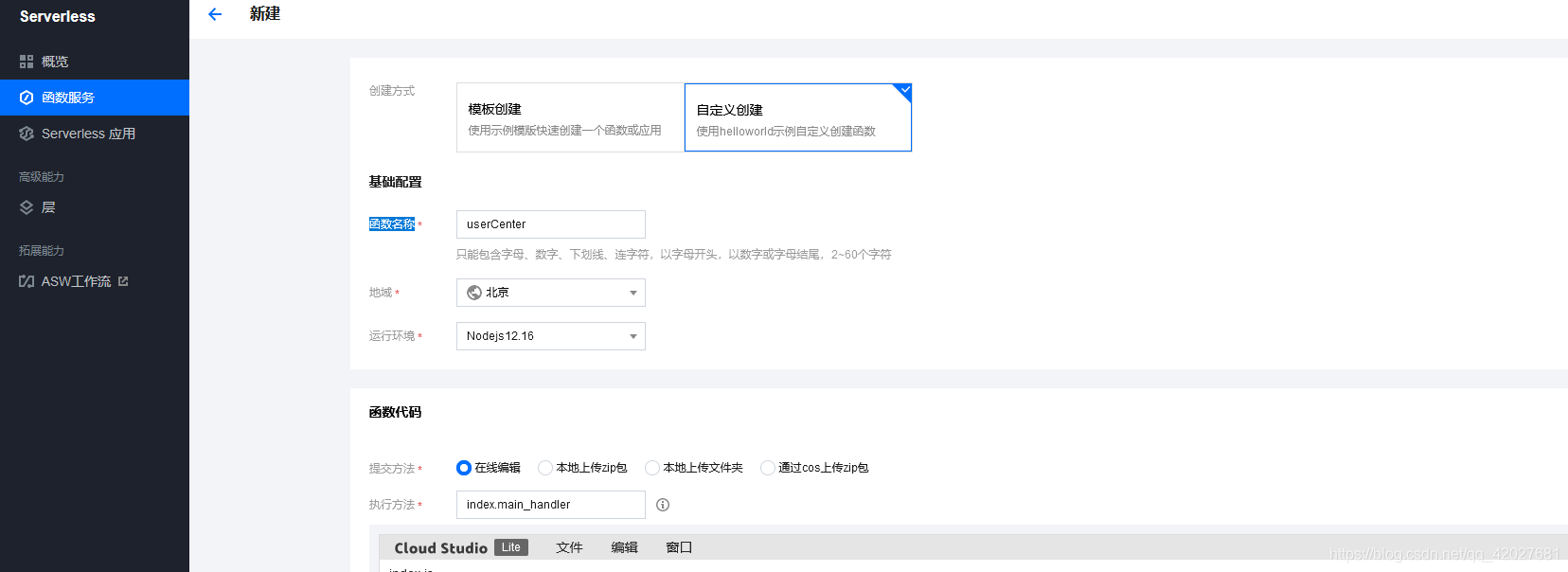
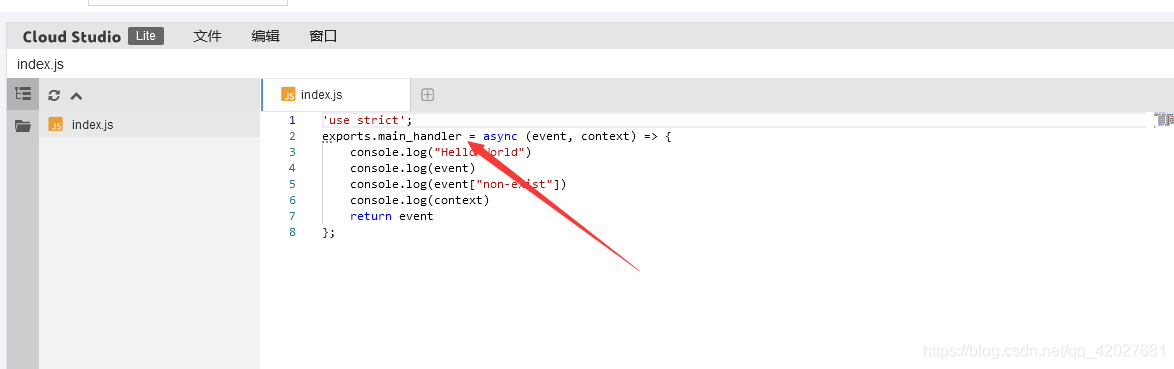
注意这里的执行方法
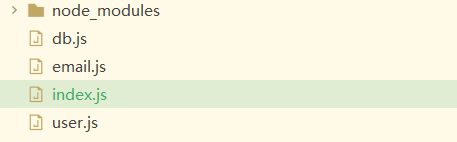
 选择我们的项目文件夹
 上传文件夹
上传文件夹
部署
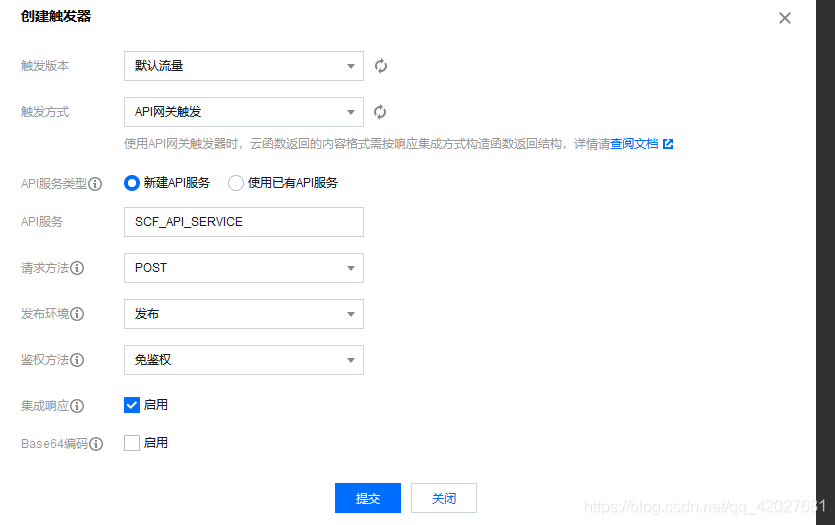
创建触发器
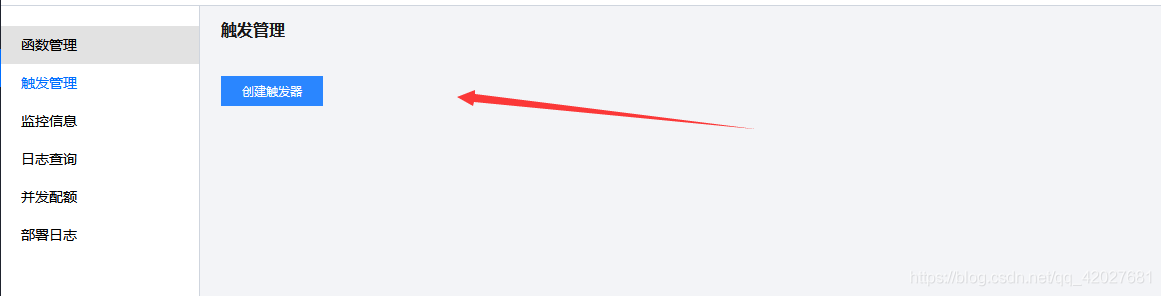
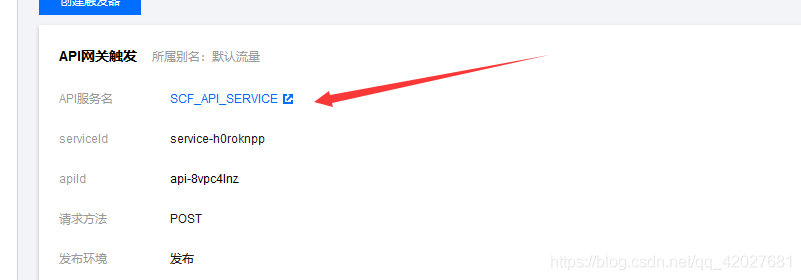
点击api名称管理
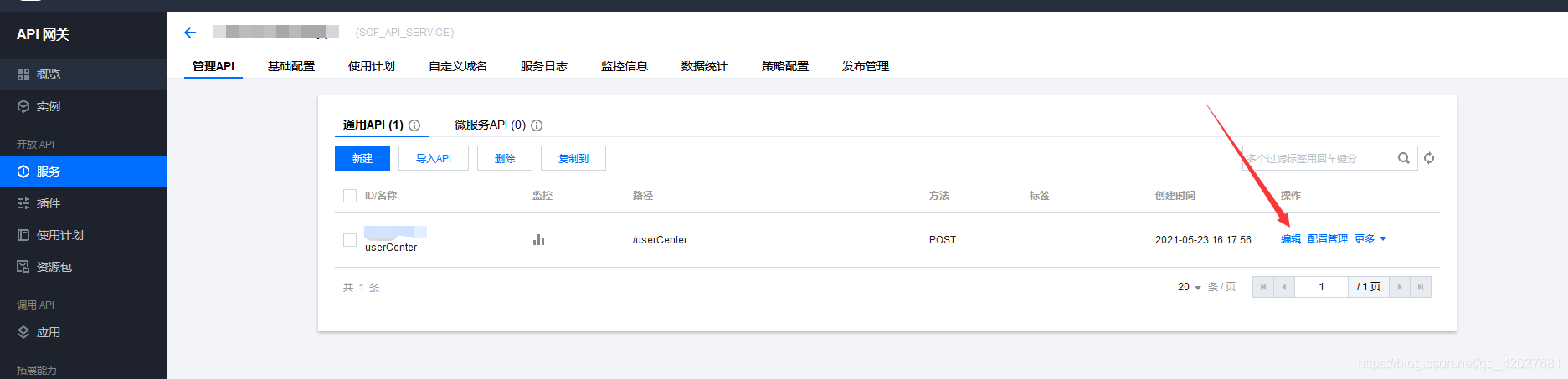
编辑触发器
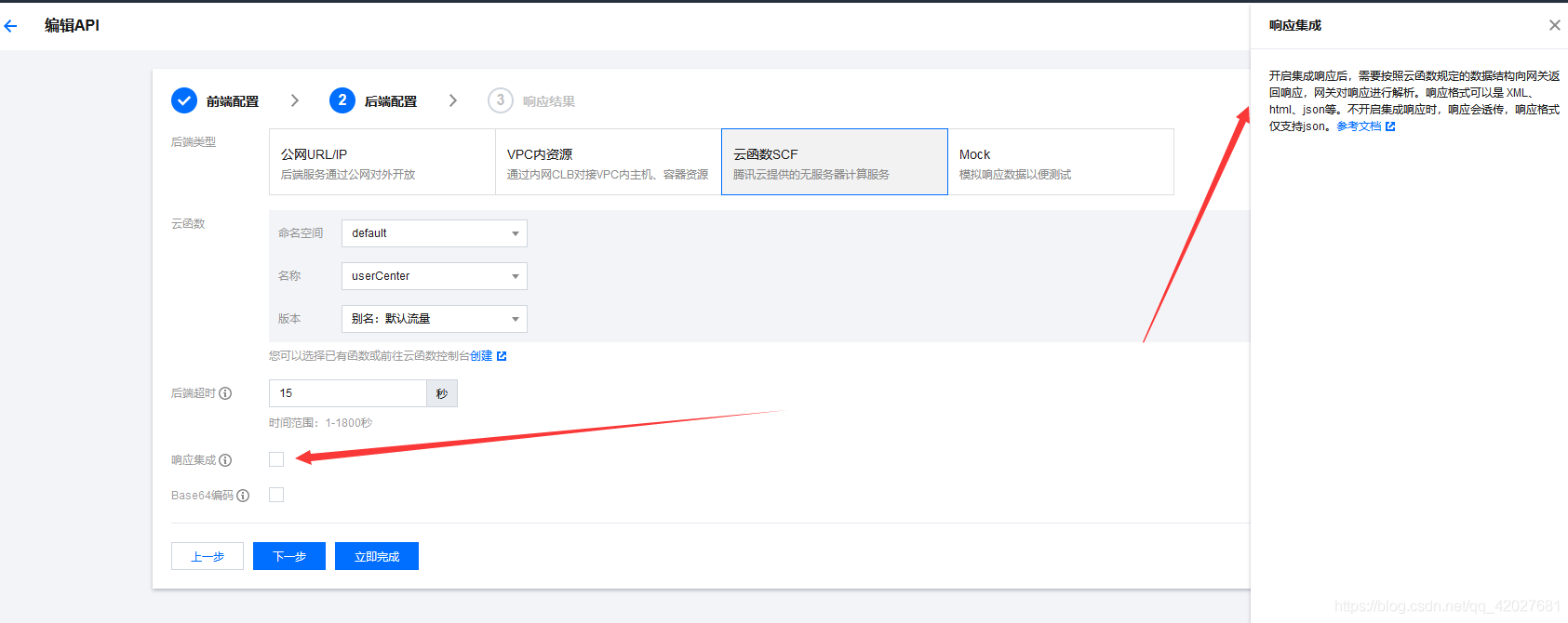
关闭集成响应
测试
触发器 拿到请求地址
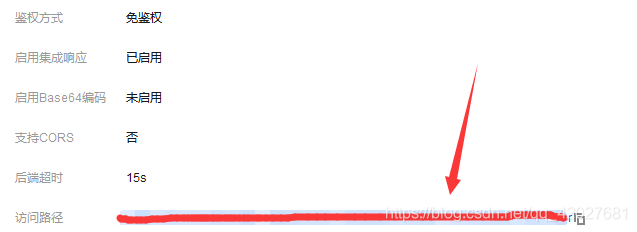 测试注册
测试注册

做个小程序
这里使用 uni-app做微信小程序
由于我们只用了 用户模块 那么我们就整合用户模块
页面很简单 登录 注册 邮箱登录 邮箱绑定 邮箱解绑
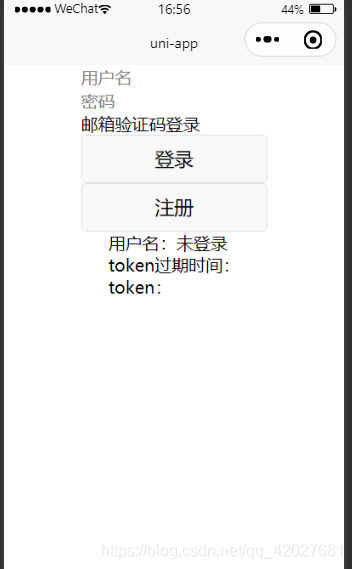
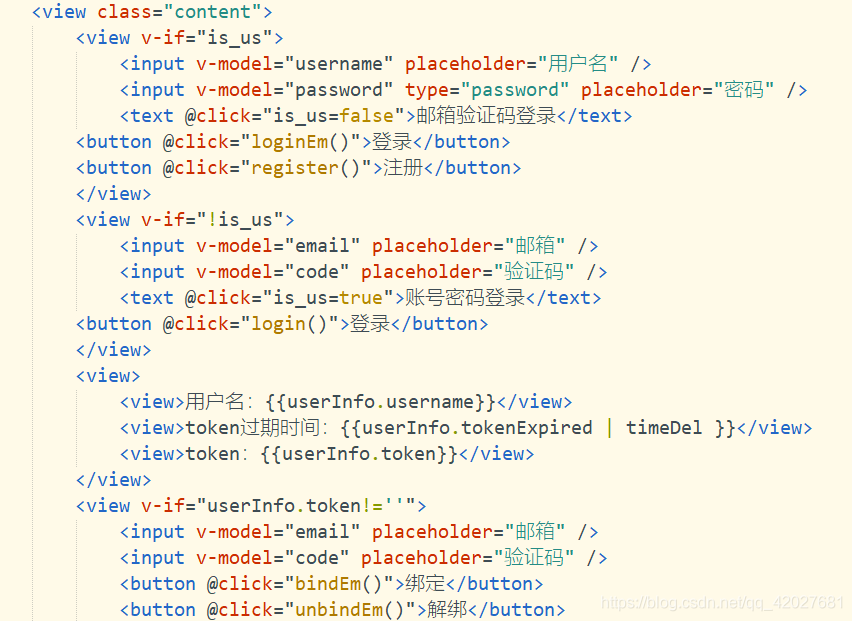 页面代码
页面代码
1<template>
2	<view class="content">
3		<view v-if="is_us">
4			<input v-model="username" placeholder="用户名" />
5			<input v-model="password" type="password" placeholder="密码" />
6			<text @click="is_us=false">邮箱验证码登录</text>
7		<button @click="login()">登录</button>
8		<button @click="register()">注册</button>
9		</view>
10		<view v-if="!is_us">
11			<input v-model="email" placeholder="邮箱" />
12			<input v-model="code" placeholder="验证码" />
13			<text @click="is_us=true">账号密码登录</text>
14			<button @click="sendEmail('login')">发送验证码</button>
15		<button @click="loginEm()">登录</button>
16		</view>
17		<view>
18			<view>用户名:{{userInfo.username}}</view>
19			<view>token过期时间:{{userInfo.tokenExpired | timeDel }}</view>
20			<view>token:{{userInfo.token}}</view>
21		</view>
22		<view v-if="userInfo.token!=''">
23			<input v-model="email" placeholder="邮箱" />
24			<input v-model="code" placeholder="验证码" />
25			<button @click="sendEmail('bind')">发送绑定验证码</button>
26			<button @click="sendEmail('unbind')">发送解绑验证码</button>
27			<button @click="bindEm()">绑定</button>
28			<button @click="unbindEm()">解绑</button>
29		</view>
30		<view>
31			<view>{{userInfoG}}</view>
32			<button @click="getUserInfo()">获取信息</button>
33		</view>
34	</view>
35</template>
36
37<script>
38	export default {
39		data() {
40			return {
41				title: 'Hello',
42				is_us: true,
43				username:"",
44				password:"",
45				email:"",
46				code:"",
47				userInfo: {
48					username: "未登录",
49					token:"",
50					tokenExpired:""
51				},
52				userInfoG:{}
53			}
54		},
55		filters:{
56			timeDel(val) {
57				if(!val){
58					return ""
59				}
60				var date = new Date(val*1000); //时间戳为10位需*1000,时间戳为13位的话不需乘1000
61				var Y = date.getFullYear() + '-';
62				var M = (date.getMonth() + 1 < 10 ? '0' + (date.getMonth() + 1) : date.getMonth() + 1) + '-';
63				var D = (date.getDate() < 10 ? '0' + date.getDate() : date.getDate()) + ' ';
64				var h = (date.getHours() < 10 ? '0' + date.getHours() : date.getHours()) + ':';
65				var m = (date.getMinutes() < 10 ? '0' + date.getMinutes() : date.getMinutes()) + ':';
66				var s = date.getSeconds() < 10 ? '0' + date.getSeconds() : date.getSeconds();
67				return Y + M + D + h + m + s;
68			}
69		},
70		onLoad() {
71
72		},
73		methods: {
74			req(action,other){
75				return new Promise(resolve=>{
76					uni.request({
77						method:'POST',
78						url:`xxx/userCenter?action=${action}&${other}`,
79						success:res=>{
80							resolve(res.data)
81						}
82					})
83				})
84			},
85			getUserInfo(){
86				let tokens = uni.getStorageSync('token')
87				this.req('checkToken',`token=${tokens}`).then(res=>{
88					uni.showToast({
89						title:res.msg,
90						icon:'none'
91					})
92					this.userInfoG = JSON.stringify(res)
93				})
94			},
95			register(){
96				this.req('sign',`username=${this.username}&password=${this.password}`).then(res=>{
97					uni.showToast({
98						title:res.msg,
99						icon:'none'
100					})
101					if(res.code==0){
102						let userInfo = res.data
103						uni.setStorageSync("token",userInfo.token)
104						uni.setStorageSync("tokenExpired",userInfo.tokenExpired)
105						this.userInfo = userInfo
106					}
107				})
108			},
109			login(){
110				this.req('login',`username=${this.username}&password=${this.password}`).then(res=>{
111					console.log(res)
112					uni.showToast({
113						title:res.msg,
114						icon:'none'
115					})
116					if(res.code==0){
117						let userInfo = res.userInfo
118						uni.setStorageSync("token",userInfo.token)
119						uni.setStorageSync("tokenExpired",userInfo.tokenExpired)
120						this.userInfo = userInfo
121					}
122				})
123			},
124			sendEmail(type){
125				this.req('emailCode',`email=${this.email}&type=${type}`).then(res=>{
126					uni.showToast({
127						title:res.msg,
128						icon:'none'
129					})
130				})
131			},
132			loginEm(){
133				this.req('loginByEmail',`email=${this.email}&code=${this.code}`).then(res=>{
134					console.log(res)
135					uni.showToast({
136						title:res.msg,
137						icon:'none'
138					})
139					if(res.code==0){
140						let userInfo = res.userInfo
141						uni.setStorageSync("token",userInfo.token)
142						uni.setStorageSync("tokenExpired",userInfo.tokenExpired)
143						this.userInfo = userInfo
144					}
145				})
146			},
147			bindEm(){
148				let tokens = uni.getStorageSync('token')
149				this.req('bind',`username=${this.username}&email=${this.email}&code=${this.code}&token=${tokens}`).then(res=>{
150					console.log(res)
151					uni.showToast({
152						title:res.msg,
153						icon:'none'
154					})
155				})
156			},
157			unbindEm(){
158				let tokens = uni.getStorageSync('token')
159				this.req('unbind',`username=${this.username}&email=${this.email}&code=${this.code}&token=${tokens}`).then(res=>{
160					console.log(res)
161					uni.showToast({
162						title:res.msg,
163						icon:'none'
164					})
165				})
166			}
167		}
168	}
169</script>
170
171<style>
172	.content {
173		display: flex;
174		flex-direction: column;
175		align-items: center;
176		justify-content: center;
177	}
178
179	.logo {
180		height: 200rpx;
181		width: 200rpx;
182		margin-top: 200rpx;
183		margin-left: auto;
184		margin-right: auto;
185		margin-bottom: 50rpx;
186	}
187
188	.text-area {
189		display: flex;
190		justify-content: center;
191	}
192
193	.title {
194		font-size: 36rpx;
195		color: #8f8f94;
196	}
197</style>
198
测试
注册
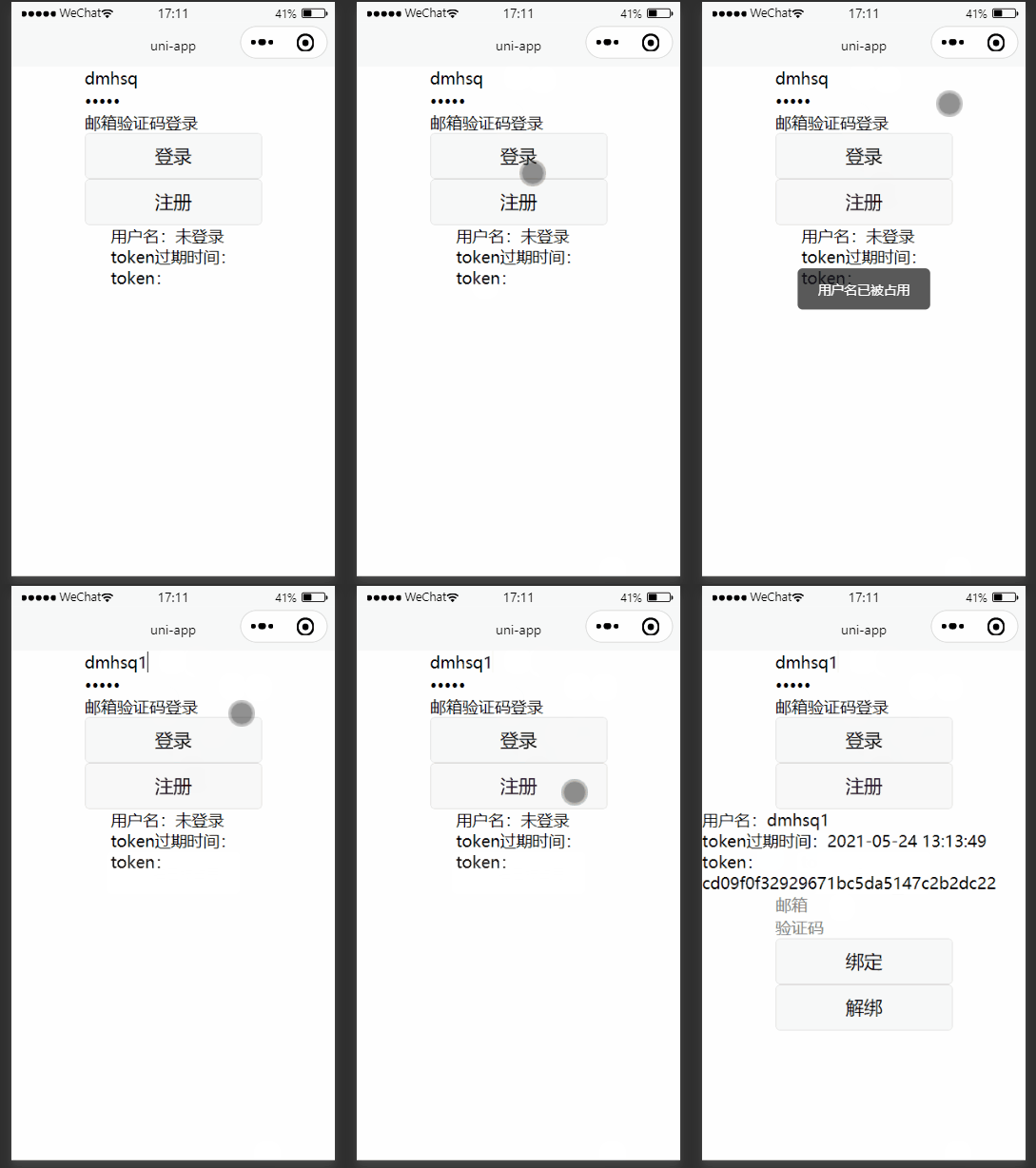
登录
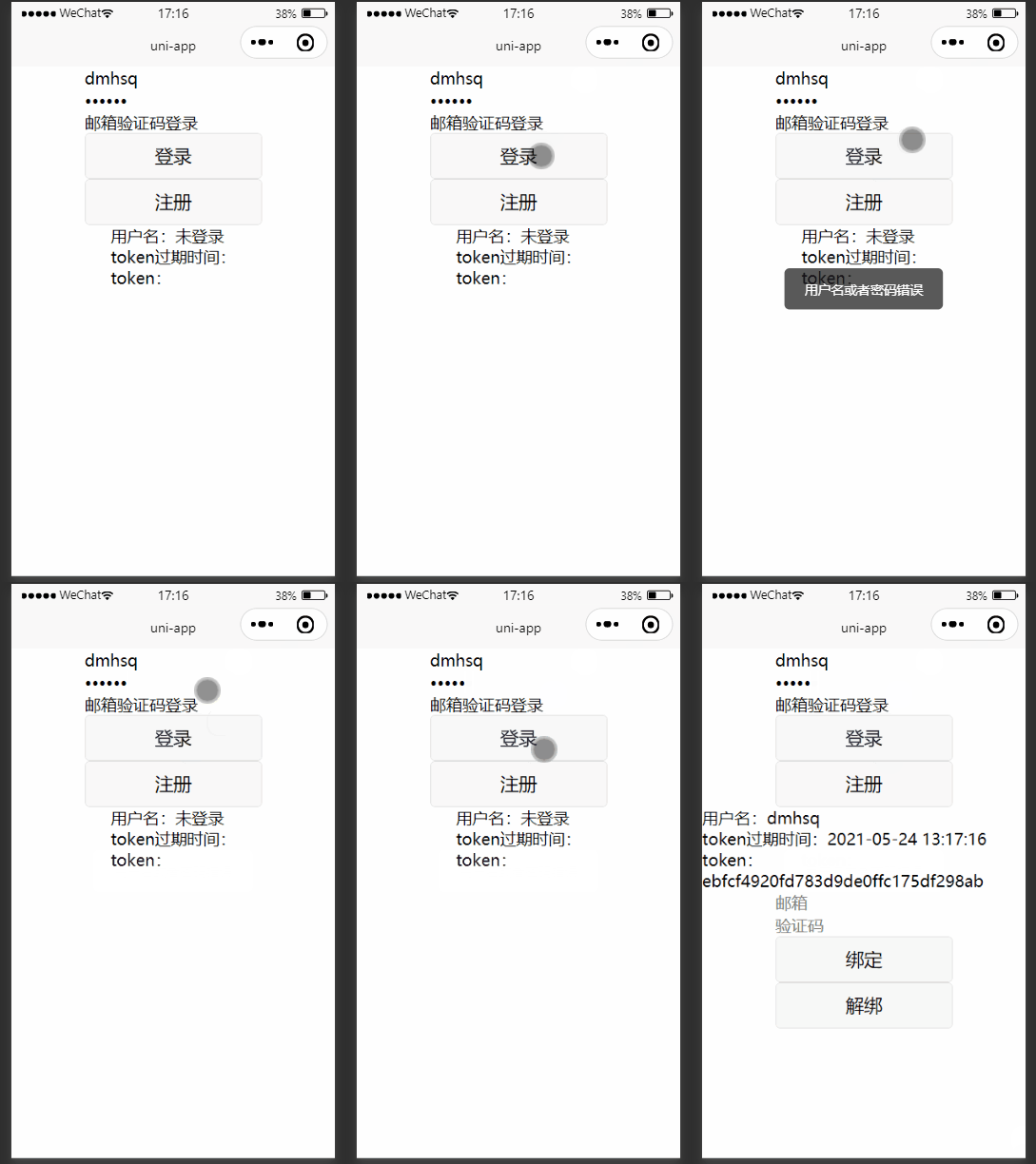
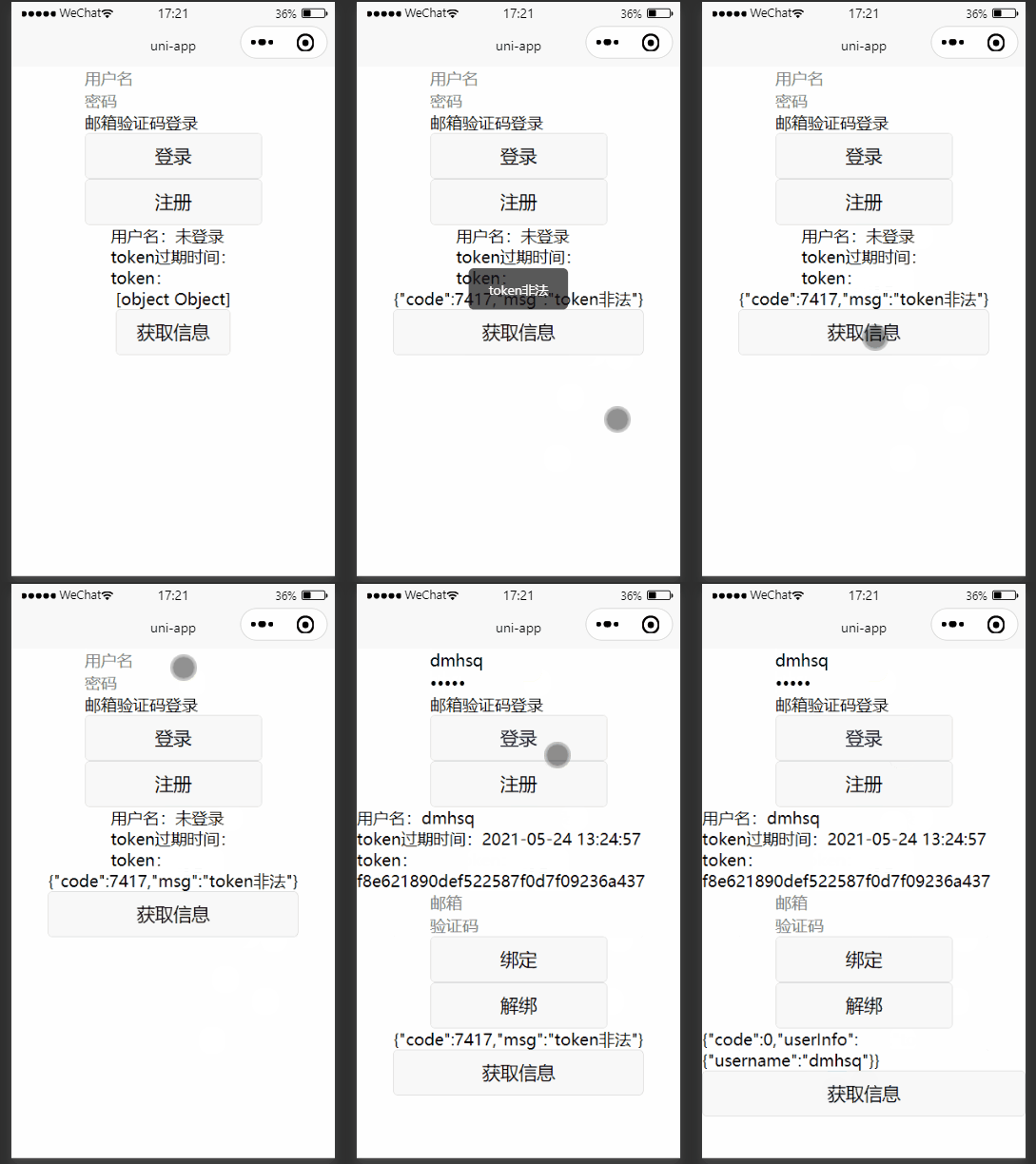
获取个人信息
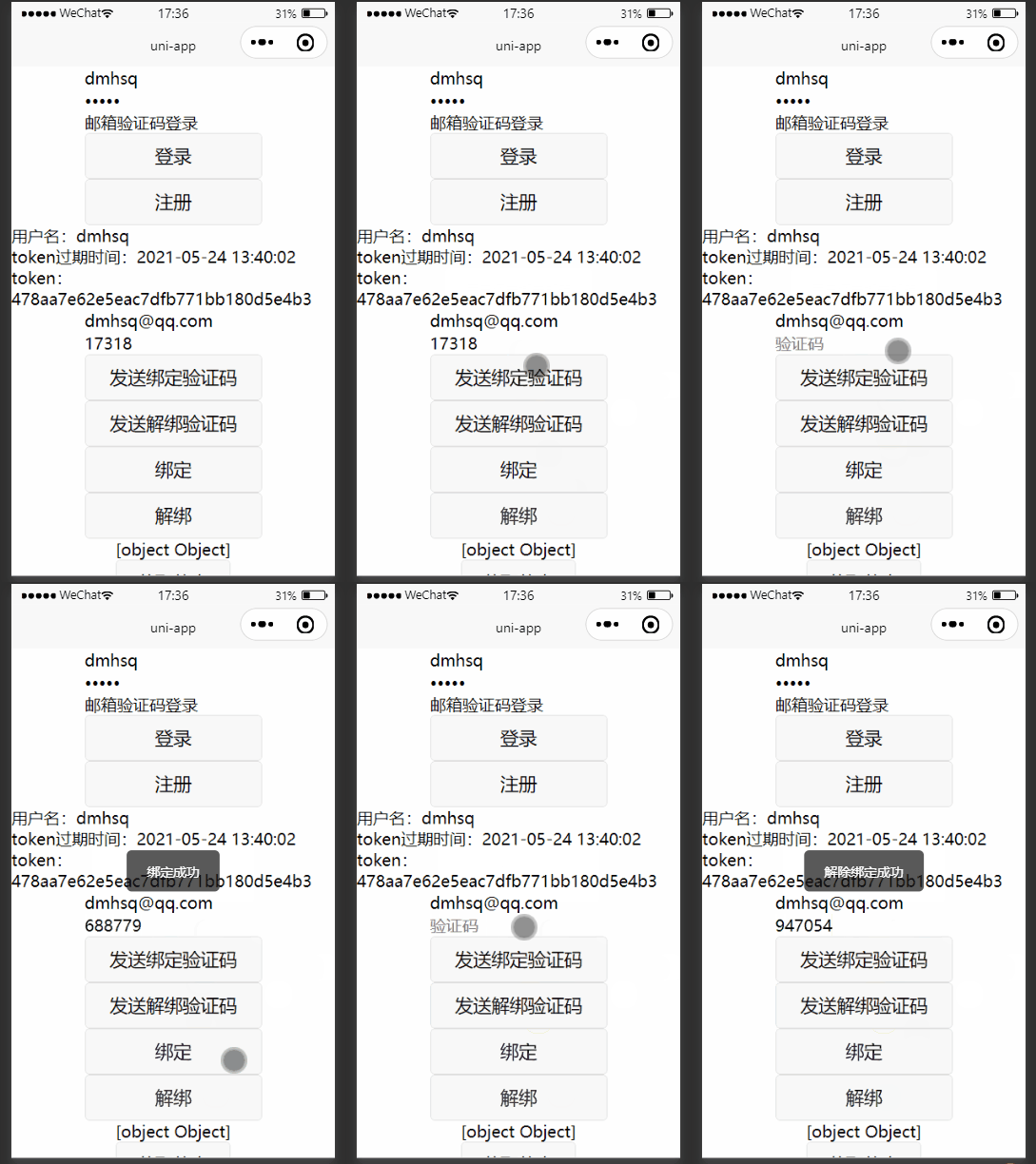
绑定/解除绑定邮箱
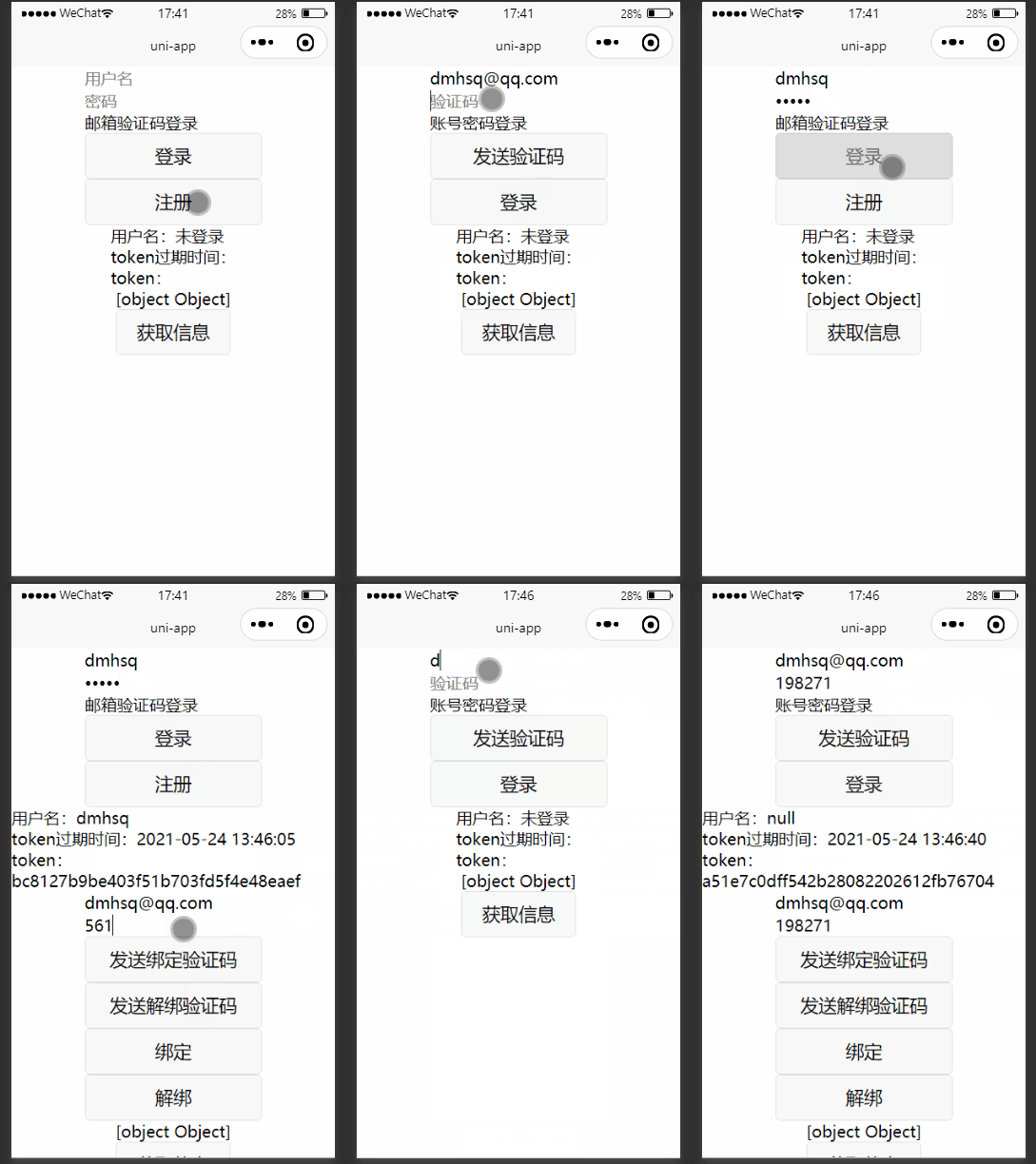
邮箱验证码登录
没有绑定则邮箱非法
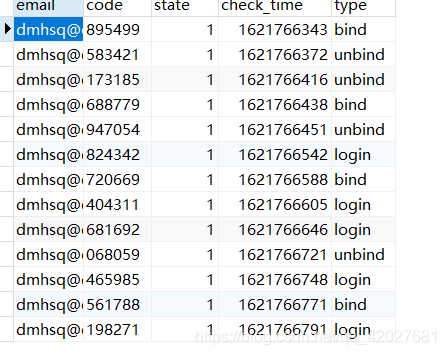
数据库状态