
前言
最近一周没有发文章了,我在这里向大家说一声抱歉。今天,我们来从零开始开发一款聊天室。好,我们现在就开始。
了解WebSocket
开发聊天室,我们需要用到WebSocket这个网络通信协议,那么为什么会用到它呢?
我们首先来引用阮一峰大佬的一篇文章一段话:
初次接触 WebSocket 的人,都会问同样的问题:我们已经有了 HTTP 协议,为什么还需要另一个协议?它能带来什么好处?
答案很简单,因为 HTTP 协议有一个缺陷:通信只能由客户端发起。
举例来说,我们想了解今天的天气,只能是客户端向服务器发出请求,服务器返回查询结果。HTTP 协议做不到服务器主动向客户端推送信息。
这种单向请求的特点,注定了如果服务器有连续的状态变化,客户端要获知就非常麻烦。我们只能使用"轮询":每隔一段时候,就发出一个询问,了解服务器有没有新的信息。最典型的场景就是聊天室。
轮询的效率低,非常浪费资源(因为必须不停连接,或者 HTTP 连接始终打开)。因此,工程师们一直在思考,有没有更好的方法。WebSocket 就是这样发明的。
我们来借用MDN网站上的官方介绍总结一下:
WebSockets 是一种先进的技术。它可以在用户的浏览器和服务器之间打开交互式通信会话。使用此API,您可以向服务器发送消息并接收事件驱动的响应,而无需通过轮询服务器的方式以获得响应。
WebSocket 协议在2008年诞生,2011年成为国际标准。
WebSocket特点
-
服务器可以主动向客户端推送信息,客户端也可以主动向服务器发送信息,是真正的双向平等对话,属于服务器推送技术的一种。
-
建立在 TCP 协议之上,服务器端的实现比较容易。
-
与 HTTP 协议有着良好的兼容性。默认端口也是80和443,并且握手阶段采用 HTTP 协议,因此握手时不容易屏蔽,能通过各种 HTTP 代理服务器。
-
数据格式比较轻量,性能开销小,通信高效。
-
可以发送文本,也可以发送二进制数据。
-
没有同源限制,客户端可以与任意服务器通信。
-
协议标识符是
ws(如果加密,则为wss),即ws对应http,wss对应https。服务器网址就是 URL。即ws://www.xx.com或wss://www.xx.com
WebSocket客户端常用API
WebSocket 对象提供了用于创建和管理 WebSocket连接,以及可以通过该连接发送和接收数据的 API。
使用WebSocket()构造函数来构造一个WebSocket 。
属性
-
WebSocket.onopen用于指定连接成功后的回调函数。
-
WebSocket.onmessage用于指定当从服务器接受到信息时的回调函数。
-
WebSocket.onclose用于指定连接关闭后的回调函数。
-
WebSocket.onerror用于指定连接失败后的回调函数。
方法
WebSocket.close()
关闭当前链接。
WebSocket.send(data)
客户端发送数据到服务器,对要传输的数据进行排队。
客户端举例
1// Create WebSocket connection.
2const socket = new WebSocket('ws://localhost:8080'); // 这里的地址是服务器的websocket服务地址
3
4// Connection opened
5socket.onopen = function(evt) {
6  console.log("Connection open ...");
7  ws.send("Hello WebSockets!");
8};
9
10// Listen for messages
11socket.onmessage = function(evt) {
12  console.log( "Received Message: " + evt.data);
13  socket.close();
14};
15
16// Connection closed
17socket.onclose = function(evt) {
18  console.log("Connection closed.");
19};
常用的WebSocket服务端
这里服务端我们使用Node.js,这里向大家介绍几个常用的库。
-
ws -
socket.io -
nodejs-websocket
具体用法,大家可以上网浏览详细文档,这里就不一一介绍啦。不过在这篇文章中。我将会给大家使用ws与nodejs-websocket这两个模块来分别进行项目开发。
客户端与服务端都介绍完啦!我们就赶快行动起来吧!
开发本地端(或局域网)聊天室(第一种)
我们将基于Vue.js@3.0开发聊天室,原因是拥抱新技术。怎么搭建vue脚手架,这里就不介绍了,想必大家也会。我们直接就上代码。
客户端
1<template>
2  <div class="home">
3    <div class="count">
4      <p>在线人数:{{ count }}</p>
5    </div>
6    <div class="content">
7      <div class="chat-box" ref="chatBox">
8        <div
9          v-for="(item, index) in chatArr"
10          :key="index"
11          class="chat-item"
12        >
13          <div v-if="item.name === name" class="chat-msg mine">
14            <p class="msg mineBg">{{ item.txt }}</p>
15            <p class="user" :style="{ background: bg }">
16              {{ item.name.substring(item.name.length - 5, item.name.length) }}
17            </p>
18          </div>
19          <div v-else class="chat-msg other">
20            <p class="user" :style="{ background: item.bg }">
21              {{ item.name.substring(item.name.length - 5, item.name.length) }}
22            </p>
23            <p class="msg otherBg">{{ item.txt }}</p>
24          </div>
25        </div>
26      </div>
27    </div>
28    <div class="footer">
29      <textarea
30        placeholder="说点什么..."
31        v-model="textValue"
32        autofocus
33        ref="texta"
34        @keyup.enter="send"
35      ></textarea>
36      <div class="send-box">
37        <p class="send active" @click="send">发送</p>
38      </div>
39    </div>
40  </div>
41</template>
42
43<script>
44import { onMounted, onUnmounted, ref, reactive, nextTick } from "vue";
45export default {
46  name: "Home",
47  setup() {
48    let socket = null;
49    const path = "ws://localhost:3000/"; // 本地服务器地址
50    const textValue = ref("");
51    const chatBox = ref(null);
52    const texta = ref(null);
53    const count = ref(0);
54    const name = new Date().getTime().toString();
55    const bg = randomRgb();
56    const chatArr = reactive([]);
57    function init() {
58      if (typeof WebSocket === "undefined") {
59        alert("您的浏览器不支持socket");
60      } else {
61        socket = new WebSocket(path);
62        socket.onopen = open;
63        socket.onerror = error;
64        socket.onclose = closed;
65        socket.onmessage = getMessage;
66        window.onbeforeunload = function(e) {
67          e = e || window.event;
68          if (e) {
69            e.returnValue = "关闭提示";
70            socket.close();
71          }
72          socket.close();
73          return "关闭提示";
74        };
75      }
76    }
77    function open() {
78      alert("socket连接成功");
79    }
80    function error() {
81      alert("连接错误");
82    }
83    function closed() {
84      alert("socket关闭");
85    }
86    async function getMessage(msg) {
87      if (typeof JSON.parse(msg.data) === "number") {
88        console.log(JSON.parse(msg.data));
89        count.value = msg.data;
90      } else {
91        const obj = JSON.parse(msg.data);
92        chatArr.push(obj);
93      }
94      await nextTick();
95      chatBox.value.scrollTop = chatBox.value.scrollHeight;
96    }
97    function randomRgb() {
98      let R = Math.floor(Math.random() * 130 + 110);
99      let G = Math.floor(Math.random() * 130 + 110);
100      let B = Math.floor(Math.random() * 130 + 110);
101      return "rgb(" + R + "," + G + "," + B + ")";
102    }
103    function send() {
104      if (textValue.value.trim().length > 0) {
105        const obj = {
106          name: name,
107          txt: textValue.value,
108          bg: bg,
109        };
110        socket.send(JSON.stringify(obj));
111        textValue.value = "";
112        texta.value.focus();
113      }
114    }
115    function close() {
116      alert("socket已经关闭");
117    }
118    onMounted(() => {
119      init();
120    });
121    onUnmounted(() => {
122      socket.onclose = close;
123    });
124    return {
125      send,
126      textValue,
127      chatArr,
128      name,
129      bg,
130      chatBox,
131      texta,
132      randomRgb,
133      count,
134    };
135  },
136};
137</script>
至于样式文件,这里我也贴出来。
1html,body{
2  background-color: #e8e8e8;
3  user-select: none;
4}
5::-webkit-scrollbar {
6  width: 8px;
7  height: 8px;
8  display: none;
9}
10::-webkit-scrollbar-thumb {
11  background-color: #D1D1D1;
12  border-radius: 3px;
13  -webkit-border-radius: 3px;
14  border-left: 2px solid transparent;
15  border-top: 2px solid transparent;
16}
17*{
18  margin: 0;
19  padding: 0;
20}
21.mine {
22  justify-content: flex-end;
23}
24.other {
25  justify-content: flex-start;
26}
27.mineBg {
28  background: #98e165;
29}
30.otherBg {
31  background: #fff;
32}
33.home {
34  position: fixed;
35  top: 0;
36  left: 50%;
37  transform: translateX(-50%);
38  width: 100%;
39  height: 100%;
40  min-width: 360px;
41  min-height: 430px;
42  box-shadow: 0 0 24px 0 rgb(19 70 80 / 25%);
43}
44.count{
45  height: 5%;
46  display: flex;
47  justify-content: center;
48  align-items: center;
49  background: #EEEAE8;
50  font-size: 16px;
51}
52.content {
53  width: 100%;
54  height: 80%;
55  background-color: #f4f4f4;
56  overflow: hidden;
57}
58.footer {
59  position: fixed;
60  bottom: 0;
61  width: 100%;
62  height: 15%;
63  background-color: #fff;
64}
65.footer textarea {
66  width: 100%;
67  height: 50%;
68  background: #fff;
69  border: 0;
70  box-sizing: border-box;
71  resize: none;
72  outline: none;
73  padding: 10px;
74  font-size: 16px;
75}
76.send-box {
77  display: flex;
78  height: 40%;
79  justify-content: flex-end;
80  align-items: center;
81}
82.send {
83  margin-right: 20px;
84  cursor: pointer;
85  border-radius: 3px;
86  background: #f5f5f5;
87  z-index: 21;
88  font-size: 16px;
89  padding: 8px 20px;
90}
91.send:hover {
92  filter: brightness(110%);
93}
94.active {
95  background: #98e165;
96  color: #fff;
97}
98.chat-box {
99  height: 100%;
100  padding:0 20px;
101  overflow-y: auto;
102}
103.chat-msg {
104  display: flex;
105  align-items: center;
106}
107.user {
108  font-weight: bold;
109  color: #fff;
110  position: relative;
111  word-wrap: break-word;
112  box-shadow: 0 2px 12px 0 rgba(0, 0, 0, 0.1);
113  width: 60px;
114  height: 60px;
115  line-height: 60px;
116  border-radius:8px ;
117  text-align: center;
118}
119.msg {
120  margin: 0 5px;
121  max-width: 74%;
122  white-space: normal;
123  word-break: break-all;
124  color: #333;
125  border-radius: 8px;
126  padding: 10px;
127  text-align: justify;
128  font-size: 16px;
129  box-shadow: 0px 0px 10px #f4f4f4;
130}
131.chat-item {
132  margin: 20px 0;
133  animation: up-down 1s both;
134}
135@keyframes up-down {
136  0% {
137    opacity: 0;
138    transform: translate3d(0, 20px, 0);
139  }
140
141  100% {
142    opacity: 1;
143    transform: none;
144  }
145}
服务端
这里使用的是Node.js。
nodejs-websocket:websocket服务器和客户端的nodejs模块。
1const ws = require("nodejs-websocket");
2const server = ws.createServer((conn) => {
3  conn.on("text", (str) => {
4    broadcast(str);
5  });
6  conn.on("error", (err) => {
7    console.log(err);
8  });
9});
10server.listen(3000, function () {
11  console.log("open");
12});
13// 群发消息
14function broadcast(data) {
15  server.connections.forEach((conn) => {
16    conn.sendText(data);
17  });
18}
项目一览
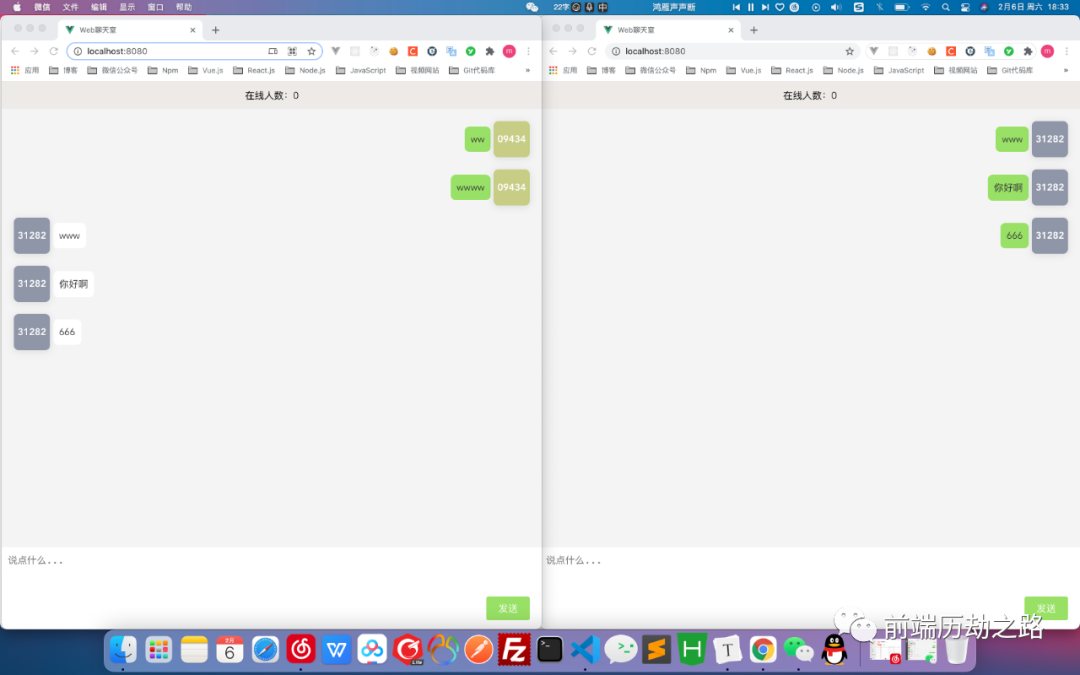
在线人数为零,这不是bug,是因为当时在本地端没有做,只是放上了这个版块。不过,在云服务端我已经放上了这个功能。那么,我们来看一下吧。
开发云端聊天室(第二种)
客户端
1<template>
2  <div class="home">
3    <div class="count">
4      <p>在线人数:{{ count }}</p>
5    </div>
6    <div class="content">
7      <div class="chat-box" ref="chatBox">
8        <div
9          v-for="(item, index) in chatArr"
10          :key="index"
11          class="chat-item"
12        >
13          <div v-if="item.name === name" class="chat-msg mine">
14            <p class="msg mineBg">{{ item.txt }}</p>
15            <p class="user" :style="{ background: bg }">
16              {{ item.name.substring(item.name.length - 5, item.name.length) }}
17            </p>
18          </div>
19          <div v-else class="chat-msg other">
20            <p class="user" :style="{ background: item.bg }">
21              {{ item.name.substring(item.name.length - 5, item.name.length) }}
22            </p>
23            <p class="msg otherBg">{{ item.txt }}</p>
24          </div>
25        </div>
26      </div>
27    </div>
28    <div class="footer">
29      <textarea
30        placeholder="说点什么..."
31        v-model="textValue"
32        autofocus
33        ref="texta"
34        @keyup.enter="send"
35      ></textarea>
36      <div class="send-box">
37        <p class="send active" @click="send">发送</p>
38      </div>
39    </div>
40  </div>
41</template>
42
43<script>
44import { onMounted, onUnmounted, ref, reactive, nextTick } from "vue";
45export default {
46  name: "Home",
47  setup() {
48    let socket = null;
49    const path = "wss:/xxx.com/wsline/"; // 这个网址只是测试网址,这里只是说明云服务地址
50    const textValue = ref("");
51    const chatBox = ref(null);
52    const texta = ref(null);
53    const count = ref(0);
54    const name = new Date().getTime().toString();
55    const bg = randomRgb();
56    const chatArr = reactive([]);
57    function init() {
58      if (typeof WebSocket === "undefined") {
59        alert("您的浏览器不支持socket");
60      } else {
61        socket = new WebSocket(path);
62        socket.onopen = open;
63        socket.onerror = error;
64        socket.onclose = closed;
65        socket.onmessage = getMessage;
66        window.onbeforeunload = function(e) {
67          e = e || window.event;
68          if (e) {
69            e.returnValue = "关闭提示";
70            socket.close();
71          }
72          socket.close();
73          return "关闭提示";
74        };
75      }
76    }
77    function open() {
78      alert("socket连接成功");
79    }
80    function error() {
81      alert("连接错误");
82    }
83    function closed() {
84      alert("socket关闭");
85    }
86    async function getMessage(msg) {
87      if (typeof JSON.parse(msg.data) === "number") {
88        console.log(JSON.parse(msg.data));
89        count.value = msg.data;
90      } else {
91        const obj = JSON.parse(msg.data);
92        chatArr.push(obj);
93      }
94      await nextTick();
95      chatBox.value.scrollTop = chatBox.value.scrollHeight;
96    }
97    function randomRgb() {
98      let R = Math.floor(Math.random() * 130 + 110);
99      let G = Math.floor(Math.random() * 130 + 110);
100      let B = Math.floor(Math.random() * 130 + 110);
101      return "rgb(" + R + "," + G + "," + B + ")";
102    }
103    function send() {
104      if (textValue.value.trim().length > 0) {
105        const obj = {
106          name: name,
107          txt: textValue.value,
108          bg: bg,
109        };
110        socket.send(JSON.stringify(obj));
111        textValue.value = "";
112        texta.value.focus();
113      }
114    }
115    function close() {
116      alert("socket已经关闭");
117    }
118    onMounted(() => {
119      init();
120    });
121    onUnmounted(() => {
122      socket.onclose = close;
123    });
124    return {
125      send,
126      textValue,
127      chatArr,
128      name,
129      bg,
130      chatBox,
131      texta,
132      randomRgb,
133      count,
134    };
135  },
136};
137</script>
样式文件同本地端样式,可以查看上方的代码。
服务端
这里我使用了ws模块,并且我也搭建了https服务器,并使用了更为安全的wss协议。接下来,我们来看下是怎么操作的。
1const fs = require("fs");
2const httpServ = require("https");
3const WebSocketServer = require("ws").Server; // 引用Server类
4
5const cfg = {
6  port: 3456,
7  ssl_key: "../../https/xxx.key", // 配置https所需的文件2
8  ssl_cert: "../../https/xxx.crt", // 配置https所需的文件1
9};
10
11// 创建request请求监听器
12const processRequest = (req, res) => {
13  res.writeHead(200);
14  res.end("Websocket linked successfully");
15};
16
17const app = httpServ
18  .createServer(
19    {
20      // 向server传递key和cert参数
21      key: fs.readFileSync(cfg.ssl_key),
22      cert: fs.readFileSync(cfg.ssl_cert),
23    },
24    processRequest
25  )
26  .listen(cfg.port);
27
28// 实例化WebSocket服务器
29const wss = new WebSocketServer({
30  server: app,
31});
32// 群发
33wss.broadcast = function broadcast(data) {
34    wss.clients.forEach(function each(client) {
35      client.send(data);
36    });
37};
38// 如果有WebSocket请求接入,wss对象可以响应connection事件来处理
39wss.on("connection", (wsConnect) => {
40  console.log("Server monitoring");
41  wss.broadcast(wss._server._connections);
42  wsConnect.on("message", (message) => {
43    wss.broadcast(message);
44  });
45  wsConnect.on("close", function close() {
46    console.log("disconnected");
47    wss.broadcast(wss._server._connections);
48  });
49});
我们在云服务上启动命令。
启动成功!
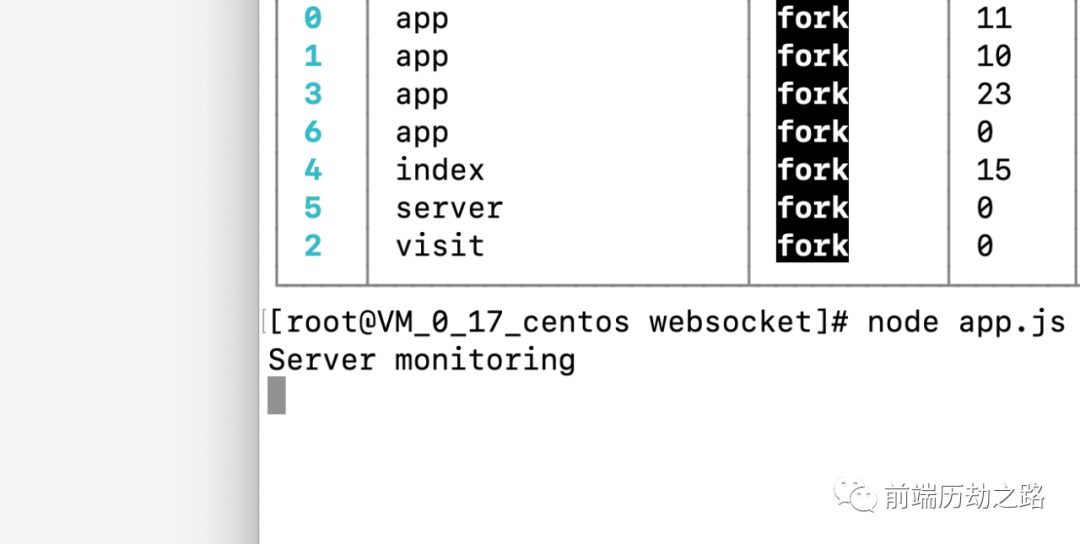
这里还没有结束,因为你使用的是ip地址端口,必须转发到域名上。所以我使用的nginx进行转发,配置如下参数。
1    location /wsline/ {
2         proxy_pass https://xxx:3456/;
3         proxy_http_version 1.1;
4         proxy_set_header Upgrade $http_upgrade;
5         proxy_set_header Connection "Upgrade";
6         proxy_set_header X-Forwarded-For $proxy_add_x_forwarded_for;
7         proxy_set_header Host $http_host;
8         proxy_set_header X-Real-IP $remote_addr;
9         proxy_set_header X-Forwarded-Proto https;
10         proxy_redirect off;
11    }
那么,重启云端服务器,看下效果。
项目一览
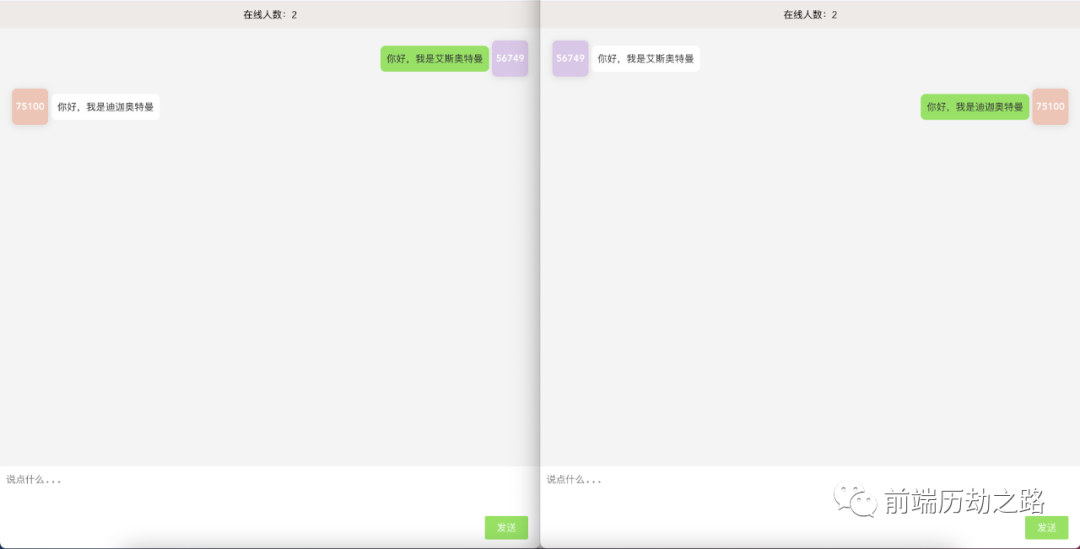
那么,到这里一款云端聊天室就这么做成了,可以实时显示在线人数,这样你就可以知道有多少人在这里跟你聊天。
结语
谢谢阅读,希望我没有浪费你的时间。看完文章了,那么赶快行动起来吧,开发一款属于自己的聊天室。
有朋自远方来,不亦乐乎。

欢迎关注我的公众号
前端历劫之路回复关键词
电子书,即可获取12本前端热门电子书。回复关键词
红宝书第4版,即可获取最新《JavaScript高级程序设计》(第四版)电子书。我创建了一个技术交流、文章分享群,群里有很多大厂的前端大佬,关注公众号后,点击下方菜单了解更多即可加我微信,期待你的加入。
作者:Vam的金豆之路
微信公众号:前端历劫之路

本文转转自微信公众号前端历劫之路原创https://mp.weixin.qq.com/s/X7QABojXtNru6kEWPWegHw,如有侵权,请联系删除。