
三台主机 centos6
已经完成的工作:
- 防火墙已关闭
- 主机名修改完毕,ssh免密登陆配置完成
- jdk已安装
- zookeeper已经部署并运行
- hadoop已经部署并运行
版本:flink-1.8.2-bin-scala_2.11
上传或下载flink,解压缩
[root@node01 software]# tar -zxvf flink-1.8.2-bin-scala_2.11.tgz -C /bigdata/application/
配置环境变量,建立软连接
将官网hadoop的jar包放入lib目录下
编辑flink-conf.yaml
jobmanager.rpc.address:值设置成你master节点的IP地址
taskmanager.heap.mb:每个TaskManager可用的总内存
taskmanager.numberOfTaskSlots:每台机器上可用CPU的总数
parallelism.default:每个Job运行时默认的并行度
taskmanager.tmp.dirs:临时目录
jobmanager.heap.mb:每个节点的JVM能够分配的最大内存
jobmanager.rpc.port: 6123
jobmanager.web.port: 8081
1################################################################################
2#  Licensed to the Apache Software Foundation (ASF) under one
3#  or more contributor license agreements.  See the NOTICE file
4#  distributed with this work for additional information
5#  regarding copyright ownership.  The ASF licenses this file
6#  to you under the Apache License, Version 2.0 (the
7#  "License"); you may not use this file except in compliance
8#  with the License.  You may obtain a copy of the License at
9#
10#      http://www.apache.org/licenses/LICENSE-2.0
11#
12#  Unless required by applicable law or agreed to in writing, software
13#  distributed under the License is distributed on an "AS IS" BASIS,
14#  WITHOUT WARRANTIES OR CONDITIONS OF ANY KIND, either express or implied.
15#  See the License for the specific language governing permissions and
16# limitations under the License.
17################################################################################
18
19
20#==============================================================================
21# Common
22#==============================================================================
23
24# The external address of the host on which the JobManager runs and can be
25# reached by the TaskManagers and any clients which want to connect. This setting
26# is only used in Standalone mode and may be overwritten on the JobManager side
27# by specifying the --host <hostname> parameter of the bin/jobmanager.sh executable.
28# In high availability mode, if you use the bin/start-cluster.sh script and setup
29# the conf/masters file, this will be taken care of automatically. Yarn/Mesos
30# automatically configure the host name based on the hostname of the node where the
31# JobManager runs.
32
33jobmanager.rpc.address: node03
34
35# The RPC port where the JobManager is reachable.
36
37jobmanager.rpc.port: 6123
38
39
40# The heap size for the JobManager JVM
41
42jobmanager.heap.size: 1024m
43
44
45# The heap size for the TaskManager JVM
46
47taskmanager.heap.size: 1024m
48
49
50# The number of task slots that each TaskManager offers. Each slot runs one parallel pipeline.
51
52taskmanager.numberOfTaskSlots: 2
53
54# The parallelism used for programs that did not specify and other parallelism.
55
56parallelism.default: 2
57
58# The default file system scheme and authority.
59#
60# By default file paths without scheme are interpreted relative to the local
61# root file system 'file:///'. Use this to override the default and interpret
62# relative paths relative to a different file system,
63# for example 'hdfs://mynamenode:12345'
64#
65fs.default-scheme: hdfs://ns/
66
67#==============================================================================
68# High Availability
69#==============================================================================
70
71# The high-availability mode. Possible options are 'NONE' or 'zookeeper'.
72#
73high-availability: zookeeper
74
75# The path where metadata for master recovery is persisted. While ZooKeeper stores
76# the small ground truth for checkpoint and leader election, this location stores
77# the larger objects, like persisted dataflow graphs.
78#
79# Must be a durable file system that is accessible from all nodes
80# (like HDFS, S3, Ceph, nfs, ...)
81#
82high-availability.storageDir: hdfs://ns/flink/ha/
83
84
85
86# The list of ZooKeeper quorum peers that coordinate the high-availability
87# setup. This must be a list of the form:
88# "host1:clientPort,host2:clientPort,..." (default clientPort: 2181)
89#
90high-availability.zookeeper.quorum: node01:2181,node02:2181,node03:2181
91high-availability.zookeeper.path.root: /flink
92
93# ACL options are based on https://zookeeper.apache.org/doc/r3.1.2/zookeeperProgrammers.html#sc_BuiltinACLSchemes
94# It can be either "creator" (ZOO_CREATE_ALL_ACL) or "open" (ZOO_OPEN_ACL_UNSAFE)
95# The default value is "open" and it can be changed to "creator" if ZK security is enabled
96#
97# high-availability.zookeeper.client.acl: open
98
99#==============================================================================
100# Fault tolerance and checkpointing
101#==============================================================================
102
103# The backend that will be used to store operator state checkpoints if
104# checkpointing is enabled.
105#
106# Supported backends are 'jobmanager', 'filesystem', 'rocksdb', or the
107# <class-name-of-factory>.
108#
109state.backend: filesystem
110
111# Directory for checkpoints filesystem, when using any of the default bundled
112# state backends.
113#
114state.checkpoints.dir: hdfs://ns/flink-checkpoints
115
116# Default target directory for savepoints, optional.
117#
118state.savepoints.dir: hdfs://ns/flink-checkpoints
119
120# Flag to enable/disable incremental checkpoints for backends that
121# support incremental checkpoints (like the RocksDB state backend).
122#
123# state.backend.incremental: false
124
125#==============================================================================
126# Rest & web frontend
127#==============================================================================
128
129# The port to which the REST client connects to. If rest.bind-port has
130# not been specified, then the server will bind to this port as well.
131#
132rest.port: 8081
133
134# The address to which the REST client will connect to
135#
136#rest.address: 0.0.0.0
137
138# Port range for the REST and web server to bind to.
139#
140#rest.bind-port: 8080-8090
141
142# The address that the REST & web server binds to
143#
144#rest.bind-address: 0.0.0.0
145
146# Flag to specify whether job submission is enabled from the web-based
147# runtime monitor. Uncomment to disable.
148
149web.submit.enable: true
150
151#==============================================================================
152# Advanced
153#==============================================================================
154
155# Override the directories for temporary files. If not specified, the
156# system-specific Java temporary directory (java.io.tmpdir property) is taken.
157#
158# For framework setups on Yarn or Mesos, Flink will automatically pick up the
159# containers' temp directories without any need for configuration.
160#
161# Add a delimited list for multiple directories, using the system directory
162# delimiter (colon ':' on unix) or a comma, e.g.:
163#     /data1/tmp:/data2/tmp:/data3/tmp
164#
165# Note: Each directory entry is read from and written to by a different I/O
166# thread. You can include the same directory multiple times in order to create
167# multiple I/O threads against that directory. This is for example relevant for
168# high-throughput RAIDs.
169#
170# io.tmp.dirs: /tmp
171
172# Specify whether TaskManager's managed memory should be allocated when starting
173# up (true) or when memory is requested.
174#
175# We recommend to set this value to 'true' only in setups for pure batch
176# processing (DataSet API). Streaming setups currently do not use the TaskManager's
177# managed memory: The 'rocksdb' state backend uses RocksDB's own memory management,
178# while the 'memory' and 'filesystem' backends explicitly keep data as objects
179# to save on serialization cost.
180#
181# taskmanager.memory.preallocate: false
182
183# The classloading resolve order. Possible values are 'child-first' (Flink's default)
184# and 'parent-first' (Java's default).
185#
186# Child first classloading allows users to use different dependency/library
187# versions in their application than those in the classpath. Switching back
188# to 'parent-first' may help with debugging dependency issues.
189#
190# classloader.resolve-order: child-first
191
192# The amount of memory going to the network stack. These numbers usually need
193# no tuning. Adjusting them may be necessary in case of an "Insufficient number
194# of network buffers" error. The default min is 64MB, the default max is 1GB.
195#
196# taskmanager.network.memory.fraction: 0.1
197# taskmanager.network.memory.min: 64mb
198# taskmanager.network.memory.max: 1gb
199
200#==============================================================================
201# Flink Cluster Security Configuration
202#==============================================================================
203
204# Kerberos authentication for various components - Hadoop, ZooKeeper, and connectors -
205# may be enabled in four steps:
206# 1. configure the local krb5.conf file
207# 2. provide Kerberos credentials (either a keytab or a ticket cache w/ kinit)
208# 3. make the credentials available to various JAAS login contexts
209# 4. configure the connector to use JAAS/SASL
210
211# The below configure how Kerberos credentials are provided. A keytab will be used instead of
212# a ticket cache if the keytab path and principal are set.
213
214# security.kerberos.login.use-ticket-cache: true
215# security.kerberos.login.keytab: /path/to/kerberos/keytab
216# security.kerberos.login.principal: flink-user
217
218# The configuration below defines which JAAS login contexts
219
220# security.kerberos.login.contexts: Client,KafkaClient
221
222#==============================================================================
223# ZK Security Configuration
224#==============================================================================
225
226# Below configurations are applicable if ZK ensemble is configured for security
227
228# Override below configuration to provide custom ZK service name if configured
229# zookeeper.sasl.service-name: zookeeper
230
231# The configuration below must match one of the values set in "security.kerberos.login.contexts"
232# zookeeper.sasl.login-context-name: Client
233
234#==============================================================================
235# HistoryServer
236#==============================================================================
237
238# The HistoryServer is started and stopped via bin/historyserver.sh (start|stop)
239
240# Directory to upload completed jobs to. Add this directory to the list of
241# monitored directories of the HistoryServer as well (see below).
242#jobmanager.archive.fs.dir: hdfs:///completed-jobs/
243
244# The address under which the web-based HistoryServer listens.
245#historyserver.web.address: 0.0.0.0
246
247# The port under which the web-based HistoryServer listens.
248historyserver.web.port: 8082
249
250# Comma separated list of directories to monitor for completed jobs.
251#historyserver.archive.fs.dir: hdfs:///completed-jobs/
252
253# Interval in milliseconds for refreshing the monitored directories.
254#historyserver.archive.fs.refresh-interval: 10000
255
256yarn.application-attempts: 10
编辑master文件
1node03:8086
2node01:8086
编辑slaves文件
1node01
2node02
3node03
编辑zoo.cfg文件
1################################################################################
2#  Licensed to the Apache Software Foundation (ASF) under one
3#  or more contributor license agreements.  See the NOTICE file
4#  distributed with this work for additional information
5#  regarding copyright ownership.  The ASF licenses this file
6#  to you under the Apache License, Version 2.0 (the
7#  "License"); you may not use this file except in compliance
8#  with the License.  You may obtain a copy of the License at
9#
10#      http://www.apache.org/licenses/LICENSE-2.0
11#
12#  Unless required by applicable law or agreed to in writing, software
13#  distributed under the License is distributed on an "AS IS" BASIS,
14#  WITHOUT WARRANTIES OR CONDITIONS OF ANY KIND, either express or implied.
15#  See the License for the specific language governing permissions and
16# limitations under the License.
17################################################################################
18
19# The number of milliseconds of each tick
20tickTime=2000
21
22# The number of ticks that the initial  synchronization phase can take
23initLimit=10
24
25# The number of ticks that can pass between  sending a request and getting an acknowledgement
26syncLimit=5
27
28# The directory where the snapshot is stored.
29# dataDir=/tmp/zookeeper
30
31# The port at which the clients will connect
32clientPort=2181
33
34# ZooKeeper quorum peers
35server.1=node01:2888:3888
36server.2=node02:2888:3888
37server.3=node03:2888:3888
38# server.2=host:peer-port:leader-port
复制到各个节点,配置环境变量,软连接
启动
bin下通过start-cluster.sh启动
访问node03:8086
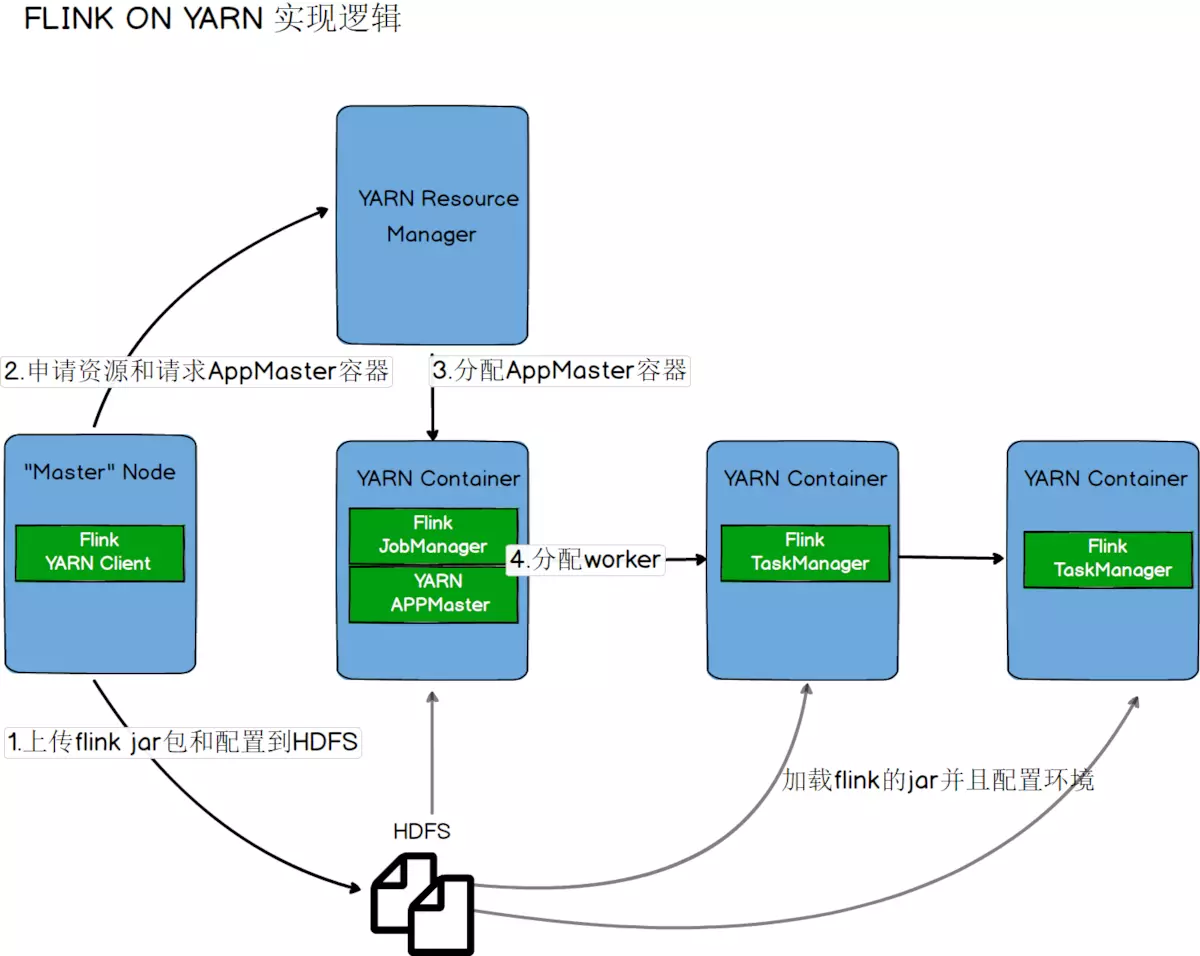
Flink On Yarn模式
flink on yarn
1.第一种方式:yarn-session.sh(开辟资源)+flink run(提交任务)
启动一个一直运行的flink集群
1# 下面的命令会申请5个taskmanager,每个2G内存和2个solt,超过集群总资源将会启动失败。
2./bin/yarn-session.sh -n 5 -tm 2048 -s 2 --nm leo-flink -d
-n ,--container <arg> 分配多少个yarn容器(=taskmanager的数量)
-D <arg> 动态属性
-d, --detached 独立运行
-jm,--jobManagerMemory <arg> JobManager的内存 [in MB]
-nm,--name 在YARN上为一个自定义的应用设置一个名字
-q,--query 显示yarn中可用的资源 (内存, cpu核数)
-qu,--queue <arg> 指定YARN队列.
-s,--slots <arg> 每个TaskManager使用的slots(vcore)数量
-tm,--taskManagerMemory <arg> 每个TaskManager的内存 [in MB]
-z,--zookeeperNamespace <arg> 针对HA模式在zookeeper上创建NameSpace
请注意:
请注意:client必须要设置YARN_CONF_DIR或者HADOOP_CONF_DIR环境变量,通过这个环境变量来读取YARN和HDFS的配置信息,否则启动会失败。
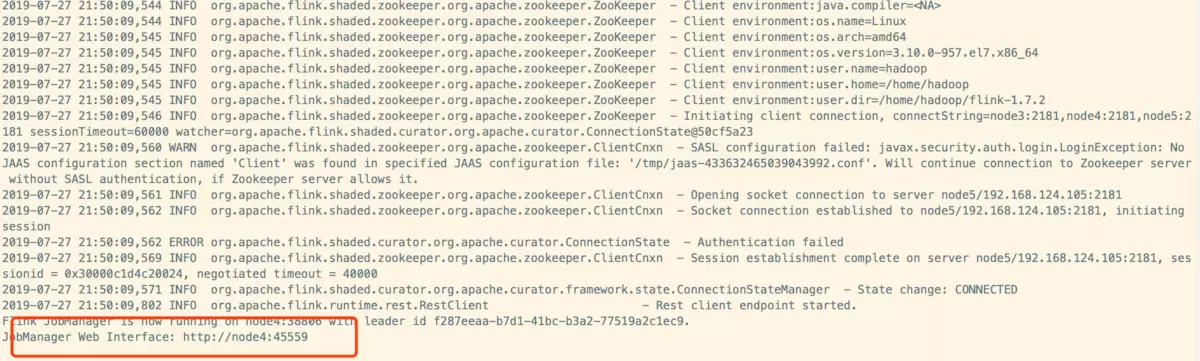
经实验发现,其实如果配置的有HADOOP_HOME环境变量的话也是可以的(只是会出现警告)。HADOOP_HOME ,YARN_CONF_DIR,HADOOP_CONF_DIR 只要配置的有任何一个即可。运行结果如图:
yarn-flink
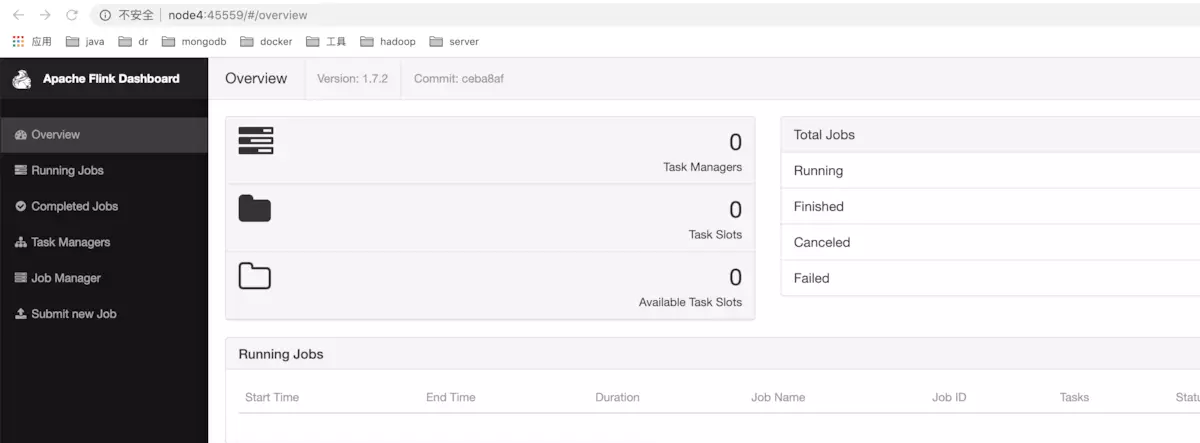
浏览器中访问 http://node4:45559
yarn-flink
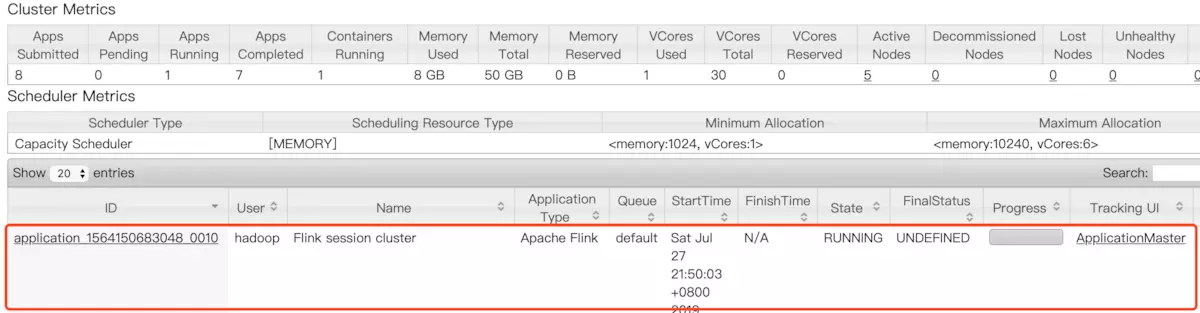
yarn web-ui中
yarn-flink
部署长期运行的flink on yarn实例后,在flink web上看到的TaskManager以及Slots都为0。只有在提交任务的时候,才会依据分配资源给对应的任务执行。</p>
提交Job到长期运行的flink on yarn实例上:
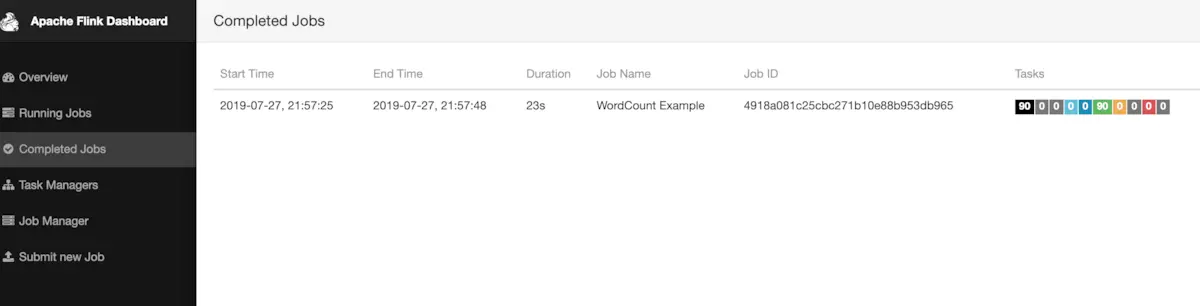
./bin/flink run ./examples/batch/WordCount.jar -input hdfs://leo/test/test.txt -output hdfs://leo/flink-word-count通过web ui可以看到已经运行完成的任务:
task
2.第二种方式:flink run -m yarn-cluster(开辟资源+提交任务)
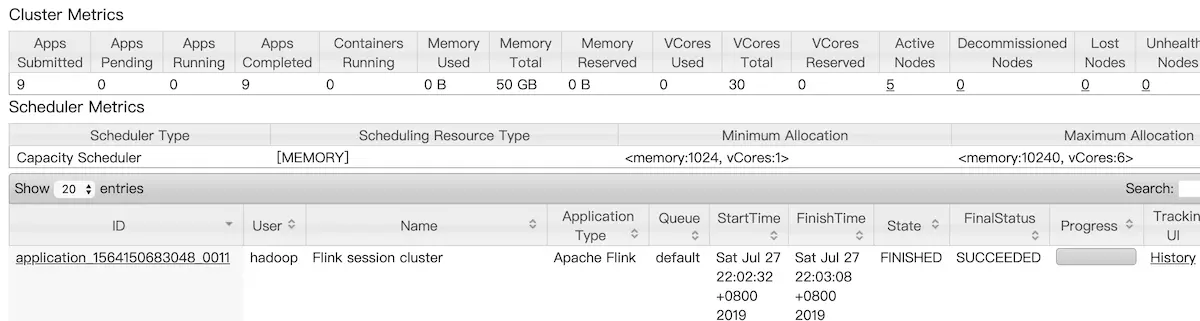
./bin/flink run -m yarn-cluster -yn 2 -yjm 1024 -ytm 1024 ./examples/batch/WordCount.jar -input hdfs://leo/test/test.txt -output hdfs://leo/test/flink-word-count2.txtyarn web ui上查看刚刚提交的任务已经执行成功
task
作者:NikolasNull
链接:https://www.jianshu.com/p/4dc0a980e7e9
来源:简书
著作权归作者所有。商业转载请联系作者获得授权,非商业转载请注明出处。
1[root@node03 bin]# start-cluster.sh
2Starting HA cluster with 2 masters.
3ssh: connect to host node03 port 22: No buffer space available
4Starting standalonesession daemon on host node01.
5Starting taskexecutor daemon on host node01.
6Starting taskexecutor daemon on host node02.
7ssh: connect to host node03 port 22: No buffer space available
8[root@node03 bin]# start-cluster.sh
9Starting HA cluster with 2 masters.
10ssh: connect to host node03 port 22: No buffer space available
11[INFO] 1 instance(s) of standalonesession are already running on node01.
12Starting standalonesession daemon on host node01.
13[INFO] 1 instance(s) of taskexecutor are already running on node01.
14Starting taskexecutor daemon on host node01.
15[INFO] 1 instance(s) of taskexecutor are already running on node02.
16Starting taskexecutor daemon on host node02.
17ssh: connect to host node03 port 22: No buffer space available
18[root@node03 bin]# echo 512 > /proc/sys/net/ipv4/neigh/default/gc_thresh1
19[root@node03 bin]# echo 2048 > /proc/sys/net/ipv4/neigh/default/gc_thresh2
20[root@node03 bin]# echo 4096 > /proc/sys/net/ipv4/neigh/default/gc_thresh3
ping 或者ssh 发生connect: No buffer space available 错误
如果遇到这种情况,一般说明你的本地服务器的arp表缓存太大,而服务器内核设定的回收条数太小,一直被回收造成的。
可以用一下命令扩大arp表可以缓存的记录条数:
1echo 512 > /proc/sys/net/ipv4/neigh/default/gc_thresh1
2echo 2048 > /proc/sys/net/ipv4/neigh/default/gc_thresh2
3echo 4096 > /proc/sys/net/ipv4/neigh/default/gc_thresh3
这三个值缺省是128,512,1024,我用arp -an |wc -l 看到自己服务器的arp缓存表竟然有300多条记录,修改完成后马上就好了,最后记得把
这三条写入/etc/rc.local 文件中,每次重启都写入下,不然机器重启就又被还原至缺省值了。