
原文链接:https://www.entityframeworktutorial.net/code-first/configure-property-mappings-using-fluent-api.aspx
EF 6 Code-First系列文章目录:
- 1 翻译系列:什么是Code First(EF 6 Code First 系列)
- 2.翻译系列:为EF Code-First设置开发环境(EF 6 Code-First系列)
- 3.翻译系列:EF Code-First 示例(EF 6 Code-First系列)
- 4.翻译系列:EF 6 Code-First默认约定(EF 6 Code-First系列)
- 5.翻译系列:EF 6中数据库的初始化(EF 6 Code-First 系列)
- 6.翻译系列:EF 6 Code-First中数据库初始化策略(EF 6 Code-First系列
- 7.翻译系列:EF 6中的继承策略(EF 6 Code-First 系列)
- 8.翻译系列: EF 6中配置领域类(EF 6 Code-First 系列)
- 9.翻译系列:EF 6以及EF Core中的数据注解特性(EF 6 Code-First系列)
- 9.1 翻译系列:数据注解特性之----Table【EF 6 Code-First 系列】
- 9.2 翻译系列:数据注解特性之---Column【EF 6 Code First系列】
- 9.3 翻译系列:数据注解特性之Key【EF 6 Code-First 系列】
- 9.4 翻译系列:EF 6以及 EF Core中的NotMapped特性(EF 6 Code-First系列)
- 9.5 翻译系列:数据注解之ForeignKey特性【EF 6 Code-First系列】
- 9.6 翻译系列:数据注解之Index特性【EF 6 Code-First系列】
- 9.7 翻译系列:EF数据注解特性之--InverseProperty【EF 6 Code-First系列】
- 9.8 翻译系列:数据注解特性之--Required 【EF 6 Code-First系列】
- 9.9 翻译系列:数据注解特性之--MaxLength 【EF 6 Code-First系列】
- 9.10 翻译系列:EF数据注解特性之StringLength【EF 6 Code-First系列】
- 9.11 翻译系列:数据注解特性之--Timestamp【EF 6 Code-First系列】
- 9.12 翻译系列:数据注解特性之ConcurrencyCheck【EF 6 Code-First系列】
- 10.翻译系列:EF 6中的Fluent API配置【EF 6 Code-First系列】
- 10.1.翻译系列:EF 6中的实体映射【EF 6 Code-First系列】
- 10.2.翻译系列:使用Fluent API进行属性映射【EF 6 Code-First】
- 11.翻译系列:在EF 6中配置一对零或者一对一的关系【EF 6 Code-First系列】
- 12.翻译系列:EF 6 中配置一对多的关系【EF 6 Code-First系列】
- 13.翻译系列:Code-First方式配置多对多关系【EF 6 Code-First系列】
- 14.翻译系列:从已经存在的数据库中生成上下文类和实体类【EF 6 Code-First系列】
- 15.翻译系列:EF 6中的级联删除【EF 6 Code-First 系列】
- 16.翻译系列:EF 6 Code -First中使用存储过程【EF 6 Code-First系列】
- 17.翻译系列:将Fluent API的配置迁移到单独的类中【EF 6 Code-First系列】
- 18.翻译系列:EF 6 Code-First 中的Seed Data(种子数据或原始测试数据)【EF 6 Code-First系列】
- 19.翻译系列:EF 6中定义自定义的约定【EF 6 Code-First约定】
- 20.翻译系列:Code-First中的数据库迁移技术【EF 6 Code-First系列】
- 20.1翻译系列:EF 6中自动数据迁移技术【EF 6 Code-First系列】
- 20.2.翻译系列:EF 6中基于代码的数据库迁移技术【EF 6 Code-First系列】
- 21.翻译系列:Entity Framework 6 Power Tools【EF 6 Code-First系列】
Fluent API可以配置实体中的属性,将其映射为数据表中的列。使用Fluent API,你可以改变相应列的名称、数据类型、大小、NULL、Not NUll、主键、外键、以及并发列等等。
我们将使用下面的实体类进行配置:
1public class Student
2{
3    public int StudentKey { get; set; }
4    public string StudentName { get; set; }
5    public DateTime DateOfBirth { get; set; }
6    public byte[]  Photo { get; set; }
7    public decimal Height { get; set; }
8    public float Weight { get; set; }
9
10    public Standard Standard { get; set; }
11}
12
13public class Standard
14{
15    public int StandardKey { get; set; }
16    public string StandardName { get; set; }
17
18    public ICollection<Student> Students { get; set; }
19}
配置主键以及复合主键
上面的实体代码,并不遵循Code-First约定【对于主键】,因为他们没有名称为Id的属性或者没有{实体名称}+”Id“的属性。所以你可以,使用HasKey()方法配置主键,请记住,modelBuilder.Entity<TEntity>()方法返回的是EntityTypeConfiguration类型的对象。
1public class SchoolContext: DbContext
2{
3    public SchoolDBContext(): base()
4    {
5    }
6
7    public DbSet<Student> Students { get; set; }
8    public DbSet<Standard> Standards { get; set; }
9
10    protected override void OnModelCreating(DbModelBuilder modelBuilder)
11    {
12        //Configure primary key
13        modelBuilder.Entity<Student>().HasKey<int>(s => s.StudentKey);
14        modelBuilder.Entity<Standard>().HasKey<int>(s => s.StandardKey);
15
16        //Configure composite primary key
17        modelBuilder.Entity<Student>().HasKey<int>(s => new { s.StudentKey, s.StudentName });
18    }
19}
配置列的名称、类型、顺序
默认的Code-FIrst约定,创建和属性一样的列名,顺序,以及数据类型,你可以重写这个约定:
1public class SchoolContext: DbContext
2{
3    public SchoolDBContext(): base()
4    {
5    }
6
7    public DbSet<Student> Students { get; set; }
8    public DbSet<Standard> Standards { get; set; }
9
10    protected override void OnModelCreating(DbModelBuilder modelBuilder)
11    {
12        //Configure Column
13        modelBuilder.Entity<Student>()
14                    .Property(p => p.DateOfBirth)
15                    .HasColumnName("DoB")
16                    .HasColumnOrder(3)
17                    .HasColumnType("datetime2");
18    }
19}
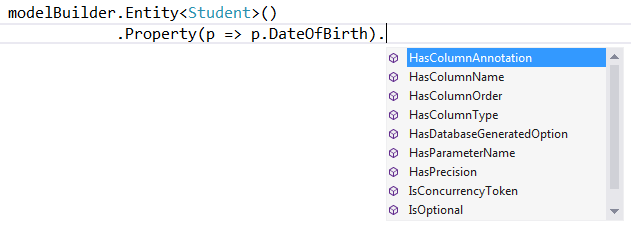
正如上面代码所示,Property()方法用来配置实体中的属性,HasColumnName()方法用来配置列名,HasColumnOrder()用来配置顺序,HasColumnType()方法用来配置类型。
配置可空、不可空的列
EF 6 API会为原始数据类型的属性,创建Not NULL列,因为原始数据类型不能为空,除非标识了可空的符号?或者Nullable.
使用IsOptional()方法创建可空列,同样使用IsRequired()方法创建不可空列。
1public class SchoolContext: DbContext
2{
3    public SchoolDBContext(): base()
4    {
5    }
6
7    public DbSet<Student> Students { get; set; }
8    public DbSet<Standard> Standards { get; set; }
9
10    protected override void OnModelCreating(DbModelBuilder modelBuilder)
11    {
12            //Configure Null Column
13        modelBuilder.Entity<Student>()
14                .Property(p => p.Heigth)
15                .IsOptional();
16
17            //Configure NotNull Column
18            modelBuilder.Entity<Student>()
19                .Property(p => p.Weight)
20                .IsRequired();
21    }
22}
配置列的大小
Code-First默认会为列创建最大的大小(nvarchar(max)或者varchar(max)),你可以重写这个约定:
1public class SchoolContext: DbContext
2{
3    public SchoolDBContext(): base()
4    {
5    }
6
7    public DbSet<Student> Students { get; set; }
8    public DbSet<Standard> Standards { get; set; }
9
10    protected override void OnModelCreating(DbModelBuilder modelBuilder)
11    {
12        //Set StudentName column size to 50
13        modelBuilder.Entity<Student>()
14                .Property(p => p.StudentName)
15                .HasMaxLength(50);
16
17        //Set StudentName column size to 50 and change datatype to nchar
18        //IsFixedLength() change datatype from nvarchar to nchar
19        modelBuilder.Entity<Student>()
20                .Property(p => p.StudentName)
21                .HasMaxLength(50).IsFixedLength();
22
23        //Set size decimal(2,2)
24            modelBuilder.Entity<Student>()
25                .Property(p => p.Height)
26                .HasPrecision(2, 2);
27    }
28}
正如上面代码所示,我们使用HasMaxLength()方法配置列的大小,IsFixedLength()方法会将列的类型从nvarchar转到nchar.HasPrecision()可以配置decimal数据类型的属性的精度。
配置并发列
你可以使用ConcurrencyToken()方法配置并发列,例如:
1public class SchoolContext: DbContext
2{
3    public SchoolDBContext(): base()
4    {
5    }
6
7    public DbSet<Student> Students { get; set; }
8    public DbSet<Standard> Standards { get; set; }
9
10    protected override void OnModelCreating(DbModelBuilder modelBuilder)
11    {
12        //Set StudentName as concurrency column
13        modelBuilder.Entity<Student>()
14                .Property(p => p.StudentName)
15                .IsConcurrencyToken();
16    }
17}
上面的代码中,StudentName列是并发列,所以更新和删除的时候,这个列名将会在where子句中。
你同样可以使用IsRowVersion()来配置并发列,只不过这个IsRowVersion()只能用在byte[]数组类型的属性上。