
1
Vuex是什么呢?它是Vue的状态管理模式,在使用vue的时候,需要在vue中各个组件之间传递值是很痛苦的,在vue中我们可以使用vuex来保存我们需要管理的状态值,值一旦被改变,所有引用该值的地方就会自动更新。是不是很方便,很好用呢?
vuex是专门为vue.js设计的状态管理模式,集中式存储和管理应用程序中所有组件的状态,vuex也集成了vue的官方调式工具,一个vuex应用的核心是store,一个容器,store包含了应用中大部分状态。
那么我们在什么时候应用vuex呢?vuex也不是随便乱用的,小型简单的应用就不那么合适了,因为用了Vuex是繁琐多余的,更适合使用简单的store模式;对于vuex更加适用于中大型单页应用:多个视图使用于同一状态,不同视图需要变更同一状态。
传参的方法对于多层嵌套的组件来说,是非常繁琐的,并且对于兄弟组件间的状态传递无能为力;采用父子组件直接引用或者通过事件来变更和同步状态的多份拷贝,通常会导致无法维护的代码。
npm install vuex --save //yarn add vuex
1import Vue from 'vue'
2import Vuex from 'vuex'
3
4Vue.use(Vuex)
在创建vuex实例的地方引入vue,vuex
1import Vue from 'vue'//引入vue
2import Vuex from 'vuex'//引入vuex
3
4Vue.use(Vuex); //使用 vuex
5
6import store from './store' //引入状态管理 store
new一个Vuex.Store实例,并注册state,mutations,actions,getters到Vuex.Store实例中:
1import Vue from 'vue';
2import Vuex from 'vuex'; // 引入vuex
3import store from './store' // 注册store
4
5Vue.use(Vuex); // 使用vuex
6
7export default new Vuex.Store({
8 state: {...},
9 mutations: {...},
10 actions: {...},
11 getters: {...}
12})
13
14// 当代码量大额时候写个js文件即可
15store
16action.js
17index.js
18mutation.js
1// 引入到store/index.js注册到vuex实例中
2import mutations from './mutations' // 引入mutations
3import actions from './action' // 引入action
4import Vue from 'vue' // 引入vue
5import Vuex from 'vuex' // 引入vuex
6
7Vue.use(Vuex);
8// 创建state
9const state = {
10 count: 0
11};
12
13export default new Vuex.Store({
14 state, // 注册state
15 action, // 注册actions
16 mutations // 注册mutations
17})
创建好vuex.store后,需要在入口文件main.js中引入store并注册到vue实例中,这样就可以在任何组件使用store了。
1import Vue from 'vue'
2import App from './App.vue'
3import router from './router'
4import store from './store' // 引入状态管理store
5
6Vue.config.productiontip = false
7new Vue({
8 router,
9 store, // 注册store
10 render: h => h(App)
11}).$mount('#app')
在组件中使用,引入vuex中各属性对应的辅助函数:
1import {mapActions, mapState,mapGetters} from 'vuex'
2//注册 action 、 state 、getter
2
创建一个vue项目,输入vue int webpack web,安装vuex,命令:npm install vuex --save。
store,index.js
1import Vue from 'vue' // 引入vue
2import Vuex from 'vuex' // 引入vuex
3// 使用vuex
4Vue.use(Vuex);
5// 创建Vuex实例
6const store = new Vuex.store({
7})
8export default store // 导出store
main.js
1import Vue from 'Vue'
2import App from './App'
3import router from './router'
4import store from '.store'
5
6Vue.config.productiontip = false
7
8new Vue({
9 el: '#app',
10 store,
11 router,
12 components: {App},
13 ...
14})
State,可以在页面通过this.$store.state来获取我们定义的数据:
1import Vue from 'vue' // 引入vue
2import Vuex from 'vuex' // 引入vuex
3// 使用vuex
4Vue.use(Vuex);
5
6// 创建Vuex实例:
7const store = new Vuex.Store({
8 state: {
9  count: 1
10 }
11})
12export default store // 导出store
{{this.$store.state.count}}
Getters相当于vue中的computed计算属性,getter的返回值根据它的依赖被缓存起来,且只有当它的依赖值发生改变时才会重新计算。
Getters可以用于监听,state中的值的变化,返回计算后的结果。
{{this.$store.getSateCount}}
1import Vue from 'vue'
2import Vuex from 'vuex'
3Vue.use(Vuex);
4const store = new Vuex.Store({
5 state: {
6  count: 1;
7 },
8 getters: {
9  getStateCount: function(state){
10   return state.count+1;
11  }
12 }
Mutations
1{{this.$store.state.count}}
2<button @click="addFun">+</button>
3<button @click="reductionFun">-</button>
4
5methods: {
6 addFun() {
7  this.$store.commit("add");
8 },
9 reductionFun() {
10  this.$store.commit("reduction");
11 }
12}
index.js
1import Vue from 'vue'
2import Vuex from 'vuex'
3Vue.use(Vuex);
4// 创建Vuex实例
5const store = new Vuex.store({
6 state: {
7  count: 1
8 },
9 getters: {
10  getStateCount: function(state){
11   return state count+1;
12  }
13 },
14 mutations: {
15  add(state) {
16   state.count = state.count+1;
17  },
18  reduction(state){
19   state.count = state.count-1;
20  }
21 }
22})
23export default store // 导出store
Actions:
1import Vue from 'vue'
2import Vuex from 'vuex'
3Vue.use(Vuex);
4const store = new Vuex.Store({
5 state: {
6  count: 1;
7 },
8 getters: {
9  getStateCount: function(state){
10   return state.count+1;
11  }
12 }
13 mutations: {
14  add(state) {
15   state.count = state.count+1;
16  },
17  reduction(state) {
18   state.count = state.count-1;
19  }
20 },
21 actions: {
22  addFun(context) {
23   context.commit("add");
24  },
25  reductionFun(context) {
26   context.commit("reduction");
27  }
28 }
1// vue
2methods: {
3 addFun() {
4  this.$store.dispatch("addFun");
5  // this.$store.commit("add");
6 },
7 reductionFun() {
8  this.$store.dispatch("reductionFun");
9 }
10}
传值:
1methods: {
2 addFun() {
3  this.$store.dispatch("addFun");
4  // this.$store.commit("add");
5 },
6 reductionFun() {
7  var n = 10;
8  this.$store.dispatch("reductionFun", n);
9 }
10}
1 mutations: {
2  add(state) {
3   state.count = state.count+1;
4  },
5  reduction(state,n) {
6   state.count = state.count-n;
7  }
8 },
9 actions: {
10  addFun(context) {
11   context.commit("add");
12  },
13  reductionFun(context,n) {
14   context.commit("reduction",n);
15  }
16 }
mapState、mapGetters、mapActions
this.$stroe.state.count
this.$store.dispatch('funName')
1<div style="border:1px solid red; margin-top: 50px;">
2 {{count1}}
3</div>
4
5import {mapState,mapActions,mapGetters} from 'vuex';
6
7computed: {
8 ...mapState({
9  count1:state=> state.count
10 })
11}
3
state是最底层的初始数据,getters就相当于vue中的计算属性,是对state数据进行处理和扩展的,mutations是当需要修改state时,定义的mutations,actions时当需要很多很多的mutations进行处理时,在actions进行mutations派发的,异步处理也是在这里定义的。
vuex时一个为vue.js应用程序开发的状态管理模式,它采用集中式存储管理应用的所有组件的状态,并以相应的规则保证以一种可预测的方式发生变化。
那么状态管理模式是怎样的书写格式:
1new Vue({
2 // state 初始状态(数据)
3 data() {
4  return {
5   count: 0
6  }
7 },
8 template: `<div>{{count}}</div>`,
9 methods: {
10  increment() {
11   this.count++
12  }
13 }
14})
多个数组共享状态时:
多个视图依赖于同一状态,来自不同视图的行为需要变更同一状态。
1Vue.use(Vuex)
2
3const store = new Vuex.Store({
4  state: {  //状态
5    count: 0
6  },
7  mutations: {  //变化
8    increment (state) {
9      state.count++
10    }
11  }
12})
store.commit('increment')
state初始状态,getter相当于计算属性,mutation状态变更,action行动,module模块。
1Vue.use(Vuex)
2
3const app = new Vue({
4  el: '#app',
5  store,
6  components: { Counter },
7  template: `
8    <div class="app">
9      <counter></counter>
10    </div>
11  `
12})
1import { mapState } from 'vuex'
2
3export default {
4  // ...
5  computed: mapState({
6    // 箭头函数可使代码更简练
7    count: state => state.count,
8
9    // 传字符串参数 'count' 等同于 `state => state.count`
10    countAlias: 'count',
11
12    // 为了能够使用 `this` 获取局部状态,必须使用常规函数
13    countPlusLocalState (state) {
14      return state.count + this.localCount
15    }
16  })
17}
1computed: mapState([
2  // 映射 this.count 为 store.state.count
3  'count'
4])
getter 的返回值会根据它的依赖被缓存起来,且只有当它的依赖值发生了改变才会被重新计算。
1const store = new Vuex.Store({
2
3  state: {
4    todos: [
5      { id: 1, text: '...', done: true },
6      { id: 2, text: '...', done: false }
7    ]
8  },
9
10  getters: {
11    doneTodos: state => {
12      return state.todos.filter(todo => todos.done)
13    }
14  }
15
16})
1getters: {
2  // ...
3  doneTodosCount: (state, getters) => {
4    return getters.doneTodos.length
5  }
6}
7
8store.getters.doneTodosCount // -> 1
mapGetters 辅助函数是将 store 中的 getter 映射到局部计算属性
更改 Vuex 的 store 中的状态的唯一方法是提交 mutation
1mutations: {
2  increment (state, n) {
3    state.count += n
4  }
5}
6
7store.commit('increment', 10)
this.$store.commit('xxx') 提交 mutation
mapMutations 辅助函数将组件中的 methods 映射为 store.commit 调用
1import { mapMutations } from 'vuex'
2export default {
3  methods: {
4
5    ...mapMutations([
6      'increment',
7      // 将 `this.increment()` 映射为 `this.$store.commit('increment')`
8      // `mapMutations` 也支持载荷:
9      'incrementBy'
10      // 将 `this.incrementBy(amount)` 映射为 `this.$store.commit('incrementBy', amount)`
11    ]),
12
13  this.incrementBy(); 调用
14
15    ...mapMutations({
16      add: 'increment'
17      // 将 `this.add()` 映射为 `this.$store.commit('increment')`
18    })
19
20  }
21
22}
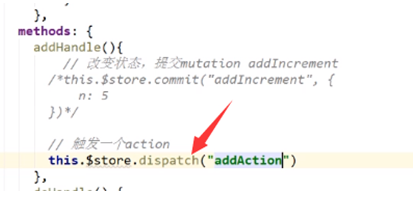
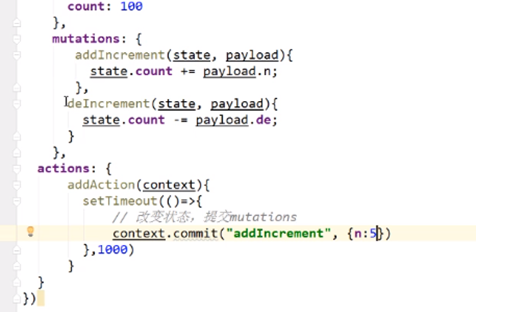
Action 提交的是 mutation变化,而不是直接变更状态。Action 可以包含任意异步操作。
store.dispatch('increment')
使用 mapActions 辅助函数将组件的 methods 映射为 store.dispatch 调用
1import { mapActions } from 'vuex'
2
3export default {
4  // ...
5  methods: {
6
7    ...mapActions([
8      'increment',
9      // 将 `this.increment()` 映射为 `this.$store.dispatch('increment')`
10
11      // `mapActions` 也支持载荷:
12      'incrementBy'
13      // 将 `this.incrementBy(amount)` 映射为 `this.$store.dispatch('incrementBy', amount)`
14    ]),
15
16    ...mapActions({
17      add: 'increment'
18      // 将 `this.add()` 映射为 `this.$store.dispatch('increment')`
19    })
20  }
21}
vue
安装vue-cli
cnpm install -g vue-cli
安装webpack模板 :
vue init webpack myProject
安装依赖
cnpm install
安装路由
cnpm install vue-router --save-dev
安装 axios http
cnpm install axios --save
vue和单纯的全局对象区别:
vuex的状态存储时响应式的,改变store中的状态的唯一途径就是显式地提交commit, mutation。
Vuex的核心是store,store包含着应用中大部分的状态 (state)。
一个最简单的store包含state与mutation,可以通过 store.state 来获取状态对象,以及通过 store.commit 方法触发状态变更。
State,存储着应用中的所有基础“全局对象”,this.$store.state.XXX可访问到。
mapState:使用此辅助函数帮助我们生成计算属性,获得多个state值。
Getter从 store 中的 state 中派生出一些状态,接受 state 作为第一个参数,第二个参数可传值计算,会暴露为 store.getters 对象,可以以属性的形式访问这些值。
Vuex 中的 mutation ,每个 mutation,事件类型 (type) 和 一个 回调函数 (handler)
Action 提交的是 mutation,不是直接变更状态,可以包含任意异步操作,通过 store.dispatch 方法触发。
5
vuex的出现是为了解决哪些问题呢?我们知道在组件之间的作用域是独立的父组件和子组件的通讯可以通过prop属性来传参,但是兄弟组件之间通讯就不那么友好了。
首先要告诉它们的父组件,然后由父组件告诉其他组件,一旦组件很多很多的时候,通讯起来就不方便了,vuex解决了这个问题,让多个子组件之间可以方便的通讯。
1|-store/ // 存放vuex代码
2| |-actions.js
3| |-getters.js
4| |-index.js
5| |-mutations.js
6| |-state.js
1|-store/ // 存放vuex代码
2| |-Module1
3| | |-actions.js
4| | |-getters.js
5| | |-index.js
6| | |-mutations.js
7| | |-state.js
8| |-Module2
9| | |-actions.js
10| | |-getters.js
11| | |-index.js
12| | |-mutations.js
13| | |-state.js
14| |-index.js // vuex的核心,创建一个store
vuex是什么?
Vuex是一个专门为vue.js应用程序开发的状态管理模式,它是采用集中式存储管理应用的所有组件的状态,并以相应的规则保证状态以一种可预测的方式发生变化。Vuex也集成到Vue的官方调式工具devtools extension,提供了诸如零配置的time-travel调试,状态快照导入导出等高级调试功能。
什么是“状态管理模式”?
1new Vue({
2
3  // state
4  data () {
5    return {
6      count: 0
7    }
8  },
9
10  // view
11  template: `
12    <div>{{ count }}</div>
13  `,
14
15  // actions
16  methods: {
17    increment () {
18      this.count++
19    }
20  }
21
22})
state,驱动应用的数据源;
view,以声明方式将 state 映射到视图;
actions,响应在 view 上的用户输入导致的状态变化。
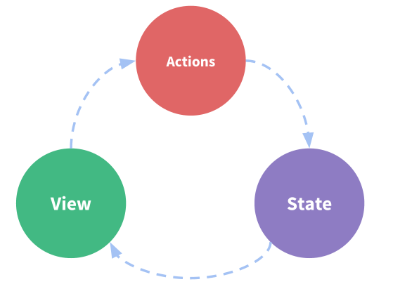
我们的应用遇到多个组件共享状态时,单向数据流的简洁性很容易被破坏:
多个视图依赖于同一状态。
来自不同视图的行为需要变更同一状态。

核心概念:State,Getter,Action,Module
Vuex 和单纯的全局对象有以下两点不同:
1.Vuex 的状态存储是响应式的。
2.不能直接改变 store 中的状态。
创建一个 store
1// 如果在模块化构建系统中,请确保在开头调用了 Vue.use(Vuex)
2
3const store = new Vuex.Store({
4
5  state: {
6    count: 0
7  },
8
9  mutations: {
10    increment (state) {
11      state.count++
12    }
13  }
14
15})
通过 store.state 来获取状态对象,通过 store.commit 方法触发状态变更
1store.commit('increment')
2
3console.log(store.state.count) // -> 1
用一个对象包含了全部的应用层级状态,每个应用将仅仅包含一个 store 实例。单一状态树。Vuex 的状态存储是响应式的,读取状态方法,即是在计算属性中返回。
1// 创建一个 Counter 组件
2
3const Counter = {
4  template: `<div>{{ count }}</div>`,
5  computed: {
6    count () {
7      return store.state.count
8    }
9  }
10}
Vuex 通过 store 选项
1const app = new Vue({
2  el: '#app',
3  // 把 store 对象提供给 “store” 选项,这可以把 store 的实例注入所有的子组件
4  store,
5  components: { Counter },
6  template: `
7    <div class="app">
8      <counter></counter>
9    </div>
10  `
11})
12
13
14const Counter = {
15  template: `<div>{{ count }}</div>`,
16  computed: {
17    count () {
18      return this.$store.state.count
19    }
20  }
21}
使用 mapState 辅助函数帮助我们生成计算属性
1// 在单独构建的版本中辅助函数为 Vuex.mapState
2import { mapState } from 'vuex'
3
4export default {
5  // ...
6  computed: mapState({
7    // 箭头函数可使代码更简练
8    count: state => state.count,
9
10    // 传字符串参数 'count' 等同于 `state => state.count`
11    countAlias: 'count',
12
13    // 为了能够使用 `this` 获取局部状态,必须使用常规函数
14    countPlusLocalState (state) {
15      return state.count + this.localCount
16    }
17  })
18}
19
20
21computed: mapState([
22  // 映射 this.count 为 store.state.count
23  'count'
24]
25
26mapState 函数返回的是一个对象。
27
28computed: {
29  localComputed () { /* ... */ },
30  // 使用对象展开运算符将此对象混入到外部对象中
31  ...mapState({
32    // ...
33  })
34}
需要从 store 中的 state 中派生出一些状态
1computed: {
2  doneTodosCount () {
3    return this.$store.state.todos.filter(todo => todo.done).length
4  }
5}
getter 的返回值会根据它的依赖被缓存起来,且只有当它的依赖值发生了改变才会被重新计算。
1const store = new Vuex.Store({
2
3  state: {
4    todos: [
5      { id: 1, text: '...', done: true },
6      { id: 2, text: '...', done: false }
7    ]
8  },
9
10  getters: {
11    doneTodos: state => {
12      return state.todos.filter(todo => todo.done)
13    }
14  }
15
16})
Getter 会暴露为 store.getters 对象
1store.getters.doneTodos
2
3// -> [{ id: 1, text: '...', done: true }]
Getter 也可以接受其他 getter 作为第二个参数:
1getters: {
2  // ...
3  doneTodosCount: (state, getters) => {
4    return getters.doneTodos.length
5  }
6}
7
8store.getters.doneTodosCount // ->
9
10computed: {
11  doneTodosCount () {
12    return this.$store.getters.doneTodosCount
13  }
14}
1getters: {
2  // ...
3  getTodoById: (state) => (id) => {
4    return state.todos.find(todo => todo.id === id)
5  }
6}
7
8store.getters.getTodoById(2)
9// -> { id: 2, text: '...', done: false }
mapGetters 辅助函数是将 store 中的 getter 映射到局部计算属性:
1import { mapGetters } from 'vuex'
2
3export default {
4  // ...
5  computed: {
6  // 使用对象展开运算符将 getter 混入 computed 对象中
7    ...mapGetters([
8      'doneTodosCount',
9      'anotherGetter',
10      // ...
11    ])
12  }
13}
1mapGetters({
2  // 把 `this.doneCount` 映射为 `this.$store.getters.doneTodosCount`
3  doneCount: 'doneTodosCount'
4})
Vuex 的 store 中的状态的唯一方法是提交 mutation
每个 mutation 都有一个字符串的 事件类型 (type) 和 一个 回调函数 (handler)
向 store.commit 传入额外的参数,即 mutation 的 载荷(payload):
1// ...
2mutations: {
3  increment (state, n) {
4    state.count += n
5  }
6}
7
8store.commit('increment', 10)
在大多数情况下,载荷应该是一个对象
可以包含多个字段并且记录的 mutation
1// ...
2mutations: {
3  increment (state, payload) {
4    state.count += payload.amount
5  }
6}
7
8store.commit('increment', {
9  amount: 10
10})
11
12store.commit({
13  type: 'increment',
14  amount: 10
15}
16
17mutations: {
18  increment (state, payload) {
19    state.count += payload.amount
20  }
21}
Action
简单的 action:
1const store = new Vuex.Store({
2  state: {
3    count: 0
4  },
5  mutations: {
6    increment (state) {
7      state.count++
8    }
9  },
10  actions: {
11    increment (context) {
12      context.commit('increment')
13    }
14  }
15}
16
17store.dispatch('increment')
store.dispatch 可以处理被触发的 action 的处理函数返回的 Promise
1actions: {
2  actionA ({ commit }) {
3    return new Promise((resolve, reject) => {
4      setTimeout(() => {
5        commit('someMutation')
6        resolve()
7      }, 1000)
8    })
9  }
10}
1store.dispatch('actionA').then(() => {
2  // ...
3}
4
5actions: {
6  // ...
7  actionB ({ dispatch, commit }) {
8    return dispatch('actionA').then(() => {
9      commit('someOtherMutation')
10    })
11  }
12}
13
14// 假设 getData() 和 getOtherData() 返回的是 Promise
15
16actions: {
17  async actionA ({ commit }) {
18    commit('gotData', await getData())
19  },
20  async actionB ({ dispatch, commit }) {
21    await dispatch('actionA') // 等待 actionA 完成
22    commit('gotOtherData', await getOtherData())
23  }
24}
文件:
1const moduleA = {
2  state: { ... },
3  mutations: { ... },
4  actions: { ... },
5  getters: { ... }
6}
7
8const moduleB = {
9  state: { ... },
10  mutations: { ... },
11  actions: { ... }
12}
13
14const store = new Vuex.Store({
15  modules: {
16    a: moduleA,
17    b: moduleB
18  }
19})
20
21store.state.a // -> moduleA 的状态
22store.state.b // -> moduleB 的状态
1store.js 文件:
2
3import Vue from 'vue'
4import Vuex from 'vuex'
5
6Vue.use(Vuex)
7
8export default new Vuex.Store({
9  state: {
10    num: 1
11  },
12  mutations: {
13    changeFunction (state, num) {
14      state.num++
15    }
16  }
17})
18
19main.js 文件:
20
21import Vue from 'vue'
22import App from './App.vue'
23import router from './router'
24import store from './store'
25
26Vue.config.productionTip = false
27
28new Vue({
29  router,
30  store,
31  render: h => h(App)
32}).$mount('#app')
33
34views/demo.vue 文件:
35
36<template>
37  <div>
38    <p>{{msg}}</p>
39    <button @click="getNum">getNum</button>
40  </div>
41</template>
42
43<script>
44export default {
45  data () {
46    return {
47      msg: '0'
48    }
49  },
50  methods: {
51    getNum () {
52      this.msg = this.$store.state.num
53    }
54  }
55}
56</script>
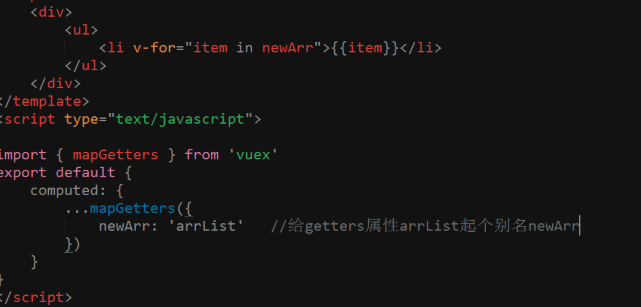
想要获得vuex里的全局数据,可以把vue看做一个类
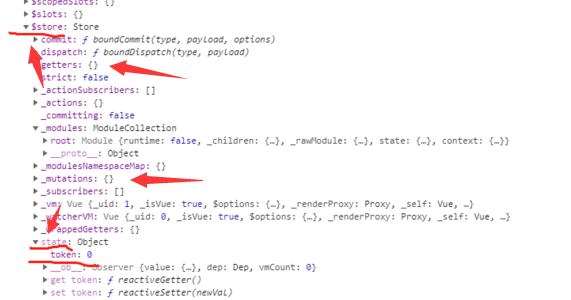

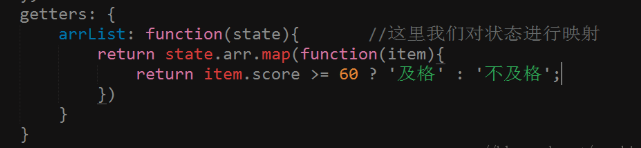

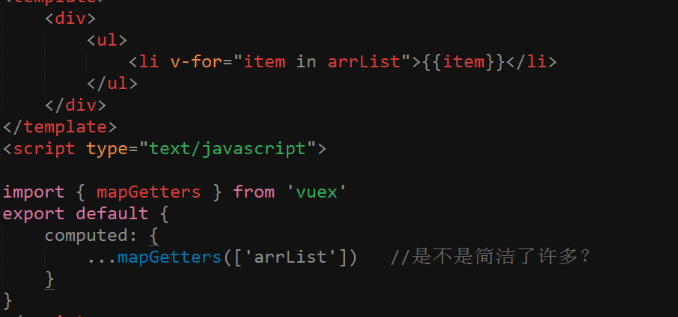
模块化:
1const moduleA = {
2  namespaced: true,
3  state: {
4    name: ''
5  },
6  getters: {},
7  mutations: {},
8  actions: {}
9}
10export default moduleA;
1const moduleB = {
2  namespaced: true,
3  state: {
4    name: ''
5  },
6  getters: {},
7  mutations: {},
8  actions: {}
9}
10export default moduleB;
1import moduleA from './moduleA.js';
2import moduleB from './moduleB.js';
3const store = new Vuex.Store({
4  modules: {
5    a: moduleA,
6    b: moduleB
7  }
8})
9export default store;
1this.$store.state.a.name // -> moduleA 的状态name
2this.$store.state.b.name // -> moduleB 的状态name
1computed: {
2    ...mapState('a', {
3      name: state => state.name
4    }),
5    ...mapState('b', {
6      name: state => state.name
7    })
8}
1state示例
2
3const state = {
4  name: 'weish',
5  age: 22
6};
7
8export default state;
1getters.js 示例
2
3export const name = (state) => {
4  return state.name;
5}
6
7export const age = (state) => {
8  return state.age
9}
10
11export const other = (state) => {
12  return `My name is ${state.name}, I am ${state.age}.`;
13}
参考官方文档:https://vuex.vuejs.org/