⭐️基础链接导航⭐️
服务器 → ☁️ 阿里云活动地址
看样例 → 🐟 摸鱼小网站地址
学代码 → 💻 源码库地址
一、前言
我们已经成功实现了一个完整的热搜组件,从后端到前端,构建了这个小网站的核心功能。接下来,我们将不断完善其功能,使其更加美观和实用。今天的主题是如何定时获取热搜数据。如果热搜数据无法定时更新,小网站将失去其核心价值。之前,我采用了@Scheduled注解来实现定时任务,但这种方式灵活性不足,因此我决定用更灵活的XXL-Job组件来替代它。
二、xxl-job部署
xxl-job是一个轻量级分布式任务调度平台,其核心设计目标是开发迅速、学习简单、轻量级、易扩展。目前github代码库star 27.3k,开源免费的,值得学习使用一下。
1. 代码库下载
下载下来后,代码库结构如下:
 源码结构如下:
1xxl-job-admin:调度中心
2xxl-job-core:公共依赖
3xxl-job-executor-samples:执行器Sample示例(选择合适的版本执行器,可直接使用,也可以参考其并将现有项目改造成执行器)
4    :xxl-job-executor-sample-springboot:Springboot版本,通过Springboot管理执行器,推荐这种方式;
5    :xxl-job-executor-sample-frameless:无框架版本;
调度中心配置内容说明:
1### 调度中心JDBC链接:链接地址请保持和 2.1章节 所创建的调度数据库的地址一致
2spring.datasource.url=jdbc:mysql://127.0.0.1:3306/xxl_job?useUnicode=true&characterEncoding=UTF-8&autoReconnect=true&serverTimezone=Asia/Shanghai
3spring.datasource.username=xxx
4spring.datasource.password=xxx
5spring.datasource.driver-class-name=com.mysql.jdbc.Driver
6
7### 报警邮箱
8spring.mail.host=smtp.qq.com
9spring.mail.port=25
10spring.mail.username=xxx@qq.com
11spring.mail.password=xxx
12spring.mail.properties.mail.smtp.auth=true
13spring.mail.properties.mail.smtp.starttls.enable=true
14spring.mail.properties.mail.smtp.starttls.required=true
15spring.mail.properties.mail.smtp.socketFactory.class=javax.net.ssl.SSLSocketFactory
16
17### 调度中心通讯TOKEN [选填]:非空时启用;
18xxl.job.accessToken=
19
20### 调度中心国际化配置 [必填]: 默认为 "zh_CN"/中文简体, 可选范围为 "zh_CN"/中文简体, "zh_TC"/中文繁体 and "en"/英文;
21xxl.job.i18n=zh_CN
22
23## 调度线程池最大线程配置【必填】
24xxl.job.triggerpool.fast.max=200
25xxl.job.triggerpool.slow.max=100
26
27### 调度中心日志表数据保存天数 [必填]:过期日志自动清理;限制大于等于7时生效,否则, 如-1,关闭自动清理功能;
28xxl.job.logretentiondays=30
2. 表结构初始化
在doc目录的 db目录下,有一个sql文件,里面有一些表和数据的初始化sql,我们要在执行XXL-Job之前要把表和数据准备好。
执行结束后,表如下:

3. 启动XXL-Job
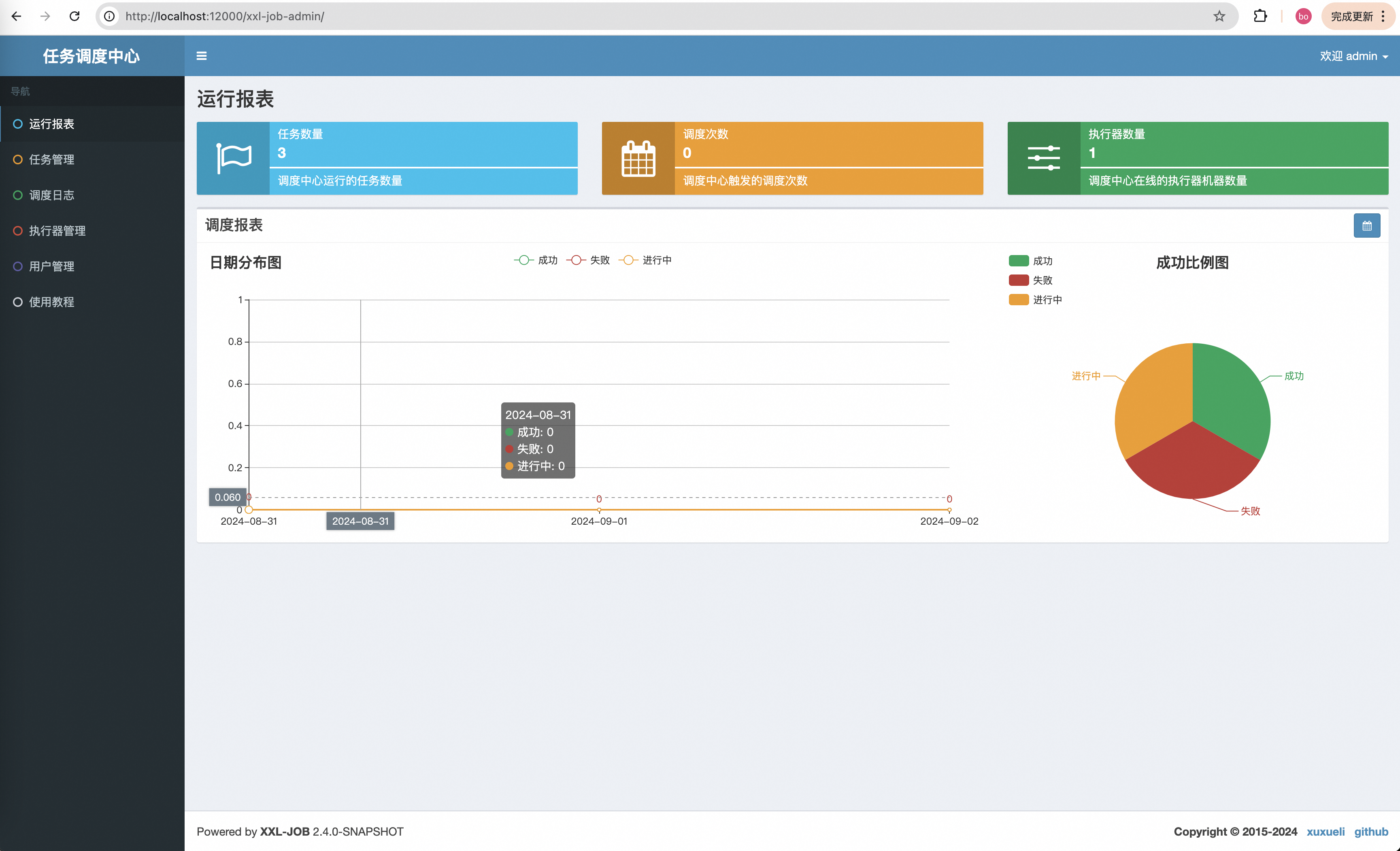
找到XxlJobAdminApplication,启动该应用,在浏览器输入:http://localhost:12000/xxl-job-admin/toLogin,会进入XXL-Job登录界面,如下:

输入用户名:admin;密码:123456点击登录进入主界面,如下:
三、自定义爬虫任务
XXL-Job的使用也很简单,一个注解就好了,这里我说一下如何使用它。
1. 引入XXL-Job依赖
在summo-sbmy-job的pom.xml下添加:
1<!-- xxl-job -->
2<dependency>
3  <groupId>com.xuxueli</groupId>
4  <artifactId>xxl-job-core</artifactId>
5  <version>2.4.1</version>
6</dependency>
2. XXL-Job配置
在application.preoperties文件中加入XXL-Job的配置,配置如下:
1# xxl-job
2xxl.job.open=true
3### xxl-job admin address list, such as "http://address" or "http://address01,http://address02"
4xxl.job.admin.addresses=http://127.0.0.1:12000/xxl-job-admin
5### xxl-job, access token
6xxl.job.accessToken=default_token
7### xxl-job executor appname
8xxl.job.executor.appname=summo-sbmy
9### xxl-job executor log-path
10xxl.job.executor.logpath=/root/logs/xxl-job/jobhandler
11### xxl-job executor log-retention-days
12xxl.job.executor.logretentiondays=30
13### xxl-job executor registry-address: default use address to registry , otherwise use ip:port if address is null
14xxl.job.executor.address=
15### xxl-job executor server-info
16xxl.job.executor.ip=
17xxl.job.executor.port=9999
配置弄好之后,在com.summo.sbmy.job.config目录下创建一个config文件,创建XxlJobConfig.java,代码如下:
1package com.summo.sbmy.job.config;
2
3import com.xxl.job.core.executor.impl.XxlJobSpringExecutor;
4import org.slf4j.Logger;
5import org.slf4j.LoggerFactory;
6import org.springframework.beans.factory.annotation.Value;
7import org.springframework.boot.autoconfigure.condition.ConditionalOnProperty;
8import org.springframework.context.annotation.Bean;
9import org.springframework.context.annotation.Configuration;
10
11/**
12 * xxl-job config
13 *
14 * @author xuxueli 2017-04-28
15 */
16@Configuration
17public class XxlJobConfig {
18    private Logger logger = LoggerFactory.getLogger(XxlJobConfig.class);
19
20    @Value("${xxl.job.admin.addresses}")
21    private String adminAddresses;
22
23    @Value("${xxl.job.accessToken}")
24    private String accessToken;
25
26    @Value("${xxl.job.executor.appname}")
27    private String appname;
28
29    @Value("${xxl.job.executor.address}")
30    private String address;
31
32    @Value("${xxl.job.executor.ip}")
33    private String ip;
34
35    @Value("${xxl.job.executor.port}")
36    private int port;
37
38    @Value("${xxl.job.executor.logpath}")
39    private String logPath;
40
41    @Value("${xxl.job.executor.logretentiondays}")
42    private int logRetentionDays;
43
44    @Bean
45    @ConditionalOnProperty(name = "xxl.job.open", havingValue = "true")
46    public XxlJobSpringExecutor xxlJobExecutor() {
47        logger.info(">>>>>>>>>>> xxl-job config init.");
48        XxlJobSpringExecutor xxlJobSpringExecutor = new XxlJobSpringExecutor();
49        xxlJobSpringExecutor.setAdminAddresses(adminAddresses);
50        xxlJobSpringExecutor.setAppname(appname);
51        xxlJobSpringExecutor.setAddress(address);
52        xxlJobSpringExecutor.setIp(ip);
53        xxlJobSpringExecutor.setPort(port);
54        xxlJobSpringExecutor.setAccessToken(accessToken);
55        xxlJobSpringExecutor.setLogPath(logPath);
56        xxlJobSpringExecutor.setLogRetentionDays(logRetentionDays);
57
58        return xxlJobSpringExecutor;
59    }
60}
配置和类都弄好之后,重新启动应用,如果顺利的话,在XXL-Job管理的执行器界面上就可以看到一个执行器已经注册了,如下:

4. 注册XXL-Job任务
以抖音热搜为例,我们最开始使用的是 @Scheduled注解,代码如下:
1/**
2  * 定时触发爬虫方法,1个小时执行一次
3  */
4@Scheduled(fixedRate = 1000 * 60 * 60)
5public void hotSearch() throws IOException{
6  ... ...
7}
将@Scheduled注解替换为@XxlJob("douyinHotSearchJob"),具体的代码如下:
1package com.summo.sbmy.job.douyin;
2
3import com.alibaba.fastjson.JSONArray;
4import com.alibaba.fastjson.JSONObject;
5import com.google.common.collect.Lists;
6import com.summo.sbmy.dao.entity.SbmyHotSearchDO;
7import com.summo.sbmy.service.SbmyHotSearchService;
8import com.summo.sbmy.service.convert.HotSearchConvert;
9import com.xxl.job.core.biz.model.ReturnT;
10import com.xxl.job.core.handler.annotation.XxlJob;
11import lombok.extern.slf4j.Slf4j;
12import okhttp3.OkHttpClient;
13import okhttp3.Request;
14import okhttp3.Response;
15import org.apache.commons.collections4.CollectionUtils;
16import org.springframework.beans.factory.annotation.Autowired;
17import org.springframework.scheduling.annotation.Scheduled;
18import org.springframework.stereotype.Component;
19
20import java.io.IOException;
21import java.util.List;
22import java.util.Random;
23import java.util.UUID;
24import java.util.stream.Collectors;
25
26import static com.summo.sbmy.common.cache.SbmyHotSearchCache.CACHE_MAP;
27import static com.summo.sbmy.common.enums.HotSearchEnum.DOUYIN;
28
29/**
30 * @author summo
31 * @version DouyinHotSearchJob.java, 1.0.0
32 * @description 抖音热搜Java爬虫代码
33 * @date 2024年08月09
34 */
35@Component
36@Slf4j
37public class DouyinHotSearchJob {
38
39    @Autowired
40    private SbmyHotSearchService sbmyHotSearchService;
41
42    @XxlJob("douyinHotSearchJob")
43    public ReturnT<String> hotSearch(String param) throws IOException {
44        log.info("抖音热搜爬虫任务开始");
45        try {
46            //查询抖音热搜数据
47            OkHttpClient client = new OkHttpClient().newBuilder().build();
48            Request request = new Request.Builder().url("https://www.iesdouyin.com/web/api/v2/hotsearch/billboard/word/").method("GET", null).build();
49            Response response = client.newCall(request).execute();
50            JSONObject jsonObject = JSONObject.parseObject(response.body().string());
51            JSONArray array = jsonObject.getJSONArray("word_list");
52            List<SbmyHotSearchDO> sbmyHotSearchDOList = Lists.newArrayList();
53            for (int i = 0, len = array.size(); i < len; i++) {
54                //获取知乎热搜信息
55                JSONObject object = (JSONObject) array.get(i);
56                //构建热搜信息榜
57                SbmyHotSearchDO sbmyHotSearchDO = SbmyHotSearchDO.builder().hotSearchResource(DOUYIN.getCode()).build();
58                //设置文章标题
59                sbmyHotSearchDO.setHotSearchTitle(object.getString("word"));
60                //设置知乎三方ID
61                sbmyHotSearchDO.setHotSearchId(getHashId(DOUYIN.getCode() + sbmyHotSearchDO.getHotSearchTitle()));
62                //设置文章连接
63                sbmyHotSearchDO.setHotSearchUrl("https://www.douyin.com/search/" + sbmyHotSearchDO.getHotSearchTitle() + "?type=general");
64                //设置热搜热度
65                sbmyHotSearchDO.setHotSearchHeat(object.getString("hot_value"));
66                //按顺序排名
67                sbmyHotSearchDO.setHotSearchOrder(i + 1);
68                sbmyHotSearchDOList.add(sbmyHotSearchDO);
69            }
70            if (CollectionUtils.isEmpty(sbmyHotSearchDOList)) {
71                return ReturnT.SUCCESS;
72            }
73            //数据加到缓存中
74            CACHE_MAP.put(DOUYIN.getCode(), sbmyHotSearchDOList.stream().map(HotSearchConvert::toDTOWhenQuery).collect(Collectors.toList()));
75
76            //数据持久化
77            sbmyHotSearchService.saveCache2DB(sbmyHotSearchDOList);
78            log.info("抖音热搜爬虫任务结束");
79        } catch (IOException e) {
80            log.error("获取抖音数据异常", e);
81        }
82        return ReturnT.SUCCESS;
83    }
84
85    /**
86     * 根据文章标题获取一个唯一ID
87     *
88     * @param title 文章标题
89     * @return 唯一ID
90     */
91    private String getHashId(String title) {
92        long seed = title.hashCode();
93        Random rnd = new Random(seed);
94        return new UUID(rnd.nextLong(), rnd.nextLong()).toString();
95    }
96
97}
在XXL-Job管理台的任务管理界面中点击新增任务,如下:

创建好任务后,我们可以手动运行一次,如下:
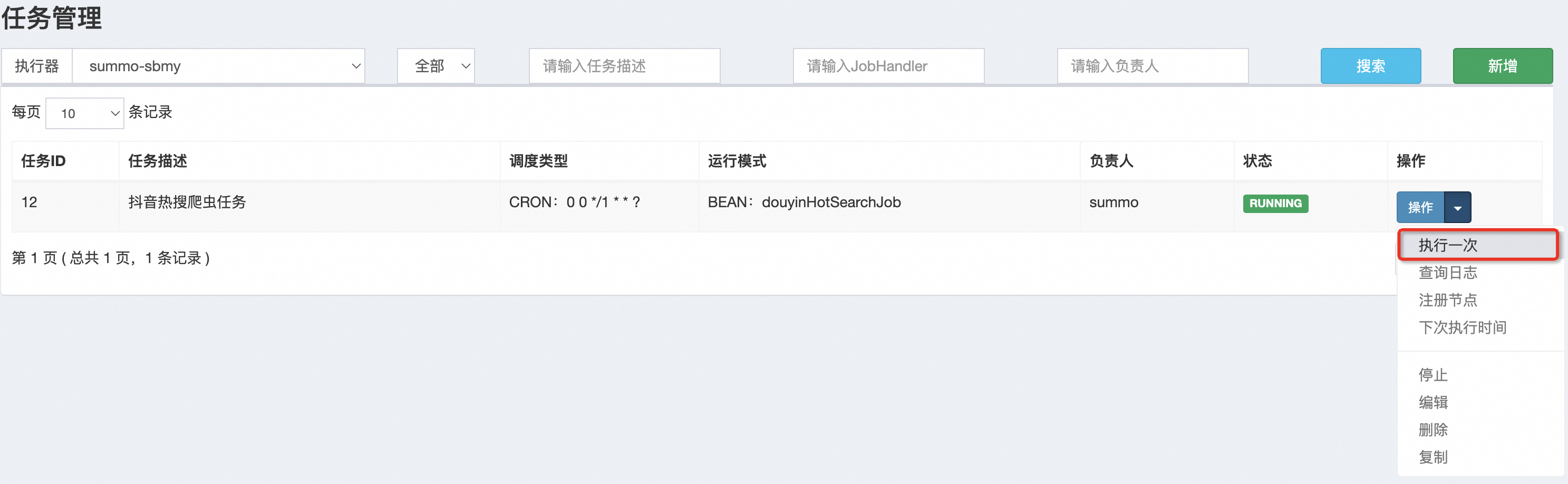

这样抖音的热搜任务我们就配置好了,其他的爬虫任务也是这样的配置。
四、热搜更新时间
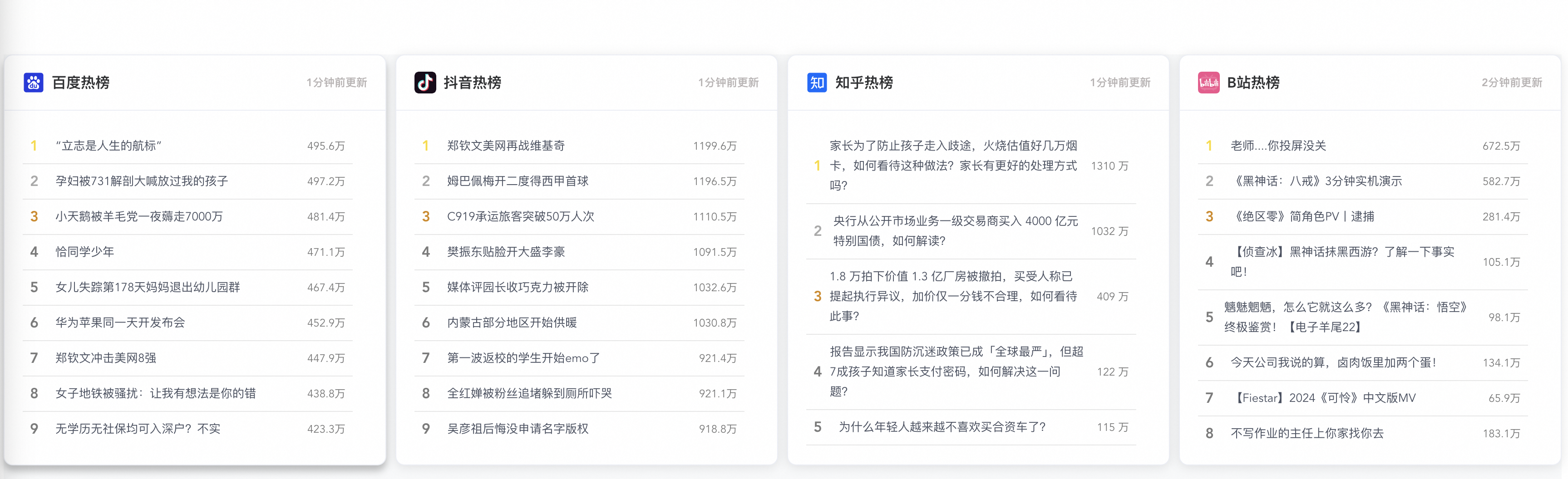
目前我们已经实现了三个热搜组件,百度、抖音、知乎,但是我们并不知道这些热搜是什么时候更新的,也不知道是不是实时的,所以我们需要把热搜更新时间放出来,大概下面这样子:
 优化后组件代码如下:
1<template>
2  <el-card class="custom-card" v-loading="loading">
3    <template #header>
4      <div class="card-title">
5        <img :src="icon" class="card-title-icon" />
6        {{ title }}热榜
7        <span class="update-time">{{ formattedUpdateTime }}</span>
8      </div>
9    </template>
10    <div class="cell-group-scrollable">
11      <div
12        v-for="item in hotSearchData"
13        :key="item.hotSearchOrder"
14        :class="getRankingClass(item.hotSearchOrder)"
15        class="cell-wrapper"
16      >
17        <span class="cell-order">{{ item.hotSearchOrder }}</span>
18        <span
19          class="cell-title hover-effect"
20          @click="openLink(item.hotSearchUrl)"
21        >
22          {{ item.hotSearchTitle }}
23        </span>
24        <span class="cell-heat">{{ formatHeat(item.hotSearchHeat) }}</span>
25      </div>
26    </div>
27  </el-card>
28</template>
29
30<script>
31import apiService from "@/config/apiService.js";
32
33export default {
34  props: {
35    title: String,
36    icon: String,
37    type: String,
38  },
39  data() {
40    return {
41      hotSearchData: [],
42      updateTime: null,
43      loading: false,
44    };
45  },
46  created() {
47    this.fetchData(this.type);
48  },
49  computed: {
50    formattedUpdateTime() {
51      if (!this.updateTime) return '';
52
53      const updateDate = new Date(this.updateTime);
54      const now = new Date();
55
56      const timeDiff = now - updateDate;
57      const minutesDiff = Math.floor(timeDiff / 1000 / 60);
58
59      if (minutesDiff < 1) {
60        return '刚刚更新';
61      } else if (minutesDiff < 60) {
62        return `${minutesDiff}分钟前更新`;
63      } else if (minutesDiff < 1440) {
64        return `${Math.floor(minutesDiff / 60)}小时前更新`;
65      } else {
66        return updateDate.toLocaleString();
67      }
68    },
69  },
70  methods: {
71    fetchData(type) {
72      this.loading = true;
73      apiService
74        .get("/hotSearch/queryByType?type=" + type)
75        .then((res) => {
76          this.hotSearchData = res.data.data.hotSearchDTOList;
77          this.updateTime = res.data.data.updateTime;
78        })
79        .catch((error) => {
80          console.error(error);
81        })
82        .finally(() => {
83          this.loading = false;
84        });
85    },
86    getRankingClass(order) {
87      if (order === 1) return "top-ranking-1";
88      if (order === 2) return "top-ranking-2";
89      if (order === 3) return "top-ranking-3";
90      return "";
91    },
92    formatHeat(heat) {
93      if (typeof heat === "string" && heat.endsWith("万")) {
94        return heat;
95      }
96      let number = parseFloat(heat);
97      if (isNaN(number)) {
98        return heat;
99      }
100      if (number < 1000) {
101        return number.toString();
102      }
103      if (number >= 1000 && number < 10000) {
104        return (number / 1000).toFixed(1) + "k";
105      }
106      if (number >= 10000) {
107        return (number / 10000).toFixed(1) + "万";
108      }
109    },
110    openLink(url) {
111      if (url) {
112        window.open(url, "_blank");
113      }
114    },
115  },
116};
117</script>
118
119<style scoped>
120.custom-card {
121  background-color: #ffffff;
122  border-radius: 10px;
123  box-shadow: 0 4px 8px rgba(0, 0, 0, 0.1);
124  margin-bottom: 20px;
125}
126.custom-card:hover {
127  box-shadow: 0 6px 8px rgba(0, 0, 0, 0.25);
128}
129.el-card__header {
130  padding: 10px 18px;
131  display: flex;
132  justify-content: space-between; /* Added to space out title and update time */
133  align-items: center;
134}
135.card-title {
136  display: flex;
137  align-items: center;
138  font-weight: bold;
139  font-size: 16px;
140  flex-grow: 1;
141}
142.card-title-icon {
143  fill: currentColor;
144  width: 24px;
145  height: 24px;
146  margin-right: 8px;
147}
148.update-time {
149  font-size: 12px;
150  color: #b7b3b3;
151  margin-left: auto; /* Ensures it is pushed to the far right */
152}
153.cell-group-scrollable {
154  max-height: 350px;
155  overflow-y: auto;
156  padding-right: 16px;
157  flex: 1;
158}
159.cell-wrapper {
160  display: flex;
161  align-items: center;
162  padding: 8px 8px;
163  border-bottom: 1px solid #e8e8e8;
164}
165.cell-order {
166  width: 20px;
167  text-align: left;
168  font-size: 16px;
169  font-weight: 700;
170  margin-right: 8px;
171  color: #7a7a7a;
172}
173.cell-heat {
174  min-width: 50px;
175  text-align: right;
176  font-size: 12px;
177  color: #7a7a7a;
178}
179.cell-title {
180  font-size: 13px;
181  color: #495060;
182  line-height: 22px;
183  flex-grow: 1;
184  overflow: hidden;
185  text-align: left;
186  text-overflow: ellipsis;
187}
188.top-ranking-1 .cell-order {
189  color: #fadb14; /* 金色 */
190}
191.top-ranking-2 .cell-order {
192  color: #a9a9a9; /* 银色 */
193}
194.top-ranking-3 .cell-order {
195  color: #d48806; /* 铜色 */
196}
197.cell-title.hover-effect {
198  cursor: pointer;
199  transition: color 0.3s ease;
200}
201.cell-title.hover-effect:hover {
202  color: #409eff;
203}
204</style>
205
优化后,我们看一下最终的样式,如下:
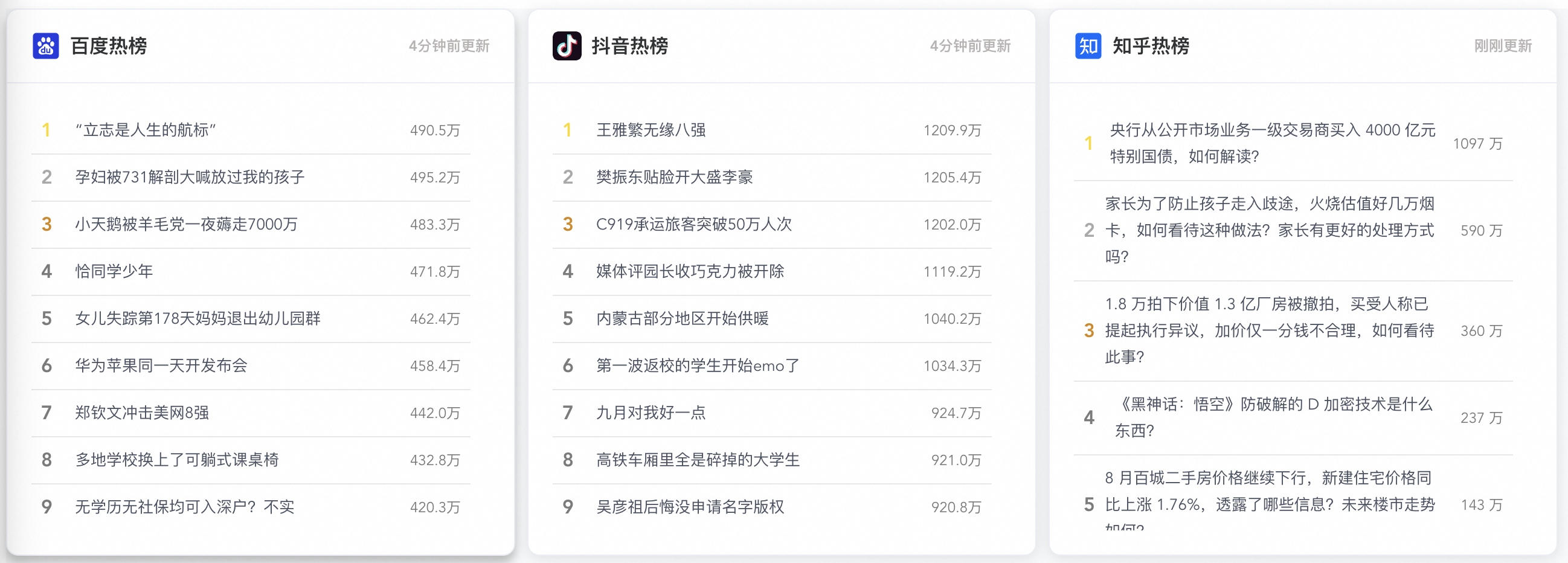
这样,我们使用XXL-Job改造热搜组件就完成了,详细代码可以去看我的代码仓库。
番外:B站热搜爬虫
1. 爬虫方案评估
B站不是热搜,是热门视频, 但逻辑是一样的,它的接口是:https://api.bilibili.com/x/web-interface/ranking/v2

这个接口返回的是JSON格式数据,这就很简单了,看下结构就行。
2. 网页解析代码
这个就可以使用Postman生成调用代码,流程我就不赘述了,直接上代码,BilibiliHotSearchJob:
1package com.summo.sbmy.job.bilibili;
2
3import java.io.IOException;
4import java.util.Calendar;
5import java.util.List;
6import java.util.stream.Collectors;
7
8import com.alibaba.fastjson.JSONArray;
9import com.alibaba.fastjson.JSONObject;
10
11import com.google.common.collect.Lists;
12import com.summo.sbmy.common.model.dto.HotSearchDetailDTO;
13import com.summo.sbmy.dao.entity.SbmyHotSearchDO;
14import com.summo.sbmy.service.SbmyHotSearchService;
15import com.summo.sbmy.service.convert.HotSearchConvert;
16import com.xxl.job.core.biz.model.ReturnT;
17import com.xxl.job.core.handler.annotation.XxlJob;
18import lombok.extern.slf4j.Slf4j;
19import okhttp3.OkHttpClient;
20import okhttp3.Request;
21import okhttp3.Response;
22import org.apache.commons.collections4.CollectionUtils;
23import org.springframework.beans.factory.annotation.Autowired;
24import org.springframework.stereotype.Component;
25
26import static com.summo.sbmy.common.cache.SbmyHotSearchCache.CACHE_MAP;
27import static com.summo.sbmy.common.enums.HotSearchEnum.BILIBILI;
28
29/**
30 * @author summo
31 * @version BilibiliHotSearchJob.java, 1.0.0
32 * @description B站热榜Java爬虫代码
33 * @date 2024年08月19
34 */
35@Component
36@Slf4j
37public class BilibiliHotSearchJob {
38
39    @Autowired
40    private SbmyHotSearchService sbmyHotSearchService;
41
42    @XxlJob("bilibiliHotSearchJob")
43    public ReturnT<String> hotSearch(String param) throws IOException {
44        log.info("B站热搜爬虫任务开始");
45        try {
46            //查询B站热搜数据
47            OkHttpClient client = new OkHttpClient().newBuilder().build();
48            Request request = new Request.Builder().url("https://api.bilibili.com/x/web-interface/ranking/v2")
49                .addHeader("User-Agent", "Mozilla/5.0 (compatible)").addHeader("Cookie", "b_nut=1712137652; "
50                    + "buvid3=DBA9C433-8738-DD67-DCF5" + "-DDC780CA892052512infoc").method("GET", null).build();
51            Response response = client.newCall(request).execute();
52            JSONObject jsonObject = JSONObject.parseObject(response.body().string());
53            JSONArray array = jsonObject.getJSONObject("data").getJSONArray("list");
54            List<SbmyHotSearchDO> sbmyHotSearchDOList = Lists.newArrayList();
55            for (int i = 0, len = array.size(); i < len; i++) {
56                //获取B站热搜信息
57                JSONObject object = (JSONObject)array.get(i);
58                //构建热搜信息榜
59                SbmyHotSearchDO sbmyHotSearchDO = SbmyHotSearchDO.builder().hotSearchResource(BILIBILI.getCode())
60                    .build();
61                //设置B站三方ID
62                sbmyHotSearchDO.setHotSearchId(object.getString("aid"));
63                //设置文章连接
64                sbmyHotSearchDO.setHotSearchUrl(object.getString("short_link_v2"));
65                //设置文章标题
66                sbmyHotSearchDO.setHotSearchTitle(object.getString("title"));
67                //设置作者名称
68                sbmyHotSearchDO.setHotSearchAuthor(object.getJSONObject("owner").getString("name"));
69                //设置作者头像
70                sbmyHotSearchDO.setHotSearchAuthorAvatar(object.getJSONObject("owner").getString("face"));
71                //设置文章封面
72                sbmyHotSearchDO.setHotSearchCover(object.getString("pic"));
73                //设置热搜热度
74                sbmyHotSearchDO.setHotSearchHeat(object.getJSONObject("stat").getString("view"));
75                //按顺序排名
76                sbmyHotSearchDO.setHotSearchOrder(i + 1);
77                sbmyHotSearchDOList.add(sbmyHotSearchDO);
78            }
79            if (CollectionUtils.isEmpty(sbmyHotSearchDOList)) {
80                return ReturnT.SUCCESS;
81            }
82            //数据加到缓存中
83            CACHE_MAP.put(BILIBILI.getCode(), HotSearchDetailDTO.builder()
84                //热搜数据
85                .hotSearchDTOList(
86                    sbmyHotSearchDOList.stream().map(HotSearchConvert::toDTOWhenQuery).collect(Collectors.toList()))
87                //更新时间
88                .updateTime(Calendar.getInstance().getTime()).build());
89            //数据持久化
90            sbmyHotSearchService.saveCache2DB(sbmyHotSearchDOList);
91            log.info("B站热搜爬虫任务结束");
92        } catch (IOException e) {
93            log.error("获取B站数据异常", e);
94        }
95        return ReturnT.SUCCESS;
96    }
97
98}
99
看下效果,第一行的4个热搜已经出来了,如下: