
⭐️基础链接导航⭐️
服务器 → ☁️ 阿里云活动地址
看样例 → 🐟 摸鱼小网站地址
学代码 → 💻 源码库地址
一、前言
大家好呀,我是summo,最近发生了些事情(被裁员了,在找工作中)导致断更了,非常抱歉。刚被裁的时候还是有些难受,而且我还有房贷要还,有些压力,不过休息了一段时间,心态也平复了一些,打算一边找工作一边写文,如果有和我一样经历的同学,大家共勉!
《花100块做个摸鱼小网站! 》这个系列的前六篇已经大概把整体的流程写完了,从这篇起我会补充一些细节和组件,让我们的小网站更加丰富一些。这一篇呢我会介绍如何将用户的访问记录留下来,看着自己做的网站被别人访问是一件很有意思和很有成就感的事情。
对应的组件也就是我用红框标出来的那个,如下图:
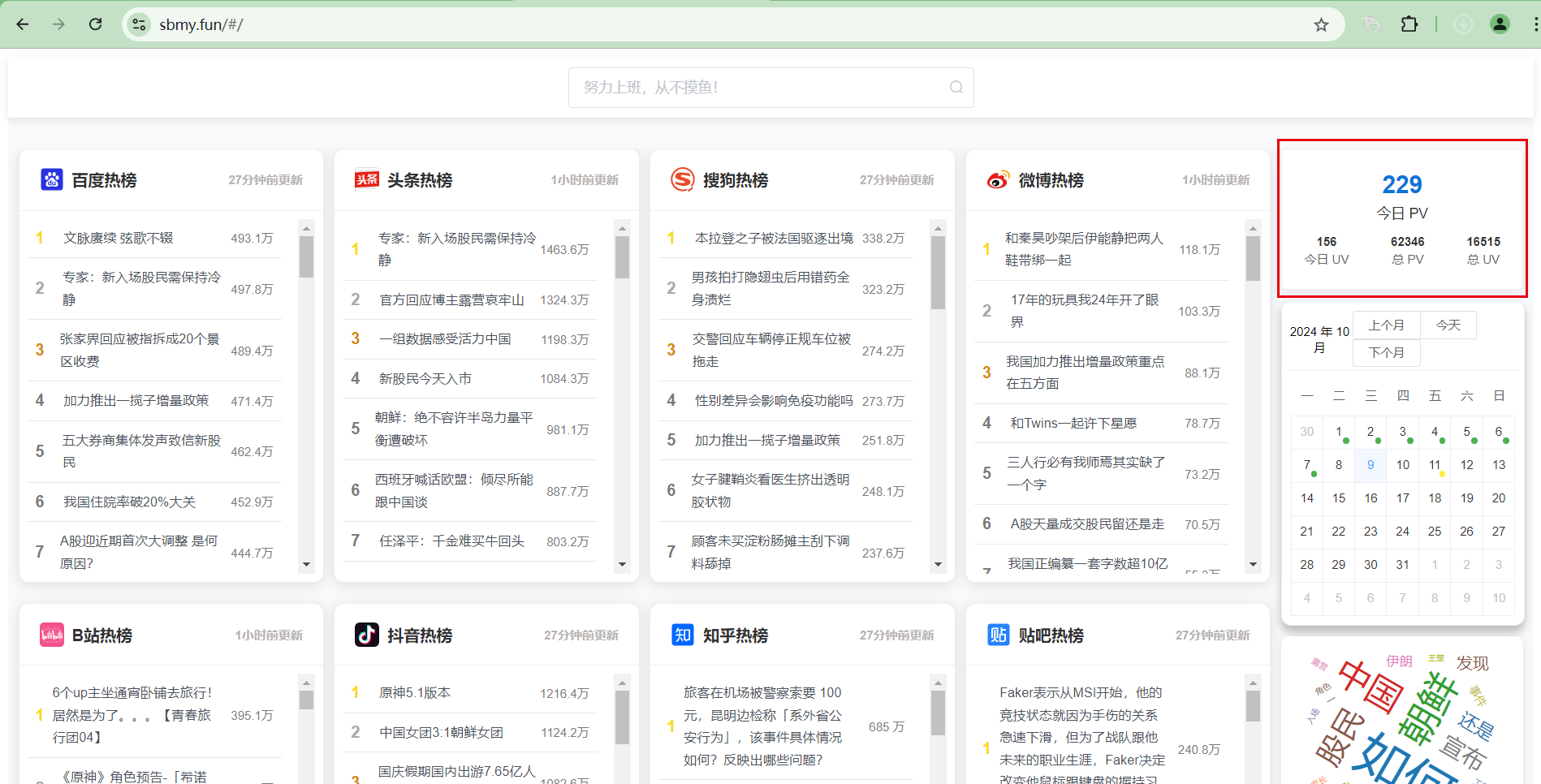
解释下PV和UV的意思,如下:
- PV:页面访问量,即PageView,用户每次对网站的访问均被记录,用户对同一页面的多次访问,访问量累计。
- UV:独立访问用户数:即UniqueVisitor,访问网站的一台电脑客户端为一个访客。
二、用户身份标识
用于表明一个用户身份最好的做法是做登录注册,但是一旦加了这样的逻辑,就会有很多麻烦的问题要处理,比如如何做人机验证啦、接口防刷啦,等等,这些问题不处理的话网站很容易被攻击。像我们这样的小网站,我觉得这个功能没必要,我们只需要知道有多少人访问过我们的网站就可以了。
对于这样的需求,最简单的做法是根据用户的访问IP作为标识,然后根据IP解析一下地域信息,这样就已经很不错了。而目前最常用的IP解析工具就是:ip2region,如何使用这个组件我之前写过一篇文章进行介绍了,文章链接:SpringBoot整合ip2region实现使用ip监控用户访问城市。
核心代码是这段:
1package com.example.springbootip.util;
2
3
4import org.apache.commons.io.FileUtils;
5import org.lionsoul.ip2region.xdb.Searcher;
6
7import java.io.File;
8import java.text.MessageFormat;
9import java.util.Objects;
10
11public class AddressUtil {
12
13    /**
14     * 当前记录地址的本地DB
15     */
16    private static final String TEMP_FILE_DIR = "/home/admin/app/";
17
18    /**
19     * 根据IP地址查询登录来源
20     *
21     * @param ip
22     * @return
23     */
24    public static String getCityInfo(String ip) {
25        try {
26            // 获取当前记录地址位置的文件
27            String dbPath = Objects.requireNonNull(AddressUtil.class.getResource("/ip2region/ip2region.xdb")).getPath();
28            File file = new File(dbPath);
29            //如果当前文件不存在,则从缓存中复制一份
30            if (!file.exists()) {
31                dbPath =    TEMP_FILE_DIR + "ip.db";
32                System.out.println(MessageFormat.format("当前目录为:[{0}]", dbPath));
33                file = new File(dbPath);
34                FileUtils.copyInputStreamToFile(Objects.requireNonNull(AddressUtil.class.getClassLoader().getResourceAsStream("classpath:ip2region/ip2region.xdb")), file);
35            }
36            //创建查询对象
37            Searcher searcher = Searcher.newWithFileOnly(dbPath);
38            //开始查询
39            return searcher.searchByStr(ip);
40        } catch (Exception e) {
41            e.printStackTrace();
42        }
43        //默认返回空字符串
44        return "";
45    }
46
47    public static void main(String[] args) {
48        System.out.println(getCityInfo("1.2.3.4"));
49    }
50}
三、功能实现
为了解耦逻辑,我使用了一个注解:@VisitLog,只要将该注解放在IndexController的index方法上即可。同时为了统计用户的访问数据,我们需要设计一张访问记录表将数据存下来,并设计一个小组件用来展示这些数据,具体流程如下文。
1. 后端部分
(1)访问记录表设计
建表语句
1-- `summo-sbmy`.t_sbmy_visit_log definition
2
3CREATE TABLE `t_sbmy_visit_log` (
4  `id` bigint(20) unsigned zerofill NOT NULL AUTO_INCREMENT COMMENT '物理主键',
5  `device_type` varchar(256) CHARACTER SET utf8mb4 COLLATE utf8mb4_0900_ai_ci DEFAULT NULL COMMENT '设备类型,手机还是电脑',
6  `ip` varchar(256) CHARACTER SET utf8mb4 COLLATE utf8mb4_0900_ai_ci DEFAULT NULL COMMENT '访问',
7  `address` varchar(256) CHARACTER SET utf8mb4 COLLATE utf8mb4_0900_ai_ci DEFAULT NULL COMMENT 'IP地址',
8  `time` int DEFAULT NULL COMMENT '耗时',
9  `method` varchar(2048) CHARACTER SET utf8mb4 COLLATE utf8mb4_0900_ai_ci DEFAULT NULL COMMENT '调用方法',
10  `params` text CHARACTER SET utf8mb4 COLLATE utf8mb4_0900_ai_ci COMMENT '参数',
11  `gmt_create` datetime DEFAULT NULL COMMENT '创建时间',
12  `gmt_modified` datetime DEFAULT NULL COMMENT '更新时间',
13  `creator_id` bigint DEFAULT NULL COMMENT '创建人',
14  `modifier_id` bigint DEFAULT NULL COMMENT '更新人',
15  PRIMARY KEY (`id`) USING BTREE
16) ENGINE=InnoDB AUTO_INCREMENT=oDEFAULT CHARSET=utf8mb4 COLLATE=utf8mb4_0900_ai_ci;
DO、Mapper、Repository等文件
还记得我在第三篇介绍的那个DO生成插件吗,在config.properties改下表名和DO名,双击mybatis-generator:generate就可以生成对应的DO、Mapper、xml了。

(2)VisitLog注解
VisitLog.java
1package com.summo.sbmy.aspect;
2
3/**
4 * 访问标识注解
5 */
6public @interface VisitLog {
7}
8
VisitLogAspect.java
1package com.summo.sbmy.aspect.visit;
2
3import java.io.Serializable;
4import java.lang.reflect.Method;
5import java.util.ArrayList;
6import java.util.LinkedHashMap;
7import java.util.List;
8import java.util.Map;
9import java.util.Set;
10
11import javax.servlet.http.HttpServletRequest;
12import javax.servlet.http.HttpServletResponse;
13
14import com.alibaba.fastjson.JSON;
15import com.alibaba.fastjson.JSONObject;
16
17import com.fasterxml.jackson.core.JsonProcessingException;
18import com.summo.sbmy.common.util.AddressUtil;
19import com.summo.sbmy.common.util.HttpContextUtil;
20import com.summo.sbmy.common.util.IpUtil;
21import com.summo.sbmy.dao.entity.SbmyVisitLogDO;
22import com.summo.sbmy.dao.repository.SbmyVisitLogRepository;
23import lombok.extern.slf4j.Slf4j;
24import org.aspectj.lang.ProceedingJoinPoint;
25import org.aspectj.lang.annotation.Around;
26import org.aspectj.lang.annotation.Aspect;
27import org.aspectj.lang.annotation.Pointcut;
28import org.aspectj.lang.reflect.MethodSignature;
29import org.springframework.beans.factory.annotation.Autowired;
30import org.springframework.core.LocalVariableTableParameterNameDiscoverer;
31import org.springframework.stereotype.Component;
32import org.springframework.web.multipart.MultipartFile;
33
34import static com.summo.sbmy.common.util.DeviceUtil.isFromMobile;
35
36
37@Slf4j
38@Aspect
39@Component
40public class VisitLogAspect {
41
42    @Autowired
43    private SbmyVisitLogRepository sbmyVisitLogRepository;
44
45    @Pointcut("@annotation(com.summo.sbmy.aspect.visit.Log)")
46    public void pointcut() {
47        // do nothing
48    }
49
50    @Around("pointcut()")
51    public Object around(ProceedingJoinPoint joinPoint) throws Throwable {
52        //获取request
53        HttpServletRequest request = HttpContextUtil.getHttpServletRequest();
54        // 请求的类名
55        MethodSignature signature = (MethodSignature)joinPoint.getSignature();
56        Method method = signature.getMethod();
57        String className = joinPoint.getTarget().getClass().getName();
58        // 请求的方法名
59        String methodName = signature.getName();
60        String ip = IpUtil.getIpAddr(request);
61        String address = AddressUtil.getAddress(ip);
62        SbmyVisitLogDO sbmyVisitLogDO = SbmyVisitLogDO.builder().deviceType(isFromMobile(request) ? "手机" : "电脑").method(
63            className + "." + methodName + "()").ip(ip).address(AddressUtil.getAddress(address)).build();
64        // 请求的方法参数值
65        Object[] args = joinPoint.getArgs();
66        // 请求的方法参数名称
67        LocalVariableTableParameterNameDiscoverer u = new LocalVariableTableParameterNameDiscoverer();
68        String[] paramNames = u.getParameterNames(method);
69        if (args != null && paramNames != null) {
70            // 创建 key-value 映射用于生成 JSON 字符串
71            Map<String, Object> paramMap = new LinkedHashMap<>();
72            for (int i = 0; i < paramNames.length; i++) {
73                if (args[i] instanceof HttpServletRequest || args[i] instanceof HttpServletResponse) {
74                    continue;
75                }
76                paramMap.put(paramNames[i], args[i]);
77            }
78            // 使用 Fastjson 将参数映射转换为 JSON 字符串
79            String paramsJson = JSON.toJSONString(paramMap);
80            sbmyVisitLogDO.setParams(paramsJson);
81        }
82        long beginTime = System.currentTimeMillis();
83        Object proceed = joinPoint.proceed();
84        long end = System.currentTimeMillis();
85        sbmyVisitLogDO.setTime((int)(end - beginTime));
86        sbmyVisitLogRepository.save(sbmyVisitLogDO);
87        return proceed;
88    }
89
90    /**
91     * 参数构造器¬
92     *
93     * @param params
94     * @param args
95     * @param paramNames
96     * @return
97     * @throws JsonProcessingException
98     */
99    private StringBuilder handleParams(StringBuilder params, Object[] args, List paramNames)
100        throws JsonProcessingException {
101        for (int i = 0; i < args.length; i++) {
102            if (args[i] instanceof Map) {
103                Set set = ((Map)args[i]).keySet();
104                List<Object> list = new ArrayList<>();
105                List<Object> paramList = new ArrayList<>();
106                for (Object key : set) {
107                    list.add(((Map)args[i]).get(key));
108                    paramList.add(key);
109                }
110                return handleParams(params, list.toArray(), paramList);
111            } else {
112                if (args[i] instanceof Serializable) {
113                    Class<?> aClass = args[i].getClass();
114                    try {
115                        aClass.getDeclaredMethod("toString", new Class[] {null});
116                        // 如果不抛出 NoSuchMethodException 异常则存在 toString 方法 ,安全的 writeValueAsString ,否则 走 Object的
117                        // toString方法
118                        params.append(" ").append(paramNames.get(i)).append(": ").append(
119                            JSONObject.toJSONString(args[i]));
120                    } catch (NoSuchMethodException e) {
121                        params.append(" ").append(paramNames.get(i)).append(": ").append(
122                            JSONObject.toJSONString(args[i].toString()));
123                    }
124                } else if (args[i] instanceof MultipartFile) {
125                    MultipartFile file = (MultipartFile)args[i];
126                    params.append(" ").append(paramNames.get(i)).append(": ").append(file.getName());
127                } else {
128                    params.append(" ").append(paramNames.get(i)).append(": ").append(args[i]);
129                }
130            }
131        }
132        return params;
133    }
134}
135
这里使用到了一些工具类,代码我已经上传到仓库了,大家直接down下来就行。
(3)注解使用
在IndexController.java中加入该注解即可
1package com.summo.sbmy.web.controller;
2
3import com.summo.sbmy.aspect.visit.VisitLog;
4import org.springframework.stereotype.Controller;
5import org.springframework.web.bind.annotation.GetMapping;
6
7@Controller
8public class IndexController {
9
10    @GetMapping("/")
11    @VisitLog
12    public String index(){
13        return "index";
14    }
15}
16
2. 前端部分
(1)新建VisitorLog组件
代码如下:
1<template>
2  <div class="stats-card-container">
3    <el-card class="stats-card-main">
4      <!-- 突出显示的今日 PV -->
5      <div class="stats-section">
6        <div class="stats-value-main">{{ statsData.todayPv }}</div>
7        <div class="stats-label-main">今日 PV</div>
8      </div>
9      <!-- 其他统计数据,以更紧凑的形式显示 -->
10      <div class="stats-section stats-others">
11        <div class="stats-item">
12          <div class="stats-value-small">{{ statsData.todayUv }}</div>
13          <div class="stats-label-small">今日 UV</div>
14        </div>
15        <div class="stats-item">
16          <div class="stats-value-small">{{ statsData.allPv }}</div>
17          <div class="stats-label-small">总 PV</div>
18        </div>
19        <div class="stats-item">
20          <div class="stats-value-small">{{ statsData.allUv }}</div>
21          <div class="stats-label-small">总 UV</div>
22        </div>
23      </div>
24    </el-card>
25  </div>
26</template>
27<script>
28import apiService from "@/config/apiService.js";
29export default {
30  name: "VisitorLog",
31  data() {
32    return {
33      statsData: {
34        todayPv: 0,
35        todayUv: 0,
36        allPv: 0,
37        allUv: 0,
38      },
39    };
40  },
41  created() {
42    this.fetchVisitorCount(); // 组件创建时立即调用一次
43    this.startPolling(); // 启动定时器
44  },
45  beforeDestroy() {
46    this.stopPolling(); // 在组件销毁前清理定时器
47  },
48  methods: {
49    fetchVisitorCount() {
50      apiService
51        .get("/welcome/queryVisitorCount")
52        .then((res) => {
53          // 处理响应数据
54          this.statsData = res.data.data;
55        })
56        .catch((error) => {
57          // 处理错误情况
58          console.error(error);
59        });
60    },
61    startPolling() {
62      // 定义一个方法来启动周期性的定时器
63      this.polling = setInterval(() => {
64        this.fetchVisitorCount();
65      }, 1000 * 60 * 60); // 每60000毫秒(1分钟)调用一次
66    },
67    stopPolling() {
68      // 定义一个方法来停止定时器
69      clearInterval(this.polling);
70    },
71  },
72};
73</script>
74
75<style scoped>
76>>> .el-card__body{
77  padding: 10px;
78}
79.stats-card-container {
80  max-width: 400px;
81  margin-bottom: 10px;
82}
83
84.stats-card-main {
85  padding: 12px;
86  box-shadow: 0 2px 4px rgba(0, 0, 0, 0.1);
87}
88
89.stats-section {
90  text-align: center;
91}
92
93.stats-value-main {
94  font-size: 24px;
95  font-weight: bold;
96  color: #0A74DA;
97  margin-bottom: 4px;
98}
99
100.stats-label-main {
101  font-size: 14px;
102  color: #333;
103}
104
105.stats-others {
106  display: flex;
107  justify-content: space-between;
108  margin-top: 12px;
109}
110
111.stats-item {
112  text-align: center;
113}
114
115.stats-value-small, .stats-label-small {
116  font-size: 12px; /* 减小字体尺寸以实现更紧凑的布局 */
117}
118
119.stats-value-small {
120  font-weight: bold;
121  color: #333;
122  margin-bottom: 2px;
123}
124
125.stats-label-small {
126  color: #666;
127}
128
129@media (max-width: 400px) {
130  .stats-others {
131    flex-direction: column;
132    align-items: center;
133  }
134
135  .stats-item {
136    margin-bottom: 8px;
137  }
138}
139</style>
140
(2)组件使用
在App.vue组件中引入VisitorLog组件,顺便将布局重新分一下,代码如下:
1<template>
2  <div id="app">
3    <el-row :gutter="10">
4      <el-col :span="20">
5        <el-row :gutter="10">
6          <el-col :span="6" v-for="(board, index) in hotBoards" :key="index">
7            <hot-search-board
8              :title="board.title"
9              :icon="board.icon"
10              :fetch-url="board.fetchUrl"
11              :type="board.type"
12            />
13          </el-col>
14        </el-row>
15      </el-col>
16      <el-col :span="4">
17        <visitor-log />
18      </el-col>
19    </el-row>
20  </div>
21</template>
22
23<script>
24import HotSearchBoard from "@/components/HotSearchBoard.vue";
25import VisitorLog from "@/components/VisitorLog.vue";
26export default {
27  name: "App",
28  components: {
29    HotSearchBoard,
30    VisitorLog,
31  },
32  data() {
33    return {
34      hotBoards: [
35        {
36          title: "百度",
37          icon: require("@/assets/icons/baidu-icon.svg"),
38          type: "baidu",
39        },
40        {
41          title: "抖音",
42          icon: require("@/assets/icons/douyin-icon.svg"),
43          type: "douyin",
44        },
45        {
46          title: "知乎",
47          icon: require("@/assets/icons/zhihu-icon.svg"),
48          type: "zhihu",
49        },
50        {
51          title: "B站",
52          icon: require("@/assets/icons/bilibili-icon.svg"),
53          type: "bilibili",
54        },
55        {
56          title: "搜狗",
57          icon: require("@/assets/icons/sougou-icon.svg"),
58          type: "sougou",
59        },
60      ],
61    };
62  },
63};
64</script>
65
66<style>
67#app {
68  font-family: Avenir, Helvetica, Arial, sans-serif;
69  -webkit-font-smoothing: antialiased;
70  -moz-osx-font-smoothing: grayscale;
71  text-align: center;
72  color: #2c3e50;
73  margin-top: 60px;
74  background: #f8f9fa; /* 提供一个柔和的背景色 */
75  min-height: 100vh; /* 使用视口高度确保填满整个屏幕 */
76  padding: 0; /* 保持整体布局紧凑,无额外内边距 */
77}
78</style>
79
咱们做出来的效果就是这样的,如下:
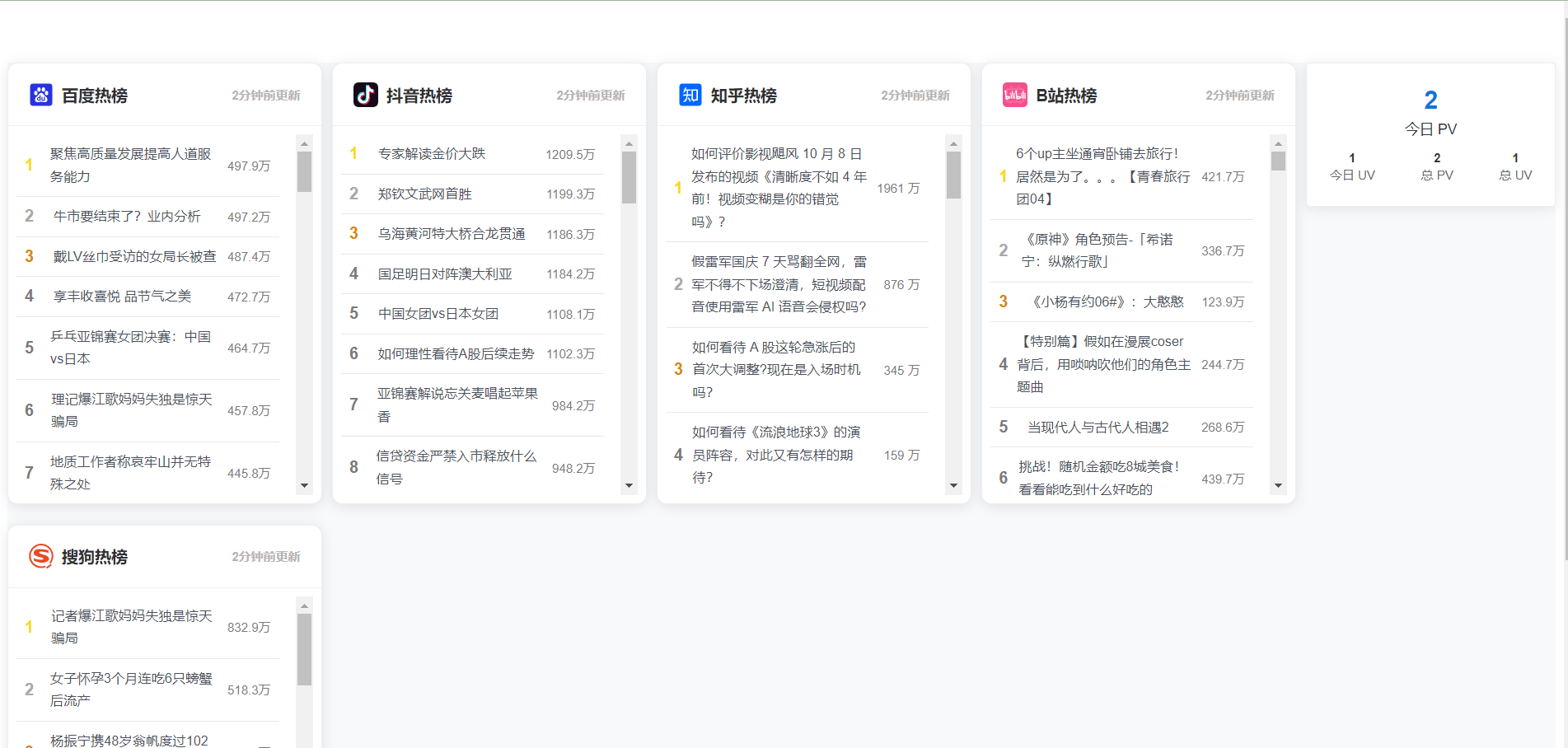
这个小组件做起来还是简单的,主要就是监控了别人的访问IP,然后通过IP反解析出所属地域,最后将其存到数据库中。
番外:搜狗热搜爬虫
1. 爬虫方案评估
搜狗的热搜接口返回的一串JSON格式数据,这就很简单了,省的我们去解析dom,访问链接是:https://go.ie.sogou.com/hot_ranks

2. 网页解析代码
SougouHotSearchJob.java
1package com.summo.sbmy.job.sougou;
2
3import com.alibaba.fastjson.JSONArray;
4import com.alibaba.fastjson.JSONObject;
5import com.google.common.collect.Lists;
6import com.summo.sbmy.common.model.dto.HotSearchDetailDTO;
7import com.summo.sbmy.dao.entity.SbmyHotSearchDO;
8import com.summo.sbmy.service.SbmyHotSearchService;
9import com.summo.sbmy.service.convert.HotSearchConvert;
10import com.xxl.job.core.biz.model.ReturnT;
11import com.xxl.job.core.handler.annotation.XxlJob;
12import lombok.extern.slf4j.Slf4j;
13import okhttp3.OkHttpClient;
14import okhttp3.Request;
15import okhttp3.Response;
16import org.apache.commons.collections4.CollectionUtils;
17import org.springframework.beans.factory.annotation.Autowired;
18import org.springframework.stereotype.Component;
19
20import java.io.IOException;
21import java.util.Calendar;
22import java.util.List;
23import java.util.Random;
24import java.util.UUID;
25import java.util.stream.Collectors;
26
27import static com.summo.sbmy.common.cache.SbmyHotSearchCache.CACHE_MAP;
28import static com.summo.sbmy.common.enums.HotSearchEnum.DOUYIN;
29import static com.summo.sbmy.common.enums.HotSearchEnum.SOUGOU;
30
31/**
32 * @author summo
33 * @version SougouHotSearchJob.java, 1.0.0
34 * @description 搜狗热搜Java爬虫代码
35 * @date 2024年08月09
36 */
37@Component
38@Slf4j
39public class SougouHotSearchJob {
40
41    @Autowired
42    private SbmyHotSearchService sbmyHotSearchService;
43
44    @XxlJob("sougouHotSearchJob")
45    public ReturnT<String> hotSearch(String param) throws IOException {
46        log.info("搜狗热搜爬虫任务开始");
47        try {
48            //查询搜狗热搜数据
49            OkHttpClient client = new OkHttpClient().newBuilder().build();
50            Request request = new Request.Builder().url("https://go.ie.sogou.com/hot_ranks").method("GET", null)
51                    .build();
52            Response response = client.newCall(request).execute();
53            JSONObject jsonObject = JSONObject.parseObject(response.body().string());
54            JSONArray array = jsonObject.getJSONArray("data");
55            List<SbmyHotSearchDO> sbmyHotSearchDOList = Lists.newArrayList();
56            for (int i = 0, len = array.size(); i < len; i++) {
57                //获取知乎热搜信息
58                JSONObject object = (JSONObject)array.get(i);
59                //构建热搜信息榜
60                SbmyHotSearchDO sbmyHotSearchDO = SbmyHotSearchDO.builder().hotSearchResource(SOUGOU.getCode()).build();
61                //设置知乎三方ID
62                sbmyHotSearchDO.setHotSearchId(object.getString("id"));
63                //设置文章标题
64                sbmyHotSearchDO.setHotSearchTitle(object.getJSONObject("attributes").getString("title"));
65                //设置文章连接
66                sbmyHotSearchDO.setHotSearchUrl(
67                        "https://www.sogou.com/web?ie=utf8&query=" + sbmyHotSearchDO.getHotSearchTitle());
68                //设置热搜热度
69                sbmyHotSearchDO.setHotSearchHeat(object.getJSONObject("attributes").getString("num"));
70                //按顺序排名
71                sbmyHotSearchDO.setHotSearchOrder(i + 1);
72                sbmyHotSearchDOList.add(sbmyHotSearchDO);
73            }
74            if (CollectionUtils.isEmpty(sbmyHotSearchDOList)) {
75                return ReturnT.SUCCESS;
76            }
77            //数据加到缓存中
78            CACHE_MAP.put(SOUGOU.getCode(), HotSearchDetailDTO.builder()
79                //热搜数据
80                .hotSearchDTOList(
81                    sbmyHotSearchDOList.stream().map(HotSearchConvert::toDTOWhenQuery).collect(Collectors.toList()))
82                //更新时间
83                .updateTime(Calendar.getInstance().getTime()).build());
84            //数据持久化
85            sbmyHotSearchService.saveCache2DB(sbmyHotSearchDOList);
86            log.info("搜狗热搜爬虫任务结束");
87        } catch (IOException e) {
88            log.error("获取搜狗数据异常", e);
89        }
90        return ReturnT.SUCCESS;
91    }
92}