
今天进行了InfluxDB和MySQL的对比测试,这里记录下结果,也方便我以后查阅。
操作系统: CentOS6.5_x64
InfluxDB版本 : v1.1.0
MySQL版本:v5.1.73
CPU : Intel(R) Core(TM) i5-2320 CPU @ 3.00GHz
内存 :12G
硬盘 :SSD
一、MySQL读写测试
测试准备
初始化SQL语句:
1CREATE DATABASE testMysql;
2CREATE TABLE `monitorStatus` (
3    `system_name` VARCHAR(20) NOT NULL,
4    `site_name` VARCHAR(50) NOT NULL,
5    `equipment_name` VARCHAR(50) NOT NULL,
6    `current_value` DOUBLE NOT NULL,
7    `timestamp` BIGINT(20) NULL DEFAULT NULL,
8    INDEX `system_name` (`system_name`),
9    INDEX `site_name` (`site_name`),
10    INDEX `equipment_name` (`equipment_name`),
11    INDEX `timestamp` (`timestamp`)
12)
13ENGINE=InnoDB;
单写测试代码(insertTest1.c):


1#include <stdlib.h>
2#include <stdio.h>
3#include <time.h>
4#include "mysql/mysql.h"
5
6#define N 100
7
8int main()
9{
10    MYSQL *conn_ptr;
11    int res;
12    int t,i,j;
13    int64_t tstamp = 1486872962;
14    srand(time(NULL));
15    t=0;
16    conn_ptr = mysql_init(NULL);
17    if (!conn_ptr)
18    {
19        printf("mysql_init failed\n");
20        return EXIT_FAILURE;
21    }
22    conn_ptr = mysql_real_connect(conn_ptr,"localhost","root","","testMysql",0,NULL,0);
23    if (conn_ptr)
24    {
25        for(i=1;i<= 10000;i++)
26        {
27            mysql_query(conn_ptr,"begin");
28            for(j=0;j<N;j++,t++)
29            {
30                char query[1024]={0};
31
32                sprintf(query,"insert into monitorStatus values ('sys_%d','s_%d','e_%d','0.%02d','%lld');",
33                    //j%10,(t+i)%10,(t+j)%10,(t+i+j)%100,tstamp);
34                    j%10,(t+i)%10,(t+j)%10,rand()%100,tstamp);
35                //printf("query : %s\n",query);
36                res = mysql_query(conn_ptr,query);
37
38                if (!res)
39                {
40                    //printf("Inserted %lu rows\n",(unsigned long)mysql_affected_rows(conn_ptr));
41                }
42                else
43                {
44                    fprintf(stderr, "Insert error %d: %sn",mysql_errno(conn_ptr),mysql_error(conn_ptr));
45                }
46                if(j%10 == 0) tstamp+=1;
47            }
48            mysql_query(conn_ptr,"commit");
49            //printf("i=%d\n",i);
50        }
51    }
52    else
53    {
54        printf("Connection failed\n");
55    }
56    mysql_close(conn_ptr);
57    return EXIT_SUCCESS;
58}
View Code
可根据情况调整测试代码中的N参数。
单读测试代码(queryTest1.c):
1#include <stdio.h>
2#include <stdlib.h>
3#include "mysql/mysql.h"
4
5int main()
6{
7    MYSQL *conn_ptr;
8    MYSQL_RES *res_ptr;
9    MYSQL_ROW sqlrow;
10    MYSQL_FIELD *fd;
11    int res, i, j;
12
13    conn_ptr = mysql_init(NULL);
14    if (!conn_ptr)
15    {
16        return EXIT_FAILURE;
17    }
18    conn_ptr = mysql_real_connect(conn_ptr,"localhost","root","","testMysql", 0, NULL, 0);
19    if (conn_ptr)
20    {
21        res = mysql_query(conn_ptr,"select * from `monitorStatus` where system_name='sys_8' and site_name='s_9' and equipment_name='e_6' order by timestamp desc limit 10000;");
22
23        if (res)
24        {
25            printf("SELECT error:%s\n",mysql_error(conn_ptr));
26        }
27        else
28        {
29            res_ptr = mysql_store_result(conn_ptr);
30            if(res_ptr)
31            {
32                printf("%lu Rows\n",(unsigned long)mysql_num_rows(res_ptr));
33                j = mysql_num_fields(res_ptr);
34                while((sqlrow = mysql_fetch_row(res_ptr)))
35                {
36                    continue;
37                    for(i = 0; i < j; i++)
38                        printf("%s\t", sqlrow[i]);
39                    printf("\n");
40                }
41                if (mysql_errno(conn_ptr))
42                {
43                    fprintf(stderr,"Retrive error:s\n",mysql_error(conn_ptr));
44                }
45            }
46            mysql_free_result(res_ptr);
47        }
48    }
49    else
50    {
51        printf("Connection failed\n");
52    }
53    mysql_close(conn_ptr);
54    return EXIT_SUCCESS;
55}
View Code
Makefile文件:
1all:
2    gcc -g insertTest1.c -o insertTest1 -L/usr/lib64/mysql/ -lmysqlclient
3    gcc -g queryTest1.c -o queryTest1 -L/usr/lib64/mysql/ -lmysqlclient
4
5clean:
6    rm -rf insertTest1
7    rm -rf queryTest1
测试数据记录
磁盘空间占用查询:
使用du方式(新数据库,仅为测试):
du -sh /var/lib/mysql
查询特定表:
1use information_schema;
2select concat(round(sum(DATA_LENGTH/1024/1024), 2), 'MB') as data from TABLES where table_schema='testMysql' and table_name='monitorStatus';
测试结果:
-
100万条数据
1[root@localhost mysqlTest]# time ./insertTest1
2
3real    1m20.645s
4user    0m8.238s
5sys    0m5.931s
6
7[root@localhost mysqlTest]# time ./queryTest1
810000 Rows
9
10real    0m0.269s
11user    0m0.006s
12sys    0m0.002s
原始数据 : 28.6M
du方式 : 279MB
sql查询方式: 57.59MB
写入速度: 12398 / s
读取速度: 37174 / s -
1000万条数据
1root@localhost mysqlTest]# time ./insertTest1
2
3real    7m15.003s
4user    0m48.187s
5sys    0m33.885s
6
7
8[root@localhost mysqlTest]# time ./queryTest1
910000 Rows
10
11real    0m6.592s
12user    0m0.005s
13sys    0m0.002s
原始数据 : 286M
du方式 : 2.4G
sql查询方式: 572MB
写入速度: 22988 / s
读取速度: 1516 / s -
3000万条数据
1[root@localhost mysqlTest]# time ./insertTest1
2
3real    20m38.235s
4user    2m21.459s
5sys    1m40.329s
6[root@localhost mysqlTest]# time ./queryTest1
710000 Rows
8
9real    0m4.421s
10user    0m0.004s
11sys    0m0.004s
原始数据 : 858M
du方式 : 7.1G
sql查询方式: 1714MB
写入速度: 24228 / s
读取速度: 2261 / s
二、InfluxDB读写测试
测试准备
需要将InfluxDB的源码放入 go/src/github.com/influxdata 目录
单写测试代码(write1.go):
1package main
2
3import (
4    "log"
5    "time"
6    "fmt"
7    "math/rand"
8    "github.com/influxdata/influxdb/client/v2"
9)
10
11const (
12    MyDB = "testInfluxdb"
13    username = "root"
14    password = ""
15)
16
17func queryDB(clnt client.Client, cmd string) (res []client.Result, err error) {
18    q := client.Query{
19        Command:  cmd,
20        Database: MyDB,
21    }
22    if response, err := clnt.Query(q); err == nil {
23        if response.Error() != nil {
24            return res, response.Error()
25        }
26        res = response.Results
27    } else {
28        return res, err
29    }
30    return res, nil
31}
32
33func writePoints(clnt client.Client,num int) {
34    sampleSize := 1 * 10000
35    rand.Seed(42)
36    t := num
37    bp, _ := client.NewBatchPoints(client.BatchPointsConfig{
38        Database:  MyDB,
39        Precision: "us",
40    })
41
42    for i := 0; i < sampleSize; i++ {
43        t += 1
44        tags := map[string]string{
45            "system_name": fmt.Sprintf("sys_%d",i%10),
46            "site_name":fmt.Sprintf("s_%d", (t+i) % 10),
47            "equipment_name":fmt.Sprintf("e_%d",t % 10),
48        }
49        fields := map[string]interface{}{
50            "value" : fmt.Sprintf("%d",rand.Int()),
51        }
52        pt, err := client.NewPoint("monitorStatus", tags, fields,time.Now())
53        if err != nil {
54            log.Fatalln("Error: ", err)
55        }
56        bp.AddPoint(pt)
57    }
58
59    err := clnt.Write(bp)
60    if err != nil {
61        log.Fatal(err)
62    }
63
64    //fmt.Printf("%d task done\n",num)
65}
66
67func main() {
68    // Make client
69    c, err := client.NewHTTPClient(client.HTTPConfig{
70        Addr: "http://localhost:8086",
71        Username: username,
72        Password: password,
73    })
74
75    if err != nil {
76        log.Fatalln("Error: ", err)
77    }
78    _, err = queryDB(c, fmt.Sprintf("CREATE DATABASE %s", MyDB))
79    if err != nil {
80        log.Fatal(err)
81    }
82
83    i := 1
84    for i <= 10000 {
85        defer writePoints(c,i)
86        //fmt.Printf("i=%d\n",i)
87        i += 1
88    }
89    //fmt.Printf("task done : i=%d \n",i)
90
91}
View Code
单读测试代码(query1.go):
1package main
2
3import (
4    "log"
5    //"time"
6    "fmt"
7    //"math/rand"
8    "github.com/influxdata/influxdb/client/v2"
9)
10
11const (
12    MyDB = "testInfluxdb"
13    username = "root"
14    password = ""
15)
16
17func queryDB(clnt client.Client, cmd string) (res []client.Result, err error) {
18    q := client.Query{
19        Command:  cmd,
20        Database: MyDB,
21    }
22    if response, err := clnt.Query(q); err == nil {
23        if response.Error() != nil {
24            return res, response.Error()
25        }
26        res = response.Results
27    } else {
28        return res, err
29    }
30    return res, nil
31}
32
33func main() {
34    // Make client
35    c, err := client.NewHTTPClient(client.HTTPConfig{
36        Addr: "http://localhost:8086",
37        Username: username,
38        Password: password,
39    })
40
41    if err != nil {
42        log.Fatalln("Error: ", err)
43    }
44    q := fmt.Sprintf("select * from monitorStatus where system_name='sys_5' and site_name='s_1' and equipment_name='e_6' order by time desc limit 10000 ;")
45    res, err2 := queryDB(c, q)
46    if err2 != nil {
47        log.Fatal(err)
48    }
49    count := len(res[0].Series[0].Values)
50    log.Printf("Found a total of %v records\n", count)
51
52}
View Code
测试结果记录
查看整体磁盘空间占用:
du -sh /var/lib/influxdb/
查看最终磁盘空间占用:
du -sh /var/lib/influxdb/data/testInfluxdb
-
100万条数据
1[root@localhost goTest2]# time ./write1
2real    0m14.594s
3user    0m11.475s
4sys    0m0.251s
5
6[root@localhost goTest2]# time ./query1
72017/02/12 20:00:24 Found a total of 10000 records
8
9real    0m0.222s
10user    0m0.052s
11sys    0m0.009s
原始数据 : 28.6M
整体磁盘占用:27M
最终磁盘占用:21M
写入速度: 68521 / s
读取速度: 45045 / s -
1000万条数据
1[root@localhost goTest2]# time ./write1
2
3real    2m22.520s
4user    1m51.704s
5sys    0m2.532s
6
7[root@localhost goTest2]# time ./query1
82017/02/12 20:05:16 Found a total of 10000 records
9
10real    0m0.221s
11user    0m0.050s
12sys    0m0.003s
原始数据 : 286M
整体磁盘占用:214M
最终磁盘占用:189M 写入速度: 70165 / s
读取速度: 45249 / s -
3000万条数据
1[root@localhost goTest2]# time ./write1
2
3real    7m19.121s
4user    5m49.738s
5sys    0m8.189s
6[root@localhost goTest2]# ls
7query1  query1.go  write1  write1.go
8[root@localhost goTest2]# time ./query1
92017/02/12 20:49:40 Found a total of 10000 records
10
11real    0m0.233s
12user    0m0.050s
13sys    0m0.012s
原始数据 : 858M
整体磁盘占用:623M
最终磁盘占用:602M
写入速度: 68318 / s
读取速度: 42918 / s
三、测试结果分析
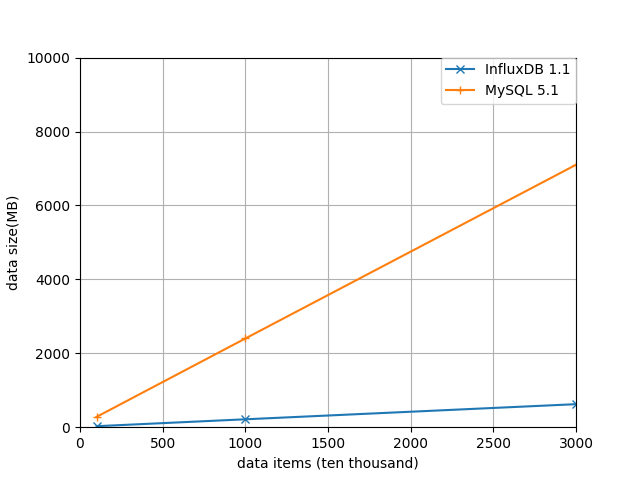
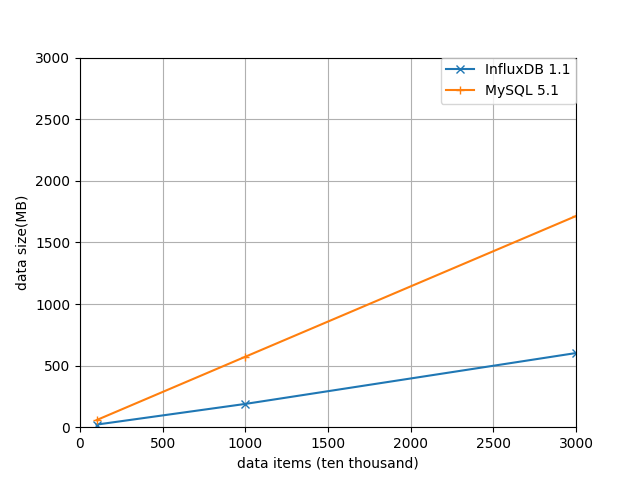
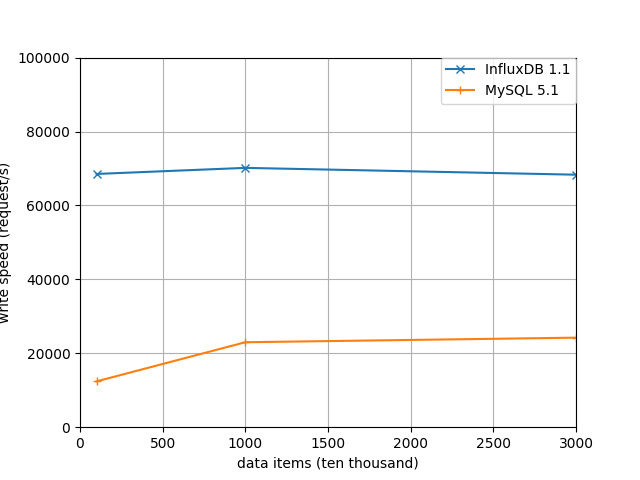
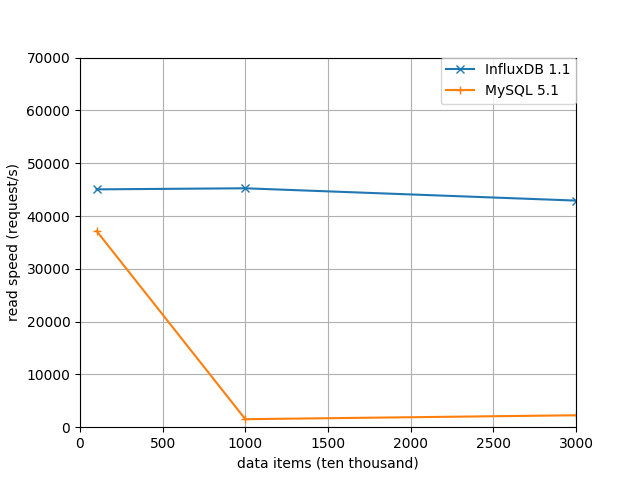
整体磁盘占用情况对比:
最终磁盘占用情况对比:
写入速度对比:
读取速度对比:
结论:
相比MySQL来说,InfluxDB在磁盘占用和数据读取方面很占优势,而且随着数据规模的扩大,查询速度没有明显的下降。
针对时序数据来说,InfluxDB有明显的优势。
好,就这些了,希望对你有帮助。
本文github地址:
https://github.com/mike-zhang/mikeBlogEssays/blob/master/2017/20170212_InfluxDB和MySQL的读写对比测试.md
欢迎补充