
⭐️基础链接导航⭐️
服务器 → ☁️ 阿里云活动地址
看样例 → 🐟 摸鱼小网站地址
学代码 → 💻 源码库地址
一、前言
大家好呀,我是summo,最近小网站崩溃了几天,原因一个是SSL证书到期,二个是免费的RDS也到期了,而我正边学习边找工作中,就没有顾得上修,不好意思哈(PS:八股文好难背,算法好难刷)。
小网站的内容和组件也不少了,今天我们继续来丰富的它的功能,让它看起来更美观和有用。今天会增加词云组件和搜索组件,并且还会将网站的内容排列一下,难度不高,但是更有意思。我们先从词云组件开始做。
二、词云组件
不同机构的热搜有一样也有不一样的,词云组件的作用是将热搜标题进行分词和计数,统计出最高频率的热搜,方便大家快速了解最热的热搜内容是什么。
1. 结巴分词器
jieba是一个分词器,可以实现智能拆词,最早是提供了python包,后来由花瓣(huaban)开发出了java版本。 源码连接:https://github.com/huaban/jieba-analysis
(1) maven依赖
1<!-- jieba分词器 -->
2<dependency>
3  <groupId>com.huaban</groupId>
4  <artifactId>jieba-analysis</artifactId>
5  <version>1.0.2</version>
6</dependency>
(2) 写一个Demo试试分词器
Demo如下:
1package com.summo.sbmy.web.controller;
2
3import com.google.common.collect.Lists;
4import com.huaban.analysis.jieba.JiebaSegmenter;
5
6import java.util.HashMap;
7import java.util.Iterator;
8import java.util.List;
9import java.util.Map;
10
11public class WordCloudTest {
12
13    public static void main(String[] args) {
14        List<String> titleList = Lists.newArrayList(
15                "《花100块做个摸鱼小网站! 》第七篇—谁访问了我们的网站?",
16                "《花100块做个摸鱼小网站! 》第六篇—将小网站部署到云服务器上",
17                "《花100块做个摸鱼小网站! 》第五篇—通过xxl-job定时获取热搜数据",
18                "《花100块做个摸鱼小网站! 》第四篇—前端应用搭建和完成第一个热搜组件",
19                "《花100块做个摸鱼小网站! 》第三篇—热搜表结构设计和热搜数据存储",
20                "《花100块做个摸鱼小网站! 》第二篇—后端应用搭建和完成第一个爬虫",
21                "《花100块做个摸鱼小网站! 》第一篇—买云服务器和初始化环境",
22                "《花100块做个摸鱼小网站! · 序》灵感来源");
23        JiebaSegmenter segmenter = new JiebaSegmenter();
24        Map<String, Integer> wordCount = new HashMap<>();
25        Iterator<String> var4 = titleList.iterator();
26
27        while (var4.hasNext()) {
28            String title = var4.next();
29            List<String> words = segmenter.sentenceProcess(title.trim());
30            Iterator<String> var7 = words.iterator();
31
32            while (var7.hasNext()) {
33                String word = var7.next();
34                wordCount.put(word, wordCount.getOrDefault(word, 0) + 1);
35            }
36        }
37        wordCount.forEach((word, count) -> {
38            System.out.println("word->" + word + ";count->" + count);
39        });
40    }
41
42}
运行结果如下:
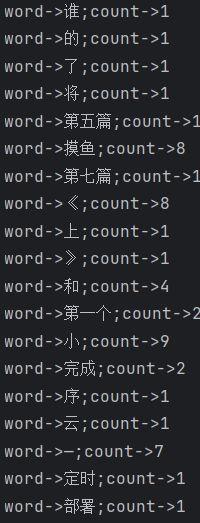
从结果上看,句子已经被分成多个词语,并且统计出了次数,但是还出现了很多无意义的词语,比如“的”、“和”、“了”这些,这样的词语被称为
停用词,一般这样的词要过滤掉。我们可以去网上搜索常见的停用词,然后在设置权重的时候把它给剔除掉。我使用的停用词库已经提交到了代码库中,大家可以直接取用。
(3) 热搜标题分词接口
WordCloudController.java
1package com.summo.sbmy.web.controller;
2
3import com.alibaba.fastjson.JSONArray;
4import com.alibaba.fastjson.JSONObject;
5import com.google.common.collect.Sets;
6import com.huaban.analysis.jieba.JiebaSegmenter;
7import com.summo.sbmy.cache.hotSearch.HotSearchCacheManager;
8import com.summo.sbmy.cache.sys.SysConfigCacheManager;
9import com.summo.sbmy.common.model.dto.HotSearchDTO;
10import com.summo.sbmy.common.model.dto.WordCloudDTO;
11import com.summo.sbmy.common.result.ResultModel;
12import org.apache.commons.collections4.CollectionUtils;
13import org.springframework.web.bind.annotation.RequestMapping;
14import org.springframework.web.bind.annotation.RequestParam;
15import org.springframework.web.bind.annotation.RestController;
16
17import java.util.*;
18import java.util.stream.Collectors;
19
20@RestController
21@RequestMapping("/api/hotSearch/wordCloud")
22public class WordCloudController {
23
24    private static Set<String> STOP_WORDS;
25    private static JSONArray WEIGHT_WORDS_ARRAY;
26
27    @RequestMapping("/queryWordCloud")
28    public ResultModel<List<WordCloudDTO>> queryWordCloud(@RequestParam(required = true) Integer topN) {
29        List<HotSearchDTO> hotSearchDTOS = gatherHotSearchData();
30        List<String> titleList = hotSearchDTOS.stream().map(HotSearchDTO::getHotSearchTitle).collect(Collectors.toList());
31        return ResultModel.success(findTopFrequentNouns(titleList, topN));
32    }
33
34    /**
35     * 获取停用词
36     *
37     * @return
38     */
39    private List<HotSearchDTO> gatherHotSearchData() {
40        String stopWordsStr = SysConfigCacheManager.getConfigByGroupCodeAndKey("WordCloud", "StopWords");
41        STOP_WORDS = Sets.newHashSet(stopWordsStr.split(","));
42        WEIGHT_WORDS_ARRAY = JSONArray.parseArray(SysConfigCacheManager.getConfigByGroupCodeAndKey("WordCloud", "WeightWords"));
43        List<HotSearchDTO> hotSearchDTOS = new ArrayList<>();
44        HotSearchCacheManager.CACHE_MAP.forEach((key, detail) -> {
45            hotSearchDTOS.addAll(detail.getHotSearchDTOList());
46        });
47        return hotSearchDTOS;
48    }
49
50    /**
51     * 分词
52     *
53     * @param titleList 标题列表
54     * @param topN      截取指定长度的热词大小
55     * @return
56     */
57    public static List findTopFrequentNouns(List<String> titleList, int topN) {
58        JiebaSegmenter segmenter = new JiebaSegmenter();
59        Map<String, Integer> wordCount = new HashMap<>();
60        Iterator<String> var4 = titleList.iterator();
61
62        while (var4.hasNext()) {
63            String title = var4.next();
64            List<String> words = segmenter.sentenceProcess(title.trim());
65            Iterator<String> var7 = words.iterator();
66
67            while (var7.hasNext()) {
68                String word = var7.next();
69                wordCount.put(word, wordCount.getOrDefault(word, 0) + 1);
70            }
71        }
72
73        return wordCount.entrySet().stream()
74                //停用词过滤
75                .filter(entry -> !STOP_WORDS.contains(entry.getKey()))
76                //构建对象
77                .map(entry -> WordCloudDTO.builder().word(entry.getKey()).rate(entry.getValue()).build())
78                //权重替换
79                .map(wordCloudDTO -> {
80                    if (CollectionUtils.isEmpty(WEIGHT_WORDS_ARRAY)) {
81                        return wordCloudDTO;
82                    } else {
83                        WEIGHT_WORDS_ARRAY.forEach(weightedWord -> {
84                            JSONObject tempObject = (JSONObject) weightedWord;
85                            if (wordCloudDTO.getWord().equals(tempObject.getString("originWord"))) {
86                                wordCloudDTO.setWord(tempObject.getString("targetWord"));
87                                if (tempObject.containsKey("weight")) {
88                                    wordCloudDTO.setRate(tempObject.getIntValue("weight"));
89                                }
90                            }
91                        });
92                        return wordCloudDTO;
93                    }
94                })
95                //按出现频率进行排序
96                .sorted(Comparator.comparing(WordCloudDTO::getRate).reversed())
97                //截取前topN的数据
98                .limit(topN)
99                .collect(Collectors.toList());
100    }
101
102}
这里我加了一个权重替换的逻辑,因为我发现分词器对于有些热词的解析有问题。比如前段时间很火的热搜“黑神话-悟空”,但在中文里面“黑神话”并不是一个词语,所以结巴在分词的时候只能识别“神话”这个词。为了解决这样的问题,我就加了一个手动替换的逻辑。
2. 前端组件
(1) vue-wordcloud组件
组件官方文档链接如下:https://www.npmjs.com/package/vue-wordcloud
npm引入指令如下:cnpm install vue-wordcloud
(2) 组件代码
WordCloud.vue
1<template>
2  <el-card class="word-cloud-card">
3    <wordcloud
4      class="word-cloud"
5      :data="words"
6      nameKey="name"
7      valueKey="value"
8      :wordPadding="2"
9      :fontSize="[10,50]"
10      :showTooltip="true"
11      :wordClick="wordClickHandler"
12    />
13  </el-card>
14</template>
15
16<script>
17import wordcloud from "vue-wordcloud";
18import apiService from "@/config/apiService.js";
19
20export default {
21  name: "app",
22  components: {
23    wordcloud,
24  },
25  methods: {
26    wordClickHandler(name, value, vm) {
27      console.log("wordClickHandler", name, value, vm);
28    },
29  },
30  data() {
31    return {
32      words: [],
33    };
34  },
35  created() {
36    apiService
37      .get("/hotSearch/wordCloud/queryWordCloud?topN=100")
38      .then((res) => {
39        this.words = res.data.data.map((item) => ({
40          value: item.rate,
41          name: item.word,
42        }));
43      })
44      .catch((error) => {
45        // 处理错误情况
46        console.error(error);
47      });
48  },
49};
50</script>
51<style scoped>
52.word-cloud-card {
53  padding: 0% !important;
54  max-height: 300px;
55  margin-top: 10px;
56}
57.word-cloud {
58  max-height: 300px;
59}
60>>> .el-card__body {
61  padding: 0;
62}
63</style>
组件使用起来很容易,效果也还不错,但是造成了一个小BUG,用完这个组件后会导致小网站底部出现一个留白,现在都不知道怎么解决。
三、重新布局和搜索组件
1. 重新布局
由于小网站的组件越来越多,整体的布局也需要重新设计一下,目前大概的布局如下:
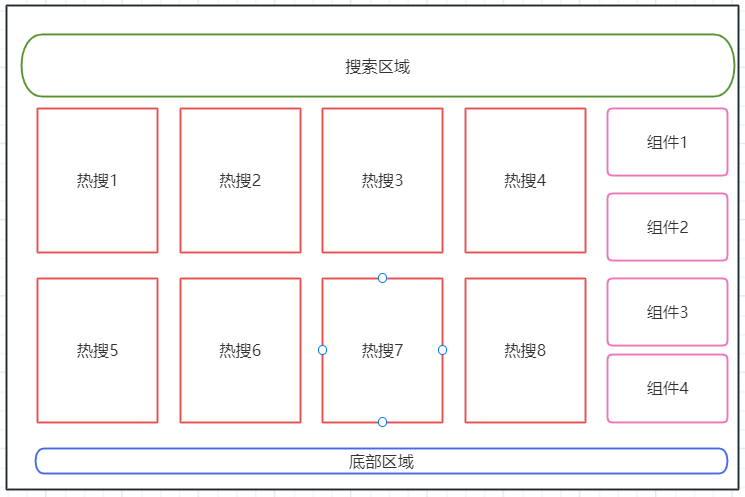
布局使用的也是ElementUI自带的布局组件:
1<el-container>
2  <el-header> ... </el-header>
3  <el-main> ... </el-main>
4  <el-footer> ... </<el-footer>
5</el-container>
2. 搜索组件
搜索组件使用的是<el-autocomplete>,使用方法看API文档就可以了。组件不难,唯一要注意的是搜索出来的结果内容是可能会重复的,所以我们需要对结果加一个来源标识。
这里需要使用一个slot组装一个自定义组件,效果像这样:
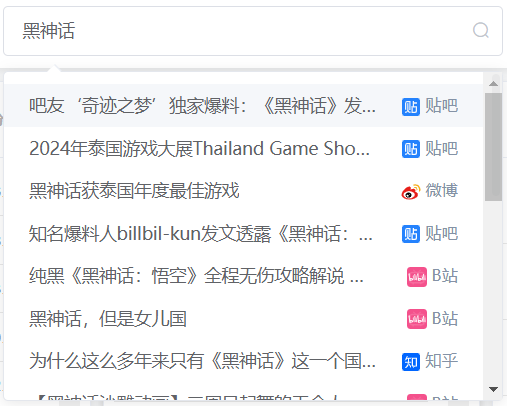
组件代码如下:
1<template slot-scope="{ item }">
2  <div style="display: flex; justify-content: space-between">
3    <span style="max-width: 280px;overflow: hidden;text-overflow: ellipsis;white-space: nowrap;">
4      {{ item.label }}
5    </span>
6    <span style="max-width: 80px; color: #8492a6; font-size: 13px; white-space: nowrap; " >
7      <img :src="getResourceInfo(item.resource).icon" style="width: 16px; height: 16px; vertical-align: middle"/>
8        {{ getResourceInfo(item.resource).title }}
9    </span>
10  </div>
11</template>
具体的逻辑可以去看我的源码,我这里就不贴整个代码了。
四、小结一下
这些小组件并不是一开始就想好要做的,大部分都是我突然灵机一动想起来才做的。可能有些东西看起来并不是那么有用,但是看着小网站的内容不断丰富起来感觉非常不错。这段时间我已经把全部的源码都提交到Gitee上了,但是还没来得及review,所以后面我除了分享怎么做组件外,还会跟大家分享我这4个月来遇到的一些BUG和问题,以及为什么我的代码要这样写。
番外:头条热搜爬虫
1. 爬虫方案评估
头条的热搜接口返回的一串JSON格式数据,这就很简单了,省的我们去解析dom,访问链接是:[https://www.toutiao.com/hot-event/hot-board/?origin=toutiao_pc)
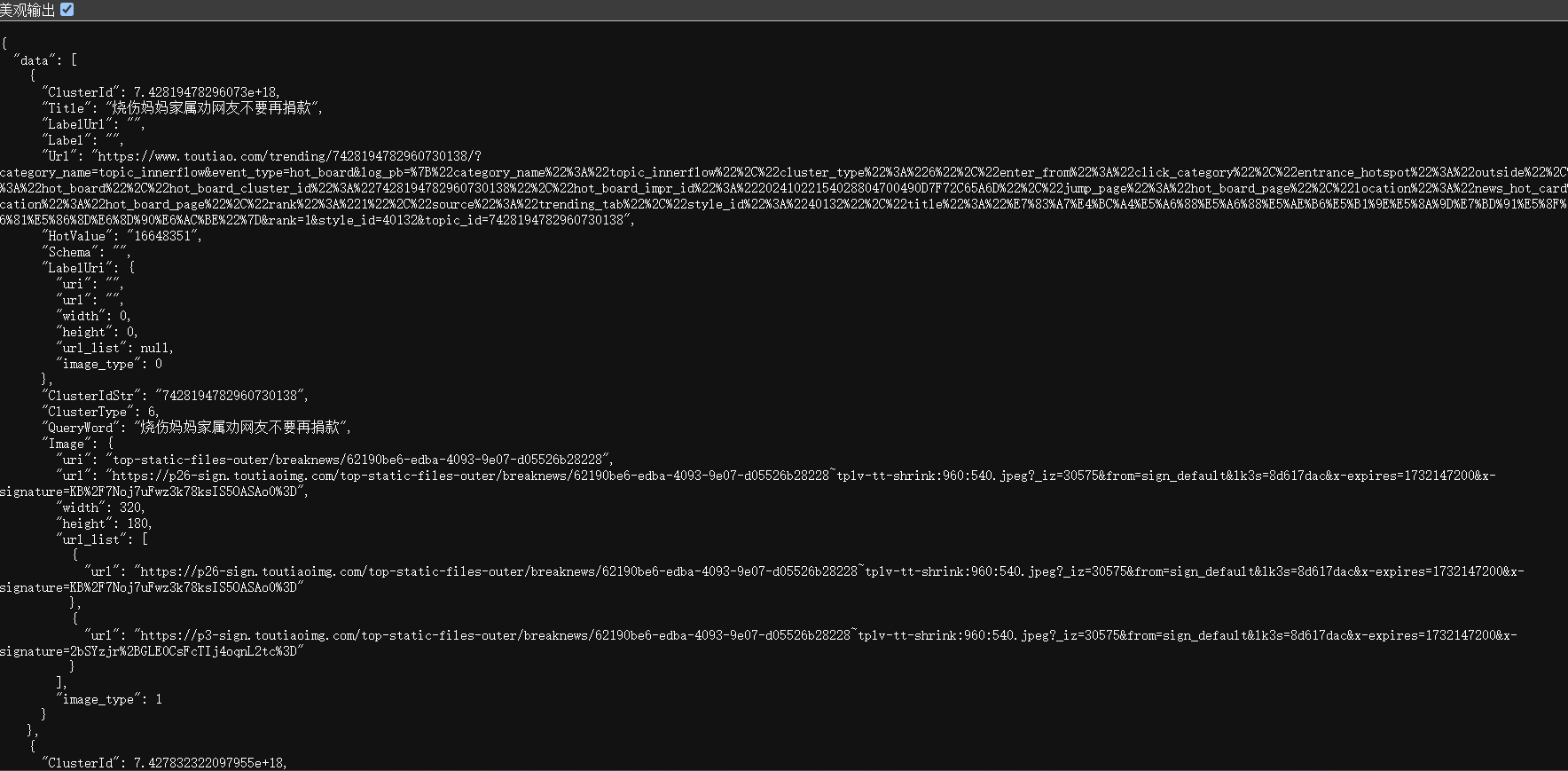
2. 网页解析代码
ToutiaoHotSearchJob.java
1package com.summo.sbmy.job.toutiao;
2
3import com.alibaba.fastjson.JSONArray;
4import com.alibaba.fastjson.JSONObject;
5import com.google.common.collect.Lists;
6import com.summo.sbmy.common.model.dto.HotSearchDetailDTO;
7import com.summo.sbmy.dao.entity.SbmyHotSearchDO;
8import com.summo.sbmy.service.SbmyHotSearchService;
9import com.summo.sbmy.service.convert.HotSearchConvert;
10import com.xxl.job.core.biz.model.ReturnT;
11import com.xxl.job.core.handler.annotation.XxlJob;
12import lombok.extern.slf4j.Slf4j;
13import okhttp3.OkHttpClient;
14import okhttp3.Request;
15import okhttp3.Response;
16import org.apache.commons.collections4.CollectionUtils;
17import org.jsoup.Jsoup;
18import org.jsoup.nodes.Document;
19import org.jsoup.select.Elements;
20import org.springframework.beans.factory.annotation.Autowired;
21import org.springframework.stereotype.Component;
22
23import javax.annotation.PostConstruct;
24import java.io.IOException;
25import java.util.*;
26import java.util.concurrent.atomic.AtomicInteger;
27import java.util.stream.Collectors;
28
29import static com.summo.sbmy.cache.hotSearch.HotSearchCacheManager.CACHE_MAP;
30import static com.summo.sbmy.common.enums.HotSearchEnum.TOUTIAO;
31
32/**
33 * @author summo
34 * @version ToutiaoHotSearchJob.java, 1.0.0
35 * @description  头条热搜Java爬虫代码
36 * @date 2024年08月09
37 */
38@Component
39@Slf4j
40public class ToutiaoHotSearchJob {
41
42    @Autowired
43    private SbmyHotSearchService sbmyHotSearchService;
44
45    @XxlJob("toutiaoHotSearchJob")
46    public ReturnT<String> hotSearch(String param) throws IOException {
47        log.info(" 头条热搜爬虫任务开始");
48        try {
49            //查询今日头条热搜数据
50            OkHttpClient client = new OkHttpClient().newBuilder().build();
51            Request request = new Request.Builder().url(
52                    "https://www.toutiao.com/hot-event/hot-board/?origin=toutiao_pc").method("GET", null).build();
53            Response response = client.newCall(request).execute();
54            JSONObject jsonObject = JSONObject.parseObject(response.body().string());
55            JSONArray array = jsonObject.getJSONArray("data");
56            List<SbmyHotSearchDO> sbmyHotSearchDOList = Lists.newArrayList();
57            for (int i = 0, len = array.size(); i < len; i++) {
58                //获取知乎热搜信息
59                JSONObject object = (JSONObject)array.get(i);
60                //构建热搜信息榜
61                SbmyHotSearchDO sbmyHotSearchDO = SbmyHotSearchDO.builder().hotSearchResource(
62                        TOUTIAO.getCode()).build();
63                //设置知乎三方ID
64                sbmyHotSearchDO.setHotSearchId(object.getString("ClusterIdStr"));
65                //设置文章连接
66                sbmyHotSearchDO.setHotSearchUrl(object.getString("Url"));
67                //设置文章标题
68                sbmyHotSearchDO.setHotSearchTitle(object.getString("Title"));
69                //设置热搜热度
70                sbmyHotSearchDO.setHotSearchHeat(object.getString("HotValue"));
71                //按顺序排名
72                sbmyHotSearchDO.setHotSearchOrder(i + 1);
73                sbmyHotSearchDOList.add(sbmyHotSearchDO);
74            }
75            if (CollectionUtils.isEmpty(sbmyHotSearchDOList)) {
76                return ReturnT.SUCCESS;
77            }
78            //数据加到缓存中
79            CACHE_MAP.put(TOUTIAO.getCode(), HotSearchDetailDTO.builder()
80                    //热搜数据
81                    .hotSearchDTOList(sbmyHotSearchDOList.stream().map(HotSearchConvert::toDTOWhenQuery).collect(Collectors.toList()))
82                    //更新时间
83                    .updateTime(Calendar.getInstance().getTime()).build());
84            //数据持久化
85            sbmyHotSearchService.saveCache2DB(sbmyHotSearchDOList);
86            log.info(" 头条热搜爬虫任务结束");
87        } catch (IOException e) {
88            log.error("获取头条数据异常", e);
89        }
90        return ReturnT.SUCCESS;
91    }
92
93    @PostConstruct
94    public void init() {
95        // 启动运行爬虫一次
96        try {
97            hotSearch(null);
98        } catch (IOException e) {
99            log.error("启动爬虫脚本失败",e);
100        }
101    }
102}