
接在Qt简单登录后
https://www.helloworld.net/p/4enJFnZUQAC8G
-
添加新文件
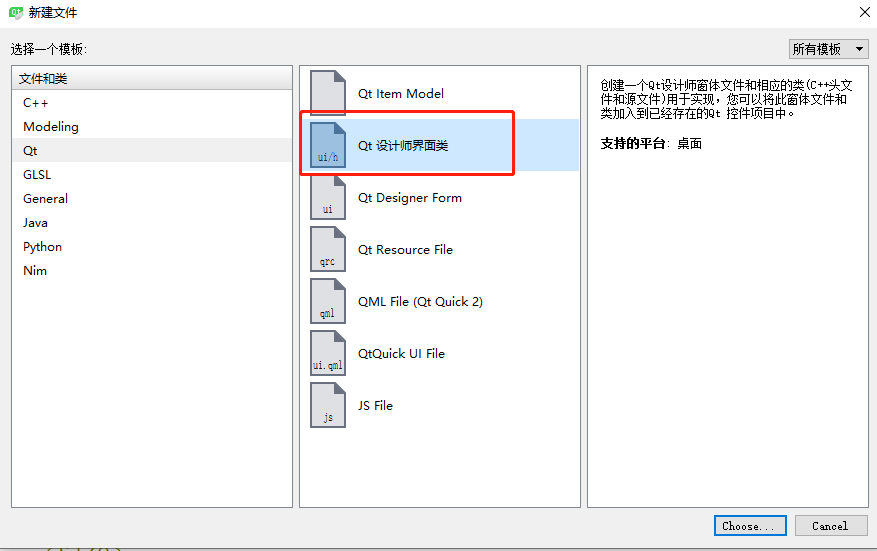
-
使用的组件table weight和 table view

头文件
1#ifndef MANAGEMENT_H
2#define MANAGEMENT_H
3
4#include <QWidget>
5#include <QMouseEvent>
6namespace Ui {
7class management;
8}
9
10class management : public QWidget
11{
12    Q_OBJECT
13
14public:
15    explicit management(QWidget *parent = 0);
16    ~management();
17
18protected:
19    void mouseReleaseEvent(QMouseEvent *event);
20    void mousePressEvent(QMouseEvent *event);
21    void mouseMoveEvent(QMouseEvent *event);
22private:
23    Ui::management *ui;
24    QPoint mousePoint;  // 记录鼠标坐标
25    bool mouse_press;  // 记录是否聚焦
26    QAction * m_action; // 右键菜单
27};
28
29#endif // MANAGEMENT_H
源文件
1management::management(QWidget *parent) :
2    QWidget(parent),
3    ui(new Ui::management)
4{
5    ui->setupUi(this);
6    // 设置窗口标题
7    this->setWindowTitle("控制窗口");
8    // 设置登录窗口无边框
9    this->setWindowFlags(Qt::FramelessWindowHint);
10    // 监听退出
11    connect(ui->exit,&QPushButton::clicked, this, &management::close);
12    // 设置标题
13    ui->tabWidget->setTabText(0, "全部人员列表");
14    ui->tabWidget->setTabText(1, "其他");
15
16    /* 创建数据模型 */
17    QStandardItemModel* model = new QStandardItemModel();
18    /* 设置表格标题行(输入数据为QStringList类型) */
19    QStringList sl;
20    QVector<QString> vs = {"ID", "User Name", "City", "Classify", "Score", "Sign"};
21    for(int i = 0;i <vs.size();++i){
22        sl.push_back(vs[i]);
23    }
24    model->setHorizontalHeaderLabels(sl);
25    /* 加载共10行数据,并每行有6列数据 */
26    for (int i = 0; i < 10; i++) {
27        /* 加载第一列(ID)数据 */
28        model->setItem(i, 0, new QStandardItem(QString("100%1").arg(i)));
29        /* 加载第二列(User Name)数据 */
30        model->setItem(i, 1, new QStandardItem(QString("User%1").arg(i)));
31        /* 加载第三列(City)数据 */
32        model->setItem(i, 2, new QStandardItem("Shanghai"));
33        /* 加载第四列(Classify)数据 */
34        model->setItem(i, 3, new QStandardItem("Engineer"));
35        /* 加载第五列(Score)数据 */
36        model->setItem(i, 4, new QStandardItem("80"));
37        /* 加载第六列(Sign)数据 */
38        model->setItem(i, 5, new QStandardItem("Hello world!"));
39    }
40    /* 自适应所有列,让它布满空间 */
41    ui->People->horizontalHeader()->setSectionResizeMode(QHeaderView::Stretch);
42    /* 设置表格视图大小 */
43    ui->People->resize(850, 400);
44    /* 设置表格视图数据 */
45    ui->People->setModel(model);
46    //设置自动排序
47    ui->People->setSortingEnabled(true);
48    // 隐藏行号
49    QHeaderView* headerView = ui->People->verticalHeader();
50    headerView->setHidden(true);
51    // 右键设置
52    m_action = new QAction("设置");
53}
54
55management::~management()
56{
57    delete ui;
58}
59
60
61void management::mouseMoveEvent(QMouseEvent *event)
62{
63    if(mouse_press)
64    {
65        move(event->globalPos() - mousePoint);
66    }
67}
68
69void management::mousePressEvent(QMouseEvent *event)
70{
71    // 如果点击鼠标左键
72    if(event->button() == Qt::LeftButton){
73        mouse_press = true;
74        // 鼠标点击的位置 - 窗口坐标
75        mousePoint = event->globalPos() - this->pos();
76    }
77    if(event->button() == Qt::RightButton)
78    {
79        // 添加按钮
80        this->addAction(m_action);
81        // 显示按钮
82        setContextMenuPolicy(Qt::ActionsContextMenu);
83    }
84}
85
86void management::mouseReleaseEvent(QMouseEvent *event)
87{
88    mouse_press = false;
89}
最终效果
