
在开始开发之前,我们需要创建一个空项目文件夹。
安装
- 初始化
1npm init -y
2
2.安装webpack相关依赖
1npm install webpack webpack-cli -D
2
- 安装babel-loader相关依赖
1npm install babel-loader @babel/core @babel/preset-env -D
2
- 安装jsx支持依赖
1npm install @babel/plugin-transform-react-jsx -D
2
配置
-
在根目录下创建main.js文件 此文件为入口文件。
-
在项目根目录下创建webpack.config.js
1module.exports={
2  entry:{
3    main:'./main.js'
4  },
5  module:{
6    rules:[
7      {
8        test:/\.js$/,
9        use:{
10          loader:'babel-loader',
11          options:{
12            presets:['@babel/preset-env'],
13            plugins:[['@babel/plugin-transform-react-jsx',{pragma:'createElement'}]] // 自定义设置pragma参数,我也可以设置为我的名字:maomin
14          }
15        }
16      }
17    ]
18  },
19  mode:'development',
20  optimization:{
21    minimize: false
22  }
23}
24
- 创建一个reactJsx.js文件 此文件为主要逻辑文件。
开发
reactJsx.js
1// 封装创建Dom节点
2class ElementWrapper {
3  constructor(type) {
4    this.root = document.createElement(type);
5  }
6  setAttibute(name, value) {
7    this.root.setAttibute(name, value);
8  }
9  appendChild(component) {
10    this.root.appendChild(component.root);
11  }
12}
13
14// 封装插入文本节点
15class TextWrapper {
16  constructor(content) {
17    this.root = document.createTextNode(content);
18  }
19}
20// 组件
21export class Component {
22  constructor() {
23    this.props = Object.create(null); // 创建一个原型为null的空对象
24    this.children = [];
25    this._root = null;
26  }
27  setAttribute(name, value) {
28    this.props[name] = value;
29  }
30  appendChild(component) {
31    this.children.push(component);
32  }
33  get root() { // 取值
34    if (!this._root) {
35      this._root = this.render().root;
36    }
37    return this._root;
38  }
39}
40// 创建节点,createElement对照 webapck.config.js 中pragma参数。
41export function createElement(type, attributes, ...children) {
42  let e;
43  if (typeof type === "string") {
44    e = new ElementWrapper(type);
45  } else {
46    e = new type();
47  }
48  for (let p in attributes) { // 循环属性
49    e.setAttribute(p, attributes[p]);
50  }
51  let insertChildren = (children) => {
52    for (let child of children) {
53      if (typeof child === "string") {
54        child = new TextWrapper(child);
55      }
56      if (typeof child === "object" && child instanceof Array) {
57        insertChildren(child); // 递归
58      } else {
59        e.appendChild(child);
60      }
61    }
62  };
63  insertChildren(children);
64  return e;
65}
66
67// 添加到Dom中
68export function render(component, parentElement) {
69  parentElement.appendChild(component.root);
70}
71
72
main.js
1import {createElement,Component,render} from './reactJsx.js'
2
3class MyComponent extends Component {
4  render(){
5    return <div>
6      <h1>maomin</h1>
7      {this.children}
8    </div>
9  }
10}
11
12render(<MyComponent id="name" class="age">
13  <div>xqm</div>
14  <div>my girlfriend</div>
15</MyComponent>,document.body)
16
执行
1npx webpack
2
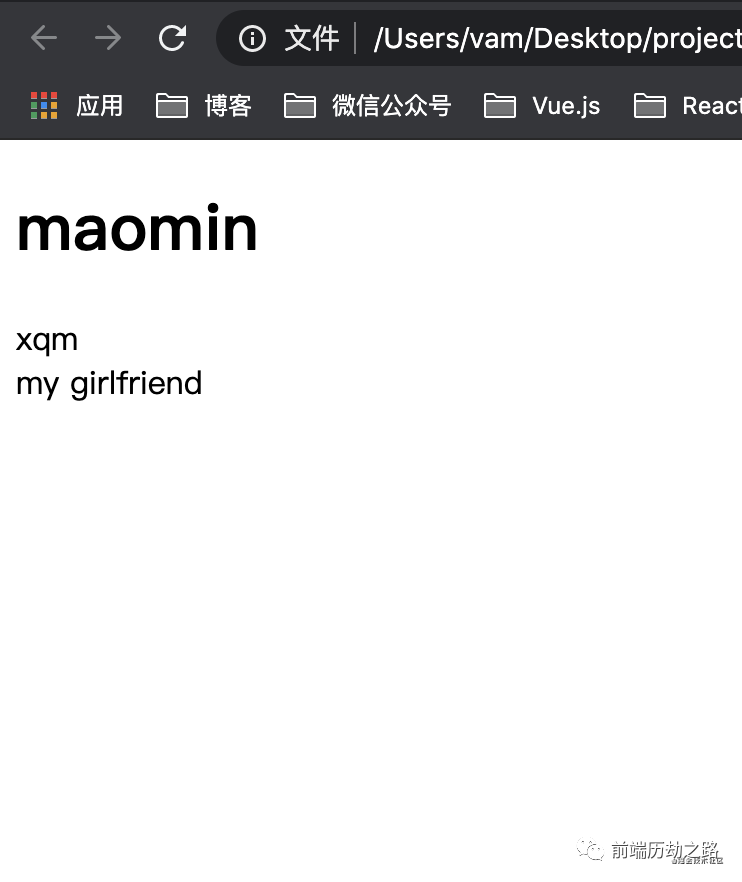
在dist文件夹下创建html文件,然后引入main.js,打开html文件就可以看到效果了。
欢迎关注我的公众号前端历劫之路
回复关键词电子书,即可获取12本前端热门电子书。
回复关键词红宝书第4版,即可获取最新《JavaScript高级程序设计》(第四版)电子书。
关注公众号后,点击下方菜单即可加我微信,我拉拢了很多IT大佬,创建了一个技术交流、文章分享群,期待你的加入。
作者:Vam的金豆之路
微信公众号:前端历劫之路

- END -

本文转转自微信公众号前端历劫之路原创https://mp.weixin.qq.com/s/x4qwEcSZ0vG4EaHiA3O0hA,如有侵权,请联系删除。