
1. Helloworld
1 1 using UnityEngine;
2 2 using XLua;
3 3
4 4 public class Helloworld : MonoBehaviour {
5 5     // Use this for initialization
6 6     void Start () {
7 7         LuaEnv luaenv = new LuaEnv();
8 8         // 执行代码块,输出 hello world
9 9         luaenv.DoString("CS.UnityEngine.Debug.Log('hello world')");
1010         // 释放资源
1111         luaenv.Dispose();
1212     }
1313 }
该案例实现了在 Unity 控制台输出 hello world。
2. U3DScripting
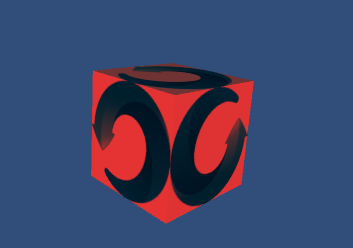
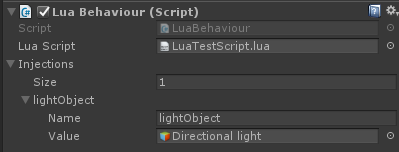
lua 代码如下:
1 1 local speed = 10
2 2 local lightCpnt = nil
3 3
4 4 function start()
5 5     print("lua start...")
6 6     -- 访问环境变量
7 7     print("injected object", lightObject)
8 8     -- 查找 Light 组件
9 9     lightCpnt= lightObject:GetComponent(typeof(CS.UnityEngine.Light))
1010 end
1111
1212 function update()
1313     local r = CS.UnityEngine.Vector3.up * CS.UnityEngine.Time.deltaTime * speed
1414     -- 绕y轴旋转
1515     self.transform:Rotate(r)
1616     -- 修改光线颜色
1717     lightCpnt.color = CS.UnityEngine.Color(CS.UnityEngine.Mathf.Sin(CS.UnityEngine.Time.time) / 2 + 0.5, 0, 0, 1)
1818 end
1919
2020 function ondestroy()
2121     print("lua destroy")
2222 end
注意,如果要插入中文注释,需要将 txt 编码格式改为 UTF-8,否则无法执行。
C# 代码如下:
1 1 using UnityEngine;
2 2 using XLua;
3 3 using System;
4 4
5 5 [System.Serializable]
6 6 public class Injection
7 7 {
8 8     public string name;
9 9     public GameObject value;
1010 }
1111
1212 [LuaCallCSharp]
1313 public class LuaBehaviour : MonoBehaviour {
1414     public TextAsset luaScript;             // lua脚本文件
1515     public Injection[] injections;          // 需要注入到环境变量的物体
1616
1717     internal static LuaEnv luaEnv = new LuaEnv(); //all lua behaviour shared one luaenv only!
1818     internal static float lastGCTime = 0;
1919     internal const float GCInterval = 1;//1 second
2020
2121     private Action luaStart;
2222     private Action luaUpdate;
2323     private Action luaOnDestroy;
2424
2525     private LuaTable scriptEnv;
2626
2727     void Awake()
2828     {
2929         scriptEnv = luaEnv.NewTable();
3030
3131         LuaTable meta = luaEnv.NewTable();
3232         meta.Set("__index", luaEnv.Global);
3333         scriptEnv.SetMetaTable(meta);
3434         meta.Dispose();
3535
3636         // 配置环境变量,在lua代码里能直接调用
3737         scriptEnv.Set("self", this);
3838         foreach (var injection in injections)
3939         {
4040             scriptEnv.Set(injection.name, injection.value);
4141         }
4242         // 参数1:Lua代码的字符串
4343         // 参数2:发生error时的debug显示信息时使用
4444         // 参数3:代码块的环境变量
4545         luaEnv.DoString(luaScript.text, "LuaBehaviour", scriptEnv);
4646
4747         // 访问函数
4848         Action luaAwake = scriptEnv.Get<Action>("awake");
4949         scriptEnv.Get("start", out luaStart);
5050         scriptEnv.Get("update", out luaUpdate);
5151         scriptEnv.Get("ondestroy", out luaOnDestroy);
5252
5353         // 执行事件
5454         if (luaAwake != null)
5555         {
5656             luaAwake();
5757         }
5858     }
5959
6060     // Use this for initialization
6161     void Start ()
6262     {
6363         if (luaStart != null)
6464         {
6565             luaStart();
6666         }
6767     }
6868
6969     // Update is called once per frame
7070     void Update ()
7171     {
7272         if (luaUpdate != null)
7373         {
7474             luaUpdate();
7575         }
7676         if (Time.time - LuaBehaviour.lastGCTime > GCInterval)
7777         {
7878             // 清楚lua未手动释放的LuaBase对象,需定期调用,这里是1s调用一次
7979             luaEnv.Tick();
8080             LuaBehaviour.lastGCTime = Time.time;
8181         }
8282     }
8383
8484     void OnDestroy()
8585     {
8686         if (luaOnDestroy != null)
8787         {
8888             luaOnDestroy();
8989         }
9090         luaOnDestroy = null;
9191         luaUpdate = null;
9292         luaStart = null;
9393         scriptEnv.Dispose();
9494         injections = null;
9595     }
9696 }
该场景实现了 lua 代码控制 U3D 物体,以实现物体的旋转和颜色变化。
三、UIEvent
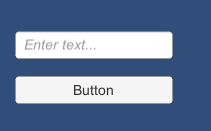
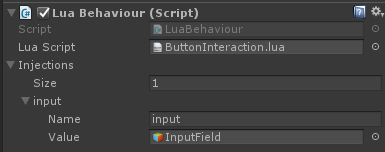
lua 代码如下:
11 function start()
22     print("lua start...")
33     -- 给button添加事件
44     -- 点击输出 input 输入内容
55     self:GetComponent("Button").onClick:AddListener(function()
66         print("clicked, you input is '" ..input:GetComponent("InputField").text .."'")
77     end)
88 end
该场景实现了 lua 代码为 button 添加事件响应函数,以实现点击按钮输出输入框内容。
注意,lua 中 . 和 : 的区别:
-
- 定义的时候:Class:test() 与 Class.test(self) 是等价的
调用的时候:``object``:test() 与object``.test(``object``) 等价
在这里,调用类的方法使用 :,调用属性用 . 。
C# 代码还是上一场景的 LuaBehaviour.cs。
四、InvokeLua
C# 代码如下:
1 1 using UnityEngine;
2 2 using XLua;
3 3
4 4 public class InvokeLua : MonoBehaviour
5 5 {
6 6     [CSharpCallLua]
7 7     public interface ICalc
8 8     {
9 9         int Add(int a, int b);
1010         int Mult { get; set; }
1111     }
1212
1313     [CSharpCallLua]
1414     public delegate ICalc CalcNew(int mult, params string[] args);
1515
1616     private string script = @"
1717                 local calc_mt = {
1818                     __index = {
1919                         Add = function(self, a, b)
2020                             return (a + b) * self.Mult
2121                         end
2222                     }
2323                 }
2424
2525                 Calc = {
2626                     -- 多参数函数
2727                     New = function (mult, ...)
2828                         print(...)
2929                         return setmetatable({Mult = mult}, calc_mt)
3030                     end
3131                 }
3232             ";
3333     // Use this for initialization
3434     void Start()
3535     {
3636         LuaEnv luaenv = new LuaEnv();
3737         Test(luaenv);//调用了带可变参数的delegate,函数结束都不会释放delegate,即使置空并调用GC
3838         luaenv.Dispose();
3939     }
4040
4141     void Test(LuaEnv luaenv)
4242     {
4343         luaenv.DoString(script);
4444         // 访问 lua 函数
4545         CalcNew calc_new = luaenv.Global.GetInPath<CalcNew>("Calc.New");
4646         ICalc calc = calc_new(10, "hi", "john"); //constructor
4747         Debug.Log("sum(*10) =" + calc.Add(1, 2));   // (1+2)*10
4848         calc.Mult = 100;
4949         Debug.Log("sum(*100)=" + calc.Add(1, 2));   // (1+2)*100
5050     }
5151 }
该场景实现了 C# 调用 lua 代码的函数,table。注意要加上 [CSharpCallLua] 。
五、NoGc
看不懂。
六、Coroutine
总共有四个代码文件,关键代码如下。
1. CoroutineTest.cs
11 LuaEnv luaenv = null;
22 // Use this for initialization
33 void Start()
44 {
55     luaenv = new LuaEnv();
66     // 执行 coruntine_test
77     luaenv.DoString("require 'coruntine_test'");
88 }
2. coruntine_test.lua
1 1 local util = require 'xlua.util'
2 2
3 3 local yield_return = (require 'cs_coroutine').yield_return
4 4
5 5 local co = coroutine.create(function()
6 6     print('coroutine start!')
7 7     local s = os.time()
8 8     -- 协程等待3秒
9 9     yield_return(CS.UnityEngine.WaitForSeconds(3))
1010     print('wait interval:', os.time() - s)
1111
1212     local www = CS.UnityEngine.WWW('http://www.cnblogs.com/coderJiebao/p/unity3d22.html')
1313     -- 协程加载网页
1414     yield_return(www)
1515     if not www.error then
1616         print(www.bytes)
1717     else
1818         print('error:', www.error)
1919     end
2020 end)
2121
2222 assert(coroutine.resume(co))
3. cs_coroutine.lua
1 1 local util = require 'xlua.util'
2 2
3 3 -- 新建物体
4 4 local gameobject = CS.UnityEngine.GameObject('Coroutine_Runner')
5 5 -- 设置不自动销毁
6 6 CS.UnityEngine.Object.DontDestroyOnLoad(gameobject)
7 7 -- 添加组件
8 8 local cs_coroutine_runner = gameobject:AddComponent(typeof(CS.Coroutine_Runner))
9 9
1010 local function async_yield_return(to_yield, cb)
1111     cs_coroutine_runner:YieldAndCallback(to_yield, cb)        -- 调用 C# 函数
1212 end
1313
1414 return {
1515     yield_return = util.async_to_sync(async_yield_return)
1616 }
4. Coroutine_Runner.cs
1 1 [LuaCallCSharp]
2 2 public class Coroutine_Runner : MonoBehaviour
3 3 {
4 4     public void YieldAndCallback(object to_yield, Action callback)
5 5     {
6 6         // 开启协程,回调callback
7 7         StartCoroutine(CoBody(to_yield, callback));
8 8     }
9 9
1010     private IEnumerator CoBody(object to_yield, Action callback)
1111     {
1212         if (to_yield is IEnumerator)
1313             yield return StartCoroutine((IEnumerator)to_yield);
1414         else
1515             yield return to_yield;
1616         callback();
1717     }
1818 }
该场景实现了协程等待3s和加载网页的功能。
调用流程为:CoroutineTest.Start -> coruntine_test(创建协程,调用 yield_return 方法)-> cs+coroutine.async_yield_return -> Coroutine_Runner.YieldAndCallback。
七、AsyncTest
继续看不懂,后期补上。
八、Hotfix
1. 使用方式
(1) 在 github 上下载 xlua 源码后,将 Asserts 文件夹内的文件以及 Tools 文件夹直接拖到工程,这时候会报错,删除 Tools 文件夹下的 System.dll 和 System.core.dll 即可。
(2) 添加 HOTFIX_ENABLE 和 INJECT_WITHOUT_TOOL 两个宏(在 File->Build Setting->Player Setting->Scripting Define Symbols)
(3) 执行XLua/Generate Code菜单
(4) 编写代码,注意在需要热更新的地方添加[Hotfix]标签
(5) 注入,构建手机包这个步骤会在构建时自动进行,编辑器下开发补丁需要手动执行"XLua/Hotfix Inject In Editor"菜单。注入成功会打印“hotfix inject finish!”或者“had injected!”。
2. 常用函数
xlua.hotfix(class, [method_name], fix)
- 描述 : 注入lua补丁
- class : C#类,两种表示方法,CS.Namespace.TypeName或者字符串方式"Namespace.TypeName",字符串格式和C#的Type.GetType要求一致,如果是内嵌类型(Nested Type)是非Public类型的话,只能用字符串方式表示"Namespace.TypeName+NestedTypeName";
- method_name : 方法名,可选;
- fix : 如果传了method_name,fix将会是一个function,否则通过table提供一组函数。table的组织按key是method_name,value是function的方式。
xlua.private_accessible(class)
- 描述 : 让一个类的私有字段,属性,方法等可用
- class : 同xlua.hotfix的class参数
util.hotfix_ex(class, method_name, fix)
- 描述 : xlua.hotfix的增强版本,可以在fix函数里头执行原来的函数,缺点是fix的执行会略慢。
- method_name : 方法名;
- fix : 用来替换C#方法的lua function。
base(csobj)
- 描述:子类 override 函数通过 base 调用父类实现
- csobj:对象
- 返回值:新对象
3. 打补丁
xlua 可以用 lua 函数替换 C# 的构造函数,函数,属性,事件的替换。
(1) 函数
可以指定一个函数,也可以传递由多个函数组成的 table。
11 -- 注入lua补丁,替换HotfixCalc.Add
22 xlua.hotfix(CS.HotfixCalc, 'Add', function(self, a, b)
33     -- 原来为 a-b
44     return a + b
55 end)
6
7 1 -- 通过table提供一组函数
8 2 -- table的组织按key是methodname,value是function的方式
9 3 xlua.hotfix(CS.HotfixCalc, {
10 4         Test1 = function(self)
11 5         print('Test1', self)
12 6         return 1
13 7         end;
14 8         Test2 = function(self, a, b)
15 9             print('Test2', self, a, b)
1610             return a + 10, 1024, b
1711         end;
1812         -- static 函数不需要加self
1913         Test3 = function(a)
2014         print(a)
2115         return 10
2216         end;
2317         Test4 = function(a)
2418         print(a)
2519         end;
2620         -- 多参数
2721         Test5 = function(self, a, ...)
2822         print('Test4', self, a, ...)
2923         end
3024 })
(2) 构造函数
构造函数对应的 method_name 是 ".ctor",和普通函数不一样的是,构造函数的热补丁并不是替换,而是执行原有逻辑后调用 lua。
11 -- 构造函数
22 ['.ctor'] = function(csobj)
33     return {evt = {}, start = 0}
44 end;
(3) 属性
每一个属性都对应一个get,set函数。
11 -- 属性AProp的赋值和取值
22 set_AProp = function(self, v)
33     print('set_AProp', v)
44     self.AProp = v
55 end;
66 get_AProp = function(self)
77     return self.AProp
88 end;
(4) [] 操作符
赋值对应 set_Item,取值对应 set_Item。
11 -- []操作符,赋值和取值
22 get_Item = function(self, k)
33     print('get_Item', k)
44     return 1024
55 end;
66 set_Item = function(self, k, v)
77     print('set_Item', k, v)
88 end;
对于其他操作符,C#的操作符都有一套内部表示,比如+号的操作符函数名是op_Addition。
(5) 事件
+= 操作符是 add_...,-= 操作符是 remove_... ,函数第一个参数是自身,第二个参数是操作符右边的 delegate。
1 1 -- 事件AEvent +=
2 2 add_AEvent = function(self, cb)
3 3     print('add_AEvent', cb)
4 4     table.insert(self.evt, cb)
5 5 end;
6 6 -- 事件AEvent -=
7 7 remove_AEvent = function(self, cb)
8 8     print('remove_AEvent', cb)
9 9     for i, v in ipairs(self.evt) do
1010         if v == cb then
1111             table.remove(self.evt, i)
1212             break
1313         end
1414     end
1515 end;
(6) 析构函数
函数名是 Finalize,传一个 self 参数。和普通函数不一样的是,析构函数的热补丁并不是替换,而是开头调用 lua 函数后继续原有逻辑。
11 -- 析构函数
22 Finalize = function(self)
33     print('Finalize', self)
44 end
(7) 泛化类型
每个泛化类型都是一个独立的类型,需要对实例化后的类型分别打补丁。
1 1 xlua.hotfix(CS['GenericClass`1[System.Double]'], {
2 2     ['.ctor'] = function(obj, a)
3 3         print('GenericClass<double>', obj, a)
4 4     end;
5 5     Func1 = function(obj)
6 6         print('GenericClass<double>.Func1', obj)
7 7     end;
8 8     Func2 = function(obj)
9 9         print('GenericClass<double>.Func2', obj)
1010         return 1314
1111     end
1212 })
(8) 子类调用父类
11 -- 子类调用父类的方法
22 xlua.hotfix(CS.BaseTest, 'Foo', function(self, p)
33         print('BaseTest', p)
44         base(self):Foo(p)
55     end)
66 xlua.hotfix(CS.BaseTest, 'ToString', function(self)
77         return '>>>' .. base(self):ToString()
88     end)