
前言
我们知道在项目开发中,后台开发权限认证是非常重要的,springboot 中常用熟悉的权限认证框架有,shiro,还有就是springboot 全家桶的 security当然他们各有各的好处,但是我比较喜欢springboot自带的权限认证框架
1<!--springboot 权限认证-->
2      <dependency>
3          <groupId>org.springframework.boot</groupId>
4          <artifactId>spring-boot-starter-security</artifactId>
5      </dependency>
与springboot天然集成,功能强大
快速上手
主要实现 Spring Security 的安全认证,结合 RESTful API 的风格,使用无状态的环境。
主要实现是通过请求的 URL ,通过过滤器来做不同的授权策略操作,为该请求提供某个认证的方法,然后进行认证,授权成功返回授权实例信息,供服务调用。
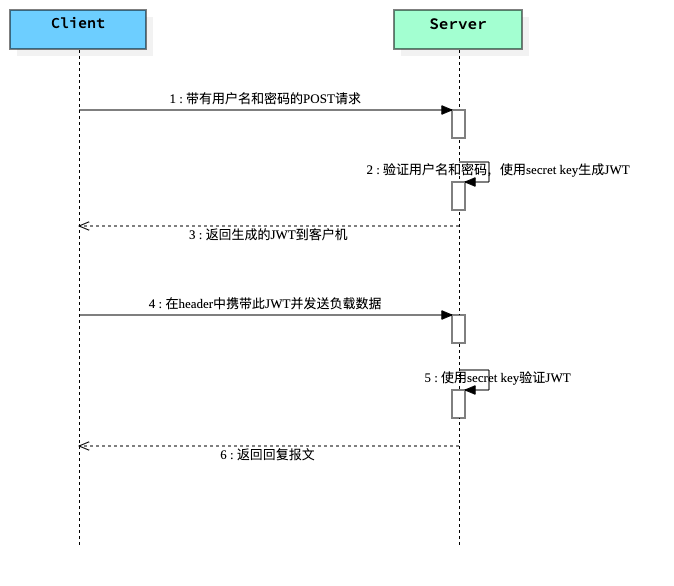
基于Token的身份验证的过程如下:
用户通过用户名和密码发送请求。 程序验证。 程序返回一个签名的token 给客户端。 客户端储存token,并且每次用于每次发送请求。 服务端验证token并返回数据。 每一次请求都需要token,所以每次请求都会去验证用户身份,所以这里必须要使用缓存,
流程图
JWT JSON Web Token 验证流程图
添加Spring Security和JWT依赖项
1       <!--springboot 权限认证-->
2          <dependency>
3              <groupId>org.springframework.boot</groupId>
4              <artifactId>spring-boot-starter-security</artifactId>
5          </dependency>
6         <!--jwt 认证-->
7         <dependency>
8             <groupId>io.jsonwebtoken</groupId>
9             <artifactId>jjwt</artifactId>
10         </dependency>
生成JWT toke
因为要生成JWT toke 所以就写了一个工具类JwtTokenUtil
1package cn.soboys.kmall.security.utils;
2
3import io.jsonwebtoken.Claims;
4import io.jsonwebtoken.Jwts;
5import io.jsonwebtoken.SignatureAlgorithm;
6import org.springframework.security.core.userdetails.UserDetails;
7import org.springframework.stereotype.Component;
8
9import java.io.Serializable;
10import java.util.Date;
11import java.util.HashMap;
12import java.util.Map;
13import java.util.function.Function;
14
15/**
16 * @author kenx
17 * @version 1.0
18 * @date 2021/8/5 22:28
19 * @webSite https://www.soboys.cn/
20 */
21@Component
22public class JwtTokenUtil implements Serializable {
23
24    private static final long serialVersionUID = -2550185165626007488L;
25
26    public static final long JWT_TOKEN_VALIDITY = 7*24*60*60;
27
28    private String secret="TcUF7CC8T3txmfQ38pYsQ3KY";
29
30    public String getUsernameFromToken(String token) {
31        return getClaimFromToken(token, Claims::getSubject);
32    }
33
34
35    public String generateToken(String username) {
36        Map<String, Object> claims = new HashMap<>();
37        return doGenerateToken(claims, username);
38    }
39
40    public Boolean validateToken(String token, UserDetails userDetails) {
41        final String username = getUsernameFromToken(token);
42        return (username.equals(userDetails.getUsername()) && !isTokenExpired(token));
43    }
44
45
46    public <T> T getClaimFromToken(String token, Function<Claims, T> claimsResolver) {
47        final Claims claims = getAllClaimsFromToken(token);
48        return claimsResolver.apply(claims);
49    }
50
51    private Claims getAllClaimsFromToken(String token) {
52        return Jwts.parser().setSigningKey(secret).parseClaimsJws(token).getBody();
53    }
54
55
56    private Boolean isTokenExpired(String token) {
57        final Date expiration = getExpirationDateFromToken(token);
58        return expiration.before(new Date());
59    }
60
61    public Date getExpirationDateFromToken(String token) {
62        return getClaimFromToken(token, Claims::getExpiration);
63    }
64
65    private String doGenerateToken(Map<String, Object> claims, String subject) {
66        return Jwts.builder().setClaims(claims).setSubject(subject).setIssuedAt(new Date(System.currentTimeMillis()))
67                .setExpiration(new Date(System.currentTimeMillis() + JWT_TOKEN_VALIDITY*1000)).signWith(SignatureAlgorithm.HS512, secret).compact();
68    }
69}
70
注入数据源
这里我们使用数据库作为权限控制数据保存,所以就要注入数据源,进行权限认证
Spring Security提供了 UserDetailsService接口 用于用户身份认证,和UserDetails实体类,用于保存用户信息,(用户凭证,权限等)
看源码
1package org.springframework.security.core.userdetails;
2
3public interface UserDetailsService {
4    UserDetails loadUserByUsername(String var1) throws UsernameNotFoundException;
5}
1package org.springframework.security.core.userdetails;
2public interface UserDetails extends Serializable {
3    Collection<? extends GrantedAuthority> getAuthorities();
4
5    String getPassword();
6
7    String getUsername();
8
9    boolean isAccountNonExpired();
10
11    boolean isAccountNonLocked();
12
13    boolean isCredentialsNonExpired();
14
15    boolean isEnabled();
16}
所以我们分为两步走:
- 自己的
User实体类继承Spring SecurityUserDetails保存相关权限信息
1package cn.soboys.kmall.security.entity;
2
3import com.baomidou.mybatisplus.annotation.IdType;
4import com.baomidou.mybatisplus.annotation.TableField;
5import com.baomidou.mybatisplus.annotation.TableId;
6import com.baomidou.mybatisplus.annotation.TableName;
7import com.fasterxml.jackson.annotation.JsonIgnore;
8import lombok.Data;
9import lombok.EqualsAndHashCode;
10import org.springframework.security.core.GrantedAuthority;
11import org.springframework.security.core.authority.SimpleGrantedAuthority;
12import org.springframework.security.core.userdetails.UserDetails;
13
14import java.io.Serializable;
15import java.time.LocalDateTime;
16import java.util.*;
17
18/**
19 * <p>
20 * 用户表
21 * </p>
22 *
23 * @author kenx
24 * @since 2021-08-06
25 */
26@Data
27@EqualsAndHashCode(callSuper = false)
28@TableName("t_user")
29public class User implements Serializable, UserDetails {
30
31    private static final long serialVersionUID = 1L;
32
33    /**
34     * 用户ID
35     */
36    @TableId(value = "USER_ID", type = IdType.AUTO)
37    private Long userId;
38
39    /**
40     * 用户名
41     */
42    @TableField("USERNAME")
43    private String username;
44
45    /**
46     * 密码
47     */
48    @TableField("PASSWORD")
49    private String password;
50
51    /**
52     * 部门ID
53     */
54    @TableField("DEPT_ID")
55    private Long deptId;
56
57    /**
58     * 邮箱
59     */
60    @TableField("EMAIL")
61    private String email;
62
63    /**
64     * 联系电话
65     */
66    @TableField("MOBILE")
67    private String mobile;
68
69    /**
70     * 状态 0锁定 1有效
71     */
72    @TableField("STATUS")
73    private String status;
74
75    /**
76     * 创建时间
77     */
78    @TableField("CREATE_TIME")
79    private Date createTime;
80
81    /**
82     * 修改时间
83     */
84    @TableField("MODIFY_TIME")
85    private Date modifyTime;
86
87    /**
88     * 最近访问时间
89     */
90    @TableField("LAST_LOGIN_TIME")
91    private Date lastLoginTime;
92
93    /**
94     * 性别 0男 1女 2保密
95     */
96    @TableField("SSEX")
97    private String ssex;
98
99    /**
100     * 是否开启tab,0关闭 1开启
101     */
102    @TableField("IS_TAB")
103    private String isTab;
104
105    /**
106     * 主题
107     */
108    @TableField("THEME")
109    private String theme;
110
111    /**
112     * 头像
113     */
114    @TableField("AVATAR")
115    private String avatar;
116
117    /**
118     * 描述
119     */
120    @TableField("DESCRIPTION")
121    private String description;
122
123    @TableField(exist = false)
124    private List<Role> roles;
125
126
127    @TableField(exist = false)
128    private Set<String> perms;
129
130    /**
131     * 用户权限
132     *
133     * @return
134     */
135    /*@Override
136    public Collection<? extends GrantedAuthority> getAuthorities() {
137        List<GrantedAuthority> auths = new ArrayList<>();
138        List<Role> roles = this.getRoles();
139        for (Role role : roles) {
140            auths.add(new SimpleGrantedAuthority(role.getRolePerms()));
141        }
142        return auths;
143    }*/
144    @Override
145    @JsonIgnore
146    public Collection<? extends GrantedAuthority> getAuthorities() {
147        List<GrantedAuthority> auths = new ArrayList<>();
148        Set<String> perms = this.getPerms();
149        for (String perm : perms) {
150            //这里perms值如果为空或空字符会报错
151            auths.add(new SimpleGrantedAuthority(perm));
152        }
153        return auths;
154    }
155
156    @Override
157    @JsonIgnore
158    public boolean isAccountNonExpired() {
159        return true;
160    }
161
162    @Override
163    @JsonIgnore
164    public boolean isAccountNonLocked() {
165        return true;
166    }
167
168    @Override
169    @JsonIgnore
170    public boolean isCredentialsNonExpired() {
171        return true;
172    }
173
174    @Override
175    @JsonIgnore
176    public boolean isEnabled() {
177        return true;
178    }
179}
180
注意这里有一个问题 登录用户时,总提示 User account is locked
是因为用户实体类实现UserDetails这个接口时,我默认把所有抽象方法给自动实现了,而自动生成下面这四个方法,默认返回false,
1    @Override
2    public boolean isAccountNonExpired() {
3        return false;
4    }
5
6    @Override
7    public boolean isAccountNonLocked() {
8        return false;
9    }
10
11    @Override
12    public boolean isCredentialsNonExpired() {
13        return false;
14    }
15
16    @Override
17    public boolean isEnabled() {
18        return false;
19    }
问题原因就在这里,只要把它们的返回值改成true就行。
UserDetails 中几个字段的解释:
//返回验证用户密码,无法返回则NULL
1String getPassword();
2String getUsername();
账户是否过期,过期无法验证
boolean isAccountNonExpired();
指定用户是否被锁定或者解锁,锁定的用户无法进行身份验证
boolean isAccountNonLocked();
指示是否已过期的用户的凭据(密码),过期的凭据防止认证
boolean isCredentialsNonExpired();
是否被禁用,禁用的用户不能身份验证
boolean isEnabled();
- 实现接口中
loadUserByUsername方法注入数据验证就可以了
自己IUserService用户接口类继承Spring Security提供了 UserDetailsService接口
1public interface IUserService  extends IService<User>, UserDetailsService {
2
3    User getUserByUsername(String username);
4
5   /* *//**
6     * 获取用户所有权限
7     *
8     * @param username
9     * @return
10     *//*
11    Set<String> getUserPerms(String username);*/
12
13}
并且加以实现
1@Service
2@RequiredArgsConstructor
3@Slf4j
4public class UserServiceImpl extends ServiceImpl<UserMapper, User> implements IUserService {
5    private final RoleMapper roleMapper;
6
7    @Override
8    public User getUserByUsername(String username) {
9        return this.baseMapper.selectOne(new QueryWrapper<User>().lambda()
10                .eq(User::getUsername, username));
11    }
12
13
14    /**
15     * 对用户提供的用户详细信息进行身份验证时
16     *
17     * @param username
18     * @return
19     * @throws UsernameNotFoundException
20     */
21    @Override
22    public UserDetails loadUserByUsername(String username) throws UsernameNotFoundException {
23        User user = this.getUserByUsername(username);
24
25        if (StrUtil.isBlankIfStr(user)) {
26            throw new UsernameNotFoundException("User not found with username: " + username);
27        }
28
29        //获取用户角色信息
30        List<Role> roles = roleMapper.findUserRolePermsByUserName(username);
31        user.setRoles(roles);
32
33        List<String> permList = this.baseMapper.findUserPerms(username);
34
35        //java8 stream 便利
36        Set<String> perms = permList.stream().filter(o->StrUtil.isNotBlank(o)).collect(Collectors.toSet());
37        user.setPerms(perms);
38
39        //用于添加用户的权限。只要把用户权限添加到authorities 就万事大吉。
40        // List<SimpleGrantedAuthority> authorities = new ArrayList<>();
41
42
43        //用于添加用户的权限。只要把用户权限添加到authorities 就万事大吉。
44        /*for (Role role : roles) {
45            authorities.add(new SimpleGrantedAuthority(role.getRolePerms()));
46            log.info("loadUserByUsername: " + user);
47        }*/
48        //user.setAuthorities(authorities);//用于登录时 @AuthenticationPrincipal 标签取值
49        return user;
50    }
51
52
53}
自己实现loadUserByUsername从数据库中验证用户名密码,获取用户角色权限信息
拦截器配置
Spring Security的AuthenticationEntryPoint类,它拒绝每个未经身份验证的请求并发送错误代码401
1package cn.soboys.kmall.security.config;
2
3import cn.soboys.kmall.common.ret.Result;
4import cn.soboys.kmall.common.ret.ResultCode;
5import cn.soboys.kmall.common.ret.ResultResponse;
6import cn.soboys.kmall.common.utils.ResponseUtil;
7import org.springframework.security.core.AuthenticationException;
8import org.springframework.security.web.AuthenticationEntryPoint;
9import org.springframework.stereotype.Component;
10
11import javax.servlet.ServletException;
12import javax.servlet.http.HttpServletRequest;
13import javax.servlet.http.HttpServletResponse;
14import java.io.IOException;
15import java.io.Serializable;
16
17/**
18 * @author kenx
19 * @version 1.0
20 * @date 2021/8/5 22:30
21 * @webSite https://www.soboys.cn/
22 * 此类继承Spring Security的AuthenticationEntryPoint类,
23 * 并重写其commence。它拒绝每个未经身份验证的请求并发送错误代码401。
24 */
25@Component
26public class JwtAuthenticationEntryPoint implements AuthenticationEntryPoint, Serializable {
27
28    /**
29     * 此类继承Spring Security的AuthenticationEntryPoint类,并重写其commence。
30     * 它拒绝每个未经身份验证的请求并发送错误代码401
31     *
32     * @param httpServletRequest
33     * @param httpServletResponse
34     * @param e
35     * @throws IOException
36     * @throws ServletException
37     */
38    @Override
39    public void commence(HttpServletRequest httpServletRequest, HttpServletResponse httpServletResponse, AuthenticationException e) throws IOException, ServletException {
40        Result result = ResultResponse.failure(ResultCode.UNAUTHORIZED, "请先登录");
41        ResponseUtil.responseJson(httpServletResponse, result);
42    }
43}
JwtRequestFilter任何请求都会执行此类检查请求是否具有有效的JWT令牌。如果它具有有效的JWT令牌,则它将在上下文中设置Authentication,以指定当前用户已通过身份验证。
1package cn.soboys.kmall.security.config;
2
3import cn.soboys.kmall.common.utils.ConstantFiledUtil;
4import cn.soboys.kmall.security.service.IUserService;
5import cn.soboys.kmall.security.utils.JwtTokenUtil;
6import io.jsonwebtoken.ExpiredJwtException;
7import lombok.extern.slf4j.Slf4j;
8import org.springframework.security.authentication.UsernamePasswordAuthenticationToken;
9import org.springframework.security.core.context.SecurityContextHolder;
10import org.springframework.security.core.userdetails.UserDetails;
11import org.springframework.security.web.authentication.WebAuthenticationDetailsSource;
12import org.springframework.stereotype.Component;
13import org.springframework.web.filter.OncePerRequestFilter;
14
15import javax.servlet.FilterChain;
16import javax.servlet.ServletException;
17import javax.servlet.http.HttpServletRequest;
18import javax.servlet.http.HttpServletResponse;
19import java.io.IOException;
20
21/**
22 * @author kenx
23 * @version 1.0
24 * @date 2021/8/5 22:27
25 * @webSite https://www.soboys.cn/
26 * 任何请求都会执行此类
27 * 检查请求是否具有有效的JWT令牌。如果它具有有效的JWT令牌,
28 * 则它将在上下文中设置Authentication,以指定当前用户已通过身份验证。
29 */
30@Component
31@Slf4j
32public class JwtRequestFilter extends OncePerRequestFilter {
33
34    //用户数据源
35    private IUserService userService;
36    //生成jwt 的token
37    private  JwtTokenUtil jwtTokenUtil;
38
39    public JwtRequestFilter(IUserService userService,JwtTokenUtil jwtTokenUtil) {
40        this.userService = userService;
41        this.jwtTokenUtil = jwtTokenUtil;
42    }
43
44    @Override
45    protected void doFilterInternal(HttpServletRequest request, HttpServletResponse response, FilterChain filterChain) throws ServletException, IOException {
46        final String requestTokenHeader = request.getHeader(ConstantFiledUtil.AUTHORIZATION_TOKEN);
47
48        String username = null;
49        String jwtToken = null;
50        // JWT Token is in the form "Bearer token". Remove Bearer word and get only the Token
51        if (requestTokenHeader != null && requestTokenHeader.startsWith("Bearer ")) {
52            jwtToken = requestTokenHeader.substring(7);
53            try {
54                username = jwtTokenUtil.getUsernameFromToken(jwtToken);
55            } catch (IllegalArgumentException e) {
56                log.error("Unable to get JWT Token");
57            } catch (ExpiredJwtException e) {
58                log.error("JWT Token has expired");
59            }
60        } else {
61            //logger.warn("JWT Token does not begin with Bearer String");
62        }
63
64        //Once we get the token validate it.
65        if (username != null && SecurityContextHolder.getContext().getAuthentication() == null) {
66
67            UserDetails userDetails = this.userService.loadUserByUsername(username);
68
69            // if token is valid configure Spring Security to manually set authentication
70            if (jwtTokenUtil.validateToken(jwtToken, userDetails)) {
71
72                //保存用户信息和权限信息
73                UsernamePasswordAuthenticationToken usernamePasswordAuthenticationToken = new UsernamePasswordAuthenticationToken(
74                        userDetails, null, userDetails.getAuthorities());
75                usernamePasswordAuthenticationToken
76                        .setDetails(new WebAuthenticationDetailsSource().buildDetails(request));
77                // After setting the Authentication in the context, we specify
78                // that the current user is authenticated. So it passes the Spring Security Configurations successfully.
79                SecurityContextHolder.getContext().setAuthentication(usernamePasswordAuthenticationToken);
80            }
81        }
82        filterChain.doFilter(request, response);
83    }
84}
85
配置Spring Security 配置类SecurityConfig
-
自定义Spring Security的时候我们需要继承自WebSecurityConfigurerAdapter来完成,相关配置重写对应 方法
-
此处使用了 BCryptPasswordEncoder 密码加密
-
通过重写configure方法添加我们自定义的认证方式。
1package cn.soboys.kmall.security.config;
2
3
4import cn.soboys.kmall.security.service.IUserService;
5import org.springframework.beans.factory.annotation.Autowired;
6import org.springframework.context.annotation.Bean;
7import org.springframework.context.annotation.Configuration;
8import org.springframework.security.authentication.AuthenticationManager;
9import org.springframework.security.config.annotation.authentication.builders.AuthenticationManagerBuilder;
10import org.springframework.security.config.annotation.method.configuration.EnableGlobalMethodSecurity;
11import org.springframework.security.config.annotation.web.builders.HttpSecurity;
12import org.springframework.security.config.annotation.web.configuration.EnableWebSecurity;
13import org.springframework.security.config.annotation.web.configuration.WebSecurityConfigurerAdapter;
14import org.springframework.security.config.http.SessionCreationPolicy;
15import org.springframework.security.crypto.bcrypt.BCryptPasswordEncoder;
16import org.springframework.security.crypto.password.PasswordEncoder;
17import org.springframework.security.web.authentication.UsernamePasswordAuthenticationFilter;
18
19import java.util.Set;
20
21/**
22 * @author kenx
23 * @version 1.0
24 * @date 2021/8/6 17:27
25 * @webSite https://www.soboys.cn/
26 */
27@EnableWebSecurity
28@Configuration
29@EnableGlobalMethodSecurity(prePostEnabled = true) // 控制权限注解
30public class SecurityConfig extends WebSecurityConfigurerAdapter {
31
32    private JwtAuthenticationEntryPoint jwtAuthenticationEntryPoint;
33    private IUserService userService;
34    private JwtRequestFilter jwtRequestFilter;
35
36
37    public SecurityConfig(JwtAuthenticationEntryPoint jwtAuthenticationEntryPoint,
38                          IUserService userService,
39                          JwtRequestFilter jwtRequestFilter) {
40        this.jwtAuthenticationEntryPoint = jwtAuthenticationEntryPoint;
41        this.userService = userService;
42        this.jwtRequestFilter = jwtRequestFilter;
43    }
44
45
46    /**
47     * 1)HttpSecurity支持cors。
48     * 2)默认会启用CRSF,此处因为没有使用thymeleaf模板(会自动注入_csrf参数),
49     * 要先禁用csrf,否则登录时需要_csrf参数,而导致登录失败。
50     * 3)antMatchers:匹配 "/" 路径,不需要权限即可访问,匹配 "/user" 及其以下所有路径,
51     * 都需要 "USER" 权限
52     * 4)配置登录地址和退出地址
53     */
54    @Override
55    protected void configure(HttpSecurity http) throws Exception {
56        // We don't need CSRF for this example
57        http.csrf().disable()
58                // dont authenticate this particular request
59                .authorizeRequests().antMatchers("/", "/*.html", "/favicon.ico", "/css/**", "/js/**", "/fonts/**", "/layui/**", "/img/**",
60                "/v3/api-docs/**", "/swagger-resources/**", "/webjars/**", "/pages/**", "/druid/**",
61                "/statics/**", "/login", "/register").permitAll().
62                // all other requests need to be authenticated
63                        anyRequest().authenticated().and().
64                // make sure we use stateless session; session won't be used to
65                // store user's state.
66                //覆盖默认登录
67                        exceptionHandling().authenticationEntryPoint(jwtAuthenticationEntryPoint).and().sessionManagement()
68                // 基于token,所以不需要session
69                .sessionCreationPolicy(SessionCreationPolicy.STATELESS);
70
71
72        // Add a filter to validate the tokens with every request
73        http.addFilterBefore(jwtRequestFilter, UsernamePasswordAuthenticationFilter.class);
74    }
75
76
77    @Bean
78    @Override
79    public AuthenticationManager authenticationManagerBean() throws Exception {
80        return super.authenticationManagerBean();
81    }
82
83    /**
84     * 密码校验
85     *
86     * @param auth
87     * @throws Exception
88     */
89    @Autowired
90    public void configureGlobal(AuthenticationManagerBuilder auth) throws Exception {
91        // configure AuthenticationManager so that it knows from where to load
92        // user for matching credentials
93        // Use BCryptPasswordEncoder
94        auth.userDetailsService(userService).passwordEncoder(passwordEncoder());
95    }
96
97    /**
98     * 密码加密验证
99     *
100     * @return
101     */
102    @Bean
103    public PasswordEncoder passwordEncoder() {
104        return new BCryptPasswordEncoder();
105    }
106
107
108}
具体应用
1package cn.soboys.kmall.security.controller;
2
3import cn.hutool.core.util.StrUtil;
4import cn.soboys.kmall.common.exception.BusinessException;
5import cn.soboys.kmall.common.ret.ResponseResult;
6import cn.soboys.kmall.common.ret.Result;
7import cn.soboys.kmall.common.ret.ResultResponse;
8import cn.soboys.kmall.security.entity.User;
9import cn.soboys.kmall.security.service.IUserService;
10import cn.soboys.kmall.security.utils.EncryptPwdUtil;
11import cn.soboys.kmall.security.utils.JwtTokenUtil;
12import com.baomidou.mybatisplus.core.conditions.update.UpdateWrapper;
13import io.swagger.annotations.*;
14import lombok.RequiredArgsConstructor;
15import lombok.SneakyThrows;
16import org.springframework.security.authentication.AuthenticationManager;
17import org.springframework.security.authentication.BadCredentialsException;
18import org.springframework.security.authentication.DisabledException;
19import org.springframework.security.authentication.UsernamePasswordAuthenticationToken;
20import org.springframework.security.core.Authentication;
21import org.springframework.security.core.userdetails.UserDetails;
22import org.springframework.security.core.userdetails.UserDetailsService;
23import org.springframework.validation.annotation.Validated;
24import org.springframework.web.bind.annotation.PostMapping;
25import org.springframework.web.bind.annotation.RequestParam;
26import org.springframework.web.bind.annotation.RestController;
27
28import javax.validation.constraints.NotBlank;
29import javax.validation.constraints.NotEmpty;
30import java.util.Date;
31import java.util.Objects;
32
33/**
34 * @author kenx
35 * @version 1.0
36 * @date 2021/8/6 12:30
37 * @webSite https://www.soboys.cn/
38 */
39@RestController
40@ResponseResult
41@Validated
42@RequiredArgsConstructor
43@Api(tags = "登录接口")
44public class LoginController {
45    private final IUserService userService;
46    //认证管理,认证用户省份
47    private final AuthenticationManager authenticationManager;
48    private final JwtTokenUtil jwtTokenUtil;
49    //自己数据源
50    private final UserDetailsService jwtInMemoryUserDetailsService;
51
52
53
54
55    @PostMapping("/login")
56    @ApiOperation("用户登录")
57    @SneakyThrows
58    public Result login(@NotBlank @RequestParam String username,
59                        @NotBlank @RequestParam String password) {
60
61
62        Authentication authentication= this.authenticate(username, password);
63
64        String user = authentication.getName();
65
66        final String token = jwtTokenUtil.generateToken(user);
67        //更新用户最后登录时间
68        User u = new User();
69        u.setLastLoginTime(new Date());
70        userService.update(u, new UpdateWrapper<User>().lambda().eq(User::getUsername, username));
71        return ResultResponse.success("Bearer " + token);
72    }
73
74    @PostMapping("/register")
75    @ApiOperation("用户注册")
76    public Result register(@NotEmpty @RequestParam String username, @NotEmpty @RequestParam String password) {
77        User user = userService.getUserByUsername(username);
78
79        if (!StrUtil.isBlankIfStr(user)) {
80            throw new BusinessException("用户已存在");
81        }
82        User u = new User();
83        u.setPassword(EncryptPwdUtil.encryptPassword(password));
84        u.setUsername(username);
85        u.setCreateTime(new Date());
86        u.setModifyTime(new Date());
87        u.setStatus("1");
88        userService.save(u);
89        return ResultResponse.success();
90
91    }
92
93
94    private Authentication authenticate(String username, String password) throws Exception {
95        Authentication authentication = null;
96        try {
97            //security 认证用户身份
98            authentication = authenticationManager.authenticate(new UsernamePasswordAuthenticationToken(username, password));
99        } catch (DisabledException e) {
100            throw new BusinessException("用户不存");
101        } catch (BadCredentialsException e) {
102            throw new BusinessException("用户名密码错误");
103        }
104
105        return authentication;
106    }
107}
108
深入了解
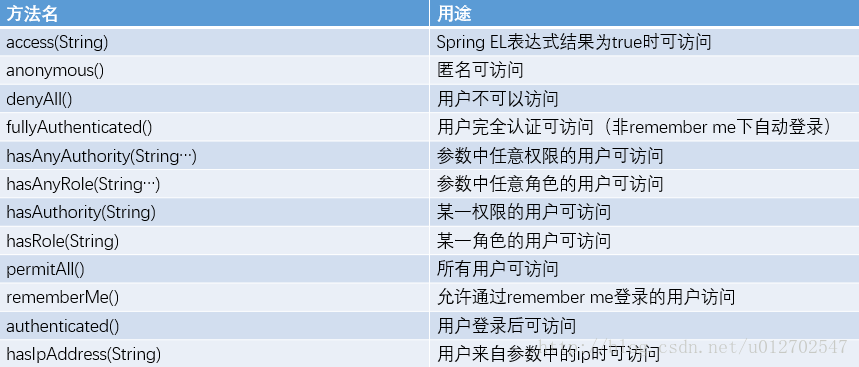
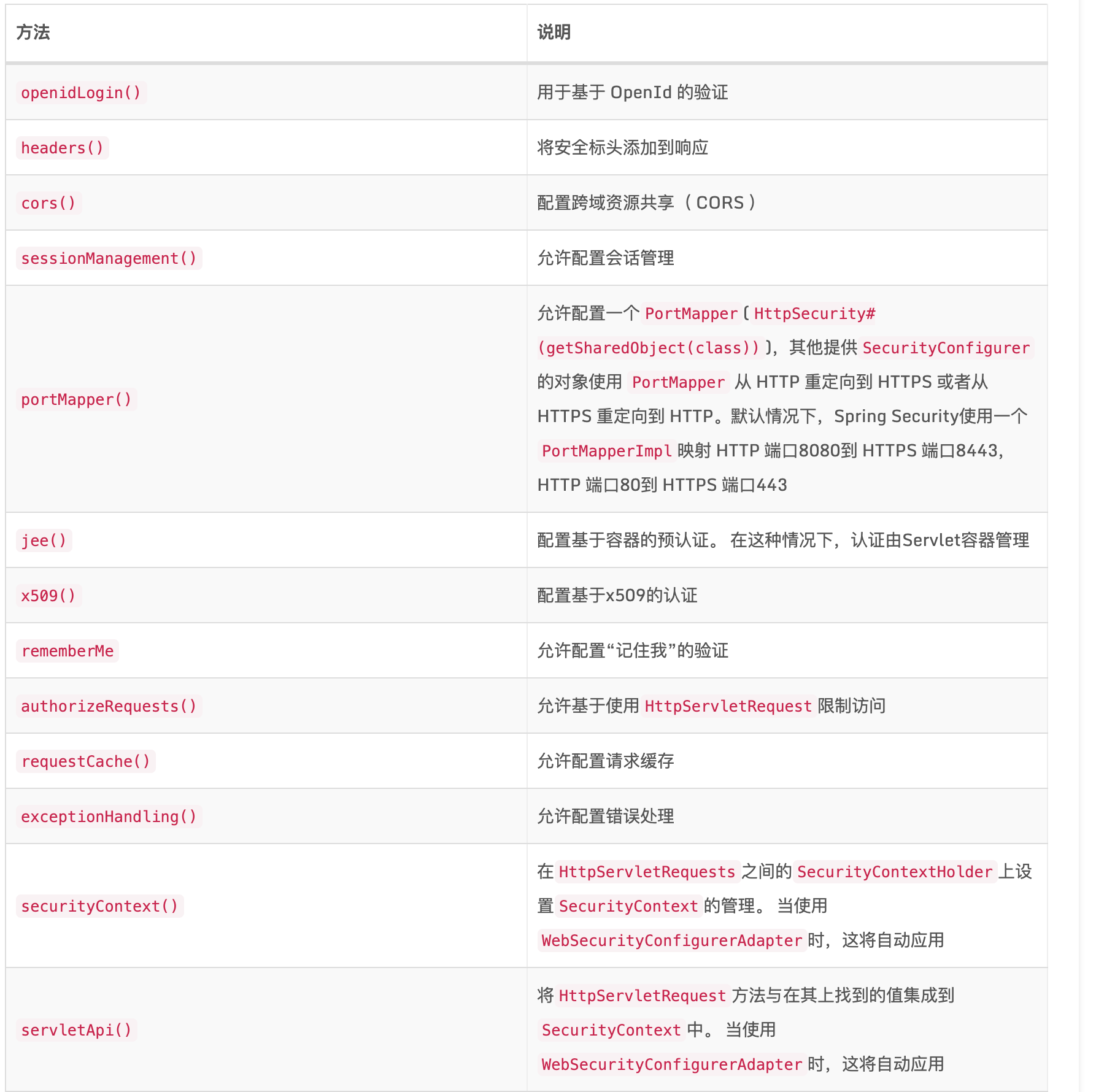
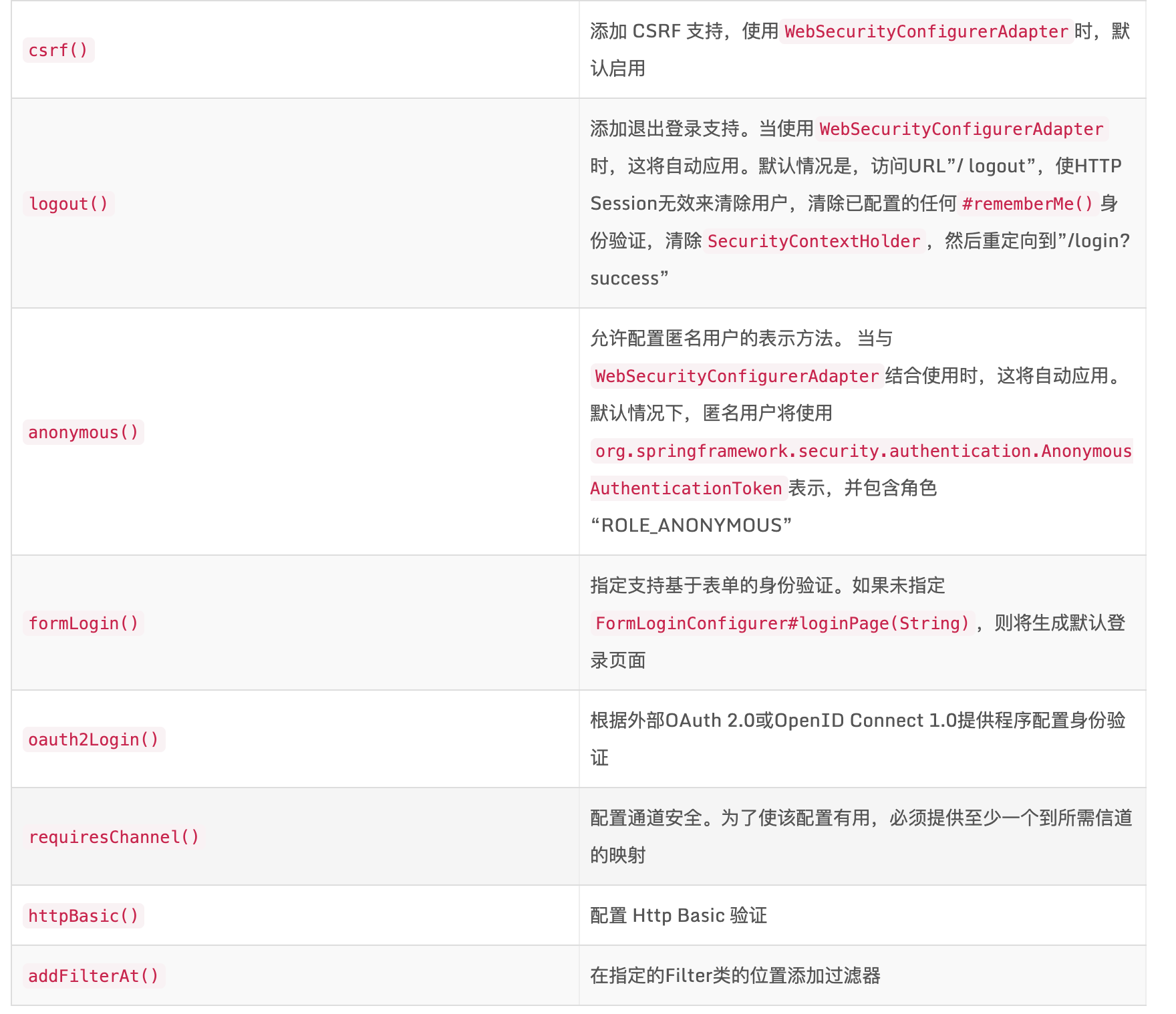
Spring Security 配置讲解
- @EnableWebSecurity 开启权限认证
- @EnableGlobalMethodSecurity(prePostEnabled = true) 开启权限注解认证
- configure 配置
1    @Override
2    protected void configure(HttpSecurity http) throws Exception {
3        // We don't need CSRF for this example
4        http.csrf().disable()
5                // dont authenticate this particular request
6                .authorizeRequests().antMatchers("/", "/*.html", "/favicon.ico", "/css/**", "/js/**", "/fonts/**", "/layui/**", "/img/**",
7                "/v3/api-docs/**", "/swagger-resources/**", "/webjars/**", "/pages/**", "/druid/**",
8                "/statics/**", "/login", "/register").permitAll().
9                // all other requests need to be authenticated
10                        anyRequest().authenticated().and().
11                // make sure we use stateless session; session won't be used to
12                // store user's state.
13                //覆盖默认登录
14                        exceptionHandling().authenticationEntryPoint(jwtAuthenticationEntryPoint).and().sessionManagement()
15                // 基于token,所以不需要session
16                .sessionCreationPolicy(SessionCreationPolicy.STATELESS);
17
18
19        // Add a filter to validate the tokens with every request
20        http.addFilterBefore(jwtRequestFilter, UsernamePasswordAuthenticationFilter.class);
21    }
22
参考