
前言
最近在开发项目,用到了redis作为缓存,来提高系统访问速度和缓解系统压力,提高用户响应和访问速度,这里遇到几个问题做一下总结和整理
快速配置
SpringBoot整合redis有专门的场景启动器整合起来还是非常方便的
1   <dependency>
2            <groupId>org.springframework.boot</groupId>
3            <artifactId>spring-boot-starter-data-redis</artifactId>
4        </dependency>
如果使用redis连接池引入
1        <!-- redis连接池 -->
2        <dependency>
3            <groupId>org.apache.commons</groupId>
4            <artifactId>commons-pool2</artifactId>
5        </dependency>
集成配置文件
1#------------------redis缓存配置------------
2# Redis数据库索引(默认为 0)
3spring.redis.database=1
4# Redis服务器地址
5spring.redis.host= 127.0.0.1
6# Redis服务器连接端口
7spring.redis.port=6379
8# Redis 密码
9spring.redis.password
10# 连接超时时间(毫秒)
11spring.redis.timeout= 5000
12# redis连接池
13# 连接池中的最小空闲连接
14spring.redis.lettuce.pool.min-idle=10
15# 连接池中的最大空闲连接
16spring.redis.lettuce.pool.max-idle= 500
17# 连接池最大连接数(使用负值表示没有限制)
18spring.redis.lettuce.pool.max-active=2000
19# 连接池最大阻塞等待时间(使用负值表示没有限制)
20spring.redis.lettuce.pool.max-wait=10000
JSON序列化
由于缓存数据默认使用的是jdk自带的序列化 二进制 需要序列化的实体类继承Serializable接口。而且序列化后的内容在redis中看起来也不是很方便。
1\xAC\xED\x00\x05sr\x00Lorg.springframework.security.oauth2.common.DefaultExpiringOAuth2RefreshToken/\xDFGc\x9D\xD0\xC9\xB7\x02\x00\x01L\x00\x0Aexpirationt\x00\x10Ljava/util/Date;xr\x00Dorg.springframework.security.oauth2.common.DefaultOAuth2RefreshTokens\xE1\x0E\x0AcT\xD4^\x02\x00\x01L\x00\x05valuet\x00\x12Ljava/lang/String;xpt\x00$805a75f7-2ee2-4a27-a598-591bfa1cf17dsr\x00\x0Ejava.util.Datehj\x81\x01KYt\x19\x03\x00\x00xpw\x08\x00\x00\x01}y\x81\xDB\x9Ax
于是萌生了需要将数据序列化成json的想法。
jackson序列化
在使用spring-data-redis,默认情况下是使用org.springframework.data.redis.serializer.JdkSerializationRedisSerializer这个类来做序列化,Jackson redis序列化是spring中自带的.我们使用jackson方式
1@Bean
2    @ConditionalOnClass(RedisOperations.class)
3    public RedisTemplate<String, Object> redisTemplate(RedisConnectionFactory factory) {
4        RedisTemplate<String, Object> template = new RedisTemplate<>();
5        template.setConnectionFactory(factory);
6
7        Jackson2JsonRedisSerializer<Object> jackson2JsonRedisSerializer = new Jackson2JsonRedisSerializer<>(Object.class);
8        //序列化包括类型描述 否则反向序列化实体会报错,一律都为JsonObject
9        ObjectMapper mapper = new ObjectMapper();
10        mapper.setVisibility(PropertyAccessor.ALL, JsonAutoDetect.Visibility.ANY);
11        mapper.activateDefaultTyping(mapper.getPolymorphicTypeValidator(), ObjectMapper.DefaultTyping.NON_FINAL);
12        jackson2JsonRedisSerializer.setObjectMapper(mapper);
13
14        StringRedisSerializer stringRedisSerializer = new StringRedisSerializer();
15        // key采用 String的序列化方式
16        template.setKeySerializer(stringRedisSerializer);
17        // hash的 key也采用 String的序列化方式
18        template.setHashKeySerializer(stringRedisSerializer);
19        // value序列化方式采用 jackson
20        template.setValueSerializer(jackson2JsonRedisSerializer);
21        // hash的 value序列化方式采用 jackson
22        template.setHashValueSerializer(jackson2JsonRedisSerializer);
23        template.afterPropertiesSet();
24
25        return template;
26    }
序列化后存储在redis后内容
1[
2  "com.qhong.test.dependBean.Person",
3  {
4    "age": 20,
5    "name": "name0",
6    "iss": true
7  }
8]
1[
2  "java.util.ArrayList",
3  [
4    [
5      "com.qhong.test.dependBean.Person",
6      {
7        "age": 20,
8        "name": "name0",
9        "iss": true
10      }
11    ],
12    [
13      "com.qhong.test.dependBean.Person",
14      {
15        "age": 21,
16        "name": "name1",
17        "iss": true
18      }
19    ],
20    [
21      "com.qhong.test.dependBean.Person",
22      {
23        "age": 22,
24        "name": "name2",
25        "iss": true
26      }
27    ]
28  ]
29]
上面的不是严格符合json格式规范,虽然比默认二进制好
注意这里序列化json代类型
"com.qhong.test.dependBean.Person"如果没有这个反序列化会报类型转换异常错误
也就是代码中这一段必须设置,我之前就是没有设置,反序列化都是JsonObject必须自己转换类型,否则会报错
1//序列化包括类型描述 否则反向序列化实体会报错,一律都为JsonObject
2        ObjectMapper mapper = new ObjectMapper();
3        mapper.setVisibility(PropertyAccessor.ALL, JsonAutoDetect.Visibility.ANY);
4        mapper.activateDefaultTyping(mapper.getPolymorphicTypeValidator(), ObjectMapper.DefaultTyping.NON_FINAL);
5        jackson2JsonRedisSerializer.setObjectMapper(mapper);
Fastjson序列化
- 需要倒入Fastjson到依赖
1<!-- JSON工具 -->
2<dependency>
3    <groupId>com.alibaba</groupId>
4    <artifactId>fastjson</artifactId>
5    <version>1.2.76</version>
6</dependency>
- 实现RedisSerializer接口
1import com.alibaba.fastjson.JSON;
2import com.alibaba.fastjson.parser.ParserConfig;
3import com.alibaba.fastjson.serializer.SerializerFeature;
4import org.springframework.data.redis.serializer.RedisSerializer;
5import org.springframework.data.redis.serializer.SerializationException;
6
7import java.nio.charset.Charset;
8import java.nio.charset.StandardCharsets;
9
10public class FastJson2JsonRedisSerializer<T> implements RedisSerializer<T> {
11
12    public static final Charset DEFAULT_CHARSET = StandardCharsets.UTF_8;
13
14    static {
15        ParserConfig.getGlobalInstance().setAutoTypeSupport(true);
16    }
17
18    private final Class<T> clazz;
19
20    public FastJson2JsonRedisSerializer(Class<T> clazz) {
21        super();
22        this.clazz = clazz;
23    }
24
25    /**
26     * 序列化
27     */
28    @Override
29    public byte[] serialize(T t) throws SerializationException {
30        if (null == t) {
31            return new byte[0];
32        }
33        return JSON.toJSONString(t, SerializerFeature.WriteClassName).getBytes(DEFAULT_CHARSET);
34    }
35
36    /**
37     * 反序列化
38     */
39    @Override
40    public T deserialize(byte[] bytes) throws SerializationException {
41        if (null == bytes || bytes.length <= 0) {
42            return null;
43        }
44        String str = new String(bytes, DEFAULT_CHARSET);
45        return (T) JSON.parseObject(str, clazz);
46    }
47}
- 配置redisTemplate
1import org.springframework.boot.autoconfigure.AutoConfigureAfter;
2import org.springframework.boot.autoconfigure.data.redis.RedisAutoConfiguration;
3import org.springframework.context.annotation.Bean;
4import org.springframework.context.annotation.Configuration;
5import org.springframework.data.redis.connection.RedisConnectionFactory;
6import org.springframework.data.redis.core.RedisTemplate;
7import org.springframework.data.redis.serializer.StringRedisSerializer;
8
9@Configuration
10@AutoConfigureAfter(RedisAutoConfiguration.class)
11public class RedisCacheAutoConfiguration {
12
13    @Bean
14    public RedisTemplate<Object, Object> redisTemplate(RedisConnectionFactory factory) {
15        RedisTemplate<Object, Object> template = new RedisTemplate<>();
16        template.setConnectionFactory(factory);
17        FastJson2JsonRedisSerializer<Object> fastJsonRedisSerializer = new FastJson2JsonRedisSerializer<>(Object.class);
18
19        StringRedisSerializer stringRedisSerializer = new StringRedisSerializer();
20        // key采用String的序列化方式
21        template.setKeySerializer(stringRedisSerializer);
22        // hash的key也采用String的序列化方式
23        template.setHashKeySerializer(stringRedisSerializer);
24
25        // value序列化方式采用fastJson
26        template.setValueSerializer(fastJsonRedisSerializer);
27        // hash的value序列化方式采用fastJson
28        template.setHashValueSerializer(fastJsonRedisSerializer);
29
30        template.afterPropertiesSet();
31        return template;
32    }
33}
注意这是一种方式自己实现RedisSerializer 序列化接口 但是FastJson 1.2.36版本以后不需要自己实现RedisSerializer
为我们提供序列化支持在com.alibaba.fastjson.support.spring中 有GenericFastJsonRedisSerializer和FastJsonRedisSerializer 两个实现类 ,
区别在于
GenericFastJsonRedisSerializer可以自动转换对象类型,FastJsonRedisSerializer需要自定义转换需要的类型。
通常使用 GenericFastJsonRedisSerializer 即可满足大部分场景,如果你想定义特定类型专用的 RedisTemplate 可以使用 FastJsonRedisSerializer 来代替 GenericFastJsonRedisSerializer”
FastJson github有对应问题描述lssues 我已入坑 ,刚开始一直使用FastJsonRedisSerializer****无法自动反向序列化
序列化后存储在redis后内容
1{
2  "@type": "com.qhong.test.dependBean.Person",
3  "age": 20,
4  "iss": true,
5  "name": "name0"
6}
1[
2  {
3    "@type": "com.qhong.test.dependBean.Person",
4    "age": 20,
5    "iss": true,
6    "name": "name0"
7  },
8  {
9    "@type": "com.qhong.test.dependBean.Person",
10    "age": 21,
11    "iss": true,
12    "name": "name1"
13  },
14  {
15    "@type": "com.qhong.test.dependBean.Person",
16    "age": 22,
17    "iss": true,
18    "name": "name2"
19  }
20]
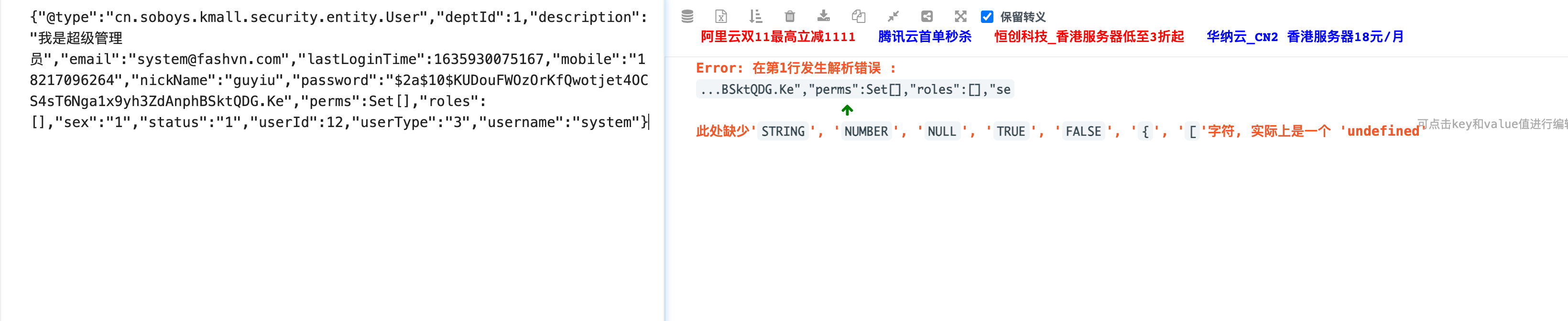
正常情况是格式是正确的,但是如果你存储内容出现set或者doubble类型,会带上Set,D类型描述如下
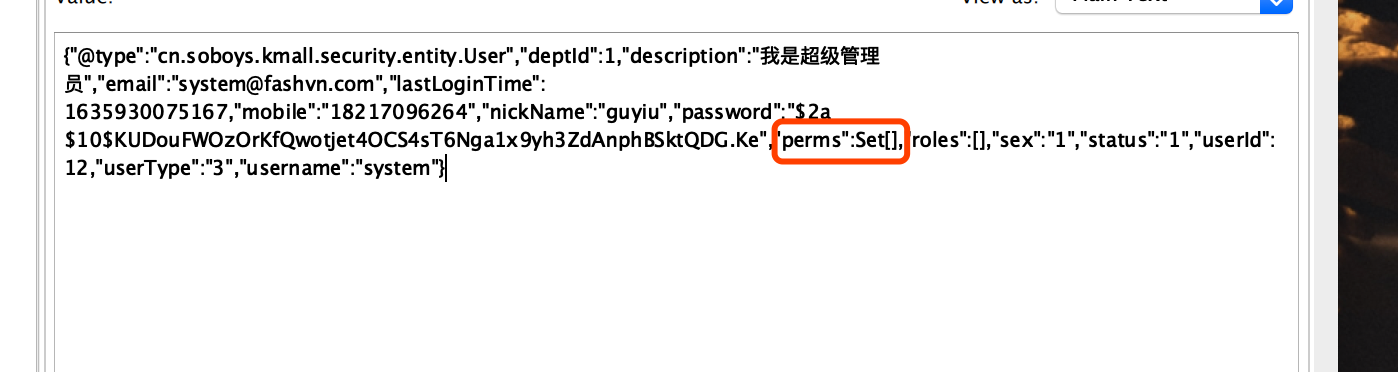
会出现问题无法解析,但是在程序里是可以反向序列化的
分析参考对比
-
jdkSerializationRedisSerializer:使用JDK提供的序列化功能。 优点是反序列化时不需要提供类型信息(class),但缺点是需要实现Serializable接口,还有序列化后的结果非常庞大,是JSON格式的5倍左右,这样就会消耗redis服务器的大量内存。 -
Jackson2JsonRedisSerializer:使用Jackson库将对象序列化为JSON字符串。优点是速度快,序列化后的字符串短小精悍,不需要实现Serializable接口。但缺点也非常致命,那就是此类的构造函数中有一个类型参数,必须提供要序列化对象的类型信息(.class对象)。 通过查看源代码,发现其只在反序列化过程中用到了类型信息。 -
FastJsonRedisSerializer性能最优号称最快的json解析库,但是反序列化后类字段顺序和原来实体类不一致发生改变,在某些set,double字段情况下json格式不正确,但是在程序可以解析
更多问题参考
redis数据库操作
在整合了spring-boot-starter-data-redis后会自动帮我们注入redisTemplate 对象,专门用来操作reids数据库的
在reids中如果想用文件夹方式存储key的话类似这样
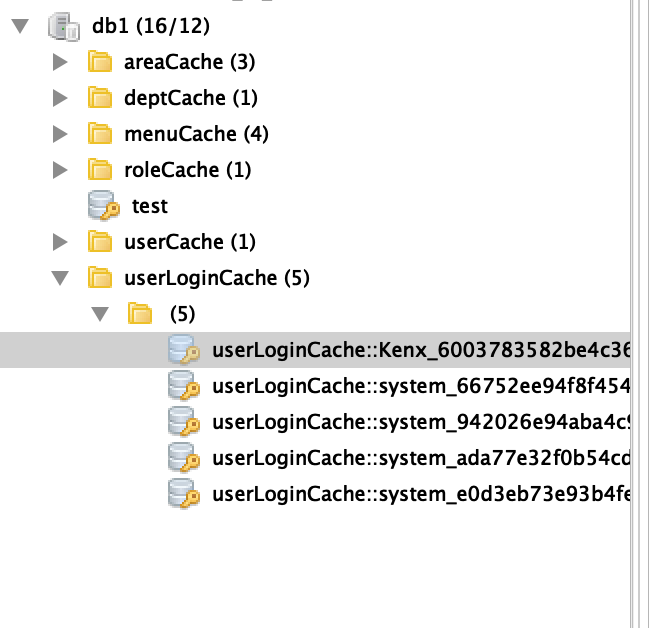
我们只需要在存储使用使用::表示文件夹就可以了
1redisTemplate.opsForValue().set("userLoginCache::Kenx_6003783582be4c368af14daf3495559c", "user");
如果需要模糊查询key话使用*来表示 如
- 获取所有key
1public static Set<String> getAllKey(String keys) {
2        Set<String> key = redisTemplate.keys(keys + "*");
3        return key;
4    }
- 模糊批量删除
1 /**
2     * 删除缓存
3     *
4     * @param key 可以传一个值 或多个
5     */
6    public static void del(String... key) {
7        if (key != null && key.length > 0) {
8            if (key.length == 1) {
9                redisTemplate.delete(key[0]);
10            } else {
11                redisTemplate.delete(Arrays.asList(key));
12            }
13        }
14    }
1public static void delByPrefix(String key) {
2        if (key != null) {
3            Set<String> keys = redisTemplate.keys(key + "*");
4            redisTemplate.delete(keys);
5        }
6    }
7
8    public static void delBySuffix(String key) {
9        if (key != null) {
10            Set<String> keys = redisTemplate.keys("*" + key);
11            redisTemplate.delete(keys);
12        }
13    }
14
15    public static  void clean(){
16        Set<String> keys = redisTemplate.keys("*");
17        redisTemplate.delete(keys);
18    }
因为使用很频繁所以我写成工具库RedisUtil 通过静态方法方式去调用就可以了
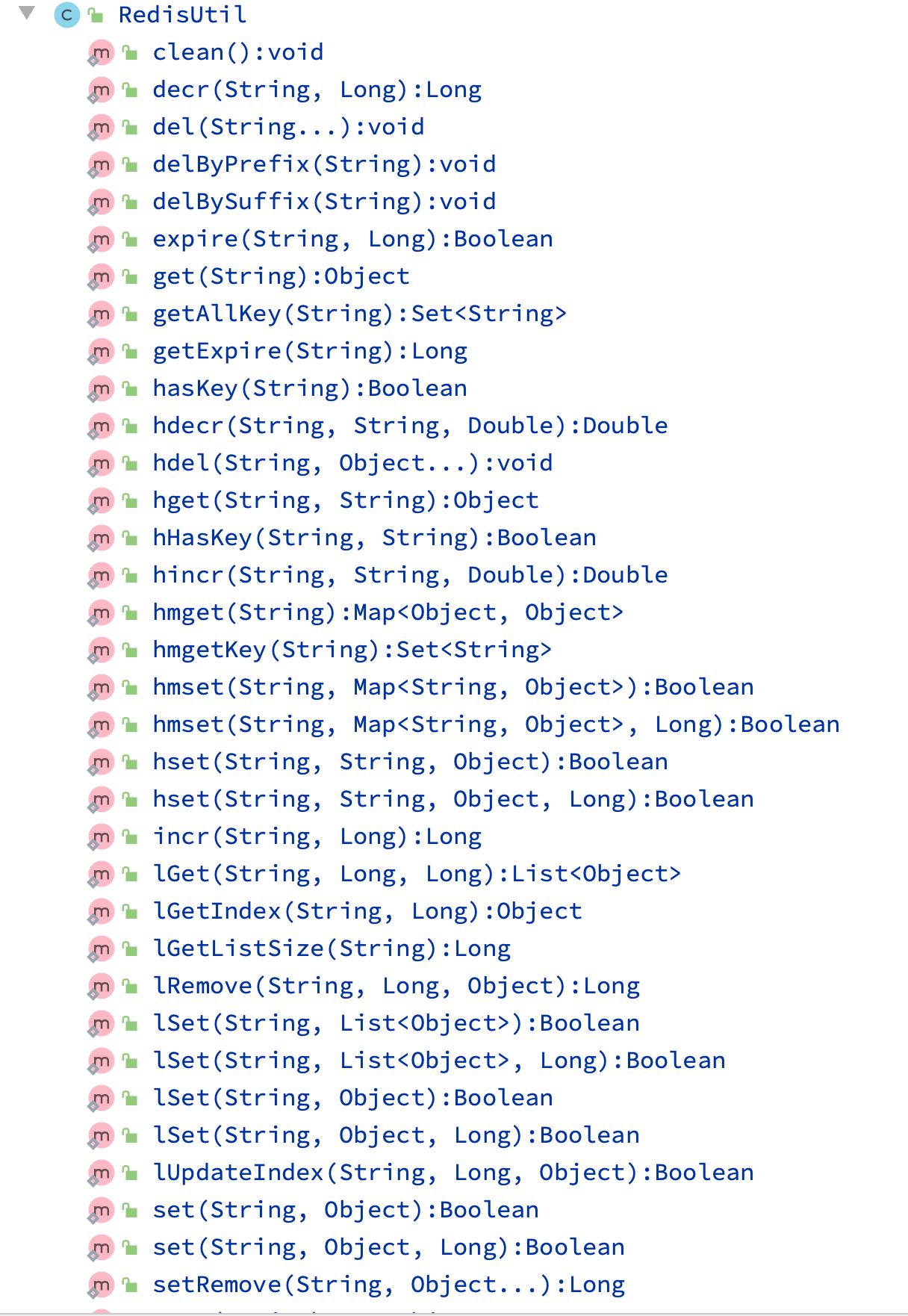
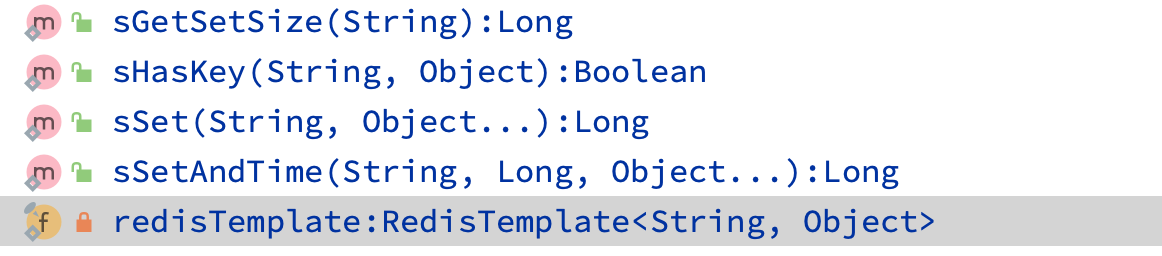 基本上包含工作中用到的所有方法, 这里附上源码
1package cn.soboys.kmall.cache.utils;
2
3import cn.hutool.extra.spring.SpringUtil;
4import org.springframework.data.redis.core.RedisTemplate;
5
6import java.util.Arrays;
7import java.util.List;
8import java.util.Map;
9import java.util.Set;
10import java.util.concurrent.TimeUnit;
11
12/**
13 * 定义常用的 Redis操作
14 *
15 * @author kenx
16 */
17
18public class RedisUtil {
19
20    private static final RedisTemplate<String, Object> redisTemplate = SpringUtil.getBean("redisTemplate", RedisTemplate.class);
21
22
23    /**
24     * 指定缓存失效时间
25     *
26     * @param key  键
27     * @param time 时间(秒)
28     * @return Boolean
29     */
30    public static Boolean expire(String key, Long time) {
31        try {
32            if (time > 0) {
33                redisTemplate.expire(key, time, TimeUnit.SECONDS);
34            }
35            return true;
36        } catch (Exception e) {
37            e.printStackTrace();
38            return false;
39        }
40    }
41
42    /**
43     * 根据key获取过期时间
44     *
45     * @param key 键 不能为 null
46     * @return 时间(秒) 返回 0代表为永久有效
47     */
48    public static Long getExpire(String key) {
49        return redisTemplate.getExpire(key, TimeUnit.SECONDS);
50    }
51
52    /**
53     * 判断 key是否存在
54     *
55     * @param key 键
56     * @return true 存在 false不存在
57     */
58    public static Boolean hasKey(String key) {
59        try {
60            return redisTemplate.hasKey(key);
61        } catch (Exception e) {
62            e.printStackTrace();
63            return false;
64        }
65    }
66
67    /**
68     * 删除缓存
69     *
70     * @param key 可以传一个值 或多个
71     */
72    public static void del(String... key) {
73        if (key != null && key.length > 0) {
74            if (key.length == 1) {
75                redisTemplate.delete(key[0]);
76            } else {
77                redisTemplate.delete(Arrays.asList(key));
78            }
79        }
80    }
81
82    public static void delByPrefix(String key) {
83        if (key != null) {
84            Set<String> keys = redisTemplate.keys(key + "*");
85            redisTemplate.delete(keys);
86        }
87    }
88
89    public static void delBySuffix(String key) {
90        if (key != null) {
91            Set<String> keys = redisTemplate.keys("*" + key);
92            redisTemplate.delete(keys);
93        }
94    }
95
96    public static  void clean(){
97        Set<String> keys = redisTemplate.keys("*");
98        redisTemplate.delete(keys);
99    }
100
101    /**
102     * 普通缓存获取
103     *
104     * @param key 键
105     * @return 值
106     */
107    public static Object get(String key) {
108        return key == null ? null : redisTemplate.opsForValue().get(key);
109    }
110
111    /**
112     * 普通缓存放入
113     *
114     * @param key   键
115     * @param value 值
116     * @return true成功 false失败
117     */
118    public static Boolean set(String key, Object value) {
119        try {
120            redisTemplate.opsForValue().set(key, value);
121            return true;
122        } catch (Exception e) {
123            e.printStackTrace();
124            return false;
125        }
126    }
127
128    /**
129     * 普通缓存放入并设置时间
130     *
131     * @param key   键
132     * @param value 值
133     * @param time  时间(秒) time要大于0 如果time小于等于0 将设置无限期
134     * @return true成功 false 失败
135     */
136    public static Boolean set(String key, Object value, Long time) {
137        try {
138            if (time > 0) {
139                redisTemplate.opsForValue().set(key, value, time, TimeUnit.SECONDS);
140            } else {
141                set(key, value);
142            }
143            return true;
144        } catch (Exception e) {
145            e.printStackTrace();
146            return false;
147        }
148    }
149
150    /**
151     * 递增
152     *
153     * @param key   键
154     * @param delta 要增加几(大于0)
155     * @return Long
156     */
157    public static Long incr(String key, Long delta) {
158        if (delta < 0) {
159            throw new RuntimeException("递增因子必须大于0");
160        }
161        return redisTemplate.opsForValue().increment(key, delta);
162    }
163
164    /**
165     * 递减
166     *
167     * @param key   键
168     * @param delta 要减少几
169     * @return Long
170     */
171    public static Long decr(String key, Long delta) {
172        if (delta < 0) {
173            throw new RuntimeException("递减因子必须大于0");
174        }
175        return redisTemplate.opsForValue().increment(key, -delta);
176    }
177
178    /**
179     * HashGet
180     *
181     * @param key  键 不能为 null
182     * @param item 项 不能为 null
183     * @return 值
184     */
185    public static Object hget(String key, String item) {
186        return redisTemplate.opsForHash().get(key, item);
187    }
188
189    /**
190     * 获取 hashKey对应的所有键值
191     *
192     * @param key 键
193     * @return 对应的多个键值
194     */
195    public static Map<Object, Object> hmget(String key) {
196        return redisTemplate.opsForHash().entries(key);
197    }
198
199    /**
200     * 获取 hashKey对应的所有键
201     *
202     * @param key 键
203     * @return 对应的多个键
204     */
205    public static Set<String> hmgetKey(String key) {
206        Map map = redisTemplate.opsForHash().entries(key);
207        return map.keySet();
208    }
209
210    /**
211     * HashSet
212     *
213     * @param key 键
214     * @param map 对应多个键值
215     * @return true 成功 false 失败
216     */
217    public static Boolean hmset(String key, Map<String, Object> map) {
218        try {
219            redisTemplate.opsForHash().putAll(key, map);
220            return true;
221        } catch (Exception e) {
222            e.printStackTrace();
223            return false;
224        }
225    }
226
227    /**
228     * HashSet 并设置时间
229     *
230     * @param key  键
231     * @param map  对应多个键值
232     * @param time 时间(秒)
233     * @return true成功 false失败
234     */
235    public static Boolean hmset(String key, Map<String, Object> map, Long time) {
236        try {
237            redisTemplate.opsForHash().putAll(key, map);
238            if (time > 0) {
239                expire(key, time);
240            }
241            return true;
242        } catch (Exception e) {
243            e.printStackTrace();
244            return false;
245        }
246    }
247
248    /**
249     * 向一张hash表中放入数据,如果不存在将创建
250     *
251     * @param key   键
252     * @param item  项
253     * @param value 值
254     * @return true 成功 false失败
255     */
256    public static Boolean hset(String key, String item, Object value) {
257        try {
258            redisTemplate.opsForHash().put(key, item, value);
259            return true;
260        } catch (Exception e) {
261            e.printStackTrace();
262            return false;
263        }
264    }
265
266    /**
267     * 向一张hash表中放入数据,如果不存在将创建
268     *
269     * @param key   键
270     * @param item  项
271     * @param value 值
272     * @param time  时间(秒) 注意:如果已存在的hash表有时间,这里将会替换原有的时间
273     * @return true 成功 false失败
274     */
275    public static Boolean hset(String key, String item, Object value, Long time) {
276        try {
277            redisTemplate.opsForHash().put(key, item, value);
278            if (time > 0) {
279                expire(key, time);
280            }
281            return true;
282        } catch (Exception e) {
283            e.printStackTrace();
284            return false;
285        }
286    }
287
288    /**
289     * 删除hash表中的值
290     *
291     * @param key  键 不能为 null
292     * @param item 项 可以使多个不能为 null
293     */
294    public static void hdel(String key, Object... item) {
295        redisTemplate.opsForHash().delete(key, item);
296    }
297
298    /**
299     * 判断hash表中是否有该项的值
300     *
301     * @param key  键 不能为 null
302     * @param item 项 不能为 null
303     * @return true 存在 false不存在
304     */
305    public static Boolean hHasKey(String key, String item) {
306        return redisTemplate.opsForHash().hasKey(key, item);
307    }
308
309    /**
310     * hash递增 如果不存在,就会创建一个 并把新增后的值返回
311     *
312     * @param key  键
313     * @param item 项
314     * @param by   要增加几(大于0)
315     * @return Double
316     */
317    public static Double hincr(String key, String item, Double by) {
318        return redisTemplate.opsForHash().increment(key, item, by);
319    }
320
321    /**
322     * hash递减
323     *
324     * @param key  键
325     * @param item 项
326     * @param by   要减少记(小于0)
327     * @return Double
328     */
329    public static Double hdecr(String key, String item, Double by) {
330        return redisTemplate.opsForHash().increment(key, item, -by);
331    }
332
333    /**
334     * 根据 key获取 Set中的所有值
335     *
336     * @param key 键
337     * @return Set
338     */
339    public static Set<Object> sGet(String key) {
340        try {
341            return redisTemplate.opsForSet().members(key);
342        } catch (Exception e) {
343            e.printStackTrace();
344            return null;
345        }
346    }
347
348    /**
349     * 根据value从一个set中查询,是否存在
350     *
351     * @param key   键
352     * @param value 值
353     * @return true 存在 false不存在
354     */
355    public static Boolean sHasKey(String key, Object value) {
356        try {
357            return redisTemplate.opsForSet().isMember(key, value);
358        } catch (Exception e) {
359            e.printStackTrace();
360            return false;
361        }
362    }
363
364    /**
365     * 将数据放入set缓存
366     *
367     * @param key    键
368     * @param values 值 可以是多个
369     * @return 成功个数
370     */
371    public static Long sSet(String key, Object... values) {
372        try {
373            return redisTemplate.opsForSet().add(key, values);
374        } catch (Exception e) {
375            e.printStackTrace();
376            return 0L;
377        }
378    }
379
380    /**
381     * 将set数据放入缓存
382     *
383     * @param key    键
384     * @param time   时间(秒)
385     * @param values 值 可以是多个
386     * @return 成功个数
387     */
388    public static Long sSetAndTime(String key, Long time, Object... values) {
389        try {
390            Long count = redisTemplate.opsForSet().add(key, values);
391            if (time > 0) {
392                expire(key, time);
393            }
394            return count;
395        } catch (Exception e) {
396            e.printStackTrace();
397            return 0L;
398        }
399    }
400
401    /**
402     * 获取set缓存的长度
403     *
404     * @param key 键
405     * @return Long
406     */
407    public static Long sGetSetSize(String key) {
408        try {
409            return redisTemplate.opsForSet().size(key);
410        } catch (Exception e) {
411            e.printStackTrace();
412            return 0L;
413        }
414    }
415
416    /**
417     * 移除值为value的
418     *
419     * @param key    键
420     * @param values 值 可以是多个
421     * @return 移除的个数
422     */
423    public static Long setRemove(String key, Object... values) {
424        try {
425            return redisTemplate.opsForSet().remove(key, values);
426        } catch (Exception e) {
427            e.printStackTrace();
428            return 0L;
429        }
430    }
431
432    /**
433     * 获取list缓存的内容
434     *
435     * @param key   键
436     * @param start 开始
437     * @param end   结束 0 到 -1代表所有值
438     * @return List
439     */
440    public static List<Object> lGet(String key, Long start, Long end) {
441        try {
442            return redisTemplate.opsForList().range(key, start, end);
443        } catch (Exception e) {
444            e.printStackTrace();
445            return null;
446        }
447    }
448
449    /**
450     * 获取list缓存的长度
451     *
452     * @param key 键
453     * @return Long
454     */
455    public static Long lGetListSize(String key) {
456        try {
457            return redisTemplate.opsForList().size(key);
458        } catch (Exception e) {
459            e.printStackTrace();
460            return 0L;
461        }
462    }
463
464    /**
465     * 通过索引 获取list中的值
466     *
467     * @param key   键
468     * @param index 索引 index>=0时, 0 表头,1 第二个元素,依次类推;
469     *              index<0时,-1,表尾,-2倒数第二个元素,依次类推
470     * @return Object
471     */
472    public static Object lGetIndex(String key, Long index) {
473        try {
474            return redisTemplate.opsForList().index(key, index);
475        } catch (Exception e) {
476            e.printStackTrace();
477            return null;
478        }
479    }
480
481    /**
482     * 将list放入缓存
483     *
484     * @param key   键
485     * @param value 值
486     * @return Boolean
487     */
488    public static Boolean lSet(String key, Object value) {
489        try {
490            redisTemplate.opsForList().rightPush(key, value);
491            return true;
492        } catch (Exception e) {
493            e.printStackTrace();
494            return false;
495        }
496    }
497
498    /**
499     * 将list放入缓存
500     *
501     * @param key   键
502     * @param value 值
503     * @param time  时间(秒)
504     * @return Boolean
505     */
506    public static Boolean lSet(String key, Object value, Long time) {
507        try {
508            redisTemplate.opsForList().rightPush(key, value);
509            if (time > 0) {
510                expire(key, time);
511            }
512            return true;
513        } catch (Exception e) {
514            e.printStackTrace();
515            return false;
516        }
517    }
518
519    /**
520     * 将list放入缓存
521     *
522     * @param key   键
523     * @param value 值
524     * @return Boolean
525     */
526    public static Boolean lSet(String key, List<Object> value) {
527        try {
528            redisTemplate.opsForList().rightPushAll(key, value);
529            return true;
530        } catch (Exception e) {
531            e.printStackTrace();
532            return false;
533        }
534    }
535
536    /**
537     * 将list放入缓存
538     *
539     * @param key   键
540     * @param value 值
541     * @param time  时间(秒)
542     * @return Boolean
543     */
544    public static Boolean lSet(String key, List<Object> value, Long time) {
545        try {
546            redisTemplate.opsForList().rightPushAll(key, value);
547            if (time > 0) {
548                expire(key, time);
549            }
550            return true;
551        } catch (Exception e) {
552            e.printStackTrace();
553            return false;
554        }
555    }
556
557    /**
558     * 根据索引修改list中的某条数据
559     *
560     * @param key   键
561     * @param index 索引
562     * @param value 值
563     * @return Boolean
564     */
565    public static Boolean lUpdateIndex(String key, Long index, Object value) {
566        try {
567            redisTemplate.opsForList().set(key, index, value);
568            return true;
569        } catch (Exception e) {
570            e.printStackTrace();
571            return false;
572        }
573    }
574
575    /**
576     * 移除N个值为value
577     *
578     * @param key   键
579     * @param count 移除多少个
580     * @param value 值
581     * @return 移除的个数
582     */
583    public static Long lRemove(String key, Long count, Object value) {
584        try {
585            return redisTemplate.opsForList().remove(key, count, value);
586        } catch (Exception e) {
587            e.printStackTrace();
588            return 0L;
589        }
590    }
591
592    public static Set<String> getAllKey(String keys) {
593        Set<String> key = redisTemplate.keys(keys + "*");
594        return key;
595    }
596
597
598}