
一、将读取Excel文件放到Plugins文件下,并添加组件
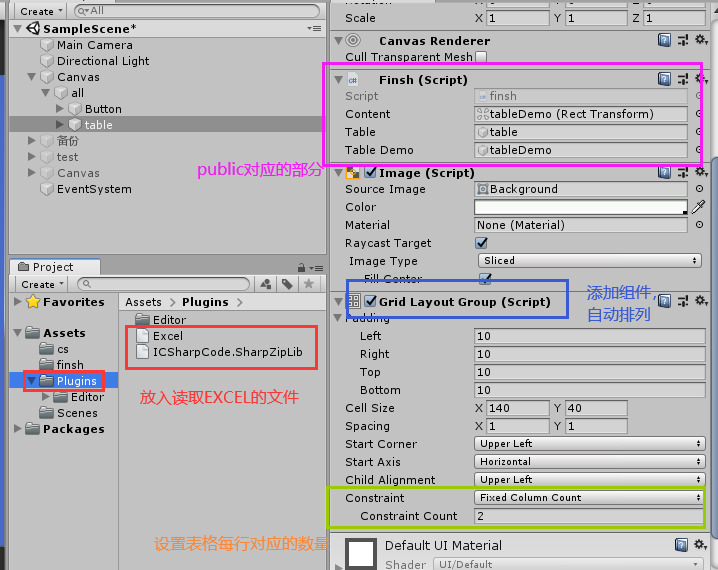
二、相关代码
1using System;
2using System.Collections;
3using System.Collections.Generic;
4using UnityEngine;
5using System.Data;
6using System.IO;
7using Excel;
8using UnityEngine.UI;
9using Object = UnityEngine.Object;
10
11public class finsh : MonoBehaviour
12{
13     //public设置为unity界面配置
14    public RectTransform content;
15    public GameObject table;
16    public GameObject tableDemo;
17    private string file1 = "Assets/finsh/cc.xlsx";//读取的文件的路径
18
19
20      //根据读取Excel表格的数量通过克隆创建对应的表格
21    public void CloneForm()
22    {
23        Dictionary<string, string> dictionary = LoadInfo(file1);
24        foreach (var i in dictionary)
25        {
26            content = table.GetComponent<RectTransform>();
27            var task = Instantiate(tableDemo, content);
28            task.gameObject.SetActive(true);
29            task.GetComponent<InputField>().text = i.Value;
30        }
31    }
32
33     //读取加载
34    public void read()
35    {
36        GameObject.Find("table").AddComponent<finsh>().LoadInfo(file1);
37        print(file1);
38        CloneForm();
39    }
40
41    //找到并读取Excel,转换成DataSet型变量
42    DataSet ReadExcel(string path)
43    {
44        Debug.Log(path + "read");
45        FileStream fs = File.Open(path, FileMode.Open, FileAccess.Read, FileShare.Read);
46        IExcelDataReader iExcelDR = ExcelReaderFactory.CreateOpenXmlReader(fs);
47        DataSet ds = iExcelDR.AsDataSet();
48        fs.Close();
49        return ds;
50    }
51
52    //加载记录表中信息
53    public Dictionary<string, string> LoadInfo(string path)
54    {
55        Debug.Log(path+"load");
56        Dictionary<string, string> table_list=new Dictionary<string, string>();
57       DataSet ds = ReadExcel(path);
58        int num= ds.Tables.Count;  //查询文件有几个表
59        print("表"+num);
60        int columns = ds.Tables[1].Columns.Count; //总列数,Tables[0]为待查询的表1
61        int rows = ds.Tables[1].Rows.Count; //总行数
62        GetComponent<GridLayoutGroup>().constraintCount = columns;
63        print(rows + "---" + columns);
64        for (int j = 0; j < rows; j++)
65        {
66            for (int i = 0; i < columns; i++)
67            {
68                //读取表1的第i行第j列
69                string value = ds.Tables[1].Rows[j][i].ToString(); //ds.Tables[0].Rows[i][0]是Object,需强行转换为string
70                string key = (j + 1) + "行" + (i + 1) + "列";
71                table_list.Add(key,value);
72               // Debug.Log(key + "===" + value);
73
74            }
75
76
77        }
78
79        return table_list;
80    }
81
82}
83
84/*创建对象
85 private Object CreateSprite(int r, int c)
86{
87    GameObject go=new GameObject(r.ToString()+c.ToString());
88    go.AddComponent<InputField>();
89    go.transform.SetParent(this.transform,false);
90    return go;
91    print(this.transform.name);
92}*/