一、下载ActiveMQ
版本:ActiveMQ 5.15.3 Release
地址:http://activemq.apache.org/download.html
二、运行ActiveMQ
1、解压apache-activemq-5.15.3-bin.zip
2、执行\bin\win64\activemq.bat脚本即可启动AMQ
三、修改配置文件持久化到Mysql数据库
文件路径:\conf\activemq.xml
1 1 <!--
2 2     Configure message persistence for the broker. The default persistence
3 3     mechanism is the KahaDB store (identified by the kahaDB tag).
4 4     For more information, see:
5 5
6 6     http://activemq.apache.org/persistence.html
7 7 -->
8 8 <persistenceAdapter>
9 9     <!--<kahaDB directory="${activemq.data}/kahadb"/>-->
1010     <jdbcPersistenceAdapter dataSource="#mysql-ds"/>
1111 </persistenceAdapter>
12
13 1 <bean id="mysql-ds" class="org.apache.commons.dbcp2.BasicDataSource" destroy-method="close">
14 2     <property name="driverClassName" value="com.mysql.jdbc.Driver"/>
15 3     <property name="url" value="jdbc:mysql://localhost:3306/db_activemq?relaxAutoCommit=true"/>
16 4     <property name="username" value="root"/>
17 5     <property name="password" value="root"/>
18 6     <property name="poolPreparedStatements" value="true"/>
19 7 </bean>
20 8
21 9 <!--
2210     Enable web consoles, REST and Ajax APIs and demos
2311     The web consoles requires by default login, you can disable this in the jetty.xml file
2412
2513     Take a look at ${ACTIVEMQ_HOME}/conf/jetty.xml for more details
2614 -->
2715 <import resource="jetty.xml"/>
四、引入Mysql包
复制mysql-connector-java-5.1.45.jar包到\lib\目录下
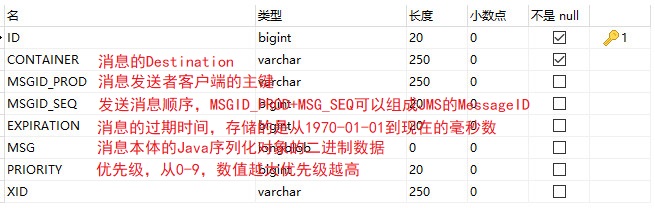
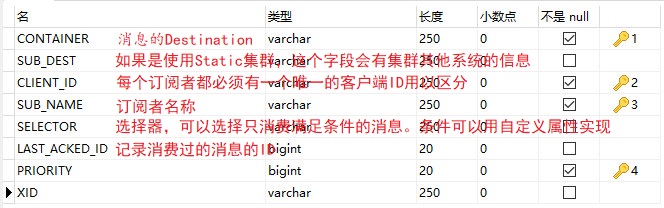
五、重新运行AMQ,数据库自动生成3张表
**activemq_acks:**用于存储订阅关系。如果是持久化Topic,订阅者和服务器的订阅关系在这个表保存
**activemq_lock:**在集群环境中才有用,只有一个Broker可以获得消息,称为Master Broker

**activemq_msgs:**用于存储消息,Queue和Topic都存储在这个表中