
Apache Thrift-Node.js教程
Node.js教程
介绍
所有Apache Thrift教程都要求您具备:
1.Apache Thrift编译器和库,请参阅下载和从源代码构建以获取更多详细信息。
2.生成了tutorial.thrift和shared.thrift文件
3.遵循以下所有先决条件。
先决条件
客户端
1var Calculator = require('./gen-nodejs/Calculator');
2var ttypes = require('./gen-nodejs/tutorial_types');
3const assert = require('assert');
4
5var transport = thrift.TBufferedTransport;
6var protocol = thrift.TBinaryProtocol;
7
8var connection = thrift.createConnection("localhost", 9090, {
9  transport : transport,
10  protocol : protocol
11});
12
13connection.on('error', function(err) {
14  assert(false, err);
15});
16
17// Create a Calculator client with the connection
18var client = thrift.createClient(Calculator, connection);
19
20
21client.ping(function(err, response) {
22  console.log('ping()');
23});
24
25
26client.add(1,1, function(err, response) {
27  console.log("1+1=" + response);
28});
29
30
31work = new ttypes.Work();
32work.op = ttypes.Operation.DIVIDE;
33work.num1 = 1;
34work.num2 = 0;
35
36client.calculate(1, work, function(err, message) {
37  if (err) {
38    console.log("InvalidOperation " + err);
39  } else {
40    console.log('Whoa? You know how to divide by zero?');
41  }
42});
43
44work.op = ttypes.Operation.SUBTRACT;
45work.num1 = 15;
46work.num2 = 10;
47
48client.calculate(1, work, function(err, message) {
49  console.log('15-10=' + message);
50
51  client.getStruct(1, function(err, message){
52    console.log('Check log: ' + message.value);
53
54    //close the connection once we're done
55    connection.end();
56  });
57});
该代码段是由Apache Thrift的源代码树文档生成的:tutorial/nodejs/NodeClient.js
服务端
1var Calculator = require("./gen-nodejs/Calculator");
2var ttypes = require("./gen-nodejs/tutorial_types");
3var SharedStruct = require("./gen-nodejs/shared_types").SharedStruct;
4
5var data = {};
6
7var server = thrift.createServer(Calculator, {
8  ping: function(result) {
9    console.log("ping()");
10    result(null);
11  },
12
13  add: function(n1, n2, result) {
14    console.log("add(", n1, ",", n2, ")");
15    result(null, n1 + n2);
16  },
17
18  calculate: function(logid, work, result) {
19    console.log("calculate(", logid, ",", work, ")");
20
21    var val = 0;
22    if (work.op == ttypes.Operation.ADD) {
23      val = work.num1 + work.num2;
24    } else if (work.op === ttypes.Operation.SUBTRACT) {
25      val = work.num1 - work.num2;
26    } else if (work.op === ttypes.Operation.MULTIPLY) {
27      val = work.num1 * work.num2;
28    } else if (work.op === ttypes.Operation.DIVIDE) {
29      if (work.num2 === 0) {
30        var x = new ttypes.InvalidOperation();
31        x.whatOp = work.op;
32        x.why = 'Cannot divide by 0';
33        result(x);
34        return;
35      }
36      val = work.num1 / work.num2;
37    } else {
38      var x = new ttypes.InvalidOperation();
39      x.whatOp = work.op;
40      x.why = 'Invalid operation';
41      result(x);
42      return;
43    }
44
45    var entry = new SharedStruct();
46    entry.key = logid;
47    entry.value = ""+val;
48    data[logid] = entry;
49
50    result(null, val);
51  },
52
53  getStruct: function(key, result) {
54    console.log("getStruct(", key, ")");
55    result(null, data[key]);
56  },
57
58  zip: function() {
59    console.log("zip()");
60  }
61
62});
63
64server.listen(9090);
此代码段由Apache Thrift的源代码树文档生成:tutorial/nodejs/NodeServer.js
附加信息
链接
参与其中
使用Apache Thrift的Nodejs示例
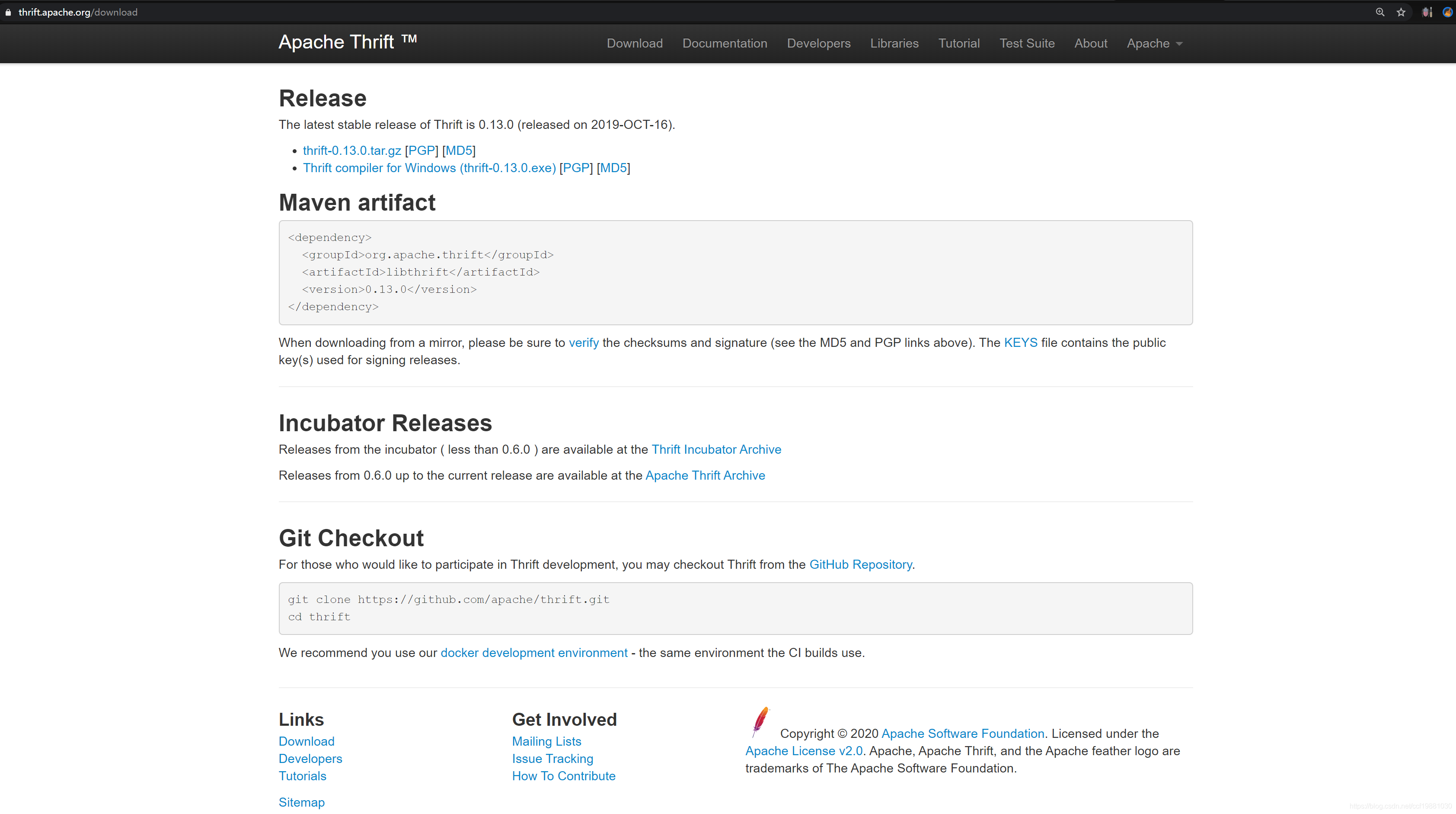
从Thrift官网下载页面下载Thrift compiler for Windows (thrift-0.13.0.exe),即下载Windows下的thrift-0.13.0.exe可执行文件,用于将前面说到的tutorial.thrift和shared.thrift接口定义文件转换为某种语言比如说Node.js的代码。
shared.thrift文件内容如下所示:
1/*
2 * Licensed to the Apache Software Foundation (ASF) under one
3 * or more contributor license agreements. See the NOTICE file
4 * distributed with this work for additional information
5 * regarding copyright ownership. The ASF licenses this file
6 * to you under the Apache License, Version 2.0 (the
7 * "License"); you may not use this file except in compliance
8 * with the License. You may obtain a copy of the License at
9 *
10 *   http://www.apache.org/licenses/LICENSE-2.0
11 *
12 * Unless required by applicable law or agreed to in writing,
13 * software distributed under the License is distributed on an
14 * "AS IS" BASIS, WITHOUT WARRANTIES OR CONDITIONS OF ANY
15 * KIND, either express or implied. See the License for the
16 * specific language governing permissions and limitations
17 * under the License.
18 */
19
20/**
21 * This Thrift file can be included by other Thrift files that want to share
22 * these definitions.
23 */
24
25namespace cl shared
26namespace cpp shared
27namespace d share // "shared" would collide with the eponymous D keyword.
28namespace dart shared
29namespace java shared
30namespace perl shared
31namespace php shared
32namespace haxe shared
33namespace netstd shared
34
35
36struct SharedStruct {
37  1: i32 key
38  2: string value
39}
40
41service SharedService {
42  SharedStruct getStruct(1: i32 key)
43}
tutorial.thrift文件如下所示:
1/*
2 * Licensed to the Apache Software Foundation (ASF) under one
3 * or more contributor license agreements. See the NOTICE file
4 * distributed with this work for additional information
5 * regarding copyright ownership. The ASF licenses this file
6 * to you under the Apache License, Version 2.0 (the
7 * "License"); you may not use this file except in compliance
8 * with the License. You may obtain a copy of the License at
9 *
10 *   http://www.apache.org/licenses/LICENSE-2.0
11 *
12 * Unless required by applicable law or agreed to in writing,
13 * software distributed under the License is distributed on an
14 * "AS IS" BASIS, WITHOUT WARRANTIES OR CONDITIONS OF ANY
15 * KIND, either express or implied. See the License for the
16 * specific language governing permissions and limitations
17 * under the License.
18 */
19
20# Thrift Tutorial
21# Mark Slee (mcslee@facebook.com)
22#
23# This file aims to teach you how to use Thrift, in a .thrift file. Neato. The
24# first thing to notice is that .thrift files support standard shell comments.
25# This lets you make your thrift file executable and include your Thrift build
26# step on the top line. And you can place comments like this anywhere you like.
27#
28# Before running this file, you will need to have installed the thrift compiler
29# into /usr/local/bin.
30
31/**
32 * The first thing to know about are types. The available types in Thrift are:
33 *
34 *  bool        Boolean, one byte
35 *  i8 (byte)   Signed 8-bit integer
36 *  i16         Signed 16-bit integer
37 *  i32         Signed 32-bit integer
38 *  i64         Signed 64-bit integer
39 *  double      64-bit floating point value
40 *  string      String
41 *  binary      Blob (byte array)
42 *  map<t1,t2>  Map from one type to another
43 *  list<t1>    Ordered list of one type
44 *  set<t1>     Set of unique elements of one type
45 *
46 * Did you also notice that Thrift supports C style comments?
47 */
48
49// Just in case you were wondering... yes. We support simple C comments too.
50
51/**
52 * Thrift files can reference other Thrift files to include common struct
53 * and service definitions. These are found using the current path, or by
54 * searching relative to any paths specified with the -I compiler flag.
55 *
56 * Included objects are accessed using the name of the .thrift file as a
57 * prefix. i.e. shared.SharedObject
58 */
59include "shared.thrift"
60
61/**
62 * Thrift files can namespace, package, or prefix their output in various
63 * target languages.
64 */
65
66namespace cl tutorial
67namespace cpp tutorial
68namespace d tutorial
69namespace dart tutorial
70namespace java tutorial
71namespace php tutorial
72namespace perl tutorial
73namespace haxe tutorial
74namespace netstd tutorial
75
76/**
77 * Thrift lets you do typedefs to get pretty names for your types. Standard
78 * C style here.
79 */
80typedef i32 MyInteger
81
82/**
83 * Thrift also lets you define constants for use across languages. Complex
84 * types and structs are specified using JSON notation.
85 */
86const i32 INT32CONSTANT = 9853
87const map<string,string> MAPCONSTANT = {'hello':'world', 'goodnight':'moon'}
88
89/**
90 * You can define enums, which are just 32 bit integers. Values are optional
91 * and start at 1 if not supplied, C style again.
92 */
93enum Operation {
94  ADD = 1,
95  SUBTRACT = 2,
96  MULTIPLY = 3,
97  DIVIDE = 4
98}
99
100/**
101 * Structs are the basic complex data structures. They are comprised of fields
102 * which each have an integer identifier, a type, a symbolic name, and an
103 * optional default value.
104 *
105 * Fields can be declared "optional", which ensures they will not be included
106 * in the serialized output if they aren't set.  Note that this requires some
107 * manual management in some languages.
108 */
109struct Work {
110  1: i32 num1 = 0,
111  2: i32 num2,
112  3: Operation op,
113  4: optional string comment,
114}
115
116/**
117 * Structs can also be exceptions, if they are nasty.
118 */
119exception InvalidOperation {
120  1: i32 whatOp,
121  2: string why
122}
123
124/**
125 * Ahh, now onto the cool part, defining a service. Services just need a name
126 * and can optionally inherit from another service using the extends keyword.
127 */
128service Calculator extends shared.SharedService {
129
130  /**
131   * A method definition looks like C code. It has a return type, arguments,
132   * and optionally a list of exceptions that it may throw. Note that argument
133   * lists and exception lists are specified using the exact same syntax as
134   * field lists in struct or exception definitions.
135   */
136
137   void ping(),
138
139   i32 add(1:i32 num1, 2:i32 num2),
140
141   i32 calculate(1:i32 logid, 2:Work w) throws (1:InvalidOperation ouch),
142
143   /**
144    * This method has a oneway modifier. That means the client only makes
145    * a request and does not listen for any response at all. Oneway methods
146    * must be void.
147    */
148   oneway void zip()
149
150}
151
152/**
153 * That just about covers the basics. Take a look in the test/ folder for more
154 * detailed examples. After you run this file, your generated code shows up
155 * in folders with names gen-<language>. The generated code isn't too scary
156 * to look at. It even has pretty indentation.
157 */
然后使用刚刚下载的thrift-0.13.0.exe采用thrift -r --gen js:node tutorial.thrift命令将tutorial.thrift和shared.thrift生成对应的Node.js文件
thrift -r --gen js:node tutorial.thrift
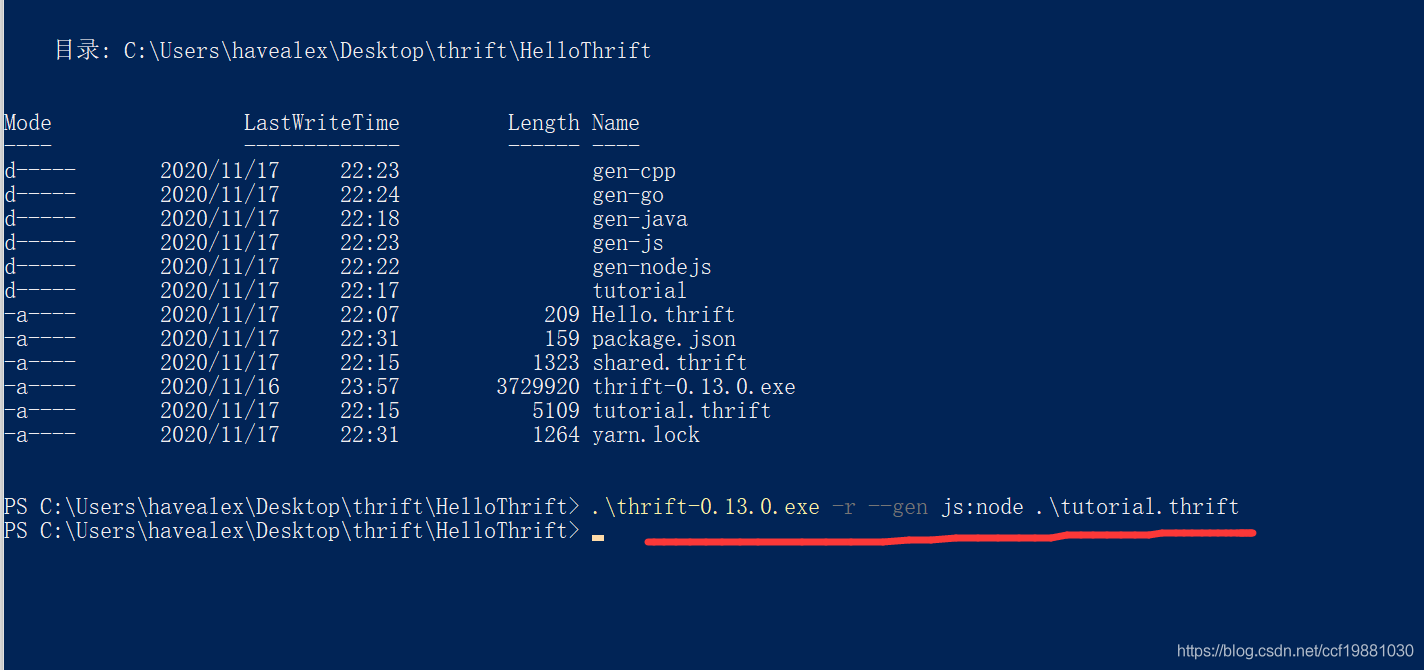
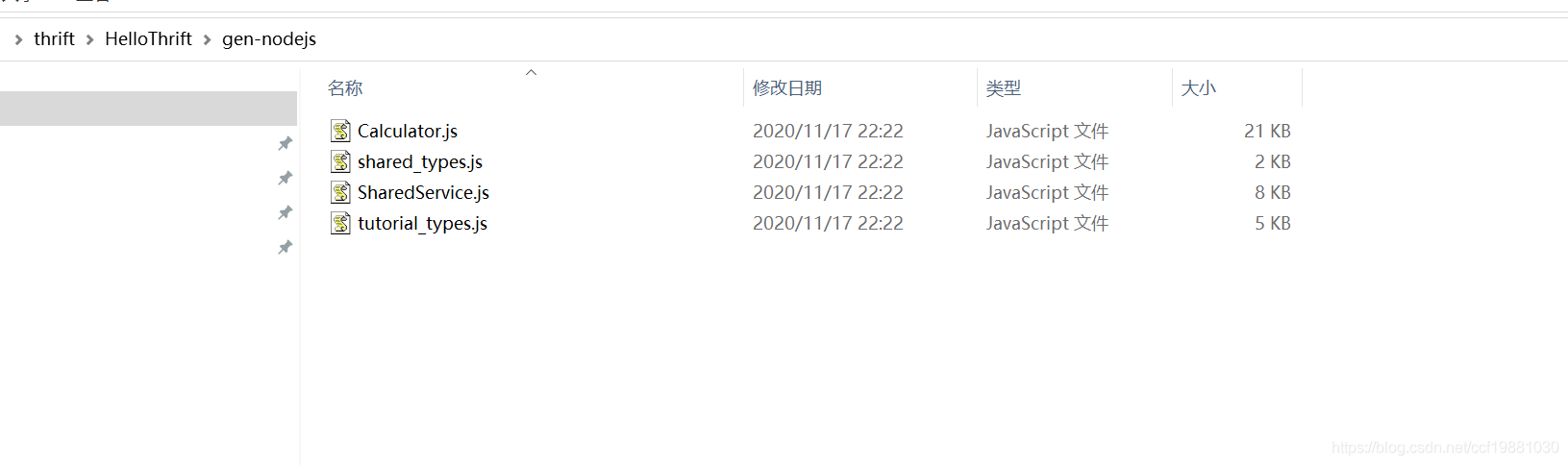
可以看到tutorial.thrift和shared.thrift当前所在目录下生成了gen-nodejs目录,如下图所示:
创建一个tutorial目录,再其下再创建一个nodejs目录,分别创建一个NodejsServer.js和NodejsClient.js文件,其内容如下所示:
NodejsServer.js
1var Calculator = require('./gen-nodejs/Calculator');
2var ttypes = require('./gen-nodejs/tutorial_types');
3var SharedStruct = require('./gen-nodejs/shared_types').SharedStruct;
4
5var thrift = require('thrift');
6
7var data = {
8
9
10   };
11
12var server = thrift.createServer(Calculator, {
13
14
15
16  ping: function(result) {
17
18
19
20    console.log("ping()");
21    result(null);
22  },
23  add: function(n1, n2, result) {
24
25
26
27    console.log("add(", n1, ",", n2, ")");
28    result(null, n1+n2);
29  },
30
31  calculate: function(logid, work, result) {
32
33
34
35    console.log("calculate(", logid, ",", work, ")");
36
37    var val = 0;
38    if (work.op == ttypes.Operation.ADD) {
39
40
41
42      val = work.num1 + work.num2;
43    } else if (work.op === ttypes.Operation.SUBTRACT) {
44
45
46
47      val = work.num1 - work.num2;
48    } else if (work.op === ttypes.Operation.MULTIPLY) {
49
50
51
52      val = work.num1 * work.num2;
53    } else if (work.op === ttypes.Operation.DIVIDE) {
54
55
56
57      if (work.num2 == 0) {
58
59
60
61        var x = new ttypes.InvalidOperation();
62        x.whatOp = work.op;
63        x.why = 'Cannot divide by 0';
64        result(x);
65        return;
66      }
67      val = work.num1 / work.num2;
68    } else {
69
70
71
72      var y = ttypes.InvalidOperation();
73      y.whatOp = work.op;
74      y.why = 'Invalid operation';
75      result(y);
76      return;
77    }
78    var entry = new SharedStruct();
79    entry.key = logid;
80    entry.value = "" + val;
81    data[logid] = entry;
82
83    result(null, val);
84  },
85
86  getStruct: function(key, result) {
87
88
89
90    console.log("getStruct(", key, ")");
91    result(null, data[key]);
92  },
93
94  zip: function() {
95
96
97
98    console.log("zip()");
99  }
100});
101
102server.listen(9090);
NodejsClient.js
1var Calculator = require('./gen-nodejs/Calculator');
2var ttypes = require('./gen-nodejs/tutorial_types');
3const assert = require('assert');
4
5var thrift = require('thrift');
6
7var transport = thrift.TBufferedTransport;
8var protocol = thrift.TBinaryProtocol;
9
10var connection = thrift.createConnection("localhost", 9090, {
11
12
13
14  transport: transport,
15  protocol: protocol
16});
17
18connection.on('error', function(err) {
19
20
21
22  assert(false, err);
23});
24
25// Create a Calculator client with the connection
26var client = thrift.createClient(Calculator, connection);
27
28client.ping(function(err, response) {
29
30
31
32  console.log('ping()');
33});
34
35client.add(1, 1, function(err, response) {
36
37
38
39  console.log("1+1=" + response);
40});
41
42work = new ttypes.Work();
43work.op = ttypes.Operation.DIVIDE;
44work.num1 = 1;
45work.num2 = 0;
46
47client.calculate(1, work, function(err, message) {
48
49
50
51  if (err) {
52
53
54
55    console.log("InvalidOperation " + err);
56  } else {
57
58
59
60    console.log('Whoa? You know how to divide by zero?');
61  }
62});
63
64work.op = ttypes.Operation.SUBTRACT;
65work.num1 = 15;
66work.num2 = 10;
67
68client.calculate(1, work, function(err, message) {
69
70
71
72  console.log('15-10=' + message);
73
74  client.getStruct(1, function(err, message) {
75
76
77
78    console.log('Check log: ' + message.value);
79
80    // close the connection once we're done
81    connection.end();
82  });
83});
在Windows下运行Node.js示例代码
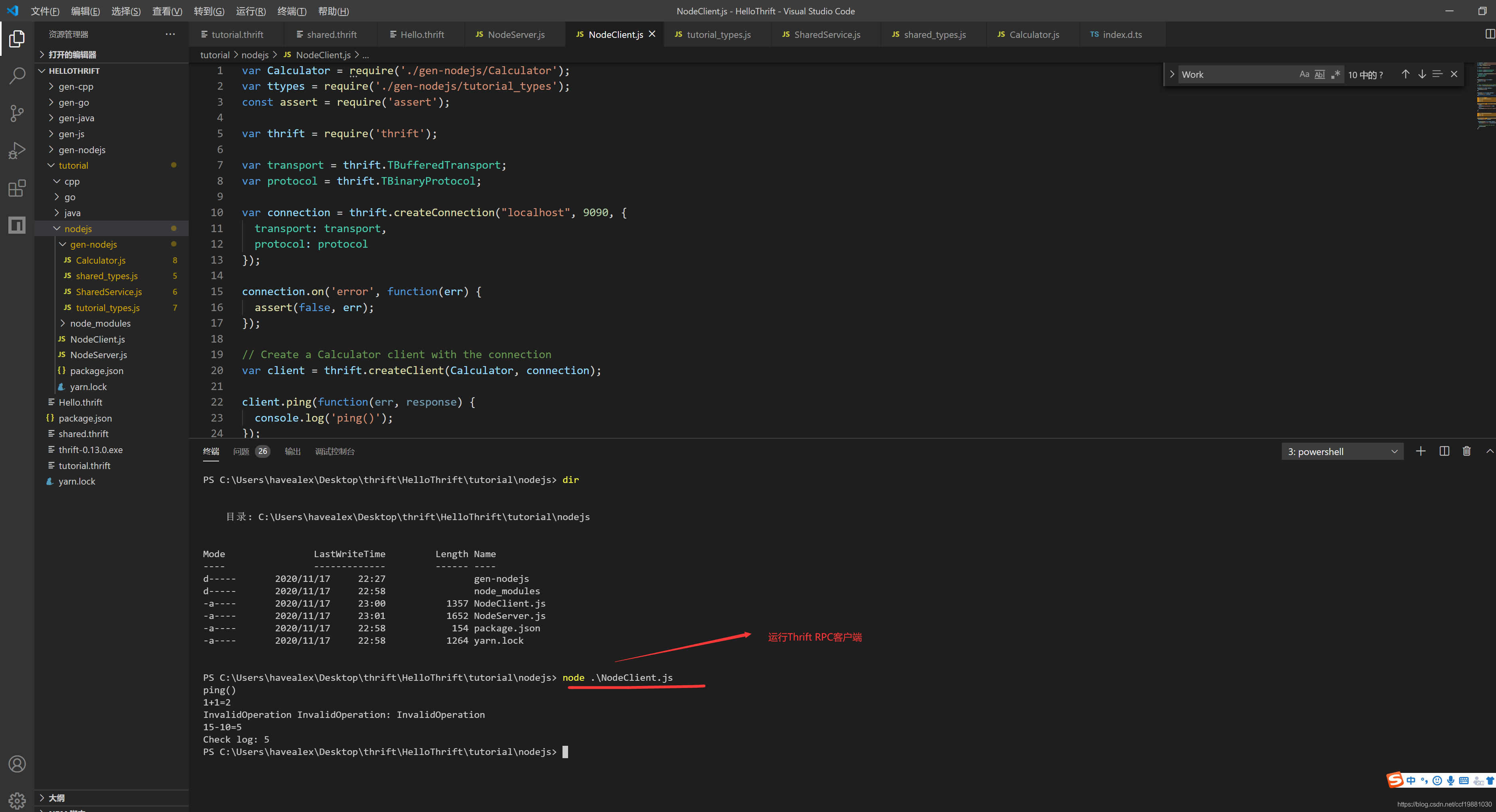
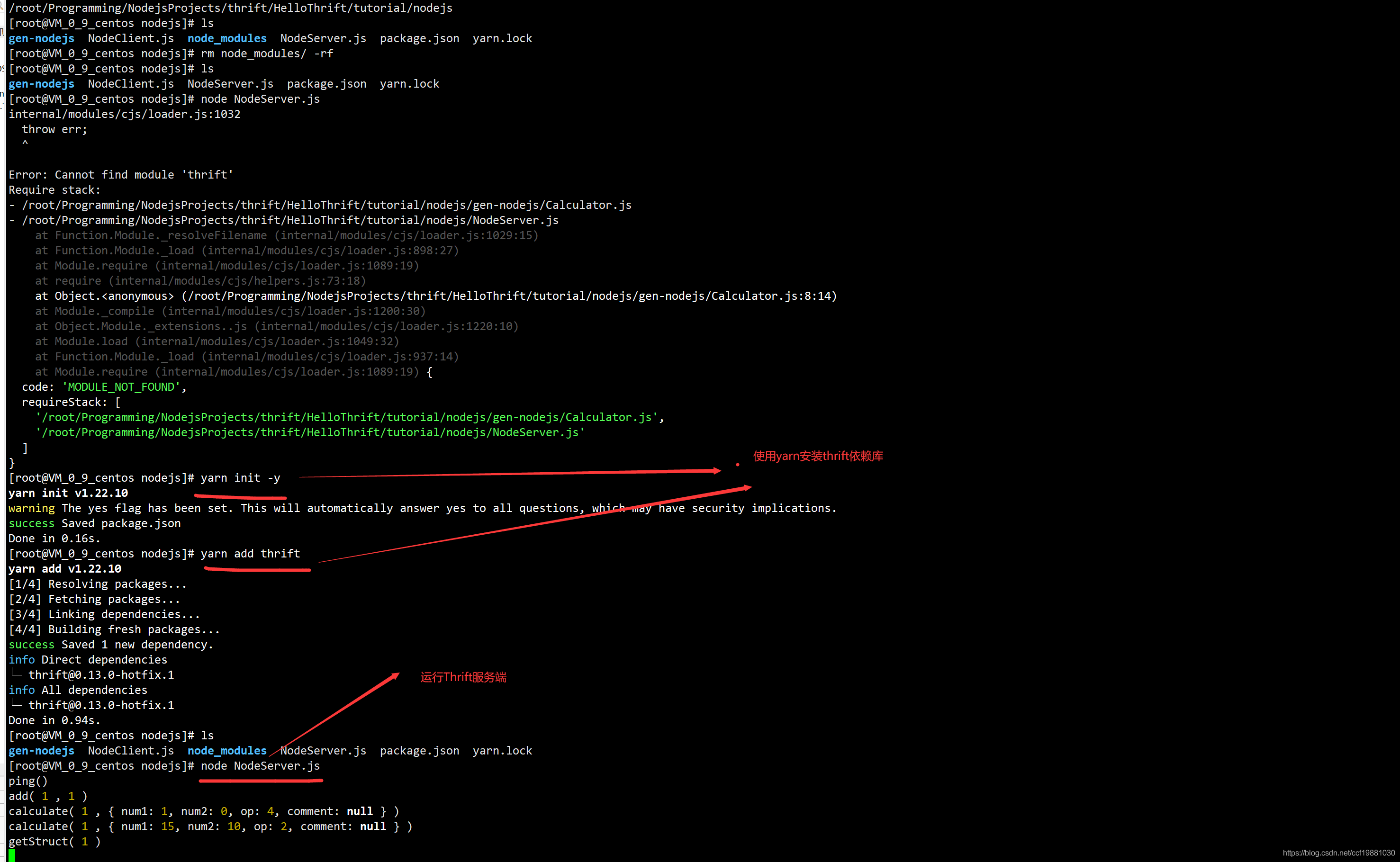
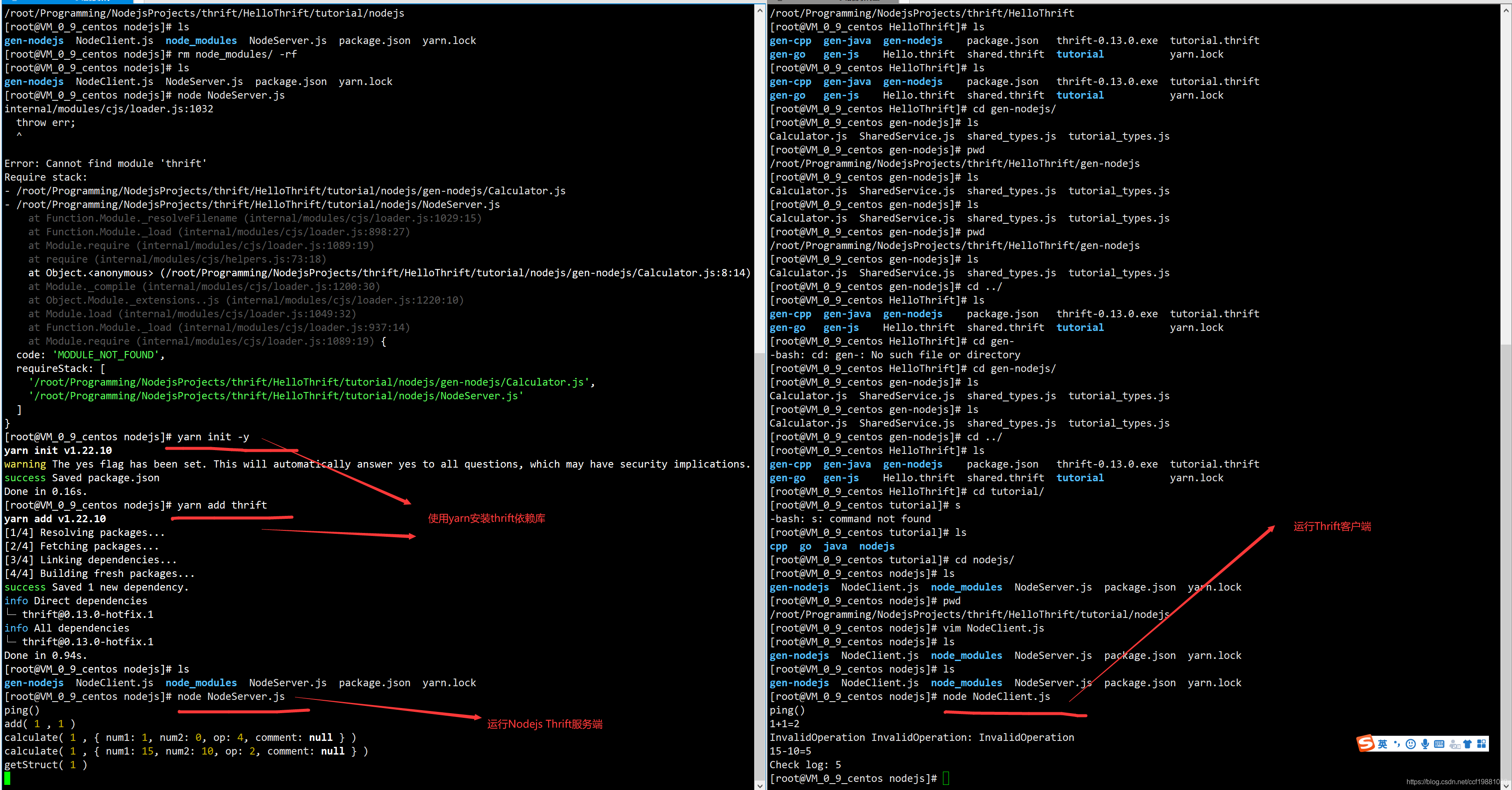
在项目源代码目录即nodejs所在目录使用npm或’cnpm或'yarn安装thrift库,在国内由于墙的原因npm下载和安装依赖库比较慢,所以建议使用’cnpm或者yarn进行安装依赖库,最近发现使用yarn`比较方便:
1yarn init -y
2yarn add thrift
我使用的是Windows下的VSCode作为开发环境,
使用node NodeServer.js运行RPC服务端:
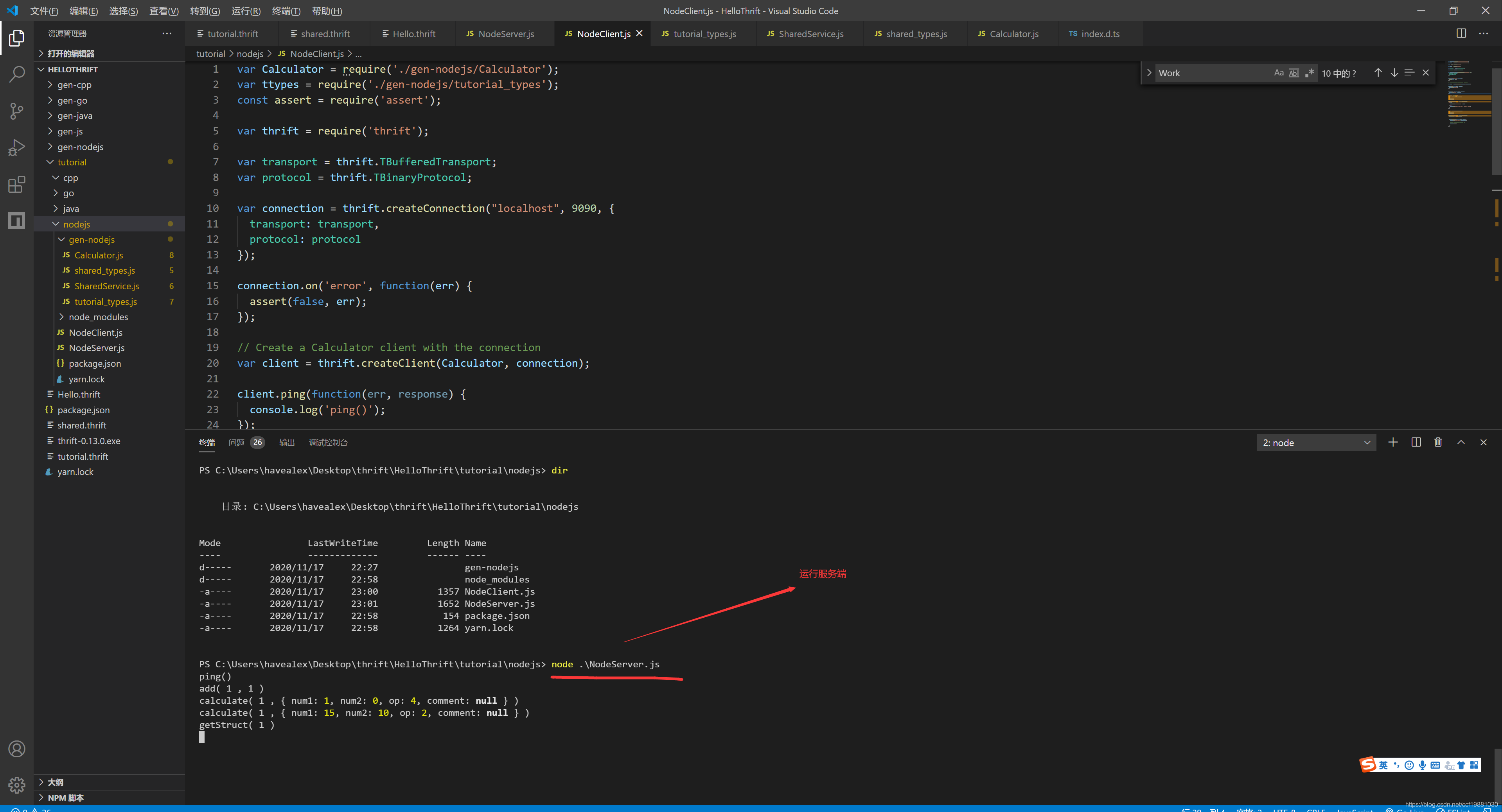
使用node NodeClient.js运行RPC客户端:
在CentOS7下运行Node.js示例代码
运行Nodejs服务端
运行Node.js客户端
本文同步分享在 博客“雪域迷影”(CSDN)。
如有侵权,请联系 support@oschina.cn 删除。
本文参与“OSC源创计划”,欢迎正在阅读的你也加入,一起分享。