
WEB框架的本质
对于所有的Web应用,本质上其实就是一个socket服务端,用户的浏览器其实就是一个socket客户端。
1#!/usr/bin/env python
2#coding:utf-8
3
4import socket
5
6def handle_request(client):
7    buf = client.recv(1024)
8    client.send("HTTP/1.1 200 OK\r\n\r\n")
9    client.send("Hello, Seven")
10
11def main():
12    sock = socket.socket(socket.AF_INET, socket.SOCK_STREAM)
13    sock.bind(('localhost',8000))
14    sock.listen(5)
15
16    while True:
17        connection, address = sock.accept()
18        handle_request(connection)
19        connection.close()
20
21if __name__ == '__main__':
22    main()
上述通过socket来实现了其本质,而对于真实开发中的python web程序来说,一般会分为两部分:服务器程序和应用程序。服务器程序负责对socket服务器进行封装,并在请求到来时,对请求的各种数据进行整理。应用程序则负责具体的逻辑处理。为了方便应用程序的开发,就出现了众多的Web框架,例如:Django、Flask、web.py 等。不同的框架有不同的开发方式,但是无论如何,开发出的应用程序都要和服务器程序配合,才能为用户提供服务。这样,服务器程序就需要为不同的框架提供不同的支持。这样混乱的局面无论对于服务器还是框架,都是不好的。对服务器来说,需要支持各种不同框架,对框架来说,只有支持它的服务器才能被开发出的应用使用。这时候,标准化就变得尤为重要。我们可以设立一个标准,只要服务器程序支持这个标准,框架也支持这个标准,那么他们就可以配合使用。一旦标准确定,双方各自实现。这样,服务器可以支持更多支持标准的框架,框架也可以使用更多支持标准的服务器。
WSGI(Web Server Gateway Interface)是一种规范,它定义了使用python编写的web app与web server之间接口格式,实现web app与web server间的解耦。
python标准库提供的独立WSGI服务器称为wsgiref。
1from wsgiref.simple_server import make_server
2
3
4def RunServer(environ, start_response):
5    start_response('200 OK', [('Content-Type', 'text/html')])
6    return [bytes('<h1>Hello, web!</h1>', encoding='utf-8'), ]
7
8
9if __name__ == '__main__':
10    httpd = make_server('', 8000, RunServer)
11    print("Serving HTTP on port 8000...")
12    httpd.serve_forever()
Python的WEB框架有Django、Tornado、Flask 等多种,Django相较与其他WEB框架其优势为:大而全,框架本身集成了ORM、模型绑定、模板引擎、缓存、Session等诸多功能。
Django工程前基本配置
一、安装Django
pip install django
二、创建Django工程
- 终端命令:django-admin startproject sitename(工程名称)
- IDE创建Django程序时,本质上都是自动执行上述命令
三、程序目录
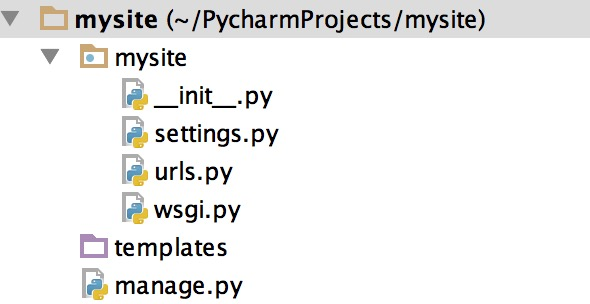
mysite
- mysite # 对整个程序进行配置
- init
- settings # 配置文件
- url # URL对应关系
- wsgi # 遵循WSIG规范,uwsgi + nginx
- manage.py # 管理Django程序:
- python manage.py
- python manage.py startapp xx
- python manage.py makemigrations
- python manage.py migrate
-templates #放置网页内容
# 运行Django功能
python manage.py runserver 127.0.0.1:8000
四、创建app
# 创建app
python manage.py startapp cmdb
python manage.py startapp openstack
python manage.py startapp xxoo....
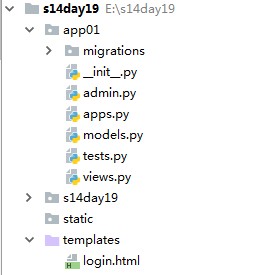
app:
migrations 数据修改表结构
admin Django为我们提供的后台管理
apps 配置当前app
models ORM,写指定的类 通过命令可以创建数据库结构
tests 单元测试
views 业务代码
五、工程前的默认配置
1.配置模板的路径


1 1 MIDDLEWARE = [
2 2     'django.middleware.security.SecurityMiddleware',
3 3     'django.contrib.sessions.middleware.SessionMiddleware',
4 4     'django.middleware.common.CommonMiddleware',
5 5     # 'django.middleware.csrf.CsrfViewMiddleware',
6 6     'django.contrib.auth.middleware.AuthenticationMiddleware',
7 7     'django.contrib.messages.middleware.MessageMiddleware',
8 8     'django.middleware.clickjacking.XFrameOptionsMiddleware',
9 9 ]
1010
1111 ROOT_URLCONF = 's14day19.urls'
1212
1313 TEMPLATES = [
1414     {
1515         'BACKEND': 'django.template.backends.django.DjangoTemplates',
1616         'DIRS': [os.path.join(BASE_DIR, 'templates')]
1717         ,
1818         'APP_DIRS': True,
1919         'OPTIONS': {
2020             'context_processors': [
2121                 'django.template.context_processors.debug',
2222                 'django.template.context_processors.request',
2323                 'django.contrib.auth.context_processors.auth',
2424                 'django.contrib.messages.context_processors.messages',
2525             ],
2626         },
2727     },
2828 ]
settings.py
2.配置静态目录
新建static目录
settings.py中添加
1STATIC_URL = '/static/'
2STATICFILES_DIRS = (
3    os.path.join(BASE_DIR,"static"),
4)
下面就可以编写程序了
编写程序
Django请求生命周期
-> URL对应关系(匹配) -> 视图函数 -> 返回用户字符串
-> URL对应关系(匹配) -> 视图函数 -> 打开一个HTML文件,读取内容
路由系统
1.单一路由的url
urls.py
1from django.contrib import admin
2from django.urls import path
3from cmdb import views
4
5urlpatterns = [
6    path('admin/', admin.site.urls),
7    path('login/', views.login),
8    path('home/', views.home),
9
10]
2.基于正则表达式的url
1re_path('detail-(\d+).html', views.detail),
2#一个函数对应多个页面
3re_path('detail-(\d+)-(\d+).html', views.detail),
4#nid ,uid  一定按照顺序
5re_path('detail-(?P<nid>\d+)-(?P<uid>\d+).html', views.detail),
6#绑定nid和uid


1 1 # def detail(request,nid):
2 2 #     return HttpResponse(nid)
3 3 #     # n = request.GET.get("nid")
4 4 #
5 5 #     # info = USER_DICT[nid]
6 6 #     # return render(request,"detail.html",{"info":info})
7 7 # def detail(request, nid):
8 8 #     info = USER_DICT[nid]
9 9 #     return render(request,"detail.html",{"info":info})
1010 def detail(request,nid,uid):
1111     print(nid,uid)
1212
1313     return HttpResponse(nid)
1414     # info = USER_DICT[nid]
1515     # return render(request,"detail.html",{"info":info})
views


1 1 <!DOCTYPE html>
2 2 <html lang="en">
3 3 <head>
4 4     <meta charset="UTF-8">
5 5     <title>Title</title>
6 6 </head>
7 7 <body>
8 8     {{ user_dict.user }}
9 9     <ul>
1010         {% for k,row in user_dict.items %}
1111             <li><a target="_blank" href="/detail-{{ k }}.html">{{ row.user }}</a></li>
1212         {% endfor %}
1313     </ul>
1414     <!--
1515     <ul>
1616         {% for k,row in user_dict.items %}
1717             <li><a target="_blank" href="https://my.oschina.net/detail/?nid={{ k }}">{{ row.user }}</a></li>
1818         {% endfor %}
1919     </ul>
2020     -->
2121
2222 </body>
2323 </html>
index.html


1 1 <!DOCTYPE html>
2 2 <html lang="en">
3 3 <head>
4 4     <meta charset="UTF-8">
5 5     <title>Title</title>
6 6 </head>
7 7 <body>
8 8     <h1>详细信息</h1>
9 9     <h3>用户名:{{ info.user }}</h3>
1010     <h3>密码:{{ info.password }}</h3>
1111     <h3>邮箱:{{ info.email }}</h3>
1212
1313 </body>
1414 </html>
detail.html
3.为路由映射设置名称
对URL路由关系进行命名, ***** 以后可以根据此名称生成自己想要的URL *****
urls.py
1urlpatterns = [
2    path('indfasfasdfdex/', views.index, name="index1"),
3    re_path('ind/(\d+)/', views.index, name="index2"),
4    re_path('ind/(\d+)/(\d+)/', views.index, name="index3"),
5    re_path('ind/(?P<nid>\d+)/(?P<uid>\d+)/', views.index, name="index4"),
6]
views.py
1def func(request, *args, **kwargs):
2	from django.urls import reverse
3
4	url1 = reverse('index1')                                         # indefasfasdfdex/
5	url2 = reverse('index3', args=(1,2,))                       # ind/1/2/
6	url3 = reverse('index4', kwargs={'pid': 1, "nid": 9})  #ind/1/9/
xxx.html
1{% url "index1" %}                      # indfasfasdfdex/
2{% url "index2" 1 2 %}                # ind/1/2/
3{% url "index3" pid=1 nid=9 %}   # ind/1/9/
注:
# 当前的URL
request.path_info
4.路由分发-----多级路由
主目录下的urls.py
1urlpatterns = [
2    path('cmdb/',include("app01.urls")),
3    path('monitor/',include("app02.urls"))
4
5]
app01下添加urls.py
1from django.urls import path,re_path
2from app01 import views
3
4urlpatterns = [
5
6    path('index/', views.index),
7
8]
app02下添加urls.py
1from django.urls import path,re_path
2from app02 import views
3
4urlpatterns = [
5
6    path('index/', views.index),
7
8]
5.默认值
url(r'^manage/(?P<name>\w*)', views.manage,{'id':333}),
6.命名空间
project.urls.py
1from django.conf.urls import url,include
2
3urlpatterns = [
4    url(r'^a/', include('app01.urls', namespace='author-polls')),
5    url(r'^b/', include('app01.urls', namespace='publisher-polls')),
6]
app01.urls.py
1from django.conf.urls import url
2from app01 import views
3
4app_name = 'app01'
5urlpatterns = [
6    url(r'^(?P<pk>\d+)/$', views.detail, name='detail')
7]
app01.views.py
1def detail(request, pk):
2    print(request.resolver_match)
3    return HttpResponse(pk)
以上定义带命名空间的url之后,使用name生成URL时候,应该如下:
- v = reverse('app01:detail', kwargs={'pk':11})
- {% url 'app01:detail' pk=12 pp=99 %}
django中的路由系统和其他语言的框架有所不同,在django中每一个请求的url都要有一条路由映射,这样才能将请求交给对一个的view中的函数去处理。其他大部分的Web框架则是对一类的url请求做一条路由映射,从而是路由系统变得简洁。
视图
views.py
def func(request):
# 包含所有的请求数据
...
return HttpResponse('字符串')
return render(request, 'index.html', {''})
retrun redirect('URL')
1from django.shortcuts import render
2from django.shortcuts import HttpResponse
3from django.shortcuts import redirect
4
5USER_LIST=[
6    {"username":"zhangsan","gender":"man","email":"abc@123.com"},
7    {"username":"zhangsi","gender":"woman","email":"abc@123.com"},
8    {"username":"zhangwu","gender":"man","email":"abc@123.com"},
9]
10
11def home(request):
12    print(request.method)
13    if request.method == "POST":
14        user=request.POST.get("username")
15        gen=request.POST.get("gender")
16        ema=request.POST.get("email")
17        temp = {"username":user,"gender":gen,"email":ema}
18        USER_LIST.append(temp)
19    return render(request,"home.html",{"user_list":USER_LIST})
20
21
22def login(request):
23    # f = open("templates/login.html","r",encoding="utf-8")
24    # date = f.read()
25    # f.close()
26
27    error_msg = " "
28    if request.method == "POST":
29        user = request.POST.get("user",None)
30        pwd = request.POST.get("pwd",None)
31
32        if user=="root" and pwd=="123":
33            return redirect("http://www.baidu.com")
34        else:
35            error_msg = "用户名密码错误"
36
37    return render(request,"login.html",{"error_msg":error_msg})
1.获取多数据和文件上传


1 1 <!DOCTYPE html>
2 2 <html lang="en">
3 3 <head>
4 4     <meta charset="UTF-8">
5 5     <title>Title</title>
6 6 </head>
7 7 <body>
8 8     <form action="/login/" method="POST" enctype="multipart/form-data">
9 9         <p>
1010             <input type="text" name="user" placeholder="用户名" />
1111         </p>
1212         <p>
1313             <input type="password" name="password" placeholder="密码" />
1414         </p>
1515         <p>
1616             男:<input type="radio" name="gender" value="1"/>
1717             女:<input type="radio" name="gender" value="2"/>
1818         </p>
1919         <p>
2020             篮球:<input type="checkbox" name="faver" value="11" />
2121             足球:<input type="checkbox" name="faver" value="22" />
2222             排球:<input type="checkbox" name="faver" value="33" />
2323         </p>
2424         <p>
2525             <select name="city" multiple>
2626                 <option value="bj">北京</option>
2727                 <option value="sh">上海</option>
2828                 <option value="tj">天津</option>
2929             </select>
3030         </p>
3131         <p>
3232             <input type="file" name="filesss"/>
3333         </p>
3434         <p>
3535             <input type="submit" value="提交" />
3636         </p>
3737     </form>
3838 </body>
3939 </html>
login.html


1 1 from django.shortcuts import render,HttpResponse,redirect
2 2
3 3 # Create your views here.
4 4
5 5 def index(request):
6 6     return HttpResponse("Welcome to Index!")
7 7
8 8 def login(request):
9 9     '''if request.method == "GET":
1010         return render(request, "login.html")
1111     elif request.method == "POST":
1212         u= request.POST.get("user")
1313         p= request.POST.get("password")
1414
1515         if u == "abc" and p == "123":
1616             return redirect("/index/")
1717         else:
1818             return render(request,"login.html")
1919     else:
2020         return redirect("/index/")
2121     '''
2222
2323     if request.method == "GET":
2424             return render(request, "login.html")
2525     elif request.method == "POST":
2626         # v = request.POST.get("gender")
2727         # print(v)
2828         # v = request.POST.getlist("faver")
2929         # print(v)
3030         # v = request.POST.getlist("city")
3131         # print(v)
3232
3333         # 文件上传
3434         obj =request.FILES.get("filesss")
3535         import os
3636         file_path = os.path.join("upload",obj.name)
3737         f= open(file_path,mode="wb")
3838         for i in obj.chunks():
3939             f.write(i)
4040         f.close()
4141
4242
4343
4444         return render(request, "login.html")
4545     else:
4646         return redirect("/index/")
views.py
2.FBV & CBV
url.py index ---> 函数名
views.py def 函数(request):................
FBV /index/ -> 函数名
CBV /index/ -> 类
1from django.views import View
2class Home(View):
3
4    def get(self,request):
5        print(request.method)
6        return render(request,"home.html")
7
8    def post(self,request):
9        print(request.method,"post")
10        return render(request, "home.html")
3.获取用户请求的相关信息以及请求头


1 1 def index(request):
2 2     print(type(request))
3 3
4 4     from django.core.handlers.wsgi import WSGIRequest
5 5
6 6     print(request.environ) #封装了请求的所有信息
7 7
8 8     for k,v in request.environ.items():  #列出所有信息
9 9         print(k,v)
1010
1111     print(request.environ["HTTP_USER_AGENT"])
1212     return HttpResponse("ok")
views.py
模板
1.模板语言
return render(request, 'index.html', {'li': [11,22,33]})
{% for item in li %}
<h1>{{item}}</h1>
{% endfor %}
*********** 索引用点 **********
<h2> {{item.0 }} </h2>


1 1 <!DOCTYPE html>
2 2 <html lang="en">
3 3 <head>
4 4     <meta charset="UTF-8">
5 5     <title>Title</title>
6 6 </head>
7 7 <body style="margin: 0">
8 8     <div style="background-color: #eeeeee;height: 50px;"></div>
9 9     <form action="/home/" method="post">
1010         <p>
1111             <input type="text" name="username" placeholder="用户名" />
1212         </p>
1313         <p>
1414             <input type="text" name="gender" placeholder="性别" />
1515         </p>
1616         <p>
1717             <input type="text" name="email" placeholder="邮箱" />
1818         </p>
1919         <p>
2020             <input type="submit" value="提交" />
2121         </p>
2222     </form>
2323     <div>
2424         <table>
2525             {% for row in user_list %}
2626                 <tr>
2727                     <td>{{ row.username }}</td>
2828                     <td>{{ row.gender }}</td>
2929                     <td>{{ row.email }}</td>
3030                 </tr>
3131             {% endfor %}
3232         </table>
3333     </div>
3434 </body>
3535 </html>
home


1 1 <!DOCTYPE html>
2 2 <html lang="en">
3 3 <head>
4 4     <meta charset="UTF-8">
5 5     <title>Title</title>
6 6     <link rel="stylesheet" href="/static/commons.css" />
7 7     <style>
8 8         label{
9 9             width: 80px;
1010             text-align: right;
1111             display: inline-block;
1212         }
1313     </style>
1414 </head>
1515 <body>
1616         <form action="/login/" method="post">
1717         <p>
1818             <label for="username">用户名:</label>
1919             <input id="username" name="user" type="text" />
2020         </p>
2121         <p>
2222             <label for="password">密码:</label>
2323             <input id="password" name="pwd" type="text" />
2424             <input type="submit" value="提交" />
2525             <span style="color: red">{{ error_msg }}</span>
2626         </p>
2727     </form>
2828     <script src="/static/jquery-1.12.4.js"></script>
2929 </body>
3030 </html>
login
2.模板的继承


1 1 def a1(request):
2 2     u_list= [1,2,3,4,5]
3 3     return render(request,"a1.html",{"u_list":u_list})
4 4
5 5 def a2(request):
6 6     name="root"
7 7     return render(request,"a2.html",{"name":name})
8 8
9 9 def a3(request):
1010     d = "删除"
1111     return render(request,"a3.html",{"d":d})
views.py
master.html是模板


1 1 <!DOCTYPE html>
2 2 <html lang="en">
3 3 <head>
4 4     <meta charset="UTF-8">
5 5     <title>Title</title>
6 6     <link rel="stylesheet" href="/static/commons.css" />
7 7     <style>
8 8         .pg-header{
9 9             height: 48px;
1010             background-color: gainsboro;
1111             color: green;
1212         }
1313     </style>
1414     {% block commons %} {% endblock %}
1515 </head>
1616 <body>
1717     <div class="pg-header">信息管理</div>
1818
1919     {% block content %} {% endblock %}
2020
2121     <script src="/static/jquery.js"></script>
2222     {% block jquery %} {% endblock %}
2323 </body>
2424 </html>
master.html
a1.html a2.html a3.html 是继承模板然后生成新的网页发给前端


11 {% extends "master.html" %}
22 {% block content %}
33     <h1>用户管理</h1>
44     <ul>
55         {% for i in u_list %}
66             <li>{{ i }}</li>
77         {% endfor %}
88     </ul>
99 {% endblock %}
a1


11 {% extends "master.html" %}
22 {% block content %}
33     <h1>{{ name }}</h1>
44 {% endblock %}
a2


11 {% extends "master.html" %}
22 {% block content %}
33    <h1>{{ d }}</h1>
44 {% endblock %}
a3
小结:
{% block 模板名称 %} 自己的内容 {% endblock %}
a.可以有多个模板继承 只要写清楚继承模板的名称
b.对于css和js同样可以继承,写在模板中正确的位置


1 1 <!DOCTYPE html>
2 2 <html lang="en">
3 3 <head>
4 4     <meta charset="UTF-8">
5 5     <title>Title</title>
6 6     <link rel="stylesheet" href="/static/commons.css" />
7 7     <style>
8 8         .pg-header{
9 9             height: 48px;
1010             background-color: gainsboro;
1111             color: green;
1212         }
1313     </style>
1414     {% block commons %} {% endblock %}
1515 </head>
1616 <body>
1717     <div class="pg-header">信息管理</div>
1818
1919     {% block content %} {% endblock %}
2020
2121     <script src="/static/jquery.js"></script>
2222     {% block jquery %} {% endblock %}
2323 </body>
2424 </html>
master.html
c.新网页上的需要继承的模板名称没有顺序之分,只要名称正确即可。
d.一个html只能继承一个模板
3.模板的导入
一个html只能继承一个模板,但是如果一个html需要多个重复的设计时,可以使用模板导入
{% include "tag.html" %}
1<form>
2    <input type="text" />
3    <input type="text" />
4    <input type="text" />
5</form>
6
7{% extends "master.html" %}
8{% block content %}
9    <h1>用户管理</h1>
10    <ul>
11        {% for i in u_list %}
12            <li>{{ i }}</li>
13        {% endfor %}
14    </ul>
15
16    {% include "tag.html" %}
17{% endblock %}
4.自定义函数
simple_tag
a.在app下面创建templatetags文件夹
b.在文件夹下面创建任意py文件
c.创建py文件的函数
1from django import template
2from django.utils.safestring import mark_safe
3
4register = template.Library()
5
6@register.simple_tag
7def ceshi(a1,a2):
8    return a1+a2
d.settings中注册app
e.在html中的头部加上{% load py文件名 %} 添加内容{% 函数名 arg1 arg2 %}
filter
py文件中@register.filter
html中{{“arg1”|函数名:“arg2” }}
参数最多是2个,可以有if条件语句中
5.自定义分页操作
列表分页实例:


1 1 def user_list(request):
2 2     list = []
3 3     for i in range(1,100):
4 4         list.append(i)
5 5
6 6     current_page = request.GET.get("p",1)
7 7     current_page = int(current_page)
8 8     start = (current_page-1)*10
9 9     end = current_page*10
1010     data=list[start:end]
1111
1212     all_current=len(list)
1313     count,y = divmod(all_current, 10)
1414     if y:
1515         count +=1
1616
1717     page_list=[]
1818     for i in range(1,count+1):
1919         if i ==current_page:
2020             temp ='<a class="page active" href="https://my.oschina.net/user_list/?p=%s">%s</a>'%(i,i)
2121         else:
2222             temp = '<a class="page" href="https://my.oschina.net/user_list/?p=%s">%s</a>' % (i, i)
2323         page_list.append(temp)
2424
2525     page_str="".join(page_list)
2626
2727     return render(request,"user_list.html",{"list":data,"temp":page_str})
views.py


1 1 <!DOCTYPE html>
2 2 <html lang="en">
3 3 <head>
4 4     <meta charset="UTF-8">
5 5     <title>Title</title>
6 6     <style>
7 7         .q .page{
8 8             display: inline-block;
9 9             background-color: aqua;
1010             margin: 5px;
1111             padding: 5px;
1212
1313         }
1414         .q .page.active{
1515             background-color: red;
1616             color: white;
1717         }
1818     </style>
1919 </head>
2020 <body>
2121     <ul>
2222         {% for item in list %}
2323             {% include "tag.html" %}
2424         {% endfor %}
2525     </ul>
2626
2727     <div class="q">
2828         {{ temp|safe }}
2929     </div>
3030 </body>
3131 </html>
user_list.html


1 <li>{{ item }}</li>
tag.html
分页进阶实例 ---- 上一页、下一页、跳转、页面布局


1 1 def user_list(request):
2 2     list = []
3 3     for i in range(1,1000):
4 4         list.append(i)
5 5     #每页显示的数据数量
6 6     page_num = 10  #每页显示数量
7 7     current_page = request.GET.get("p",1)
8 8     current_page = int(current_page)   #当前页
9 9     start = (current_page-1)*page_num
1010     end = current_page*page_num
1111     data=list[start:end]
1212
1313     #分页的数据数量
1414     all_current=len(list)
1515     total_count,y = divmod(all_current, page_num)
1616     if y:
1717         total_count +=1   #总页数
1818     page_list=[]
1919     start_index = current_page - 5
2020     end_index = current_page + 6
2121     pag = 11  #显示分页数量
2222     if total_count < pag:
2323         start_index = 1
2424         end_index = total_count
2525     else:
2626         if current_page <= (pag+1)/2:
2727             start_index = 1
2828             end_index = pag+1
2929         else:
3030             start_index = current_page - (pag-1)/2
3131             end_index = current_page + (pag+1)/2
3232             if (current_page + (pag-1)/2) >=total_count:
3333                 end_index = total_count + 1
3434                 start_index = total_count - pag -1
3535
3636     #上一页 代码开始
3737     if current_page == 1:
3838         prev = '<a class="page" href="#">上一页</a>'
3939     else:
4040         prev = '<a class="page" href="https://my.oschina.net/user_list/?p=%s">上一页</a>' % (current_page-1)
4141     page_list.append(prev)
4242
4343     #分页代码开始
4444     for i in range(int(start_index),int(end_index)):
4545         if i ==current_page:
4646             temp ='<a class="page active" href="https://my.oschina.net/user_list/?p=%s">%s</a>'%(i,i)
4747         else:
4848             temp = '<a class="page" href="https://my.oschina.net/user_list/?p=%s">%s</a>' % (i, i)
4949         page_list.append(temp)
5050
5151     # 下一页代码开始
5252     if current_page == total_count:
5353         nex = '<a class="page" href="javascript:void(0);">下一页</a>'
5454     else:
5555         nex = '<a class="page" href="https://my.oschina.net/user_list/?p=%s">下一页</a>' % (current_page + 1)
5656     page_list.append(nex)
5757
5858     page_str="".join(page_list)
5959
6060     return render(request,"user_list.html",{"list":data,"temp":page_str})
views.py


1 1 <!DOCTYPE html>
2 2 <html lang="en">
3 3 <head>
4 4     <meta charset="UTF-8">
5 5     <title>Title</title>
6 6     <style>
7 7         .q .page{
8 8             display: inline-block;
9 9             background-color: aqua;
1010             margin: 5px;
1111             padding: 5px;
1212
1313         }
1414         .q .page.active{
1515             background-color: red;
1616             color: white;
1717         }
1818     </style>
1919 </head>
2020 <body>
2121     <ul>
2222         {% for item in list %}
2323             {% include "tag.html" %}
2424         {% endfor %}
2525     </ul>
2626
2727     <div class="q">
2828         {{ temp|safe }}
2929         <input type="text" />
3030         <a onclick="Go(this,'/user_list/?p=');" id="i1">GO</a>
3131     </div>
3232     <script>
3333         function Go(th,base) {
3434              var val = th.previousElementSibling.value;
3535             location.href = base + val
3636         }
3737     </script>
3838 </body>
3939 </html>
user_list.html
自定义分页实例封装
新建utils文件夹


1 1 class Page:
2 2
3 3     def __init__(self,current_page,data_count,per_page_num=10,page_num=11):
4 4         self.current_page = current_page
5 5         self.data_count =data_count
6 6         self.per_page_num = per_page_num
7 7         self.page_num = page_num
8 8
9 9     @property
1010     def start(self):
1111         return (self.current_page-1) * self.per_page_num
1212
1313     @property
1414     def end(self):
1515         return self.current_page * self.per_page_num
1616
1717     @property
1818     def total_count(self):
1919         v, y = divmod(self.data_count, self.per_page_num)
2020         if y:
2121             v += 1  # 总页数
2222         return v
2323
2424     def page_str(self,base_url):
2525         page_list = []
2626         start_index = self.current_page - 5
2727         end_index = self.current_page + 6
2828
2929         if self.total_count < self.page_num:
3030             start_index = 1
3131             end_index = self.total_count
3232         else:
3333             if self.current_page <= (self.page_num + 1) / 2:
3434                 start_index = 1
3535                 end_index = self.page_num + 1
3636             else:
3737                 start_index = self.current_page - (self.page_num - 1) / 2
3838                 end_index = self.current_page + (self.page_num + 1) / 2
3939                 if (self.current_page + (self.page_num - 1) / 2) >= self.total_count:
4040                     end_index = self.total_count + 1
4141                     start_index = self.total_count - self.page_num - 1
4242
4343         # 上一页 代码开始
4444         if self.current_page == 1:
4545             prev = '<a class="page" href="#">上一页</a>'
4646         else:
4747             prev = '<a class="page" href="%s?p=%s">上一页</a>' % (base_url,self.current_page - 1)
4848         page_list.append(prev)
4949
5050         # 分页代码开始
5151         for i in range(int(start_index), int(end_index)):
5252             if i == self.current_page:
5353                 temp = '<a class="page active" href="%s?p=%s">%s</a>' % (base_url,i, i)
5454             else:
5555                 temp = '<a class="page" href="%s?p=%s">%s</a>' % (base_url,i, i)
5656             page_list.append(temp)
5757
5858         # 下一页代码开始
5959         if self.current_page == self.total_count:
6060             nex = '<a class="page" href="javascript:void(0);">下一页</a>'
6161         else:
6262             nex = '<a class="page" href="%s?p=%s">下一页</a>' % (base_url,self.current_page + 1)
6363         page_list.append(nex)
6464
6565         page_str = "".join(page_list)
6666
6767         return page_str
pagination.py


11 def user_list(request):
22     current_page = request.GET.get("p",1)
33     current_page = int(current_page)   #当前页
44     page_obj = pagination.Page(current_page,len(list))
55     data=list[page_obj.start:page_obj.end]
66     page_str = page_obj.page_str("/user_list/")
77     return render(request,"user_list.html",{"list":data,"temp":page_str})
views.py
ORM操作
当我们的程序涉及到数据库相关操作时,我们一般都会这么搞:
-
创建数据库,设计表结构和字段
-
使用 MySQLdb 来连接数据库,并编写数据访问层代码
-
业务逻辑层去调用数据访问层执行数据库操作
import MySQLdb
def GetList(sql): db = MySQLdb.connect(user='root', db='wupeiqidb', passwd='1234', host='localhost') cursor = db.cursor() cursor.execute(sql) data = cursor.fetchall() db.close() return data
def GetSingle(sql): db = MySQLdb.connect(user='root', db='wupeiqidb', passwd='1234', host='localhost') cursor = db.cursor() cursor.execute(sql) data = cursor.fetchone() db.close() return data
django为使用一种新的方式,即:关系对象映射(Object Relational Mapping,简称ORM)。
PHP:activerecord
Java:Hibernate
C#:Entity Framework
django中遵循 Code Frist 的原则,即:根据代码中定义的类来自动生成数据库表。
1.创建表基本结构
1 1 a. 先写类(models.py)
2 2         from django.db import models
3 3
4 4         class UserInfo(models.Model):
5 5             # id列,自增,主键
6 6             # 用户名列,字符串类型,指定长度
7 7             username = models.CharField(max_length=32)
8 8             password = models.CharField(max_length=64)
9 9
1010 b. 注册APP (settings.py)
1111
1212         INSTALLED_APPS = [
1313             'django.contrib.admin',
1414             'django.contrib.auth',
1515             'django.contrib.contenttypes',
1616             'django.contrib.sessions',
1717             'django.contrib.messages',
1818             'django.contrib.staticfiles',
1919             'app01',
2020         ]
2121 c. 执行命令(cmd)
2222         python manage.py  makemigrations
2323         python manage.py  migrate
2424
2525 d. ********** 注意 ***********
2626         Django默认使用MySQLdb模块链接MySQL
2727         主动修改为pymysql,在project同名文件夹下的__init__文件中添加如下代码
2828
2929 即可:
3030             import pymysql
3131             pymysql.install_as_MySQLdb()
表增删改查
1 1 def orm(request):
2 2
3 3     #增
4 4     # models.UserInfo.objects.create(username="alex",password=123)
5 5
6 6     # dic ={"username":"root","password":456}
7 7     # models.UserInfo.objects.create(**dic)
8 8
9 9     # obj = models.UserInfo(username="jack",password=789)
1010     # obj.save()
1111
1212     # 查
1313     # re = models.UserInfo.objects.all()
1414     # re = models.UserInfo.objects.filter(username="root")
1515     # print(re)
1616     # for row in re:
1717     #     print(row.id,row.username,row.password)
1818
1919     # 删除
2020     # models.UserInfo.objects.all().delete()
2121     # models.UserInfo.objects.filter(id=3).delete()
2222
2323     # 修改
2424     models.UserInfo.objects.filter(id=3).update(password=825)
2525
2626     return HttpResponse("ORM")
2.连表结构
一对多
a. 外键
b.
外键字段_id models.foreignkey("user_type",to_field="id") #约束条件
c.
models.tb.object.create(name='root', user_group_id=1)
d.
userlist = models.tb.object.all()
for row in userlist:
row.id
row.user_group_id
row.user_group.caption
a.一对多获取单表数据的方式
html


1 1 <!DOCTYPE html>
2 2 <html lang="en">
3 3 <head>
4 4     <meta charset="UTF-8">
5 5     <title>Title</title>
6 6 </head>
7 7 <body>
8 8     <h1>业务线列表</h1>
9 9     <ul>
1010         {% for row in v1 %}
1111             <li>{{ row.id }}--{{ row.caption }}--{{ row.code }}</li>
1212         {% endfor %}
1313     <h2>zidian</h2>
1414         {% for row in v2 %}
1515             <li>{{ row.id }}--{{ row.caption }}</li>
1616         {% endfor %}
1717     <h2>yuanzu</h2>
1818         {% for row in v3 %}
1919             <li>{{ row.0}}--{{ row.1 }}</li>
2020         {% endfor %}
2121     </ul>
2222 </body>
2323 </html>
html
views


11 def biness(request):
22      v1 = models.Biness.objects.all()
33
44      v2 = models.Biness.objects.all().values("id","caption")
55
66      v3 = models.Biness.objects.all().values_list("id","caption")
77
88      return render(request,"biness.html",{"v1":v1,"v2":v2,"v3":v3})
views
b.一对多跨表操作的方式
html


1 1 <!DOCTYPE html>
2 2 <html lang="en">
3 3 <head>
4 4     <meta charset="UTF-8">
5 5     <title>Title</title>
6 6 </head>
7 7 <body>
8 8
9 9     <table border="1">
1010         <thead>
1111             <tr>
1212 {#                <th>主机ID</th>#}
1313                 <th>主机名</th>
1414                 <th>IP</th>
1515 {#                <th>端口号</th>#}
1616                 <th>业务线ID</th>
1717                 <th>业务线名</th>
1818 {#                <th>业务线code</th>#}
1919             </tr>
2020         </thead>
2121         <tbody>
2222             {% for row in v1 %}
2323                 <tr nid="{{ row.nid }}",bid="{{ row.b_id }}">
2424 {#                    <td>{{ row.nid }}</td>#}
2525                     <td>{{ row.host }}</td>
2626                     <td>{{ row.ip }}</td>
2727                     <td>{{ row.port }}</td>
2828 {#                    <td>{{ row.b_id }}</td>#}
2929                     <td>{{ row.b.caption }}</td>
3030 {#                    <td>{{ row.b.code }}</td>#}
3131                 </tr>
3232             {% endfor %}
3333         </tbody>
3434     </table>
3535
3636     <table border="1">
3737         <thead>
3838             <tr>
3939                 <th>主机ID</th>
4040                 <th>主机名</th>
4141                 <th>IP</th>
4242 {#                <th>端口号</th>#}
4343                 <th>业务线ID</th>
4444                 <th>业务线名</th>
4545 {#                <th>业务线code</th>#}
4646             </tr>
4747         </thead>
4848         <tbody>
4949             {% for row in v2 %}
5050                 <tr>
5151                     <td>{{ row.nid }}</td>
5252                     <td>{{ row.host}}</td>
5353                     <td>{{ row.ip }}</td>
5454 {#                    <td>{{ row.port }}</td>>#}
5555                     <td>{{ row.b_id }}</td>
5656                     <td>{{ row.b.caption }}</td>
5757 {#                    <td>{{ row.b.code }}</td>#}
5858                 </tr>
5959             {% endfor %}
6060         </tbody>
6161     </table>
6262
6363     <table border="1">
6464         <thead>
6565             <tr>
6666                 <th>主机ID</th>
6767                 <th>主机名</th>
6868                 <th>IP</th>
6969 {#                <th>端口号</th>#}
7070                 <th>业务线ID</th>
7171                 <th>业务线名</th>
7272 {#                <th>业务线code</th>#}
7373             </tr>
7474         </thead>
7575         <tbody>
7676             {% for row in v3 %}
7777                 <tr >
7878                     <td>{{ row.0 }}</td>
7979                     <td>{{ row.1 }}</td>
8080                     <td>{{ row.2 }}</td>
8181 {#                    <td>{{ row.port }}</td>#}
8282                     <td>{{ row.3 }}</td>
8383                     <td>{{ row.4 }}</td>
8484 {#                    <td>{{ row.b.code }}</td>#}
8585                 </tr>
8686             {% endfor %}
8787         </tbody>
8888     </table>
8989
9090 </body>
9191 </html>
html
views


11 def host(request):
22     # v1 = models.Host.objects.all()
33     v1 = models.Host.objects.filter(nid__gt=0)
44     v2 = models.Host.objects.filter(nid__gt=0).values("nid","host","ip","b_id","b__caption")
55     v3 = models.Host.objects.filter(nid__gt=0).values_list("nid","host","ip","b_id","b__caption")
66
77     return render(request, "host.html", {"v1": v1,"v2":v2,"v3":v3})
views
实例:增加一对多的数据
host.html


1  1 <!DOCTYPE html>
2  2 <html lang="en">
3  3 <head>
4  4     <meta charset="UTF-8">
5  5     <title>Title</title>
6  6     <style>
7  7         .hide{
8  8             display: none;
9  9         }
10 10         .shade{
11 11             position: fixed;
12 12             top:0;
13 13             right: 0;
14 14             bottom: 0;
15 15             left: 0;
16 16             background-color: black;
17 17             opacity: 0.6;
18 18             z-index: 9;
19 19         }
20 20         .content{
21 21             position:fixed;
22 22             height: 300px;
23 23             width: 500px;
24 24             top:100px;
25 25             left: 50%;
26 26             background-color: white;
27 27             border: white 1px solid;
28 28             z-index: 10;
29 29             margin-left: -250px;
30 30         }
31 31     </style>
32 32 </head>
33 33 <body>
34 34     <div>
35 35         <input id="add_host" type="button" value="添加" />
36 36     </div>
37 37     <table border="1">
38 38         <thead>
39 39             <tr>
40 40 {#                <th>主机ID</th>#}
41 41                 <th>主机名</th>
42 42                 <th>IP</th>
43 43                 <th>端口号</th>
44 44 {#                <th>业务线ID</th>#}
45 45                 <th>业务线名</th>
46 46 {#                <th>业务线code</th>#}
47 47             </tr>
48 48         </thead>
49 49         <tbody>
50 50             {% for row in v1 %}
51 51                 <tr nid="{{ row.nid }}",bid="{{ row.b_id }}">
52 52 {#                    <td>{{ row.nid }}</td>#}
53 53                     <td>{{ row.host }}</td>
54 54                     <td>{{ row.ip }}</td>
55 55                     <td>{{ row.port }}</td>
56 56 {#                    <td>{{ row.b_id }}</td>#}
57 57                     <td>{{ row.b.caption }}</td>
58 58 {#                    <td>{{ row.b.code }}</td>#}
59 59                 </tr>
60 60             {% endfor %}
61 61         </tbody>
62 62     </table>
63 63
64 64     <table border="1">
65 65         <thead>
66 66             <tr>
67 67                 <th>主机ID</th>
68 68                 <th>主机名</th>
69 69                 <th>IP</th>
70 70 {#                <th>端口号</th>#}
71 71                 <th>业务线ID</th>
72 72                 <th>业务线名</th>
73 73 {#                <th>业务线code</th>#}
74 74             </tr>
75 75         </thead>
76 76         <tbody>
77 77             {% for row in v2 %}
78 78                 <tr>
79 79                     <td>{{ row.nid }}</td>
80 80                     <td>{{ row.host}}</td>
81 81                     <td>{{ row.ip }}</td>
82 82 {#                    <td>{{ row.port }}</td>>#}
83 83                     <td>{{ row.b_id }}</td>
84 84                     <td>{{ row.b.caption }}</td>
85 85 {#                    <td>{{ row.b.code }}</td>#}
86 86                 </tr>
87 87             {% endfor %}
88 88         </tbody>
89 89     </table>
90 90
91 91     <table border="1">
92 92         <thead>
93 93             <tr>
94 94                 <th>主机ID</th>
95 95                 <th>主机名</th>
96 96                 <th>IP</th>
97 97 {#                <th>端口号</th>#}
98 98                 <th>业务线ID</th>
99 99                 <th>业务线名</th>
100100 {#                <th>业务线code</th>#}
101101             </tr>
102102         </thead>
103103         <tbody>
104104             {% for row in v3 %}
105105                 <tr >
106106                     <td>{{ row.0 }}</td>
107107                     <td>{{ row.1 }}</td>
108108                     <td>{{ row.2 }}</td>
109109 {#                    <td>{{ row.port }}</td>#}
110110                     <td>{{ row.3 }}</td>
111111                     <td>{{ row.4 }}</td>
112112 {#                    <td>{{ row.b.code }}</td>#}
113113                 </tr>
114114             {% endfor %}
115115         </tbody>
116116     </table>
117117
118118 {#    遮罩层#}
119119     <div class="shade hide"></div>
120120 {#    弹出层#}
121121     <div class="content hide">
122122         <form action="/host/" method="POST">
123123             <div class="group">
124124                 <input type="text" placeholder="hostname" name="hostname" />
125125             </div>
126126             <div class="group">
127127                 <input type="text" placeholder="ip" name="ip" />
128128             </div>
129129             <div class="group">
130130                 <input type="text" placeholder="port" name="port" />
131131             </div>
132132             <div>
133133                 <select name="b_id">
134134                     {% for row in b_list %}
135135                     <option value="{{ row.id }}">{{ row.caption }}</option>
136136                     {% endfor %}
137137
138138                 </select>
139139             </div>
140140
141141             <p><input type="submit" value="提交" />
142142                 <input id="del" type="button" value="取消" /></p>
143143         </form>
144144     </div>
145145
146146     <script src="/static/jquery-1.12.4.js"></script>
147147     <script>
148148         $(function(){
149149             $("#add_host").click(function () {
150150                 $(".shade,.content").removeClass("hide")
151151             })
152152
153153             $("#del").click(function () {
154154                 $(".shade,.content").addClass("hide")
155155             })
156156         })
157157
158158     </script>
159159 </body>
160160 </html>
View Code
views.py


1 1 def host(request):
2 2     if request.method == "GET":
3 3         # v1 = models.Host.objects.all()
4 4         v1 = models.Host.objects.filter(nid__gt=0)
5 5         v2 = models.Host.objects.filter(nid__gt=0).values("nid","host","ip","b_id","b__caption")
6 6         v3 = models.Host.objects.filter(nid__gt=0).values_list("nid","host","ip","b_id","b__caption")
7 7
8 8         b_list=models.Biness.objects.all()
9 9
1010
1111         return render(request, "host.html", {"v1": v1,"v2":v2,"v3":v3,"b_list":b_list})
1212     elif request.method == "POST":
1313         h = request.POST.get("hostname")
1414         i = request.POST.get("ip")
1515         p = request.POST.get("port")
1616         b = request.POST.get("b_id")
1717         models.Host.objects.create(host=h,ip=i,port=p,b_id=b)
1818
1919         return redirect("/host")
View Code
使用ajax方式进行一对多的数据操作:


1 1  $("#add_ajax").click(function(){
2 2             $.ajax({
3 3                 url:"/test_ajax/",
4 4                 type:"POST",
5 5                 data:{"hostname":$("#host").val(),"ip":$("#ip").val(),"port":$("#port").val(),"b_id":$("#sel").val()},
6 6                 success:function(data){
7 7                     var obj =JSON.parse(data);
8 8                     if(obj.stauts){
9 9                         location.reload()
1010                     }else{
1111                         $("#host_p").text(obj.error)
1212                     }
1313                 }
1414             })
1515         })
host.html


1 1 def test_ajax(request):
2 2
3 3     ret={"stauts":True,"error":None,"data":None}
4 4     try:
5 5         h = request.POST.get("hostname")
6 6         i = request.POST.get("ip")
7 7         p = request.POST.get("port")
8 8         b = request.POST.get("b_id")
9 9         # print(h,i,p,b)
1010         if h and len(h) > 8:
1111             models.Host.objects.create(host=h, ip=i, port=p, b_id=b)
1212
1313         else:
1414             ret["stauts"]=False
1515             ret["error"]="Lack of longth "
1616
1717     except Exception as e:
1818         ret["stauts"] = False
1919         ret["error"] = "this is error"
2020
2121     return HttpResponse(json.dumps(ret))
views
ajax更多:https://docs.djangoproject.com/en/dev/ref/csrf/#ajax
编辑一对多表实例:


1  1 <!DOCTYPE html>
2  2 <html lang="en">
3  3 <head>
4  4     <meta charset="UTF-8">
5  5     <title>Title</title>
6  6     <style>
7  7         .hide{
8  8             display: none;
9  9         }
10 10         .shade{
11 11             position: fixed;
12 12             top:0;
13 13             right: 0;
14 14             bottom: 0;
15 15             left: 0;
16 16             background-color: black;
17 17             opacity: 0.6;
18 18             z-index: 9;
19 19         }
20 20         .content,.edit_content{
21 21             position:fixed;
22 22             height: 300px;
23 23             width: 500px;
24 24             top:100px;
25 25             left: 50%;
26 26             background-color: white;
27 27             border: white 1px solid;
28 28             z-index: 10;
29 29             margin-left: -250px;
30 30         }
31 31     </style>
32 32 </head>
33 33 <body>
34 34     <div>
35 35         <input id="add_host" type="button" value="添加" />
36 36     </div>
37 37     <table border="1">
38 38         <thead>
39 39             <tr>
40 40 {#                <th>主机ID</th>#}
41 41                 <th>主机名</th>
42 42                 <th>IP</th>
43 43                 <th>端口号</th>
44 44 {#                <th>业务线ID</th>#}
45 45                 <th>业务线名</th>
46 46                 <th>操作</th>
47 47             </tr>
48 48         </thead>
49 49         <tbody>
50 50             {% for row in v1 %}
51 51                 <tr nid="{{ row.nid }}" bid="{{ row.b_id }}">
52 52 {#                    <td>{{ row.nid }}</td>#}
53 53                     <td>{{ row.host }}</td>
54 54                     <td>{{ row.ip }}</td>
55 55                     <td>{{ row.port }}</td>
56 56 {#                    <td>{{ row.b_id }}</td>#}
57 57                     <td>{{ row.b.caption }}</td>
58 58                     <td>
59 59                         <span class="edit">编辑</span>|<a href="/del_host?nid={{ row.nid }}">删除</a>
60 60                     </td>
61 61                 </tr>
62 62             {% endfor %}
63 63         </tbody>
64 64     </table>
65 65
66 66 {#    <table border="1">#}
67 67 {#        <thead>#}
68 68 {#            <tr>#}
69 69 {#                <th>主机ID</th>#}
70 70 {#                <th>主机名</th>#}
71 71 {#                <th>IP</th>#}
72 72 {#                <th>端口号</th>#}
73 73 {#                <th>业务线ID</th>#}
74 74 {#                <th>业务线名</th>#}
75 75 {#                <th>业务线code</th>#}
76 76 {#            </tr>#}
77 77 {#        </thead>#}
78 78 {#        <tbody>#}
79 79 {#            {% for row in v2 %}#}
80 80 {#                <tr>#}
81 81 {#                    <td>{{ row.nid }}</td>#}
82 82 {#                    <td>{{ row.host}}</td>#}
83 83 {#                    <td>{{ row.ip }}</td>#}
84 84 {#                    <td>{{ row.port }}</td>>#}
85 85 {#                    <td>{{ row.b_id }}</td>#}
86 86 {#                    <td>{{ row.b.caption }}</td>#}
87 87 {#                    <td>{{ row.b.code }}</td>#}
88 88 {#                </tr>#}
89 89 {#            {% endfor %}#}
90 90 {#        </tbody>#}
91 91 {#    </table>#}
92 92 {##}
93 93 {#    <table border="1">#}
94 94 {#        <thead>#}
95 95 {#            <tr>#}
96 96 {#                <th>主机ID</th>#}
97 97 {#                <th>主机名</th>#}
98 98 {#                <th>IP</th>#}
99 99 {#                <th>端口号</th>#}
100100 {#                <th>业务线ID</th>#}
101101 {#                <th>业务线名</th>#}
102102 {#                <th>业务线code</th>#}
103103 {#            </tr>#}
104104 {#        </thead>#}
105105 {#        <tbody>#}
106106 {#            {% for row in v3 %}#}
107107 {#                <tr >#}
108108 {#                    <td>{{ row.0 }}</td>#}
109109 {#                    <td>{{ row.1 }}</td>#}
110110 {#                    <td>{{ row.2 }}</td>#}
111111 {#                    <td>{{ row.port }}</td>#}
112112 {#                    <td>{{ row.3 }}</td>#}
113113 {#                    <td>{{ row.4 }}</td>#}
114114 {#                    <td>{{ row.b.code }}</td>#}
115115 {#                </tr>#}
116116 {#            {% endfor %}#}
117117 {#        </tbody>#}
118118 {#    </table>#}
119119
120120 {#    遮罩层#}
121121     <div class="shade hide"></div>
122122 {#    弹出层#}
123123     <div class="content hide">
124124         <form action="/host/" method="POST">
125125             <div class="group">
126126                 <input id="host" type="text" placeholder="hostname" name="hostname" />
127127                 <span id="host_p" style="color: red"></span>
128128             </div>
129129             <div class="group">
130130                 <input id="ip" type="text" placeholder="ip" name="ip" />
131131             </div>
132132             <div class="group">
133133                 <input id="port" type="text" placeholder="port" name="port" />
134134             </div>
135135             <div class="group">
136136                 <select id="sel" name="b_id">
137137                     {% for row in b_list %}
138138                     <option value="{{ row.id }}">{{ row.caption }}</option>
139139                     {% endfor %}
140140                 </select>
141141             </div>
142142
143143             <p><input type="submit" value="提交" />
144144                 <a id="add_ajax" style="background-color: aqua">悄悄提交</a>
145145                 <input id="del" type="button" value="取消" /></p>
146146         </form>
147147     </div>
148148
149149      <div class="edit_content hide">
150150         <form id="edit_form" action="/host/" method="POST">
151151             <div><input type="text" name="nid" style="display: none" /></div>
152152             <div>
153153                 <input  type="text" placeholder="hostname" name="hostname" />
154154             </div>
155155             <div>
156156                 <input  type="text" placeholder="ip" name="ip" />
157157             </div>
158158             <div>
159159                 <input  type="text" placeholder="port" name="port" />
160160             </div>
161161             <div>
162162                 <select  name="b_id">
163163                     {% for row in b_list %}
164164                     <option value="{{ row.id }}">{{ row.caption }}</option>
165165                     {% endfor %}
166166                 </select>
167167             </div>
168168
169169             <p>
170170                 <a id="add_ajax_edit" style="background-color: aqua">确认编辑</a>
171171                 <input id="edit_del" type="button" value="取消" /></p>
172172         </form>
173173     </div>
174174
175175     <script src="/static/jquery-1.12.4.js"></script>
176176     <script>
177177         $(function(){
178178             $("#add_host").click(function () {
179179                 $(".shade,.content").removeClass("hide")
180180             });
181181
182182             $("#del").click(function () {
183183                 $(".shade,.content").addClass("hide")
184184             });
185185
186186             $(".edit").click(function(){
187187                $(".shade,.edit_content") .removeClass("hide");
188188
189189                var h = $(this).parent().parent().children().first().text();
190190                $("#edit_form").find("input[name='hostname']").val(h);
191191
192192                var i = $(this).parent().parent().children().first().next().text();
193193                $("#edit_form").find("input[name='ip']").val(i);
194194
195195                var p = $(this).parent().parent().children().first().next().next().text();
196196                $("#edit_form").find("input[name='port']").val(p);
197197
198198                var bid = $(this).parent().parent().attr("bid");
199199                $("#edit_form").find("select").val(bid);
200200
201201                var nid = $(this).parent().parent().attr("nid");
202202                $("#edit_form").find("input[name='nid']").val(nid);
203203
204204
205205             });
206206
207207             $("#edit_del").click(function () {
208208                 $(".shade,.edit_content").addClass("hide")
209209             });
210210
211211             $("#add_ajax").click(function(){
212212                 $.ajax({
213213                 url:"/test_ajax/",
214214                 type:"POST",
215215                 data:{"hostname":$("#host").val(),"ip":$("#ip").val(),"port":$("#port").val(),"b_id":$("#sel").val()},
216216                 success:function(data){
217217                     var obj =JSON.parse(data);
218218                     if(obj.stauts){
219219                         location.reload()
220220                     }else{
221221                         $("#host_p").text(obj.error)
222222                         }
223223                     }
224224                 })
225225             });
226226
227227             $("#add_ajax_edit").click(function(){
228228                 $.ajax({
229229                 url:"/test_ajax_edit/",
230230                 type:"POST",
231231                 {#data:{"hostname":$("#host").val(),"ip":$("#ip").val(),"port":$("#port").val(),"b_id":$("#sel").val()},#}
232232                 data:$("#edit_form").serialize(),
233233                 success:function(data){
234234                     var obj =JSON.parse(data);
235235                     if(obj.stauts){
236236                         location.reload()
237237                     }else{
238238                         $("#host_p").text(obj.error)
239239                         }
240240                     }
241241                 })
242242             });
243243         })
244244     </script>
245245 </body>
246246 </html>
host.html


1 1 """s14day20 URL Configuration
2 2
3 3 The `urlpatterns` list routes URLs to views. For more information please see:
4 4     https://docs.djangoproject.com/en/2.0/topics/http/urls/
5 5 Examples:
6 6 Function views
7 7     1. Add an import:  from my_app import views
8 8     2. Add a URL to urlpatterns:  path('', views.home, name='home')
9 9 Class-based views
1010     1. Add an import:  from other_app.views import Home
1111     2. Add a URL to urlpatterns:  path('', Home.as_view(), name='home')
1212 Including another URLconf
1313     1. Import the include() function: from django.urls import include, path
1414     2. Add a URL to urlpatterns:  path('blog/', include('blog.urls'))
1515 """
1616 from django.contrib import admin
1717 from django.urls import path
1818 from app01 import views
1919
2020 urlpatterns = [
2121     path('admin/', admin.site.urls),
2222     path('biness/', views.biness),
2323     path('host/', views.host),
2424     path('test_ajax/', views.test_ajax),
2525     path('del_host/', views.del_host),
2626     path('test_ajax_edit/', views.test_ajax_edit),
2727 ]
url.py


1 1 from django.shortcuts import render,redirect,HttpResponse
2 2 import json
3 3
4 4 from app01 import models
5 5
6 6 # Create your views here.
7 7 def biness(request):
8 8      v1 = models.Biness.objects.all()
9 9
1010      v2 = models.Biness.objects.all().values("id","caption")
1111
1212      v3 = models.Biness.objects.all().values_list("id","caption")
1313
1414      return render(request,"biness.html",{"v1":v1,"v2":v2,"v3":v3})
1515
1616 def host(request):
1717     if request.method == "GET":
1818         # v1 = models.Host.objects.all()
1919         v1 = models.Host.objects.filter(nid__gt=0)
2020         v2 = models.Host.objects.filter(nid__gt=0).values("nid","host","ip","b_id","b__caption")
2121         v3 = models.Host.objects.filter(nid__gt=0).values_list("nid","host","ip","b_id","b__caption")
2222
2323         b_list=models.Biness.objects.all()
2424
2525
2626         return render(request, "host.html", {"v1": v1,"v2":v2,"v3":v3,"b_list":b_list})
2727     elif request.method == "POST":
2828         h = request.POST.get("hostname")
2929         i = request.POST.get("ip")
3030         p = request.POST.get("port")
3131         b = request.POST.get("b_id")
3232         models.Host.objects.create(host=h,ip=i,port=p,b_id=b)
3333
3434         return redirect("/host")
3535
3636 def test_ajax(request):
3737
3838     ret={"stauts":True,"error":None,"data":None}
3939     try:
4040         h = request.POST.get("hostname")
4141         i = request.POST.get("ip")
4242         p = request.POST.get("port")
4343         b = request.POST.get("b_id")
4444         # print(h,i,p,b)
4545         if h and len(h) > 8:
4646             models.Host.objects.create(host=h, ip=i, port=p, b_id=b)
4747
4848         else:
4949             ret["stauts"]=False
5050             ret["error"]="Lack of longth "
5151
5252     except Exception as e:
5353         ret["stauts"] = False
5454         ret["error"] = "this is error"
5555
5656     return HttpResponse(json.dumps(ret))
5757
5858 def test_ajax_edit(request):
5959     ret = {"stauts": True, "error": None, "data": None}
6060     try:
6161         id  = request.POST.get("nid")
6262         h = request.POST.get("hostname")
6363         i = request.POST.get("ip")
6464         p = request.POST.get("port")
6565         b = request.POST.get("b_id")
6666         # print(h,i,p,b)
6767
6868         models.Host.objects.filter(nid=id).update(host=h, ip=i, port=p, b_id=b)
6969
7070     except Exception as e:
7171         ret["stauts"] = False
7272         ret["error"] = "this is error"
7373
7474     return HttpResponse(json.dumps(ret))
7575
7676 def del_host(request):
7777     nnid = request.GET.get("nid")
7878     models.Host.objects.filter(nid=nnid).delete()
7979     return redirect("/host/")
views.py
实现了编辑表内容和删除表数据,编辑时候显示正在编辑的数据。使用ajax编辑。
c.创建多对多数据
models.py


1 1 方法一: 自定义创建多对多
2 2 from django.db import models
3 3
4 4 # Create your models here.
5 5
6 6 class Biness(models.Model):
7 7     caption = models.CharField(max_length=32)
8 8     code = models.CharField(max_length=32,default="sa")
9 9
1010 class Host(models.Model):
1111     nid = models.AutoField(primary_key=True)
1212     host = models.CharField(max_length=32,db_index=True)
1313     ip = models.GenericIPAddressField(db_index=True)
1414     port = models.IntegerField()
1515     b = models.ForeignKey(to="Biness",to_field="id",on_delete=models.CASCADE,)
1616
1717 class Application(models.Model):
1818     name = models.CharField(max_length=32)
1919
2020
2121 class HostToApp(models.Model):
2222     nobj = models.ForeignKey("Host",to_field="nid",on_delete=models.CASCADE,)
2323     aobj = models.ForeignKey("Application",to_field="id",on_delete=models.CASCADE,)
2424
2525 方法二:自动创建多对多
2626 from django.db import models
2727
2828 # Create your models here.
2929
3030 class Biness(models.Model):
3131     caption = models.CharField(max_length=32)
3232     code = models.CharField(max_length=32,default="sa")
3333
3434 class Host(models.Model):
3535     nid = models.AutoField(primary_key=True)
3636     host = models.CharField(max_length=32,db_index=True)
3737     ip = models.GenericIPAddressField(db_index=True)
3838     port = models.IntegerField()
3939     b = models.ForeignKey(to="Biness",to_field="id",on_delete=models.CASCADE,)
4040
4141 class Application(models.Model):
4242     name = models.CharField(max_length=32)
4343
4444     t = models.ManyToManyField("Host")
View Code
views.py


11 def app(request):
22
33     app_list = models.Application.objects.all()
44
55
66     return render(request,"app.html",{"app_list":app_list})
View Code
app.html


1 1 <!DOCTYPE html>
2 2 <html lang="en">
3 3 <head>
4 4     <meta charset="UTF-8">
5 5     <title>Title</title>
6 6 </head>
7 7 <body>
8 8     <h1>应用列表</h1>
9 9     <table border="1">
1010         <thead>
1111             <tr>
1212                 <th>应用名称</th>
1313                 <th>应用主机列表</th>
1414             </tr>
1515         </thead>
1616         <tbody>
1717             {% for row in app_list %}
1818                 <tr>
1919                     <td>{{ row.name }}</td>
2020                     <td>
2121                         {% for host in row.t.all %}
2222                             <span style="background-color: aqua ;display: inline-block;padding: 3px;">{{ host.ip }}</span>
2323                         {% endfor %}
2424                     </td>
2525                 </tr>
2626             {% endfor %}
2727         </tbody>
2828     </table>
2929 </body>
3030 </html>
View Code
多对多增加、删除、编辑实例:


1  1 <!DOCTYPE html>
2  2 <html lang="en">
3  3 <head>
4  4     <meta charset="UTF-8">
5  5     <title>Title</title>
6  6     <style>
7  7         .hide{
8  8             display: none;
9  9         }
10 10         .shade{
11 11             position: fixed;
12 12             top:0;
13 13             right: 0;
14 14             bottom: 0;
15 15             left: 0;
16 16             background-color: black;
17 17             opacity: 0.6;
18 18             z-index: 9;
19 19         }
20 20         .content,.edit_content{
21 21             position:fixed;
22 22             height: 300px;
23 23             width: 500px;
24 24             top:100px;
25 25             left: 50%;
26 26             background-color: white;
27 27             border: white 1px solid;
28 28             z-index: 10;
29 29             margin-left: -250px;
30 30         }
31 31     </style>
32 32 </head>
33 33 <body>
34 34     <h1>应用列表</h1>
35 35     <div>
36 36         <input id="add_host" type="button" value="添加" />
37 37     </div>
38 38     <table border="1">
39 39         <thead>
40 40             <tr>
41 41                 <th>应用名称</th>
42 42                 <th>应用主机列表</th>
43 43                 <th>操作</th>
44 44             </tr>
45 45         </thead>
46 46         <tbody>
47 47             {% for row in app_list %}
48 48                 <tr aid="{{ row.id }}">
49 49                     <td>{{ row.name }}</td>
50 50                     <td>
51 51                         {% for host in row.t.all %}
52 52                             <span style="background-color: aqua ;display: inline-block;padding: 3px;" hid="{{ host.nid }}">{{ host.ip }}</span>
53 53                         {% endfor %}
54 54                     </td>
55 55                     <td>
56 56                         <span class="edit">编辑</span>|<a href="/del_app?nid={{ row.id }}">删除</a>
57 57                     </td>
58 58                 </tr>
59 59             {% endfor %}
60 60         </tbody>
61 61     </table>
62 62
63 63     {#    遮罩层#}
64 64     <div class="shade hide"></div>
65 65     {#    弹出层#}
66 66     <div class="content hide">
67 67         <form action="/app/" method="POST" id="add_form">
68 68             <div class="group">
69 69                 <input id="app_name" type="text" placeholder="app_name" name="app_name" />
70 70                 <span id="host_p" style="color: red"></span>
71 71             </div>
72 72             <div class="group">
73 73                 <select id="ip_name" name="ip_name" multiple>
74 74                     {% for row in host_list %}
75 75                     <option value="{{ row.nid }}">{{ row.ip}}</option>
76 76                     {% endfor %}
77 77                 </select>
78 78             </div>
79 79
80 80             <p><input type="submit" value="提交" />
81 81                 <input id="add_app_ajax" type="button" value="悄悄提交">
82 82                 <input id="del" type="button" value="取消" />
83 83             </p>
84 84         </form>
85 85     </div>
86 86
87 87      <div class="edit_content hide">
88 88         <form id="edit_form" action="/app/" method="POST">
89 89             <div><input type="text" name="nid" style="display: none"/></div>
90 90             <div>
91 91                 <input  type="text" placeholder="app" name="app_name" />
92 92             </div>
93 93             <div>
94 94                <select id="edit_ip_name" name="edit_ip_name" multiple>
95 95                     {% for row in host_list %}
96 96                     <option value="{{ row.nid }}">{{ row.ip}}</option>
97 97                     {% endfor %}
98 98                 </select>
99 99             </div>
100100
101101             <p>
102102                 <input id="ajax_edit" type="button" value="确认编辑">
103103                 <input id="edit_del" type="button" value="取消" /></p>
104104         </form>
105105     </div>
106106
107107     <script src="/static/jquery-1.12.4.js"></script>
108108     <script>
109109         $(function(){
110110             $("#add_host").click(function () {
111111                 $(".shade,.content").removeClass("hide")
112112             });
113113
114114             $("#del").click(function () {
115115                 $(".shade,.content").addClass("hide")
116116             });
117117
118118             $(".edit").click(function(){
119119                $(".shade,.edit_content") .removeClass("hide");
120120
121121                var i = $(this).parent().parent().children().first().text();
122122                $("#edit_form").find("input[name='app_name']").val(i);
123123
124124                var aid = $(this).parent().parent().attr("aid");
125125                $("#edit_form").find("input[name='nid']").val(aid);
126126
127127                var hid_list=[];
128128                $(this).parent().prev().children().each(function(){
129129                    var hid = $(this).attr("hid");
130130                    hid_list.push(hid)
131131                });
132132
133133                $("#edit_form").find("select").val(hid_list);
134134
135135             });
136136
137137             $("#edit_del").click(function () {
138138                 $(".shade,.edit_content").addClass("hide")
139139             });
140140
141141             $("#add_app_ajax").click(function () {
142142                 $.ajax({
143143                     url:"/app_ajax/",
144144                     type:"POST",
145145                     dataType:"JSON",
146146                     traditional:true,
147147                     data:$("#add_form").serialize(),
148148                     success:function(obj){
149149                         if(obj.stauts){
150150                             location.reload()
151151                         }else{
152152                             $("#host_p").text(obj.error)
153153                         }
154154                     }
155155                 })
156156             });
157157
158158             $("#ajax_edit").click(function(){
159159                 $.ajax({
160160                     url:"/test_app_edit/",
161161                     type:"POST",
162162                     dataType:"JSON",
163163                     traditional:true,
164164                     data:$("#edit_form").serialize(),
165165                     success:function(obj){
166166                         if(obj.stauts){
167167                             location.reload()
168168                         }else{
169169                             $("#host_p").text(obj.error)
170170                             }
171171                     }
172172                 })
173173             });
174174         })
175175     </script>
176176 </body>
177177 </html>
app.html


1 1 def del_app(request):
2 2     nnid = request.GET.get("nid")
3 3     models.Application.objects.filter(id=nnid).delete()
4 4
5 5     return redirect("/app/")
6 6
7 7 def app(request):
8 8     if request.method == "GET":
9 9         app_list = models.Application.objects.all()
1010         host_list = models.Host.objects.all()
1111
1212         return render(request,"app.html",{"app_list":app_list,"host_list":host_list})
1313     elif request.method == "POST":
1414         app_name = request.POST.get("app_name")
1515         ip_name = request.POST.getlist("ip_name")
1616         print(app_name,ip_name)
1717
1818         obj = models.Application.objects.create(name=app_name)
1919         obj.t.add(*ip_name)
2020
2121         return redirect("/app/")
2222
2323 def app_ajax(request):
2424     ret ={"stauts":True,"error":None,"data":None}
2525     try:
2626         app_name = request.POST.get("app_name")
2727         ip_name = request.POST.getlist("ip_name")
2828         print(app_name,ip_name)
2929
3030         obj = models.Application.objects.create(name=app_name)
3131         obj.t.add(*ip_name)
3232     except Exception as e:
3333         ret["stauts"] = False
3434         ret["error"] = "this is error"
3535
3636     return HttpResponse(json.dumps(ret))
3737
3838 def test_app_edit(request):
3939     ret = {"stauts": True, "error": None, "data": None}
4040     try:
4141         id = request.POST.get("nid")
4242         name = request.POST.get("app_name")
4343         ip_list = request.POST.getlist("edit_ip_name")
4444         print(id,name,ip_list)
4545
4646         obj = models.Application.objects.get(id =id)
4747         obj.name = name
4848
4949         obj.t.set(ip_list)
5050         obj.save()
5151     except Exception as e:
5252         ret["stauts"] = False
5353         ret["error"] = "this is error"
5454
5555     return HttpResponse(json.dumps(ret))
views.py
*******************************To Be Continue************************************