
#POM继承与多模块构建 ##约定(管理)优先于配置
-
标准的目录结构
-
*.java放到src/main/java
-
*.class在target/classes目录下
-
- 对于web项目,配置及静态文件
src/webapp
- 对于web项目,配置及静态文件
-
- resources目录存放在
src/resources
- resources目录存放在
-
- ...
-
项目描述符,pom.xml ##POM
-
xml文件,pom.xml
一个pom.xml定义了一个项目,告诉项目类型、构建所需要的配置 -
project <-> artifact
构建概念,我们假定认为一个构建就是一个项目 -
项目类型<packaging></packaging>
-
- pom、jar、war
-
坐标
-
- 由groupId、artifactId、version三个属性唯一确定其坐标
-
属性,${property}
-
- 通过在properties中定义属性,可以在其他地方通过${property}直接进行引用
-
依赖dependencies
<dependencies> <dependency> <groupId>javax.servlet</groupId> <artifactId>javax.servlet-api</artifactId> <version>3.1.0</version> <scope>provided</scope> </dependency> </dependencies> -
构建配置build
<build> <finalName>Restaurant</finalName> <plugins> <plugin> <groupId>org.apache.maven.plugins</groupId> <artifactId>maven-compiler-plugin</artifactId> <configuration> <source>1.6</source> <target>1.6</target> <encoding>UTF-8</encoding> </configuration> </plugin>
</build>1 <plugin> 2 <groupId>org.apache.tomcat.maven</groupId> 3 <artifactId>tomcat7-maven-plugin</artifactId> 4 <version>2.2</version> 5 <configuration> 6 <uriEncoding>UTF-8</uriEncoding> 7 <finalName>Restaurant</finalName> 8 <server>tomcat</server> 9 </configuration> 10 </plugin> 11</plugins> -
多项目、继承parent
<!-- 添加总管理依赖 --> <parent> <groupId>com.netease.restaurant</groupId> <artifactId>restarant-parent</artifactId> <version>1.0.0-SNAPSHOT</version> <relativePath>../pom.xml</relativePath> </parent> -
项目总体信息
##问题 大项目分为多个子项目进行管理,会造成如下问题:
- 多个项目配置重复
- 修改繁琐
- 依赖版本不一致
- 配置管理混乱
以上问题如何解决?
##继承 pom叫做项目对象模型,可以借助面向对象的思想,把公共的配置,放到父配置子项目进行继承
- 继承或者覆盖,Override
- 可继承项
-
- 坐标属性,如groupId
-
- 依赖配置
-
- 插件配置
-
- 一般性信息,如开发者信息
继承的根在哪里?Java中的Object类 ##Super POM
-
所有的Maven项目的POM都继承Super POM
-
是Maven的组成部分
-
超级POM定义了一组被所有项目共享的默认设置
-
- 默认的文件位置(约定的位置)
-
- 统一的插件配置
-
- 默认的中央仓库配置
-
- ...
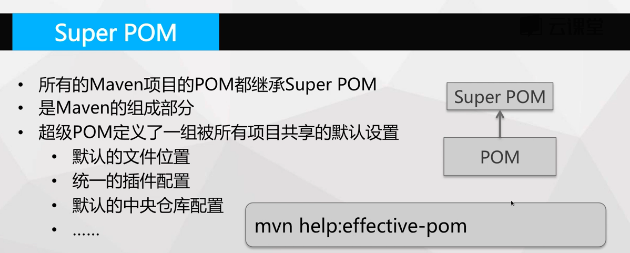
显示继承Super POM的pom内容命令:
由于内容过长自行查看
mvn help:effective-pom
- ...
-
继承配置
-
- 使用parent元素进行配置
##多模块构建
- parent项目,类型pom
-
- 定义多个modules
- 子模块中配置parent,进行继承
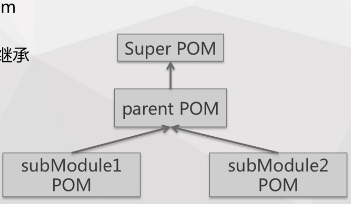
- 统一配置提到parent项目中
- 既使用继承又使用组合
#依赖管理、仓库及构建生命周期 ##依赖配置
-
依赖坐标 groupId、artifactId、version
-
scope配置
-
- compile、provided
-
- compile:如果不进行配置则compile为默认值,在编译使用,在打包时打进包内
-
- provided:需要进行配置,在编译使用,在打包时不打进包内
-
用于继承的pom配置
-
- dependencyManagement
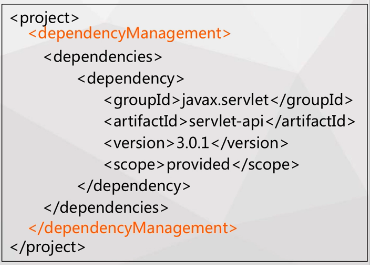
- dependencyManagement
##仓库
- 用于统一存储所有Maven项目,共享的构建空间
-
- 通过坐标去仓库中查询
- 仓库分类
-
- 本地仓库
Maven本地仓库默认路径为${user.home}/.m2/repository
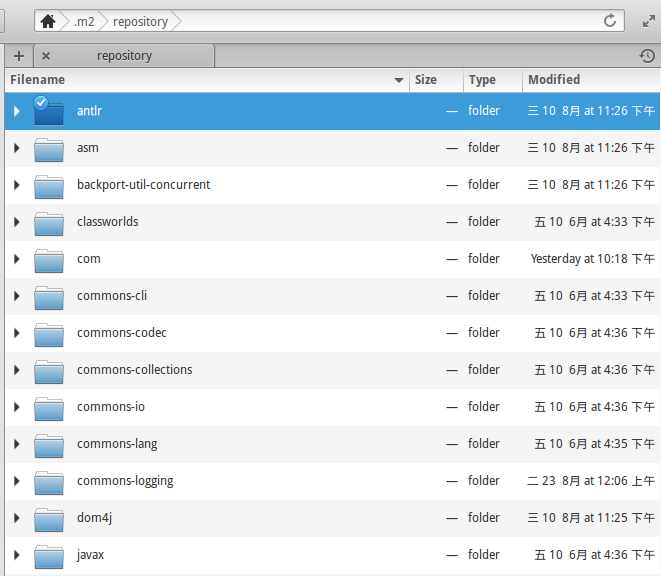
- 本地仓库
-
- 远程仓库 ##远程仓库
- 本地仓库优先查找
- 提供Maven项目访问并下载构建至本地仓库
/<groupId>/<artifactId>/<version>/<artifactId>-<version>.<packagin>- 分类
-
- 中央仓库
The Central Repository
国内速度慢
- 中央仓库
-
- 其他公共仓库(镜像仓库)
-
- 私服 - 常见的artifactory
- 配置(远程仓库)
-
- 全局:使用配置文件settings.xml
-
- 某项目:在pom.xml为依赖制定repositories
##构建生命周期
- 一个构建生命周期是一组精心组织的有序的阶段
- 每一个阶段执行预先定义的
动作 -
- 编译
-
- 构建
-
- 运行
-
- ...
- 这些
动作会根据项目类型进行选择
###三套独立的生命周期 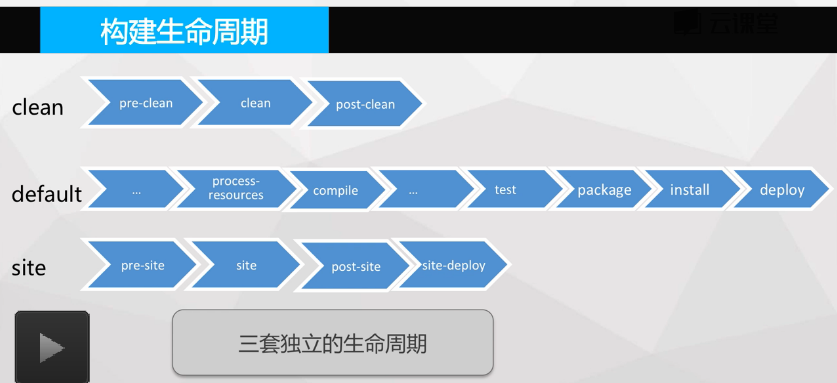
一些命令
- mvn clean
- mvn clean install - 先执行clean在执行install
- mvn site - 生成文档
- mvn package - 打包
##默认生命周期 mvn default 如果想知道mvn default的所有生命周期过程,则需要查询文档 Introduction to the Build Lifecycle

- validate 验证-验证项目是正确的,所有必要的信息是可用的
- process-resources 复制-将资源文件复制到目录下,为了打包使用
- compile 编译-编译项目的源代码
- test 测试-使用合适的单元测试框架测试编译后的源代码。这些测试不应该要求被打包或部署的代码
- package 打包-包以编译的代码在其分配的格式封装,如JAR。
- verify 验证-对集成测试的结果进行检查,以确保质量标准得到满足
- install 安装-将软件包安装到本地存储库中,作为本地其他项目的依赖项
- deploy 部署-在生成环境中进行部署,将最终包复制到远程存储库,用于与其他开发人员和项目共享。
##插件和目标
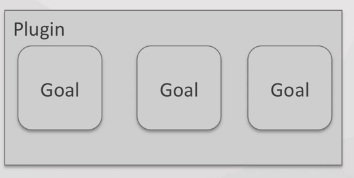
- 插件(Plugin)式架构
- 所有的插件本身也是一个Maven构建,由Maven仓库管理
- 每一个插件提供多个目标(Goal)
- 调用目标的格式
-
mvn <Plugin>:<Goal>,举例mvn tomcat7:run
##插件目标绑定构建生命周期
- 生命周期阶段与目标绑定 当你调用mvn 命令时,实际上调用的是mvn对应的目标
- 用户通过制定生命周期阶段就能够隐式的通过插件执行任务
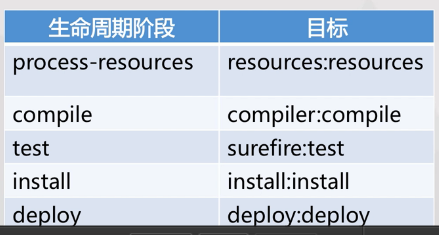
当我们调用mvn compile时,实际上调用的是mvn comppiler:compile目标
-
对于package阶段,会根据项目类型不同,绑定到不同的目标 ##插件配置
-
插件配置元素
-
configuration配置 - 不同插件的配置项查询,查询模板如下
mvn help:describe -Dplugin=<plugin_name> -Dgoal=<goal> -Ddetail
-
对于继承的父pom
-
- pluginManagement
查询实例:
mvn help:describe -Dplugin=tomcat7 -Dgoal=run -Ddetail
插件的例子:
1<build>
2    <finalName>Restaurant</finalName>
3    <plugins>
4      <plugin>
5        <groupId>org.apache.maven.plugins</groupId>
6        <artifactId>maven-compiler-plugin</artifactId>
7        <configuration>
8          <source>1.6</source>
9          <target>1.6</target>
10          <encoding>UTF-8</encoding>
11        </configuration>
12      </plugin>
备注:mvn help插件查看详细内容
#插件及总结演示 ##mvn compile 插件compiler的目标compile的配置项:
mvn help:describe -Dplugin=compiler -Dgoal=compile -Ddetail=true
##Plugins
- mvn内建插件
- help
-
mvn help:help -Ddetail=true
- tomcat7
- exec - 我们简单跑jar包
- 更多插件内容
- 自定义插件
##pom.xml描述内容 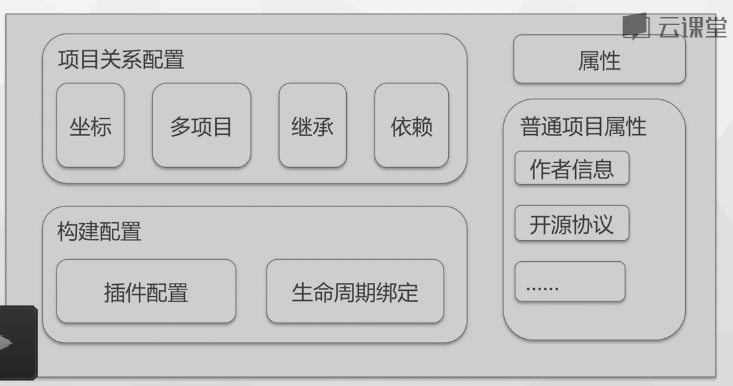
##使用Maven的大致过程 我们使用pom.xml,来描述项目构建。 远端有依赖仓库。 首先要根据pom.xml解析项目对象模型,去依赖仓库查找对应依赖。项目依赖管理从项目对象模型pom.xml配置。构建生命周期,不同的构建阶段。不同的构建阶段,实际上是由对应的构建插件所完成的。一个构建阶段可以绑定到一个或者多个目标。一个目标,可以认为是构建逻辑。
##mvn的全局配置settings mvn的配置文件是${M2_HOME}/conf/settings.xml
#总结
- 默认标准的目录结构
- pom继承、Super POM、多项目管理
- 依赖及依赖配置
- 仓库的概念
- 构建生命周期
- 插件及目标
#附录 ##教学项目的目录树结构
1.
2├── Kitchen
3│   ├── Kitchen.iml
4│   ├── pom.xml
5│   ├── src
6│   │   ├── main
7│   │   │   ├── java
8│   │   │   │   └── com
9│   │   │   │       └── netease
10│   │   │   │           ├── App.java
11│   │   │   │           └── Kitchen.java
12│   │   │   └── resources
13│   │   └── test
14│   │       └── java
15│   │           └── com
16│   │               └── netease
17│   │                   └── AppTest.java
18│   └── target
19│       ├── classes
20│       │   └── com
21│       │       └── netease
22│       │           ├── App.class
23│       │           └── Kitchen.class
24│       ├── generated-sources
25│       │   └── annotations
26│       ├── generated-test-sources
27│       │   └── test-annotations
28│       ├── Kitchen-1.0.0-SNAPSHOT.jar
29│       ├── maven-archiver
30│       │   └── pom.properties
31│       ├── surefire
32│       ├── surefire-reports
33│       │   ├── com.netease.AppTest.txt
34│       │   └── TEST-com.netease.AppTest.xml
35│       └── test-classes
36│           └── com
37│               └── netease
38│                   └── AppTest.class
39├── pom.xml
40├── pom.xml~
41├── restarant-parent.iml
42└── Restaurant
43    ├── pom.xml
44    ├── Restaurant.iml
45    ├── src
46    │   ├── main
47    │   │   ├── java
48    │   │   │   └── com
49    │   │   │       └── netease
50    │   │   │           ├── HelloServlet.java
51    │   │   │           └── NoodlesServlet.java
52    │   │   ├── resources
53    │   │   └── webapp
54    │   │       ├── index.jsp
55    │   │       ├── SoybeanMilk.html
56    │   │       └── WEB-INF
57    │   │           ├── web.xml
58    │   │           └── web.xml~
59    │   └── test
60    │       └── java
61    └── target
62        ├── apache-tomcat-maven-plugin
63        ├── classes
64        │   └── com
65        │       └── netease
66        │           ├── HelloServlet.class
67        │           └── NoodlesServlet.class
68        ├── generated-sources
69        │   └── annotations
70        ├── maven-archiver
71        │   └── pom.properties
72        ├── maven-status
73        │   └── maven-compiler-plugin
74        │       └── compile
75        │           └── default-compile
76        │               ├── createdFiles.lst
77        │               └── inputFiles.lst
78        ├── Restaurant
79        │   ├── index.jsp
80        │   ├── META-INF
81        │   │   └── MANIFEST.MF
82        │   ├── SoybeanMilk.html
83        │   └── WEB-INF
84        │       ├── classes
85        │       │   └── com
86        │       │       └── netease
87        │       │           ├── HelloServlet.class
88        │       │           └── NoodlesServlet.class
89        │       ├── lib
90        │       │   ├── javax.servlet-api-3.1.0.jar
91        │       │   └── Kitchen-1.0.0-SNAPSHOT.jar
92        │       └── web.xml
93        ├── Restaurant.war
94        ├── surefire
95        ├── test-classes
96        └── tomcat
97            ├── conf
98            │   ├── logging.properties
99            │   ├── tomcat-users.xml
100            │   └── web.xml
101            ├── logs
102            │   ├── access_log.2016-08-24
103            │   └── access_log.2016-08-25
104            ├── webapps
105            └── work
106                └── Tomcat
107                    └── localhost
108                        └── Restaurant
109                            └── org
110                                └── apache
111                                    └── jsp
112                                        ├── index_jsp.class
113                                        └── index_jsp.java
##pom.xml示例
1<project xmlns="http://maven.apache.org/POM/4.0.0" xmlns:xsi="http://www.w3.org/2001/XMLSchema-instance"
2  xsi:schemaLocation="http://maven.apache.org/POM/4.0.0 http://maven.apache.org/maven-v4_0_0.xsd">
3  <modelVersion>4.0.0</modelVersion>
4  <groupId>com.netease.restaurant</groupId>
5  <artifactId>Restaurant</artifactId>
6  <packaging>war</packaging>
7  <version>1.0.0-SNAPSHOT</version>
8  <name>Restaurant Maven Webapp</name>
9  <url>http://maven.apache.org</url>
10
11  <!-- 添加总管理依赖 -->
12  <parent>
13    <groupId>com.netease.restaurant</groupId>
14    <artifactId>restarant-parent</artifactId>
15    <version>1.0.0-SNAPSHOT</version>
16    <relativePath>../pom.xml</relativePath>
17  </parent>
18
19  <dependencies>
20    <!-- 依赖Kitchen -->
21    <dependency>
22      <groupId>com.netease.restaurant</groupId>
23      <artifactId>Kitchen</artifactId>
24      <version>1.0.0-SNAPSHOT</version>
25    </dependency>
26
27    <dependency>
28      <groupId>junit</groupId>
29      <artifactId>junit</artifactId>
30      <version>3.8.1</version>
31      <scope>test</scope>
32    </dependency>
33    <dependency>
34      <groupId>javax.servlet</groupId>
35      <artifactId>javax.servlet-api</artifactId>
36      <version>3.1.0</version>
37      <scope>provided</scope>
38    </dependency>
39  </dependencies>
40  <build>
41    <finalName>Restaurant</finalName>
42    <plugins>
43      <plugin>
44        <groupId>org.apache.maven.plugins</groupId>
45        <artifactId>maven-compiler-plugin</artifactId>
46        <configuration>
47          <source>1.6</source>
48          <target>1.6</target>
49          <encoding>UTF-8</encoding>
50        </configuration>
51      </plugin>
52
53      <plugin>
54        <groupId>org.apache.tomcat.maven</groupId>
55        <artifactId>tomcat7-maven-plugin</artifactId>
56        <version>2.2</version>
57        <configuration>
58          <uriEncoding>UTF-8</uriEncoding>
59          <finalName>Restaurant</finalName>
60          <server>tomcat</server>
61        </configuration>
62      </plugin>
63    </plugins>
64  </build>
65</project>
##mvn compiler:compile的配置项查询
1zhanpeng@GE70:~$  mvn help:describe -Dplugin=compiler -Dgoal=compile -Ddetail=true
2[INFO] Scanning for projects...
3[INFO]
4[INFO] ------------------------------------------------------------------------
5[INFO] Building Maven Stub Project (No POM) 1
6[INFO] ------------------------------------------------------------------------
7[INFO]
8[INFO] --- maven-help-plugin:2.2:describe (default-cli) @ standalone-pom ---
9[INFO] Mojo: 'compiler:compile'
10compiler:compile
11  Description: Compiles application sources
12  Implementation: org.apache.maven.plugin.compiler.CompilerMojo
13  Language: java
14  Bound to phase: compile
15
16  Available parameters:
17
18    annotationProcessorPaths
19      Classpath elements to supply as annotation processor path. If specified,
20      the compiler will detect annotation processors only in those classpath
21      elements. If omitted, the default classpath is used to detect annotation
22      processors. The detection itself depends on the configuration of
23      annotationProcessors.
24
25      Each classpath element is specified using their Maven coordinates
26      (groupId, artifactId, version, classifier, type). Transitive dependencies
27      are added automatically. Example:
28
29      <configuration>
30        <annotationProcessorPaths>
31          <path>
32            <groupId>org.sample</groupId>
33            <artifactId>sample-annotation-processor</artifactId>
34            <version>1.2.3</version>
35          </path>
36          <!-- ... more ... -->
37        </annotationProcessorPaths>
38      </configuration>
39
40    annotationProcessors
41      Names of annotation processors to run. Only applies to JDK 1.6+ If not
42      set, the default annotation processors discovery process applies.
43
44    compilerArgs
45      Sets the arguments to be passed to the compiler if fork is set to true.
46      Example:
47
48      <compilerArgs>
49        <arg>-Xmaxerrs=1000</arg>
50        <arg>-Xlint</arg>
51        <arg>-J-Duser.language=en_us</arg>
52      </compilerArgs>
53
54    compilerArgument
55      Sets the unformatted single argument string to be passed to the compiler
56      if fork is set to true. To pass multiple arguments such as -Xmaxerrs 1000
57      (which are actually two arguments) you have to use compilerArguments.
58
59      This is because the list of valid arguments passed to a Java compiler
60      varies based on the compiler version.
61
62    compilerArguments
63      Sets the arguments to be passed to the compiler (prepending a dash) if
64      fork is set to true.
65
66      This is because the list of valid arguments passed to a Java compiler
67      varies based on the compiler version.
68
69      To pass -Xmaxerrs 1000 -Xlint -Xlint:-path -Averbose=true you should
70      include the following:
71
72      <compilerArguments>
73        <Xmaxerrs>1000</Xmaxerrs>
74        <Xlint/>
75        <Xlint:-path/>
76        <Averbose>true</Averbose>
77      </compilerArguments>
78      Deprecated. use {@link #compilerArgs} instead.
79
80    compilerId (Default: javac)
81      User property: maven.compiler.compilerId
82      The compiler id of the compiler to use. See this guide for more
83      information.
84
85    compilerReuseStrategy (Default: ${reuseCreated})
86      User property: maven.compiler.compilerReuseStrategy
87      Strategy to re use javacc class created:
88      - reuseCreated (default): will reuse already created but in case of
89        multi-threaded builds, each thread will have its own instance
90      - reuseSame: the same Javacc class will be used for each compilation even
91        for multi-threaded build
92      - alwaysNew: a new Javacc class will be created for each compilation
93      Note this parameter value depends on the os/jdk you are using, but the
94      default value should work on most of env.
95
96    compilerVersion
97      User property: maven.compiler.compilerVersion
98      Version of the compiler to use, ex. '1.3', '1.5', if fork is set to true.
99
100    debug (Default: true)
101      User property: maven.compiler.debug
102      Set to true to include debugging information in the compiled class files.
103
104    debuglevel
105      User property: maven.compiler.debuglevel
106      Keyword list to be appended to the -g command-line switch. Legal values
107      are none or a comma-separated list of the following keywords: lines,
108      vars, and source. If debug level is not specified, by default, nothing
109      will be appended to -g. If debug is not turned on, this attribute will be
110      ignored.
111
112    encoding (Default: ${project.build.sourceEncoding})
113      User property: encoding
114      The -encoding argument for the Java compiler.
115
116    excludes
117      A list of exclusion filters for the compiler.
118
119    executable
120      User property: maven.compiler.executable
121      Sets the executable of the compiler to use when fork is true.
122
123    failOnError (Default: true)
124      User property: maven.compiler.failOnError
125      Indicates whether the build will continue even if there are compilation
126      errors.
127
128    fileExtensions
129      file extensions to check timestamp for incremental build default contains
130      only .class
131
132    forceJavacCompilerUse (Default: false)
133      User property: maven.compiler.forceJavacCompilerUse
134      compiler can now use javax.tools if available in your current jdk, you
135      can disable this feature using
136      -Dmaven.compiler.forceJavacCompilerUse=true or in the plugin
137      configuration
138
139    fork (Default: false)
140      User property: maven.compiler.fork
141      Allows running the compiler in a separate process. If false it uses the
142      built in compiler, while if true it will use an executable.
143
144    generatedSourcesDirectory (Default:
145    ${project.build.directory}/generated-sources/annotations)
146      Specify where to place generated source files created by annotation
147      processing. Only applies to JDK 1.6+
148
149    includes
150      A list of inclusion filters for the compiler.
151
152    maxmem
153      User property: maven.compiler.maxmem
154      Sets the maximum size, in megabytes, of the memory allocation pool, ex.
155      '128', '128m' if fork is set to true.
156
157    meminitial
158      User property: maven.compiler.meminitial
159      Initial size, in megabytes, of the memory allocation pool, ex. '64',
160      '64m' if fork is set to true.
161
162    optimize (Default: false)
163      User property: maven.compiler.optimize
164      Set to true to optimize the compiled code using the compiler's
165      optimization methods.
166
167    outputFileName
168      Sets the name of the output file when compiling a set of sources to a
169      single file.
170      expression='${project.build.finalName}'
171
172    proc
173      Sets whether annotation processing is performed or not. Only applies to
174      JDK 1.6+ If not set, both compilation and annotation processing are
175      performed at the same time.
176
177      Allowed values are:
178
179      - none - no annotation processing is performed.
180      - only - only annotation processing is done, no compilation.
181
182    showDeprecation (Default: false)
183      User property: maven.compiler.showDeprecation
184      Sets whether to show source locations where deprecated APIs are used.
185
186    showWarnings (Default: false)
187      User property: maven.compiler.showWarnings
188      Set to true to show compilation warnings.
189
190    skipMain
191      User property: maven.main.skip
192      Set this to 'true' to bypass compilation of main sources. Its use is NOT
193      RECOMMENDED, but quite convenient on occasion.
194
195    skipMultiThreadWarning (Default: false)
196      User property: maven.compiler.skipMultiThreadWarning
197      (no description available)
198
199    source (Default: 1.5)
200      User property: maven.compiler.source
201      The -source argument for the Java compiler.
202
203    staleMillis (Default: 0)
204      User property: lastModGranularityMs
205      Sets the granularity in milliseconds of the last modification date for
206      testing whether a source needs recompilation.
207
208    target (Default: 1.5)
209      User property: maven.compiler.target
210      The -target argument for the Java compiler.
211
212    useIncrementalCompilation (Default: true)
213      User property: maven.compiler.useIncrementalCompilation
214      to enable/disable incrementation compilation feature
215
216    verbose (Default: false)
217      User property: maven.compiler.verbose
218      Set to true to show messages about what the compiler is doing.
219
220
221[INFO] ------------------------------------------------------------------------
222[INFO] BUILD SUCCESS
223[INFO] ------------------------------------------------------------------------
224[INFO] Total time: 0.768s
225[INFO] Finished at: Fri Aug 26 22:25:55 CST 2016
226[INFO] Final Memory: 9M/180M
227[INFO] ------------------------------------------------------------------------
228
##mvn help:help -Ddetail=true
1zhanpeng@GE70:~$ mvn help:help -Ddetail=true
2[INFO] Scanning for projects...
3[INFO]
4[INFO] ------------------------------------------------------------------------
5[INFO] Building Maven Stub Project (No POM) 1
6[INFO] ------------------------------------------------------------------------
7[INFO]
8[INFO] --- maven-help-plugin:2.2:help (default-cli) @ standalone-pom ---
9[INFO] Maven Help Plugin 2.2
10  The Maven Help plugin provides goals aimed at helping to make sense out of the
11  build environment. It includes the ability to view the effective POM and
12  settings files, after inheritance and active profiles have been applied, as
13  well as a describe a particular plugin goal to give usage information.
14
15This plugin has 9 goals:
16
17help:active-profiles
18  Displays a list of the profiles which are currently active for this build.
19
20  Available parameters:
21
22    output
23      Optional parameter to write the output of this help in a given file,
24      instead of writing to the console.
25      Note: Could be a relative path.
26
27help:all-profiles
28  Displays a list of available profiles under the current project.
29  Note: it will list all profiles for a project. If a profile comes up with a
30  status inactive then there might be a need to set profile activation
31  switches/property.
32
33  Available parameters:
34
35    output
36      Optional parameter to write the output of this help in a given file,
37      instead of writing to the console.
38      Note: Could be a relative path.
39
40help:describe
41  Displays a list of the attributes for a Maven Plugin and/or goals (aka Mojo -
42  Maven plain Old Java Object).
43
44  Available parameters:
45
46    artifactId
47      The Maven Plugin artifactId to describe.
48      Note: Should be used with groupId parameter.
49
50    cmd
51      A Maven command like a single goal or a single phase following the Maven
52      command line:
53      mvn [options] [<goal(s)>] [<phase(s)>]
54
55    detail
56      This flag specifies that a detailed (verbose) list of goal (Mojo)
57      information should be given.
58
59    goal
60      The goal name of a Mojo to describe within the specified Maven Plugin. If
61      this parameter is specified, only the corresponding goal (Mojo) will be
62      described, rather than the whole Plugin.
63
64    groupId
65      The Maven Plugin groupId to describe.
66      Note: Should be used with artifactId parameter.
67
68    medium
69      This flag specifies that a medium list of goal (Mojo) information should
70      be given.
71
72    minimal
73      This flag specifies that a minimal list of goal (Mojo) information should
74      be given.
75
76    output
77      Optional parameter to write the output of this help in a given file,
78      instead of writing to the console.
79      Note: Could be a relative path.
80
81    plugin
82      The Maven Plugin to describe. This must be specified in one of three ways:
83
84      1.  plugin-prefix, i.e. 'help'
85      2.  groupId:artifactId, i.e. 'org.apache.maven.plugins:maven-help-plugin'
86      3.  groupId:artifactId:version, i.e.
87        'org.apache.maven.plugins:maven-help-plugin:2.0'
88
89    version
90      The Maven Plugin version to describe.
91      Note: Should be used with groupId/artifactId parameters.
92
93help:effective-pom
94  Displays the effective POM as an XML for this build, with the active profiles
95  factored in.
96
97  Available parameters:
98
99    output
100      Optional parameter to write the output of this help in a given file,
101      instead of writing to the console.
102      Note: Could be a relative path.
103
104help:effective-settings
105  Displays the calculated settings as XML for this project, given any profile
106  enhancement and the inheritance of the global settings into the user-level
107  settings.
108
109  Available parameters:
110
111    output
112      Optional parameter to write the output of this help in a given file,
113      instead of writing to the console.
114      Note: Could be a relative path.
115
116    showPasswords
117      For security reasons, all passwords are hidden by default. Set this to
118      true to show all passwords.
119
120help:evaluate
121  Evaluates Maven expressions given by the user in an interactive mode.
122
123  Available parameters:
124
125    artifact
126      An artifact for evaluating Maven expressions.
127      Note: Should respect the Maven format, i.e.
128      groupId:artifactId[:version][:classifier].
129
130    expression
131      An expression to evaluate instead of prompting. Note that this must not
132      include the surrounding ${...}.
133
134help:expressions
135  Displays the supported Plugin expressions used by Maven.
136
137  Available parameters:
138
139    output
140      Optional parameter to write the output of this help in a given file,
141      instead of writing to the console.
142      Note: Could be a relative path.
143
144help:help
145  Display help information on maven-help-plugin.
146  Call mvn help:help -Ddetail=true -Dgoal=<goal-name> to display parameter
147  details.
148
149  Available parameters:
150
151    detail
152      If true, display all settable properties for each goal.
153
154    goal
155      The name of the goal for which to show help. If unspecified, all goals
156      will be displayed.
157
158    indentSize
159      The number of spaces per indentation level, should be positive.
160
161    lineLength
162      The maximum length of a display line, should be positive.
163
164help:system
165  Displays a list of the platform details like system properties and environment
166  variables.
167
168  Available parameters:
169
170    output
171      Optional parameter to write the output of this help in a given file,
172      instead of writing to the console.
173      Note: Could be a relative path.
174
175
176[INFO] ------------------------------------------------------------------------
177[INFO] BUILD SUCCESS
178[INFO] ------------------------------------------------------------------------
179[INFO] Total time: 0.853s
180[INFO] Finished at: Fri Aug 26 22:33:07 CST 2016
181[INFO] Final Memory: 8M/180M
182[INFO] ------------------------------------------------------------------------