
原文地址:https://www.cnblogs.com/yuxiaole/p/9809294.html
oracle 11g 支持自动分区,不过得在创建表时就设置好分区。
如果已经存在的表需要改分区表,就需要将当前表 rename后,再创建新表,然后复制数据到新表,然后删除旧表就可以了。
一、为什么要分区(Partition)
1、一般一张表超过2G的大小,ORACLE是推荐使用分区表的。
2、这张表主要是查询,而且可以按分区查询,只会修改当前最新分区的数据,对以前的不怎么做删除和修改。
3、数据量大时查询慢。
4、便于维护,可扩展:11g 中的分区表新特性:Partition(分区)一直是 Oracle 数据库引以为傲的一项技术,正是分区的存在让 Oracle 高效的处理海量数据成为可能,在 Oracle 11g 中,分区技术在易用性和可扩展性上再次得到了增强。
5、与普通表的 sql 一致,不需要因为普通表变分区表而修改我们的代码。
二、oracle 11g 如何按天、周、月、年自动分区
2.1 按年创建
numtoyminterval(1, 'year')

1--按年创建分区表
2create table test_part
3(
4   ID NUMBER(20) not null,
5   REMARK VARCHAR2(1000),
6   create_time DATE
7)
8PARTITION BY RANGE (CREATE_TIME) INTERVAL (numtoyminterval(1, 'year'))
9(partition part_t01 values less than(to_date('2018-11-01', 'yyyy-mm-dd')));
10
11--创建主键
12alter table test_part add constraint test_part_pk primary key (ID) using INDEX;
13-- Create/Recreate indexes
14create index test_part_create_time on TEST_PART (create_time);

2.2 按月创建
numtoyminterval(1, 'month')

1--按月创建分区表
2create table test_part
3(
4   ID NUMBER(20) not null,
5   REMARK VARCHAR2(1000),
6   create_time DATE
7)
8PARTITION BY RANGE (CREATE_TIME) INTERVAL (numtoyminterval(1, 'month'))
9(partition part_t01 values less than(to_date('2018-11-01', 'yyyy-mm-dd')));
10
11--创建主键
12alter table test_part add constraint test_part_pk primary key (ID) using INDEX;

2.3 按天创建
NUMTODSINTERVAL(1, 'day')

1--按天创建分区表
2create table test_part
3(
4   ID NUMBER(20) not null,
5   REMARK VARCHAR2(1000),
6   create_time DATE
7)
8PARTITION BY RANGE (CREATE_TIME) INTERVAL (NUMTODSINTERVAL(1, 'day'))
9(partition part_t01 values less than(to_date('2018-11-12', 'yyyy-mm-dd')));
10
11--创建主键
12alter table test_part add constraint test_part_pk primary key (ID) using INDEX;

2.4 按周创建
NUMTODSINTERVAL (7, 'day')

1--按周创建分区表
2create table test_part
3(
4   ID NUMBER(20) not null,
5   REMARK VARCHAR2(1000),
6   create_time DATE
7)
8PARTITION BY RANGE (CREATE_TIME) INTERVAL (NUMTODSINTERVAL (7, 'day'))
9(partition part_t01 values less than(to_date('2018-11-12', 'yyyy-mm-dd')));
10
11--创建主键
12alter table test_part add constraint test_part_pk primary key (ID) using INDEX;

2.5 测试
可以添加几条数据来看看效果,oracle 会自动添加分区。
1--查询当前表有多少分区
2select table_name,partition_name from user_tab_partitions where table_name='TEST_PART';
3
4--查询这个表的某个(SYS_P21)里的数据
5select * from TEST_PART partition(SYS_P21);
三、numtoyminterval 和 numtodsinterval 的区别
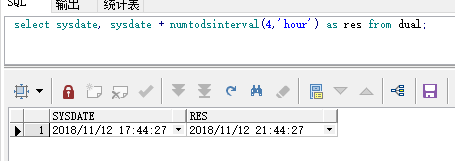
3.1 numtodsinterval(<x>,<c>) ,x 是一个数字,c 是一个字符串。
把 x 转为 interval day to second 数据类型。
常用的单位有 ('day','hour','minute','second')。
测试一下:
select sysdate, sysdate + numtodsinterval(4,'hour') as res from dual;
结果:
3.2 numtoyminterval (<x>,<c>)
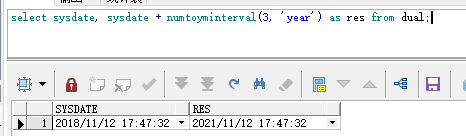
将 x 转为 interval year to month 数据类型。
常用的单位有 ('year','month')。
测试一下:
select sysdate, sysdate + numtoyminterval(3, 'year') as res from dual;
结果:
四、默认分区
4.1 partition part_t01 values less than(to_date('2018-11-01', 'yyyy-mm-dd'))。
表示小于 2018-11-01 的都放在 part_t01 分区表中。
五、给已有的表分区
需要先备份表,然后新建这个表,拷贝数据,删除备份表。

1-- 1. 重命名
2alter table test_part rename to test_part_temp;
3
4-- 2. 创建 partition table
5create table test_part
6(
7   ID NUMBER(20) not null,
8   REMARK VARCHAR2(1000),
9   create_time DATE
10)
11PARTITION BY RANGE (CREATE_TIME) INTERVAL (numtoyminterval(1, 'month'))
12(partition part_t1 values less than(to_date('2018-11-01', 'yyyy-mm-dd')));
13
14
15-- 3. 创建主键
16alter table test_part add constraint test_part_pk_1 primary key (ID) using INDEX;
17
18-- 4. 将 test_part_temp 表里的数据迁移到 test_part 表中
19insert into test_part_temp select * from test_part;
20
21-- 5. 为分区表设置索引
22-- Create/Recreate indexes
23create index test_part_create_time_1 on TEST_PART (create_time);
24
25-- 6. 删除老的 test_part_temp 表
26drop table test_part_temp purge;
27
28-- 7. 作用是:允许分区表的分区键是可更新。
29-- 当某一行更新时,如果更新的是分区列,并且更新后的列植不属于原来的这个分区,
30-- 如果开启了这个选项,就会把这行从这个分区中 delete 掉,并加到更新后所属的分区,此时就会发生 rowid 的改变。
31-- 相当于一个隐式的 delete + insert ,但是不会触发 insert/delete 触发器。
32alter table test_part enable row movement;

六、全局索引和 Local 索引
我的理解是:
当查询经常跨分区查,则应该使用全局索引,因为这是全局索引比分区索引效率高。
当查询在一个分区里查询时,则应该使用 local 索引,因为本地索引比全局索引效率高。
扩展:https://blog.csdn.net/lively1982/article/details/9398485
分区索引: