
引文
HTTP 304/200(from cache) 静态资源缓存原理
**断点续传下载需要重视2对头信息Accept-Ranges/**Range与If-Range/tag
一.断点续传的原理
其实断点续传的原理很简单,就是在http的请求上和一般的下载有所不同而已。
打个比方,浏览器请求服务器上的一个文时,所发出的请求如下:
假设服务器域名为www.ksTest.com,文件名为down.zip。
1.1、不使用断点续传的场景
1get /down.zip http/1.1
2accept: image/gif, image/x-xbitmap, image/jpeg, image/pjpeg, application/vnd.ms-
3excel, application/msword, application/vnd.ms-powerpoint, */*
4accept-language: zh-cn
5accept-encoding: gzip, deflate
6user-agent: mozilla/4.0 (compatible; msie 5.01; windows nt 5.0)
7connection: keep-alive
服务器收到请求后,按要求寻找请求的文件,提取文件的信息,然后返回给浏览器,返回信息如下:
1HTTP/1.1 200 Ok
2content-length=106786028
3accept-ranges=bytes
4date=mon, 30 apr 2001 12:56:11 gmt
5etag=w/"02ca57e173c11:95b"
6content-type=application/octet-stream
7server=microsoft-iis/5.0
8last-modified=mon, 30 apr 2001 12:56:11 gmt
1.2、判断服务器是否支持断点续传
当请求资源时,如果服务器返回如下响应头
accept-ranges=bytes
表明服务器支持bytes类型得数据断点续传。如果为空或者none,可能不支持断点续传。
1.3、断点续传案例
所谓断点续传,也就是要从文件已经下载的地方开始继续下载。所以在客户端浏览器传给web服务器的时候要多加一条信息--从哪里开始。
下面是用自己编的一个“浏览器”来传递请求信息给web服务器,要求从2000070字节开始。
1get /down.zip http/1.0
2User-Agent: netfox
3Range: bytes=2000070-
4accept: text/html, image/gif, image/jpeg, *; q=.2, */*; q=.2
仔细看一下就会发现多了一行
Range: bytes=2000070-
这一行的意思就是告诉服务器down.zip这个文件从2000070字节开始传,前面的字节不用传了。
Range的完整格式是
1Range: bytes=startOffset-targetOffset/sum  [表示从startOffset读取,一直读取到targetOffset位置,读取总数为sum直接]
2
3Range: bytes=startOffset-targetOffset  [字节总数也可以去掉]
服务器收到这个请求以后,返回的信息如下:
1HTTP/1.1 206 Partial Content
2content-length=106786028
3content-range=bytes 2000070-106786027/106786028
4date=mon, 30 apr 2001 12:55:20 gmt
5etag=w/"02ca57e173c11:95b"
6content-type=application/octet-stream
7server=microsoft-iis/5.0
8last-modified=mon, 30 apr 2001 12:55:20 gmt
和前面服务器返回的信息比较一下,就会发现增加了一行:
Content-Range=bytes 2000070-106786027/106786028
返回的代码也改为206了,而不再是200了。
HTTP/1.1 206 Partial Content
以上信息不需要后台程序返回,而是服务器直接读取信息返回给client
知道了以上原理,就可以进行断点续传的编程了。
Client端代码如下
1try {
2	URL url = new URL("http://img5.duitang.com/uploads/item/201203/16/20120316164401_tyAVV.thumb.700_0.jpeg");
3	File targetFile = new File("test.jpeg");
4	HttpURLConnection openConnection = (HttpURLConnection) url.openConnection();
5	openConnection.setRequestMethod("POST");
6	if(targetFile.exists())
7	{
8		openConnection.addRequestProperty("Range", "bytes="+targetFile.length()+"-");
9	}else{
10		openConnection.addRequestProperty("Range", "bytes=0-");
11	}
12	openConnection.connect();
13	int responseCode = openConnection.getResponseCode();
14	Map<String, List<String>> headerFields = openConnection.getHeaderFields();
15	System.out.println(headerFields);
16	if(responseCode==200 || responseCode==206)
17	{
18		InputStream is = openConnection.getInputStream();
19		FileOutputStream fos = new FileOutputStream(targetFile);
20
21		int len = -1;
22		byte[] buf = new byte[1024];
23		while((len=is.read(buf,0,1024))>0)
24		{
25
26			fos.write(buf, 0, len);
27			break;//为了便于测试,每次只读取一次
28		}
29
30		fos.close();
31		is.close();
32	}
33
34		} catch (IOException e) {
35			e.printStackTrace();
36		}
二.使用代码控制断点续传
文件下载原理主要控制来自于服务器端响应,浏览器或者httpClient自行读取IO流
2.1、在PHP文件下载所需要的头信息
1Accept-Ranges:bytes  #接受类型
2Access-Control-Allow-Origin:* #允许任何主机均可跨域访问,ajax同样可以
3Access-Control-Max-Age:2592000
4Cache-Control:public, max-age=31536000
5Connection:keep-alive
6Content-Disposition:attachment; filename="c501b_01_h264_sd_960_540.mp4"
7Content-Length:14470485
8Content-Transfer-Encoding:binary #传输类型,字节类型
9Content-Type:video/mp4  #响应类型
10Date:Sun, 25 Jan 2015 00:17:14 GM  #文件日期--注意,对于浏览器读取缓存而不重新请求服务器十分有用,用来检测静态文件有没有被修改
11ETag:"lraEcGPNv-73F2tLNOKhuA8a6pFa" #
下面是一个简单的PHP下载文件的示例
2.2、用代码控制断点续传
1<?php
2function smartReadFile( $filepath, $mimeType='application/octet-stream')
3{
4
5  date_default_timezone_set('GMT');  //注意时区必须是GMT,否则可能产生错误缓存
6
7  $filepath=iconv("utf-8","gb2312",$filepath);
8 if(!file_exists($filepath))
9  {
10     header ("HTTP/1.0 404 Not Found");
11    return;
12  }
13  $size=filesize($filepath);
14
15  $time=date('D, j M Y H:i:s e',filemtime($filepath)); //转为格林尼治时间,同时注意php中文件时间写入的函数是  touch
16
17  $fm=@fopen($filepath,'rb'); //测试能否打开文
18  if(!$fm)
19  {
20     header ("HTTP/1.0 505 Internal server error");
21     return;
22  }
23
24  $stat = stat($filepath);
25  $md5str = md5_file($filepath); //使用md5校验,更加精确
26  $etag =  $md5str.'-'.sprintf('%x-%x-%x', $stat['ino'], $stat['size'], $stat['mtime'] * 1000000);
27
28  if(isset($_SERVER['HTTP_IF_RANGE']) && (($_SERVER['HTTP_IF_RANGE'] == $etag) || (strtotime($_SERVER['HTTP_IF_RANGE']) >= $stat['mtime'])))
29  {
30
31       header('Etag: "' . $etag . '"');
32       header('Last-Modified: ' . date('D, j M Y H:i:s e', $stat['mtime']));
33       header('HTTP/1.0 304 Not Modified');
34       return ;
35  }
36
37   if(isset($_SERVER['HTTP_IF_NONE_MATCH']) && $_SERVER['HTTP_IF_NONE_MATCH'] == $etag)
38    {
39        header('Etag: "' . $etag . '"');
40        header('HTTP/1.0 304 Not Modified');
41        return ;
42    } elseif(isset($_SERVER['HTTP_IF_MODIFIED_SINCE']) &&strtotime($_SERVER['HTTP_IF_MODIFIED_SINCE']) >= $stat['mtime']) {
43        header('Last-Modified: ' . date('D, j M Y H:i:s e', $stat['mtime']));
44        header('HTTP/1.0 304 Not Modified');
45        return;
46    }
47
48  $begin=0;
49  $end=$size;
50
51  if(isset($_SERVER['HTTP_RANGE']))
52  { if(preg_match('/bytes=\h*(\d+)-(\d*)[\D.*]?/i', $_SERVER['HTTP_RANGE'], $matches))
53    { $begin=intval($matches[0]);
54      if(!empty($matches[1]))
55        $end=intval($matches[1]);
56    }
57  }
58
59  if($begin>0||$end<$size)
60    header('HTTP/1.0 206 Partial Content');
61  else
62    header('HTTP/1.0 200 OK');
63
64  header("Content-Type: $mimeType"); //指定文件minetype,//注意,部分浏览器mineType需要明确指定(如image/png),否则不能下载
65  header('Cache-Control: public, must-revalidate, max-age=0'); //控制client缓存,要求不缓存
66  header('Pragma: no-cache');
67  header('Accept-Ranges: bytes'); //表示浏览器接受bytes的断点续传
68  header('Content-Length:'.($end-$begin)); //如果未指定长度,这以chunked编码传输文件到客户端
69  header("Content-Range: bytes $begin-$end/$size");
70  header("Content-Disposition: attachment; filename=".basename($filepath)."");  //文件下载
71  header('Content-Description: File Transfer');//非标准头信息,可以不要
72  header("Content-Transfer-Encoding: binary\n"); //非标准头信息,可以不要
73  header("Last-Modified: $time"); //用于校验
74  header('Etag: "' . $etag . '"');
75  header('Connection: close');
76
77  $cur=$begin;
78  fseek($fm,$begin,0); //将指针定位到要读取的位置
79
80  while(!feof($fm)&&$cur<$end&&(connection_status()==0))
81  {
82    echo fread($fm,min(1024*16,$end-$cur));
83    $cur+=1024*16;
84  }
85
86  fclose($fm);
87
88}
89
90
91
92$file = './test.png';
93$exts = get_loaded_extensions();
94$mimeType = 'application/octet-stream';
95if(array_search('fileinfo', $exts)===FALSE)
96{
97  $sizeInfo = getimagesize($file);
98  $mimeType = $sizeInfo['mime'];
99}else{
100  $mimeType = mime_content_type($file);
101}
102
103smartReadFile($file,$mimeType);
104?>
三、服务器断点续传文件增强验证(If-Range,If-Match)
3.1、使用if-Range进行增强校验
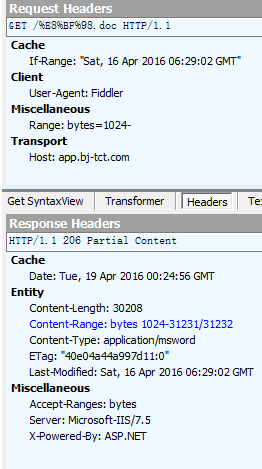
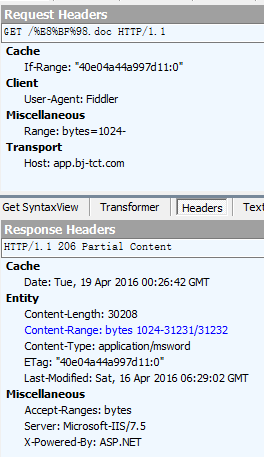
部分服务器支持断点续传,但是前提是必须保证如下格式请求头才行,否则无法断点续传,只能是http 200正常下载
1If-Range: "40e04a44a997d11:0" //第一次获取到的Etag的值
2//If-Range: "Sat, 16 Apr 2016 06:29:02 GMT"//或者是Last-Modified的值
3
4#对于IIS服务器
51.我们下载中断的时候一定要把得到的Last-Modified和Etag写入文件meta信息中,但是很多情况下ETag无法写入文件meta信息,因此,我们要确保last-Modifield被保存
62.注意,使用时间必须是格林尼治时间
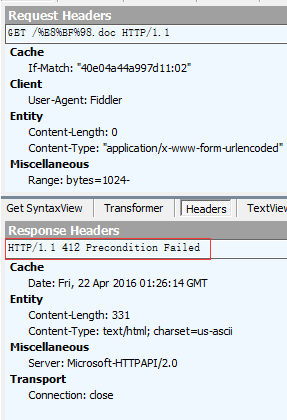
3.2使用if-Match进行增强校验与Http 412问题
当然使用if-Match也是一种方式,但是,如果服务器端的资源被修改了,那么,http请求时http 412,因此,我们建议使用iF-Range,这样,即时文件被修改,也会以http 200返回全部资源。
If-Match: "40e04a44a997d11:0" //第一次获取到的Etag的值
3.3关于If-Range增强断点续传验证测试
不设置If-Range的时候

设置If-Range的时候
3.3、 使用If-Modified-Since & If-None-Match时304冲突
If-Modified-Since/Last-Modified 传递时间
If-None-Match/Etag 消息摘要,不会出现http 412问题
这里If-Modified-Since/Last-Modified的值值示服务器上的资源更新时间,服务器对待If-Modified-Since的优先级低于If-Range:Etag、If-Range:Last-Modified和If-None-Match:Etag 。
在断点续传时需要注意优先级是If-None-Match > If-Range > If-Modified-Since****。****所以如果资源需要断点续传,那么最好不要设置,否则有可能返回304,表示资源未更新。
简单来说,Accept-Ranges对应Range来指示服务器使用断点续传,而if-Range对应Etag或者Last-Modified用来增强资源得一致性。If-Modified-Since对应Last-Modified来支持校验资源是否过期,而If-None-Match/Etag用来增强这种作用。
问题:if-Range和If-None-Match 的值都为同一个etag,为什么会有不同的响应?
if-Range主要是验证断点续传传输时,资源没有被更改,而If-None-Match是用来校验本地缓存的有效性。
四.关于在浏览器中显示文件内容
浏览器默认会显示一些 text/*,image/*,PDF类型的文件,但默认会变成自动下载,这是我们需要修改响应头为
Content-Disposition:inline; filename="c501b_01_h264_sd_960_540.mp4"