
一、开发服务端
1、新建工程 cfx-webservice ,最终的完整工程如下:

pom.xml如下:
1<?xml version="1.0" encoding="UTF-8"?>
2<project xmlns="http://maven.apache.org/POM/4.0.0"
3         xmlns:xsi="http://www.w3.org/2001/XMLSchema-instance"
4         xsi:schemaLocation="http://maven.apache.org/POM/4.0.0 http://maven.apache.org/xsd/maven-4.0.0.xsd">
5    <modelVersion>4.0.0</modelVersion>
6
7    <groupId>com.cfx.simple.service</groupId>
8    <artifactId>cfx-webservice</artifactId>
9    <version>1.0-SNAPSHOT</version>
10    <parent>
11        <groupId>org.springframework.boot</groupId>
12        <artifactId>spring-boot-starter-parent</artifactId>
13        <version>1.4.1.RELEASE</version>
14    </parent>
15    <dependencies>
16        <dependency>
17            <groupId>org.springframework.boot</groupId>
18            <artifactId>spring-boot-starter-web</artifactId>
19        </dependency>
20        <dependency>
21            <groupId>org.apache.cxf</groupId>
22            <artifactId>cxf-spring-boot-starter-jaxws</artifactId>
23            <version>3.1.12</version>
24        </dependency>
25    </dependencies>
26
27</project>
红色部分的依赖是开发webservice的依赖包,其他的只是springboot需要的基本包
1、实体类(Student和User)
1public class Student {
2    private String stuName;
3    private Integer stuAge;
4
5    public Student(String stuName, Integer stuAge) {
6        this.stuName = stuName;
7        this.stuAge = stuAge;
8    }
9
10    public String getStuName() {
11        return stuName;
12    }
13
14    public void setStuName(String stuName) {
15        this.stuName = stuName;
16    }
17
18    public Integer getStuAge() {
19        return stuAge;
20    }
21
22    public void setStuAge(Integer stuAge) {
23        this.stuAge = stuAge;
24    }
25}
26
27public class User {
28    private String name;
29    private String sex;
30
31    public User(String name, String sex) {
32        this.name = name;
33        this.sex = sex;
34    }
35
36    public String getName() {
37        return name;
38    }
39
40    public void setName(String name) {
41        this.name = name;
42    }
43
44    public String getSex() {
45        return sex;
46    }
47
48    public void setSex(String sex) {
49        this.sex = sex;
50    }
51
52}
2、WebService的接口和实现类(一个是返回用户信息的WebService,一个是返回学生信息的WebService)
1)学生的
1package com.cfx.simple.service;
2
3import com.cfx.simple.model.Student;
4import javax.jws.WebMethod;
5import javax.jws.WebService;
6import java.util.List;
7
8/**
9 * @author Administrator
10 * @date 2019/01/30
11 */
12@WebService(targetNamespace = "http://service.simple.cfx.com")//  命名空间,写一个有意义的http地址就行,并不是网上所说的要写成包名倒序,只不过写成包名倒序易读而已
13public interface StudentService {
14
15    @WebMethod
16    List<Student> getStudentList();
17}
18
19package com.cfx.simple.service;
20
21import com.cfx.simple.model.Student;
22import org.springframework.stereotype.Component;
23import javax.jws.WebService;
24import java.util.Arrays;
25import java.util.List;
26
27/**
28 * @author Administrator
29 * @date 2019/01/30
30 */
31@WebService(serviceName = "StudentService",
32        targetNamespace = "http://service.simple.cfx.com",
33        endpointInterface = "com.cfx.simple.service.StudentService")
34@Component
35public class StudentServiceImpl implements StudentService {
36    @Override
37    public List<Student> getStudentList() {
38        Student stu1 = new Student("学生1",25);
39        Student stu2 = new Student("学生2",30);
40        return Arrays.asList(stu1,stu2);
41    }
42}
2)用户的
1package com.cfx.simple.service;
2
3import com.cfx.simple.model.User;
4import javax.jws.WebMethod;
5import javax.jws.WebParam;
6import javax.jws.WebService;
7import java.util.List;
8
9/**
10 * @author Administrator
11 * @date 2019/01/30
12 */
13@WebService(targetNamespace = "http://service.simple.cfx.com")// 命名空间,写一个有意义的http地址就行,并不是网上所说的要写成包名倒序,只不过写成包名倒序易读而已
14public interface UserService {
15
16    @WebMethod
17    List<User> getUserList(@WebParam(name = "userName") String userName);
18}
19
20package com.cfx.simple.service;
21
22import com.cfx.simple.model.User;
23import org.springframework.stereotype.Component;
24import javax.jws.WebService;
25import java.util.Arrays;
26import java.util.List;
27
28/**
29 * @author Administrator
30 * @date 2019/01/30
31 */
32@WebService(serviceName = "UserService",
33        targetNamespace = "http://service.simple.cfx.com",
34        endpointInterface = "com.cfx.simple.service.UserService")
35@Component
36public class UserServiceImpl implements UserService {
37    @Override
38    public List<User> getUserList(String userName) {
39        System.out.println("输入参数:" + userName);
40        User user1 = new User("张三", "男");
41        User user2 = new User("李四", "男");
42        return Arrays.asList(user1,user2);
43    }
44}
3、发布WebService的配置类
1package com.cfx.simple.config;
2
3import com.cfx.simple.service.StudentService;
4import com.cfx.simple.service.UserService;
5import org.apache.cxf.Bus;
6import org.apache.cxf.jaxws.EndpointImpl;
7import org.springframework.beans.factory.annotation.Autowired;
8import org.springframework.context.annotation.Bean;
9import org.springframework.context.annotation.Configuration;
10
11import javax.xml.ws.Endpoint;
12
13/**
14 * @author Administrator
15 * @date 2019/01/30
16 */
17@Configuration
18public class WebServiceConfig {
19
20    @Autowired
21    private Bus bus;
22    @Autowired
23    private UserService userService;
24    @Autowired
25    private StudentService studentService;
26
27    @Bean
28    public Endpoint endpointUserService() {
29        EndpointImpl endpoint = new EndpointImpl(bus,userService);
30        endpoint.publish("/UserService");//接口发布在 /UserService 目录下
31        return endpoint;
32    }
33
34    @Bean
35    public Endpoint endpointStudentService() {
36        EndpointImpl endpoint = new EndpointImpl(bus,studentService);
37        endpoint.publish("/StudentService");//接口发布在 /StudentService 目录下
38        return endpoint;
39    }
40}
4、springboot启动类
1package com.cfx.simple;
2
3import org.springframework.boot.SpringApplication;
4import org.springframework.boot.autoconfigure.SpringBootApplication;
5
6/**
7 * @author Administrator
8 * @date 2019/01/30
9 */
10@SpringBootApplication
11public class Application {
12    public static void main(String[] args) throws Exception {
13        SpringApplication.run(Application.class, args);
14    }
15}
5、application.yml
1server:
2  port: 8084
3  context-path: /
启动程序,浏览器输入:http://localhost:8084/services
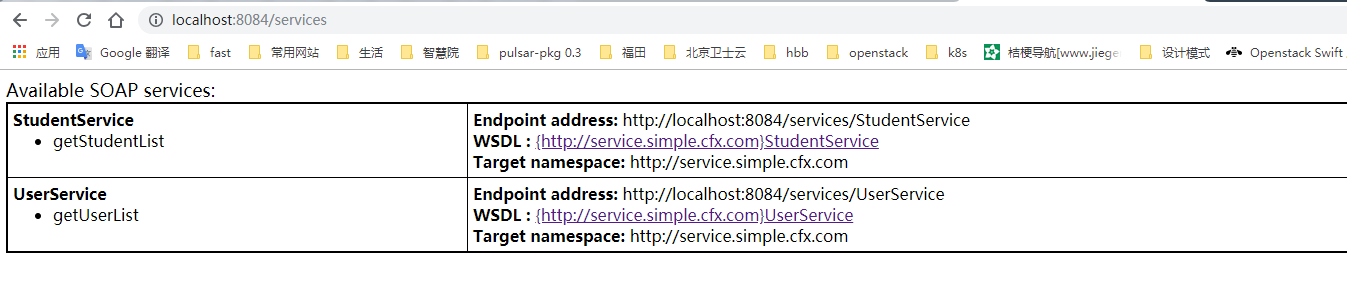
点击WSDL

二、开发客户端进行测试
1、新建cfx-webservice-client

pom.xml如下:
1<?xml version="1.0" encoding="UTF-8"?>
2<project xmlns="http://maven.apache.org/POM/4.0.0"
3         xmlns:xsi="http://www.w3.org/2001/XMLSchema-instance"
4         xsi:schemaLocation="http://maven.apache.org/POM/4.0.0 http://maven.apache.org/xsd/maven-4.0.0.xsd">
5    <modelVersion>4.0.0</modelVersion>
6
7    <groupId>cfx.webservice.client</groupId>
8    <artifactId>cfx-webservice-client</artifactId>
9    <version>1.0-SNAPSHOT</version>
10    <dependencies>
11        <!--调用webserivce的依赖-->
12        <dependency>
13            <groupId>org.apache.cxf</groupId>
14            <artifactId>cxf-spring-boot-starter-jaxws</artifactId>
15            <version>3.1.12</version>
16        </dependency>
17        <!--用于将对象转换成json-->
18        <dependency>
19            <groupId>net.sf.json-lib</groupId>
20            <artifactId>json-lib</artifactId>
21            <version>2.4</version>
22            <classifier>jdk15</classifier>
23        </dependency>
24    </dependencies>
25</project>
2、编写测试类
1import net.sf.json.JSONObject;
2import org.apache.cxf.endpoint.Client;
3import org.apache.cxf.jaxws.endpoint.dynamic.JaxWsDynamicClientFactory;
4
5import java.util.ArrayList;
6
7/**
8 * @author Administrator
9 * @date 2019/01/30
10 */
11public class Test {
12    public static void main(String[] args){
13        //在一个方法中连续调用多次WebService接口,每次调用前需要重置上下文
14        ClassLoader cl = Thread.currentThread().getContextClassLoader();
15
16        JaxWsDynamicClientFactory dcf = JaxWsDynamicClientFactory.newInstance();
17        System.out.println("学生的信息如下:================");
18        printStudentList(dcf);
19        //在调用第二个webservice前,需要重置上下文
20        Thread.currentThread().setContextClassLoader(cl);
21
22        System.out.println("用户的信息如下:================");
23        printUserList(dcf);
24    }
25
26    private static void printUserList(JaxWsDynamicClientFactory dcf){
27        Client client = dcf.createClient("http://localhost:8084/services/UserService?wsdl");
28        // 需要密码的情况需要加上用户名和密码
29        // client.getOutInterceptors().add(new ClientLoginInterceptor(USER_NAME, PASS_WORD));
30        Object[] objects = new Object[0];
31        try {
32            // invoke("方法名",参数1,参数2,参数3....);
33            objects = client.invoke("getUserList", "张三");
34            if(objects.length>0){
35                ArrayList<Object> objectList = (ArrayList)objects[0];
36                for (Object o:objectList){
37                    JSONObject jsonObject = JSONObject.fromObject(o);
38                    System.out.println("userName:"+jsonObject.getString("name")+",sex:"+jsonObject.getString("sex"));
39                }
40            }
41        } catch (java.lang.Exception e) {
42            e.printStackTrace();
43        }
44    }
45
46    private static void printStudentList(JaxWsDynamicClientFactory dcf){
47
48        Client client = dcf.createClient("http://localhost:8084/services/StudentService?wsdl");
49        // 需要密码的情况需要加上用户名和密码
50        // client.getOutInterceptors().add(new ClientLoginInterceptor(USER_NAME, PASS_WORD));
51        Object[] objects = new Object[0];
52        try {
53            // invoke("方法名",参数1,参数2,参数3....);
54            objects = client.invoke("getStudentList","");
55            if(objects.length>0){
56                ArrayList<Object> objectList = (ArrayList)objects[0];
57                for (Object o:objectList){
58                    JSONObject jsonObject = JSONObject.fromObject(o);
59                    System.out.println("stuName:"+jsonObject.getString("stuName")+",stuAge:"+jsonObject.getString("stuAge"));
60                }
61            }
62        } catch (java.lang.Exception e) {
63            e.printStackTrace();
64        }
65    }
66}
67
68学生的信息如下:================
69stuName:学生1,stuAge:25
70stuName:学生2,stuAge:30
71用户的信息如下:================
72userName:张三,sex:男
73userName:李四,sex:男
上面的红色代码不能去掉,去掉后,第一个webservice调用正常,第二个会报以下错误:
