
最近两天想实现一个登陆网站就可以自动显示该地区的的天气情况。很是苦恼。慢慢研究然后才其所得。
研究的思路大致是这样的。ip 定位–>通过位置获取天气。首先声明一下,以前国家气象局的接口已经被封,以前直接传一个json数据就有天气情况,现在需要手动解析下。
所以,这样的实际思路为:ip获取地址(操作获取城市名称)------百度下载各城市对应编号---------io字符串处理(你方便得到的)------通过城市名获取编号---------通过编号组成网页url访问---------截取你所需要的部分。
1:首先,你要做的事可以通过ip访问到你的地理位置,百度地图api免费并且挺好用的。百度api
http://api.map.baidu.com/location/ip //HTTP协议
https://api.map.baidu.com/location/ip //HTTPS
协议你要先申请下才能获取ak,你要访问的地址 其实是http://api.map.baidu.com/location/ip?ak=“你的ak”;如果有ip加上:&ip="";他返回的是一个json串,你可以用阿里的fastjson解析他,获取你想要的东西。
2:有了地址之后,在上中国气象局官网
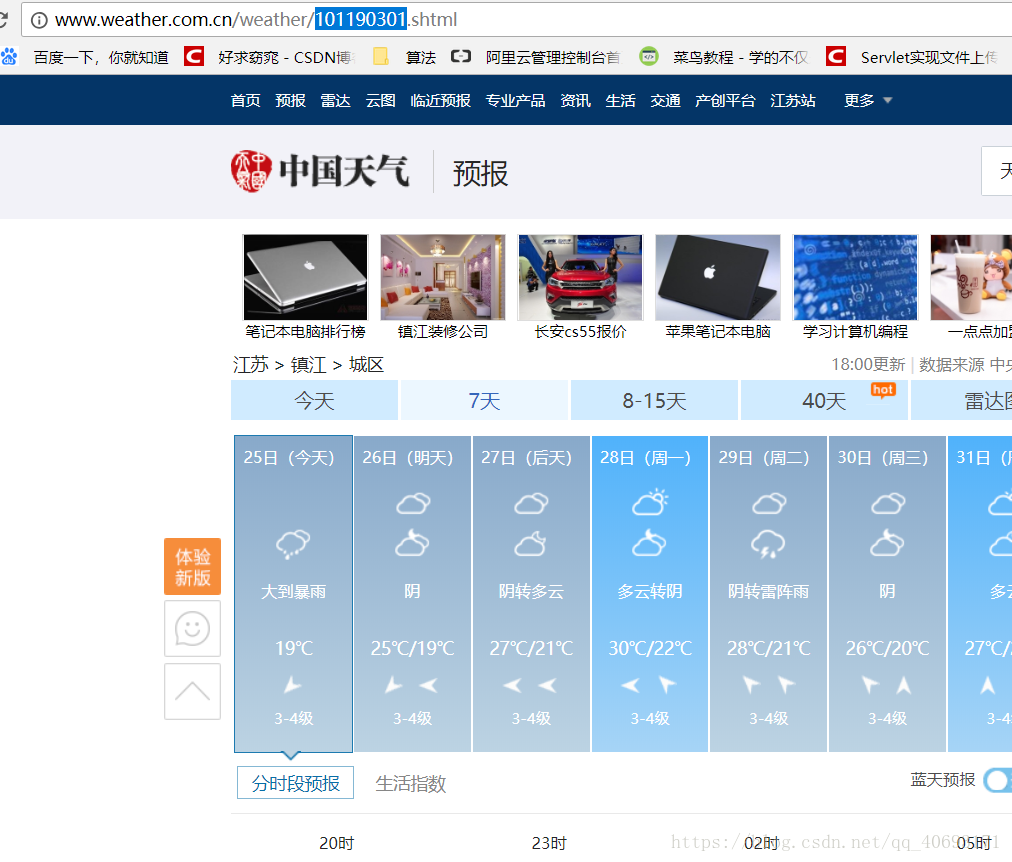
你会发现每个城市都有一个编号,你可以百度复制到然后通过io字符串处理例如这样
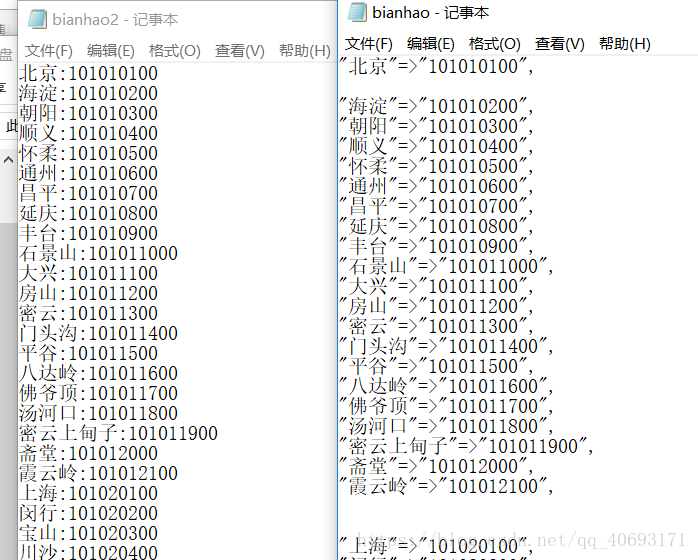
通过百度接口获取的名称,在通过io按照行读取遍历找到这个城市的编号,返回
3:通过返回的号拼接地址,抓取,谷歌浏览器先抓包分析要抓去的层次内容:
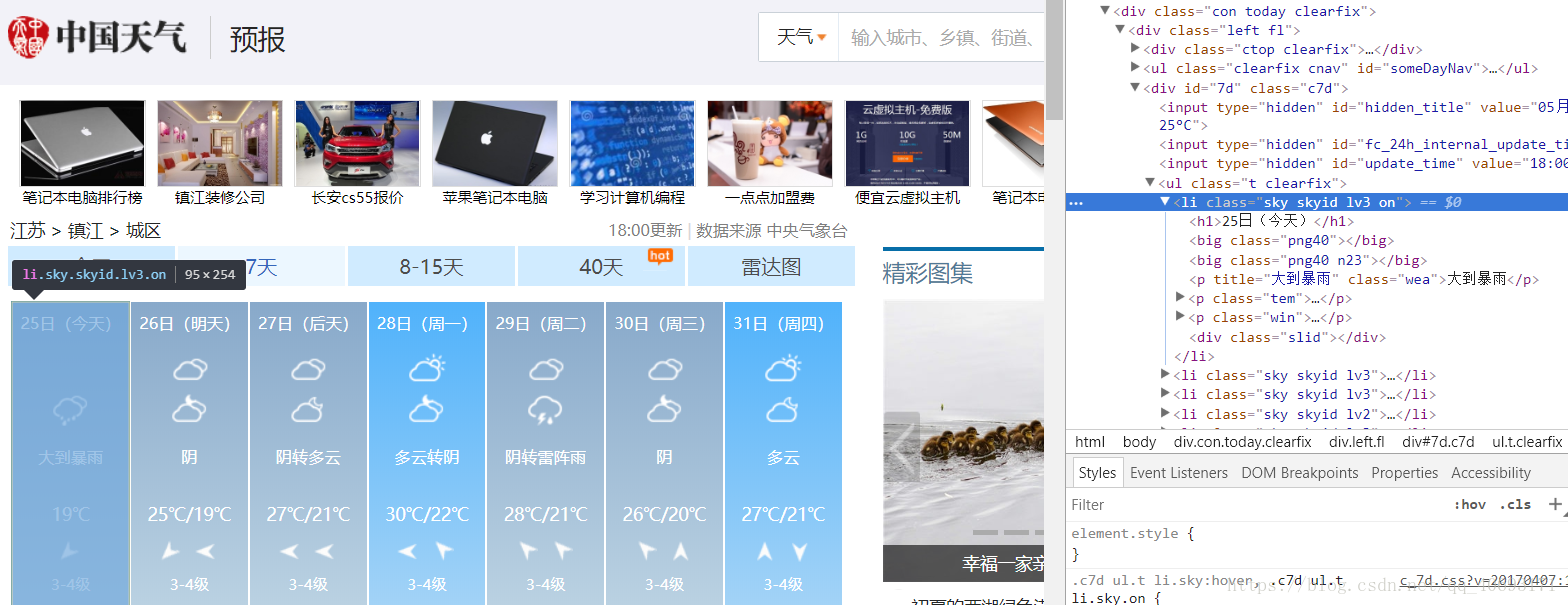
下面先附上没涉及web端的测试代码:爬取分析工具:jsuop fastjson
获取地址 调用方法主类
1import java.io.IOException;
2import java.io.InputStream;
3import java.net.HttpURLConnection;
4import java.net.MalformedURLException;
5import java.net.URL;
6
7import org.jsoup.Jsoup;
8import org.jsoup.nodes.Document;
9
10import com.alibaba.fastjson.JSON;
11import com.alibaba.fastjson.JSONObject;
12
13public class 地址 {
14
15
16
17	public static void main(String[] args) throws IOException
18	{
19
20
21
22	 Document doc=Jsoup.connect("http://api.map.baidu.com/location/ip?ak=nZFzpfoHLDVD3pEPGaSrGCYebppWx7ge").ignoreContentType(true).get();
23	// System.out.println(doc.text());
24	 JSONObject jsonObj = JSON.parseObject(doc.text());
25//	 System.out.println(jsonObj);
26	 JSONObject jsonObj1=jsonObj.getJSONObject("content").getJSONObject("address_detail");
27	 String jsonObj2=(String) jsonObj1.get("city");
28	 System.out.println(jsonObj2);//这就是城市名
29	 /*
30	 * 获取城市对应编号
31	 */
32	 city city=new city();
33	String number= city.getcity(jsonObj2);
34	System.out.println(number);
35	/*
36	 * 获取天气信息
37	 */
38	String weather=new search().weather(number);
39	System.out.println(jsonObj2 ":" weather);
40
41	}
42}
返回城市编号
1import java.io.BufferedReader;
2import java.io.BufferedWriter;
3import java.io.File;
4import java.io.FileNotFoundException;
5import java.io.FileReader;
6import java.io.FileWriter;
7import java.io.IOException;
8
9public class city {
10
11
12
13	public city(){
14
15
16   }
17	public String getcity(String city) throws IOException{
18
19
20
21	{
22
23
24
25
26		String citynumber="";
27	 	File file=new File("E:/bianhao2.txt");
28	 	FileReader in=new FileReader(file);
29	 	BufferedReader buf=new BufferedReader(in);
30	 	String s="";
31	 	while((s=buf.readLine())!=null)
32	 	{
33
34
35
36	 		String a[]=s.split(":");
37	 		//System.out.println(a[0]);
38	 		if(a[0].equals(city.substring(0, city.length()-1)))
39	 		{
40
41
42
43
44	 			citynumber=a[1];
45	 		}
46
47	 	}
48	 	in.close();
49	 	buf.close();
50	 	//System.out.println(citynumber);
51	 	return citynumber;
52	}
53
54	}
55}
56
返回天气信息,简单爬虫不做过多解释
1import java.io.IOException;
2
3import org.jsoup.Jsoup;
4import org.jsoup.nodes.Document;
5import org.jsoup.nodes.Element;
6import org.jsoup.select.Elements;
7
8public class search {
9
10
11
12	public search() {
13
14
15   }
16	public String weather(String bianhao) throws IOException
17	{
18
19
20
21		String url="http://www.weather.com.cn/weather/" bianhao ".shtml";
22		Document doc=Jsoup.connect(url).get();
23		Elements links=doc.getElementsByClass("sky skyid lv3 on");
24		//System.out.println(links.text());
25		return links.text();
26	}
27}
上述是测试主机。如果整合到web上,有几点注意的
1:request方法获取客户端ip正常事可以的,但是获取本机会是ipv6。并且这个ip也查不到地理位置,所以就需要判断是否为本机,如果市本机就默认使用不带ip(不带ip是解析本机)。
2:通过session传递数据。跳转到该网页但url不变。
3:输入流,这就是很坑的地方,如果正常的字符流在windows上是没问题的,但是部署到linnux服务器上会乱码,并且linux的sevlet不好调试还得从新导入。试了很多方法才发现原来是我的字符编码没设置好(设置成utf不行你可以试试)。注意流的关闭
4:sesson.jsp网页自行设计,传递的内容只需session.getAttribute(“tf”),即可获取。注意访问页面第一次要访问sevlet。我也不知道为什么。
sevlet代码为
1import java.io.*;
2
3import javax.servlet.RequestDispatcher;
4import javax.servlet.ServletException;
5import javax.servlet.ServletRequest;
6import javax.servlet.http.HttpServlet;
7import javax.servlet.http.HttpServletRequest;
8import javax.servlet.http.HttpServletResponse;
9
10import org.jsoup.Jsoup;
11import org.jsoup.nodes.Document;
12import org.jsoup.select.Elements;
13
14import com.alibaba.fastjson.JSON;
15import com.alibaba.fastjson.JSONObject;
16
17public class weather extends HttpServlet {
18
19
20
21
22	public void doGet(HttpServletRequest request, HttpServletResponse response) throws ServletException, IOException {
23
24
25
26
27		request.setCharacterEncoding("UTF-8");//防止乱码
28		response.setCharacterEncoding("UTF-8");
29		String path=this.getServletContext().getRealPath("/");
30		String ip=request.getRemoteAddr();
31		String localip=request.getLocalAddr();
32		//System.out.print(ip " " localip " " ip.equals(localip));
33		String url="http://api.map.baidu.com/location/ip?ak=nZFzpfoHLDVD3pEPGaSrGCYebppWx7ge";
34		if(!ip.equals(localip)){
35
36
37   url ="&ip=" ip;}
38		 Document doc=Jsoup.connect(url).ignoreContentType(true).get();
39			// System.out.println(doc.text());
40			 JSONObject jsonObj = JSON.parseObject(doc.text());
41//			 System.out.println(jsonObj);
42			 JSONObject jsonObj1=jsonObj.getJSONObject("content").getJSONObject("address_detail");
43			 String jsonObj2=(String) jsonObj1.get("city");//获取城市名称
44			// System.out.println(jsonObj2);
45			String number= getcity(request, jsonObj2, path);
46		//	System.out.println(number);
47			String weather=jsonObj2 ":" getweather(number);
48		//	System.out.println(weather);
49
50			request.getSession().setAttribute("tf",weather);
51			RequestDispatcher dis= request.getRequestDispatcher("session.jsp");//传输数据
52			dis.forward(request,response);//
53	}
54	public void doPost(HttpServletRequest request, HttpServletResponse response) throws ServletException, IOException {
55
56
57
58
59		this.doGet(request, response);
60	}
61	//解析中国天气网
62
63		public String getweather(String bianhao) throws IOException
64		{
65
66
67
68			String url="http://www.weather.com.cn/weather/" bianhao ".shtml";
69			Document doc=Jsoup.connect(url).get();
70			Elements links=doc.getElementsByClass("sky skyid lv3 on");
71			//System.out.println(links.text());
72			return links.text();
73		}
74
75	//返回城市代码号
76		public String getcity(HttpServletRequest request,String city,String path) throws IOException{
77
78
79
80		{
81
82
83
84
85			String citynumber="";
86		 	File file=new File(path "image/bianhao2.txt");//System.out.print(file.getAbsolutePath());
87		 	citynumber=file.getAbsolutePath();
88
89		 	//FileReader in=new FileReader(file);
90		 	InputStreamReader isr = new InputStreamReader(new FileInputStream(file),"GB2312");
91		 	BufferedReader buf=new BufferedReader(isr);
92		 	String s="";
93		 	while((s=buf.readLine())!=null)
94		 	{
95
96
97
98		 		String a[]=s.split(":");
99
100		 		//System.out.println(a[0]);
101		 		if(a[0].equals(city.substring(0, city.length()-1)))
102		 		{
103
104
105
106		 			citynumber=a[1];
107		 			return citynumber;
108		 		}
109		 	}
110		 	isr.close();
111		 	buf.close();
112		 	//System.out.println(citynumber);
113		 	return citynumber;
114		}
115	}
116}
117
祝君好运,一起加油。
本文分享 CSDN - Big sai。
如有侵权,请联系 support@oschina.cn 删除。
本文参与“OSC源创计划”,欢迎正在阅读的你也加入,一起分享。