
一 简单应用
RPC——远程过程调用,通过网络调用运行在另一台计算机上的程序的函数\方法,是构建分布式程序的一种方式。RabbitMQ是一个消息队列系统,可以在程序之间收发消息。利用RabbitMQ可以实现RPC。本文所有操作都是在ubuntu16.04.3上进行的,示例代码语言为Python2.7。
1yum install rabbitmq-server python-pika -y
2/etc/init.d/rabbitmq-server start
3update-rc.d rabbitmq-server enable
1 RPC的基本实现
1root@ansible:~/workspace/RPC_TEST/RPC01# cat RPC_Server.py
2#!/usr/bin/env python
3# coding:utf-8
4
5"""
61.首先与rabbitmq建立链接,然后定义个函数fun(),
7fun的功能是传入一个数返回该数的2倍,这个函数就是我们要远程调用的函数
82.on_request()是一个回调函数,他作为参数传递给了basic_consume(),
9当basic_consume()在队列中消费1条消息时,on_request()就会被调用
103.on_request()从消息内容body中获取数,并传给fun()进行计算,并将返回值作为消息内容发给调用方指定的队列
11队列名称保存在props.relay_to中
12"""
13import pika
14
15connection = pika.BlockingConnection(pika.ConnectionParameters(host='localhost'))
16channel = connection.channel()
17
18channel.queue_declare(queue='rpc_queue')
19
20def fun(n):
21    return n*2
22
23def on_request(channel,method,props,body):
24    print " props.correlation_id: %s"  %props.correlation_id
25    print "props.reply_to: %s" %props.reply_to
26    n = int(body)
27    response = fun(n)
28    channel.basic_publish(exchange='',routing_key=props.reply_to,
29                          properties=pika.BasicProperties(
30                              correlation_id=props.correlation_id),
31                          body=str(response))
32    channel.basic_ack(delivery_tag=method.delivery_tag)
33
34channel.basic_qos(prefetch_count=1)
35channel.basic_consume(on_request,queue='rpc_queue')
36print "[x] Waiting RPC request..."
37channel.start_consuming()
以上代码中,首先与RabbitMQ服务建立连接,然后定义了一个函数fun(),fun()功能很简单,输入一个数然后返回该数的两倍,这个函数就是我们要远程调用的函数。on_request()是一个回调函数,它作为参数传递给了basic_consume(),当basic_consume()在队列中消费1条消息时,on_request()就会被调用,on_request()从消息内容body中获取数字,并传给fun()进行计算,并将返回值作为消息内容发给调用方指定的接收队列,队列名称保存在变量props.reply_to中。
1root@ansible:~/workspace/RPC_TEST/RPC01# cat RPC_Client.py
2#!/usr/bin/env python
3# coding:utf-8
4
5"""
61. 链接rabbitmq ,然后开始消费消息队列callback_queue中的消息,该队列的名字通过RPC_Server端的Request属性中的
7props.reply_to告诉server端,把返回的消息发送到这里队列中
82. basic_consume()的回调函数为on_response(),这个函数从callback_queue队列中取出消息的结果
93. 函数call实际的发送请求,把数字n发给服务器端,当response不为空时,返回response的值
10
11"""
12
13
14import pika
15import uuid
16
17class RpcClient(object):
18    def __init__(self):
19        self.connection = pika.BlockingConnection(pika.ConnectionParameters(host='localhost'))
20        self.channel = self.connection.channel()
21
22        result = self.channel.queue_declare(exclusive=True)
23        self.callback_queue = result.method.queue
24
25
26        # 订阅消息,并触发回调函数
27        self.channel.basic_consume(self.on_response,no_ack=True,
28                                   queue=self.callback_queue)
29
30    def on_response(self,channel,method,props,body):
31        # 判断client端这次的请求是server端这次的响应
32        if self.corr_id == props.correlation_id:
33            print "self.corr_id: %s" %self.corr_id
34            print "self.callback_queue: %s" %self.callback_queue
35            self.response = body
36
37    def call(self,n):
38        self.response = None
39        self.corr_id = str(uuid.uuid4())
40
41        # 发布消息,relay_to表示接收消息的队列,correlation_id表示携带请求的唯一ID
42        self.channel.basic_publish(exchange='',routing_key='rpc_queue',
43                                   properties=pika.BasicProperties(
44                                       reply_to=self.callback_queue,
45                                   correlation_id=self.corr_id,),
46                                   body=str(n))
47        while self.response is None:
48            self.connection.process_data_events()
49        return str(self.response)
50
51rpc = RpcClient()
52
53print "[x] Requesting..."
54response = rpc.call(2)
55
56print "[.] Got %r" %response
代码开始也是连接RabbitMQ,然后开始消费消息队列callback_queue中的消息,该队列的名字通过Request的属性reply_to传递给服务端,就是在上面介绍服务端代码时提到过的props.reply_to,作用是告诉服务端把结果发到这个队列。 basic_consume()的回调函数变成了on_response(),这个函数从callback_queue的消息内容中获取返回结果。
函数call实际发起请求,把数字n发给服务端程序,当response不为空时,返回response值。
有本事来张图描述一下:
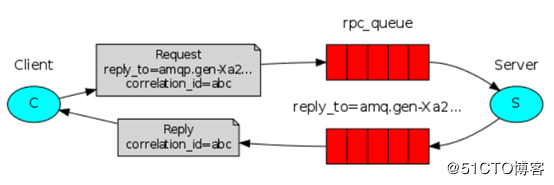
当客户端启动时,它将创建一个callback queue用于接收服务端的返回消息Reply,名称由RabbitMQ自动生成,如上图中的amq.gen-Xa2..。同一个客户端可能会发出多个Request,这些Request的Reply都由callback queue接收,为了互相区分,就引入了correlation_id属性,每个请求的correlation_id值唯一。这样,客户端发起的Request就带由2个关键属性:reply_to告诉服务端向哪个队列返回结果;correlation_id用来区分是哪个Request的返回。
2 稍微复杂点的RPC
如果服务端定义了多个函数供远程调用怎么办?有两种思路,一种是利用Request的属性app_id传递函数名,另一种是把函数名通过消息内容发送给服务端。
1)第一种思路
1root@ansible:~/workspace/RPC_TEST/RPC02# cat RPC_Server.py
2#!/usr/bin/env python
3# coding:utf-8
4
5"""
61.首先与rabbitmq建立链接,然后定义个函数fun(),
7fun的功能是传入一个数返回该数的2倍,这个函数就是我们要远程调用的函数
82.on_request()是一个回调函数,他作为参数传递给了basic_consume(),
9当basic_consume()在队列中消费1条消息时,on_request()就会被调用
103.on_request()从消息内容body中获取数,并传给fun()进行计算,并将返回值作为消息内容发给调用方指定的队列
11队列名称保存在props.relay_to中。
12
13疑问:
141. server端怎么得到client的callback_queue的?
15是通过过 routing_key=props.reply_to得到的,props是一个神奇的东西
162. 一个队列中多个请求,怎么区分的 ?
17是通过props.correlation_id 然后client端做判断,是否和自己的相等。还是props
18"""
19import pika
20
21connection = pika.BlockingConnection(pika.ConnectionParameters(host='localhost'))
22channel = connection.channel()
23
24channel.queue_declare(queue='rpc_queue')
25
26def a(n):
27    return n*2
28
29def b(n):
30    return n*4
31
32def on_request(channel,method,props,body):
33    print " props.correlation_id: %s"  %props.correlation_id
34    print "props.reply_to: %s" %props.reply_to
35    #n = int(body)
36    n = body
37    funname = props.app_id
38    print 'funname: %s' %funname
39    if funname == 'a':
40
41        response = a(n)
42    if funname == 'b':
43        response = b(n)
44
45    channel.basic_publish(exchange='',routing_key=props.reply_to,
46                          properties=pika.BasicProperties(
47                              correlation_id=props.correlation_id),
48                          body=str(response))
49    channel.basic_ack(delivery_tag=method.delivery_tag)
50
51channel.basic_qos(prefetch_count=1)
52channel.basic_consume(on_request,queue='rpc_queue')
53print "[x] Waiting RPC request..."
54channel.start_consuming()
上面代码的一点改进就是如果函数过多怎么办?尼玛的,破电脑,都写完了,尼玛突然关机了,真是操了,有机会立马换ubuntu系统,windows太尼玛坑爹了,尤其是TMD的win10。
移驾http://www.cnblogs.com/wanstack/p/7052874.html
1root@ansible:~/workspace/RPC_TEST/RPC02# cat RPC_Client.py
2#!/usr/bin/env python
3# coding:utf-8
4
5"""
61. 链接rabbitmq ,然后开始消费消息队列callback_queue中的消息,该队列的名字通过RPC_Server端的Request属性中的
7props.reply_to告诉server端,把返回的消息发送到这里队列中
82. basic_consume()的回调函数为on_response(),这个函数从callback_queue队列中取出消息的结果
93. 函数call实际的发送请求,把数字n发给服务器端,当response不为空时,返回response的值
10
11"""
12
13
14import pika
15import uuid
16
17class RpcClient(object):
18    def __init__(self):
19        self.connection = pika.BlockingConnection(pika.ConnectionParameters(host='localhost'))
20        self.channel = self.connection.channel()
21
22        result = self.channel.queue_declare(exclusive=True)
23        self.callback_queue = result.method.queue
24
25
26        # 订阅消息,并触发回调函数
27        self.channel.basic_consume(self.on_response,no_ack=True,
28                                   queue=self.callback_queue)
29
30    def on_response(self,channel,method,props,body):
31        # 判断client端这次的请求是server端这次的响应
32        if self.corr_id == props.correlation_id:
33            print "self.corr_id: %s" %self.corr_id
34            print "self.callback_queue: %s" %self.callback_queue
35            self.response = body
36
37    def call(self,n):
38        self.response = None
39        self.corr_id = str(uuid.uuid4())
40
41        # 发布消息,relay_to表示接收消息的队列,correlation_id表示携带请求的唯一ID
42        self.channel.basic_publish(exchange='',routing_key='rpc_queue',
43                                   properties=pika.BasicProperties(
44                                       reply_to=self.callback_queue,
45                                   correlation_id=self.corr_id,
46                                   app_id=str(n)),
47                                   body=str('request'))
48        while self.response is None:
49            self.connection.process_data_events()
50        return str(self.response)
51
52rpc = RpcClient()
53
54print "[x] Requesting..."
55response = rpc.call('b')
56
57print "[.] Got %r" %response
函数call()接收参数name作为被调用的远程函数的名字,通过app_id传给服务端程序,这段代码里我们选择调用服务端的函数b(),rpc.call(“b”)。
2)第二种方式
1root@ansible:~/workspace/RPC_TEST/RPC03# cat RPC_Server.py
2#!/usr/bin/env python
3# coding:utf-8
4
5"""
61.首先与rabbitmq建立链接,然后定义个函数fun(),
7fun的功能是传入一个数返回该数的2倍,这个函数就是我们要远程调用的函数
82.on_request()是一个回调函数,他作为参数传递给了basic_consume(),
9当basic_consume()在队列中消费1条消息时,on_request()就会被调用
103.on_request()从消息内容body中获取数,并传给fun()进行计算,并将返回值作为消息内容发给调用方指定的队列
11队列名称保存在props.relay_to中。
12
13疑问:
141. server端怎么得到client的callback_queue的?
15是通过过 routing_key=props.reply_to得到的,props是一个神奇的东西
162. 一个队列中多个请求,怎么区分的 ?
17是通过props.correlation_id 然后client端做判断,是否和自己的相等。还是props
18"""
19import pika
20
21connection = pika.BlockingConnection(pika.ConnectionParameters(host='localhost'))
22channel = connection.channel()
23
24channel.queue_declare(queue='rpc_queue')
25
26def a():
27    return 2
28
29def b():
30    return 4
31
32def on_request(channel,method,props,body):
33    print " props.correlation_id: %s"  %props.correlation_id
34    print "props.reply_to: %s" %props.reply_to
35    #n = int(body)
36
37    funname = body
38    # args01 = body.__code__.co_varnames[0]
39    print 'funname: %s' %funname
40    if funname == 'a':
41
42        response = a()
43    if funname == 'b':
44        response = b()
45
46    channel.basic_publish(exchange='',routing_key=props.reply_to,
47                          properties=pika.BasicProperties(
48                              correlation_id=props.correlation_id),
49                          body=str(response))
50    channel.basic_ack(delivery_tag=method.delivery_tag)
51
52channel.basic_qos(prefetch_count=1)
53channel.basic_consume(on_request,queue='rpc_queue')
54print "[x] Waiting RPC request..."
55channel.start_consuming()
56
57root@ansible:~/workspace/RPC_TEST/RPC03# cat RPC_Client.py
58#!/usr/bin/env python
59# coding:utf-8
60
61"""
621. 链接rabbitmq ,然后开始消费消息队列callback_queue中的消息,该队列的名字通过RPC_Server端的Request属性中的
63props.reply_to告诉server端,把返回的消息发送到这里队列中
642. basic_consume()的回调函数为on_response(),这个函数从callback_queue队列中取出消息的结果
653. 函数call实际的发送请求,把数字n发给服务器端,当response不为空时,返回response的值
66
67"""
68
69
70import pika
71import uuid
72
73class RpcClient(object):
74    def __init__(self):
75        self.connection = pika.BlockingConnection(pika.ConnectionParameters(host='localhost'))
76        self.channel = self.connection.channel()
77
78        result = self.channel.queue_declare(exclusive=True)
79        self.callback_queue = result.method.queue
80
81
82        # 订阅消息,并触发回调函数
83        self.channel.basic_consume(self.on_response,no_ack=True,
84                                   queue=self.callback_queue)
85
86    def on_response(self,channel,method,props,body):
87        # 判断client端这次的请求是server端这次的响应
88        if self.corr_id == props.correlation_id:
89            print "self.corr_id: %s" %self.corr_id
90            print "self.callback_queue: %s" %self.callback_queue
91            self.response = body
92
93    def call(self,name):
94        self.response = None
95        self.corr_id = str(uuid.uuid4())
96
97        # 发布消息,relay_to表示接收消息的队列,correlation_id表示携带请求的唯一ID
98        self.channel.basic_publish(exchange='',routing_key='rpc_queue',
99                                   properties=pika.BasicProperties(
100                                       reply_to=self.callback_queue,
101                                   correlation_id=self.corr_id,
102                                   ),
103                                   body=str(name))
104        while self.response is None:
105            self.connection.process_data_events()
106        return str(self.response)
107
108rpc = RpcClient()
109
110print "[x] Requesting..."
111response = rpc.call('b')
112
113print "[.] Got %r" %response
与第一种实现方法的区别就是没有使用属性app_id,而是把要调用的函数名放在消息内容body中,执行结果跟第一种方法一样。
一个简单的实际应用案例
下面我们将编写一个小程序,用于收集多台KVM宿主机上的虚拟机数量和剩余可使用的资源。程序由两部分组成,运行在每台宿主机上的脚本agent.py和管理机上收集信息的脚本collect.py。从RPC的角度,agent.py是服务端,collect.py是客户端。
1root@ansible:~/workspace/RPC_TEST/RPC04# cat agent.py
2#!/usr/bin/env python
3# coding:utf-8
4
5"""
6类似于RPC中的Server端
7"""
8
9
10import pika
11import libvirt
12import psutil
13import json
14import socket
15import os
16import sys
17# 用于解析XML文件
18from xml.dom import minidom
19
20RabbitmqHost = '172.20.6.184'
21RabbitmqUser = 'admin'
22RabbitmqPwd = 'admin'
23
24credentials = pika.PlainCredentials(RabbitmqUser,RabbitmqPwd)
25
26# 链接libvirt,libvirt是一个虚拟机、容器管理程序
27
28def get_conn():
29    conn = libvirt.open('qemu:///system')
30    if conn == None:
31        print "Failed to open connection to QEMU/KVM"
32
33        sys.exit(2)
34
35    else:
36        return conn
37
38# 获取宿主机虚拟机running的数量
39def getVMcount():
40    conn = get_conn()
41    domainIDs = conn.listDomainsID()
42    return len(domainIDs)
43
44# 获取分配给所有虚拟机的内存之和
45def getMemoryused():
46    conn = get_conn()
47    domainIDs = conn.listDomainsID()
48    used_mem = 0
49    for id in domainIDs:
50        dom = conn.lookupByID(id)
51        used_mem += dom.maxMemory()/(1024*1024)
52    # used_mem = ''.join((str(used_mem),'G'))
53    return used_mem
54
55# 获取分配给所有虚拟机的内存之和
56def getCPUused():
57    conn = get_conn()
58    domainIDs = conn.listDomainsID()
59    used_cpu = 0
60    for id in domainIDs:
61        dom = conn.lookupByID(id)
62        used_cpu += dom.maxVcpus()
63    return used_cpu
64
65# 获取所有虚拟机磁盘文件大小之和
66def getDiskused():
67
68    conn = get_conn()
69    domainIDs = conn.listDomainsID()
70    diskused = 0
71
72    for id in domainIDs:
73        # 获取libvirt对象
74        dom = conn.lookupByID(id)
75        # 获取虚拟机xml描述配置文件
76        xml = dom.XMLDesc(0)
77        doc = minidom.parseString(xml)
78        disks = doc.getElementsByTagName('disk')
79        for disk in disks:
80            if disk.getAttribute('device') == 'disk':
81                diskfile = disk.getElementsByTagName('source')[0].getAttribute('file')
82                diskused += dom.blockInfo(diskfile,0)[0]/(1024**3)
83    return diskused
84
85# 使agent.py进入守护进程模式
86def daemonize(stdin='/dev/null',stdout='/dev/null',stderr='/dev/null'):
87    try:
88        pid = os.fork()
89        if pid > 0:
90            sys.exit(0)
91    except OSError,e:
92        sys.stderr.write("fork #1 failed: (%d) %s\n" % (e.errno,e.strerror))
93        sys.exit(1)
94    os.chdir("/")
95    os.umask(0)
96    os.setsid()
97    try:
98        pid = os.fork()
99        if pid > 0:
100            sys.exit(0)
101    except OSError,e:
102        sys.stderr.write("fork #2 failed: (%d) %s\n" % (e.errno,e.strerror))
103        sys.exit(1)
104    for f in sys.stdout,sys.stderr,: f.flush()
105    si = file(stdin,'r')
106    so = file(stdout,'a+',0)
107    se = file(stderr,'a+',0)
108    os.dup2(si.fileno(),sys.stdin.fileno())
109    os.dup2(so.fileno(),sys.stdout.fileno())
110    os.dup2(se.fileno(),sys.stderr.fileno())
111
112daemonize('/dev/null','/root/kvm/agent.log','/root/kvm/agent.log')
113
114
115connection = pika.BlockingConnection(pika.ConnectionParameters(host=RabbitmqHost,
116                                                               credentials=credentials))
117channel = connection.channel()
118channel.exchange_declare(exchange='kvm',type='fanout')
119result = channel.queue_declare(exclusive=True)
120queue_name = result.method.queue
121# 把随机queue绑定到exchange上
122channel.queue_bind(exchange='kvm',queue=queue_name)
123
124# 定义回调函数
125def on_request(channle,method,props,body):
126    sys.stdout.write(body+'\n')
127    sys.stdout.write("callback_queue : %s" %props.reply_to)
128    sys.stdout.flush()
129    mem_total = psutil.virtual_memory()[0]/(1024*1024*1024)
130    cpu_total = psutil.cpu_count()
131    statvfs = os.statvfs('/root')
132    disk_total = (statvfs.f_frsize * statvfs.f_blocks)/(1024**3)
133    print(type(mem_total))
134    print(type(getMemoryused()))
135    mem_unused = mem_total - getMemoryused()
136    cpu_unused = cpu_total - getCPUused()
137    disk_unused = disk_total - getDiskused()
138    data = {
139        'hostname': socket.gethostname(),
140        'vm' : getVMcount(),
141        'available_memory' : mem_unused,
142        'available_cpu' : cpu_unused,
143        'available_disk' : disk_unused,
144    }
145    json_str = json.dumps(data) # 把dict转换成str类型
146
147    # 服务器端回复client消息到callback_queue中
148    channel.basic_publish(exchange='',routing_key=props.reply_to,
149                          properties=pika.BasicProperties(
150                              correlation_id=props.correlation_id,
151                          ),
152                          body=json_str,
153                          )
154    channel.basic_ack(delivery_tag=method.delivery_tag)
155
156channel.basic_qos(prefetch_count=1)
157
158channel.basic_consume(on_request,queue=queue_name)
159
160sys.stdout.write('[x] Waiting PRC request\n')
161sys.stdout.flush()
162
163channel.start_consuming()
164
165root@ansible:~/workspace/RPC_TEST/RPC04# cat collent.py
166#!/usr/bin/env python
167# coding:utf-8
168
169import pika
170import uuid
171import json
172import datetime
173
174RabbitmqHost = '172.20.6.184'
175RabbitmqUser = 'admin'
176RabbitmqPwd = 'admin'
177
178credentials = pika.PlainCredentials(RabbitmqUser,RabbitmqPwd)
179
180class RpcClient(object):
181    def __init__(self):
182        self.connection = pika.BlockingConnection(pika.ConnectionParameters(host=RabbitmqHost,
183                                                                            credentials=credentials))
184        self.channel = self.connection.channel()
185        self.channel.exchange_declare(exchange='kvm', type='fanout')
186        result = self.channel.queue_declare(exclusive=True)
187        self.callback_queue = result.method.queue
188
189        self.channel.basic_consume(self.on_responses,no_ack=True,queue=self.callback_queue)
190
191        self.responses = []
192
193    def on_responses(self,channel,method,props,body):
194        if self.corr_id == props.correlation_id:
195            self.responses.append(body)
196
197
198    def call(self):
199        timestamp = datetime.datetime.strftime(datetime.datetime.now(),'%Y-%m-%dT%H:%M:%SZ')
200        self.corr_id = str(uuid.uuid4())
201        self.channel.basic_publish(exchange='kvm',routing_key='',
202                           properties=pika.BasicProperties(
203                               reply_to=self.callback_queue,
204                               correlation_id=self.corr_id,
205                           ),
206                           body='%s: receive a request.' %timestamp)
207
208        # 定义超时回调函数
209        def outoftime():
210            self.channel.stop_consuming()
211
212        self.connection.add_timeout(30,outoftime)
213        self.channel.start_consuming()
214        print "callback_queue : %s" %self.callback_queue
215        return self.responses
216
217rpc = RpcClient()
218responses = rpc.call()
219for i in responses:
220    response = json.loads(i)
221    print '[.] Got %r' %response
本文在前面演示的RPC都是只有一个服务端的情况,客户端发起请求后是用一个while循环来阻塞程序以等待返回结果的,当self.response不为None,就退出循环。
如果在多服务端的情况下照搬过来就会出问题,实际情况中我们可能有几十台宿主机,每台上面都运行了一个agent.py,当collect.py向几十个agent.py发起请求时,收到第一个宿主机的返回结果后就会退出上述while循环,导致后续其他宿主机的返回结果被丢弃。这里我选择定义了一个超时回调函数outoftime()来替代之前的while循环,超时时间设为30秒。collect.py发起请求后阻塞30秒来等待所有宿主机的回应。如果宿主机数量特别多,可以再调大超时时间。真是怕了,先这样结束吧。还有一个例子下篇写