JSSE(Java Security Socket Extension)是Sun公司为了解决互联网信息安全传输提出的一个解决方案,它实现了SSL和TSL协议,包含了数据加密、服务器验证、消息完整性和客户端验证等技术。通过使用JSSE简洁的API,可以在客户端和服务器端之间通过SSL/TSL协议安全地传输数据。
首先,需要将OpenSSL生成根证书CA及签发子证书一文中生成的客户端及服务端私钥和数字证书进行导出,生成Java环境可用的keystore文件。
客户端私钥与证书的导出:
1openssl pkcs12 -export -clcerts -name www.mydomain.com \
2-inkey private/client-key.pem -in certs/client.cer -out certs/client.keystore

服务器端私钥与证书的导出:
1openssl pkcs12 -export -clcerts -name www.mydomain.com \
2-inkey private/server-key.pem -in certs/server.cer -out certs/server.keystore

受信任的CA证书的导出:
1keytool -importcert -trustcacerts -alias www.mydomain.com -file certs/ca.cer \
2-keystore certs/ca-trust.keystore
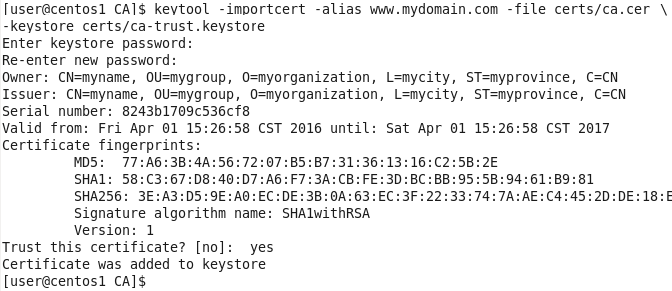
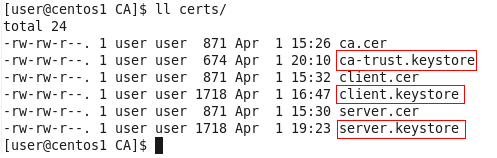
之后,便会在certs文件夹下生成ca-trust.keystore文件。加上上面生成的server.keystore和client.keystore,certs下会生成这三个文件:
Java实现的SSL通信客户端:
1package com.demo.ssl;
2
3import java.io.FileInputStream;
4import java.io.InputStream;
5import java.io.OutputStream;
6import java.security.KeyStore;
7
8import javax.net.ssl.KeyManagerFactory;
9import javax.net.ssl.SSLContext;
10import javax.net.ssl.SSLSocket;
11import javax.net.ssl.TrustManagerFactory;
12
13public class SSLClient {
14	private SSLSocket sslSocket;
15	public static void main(String[] args) throws Exception {
16		SSLClient client = new SSLClient();
17		client.init();
18		System.out.println("SSLClient initialized.");
19		client.process();
20	}
21
22	//客户端将要使用到client.keystore和ca-trust.keystore
23	public void init() throws Exception {
24		String host = "127.0.0.1";
25		int port = 1234;
26		String keystorePath = "/home/user/CA/certs/client.keystore";
27		String trustKeystorePath = "/home/user/CA/certs/ca-trust.keystore";
28		String keystorePassword = "abc123_";
29		SSLContext context = SSLContext.getInstance("SSL");
30		//客户端证书库
31		KeyStore clientKeystore = KeyStore.getInstance("pkcs12");
32		FileInputStream keystoreFis = new FileInputStream(keystorePath);
33		clientKeystore.load(keystoreFis, keystorePassword.toCharArray());
34		//信任证书库
35		KeyStore trustKeystore = KeyStore.getInstance("jks");
36		FileInputStream trustKeystoreFis = new FileInputStream(trustKeystorePath);
37		trustKeystore.load(trustKeystoreFis, keystorePassword.toCharArray());
38
39		//密钥库
40		KeyManagerFactory kmf = KeyManagerFactory.getInstance("sunx509");
41		kmf.init(clientKeystore, keystorePassword.toCharArray());
42
43		//信任库
44		TrustManagerFactory tmf = TrustManagerFactory.getInstance("sunx509");
45		tmf.init(trustKeystore);
46
47		//初始化SSL上下文
48		context.init(kmf.getKeyManagers(), tmf.getTrustManagers(), null);
49
50		sslSocket = (SSLSocket)context.getSocketFactory().createSocket(host, port);
51	}
52
53	public void process() throws Exception {
54		//往SSLSocket中写入数据
55		String hello = "hello boy!";
56		OutputStream out = sslSocket.getOutputStream();
57		out.write(hello.getBytes(), 0, hello.getBytes().length);
58		out.flush();
59
60		//从SSLSocket中读取数据
61		InputStream in = sslSocket.getInputStream();
62		byte[] buffer = new byte[50];
63		in.read(buffer);
64		System.out.println(new String(buffer));
65	}
66}
初始化时,首先取得SSLContext、KeyManagerFactory、TrustManagerFactory实例,然后加载客户端的密钥库和信任库到相应的KeyStore,对KeyManagerFactory和TrustManagerFactory进行初始化,最后用KeyManagerFactory和TrustManagerFactory对SSLContext进行初始化,并创建SSLSocket。
Java实现的SSL通信服务器端:
1package com.demo.ssl;
2
3import java.io.FileInputStream;
4import java.io.InputStream;
5import java.io.OutputStream;
6import java.net.Socket;
7import java.security.KeyStore;
8
9import javax.net.ssl.KeyManagerFactory;
10import javax.net.ssl.SSLContext;
11import javax.net.ssl.SSLServerSocket;
12import javax.net.ssl.TrustManagerFactory;
13
14public class SSLServer {
15	private SSLServerSocket sslServerSocket;
16	public static void main(String[] args) throws Exception {
17		SSLServer server = new SSLServer();
18		server.init();
19		System.out.println("SSLServer initialized.");
20		server.process();
21	}
22
23	//服务器端将要使用到server.keystore和ca-trust.keystore
24	public void init() throws Exception {
25		int port = 1234;
26		String keystorePath = "/home/user/CA/certs/server.keystore";
27		String trustKeystorePath = "/home/user/CA/certs/ca-trust.keystore";
28		String keystorePassword = "abc123_";
29		SSLContext context = SSLContext.getInstance("SSL");
30
31		//客户端证书库
32		KeyStore keystore = KeyStore.getInstance("pkcs12");
33		FileInputStream keystoreFis = new FileInputStream(keystorePath);
34		keystore.load(keystoreFis, keystorePassword.toCharArray());
35		//信任证书库
36		KeyStore trustKeystore = KeyStore.getInstance("jks");
37		FileInputStream trustKeystoreFis = new FileInputStream(trustKeystorePath);
38		trustKeystore.load(trustKeystoreFis, keystorePassword.toCharArray());
39
40		//密钥库
41		KeyManagerFactory kmf = KeyManagerFactory.getInstance("sunx509");
42		kmf.init(keystore, keystorePassword.toCharArray());
43
44		//信任库
45		TrustManagerFactory tmf = TrustManagerFactory.getInstance("sunx509");
46		tmf.init(trustKeystore);
47
48		//初始化SSL上下文
49		context.init(kmf.getKeyManagers(), tmf.getTrustManagers(), null);
50		//初始化SSLSocket
51		sslServerSocket = (SSLServerSocket)context.getServerSocketFactory().createServerSocket(port);
52		//设置这个SSLServerSocket需要授权的客户端访问
53		sslServerSocket.setNeedClientAuth(true);
54	}
55
56	public void process() throws Exception {
57		String bye = "Bye!";
58		byte[] buffer = new byte[50];
59		while(true) {
60			Socket socket = sslServerSocket.accept();
61			InputStream in = socket.getInputStream();
62			in.read(buffer);
63			System.out.println("Received: " + new String(buffer));
64			OutputStream out = socket.getOutputStream();
65			out.write(bye.getBytes());
66			out.flush();
67		}
68	}
69}
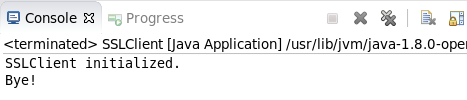
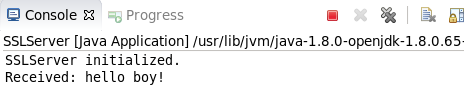
先运行服务器端,再运行客户端。服务器端执行结果:
客户端执行结果: