
工作中用到所以开发了一个,。
映射文档如下格式。格式按照自己需求参考。我这里有N列,可以参考。做必要改动即可。


下面是运行结果
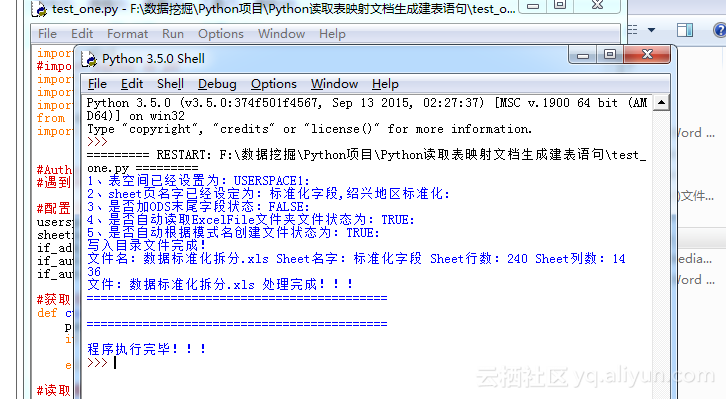
其他SQL语句都是基本差不多的,看一下代码,略微改动一下,就可以完美移植各种数据库的映射语句。
简单说一下怎么使用
下面是目录的结构,文档的格式在ExcelFile文件夹中。
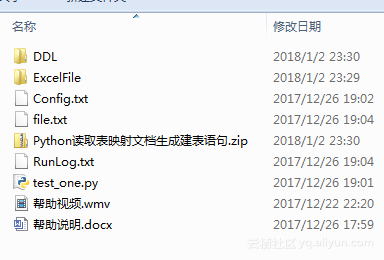
1、首先要保证安装Python3.x版本。我这里用的是3.0
2、安装所需要包,用win+R进入CMD窗口输入:python -m pip install xlrd
3、按照标准化文档的格式写映射文档,然后放到ExcelFile目录下,名字格式:数据标准化拆分-XXXXX
4、按照自己需求配置,配置文件。同级目录:Config.txt
1import xlrd
2#import pandas as pd
3import collections
4import random
5import time
6from datetime import date,datetime
7import sys,os,io
8
9
10#Author JackChiang
11#遇到问题:联系QQ595696297哦!
12
13#配置名称置为空等待读取
14userspace = ''
15sheetname = ''
16if_add_flog = ''
17if_auto_load = ''
18if_auto_mkdir = ''
19
20#获取当前脚本所在路径
21def cur_file_dir():
22    path = sys.path[0] #获取脚本路径
23    if os.path.isdir(path):#判断脚本是文件还是编译后的文件,如果是脚本返回脚本目录,如果是编译文件,返回编译文件路径
24        return path
25    elif os.path.isfile(path):
26        return os.path.dirname(path)
27#读取配置文件
28def read_config(fileone):
29                #申明修改全局变量
30        global userspace,sheetname,if_add_flog,if_auto_load,if_auto_mkdir
31        f1 = open(fileone,'r+')
32        while 1:
33            lines = f1.readlines(10)
34            if not lines:
35                break
36            for line in lines:
37                line=line.strip('\n')
38                file_key = line.split('=')[0]
39                file_value = line.split('=')[1]
40                if file_key == 'USERSPACE':
41                    userspace = file_value
42                if file_key == 'SHEETNAME':
43                    sheetname = file_value
44                if file_key == 'IF_ADD_FLOG':
45                    if_add_flog = file_value
46                if file_key == 'IF_AUTO_LOAD':
47                    if_auto_load = file_value
48                if file_key == 'IF_AUTO_MKDIR':
49                    if_auto_mkdir = file_value
50        if userspace != '' and sheetname != '' and if_add_flog != '' and if_auto_load != '' and if_auto_mkdir != '':
51            logMsg.write('配置文件读取完成!\n')
52            return True
53        else:
54            logMsg.write('配置文件读取失败!\n')
55            return False
56
57#搜索当前标准化文档的文件
58def file_name(file_dir):
59    L = []
60    #TRUE代表开启自动搜索全部文档,否则代表读取file文件目录
61    if if_auto_load != 'TRUE':
62        f2 = open(file_dir+"\\file.txt",'r+')
63        while 1:
64            lines = f2.readlines(100)
65            if not lines:
66                break
67            for line in lines:
68                line=line.strip('\n')
69                L.append(line)
70        f2.close()
71        print('从文件读取目录文件完成!')
72        logMsg.write('从文件读取目录文件完成!\n')
73    else:
74        f1 = open(file_dir+"\\file.txt",'w')
75        ExcelFile = file_dir+'\\ExcelFile'
76        #清空文件内容
77        f1.truncate()
78        for root, dirs, files in os.walk(ExcelFile):
79            for file in files:
80                filename = os.path.splitext(file)[0]
81                filespl  = os.path.splitext(file)[1]
82                if '数据标准化拆分' in filename:
83                    if filespl == '.xls':
84                       path = '%s%s%s' % (root, '\\', file)
85                       L.append(path)
86                       f1.write(path)
87                       f1.write('\n')
88                       logMsg.write(file + '文件写入!!\n')
89        print('写入目录文件完成!')
90        logMsg.write('写入目录文件完成!\n')
91        f1.close()
92
93
94
95    return tuple(L)
96
97#读取Excel文件中的内容,找到没张表的位置
98def read_excel_one(sheet):
99    #开始一行一行遍历锁定ALL位置
100    flog = 0
101    flog_count = 0
102    L = []
103    j = 0
104    L1 = []
105    #dict = {}
106    #使用有序字典
107    dict = collections.OrderedDict()
108    for i in range(sheet.nrows):
109        value = sheet.cell_value(i, 3)
110        table_name = sheet.cell_value(i, 1)
111        mode_value = sheet.cell_value(i, 0)
112        if value == 'ALL':
113            j = i
114            if j != 1:
115                L.append(j)
116
117            L.append(i)
118            L.append(table_name)
119            L.append(mode_value)
120            flog_count = flog_count + 1
121            #print('%s 找到啦!第%s次有ALL:%s'%(flog_count,i,table_name))
122    L.append(sheet.nrows-1)
123    #print(L)
124    #找到第一次出现ALL的位置代表表的开始,第二次出现的前一个位置代表结束。
125    #遍历列表
126    print(len(L))
127    for i in range(len(L)):
128        #print(i+1,L[i])
129        if(i+1)%4==0:
130            if i+1 != len(L):
131                #print(L[i-3])
132                #print(L[i-2])
133                #print(L[i-1])
134                #print(L[i])
135                L1.append(L[i-1])
136                L1.append(L[i-3])
137                L1.append(L[i]-1)
138                dict[L[i-2]] = L1
139                L1 = []
140            else:
141            #处理最后一个情况
142                L1.append(L[i-1])
143                L1.append(L[i-3])
144                L1.append(L[i])
145                dict[L[i-2]] = L1
146                L1 = []
147    #print(dict)
148    return dict
149
150#创建目录
151def mkdir_one(fileone,cell_value):
152    path_one = fileone + '\\' + cell_value
153    # 判断路径是否存在
154    # 存在     True
155    # 不存在   False
156    isExists=os.path.exists(path_one)
157    # 判断结果
158    if not isExists:
159        # 如果不存在则创建目录
160        # 创建目录操作函数
161        os.makedirs(path_one)
162
163        logMsg.write(path_one +' 创建成功\n')
164    else:
165        # 如果目录存在则不创建,并提示目录已存在
166        logMsg.write(path_one +' 目录已存在\n')
167    return path_one
168
169#翻译语句
170def read_table_one(dict,sheet,fileone):
171    ddlFile = fileone + '\\DDL'
172    defFile = fileone + '\\DDL\\DEFAULT_DDL'
173    #cell_value = sheet.cell_value(2,0)
174    #path_one = mkdir_one(ddlFile,cell_value)
175    #判断是否需要创建文件夹,还是使用默认
176    path_one = defFile
177
178    #遍历字典取值
179    for k,v in dict.items():
180        cell_value = v[0] #BANK : ['IMBS',1, 18]
181        if if_auto_mkdir == 'TRUE':
182            path_one = mkdir_one(ddlFile,cell_value)
183
184        logMsg.write('%s 表的行范围为: %s\n'%(k,v))
185        f1 = open('%s\\%s_%s.ddl'%(path_one,cell_value,k),'w',encoding='utf-8')
186        page = '--------------------------------------------------\n'
187        f1.write(page)
188        f1.write('-- Create Table '+ cell_value + '.'+ k+'\n')
189        f1.write(page)
190        f1.write('Create Table '+ cell_value + '.'+ k+'(\n')
191        row_pri_name = ''
192        row_table_decs = ''
193        Str_com = []
194        for i in range(v[1]+1,v[2]+1):
195            row_data = sheet.row_values(i)
196            if row_data[5] == 'INTEGER':
197                table_cloumn_type = row_data[5]
198            elif row_data[5] == 'TIMESTAMP':
199                table_cloumn_type = row_data[5]
200            elif row_data[5] == 'DATE':
201                table_cloumn_type = row_data[5]
202            elif row_data[5] == 'BIGINT':
203                table_cloumn_type = row_data[5]
204            elif row_data[5] == 'DECIMAL':
205                row_data7 = row_data[7]
206
207                if row_data[6] == '':
208                    logMsg.write('在%s表中的%s字段长度没有写!!\n'%(k,row_data[3]))
209                    return;
210                if row_data[7] == '':
211                    logMsg.write('在%s表中的%s字段精度没有写!!默认为0 \n'%(k,row_data[3]))
212                    row_data7 = 0
213
214                table_cloumn_type = '%s(%d,%d)'%(row_data[5],row_data[6],row_data7)
215            else:
216                table_cloumn_type = '%s(%d)'%(row_data[5],row_data[6])
217
218            if row_data[10] == 'Physical Primary Key':
219                table_pri = '             NOT NULL    ,'
220                if row_pri_name == '':
221                        row_pri_name = row_data[3]+','
222                else:
223                        row_pri_name = row_pri_name+row_data[3]+','
224            else:
225                table_pri = '                         ,'
226
227            #读到最后一行,去掉逗号
228            if i == v[2] and if_add_flog != 'TRUE':
229                table_pri = table_pri[:-1]+')'
230
231            #拼接字段
232            f1.write('    '+row_data[3]+'                       '+table_cloumn_type+table_pri)
233            f1.write('\n')
234
235            #注解放入列表
236            if row_data[4] != '':
237                Str_com.append('Comment on Column %s.%s.%s               is \'%s\';'%(cell_value,k,row_data[3],row_data[4]))
238            row_table_decs = row_data[2]
239            #print(row_data)
240
241        if if_add_flog == 'TRUE':
242            f1.write('    EFF_DT                         DATE                NOT NULL    ,\n')
243            f1.write('    END_DT                         DATE                            ,\n')
244            f1.write('    JOB_SEQ_ID                     INTEGER                         )\n')
245            f1.write('in %s\n'%(userspace))
246            f1.write('Partitioning Key ('+row_pri_name+'EFF_DT) Using Hashing\n')
247            f1.write('Compress Yes;\n')
248        else:
249            f1.write('in %s\n'%(userspace))
250            f1.write('Partitioning Key ('+row_pri_name[:-1]+') Using Hashing\n')
251            f1.write('Compress Yes;\n')
252
253
254        #创建注解
255        f1.write('Comment on Table '+cell_value + '.'+ k+'               is \''+ row_table_decs + '\';\n')
256        for i in Str_com:
257            f1.write(i)
258            f1.write('\n')
259        f1.write('\n')
260
261        if if_add_flog == 'TRUE':
262            #创建索引
263            f1.write(page)
264            f1.write('-- Create Index '+cell_value + '.'+ k+'_'+time.strftime("%Y%m%d")+'_1\n')
265            f1.write(page)
266            f1.write('Create Index '+cell_value + '.'+ k+'_'+time.strftime("%Y%m%d")+'_1\n')
267            f1.write('  on '+cell_value + '.'+ k+'\n')
268            f1.write('  (END_DT)    Allow Reverse Scans;\n')
269            f1.write('\n')
270            f1.write(page)
271            f1.write('-- Create Index '+cell_value + '.'+ k+'_'+time.strftime("%Y%m%d")+'_2\n')
272            f1.write(page)
273            f1.write('Create Index '+cell_value + '.'+ k+'_'+time.strftime("%Y%m%d")+'_2\n')
274            f1.write('  on '+cell_value + '.'+ k)
275            f1.write('  (JOB_SEQ_ID)    Allow Reverse Scans;\n')
276            f1.write('\n')
277
278        #创建主键
279        f1.write(page)
280        SQLKey = random.randint(100000000000000,999999999999999)
281        f1.write('-- Create Primary Key SQL%d\n'%SQLKey)
282        f1.write(page)
283        f1.write('alter table '+cell_value + '.'+ k+'\n')
284        f1.write('  add constraint SQL%d\n'%SQLKey)
285        if if_add_flog == 'TRUE':
286            f1.write('Primary Key ('+row_pri_name+' EFF_DT);\n')
287        else:
288            f1.write('Primary Key ('+row_pri_name[:-1]+');\n')
289        f1.close()
290def execute_mode(L_name):
291    #循环处理文档
292    for L in L_name:
293        ExcelFile=xlrd.open_workbook(L)
294        path_name = L.split('\\')[-1]
295        SheelList = sheetname.split(',')
296        #获取目标EXCEL文件sheet名
297        L_Sheetname = []
298        Sheetname_one = ExcelFile.sheet_names()
299        for  Sheet_NM in Sheetname_one:
300                for Shee_t in SheelList:
301                    if Sheet_NM == Shee_t:
302                        L_Sheetname.append(Sheet_NM)
303                    else:
304                        pass
305
306                #print(L_Sheetname)
307
308                for Sheet_NM in L_Sheetname:
309                    sheet=ExcelFile.sheet_by_name(Sheet_NM)
310                    print('文件名:%s Sheet名字:%s Sheet行数:%s Sheet列数:%s'%(path_name,sheet.name,sheet.nrows,sheet.ncols))
311                    logMsg.write('文件名:%s Sheet名字:%s Sheet列数:%s Sheet行数:%s\n'%(path_name,sheet.name,sheet.nrows,sheet.ncols))
312                    #rows=sheet.row_values(2)#第三行内容
313                    #cols=sheet.col_values(1)#第二列内容
314                    #value = sheet.cell_value(1, 3)
315                    #print(value)
316                    dict = read_excel_one(sheet)
317
318                    read_table_one(dict,sheet,fileone)
319                L_Sheetname = []
320
321        print('文件:%s 处理完成!!!'%path_name)
322        logMsg.write('文件:%s 处理完成!!!\n'%path_name)
323        print('===========================================\n')
324        logMsg.write('===========================================\n')
325        print('===========================================\n')
326        logMsg.write('===========================================\n')
327
328
329#用pandas 实现(暂时放弃)
330#def read_excel_two(filepath):
331#    df = pd.read_excel(filepath)
332#    print(df.shape)
333#    print(df.dtypes)
334#    #print(df[df.字段代码 == 'ALL'])
335
336
337###################################################
338    ###################开始##################
339#记录日志
340fileone = cur_file_dir()
341
342
343logMsg = open(fileone+"\\RunLog.txt",'w',encoding='utf-8')
344con_flog = read_config(fileone+"\\Config.txt")
345
346v1 = '%s、表空间已经设置为:%s:'%(1,userspace);
347v2 = '%s、sheet页名字已经设定为:%s:'%(2,sheetname)
348v3 = '%s、是否加ODS末尾字段状态:%s:'%(3,if_add_flog)
349v4 = '%s、是否自动读取ExcelFile文件夹文件状态为:%s:'%(4,if_auto_load)
350v5 = '%s、是否自动根据模式名创建文件状态为:%s:'%(5,if_auto_mkdir)
351print(v1)
352print(v2)
353print(v3)
354print(v4)
355print(v5)
356logMsg.write(v1+'\n')
357logMsg.write(v2+'\n')
358logMsg.write(v3+'\n')
359logMsg.write(v4+'\n')
360logMsg.write(v5+'\n')
361
362#可以从L取数,但这里灵活一点从文件取数
363#如果需要自动识别所有,配置文件修改为TRUE,否则手动决定目录
364L = file_name(fileone)
365#print(L[1])
366if con_flog == True:
367    execute_mode(L)
368
369    print('程序执行完毕!!!')
370    logMsg.write('=========程序执行完毕!!!============\n')
371    logMsg.close()
372else:
373    print('配置文件格式错误!!')
374
375
376
377
378
379
380
381
阅读原文
[http://click.aliyun.com/m/38665/](https://www.oschina.net/action/GoToLink?url=http%3A%2F%2Fclick.aliyun.com%2Fm%2F38665%2F)