1、创建工具类
1package com.kobe.rabbitmq;
2
3import com.rabbitmq.client.Connection;
4import com.rabbitmq.client.ConnectionFactory;
5
6import java.io.IOException;
7import java.util.concurrent.TimeoutException;
8
9public class ConnectionUtils {
10
11    public static Connection getConnection() throws TimeoutException,IOException {
12
13        ConnectionFactory factory = new ConnectionFactory();
14
15        factory.setHost("127.0.0.1");
16
17        factory.setPort(5672);
18
19        factory.setVirtualHost("/vhost_kobe");
20
21        factory.setUsername("kobe");
22
23        factory.setPassword("123");
24
25        return factory.newConnection();
26    }
27
28}
2、创建生产者
1package com.kobe.rabbitmq;
2
3import com.rabbitmq.client.Channel;
4import com.rabbitmq.client.Connection;
5
6public class SendSms {
7    private static final String QUEUE_NAME = "simple_queue";
8
9    public static void main(String[] args) {
10        Connection connection = null;
11        Channel channel = null;
12        try {
13            connection = ConnectionUtils.getConnection();
14            channel = connection.createChannel();
15            channel.queueDeclare(QUEUE_NAME,false,false,false,null);
16            String msg = "hello rabbitmq : " + System.currentTimeMillis();
17            channel.basicPublish("",QUEUE_NAME,null,msg.getBytes());
18            System.out.println("send msg to rabbitmq:" + msg );
19        } catch (Exception e ) {
20            e.printStackTrace();
21        } finally {
22            try {
23                channel.close();
24                connection.close();
25            } catch (Exception e) {
26                e.printStackTrace();
27            }
28        }
29    }
30}
3、创建消费者
1package com.kobe.rabbitmq;
2
3import com.rabbitmq.client.*;
4
5import java.io.IOException;
6
7public class ReceiveSms {
8
9    private static final String QUEUE_NAME = "simple_queue";
10
11    public static void main(String[] args) {
12        Connection connection = null;
13        Channel channel = null;
14        try {
15            connection = ConnectionUtils.getConnection();
16            channel = connection.createChannel();
17            channel.queueDeclare(QUEUE_NAME,false,false,false,null);
18            DefaultConsumer consumer =  new DefaultConsumer(channel){
19                //一旦有消息进入队列就会触发
20                @Override
21                public void handleDelivery(String consumerTag, Envelope envelope, AMQP.BasicProperties properties, byte[] body) throws IOException {
22                    String msg = new String (body,"utf-8");
23                    System.out.println("receive msg :" + msg);
24                }
25            };
26            //监听队列
27            channel.basicConsume(QUEUE_NAME,true,consumer);
28
29        } catch (Exception e ) {
30            e.printStackTrace();
31        }
32    }
33
34}
4、运行生产者,往队列里存数据
输出结果:send msg to rabbitmq:hello rabbitmq : 1534087498613
5、查看RabbitMQ Management
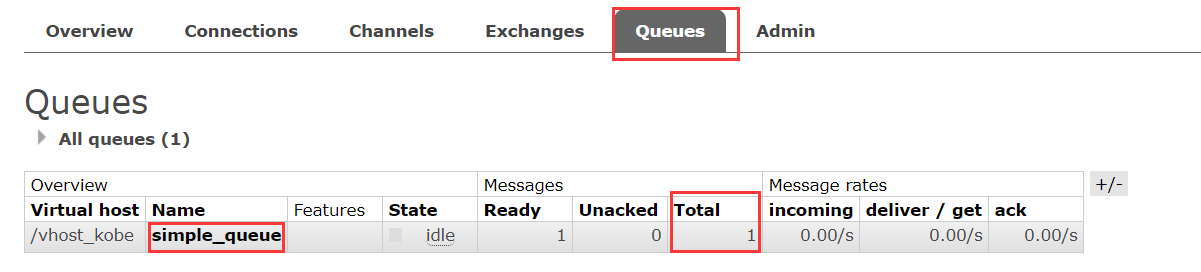
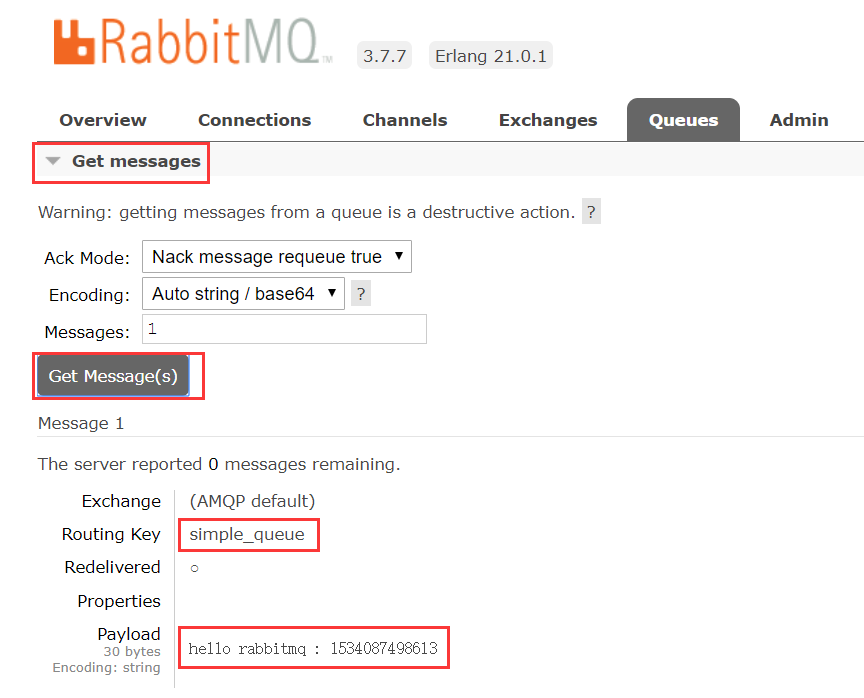
可以看得到数据已经存入队列
6、运行消费者进行消息监听
输出结果:receive msg :hello rabbitmq : 1534087498613
7、再次运行生产者
输出结果:send msg to rabbitmq:hello rabbitmq : 1534087638186
消费者监听到之后打印出 receive msg :hello rabbitmq : 1534087638186
8、查看RabbitMQ Management