
1.QWT
Qwt (http://sourceforge.jp/projects/sfnet\_qwt/)is a graphics extension to the Qt GUI application framework from Trolltech AS of Norway. It provides a 2D plotting widget and more.
2.安装Qwt
a. cd /path/to/qwt
b. qmake
c. make -j 4
d. sudo make install
以上方法会将qwt安装到/usr/local/qwt-6.1.2
3.测试Qwt是否安装成功
3.1 LearnQwt
A. LearnQwt.pro
1QT +=core gui
2
3include(/usr/local/qwt-6.1.2/features/qwt.prf)
4
5INCLUDEPATH += /usr/local/qwt-6.1.2/lib/qwt.framework/Versions/6/Headers
6
7TARGET = LearnQwt
8
9TEMPLATE = app
10
11SOURCES += \
12    main.cxx
13
14LIBS += -F"/usr/local/qwt-6.1.2/lib/qwt.framework"
15
16LIBS += -framework qwt
B. main.cxx
1p, li { white-space: pre-wrap; }
2//std
3#include <cmath>
4
5//qwt
6#include <qwt_series_data.h>
7#include <qwt_plot_curve.h>
8#include <qwt_plot.h>
9#include <qwt_point_data.h>
10
11//qt
12#include <QApplication>
13
14class SinusData : public QwtSyntheticPointData
15{
16public:
17  SinusData():
18      QwtSyntheticPointData(100)
19  {}
20  virtual double y(double x) const
21  {
22      return qSin(x);
23  }
24};
25
26int main(int argc, char **argv)
27{
28    QApplication app(argc,argv);
29
30    QwtPlot plot;
31    plot.setAxisScale( QwtPlot::xBottom, 0.0, 10.0);
32    plot.setAxisScale( QwtPlot::yLeft, -1.0, 1.0);
33
34    QwtPlotCurve *curve = new QwtPlotCurve("y = sin(x)");
35    curve->setData(new SinusData());
36    curve->attach(&plot);
37
38    plot.show();
39
40    return app.exec();
41}
C. 终端下运行LearnQwt.app
export DYLD_FRAMEWORK_PATH="/usr/local/qwt-6.1.2/lib/"
这点实在无语,和Linux平台的LD_LIBRARY_PATH起着一样的作用。否则会提示
dyld: Library not loaded: qwt.framework/Versions/6/qwt
LearnQwt.app/Contents/MacOS/LearnQwt
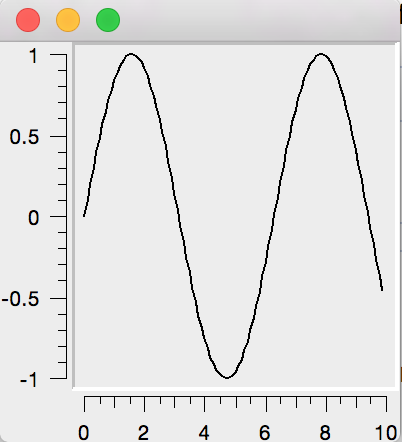
D. 运行结果如下:
4.总结。
在PRO文件中LIBS += -F "/path/to/lib" -framework(f) qwt
include("/path/to/qwt.pri")
export DYLD_FRAMEWORK_PATH="/path/to/lib"
Terminal: ./xxx.app/Contents/MacOS/xxx