Android IPC(跨进程通信)之AIDL
IPC——跨进程通信,是指两个进程之间的数据交换过程。在说IPC的同时我们要知道什么是进程,什么是线程。线程是CPU调度的最小单元,进程可以理解为一个程序或者一个应用。一个进程中可以运行多个线程,而在Android程序中有一个主线程,也叫UI线程。
在Android上,一个应用代表一个进程,当你运行应用的是时候,Android会为你分配一个独立的虚拟机,这也就相当于给你分配一块独立的内存,程序中使用的对象以及数据可以在这里共享的。但当你开启多进程时,这个进程的内存跟应用的内存就是两块不同的内存,这个时候两个内存之间的数据是不可以共享的。
多进程会产生以下几个问题:
(1)静态成员和单例模式完全失效。
(2)线程同步机制完全失效。
(3)SharedPreferences的可靠性下降。
(4)Application会多次创建。
跨进程通信的方式有多种,如Bundle、AIDL、文件共享、Messenger、ContentProvider和Socket等,今天主要介绍的AIDL的使用。
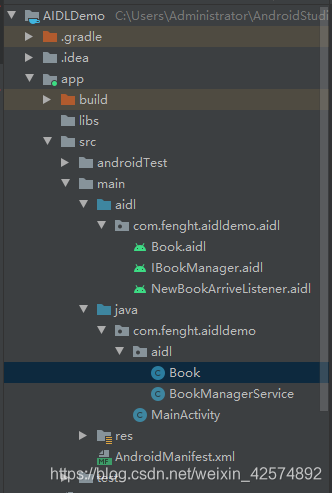
一、项目代码文件结构
这里以书店为例讲解一下,这里实现的功能是书店(服务端)把自家拥有哪些书籍告知客户(客户端),而且客户(客户端)还进行了消息订阅,当书店(服务端)有新书了就通知客户(客户端)。
二、代码实现与讲解
1、新建实体类Book.java,使用Pracelable实现序列化。
1package com.fenght.aidldemo.aidl;
2
3import android.os.Parcel;
4import android.os.Parcelable;
5
6public class Book implements Parcelable {
7
8    private int bookId;
9    private String bookName;
10
11    public Book(int bookId, String bookName) {
12        this.bookId = bookId;
13        this.bookName = bookName;
14    }
15
16    private Book(Parcel in) {
17        bookId = in.readInt();
18        bookName = in.readString();
19    }
20
21
22    @Override
23    public int describeContents() {
24        return 0;
25    }
26
27    @Override
28    public void writeToParcel(Parcel dest, int flags) {
29        dest.writeInt(bookId);
30        dest.writeString(bookName);
31    }
32
33    public static final Parcelable.Creator<Book> CREATOR = new Parcelable.Creator<Book>(){
34
35        @Override
36        public Book createFromParcel(Parcel source) {
37            return new Book(source);
38        }
39
40        @Override
41        public Book[] newArray(int size) {
42            return new Book[size];
43        }
44    };
45
46    @Override
47    public String toString() {
48        return "Book{" +
49                "bookId=" + bookId +
50                ", bookName='" + bookName + '\'' +
51                '}';
52    }
53}
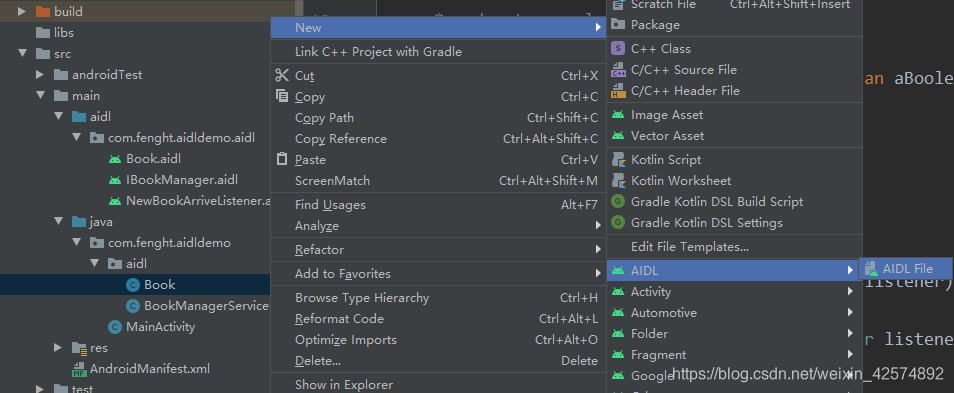
2、右击Book.java,新建Book.aidl和IBookManager.aidl以及NewBookArriveListener.aidl文件,AS会自动帮你把文件路径建好,不需要再新建文件夹。
Book.aidl文件代码
1// Book.aidl
2package com.fenght.aidldemo.aidl;
3
4// Declare any non-default types here with import statements
5parcelable Book;
IBookManager.aidl文件代码
1// IBookManager.aidl
2package com.fenght.aidldemo.aidl;
3import com.fenght.aidldemo.aidl.Book;
4import com.fenght.aidldemo.aidl.NewBookArriveListener;
5// Declare any non-default types here with import statements
6
7interface IBookManager {
8    /**
9     * Demonstrates some basic types that you can use as parameters
10     * and return values in AIDL.
11     */
12    void basicTypes(int anInt, long aLong, boolean aBoolean, float aFloat,
13            double aDouble, String aString);
14    List<Book> getBookList();
15    void addBook(in Book book);
16    void registerListener(NewBookArriveListener listener);
17    void unregisterListener(NewBookArriveListener listener);
18}
NewBookArriveListener.aidl文件代码
1// NewBookArriveListener.aidl
2package com.fenght.aidldemo.aidl;
3import com.fenght.aidldemo.aidl.Book;
4// Declare any non-default types here with import statements
5
6interface NewBookArriveListener {
7    //通知方法
8    void newBookArrived(in Book newBook);
9}
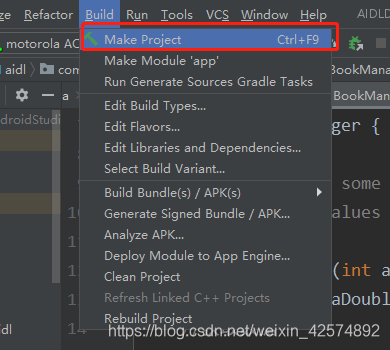
添加代码之后,点击Make Project重新编译项目。
注意:包名必须是一样com.fenght.aidldemo.aidl,不然后续编译会报错,如下图。
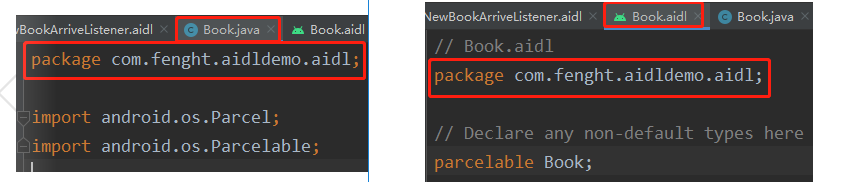
在aidl文件中写相关方法时AS没有自动帮你引入相关类,你需要自己引入。如在IBookManager.aidl文件中添加方法List<Book> getBookList(); 你可能需要手动引入import com.fenght.aidldemo.aidl.Book; Book.java的类。否则会报错:Failed to resolve ‘Book’
而且每次在aidl文件中添加相关代码之后需要重新编译一下项目。
3、远程服务端service的实现,新建BookManagerService.java服务。
1package com.fenght.aidldemo.aidl;
2
3import android.app.Service;
4import android.content.Intent;
5import android.content.pm.PackageManager;
6import android.os.Binder;
7import android.os.IBinder;
8import android.os.RemoteCallbackList;
9import android.os.RemoteException;
10import android.util.Log;
11
12import java.util.List;
13import java.util.concurrent.CopyOnWriteArrayList;
14import java.util.concurrent.atomic.AtomicBoolean;
15
16import androidx.annotation.Nullable;
17
18/**
19 * 数据管理服务
20 * @author fht
21 * @time 2020年8月1日14:02:38
22 */
23public class BookManagerService extends Service {
24
25    private CopyOnWriteArrayList<Book> mBookList = new CopyOnWriteArrayList<>();
26    private AtomicBoolean isDestory = new AtomicBoolean(false);
27    //使用RemoteCallbackList可以对监听进行反注册,否则反注册会失败
28    private RemoteCallbackList<NewBookArriveListener> listeners = new RemoteCallbackList<>();
29    private Binder mBinder = new IBookManager.Stub() {
30        @Override
31        public void basicTypes(int anInt, long aLong, boolean aBoolean, float aFloat, double aDouble, String aString) throws RemoteException {
32
33        }
34
35        @Override
36        public List<Book> getBookList() throws RemoteException {
37            return mBookList;
38        }
39
40        @Override
41        public void addBook(Book book) throws RemoteException {
42            mBookList.add(book);
43        }
44
45        @Override
46        public void registerListener(NewBookArriveListener listener) throws RemoteException {
47            //注册监听
48            listeners.register(listener);
49        }
50
51        @Override
52        public void unregisterListener(NewBookArriveListener listener) throws RemoteException {
53            //反注册
54            listeners.unregister(listener);
55        }
56    };
57
58    @Override
59    public void onCreate() {
60        super.onCreate();
61        mBookList.add(new Book(1,"android"));
62        mBookList.add(new Book(2,"java"));
63        //启动线程
64        new Thread(new ServiceWorker()).start();
65    }
66
67    @Nullable
68    @Override
69    public IBinder onBind(Intent intent) {
70        int check = checkCallingOrSelfPermission("com.fenght.aidldemo.aidl.BOOK_SERVICE");
71        if (check == PackageManager.PERMISSION_DENIED) {
72            return null;
73        }
74        return mBinder;
75    }
76
77    @Override
78    public void onDestroy() {
79        isDestory.set(true);
80        super.onDestroy();
81    }
82
83    private class ServiceWorker implements Runnable{
84        @Override
85        public void run() {
86            while (!isDestory.get()){
87                try {
88                    Thread.sleep(100);
89                    int bookId = mBookList.size() + 1;
90                    Book newBook = new Book(bookId,"新书" + bookId);
91                    mBookList.add(newBook);
92                    Log.e("fht","服务中添加新书:" + newBook.toString());
93                    final int size = listeners.beginBroadcast();
94                    for (int i=0;i<size;i++) {
95                        //获取监听
96                        NewBookArriveListener newBookArriveListener = listeners.getBroadcastItem(i);
97                        if (newBookArriveListener != null) {
98                            //发送通知
99                            newBookArriveListener.newBookArrived(newBook);
100                        }
101                    }
102                    //beginBroadcast和finishBroadcast必须配对使用
103                    listeners.finishBroadcast();
104                    //中断重连测试
105//                    if (bookId == 9) {
106//                        //结束当前进程,测试Binder死亡回调
107//                        android.os.Process.killProcess(android.os.Process.myPid());
108//                        return;
109//                    }
110                } catch (InterruptedException | RemoteException e) {
111                    e.printStackTrace();
112                }
113
114            }
115        }
116    }
117}
注意:在AndroidMainfest.xml中添加如下代码,开启多进程:
1<service android:name=".aidl.BookManagerService"
2    android:process=":remote"/>
4、接着在Mainactivity.java中绑定服务,接收数据。
1package com.fenght.aidldemo;
2
3import androidx.annotation.NonNull;
4import androidx.appcompat.app.AppCompatActivity;
5
6import android.content.ComponentName;
7import android.content.Intent;
8import android.content.ServiceConnection;
9import android.os.Bundle;
10import android.os.Handler;
11import android.os.IBinder;
12import android.os.Message;
13import android.os.RemoteException;
14import android.util.Log;
15import android.widget.TextView;
16
17import com.fenght.aidldemo.aidl.Book;
18import com.fenght.aidldemo.aidl.BookManagerService;
19import com.fenght.aidldemo.aidl.IBookManager;
20import com.fenght.aidldemo.aidl.NewBookArriveListener;
21
22import java.util.List;
23
24public class MainActivity extends AppCompatActivity {
25    private TextView tv_book;
26    private IBookManager iBookManager;
27
28    private Handler handler = new Handler(new Handler.Callback() {
29        @Override
30        public boolean handleMessage(@NonNull Message msg) {
31            switch (msg.what){
32                case 1:
33                    Log.e("fht","新书:" + msg.obj.toString());
34                    tv_book.setText(msg.obj.toString());
35                    break;
36            }
37            return false;
38        }
39    });
40
41    //服务连接
42    private ServiceConnection serviceConnection = new ServiceConnection() {
43        @Override
44        public void onServiceConnected(ComponentName name, IBinder service) {
45            iBookManager = IBookManager.Stub.asInterface(service);
46            try {
47                //设置binder死亡代理,binder死亡时有回调
48                service.linkToDeath(deathRecipient,0);
49                //获取数据
50                List<Book> list = iBookManager.getBookList();
51                Log.e("fht","书本:" + list.toString());
52                iBookManager.addBook(new Book(3,"这是客户端发送的书"));
53                List<Book> list1 = iBookManager.getBookList();
54                Log.e("fht","书本:" + list1.toString());
55                iBookManager.registerListener(newBookArriveListener);
56            } catch (RemoteException e) {
57                e.printStackTrace();
58            }
59        }
60
61        @Override
62        public void onServiceDisconnected(ComponentName name) {
63
64        }
65    };
66
67    //回调方法:当binder死亡时,系统会回调binderDied方法
68    private IBinder.DeathRecipient deathRecipient = new IBinder.DeathRecipient() {
69        @Override
70        public void binderDied() {
71            if (iBookManager == null) {
72                return;
73            }
74            //先解除binder旧的死亡监听,在ServiceConnection中会重新新的设置监听
75            iBookManager.asBinder().unlinkToDeath(deathRecipient,0);
76            iBookManager = null;
77            //死亡时,重新启动连接
78            Intent intent = new Intent(MainActivity.this, BookManagerService.class);
79            bindService(intent,serviceConnection,BIND_AUTO_CREATE);
80        }
81    };
82
83    //新书监听
84    private NewBookArriveListener newBookArriveListener = new NewBookArriveListener.Stub() {
85        @Override
86        public void newBookArrived(Book newBook) throws RemoteException {
87            //发送消息,由UI线程处理数据
88            handler.obtainMessage(1,newBook).sendToTarget();
89        }
90    };
91
92    @Override
93    protected void onCreate(Bundle savedInstanceState) {
94        super.onCreate(savedInstanceState);
95        setContentView(R.layout.activity_main);
96        tv_book = findViewById(R.id.tv_book);
97        Intent intent = new Intent(this, BookManagerService.class);
98        bindService(intent,serviceConnection,BIND_AUTO_CREATE);
99    }
100
101
102
103    @Override
104    protected void onDestroy() {
105        if (iBookManager != null && iBookManager.asBinder().isBinderAlive()) {
106            try {
107                //反注册监听
108                iBookManager.unregisterListener(newBookArriveListener);
109            } catch (RemoteException e) {
110                e.printStackTrace();
111            }
112        }
113        unbindService(serviceConnection);
114        super.onDestroy();
115    }
116}
AndroidManifest.xml代码,注意跟自己的比对一下
1<?xml version="1.0" encoding="utf-8"?>
2<manifest xmlns:android="http://schemas.android.com/apk/res/android"
3    package="com.fenght.aidldemo">
4
5    <permission android:name="com.fenght.aidldemo.aidl.BOOK_SERVICE"
6        android:protectionLevel="normal"/>
7    <uses-permission android:name="com.fenght.aidldemo.aidl.BOOK_SERVICE"/>
8
9    <application
10        android:allowBackup="true"
11        android:icon="@mipmap/ic_launcher"
12        android:label="@string/app_name"
13        android:roundIcon="@mipmap/ic_launcher_round"
14        android:supportsRtl="true"
15        android:theme="@style/AppTheme">
16        <activity android:name=".MainActivity">
17            <intent-filter>
18                <action android:name="android.intent.action.MAIN" />
19
20                <category android:name="android.intent.category.LAUNCHER" />
21            </intent-filter>
22        </activity>
23
24        <service android:name=".aidl.BookManagerService"
25            android:process=":remote"/>
26    </application>
27
28</manifest>
项目跑起来就可以了
三、注意点以及相关代码讲解
1、如何监听Binder是否死亡?
有时候服务端进程由于某些意外停止了,这回导致Binder的意外死亡,这时候需要我们重新连接服务。我们如何Binder是否死亡呢?给Binder设置DeathRecipient监听,当Binder死亡时,我们会收到binderDied方法的回调。相关代码在MainActivity.java。
(1)设置代理的代码为:
1//设置binder死亡代理,binder死亡时有回调
2service.linkToDeath(deathRecipient,0);
(2)回调方法代码为:
1//回调方法:当binder死亡时,系统会回调binderDied方法
2private IBinder.DeathRecipient deathRecipient = new IBinder.DeathRecipient() {
3    @Override
4    public void binderDied() {
5        if (iBookManager == null) {
6            return;
7        }
8        //先解除binder旧的死亡监听,在ServiceConnection中会重新新的设置监听
9        iBookManager.asBinder().unlinkToDeath(deathRecipient,0);
10        iBookManager = null;
11        //死亡时,重新启动连接
12        Intent intent = new Intent(MainActivity.this, BookManagerService.class);
13        bindService(intent,serviceConnection,BIND_AUTO_CREATE);
14    }
15};
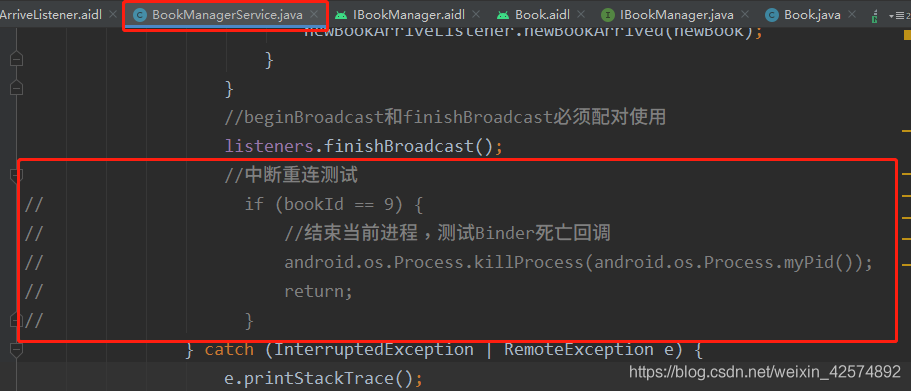
(3)验证方法就是放开如下代码:
2、如何进行权限验证?
默认情况下,我们的远程服务任何人都可以连接的,但这是不安全的,我们需要加入权限验证以保护数据的安全性。验证通过才可以连接,验证失败则不能连接。相关代码如下:
(1)在AndroidManifest.xml添加权限,这是连接服务需要的权限,自己定义的:
1<permission android:name="com.fenght.aidldemo.aidl.BOOK_SERVICE"
2    android:protectionLevel="normal"/>
(2)在BookManagerService.java中进行权限控制:
1@Nullable
2@Override
3public IBinder onBind(Intent intent) {
4    int check = checkCallingOrSelfPermission("com.fenght.aidldemo.aidl.BOOK_SERVICE");
5    if (check == PackageManager.PERMISSION_DENIED) {
6        return null;
7    }
8    return mBinder;
9}
(3)在AndroidManifest.xml声明权限,跟(1)中的权限要一致:
<uses-permission android:name="com.fenght.aidldemo.aidl.BOOK_SERVICE"/>
3、因为反注册的需要,这里使用RemoteCallbackList,不需要注册与反注册监听的可以使用CopyOnWriteArrayList,具体原因不多说了。