
顾名思义,Android ScaleDrawable实现一个drawable的缩放。写一个例子。
一个线性布局,垂直放几个ImageView,然后依次缩放若干个ScaleDrawable。
布局文件:
1<?xml version="1.0" encoding="utf-8"?>
2<LinearLayout xmlns:android="http://schemas.android.com/apk/res/android"
3    xmlns:tools="http://schemas.android.com/tools"
4    android:layout_width="match_parent"
5    android:layout_height="match_parent"
6    android:orientation="vertical"
7    tools:context="zhangphil.app.MainActivity">
8
9    <ImageView
10        android:layout_width="match_parent"
11        android:layout_height="100dp"
12        android:id="@+id/imageView1" />
13
14    <ImageView
15        android:layout_width="match_parent"
16        android:layout_height="100dp"
17        android:id="@+id/imageView2" />
18
19    <ImageView
20        android:layout_width="match_parent"
21        android:layout_height="100dp"
22        android:id="@+id/imageView3" />
23
24    <ImageView
25        android:layout_width="match_parent"
26        android:layout_height="100dp"
27        android:id="@+id/imageView4" />
28
29</LinearLayout>
Java代码:
1package zhangphil.app;
2
3import android.graphics.Color;
4import android.graphics.drawable.ColorDrawable;
5import android.graphics.drawable.ScaleDrawable;
6import android.support.v7.app.AppCompatActivity;
7import android.os.Bundle;
8import android.view.Gravity;
9import android.widget.ImageView;
10
11public class MainActivity extends AppCompatActivity {
12
13    @Override
14    protected void onCreate(Bundle savedInstanceState) {
15        super.onCreate(savedInstanceState);
16        setContentView(R.layout.activity_main);
17
18        ColorDrawable drawable1=new ColorDrawable(Color.RED);
19        drawable1.setLevel(1);
20        ImageView image1= (ImageView) findViewById(R.id.imageView1);
21        image1.setImageDrawable(drawable1);
22
23        ColorDrawable drawable2=new ColorDrawable(Color.YELLOW);
24        drawable2.setLevel(1);
25        ScaleDrawable sd2 = new ScaleDrawable(drawable2, Gravity.LEFT,0.1f,0.0f);
26        ImageView image2= (ImageView) findViewById(R.id.imageView2);
27        image2.setImageDrawable(sd2);
28
29        ColorDrawable drawable3=new ColorDrawable(Color.BLUE);
30        drawable3.setLevel(1);
31        ScaleDrawable sd3 = new ScaleDrawable(drawable3, Gravity.LEFT,0.2f,0.0f);
32        ImageView image3= (ImageView) findViewById(R.id.imageView3);
33        image3.setImageDrawable(sd3);
34
35        ColorDrawable drawable4=new ColorDrawable(Color.GREEN);
36        drawable4.setLevel(1);
37        ScaleDrawable sd4 = new ScaleDrawable(drawable4, Gravity.LEFT,0.3f,0.0f);
38        ImageView image4= (ImageView) findViewById(R.id.imageView4);
39        image4.setImageDrawable(sd4);
40    }
41}
代码运行结果:
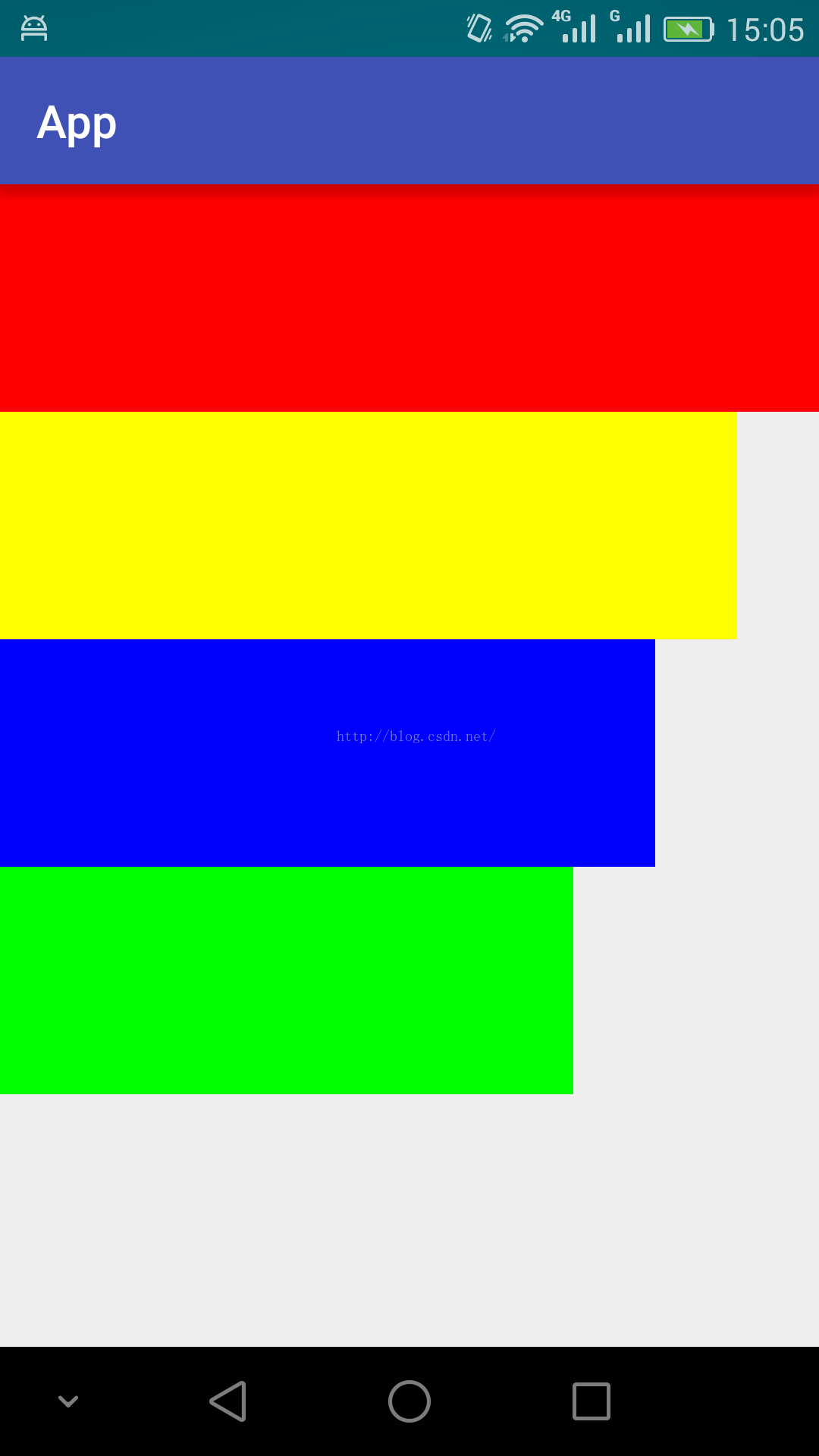
以上ScaleDrawable没有让drawable的高度缩放,只缩放宽度。
附录:
1,《Android ImageView的setImageLevel和level-list使用简介》链接:http://blog.csdn.net/zhangphil/article/details/48936209