
侧滑菜单的简单使用;DrawerLayout android提供的侧滑菜单,能够实现 目录推出,就是大家常见的效果,效果图如下;
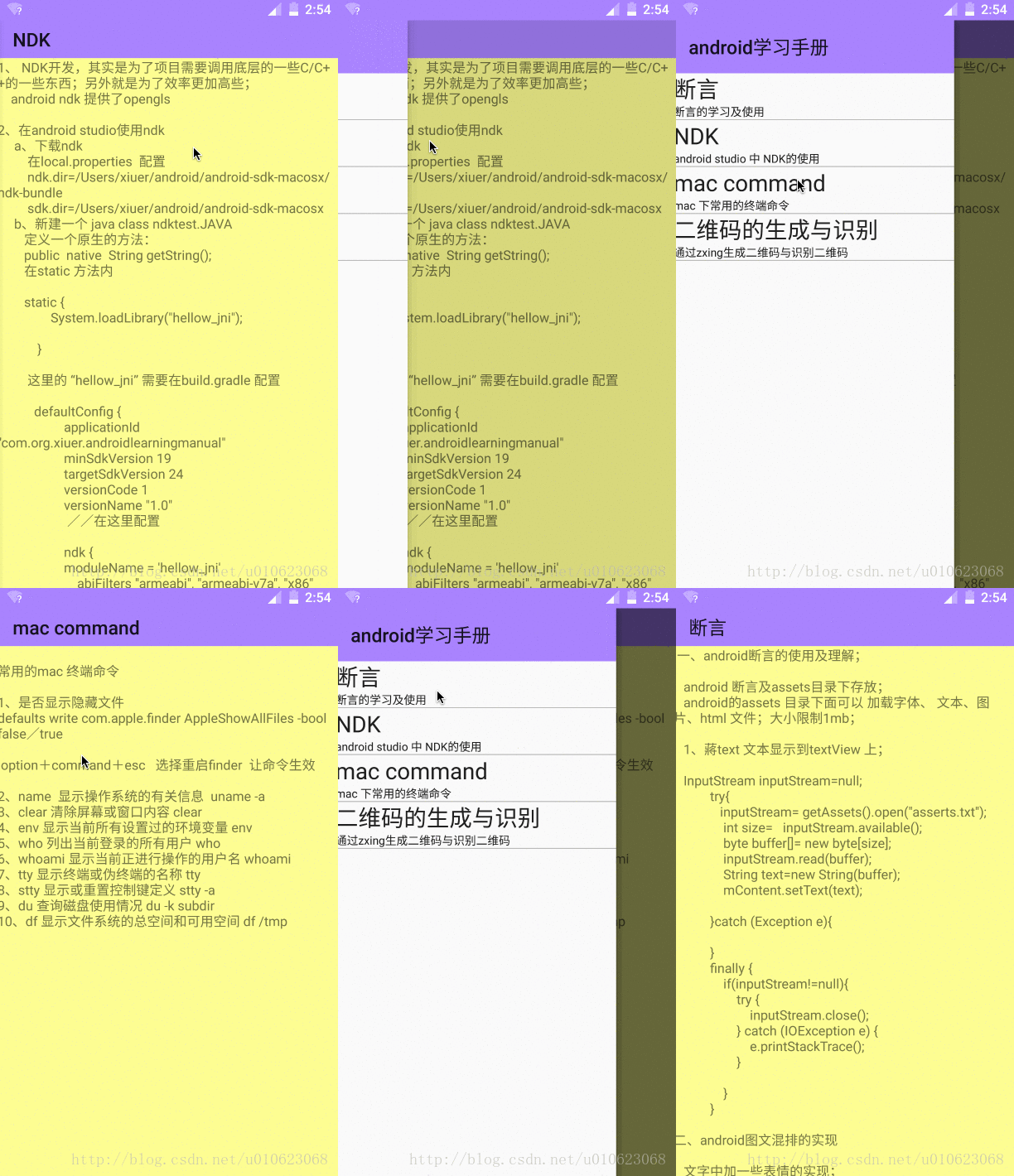
DrawerLayout 的使用非常简单;只要你提供布局就好;
一个左边的布局,一个显示内容的布局;
布局文件 代码如下所示
1<android.support.v4.widget.DrawerLayout
2xmlns:android="http://schemas.android.com/apk/res/android"
3android:id="@+id/drawer_layout"
4android:layout_width="match_parent"
5android:layout_height="match_parent">
6
7//左边
8<include layout="@layout/activity_content"/>
9//内容
10<include layout="@layout/activity_left_content"/>
11
12</android.support.v4.widget.DrawerLayout>
java 代码 控制; DrawerLayout 已经封装好了手势滑动,如果想要隐藏左边的目录,通过
mDrawerLayout.closeDrawer(mLView);
即可 手动隐藏;
DrawerLayout的使用就是这么简单;接下来我稍微说一下我写的这个例子
1、界面
左边导航布局
1<?xml version="1.0" encoding="utf-8"?>
2<LinearLayout xmlns:android="http://schemas.android.com/apk/res/android"
3    android:orientation="vertical"
4    android:layout_width="match_parent"
5    android:layout_height="match_parent"
6    android:layout_gravity="start"
7    android:background="#FBFBFB"
8    android:id="@+id/left_view"
9
10    >
11    <android.support.v7.widget.Toolbar
12        android:layout_width="match_parent"
13        android:layout_height="wrap_content"
14        android:id="@+id/left_tool"
15        android:background="#AA88FF"
16
17        >
18
19    </android.support.v7.widget.Toolbar>
20
21    <android.support.v7.widget.RecyclerView
22        android:id="@+id/left_recyclerView"
23        android:layout_width="match_parent"
24        android:layout_height="match_parent"
25        >
26
27
28    </android.support.v7.widget.RecyclerView>
29
30</LinearLayout>
内容布局
1<?xml version="1.0" encoding="utf-8"?>
2<LinearLayout xmlns:android="http://schemas.android.com/apk/res/android" android:orientation="vertical" android:layout_width="match_parent" android:layout_height="match_parent" android:background="#FFFF99" >
3    <android.support.v7.widget.Toolbar  android:id="@+id/center_content_tool" android:layout_width="match_parent" android:layout_height="40dp" android:background="@color/colorLilac" android:title="断言" >
4
5    </android.support.v7.widget.Toolbar>
6    <FrameLayout  android:id="@+id/center_content_frame" android:layout_width="match_parent" android:layout_height="match_parent"></FrameLayout>
7
8</LinearLayout>
2、主要代码
1/** * 根据向导加载内容,默认为第一个 * @param position */
2     public void  loadCenterContent(int position){
3         String title=guides.get(position).getmTitle();
4         mCenterTool.setTitle(title);
5         String content=readStringFromAssert(guides.get(position).getGuideName());
6         Content_Fragment fragment=Content_Fragment.newInstance(title,content);
7         getFragmentManager().beginTransaction().replace(R.id.center_content_frame,
8                 fragment).commit();
9
10         mDrawerLayout.closeDrawer(mLView);}
11
12protected  void initUIData(){
13        mLeftToolbar.setTitle("android学习手册");
14        //默认加载第一项
15        loadCenterContent(0);
16
17        RecyclerView.LayoutManager manager=new LinearLayoutManager(this);
18        mLeftView.setLayoutManager(manager);
19        mLeftView.setAdapter(new LeftAdapter(guides, new ItemClickListener() {
20            @Override
21            public void onItemClick(View view, int position) {
22                //当前选个哪个就加载其内容
23                loadCenterContent(position);
24            }
25            @Override
26            public void onLongItemClick(View view, int position) {
27                Log.i(TAG, "onLongItemClick: ");
28            }
29        }));
30
31
32
33
34    }
35
36 /** * 初始化目录列表内容 */
37    protected  void initList(){
38        guides.add(new Guide("断言","断言的学习及使用","asserts.txt"));
39        guides.add(new Guide("NDK","android studio 中 NDK的使用","ndk study.txt"));
40        guides.add(new Guide("mac command","mac 下常用的终端命令","command"));
41        guides.add(new Guide("二维码的生成与识别","通过zxing生成二维码与识别二维码","zxing"));
42
43
44    }