
##多表查询 ###多表联合查询
1#创建部门
2CREATE TABLE IF NOT EXISTS dept (
3    did int not null auto_increment PRIMARY KEY,
4    dname VARCHAR(50) not null COMMENT '部门名称'
5)ENGINE=INNODB DEFAULT charset utf8;
6
7
8#添加部门数据
9INSERT INTO `dept` VALUES ('1', '教学部');
10INSERT INTO `dept` VALUES ('2', '销售部');
11INSERT INTO `dept` VALUES ('3', '市场部');
12INSERT INTO `dept` VALUES ('4', '人事部');
13INSERT INTO `dept` VALUES ('5', '鼓励部');
14
15-- 创建人员
16DROP TABLE IF EXISTS `person`;
17CREATE TABLE `person` (
18  `id` int(11) NOT NULL AUTO_INCREMENT,
19  `name` varchar(50) NOT NULL,
20  `age` tinyint(4) DEFAULT '0',
21  `sex` enum('男','女','人妖') NOT NULL DEFAULT '人妖',
22  `salary` decimal(10,2) NOT NULL DEFAULT '250.00',
23  `hire_date` date NOT NULL,
24  `dept_id` int(11) DEFAULT NULL,
25  PRIMARY KEY (`id`)
26) ENGINE=InnoDB AUTO_INCREMENT=13 DEFAULT CHARSET=utf8;
27
28-- 添加人员数据
29
30-- 教学部
31INSERT INTO `person` VALUES ('1', 'alex', '28', '人妖', '53000.00', '2010-06-21', '1');
32INSERT INTO `person` VALUES ('2', 'wupeiqi', '23', '男', '8000.00', '2011-02-21', '1');
33INSERT INTO `person` VALUES ('3', 'egon', '30', '男', '6500.00', '2015-06-21', '1');
34INSERT INTO `person` VALUES ('4', 'jingnvshen', '18', '女', '6680.00', '2014-06-21', '1');
35
36-- 销售部
37INSERT INTO `person` VALUES ('5', '歪歪', '20', '女', '3000.00', '2015-02-21', '2');
38INSERT INTO `person` VALUES ('6', '星星', '20', '女', '2000.00', '2018-01-30', '2');
39INSERT INTO `person` VALUES ('7', '格格', '20', '女', '2000.00', '2018-02-27', '2');
40INSERT INTO `person` VALUES ('8', '周周', '20', '女', '2000.00', '2015-06-21', '2');
41
42-- 市场部
43INSERT INTO `person` VALUES ('9', '月月', '21', '女', '4000.00', '2014-07-21', '3');
44INSERT INTO `person` VALUES ('10', '安琪', '22', '女', '4000.00', '2015-07-15', '3');
45
46-- 人事部
47INSERT INTO `person` VALUES ('11', '周明月', '17', '女', '5000.00', '2014-06-21', '4');
48
49-- 鼓励部
50INSERT INTO `person` VALUES ('12', '赵四', '33', '女', '1000000.00', '2018-02-21', null);
51
52创建表和数据
53
54
55#多表查询语法
56select  字段1,字段2... from 表1,表2... [where 条件]
注意: 如果不加条件直接进行查询,则会出现以下效果,这种结果我们称之为 笛卡尔乘积
1#查询人员和部门所有信息
2select * from person,dept
笛卡尔乘积公式 : A表中数据条数 * B表中数据条数 = 笛卡尔乘积.
1mysql> select * from person ,dept;
2+----+----------+-----+-----+--------+------+-----+--------+
3| id | name     | age | sex | salary | did  | did | dname  |
4+----+----------+-----+-----+--------+------+-----+--------+
5|  1 | alex     |  28 | 女  |  53000 |    1 |   1 | python |
6|  1 | alex     |  28 | 女  |  53000 |    1 |   2 | linux  |
7|  1 | alex     |  28 | 女  |  53000 |    1 |   3 | 明教   |
8|  2 | wupeiqi  |  23 | 女  |  29000 |    1 |   1 | python |
9|  2 | wupeiqi  |  23 | 女  |  29000 |    1 |   2 | linux  |
10|  2 | wupeiqi  |  23 | 女  |  29000 |    1 |   3 | 明教   |
11|  3 | egon     |  30 | 男  |  27000 |    1 |   1 | python |
12|  3 | egon     |  30 | 男  |  27000 |    1 |   2 | linux  |
13|  3 | egon     |  30 | 男  |  27000 |    1 |   3 | 明教   |
14|  4 | oldboy   |  22 | 男  |      1 |    2 |   1 | python |
15|  4 | oldboy   |  22 | 男  |      1 |    2 |   2 | linux  |
16|  4 | oldboy   |  22 | 男  |      1 |    2 |   3 | 明教   |
17|  5 | jinxin   |  33 | 女  |  28888 |    1 |   1 | python |
18|  5 | jinxin   |  33 | 女  |  28888 |    1 |   2 | linux  |
19|  5 | jinxin   |  33 | 女  |  28888 |    1 |   3 | 明教   |
20|  6 | 张无忌   |  20 | 男  |   8000 |    3 |   1 | python |
21|  6 | 张无忌   |  20 | 男  |   8000 |    3 |   2 | linux  |
22|  6 | 张无忌   |  20 | 男  |   8000 |    3 |   3 | 明教   |
23|  7 | 令狐冲   |  22 | 男  |   6500 | NULL |   1 | python |
24|  7 | 令狐冲   |  22 | 男  |   6500 | NULL |   2 | linux  |
25|  7 | 令狐冲   |  22 | 男  |   6500 | NULL |   3 | 明教   |
26|  8 | 东方不败 |  23 | 女  |  18000 | NULL |   1 | python |
27|  8 | 东方不败 |  23 | 女  |  18000 | NULL |   2 | linux  |
28|  8 | 东方不败 |  23 | 女  |  18000 | NULL |   3 | 明教   |
29+----+----------+-----+-----+--------+------+-----+--------+
30
31笛卡尔乘积示例
32
33
34#查询人员和部门所有信息
35select * from person,dept where person.did = dept.did;
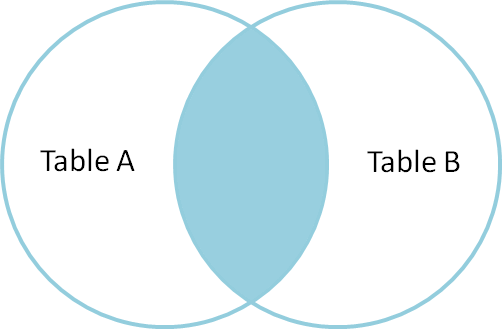
注意: 多表查询时,一定要找到两个表中相互关联的字段,并且作为条件使用
1mysql> select * from person,dept where person.did = dept.did;
2+----+---------+-----+-----+--------+-----+-----+--------+
3| id | name    | age | sex | salary | did | did | dname  |
4+----+---------+-----+-----+--------+-----+-----+--------+
5|  1 | alex    |  28 | 女  |  53000 |   1 |   1 | python |
6|  2 | wupeiqi |  23 | 女  |  29000 |   1 |   1 | python |
7|  3 | egon    |  30 | 男  |  27000 |   1 |   1 | python |
8|  4 | oldboy  |  22 | 男  |      1 |   2 |   2 | linux  |
9|  5 | jinxin  |  33 | 女  |  28888 |   1 |   1 | python |
10|  6 | 张无忌  |  20 | 男  |   8000 |   3 |   3 | 明教   |
11|  7 | 令狐冲  |  22 | 男  |   6500 |   2 |   2 | linux  |
12+----+---------+-----+-----+--------+-----+-----+--------+
13rows in set
14
15示例
 ###多表链接查询
1#多表连接查询语法(重点)
2SELECT 字段列表
3    FROM 表1  INNER|LEFT|RIGHT JOIN  表2
4ON 表1.字段 = 表2.字段;
####1 内连接查询 (只显示符合条件的数据)
1#查询人员和部门所有信息
2select * from person inner join dept  on person.did =dept.did;
效果: 大家可能会发现, 内连接查询与多表联合查询的效果是一样的. 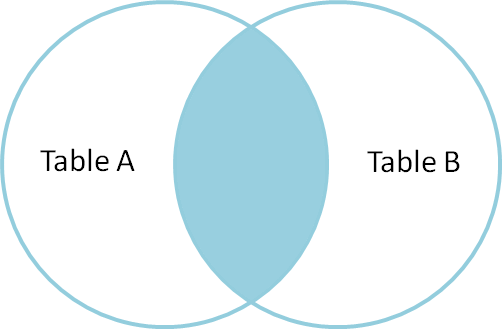
1mysql> select * from person inner join  dept  on  person.did =dept.did;
2+----+---------+-----+-----+--------+-----+-----+--------+
3| id | name    | age | sex | salary | did | did | dname  |
4+----+---------+-----+-----+--------+-----+-----+--------+
5|  1 | alex    |  28 | 女  |  53000 |   1 |   1 | python |
6|  2 | wupeiqi |  23 | 女  |  29000 |   1 |   1 | python |
7|  3 | egon    |  30 | 男  |  27000 |   1 |   1 | python |
8|  4 | oldboy  |  22 | 男  |      1 |   2 |   2 | linux  |
9|  5 | jinxin  |  33 | 女  |  28888 |   1 |   1 | python |
10|  6 | 张无忌  |  20 | 男  |   8000 |   3 |   3 | 明教   |
11|  7 | 令狐冲  |  22 | 男  |   6500 |   2 |   2 | linux  |
12+----+---------+-----+-----+--------+-----+-----+--------+
13rows in set
14
####2 左外连接查询 (左边表中的数据优先全部显示)
1#查询人员和部门所有信息
2select * from person left join  dept  on  person.did =dept.did;
效果:人员表中的数据全部都显示,而 部门表中的数据符合条件的才会显示,不符合条件的会以 null 进行填充.
1mysql> select * from person left join  dept  on  person.did =dept.did;
2+----+----------+-----+-----+--------+------+------+--------+
3| id | name     | age | sex | salary | did  | did  | dname  |
4+----+----------+-----+-----+--------+------+------+--------+
5|  1 | alex     |  28 | 女  |  53000 |    1 |    1 | python |
6|  2 | wupeiqi  |  23 | 女  |  29000 |    1 |    1 | python |
7|  3 | egon     |  30 | 男  |  27000 |    1 |    1 | python |
8|  5 | jinxin   |  33 | 女  |  28888 |    1 |    1 | python |
9|  4 | oldboy   |  22 | 男  |      1 |    2 |    2 | linux  |
10|  7 | 令狐冲   |  22 | 男  |   6500 |    2 |    2 | linux  |
11|  6 | 张无忌   |  20 | 男  |   8000 |    3 |    3 | 明教   |
12|  8 | 东方不败 |  23 | 女  |  18000 | NULL | NULL | NULL   |
13+----+----------+-----+-----+--------+------+------+--------+
14rows in set
15
####3 右外连接查询 (右边表中的数据优先全部显示)
1#查询人员和部门所有信息
2select * from person right join  dept  on  person.did =dept.did;
效果:正好与[左外连接相反]
1mysql> select * from person right join  dept  on  person.did =dept.did;
2+----+---------+-----+-----+--------+-----+-----+--------+
3| id | name    | age | sex | salary | did | did | dname  |
4+----+---------+-----+-----+--------+-----+-----+--------+
5|  1 | alex    |  28 | 女  |  53000 |   1 |   1 | python |
6|  2 | wupeiqi |  23 | 女  |  29000 |   1 |   1 | python |
7|  3 | egon    |  30 | 男  |  27000 |   1 |   1 | python |
8|  4 | oldboy  |  22 | 男  |      1 |   2 |   2 | linux  |
9|  5 | jinxin  |  33 | 女  |  28888 |   1 |   1 | python |
10|  6 | 张无忌  |  20 | 男  |   8000 |   3 |   3 | 明教   |
11|  7 | 令狐冲  |  22 | 男  |   6500 |   2 |   2 | linux  |
12+----+---------+-----+-----+--------+-----+-----+--------+
13rows in set
####4 全连接查询(显示左右表中全部数据) 全连接查询:是在内连接的基础上增加 左右两边没有显示的数据 注意: mysql并不支持全连接 full JOIN 关键字 注意: 但是mysql 提供了 UNION 关键字.使用 UNION 可以间接实现 full JOIN 功能
1#查询人员和部门的所有数据
2
3SELECT * FROM person LEFT JOIN dept ON person.did = dept.did
4UNION
5SELECT * FROM person RIGHT JOIN dept ON person.did = dept.did;
6
7
8mysql> SELECT * FROM person LEFT JOIN dept ON person.did = dept.did
9                UNION
10            SELECT * FROM person RIGHT JOIN dept ON person.did = dept.did;
11+------+----------+------+------+--------+------+------+--------+
12| id   | name     | age  | sex  | salary | did  | did  | dname  |
13+------+----------+------+------+--------+------+------+--------+
14|    1 | alex     |   28 | 女   |  53000 |    1 |    1 | python |
15|    2 | wupeiqi  |   23 | 女   |  29000 |    1 |    1 | python |
16|    3 | egon     |   30 | 男   |  27000 |    1 |    1 | python |
17|    5 | jinxin   |   33 | 女   |  28888 |    1 |    1 | python |
18|    4 | oldboy   |   22 | 男   |      1 |    2 |    2 | linux  |
19|    7 | 令狐冲   |   22 | 男   |   6500 |    2 |    2 | linux  |
20|    6 | 张无忌   |   20 | 男   |   8000 |    3 |    3 | 明教   |
21|    8 | 东方不败 |   23 | 女   |  18000 | NULL | NULL | NULL   |
22| NULL | NULL     | NULL | NULL | NULL   | NULL |    4 | 基督教 |
23+------+----------+------+------+--------+------+------+--------+
24rows in set
25
26注意: UNION 和 UNION ALL 的区别:UNION 会去掉重复的数据,而 UNION ALL 则直接显示结果
27
###复杂条件多表查询
-
查询出 教学部 年龄大于20岁,并且工资小于40000的员工,按工资倒序排列.(要求:分别使用多表联合查询和内连接查询)
#1.多表联合查询方式: select * from person p1,dept d2 where p1.did = d2.did
and d2.dname='python' and age>20 and salary <40000 ORDER BY salary DESC;#2.内连接查询方式: SELECT * FROM person p1 INNER JOIN dept d2 ON p1.did= d2.did and d2.dname='python' and age>20 and salary <40000 ORDER BY salary DESC;
2.查询每个部门中最高工资和最低工资是多少,显示部门名称
1select MAX(salary),MIN(salary),dept.dname from
2        person LEFT JOIN dept
3            ON person.did = dept.did
4 GROUP BY person.did;
###子语句查询 子查询(嵌套查询): 查多次, 多个select 注意: 第一次的查询结果可以作为第二次的查询的 条件 或者 表名 使用. 子查询中可以包含:IN、NOT IN、ANY、ALL、EXISTS 和 NOT EXISTS等关键字. 还可以包含比较运算符:= 、 !=、> 、<等. ####1.作为表名使用 select * from (select * from person) as 表名;
ps:大家需要注意的是: 一条语句中可以有多个这样的子查询,在执行时,最里层括号(sql语句) 具有优先执行权.<br>注意: as 后面的表名称不能加引号('')
2.求最大工资那个人的姓名和薪水
11.求最大工资
2select max(salary) from person;
32.求最大工资那个人叫什么
4select name,salary from person where salary=53000;
5
6合并
7select name,salary from person where salary=(select max(salary) from person);
####3. 求工资高于所有人员平均工资的人员
11.求平均工资
2select avg(salary) from person;
3
42.工资大于平均工资的 人的姓名、工资
5select name,salary from person where salary > 21298.625;
6
7合并
8select name,salary from person where salary >(select avg(salary) from person);
####4.关键字
1 ANY:
2        假设any内部的查询语句返回的结果个数是三个,如:result1,result2,result3,那么,
3
4select ...from ... where a > any(...);
5->
6select ...from ... where a > result1 or a > result2 or a > result3;
7
8
9ALL:
10        ALL关键字与any关键字类似,只不过上面的or改成and。即:
11
12select ...from ... where a > all(...);
13->
14select ...from ... where a > result1 and a > result2 and a > result3;
15
16
17SOME:
18        some关键字和any关键字是一样的功能。所以:
19
20select ...from ... where a > some(...);
21->
22select ...from ... where a > result1 or a > result2 or a > result3;
23
24
25EXISTS关键字:
26EXISTS 和 NOT EXISTS 子查询语法如下:
27
28  SELECT ... FROM table WHERE  EXISTS (subquery)
29该语法可以理解为:主查询(外部查询)会根据子查询验证结果(TRUE 或 FALSE)来决定主查询是否得以执行。
30
31mysql> SELECT * FROM person
32    -> WHERE EXISTS
33    -> (SELECT * FROM dept WHERE did=5);
34Empty set (0.00 sec)
35此处内层循环并没有查询到满足条件的结果,因此返回false,外层查询不执行。
36
37NOT EXISTS刚好与之相反
38
39mysql> SELECT * FROM person
40    -> WHERE NOT EXISTS
41    -> (SELECT * FROM dept WHERE did=5);
42+----+----------+-----+-----+--------+------+
43| id | name     | age | sex | salary | did  |
44+----+----------+-----+-----+--------+------+
45|  1 | alex     |  28 | 女  |  53000 |    1 |
46|  2 | wupeiqi  |  23 | 女  |  29000 |    1 |
47|  3 | egon     |  30 | 男  |  27000 |    1 |
48|  4 | oldboy   |  22 | 男  |      1 |    2 |
49|  5 | jinxin   |  33 | 女  |  28888 |    1 |
50|  6 | 张无忌   |  20 | 男  |   8000 |    3 |
51|  7 | 令狐冲   |  22 | 男  |   6500 |    2 |
52|  8 | 东方不败 |  23 | 女  |  18000 | NULL |
53+----+----------+-----+-----+--------+------+
54rows in set
55
56当然,EXISTS关键字可以与其他的查询条件一起使用,条件表达式与EXISTS关键字之间用AND或者OR来连接,如下:
57
58mysql> SELECT * FROM person
59    -> WHERE AGE >23 AND NOT EXISTS
60    -> (SELECT * FROM dept WHERE did=5);
61提示:
62•EXISTS (subquery) 只返回 TRUE 或 FALSE,因此子查询中的 SELECT * 也可以是 SELECT 1 或其他,官方说法是实际执行时会忽略 SELECT 清单,因此没有区别。