
本文将详细介绍批量获取API(Multi Get API)与Bulk API。
1、Multi Get API
-
public final MultiGetResponse mget(MultiGetRequest multiGetRequest, RequestOptions options) throws IOException
-
public final void mgetAsync(MultiGetRequest multiGetRequest, RequestOptions options, ActionListener<MultiGetResponse> listener)
其核心需要关注MultiGetRequest 。
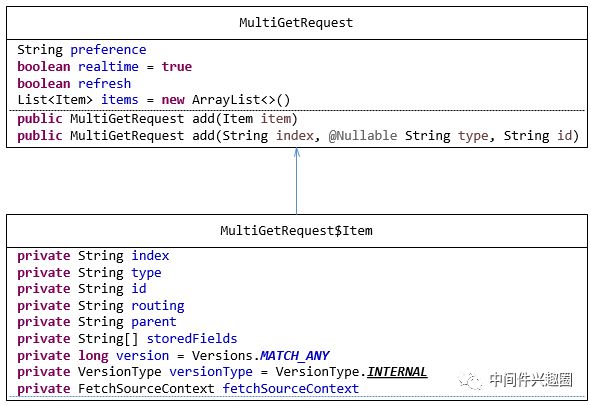
从上面所知,mget及批量获取文档,通过add方法添加多个Item,每一个item代表一个文件获取请求,其相关字段已在get API中详细介绍,这里就不做过多详解。
Mget API使用示例
1public static void testMget() {
2        RestHighLevelClient client = EsClient.getClient();
3        try {
4            MultiGetRequest request = new MultiGetRequest();
5            request.add("twitter", "_doc", "10");
6            request.add("twitter", "_doc", "11");
7            request.add("twitter", "_doc", "12");
8            request.add("gisdemo", "_doc", "10");
9            MultiGetResponse result = client.mget(request, RequestOptions.DEFAULT);
10            System.out.println(result);
11        } catch (Throwable e) {
12            e.printStackTrace();
13        } finally {
14            EsClient.close(client);
15        }
16    }
返回的结果其本质是一个 GetResponse的数组,不会因为其中一个失败,整个请求失败,但其结果中会标明每一个是否成功。其返回结果类图如下:
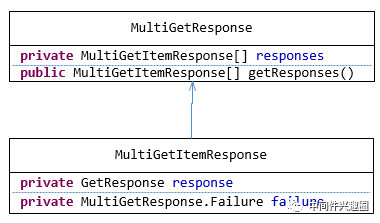
其字段过滤(Source filtering)、路由等机制与Get API相同,故不重复讲解。
2、Bluk API详解
Bulk API可以在一次API调用中包含多个索引操作,例如更新索引,删除索引等。其API定义如下:
-
public final BulkResponse bulk(BulkRequest bulkRequest, RequestOptions options) throws IOException
-
public final void bulkAsync(BulkRequest bulkRequest, RequestOptions options, ActionListener<BulkResponse> listener)
其核心需要关注BulkRequest。
2.1BulkRequest详解
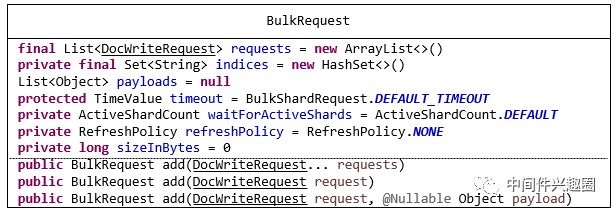
-
List<DocWriteRequest> requests:单个命令容器,DocWriteRequest的子类包括:IndexRequest、UpdateRequest、DeleteRequest。
-
private final Set<String> indices:requests涉及到的索引。
-
List<Object> payloads :有效载荷,6.4.0版本,貌似该字段意义不大,通常命令的请求体(负载数据)存放在DocWriteRequest对象中,例如IndexRequest的source字段。
-
protected TimeValue timeout:timeout机制,针对一个Bulk请求生效。
-
ActiveShardCount waitForActiveShards:针对整个Bulk请求有效。
-
private RefreshPolicy refreshPolicy = RefreshPolicy.NONE:刷新策略。
-
private long sizeInBytes = 0:整个Bulk请求的大小。
通过add api为BulkRequest添加一个请求。
2.2 Bulk API请求格式详解
Bulk Rest请求协议基于如下格式:
1POST _bulk
2{ "index" : { "_index" : "test", "_type" : "_doc", "_id" : "1" } }
3{ "field1" : "value1" }
4{ "delete" : { "_index" : "test", "_type" : "_doc", "_id" : "2" } }
5{ "create" : { "_index" : "test", "_type" : "_doc", "_id" : "3" } }
6{ "field1" : "value3" }
7{ "update" : {"_id" : "1", "_type" : "_doc", "_index" : "test"} }
8{ "doc" : {"field2" : "value2"} }
其请求格式定义如下(restfull):
-
POST请求,其Content-Type为application/x-ndjson。
-
每一个命令占用两行,每行的结束字符为\r\n。
-
第一行为元数据,"opType" : {元数据}。
-
第二行为有效载体(非必选),例如Index操作,其有效载荷为IndexRequest#source字段。
-
opType可选值 index、create、update、delete。
-
公用元数据(index、create、update、delete)如下
1)_index :索引名
2)_type:类型名
3)_id:文档ID
4)routing:路由值
5)parent
6)version:数据版本号
7)version_type:版本类型
- 各操作特有元数据
1、index | create
1)pipeline
2、update
1)retry_on_conflict :更新冲突时重试次数。
2)_source:字段过滤。
- 有效载荷说明
1、index | create
其有效载荷为_source字段。
2、update
其有效载荷为:partial doc, upsert and script。
3、delete
没有有效载荷。
对请求格式为什么要设计成metdata+有效载体的方式,主要是为了在接受端节点(所谓的接受端节点是指收到命令的第一节点),只需解析metadata,然后将请求直接转发给对应的数据节点。
2.3 bulk API通用特性分析
2.3.1 版本管理
每一个Bulk条目拥有独自的version,存在于请求条目的item的元数据中。
2.3.2 路由
每一个Bulk条目各自生效。
2.3.3 Wait For Active Shards
通常可以设置BulkRequest#waitForActiveShards来要求Bulk批量执行之前要求处于激活的最小副本数。
2.3.4 Bulk Demo
1public static final void testBulk() {
2        RestHighLevelClient client = EsClient.getClient();
3        try {
4            IndexRequest indexRequest = new IndexRequest("twitter", "_doc", "12")
5                    .source(buildTwitter("dingw", "2009-11-18T14:12:12", "test bulk"));
6
7            UpdateRequest updateRequest = new UpdateRequest("twitter", "_doc", "11")
8                        .doc(new IndexRequest("twitter", "_doc", "11")
9                                .source(buildTwitter("dingw", "2009-11-18T14:12:12", "test bulk update")));
10
11            BulkRequest request = new BulkRequest();
12            request.add(indexRequest);
13            request.add(updateRequest);
14            BulkResponse bulkResponse = client.bulk(request, RequestOptions.DEFAULT);
15            for (BulkItemResponse bulkItemResponse : bulkResponse) {
16                if (bulkItemResponse.isFailed()) {
17                    BulkItemResponse.Failure failure = bulkItemResponse.getFailure();
18                    System.out.println(failure);
19                    continue;
20                }
21                DocWriteResponse itemResponse = bulkItemResponse.getResponse();
22                if (bulkItemResponse.getOpType() == DocWriteRequest.OpType.INDEX
23                        || bulkItemResponse.getOpType() == DocWriteRequest.OpType.CREATE) {
24                    IndexResponse indexResponse = (IndexResponse) itemResponse;
25                    System.out.println(indexRequest);
26                } else if (bulkItemResponse.getOpType() == DocWriteRequest.OpType.UPDATE) {
27                    UpdateResponse updateResponse = (UpdateResponse) itemResponse;
28                    System.out.println(updateRequest);
29                } else if (bulkItemResponse.getOpType() == DocWriteRequest.OpType.DELETE) {
30                    DeleteResponse deleteResponse = (DeleteResponse) itemResponse;
31                    System.out.println(deleteResponse);
32                }
33            }
34        } catch (Exception e) {
35            e.printStackTrace();
36        } finally {
37            EsClient.close(client);
38        }
39    }
更多文章请关注公众号中间件兴趣圈:

本文分享自微信公众号 - 中间件兴趣圈(dingwpmz_zjj)。
如有侵权,请联系 support@oschina.cn 删除。
本文参与“OSC源创计划”,欢迎正在阅读的你也加入,一起分享。