
前言:作者查阅了Sentinel官网、51CTO、CSDN、码农家园、博客园等很多技术文章都没有很准确的springmvc集成Sentinel的示例,因此整理了本文,主要介绍SpringMvc集成Sentinel
SpringMvc集成Sentinel
一、Sentinel 介绍
随着微服务的流行,服务和服务之间的稳定性变得越来越重要。Sentinel 是面向分布式、多语言异构化服务架构的流量治理组件,主要以流量为切入点,从流量路由、流量控制、流量整形、熔断降级、系统自适应过载保护、热点流量防护等多个维度来帮助开发者保障微服务的稳定性。
GitHub主页:https://github.com/alibaba/Sentinel
中文文档:https://sentinelguard.io/zh-cn/docs/introduction.html
控制台文档:https://sentinelguard.io/zh-cn/docs/dashboard.html
核心类解析:https://github.com/alibaba/Sentinel/wiki/Sentinel-核心类解析
Sentinel示例项目:https://github.com/alibaba/Sentinel/tree/master/sentinel-demo
二、Sentinel 基本概念
资源
资源是 Sentinel 的关键概念。它可以是 Java 应用程序中的任何内容,例如,由应用程序提供的服务,或由应用程序调用的其它应用提供的服务,甚至可以是一段代码。在接下来的文档中,我们都会用资源来描述代码块。
只要通过 Sentinel API 定义的代码,就是资源,能够被 Sentinel 保护起来。大部分情况下,可以使用方法签名,URL,甚至服务名称作为资源名来标示资源。
规则
围绕资源的实时状态设定的规则,可以包括流量控制规则、熔断降级规则以及系统保护规则。所有规则可以动态实时调整。
三、springMVC集成Sentinel
这里用的是spring
<spring.version>5.3.18</spring.version>
<servlet.api.version>2.5</servlet.api.version> <sentinel.version>1.8.6</sentinel.version>
1、springmvc项目引入依赖pom
1        <!-- 这是sentinel的核心依赖 -->
2        <dependency>
3            <groupId>com.alibaba.csp</groupId>
4            <artifactId>sentinel-core</artifactId>
5            <version>${sentinel.version}</version>
6        </dependency>
7        <!-- 这是将自己项目和sentinel-dashboard打通的依赖 -->
8        <dependency>
9            <groupId>com.alibaba.csp</groupId>
10            <artifactId>sentinel-transport-simple-http</artifactId>
11            <version>${sentinel.version}</version>
12        </dependency>
13        <!-- 这是使用sentinel对限流资源进行AOP -->
14        <dependency>
15            <groupId>com.alibaba.csp</groupId>
16            <artifactId>sentinel-annotation-aspectj</artifactId>
17            <version>${sentinel.version}</version>
18        </dependency>
19        <!--这是使用sentinel适配Web Servlet的依赖-->
20        <dependency>
21            <groupId>com.alibaba.csp</groupId>
22            <artifactId>sentinel-web-servlet</artifactId>
23            <version>${sentinel.version}</version>
24        </dependency>
25        <!-- 这是使用sentinel热点参数限流功能依赖 -->
26        <dependency>
27            <groupId>com.alibaba.csp</groupId>
28            <artifactId>sentinel-parameter-flow-control</artifactId>
29            <version>${sentinel.version}</version>
30        </dependency>
31
2、添加配置文件
在application.properties下创建同级文件sentinel.properties,内容如下
1# 集成到sentinel的项目名称
2project.name=spring-sentinel-demo
3# 对应的sentinel-dashboard地址
4csp.sentinel.dashboard.server=localhost:8080
5
3、添加配置类引入配置文件
创建配置类SentinelAspectConfiguration并引入配置文件sentinel.properties
1import com.alibaba.csp.sentinel.annotation.aspectj.SentinelResourceAspect;
2import org.springframework.context.annotation.Bean;
3import org.springframework.context.annotation.Configuration;
4import org.springframework.context.annotation.PropertySource;
5import org.springframework.context.annotation.PropertySources;
6
7@Configuration
8@PropertySources({@PropertySource("classpath:/sentinel.properties")})
9public class SentinelAspectConfiguration {
10
11    @Bean
12    public SentinelResourceAspect sentinelResourceAspect() {
13        return new SentinelResourceAspect();
14    }
15}
16
4、web.xml新增如下过滤器配置
1 <filter>
2        <filter-name>SentinelCommonFilter</filter-name>
3        <filter-class>com.alibaba.csp.sentinel.adapter.servlet.CommonFilter</filter-class>
4    </filter>
5
6    <filter-mapping>
7        <filter-name>SentinelCommonFilter</filter-name>
8        <url-pattern>/*</url-pattern>
9    </filter-mapping>
10
接入 filter 之后,所有访问的 Web URL 就会被自动统计为 Sentinel 的资源---来源于 https://sentinelguard.io/zh-cn/docs/open-source-framework-integrations.html
开源框架适配的Web 适配下的Web Servlet
5、创建Controller接口
1@Controller
2public class WebMvcTestController {
3
4    @GetMapping("/hello")
5    @ResponseBody
6    public String apiHello(String id) {
7        System.out.println("id = " + id);
8        Date date = new Date();
9        System.out.println("date = " + date);
10        return "Hello!";
11    }
12
13    @GetMapping("/doBusiness")
14    @ResponseBody
15    public String doBusiness(String id) {
16        System.out.println("doBusiness = ");
17        return "Oops...";
18    }
19 }
20
6、下载控制台-即图形化实时监控平台
参考 https://sentinelguard.io/zh-cn/docs/dashboard.html Sentinel 控制台的下载和启动
访问 https://github.com/alibaba/Sentinel/releases/tag/1.8.6
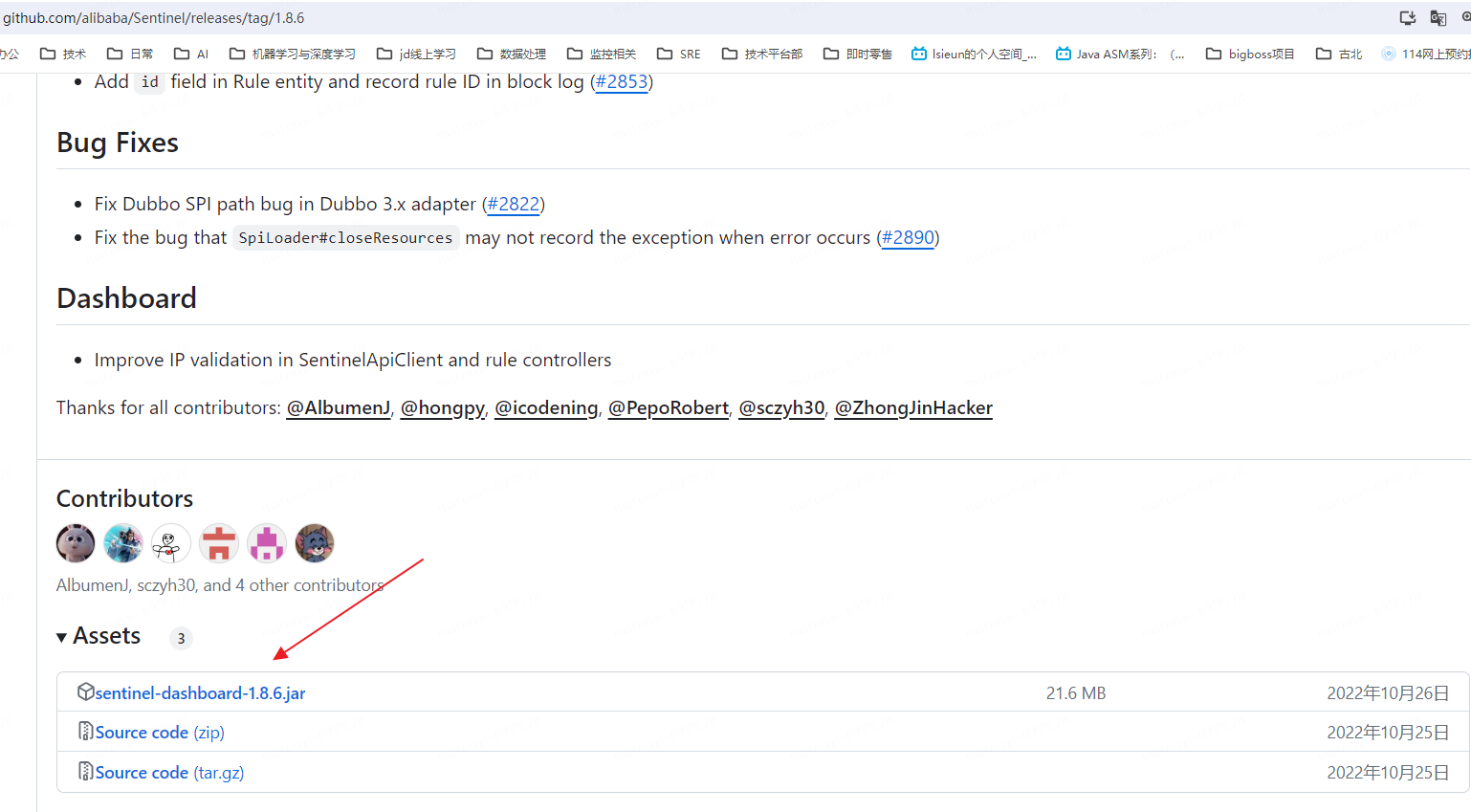
点击下载
7、运行控制台
1java -Dserver.port=8080 -Dcsp.sentinel.dashboard.server=localhost:8080 -Dproject.name=sentinel-dashboard -jar sentinel-dashboard.jar
2

运行控制台后运行springmvc项目,然后访问某一个路径,就可以在控制台看到了,实时监控如果这个路径没有被访问是显示不出来的
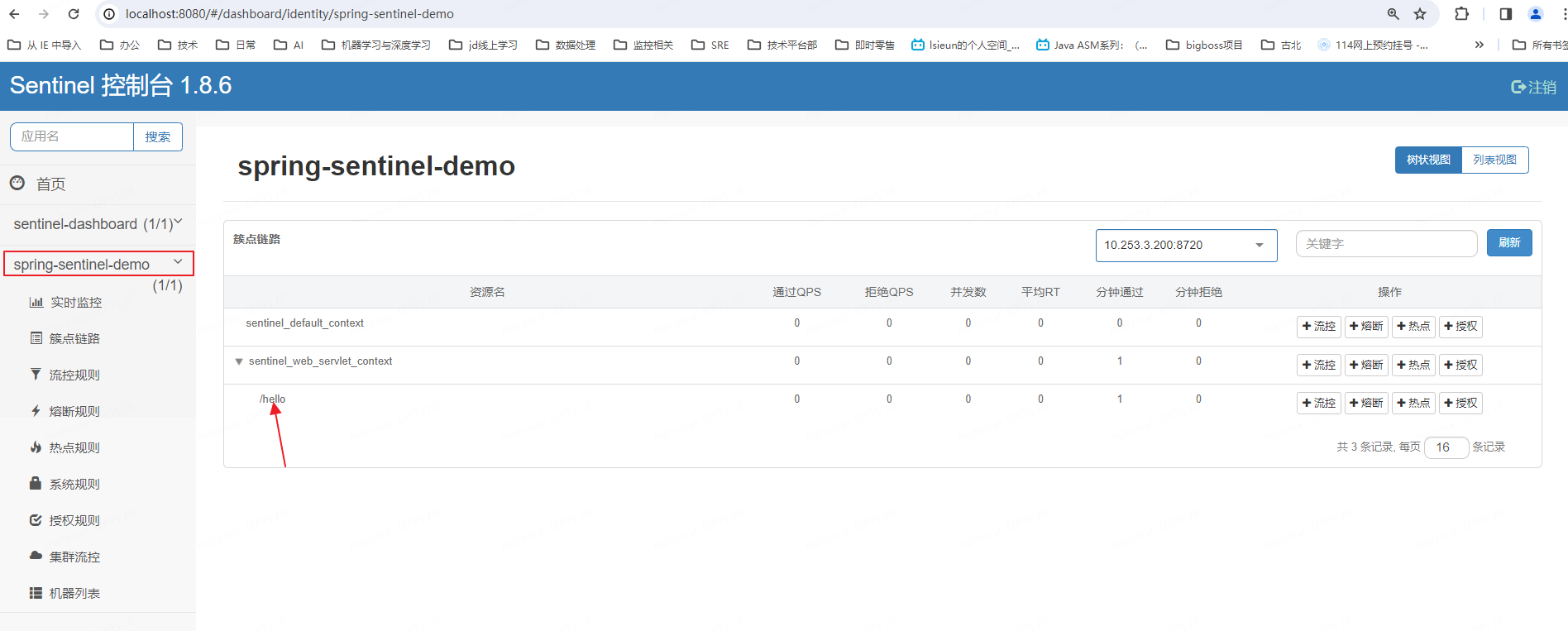
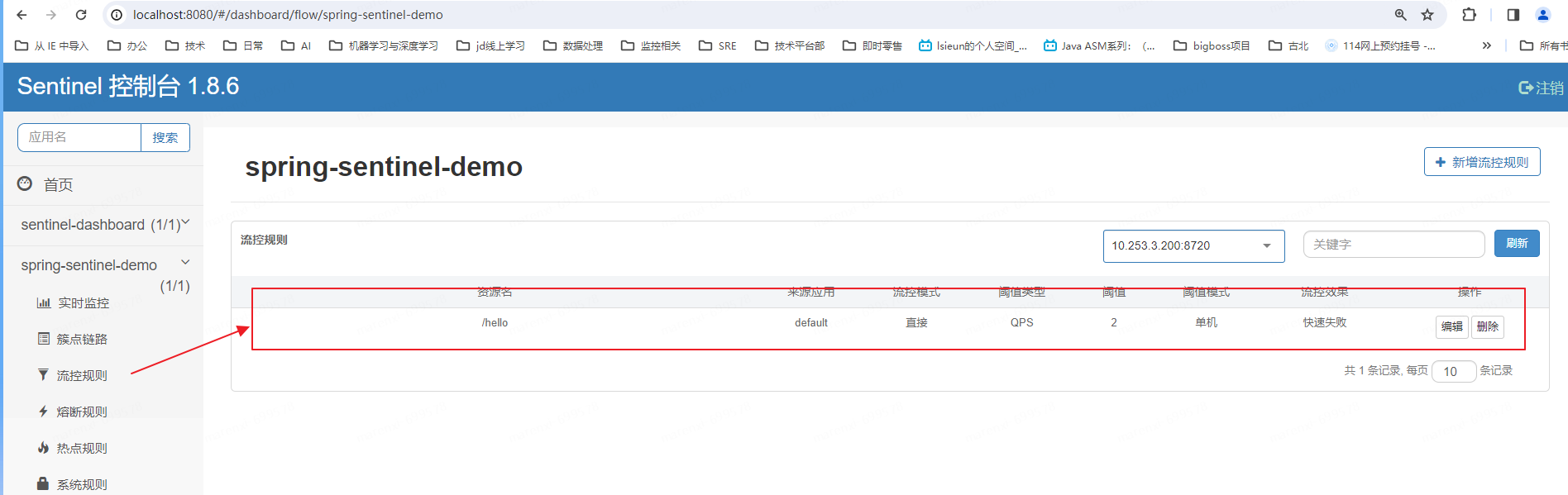
这个时候我们配置限流为即Qps为2
8、测试限流
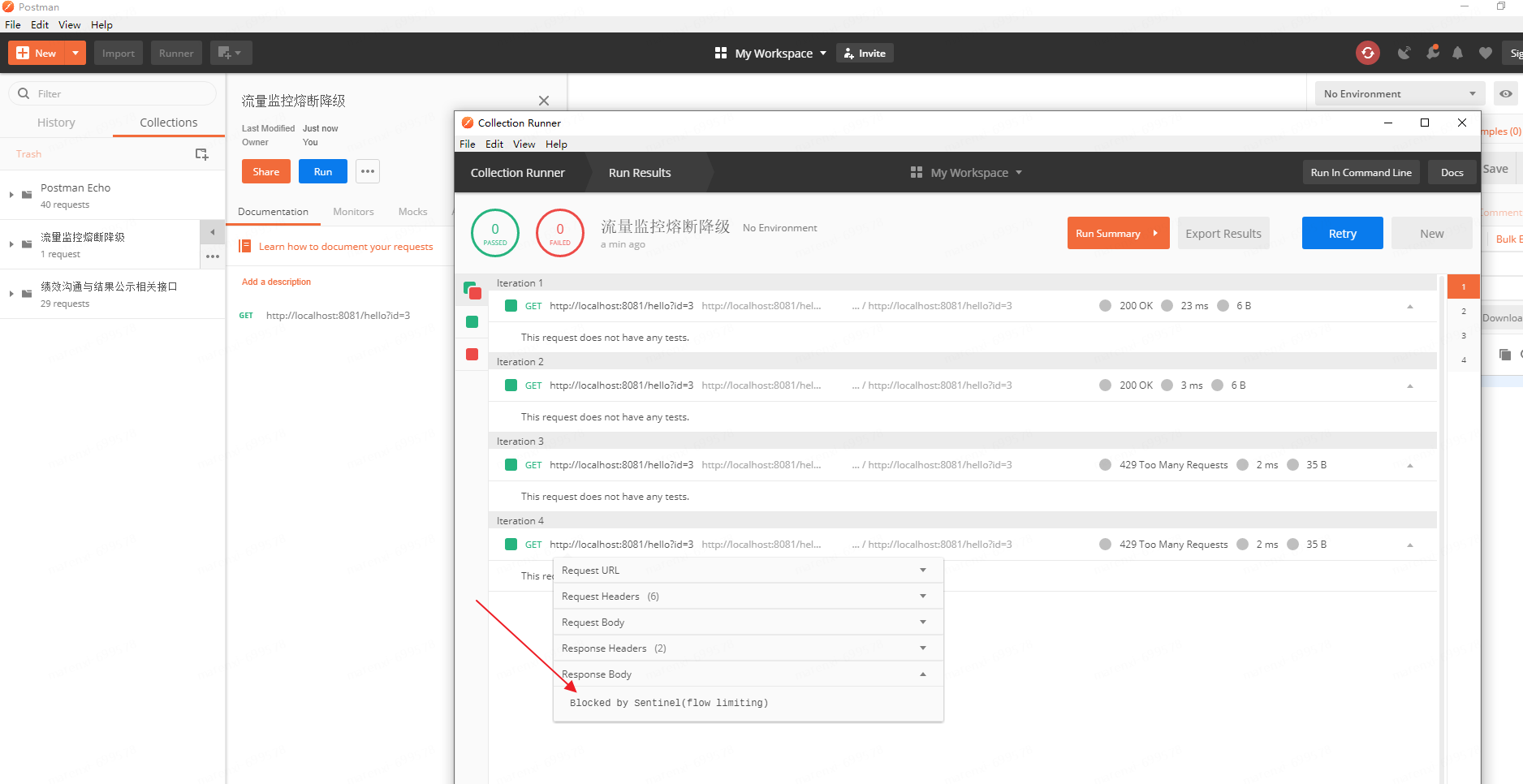
这里我们用postman进行压测,填写请求的路径保存。并点击run调出压测执行器
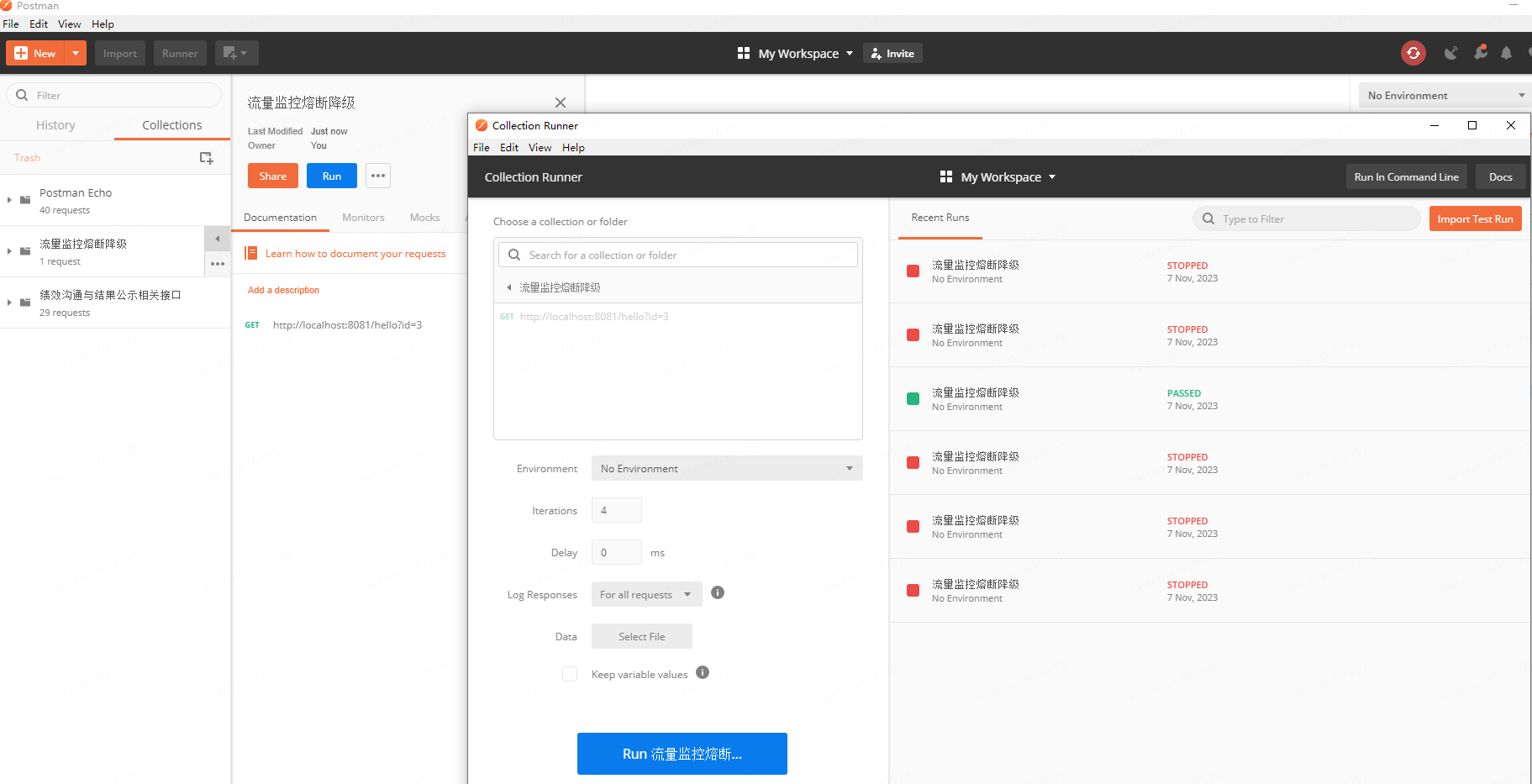
执行后查看结果如下
四、自定义异常返回
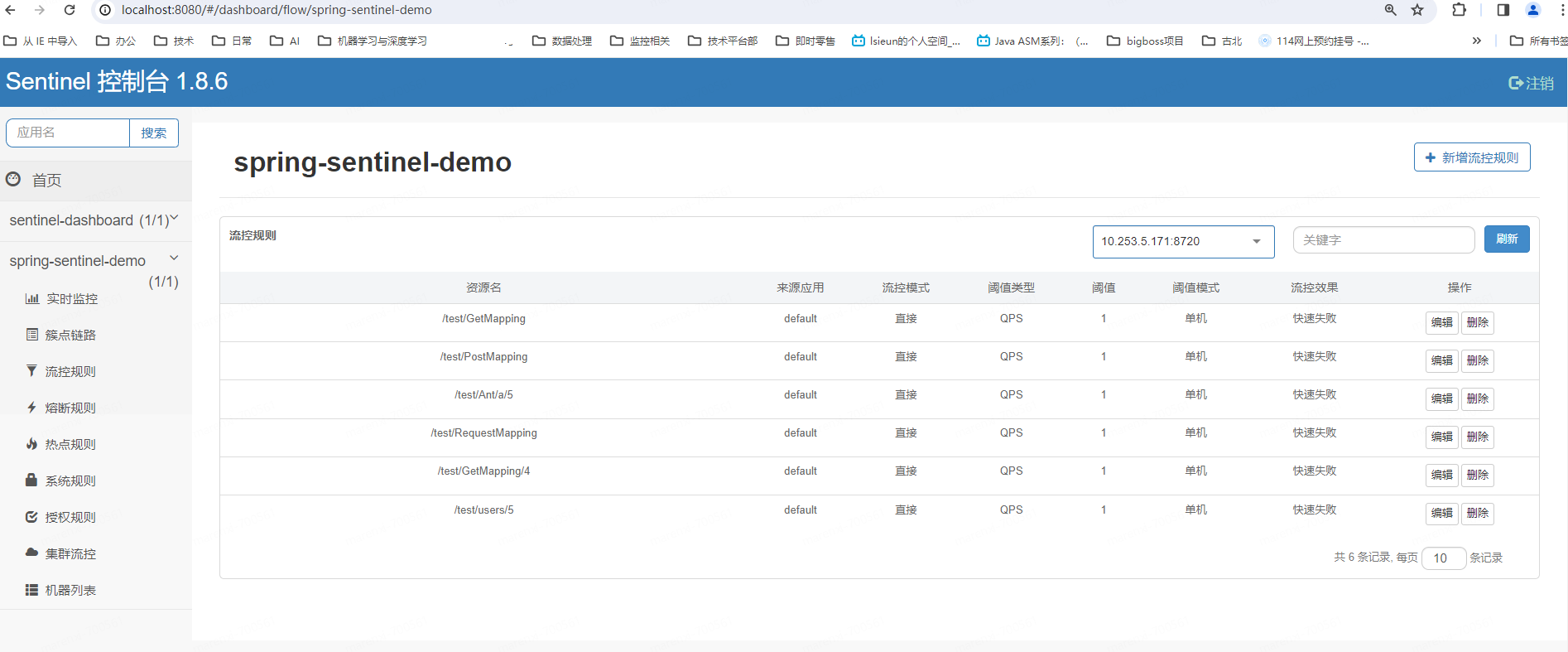
1、定义如下接口(这里只进行了常见的url定义方式的定义)
1import org.springframework.stereotype.Controller;
2import org.springframework.web.bind.annotation.*;
3
4@Controller
5@RequestMapping("/test")
6public class WebMvcTestController {
7
8    /**
9     * 1.未配置流控规则 1000次请求没有间隔发起请求,应该在1秒中完成09:44:33
10     * @param id
11     * @return
12     */
13    @RequestMapping("/RequestMapping")
14    @ResponseBody
15    public String RequestMapping(String id) {
16        return "RequestMapping!";
17    }
18
19    @GetMapping("/GetMapping")
20    @ResponseBody
21    public String GetMapping(String id) {
22        return "GetMapping...";
23    }
24
25    @PostMapping("/PostMapping")
26    @ResponseBody
27    public String PostMapping(String id) {
28        return "PostMapping...";
29    }
30
31    /*
32    * 路径变量(Path Variables):使用花括号 {} 来标记路径中的变量,并通过 @PathVariable 注解将其绑定到方法参数上
33    * */
34    @GetMapping("/GetMapping/{id}")
35    @ResponseBody
36    public String apiFoo(@PathVariable("id") Long id) {
37        return "Hello " + id;
38    }
39
40    /*
41    * Ant风格的路径匹配:
42    *   使用 ? 表示任意单个字符,
43    *   * 表示任意多个字符(不包含路径分隔符 /),
44    *   ** 表示任意多个字符(包含路径分隔符 /)。
45    * */
46    @GetMapping("/Ant/*/{id}")
47    @ResponseBody
48    public String Ant(@PathVariable("id") Long id) {
49        return "Ant " + id;
50    }
51
52    /*
53    * 正则表达式路径匹配:使用 @RequestMapping 注解的 value 属性结合正则表达式来定义请求路径。
54    * */
55    @GetMapping(value = "/users/{id:\\d+}")
56    @ResponseBody
57    public String pattern(@PathVariable("id") int id) {
58        return "Ant " + id;
59    }
60}
61
62
63
2、自定义限流返回处理Handler
1import com.alibaba.csp.sentinel.adapter.servlet.callback.UrlBlockHandler;
2import com.alibaba.csp.sentinel.slots.block.BlockException;
3import com.alibaba.csp.sentinel.slots.block.authority.AuthorityException;
4import com.alibaba.csp.sentinel.slots.block.degrade.DegradeException;
5import com.alibaba.csp.sentinel.slots.block.flow.FlowException;
6import com.alibaba.csp.sentinel.slots.block.flow.param.ParamFlowException;
7import com.alibaba.csp.sentinel.slots.system.SystemBlockException;
8import com.alibaba.fastjson.JSON;
9import org.springframework.context.ApplicationContext;
10import org.springframework.web.method.HandlerMethod;
11import org.springframework.web.servlet.mvc.condition.PatternsRequestCondition;
12import org.springframework.web.servlet.mvc.method.RequestMappingInfo;
13import org.springframework.web.servlet.mvc.method.annotation.RequestMappingHandlerMapping;
14import org.springframework.web.util.UrlPathHelper;
15
16import javax.servlet.http.HttpServletRequest;
17import javax.servlet.http.HttpServletResponse;
18import java.io.IOException;
19import java.util.*;
20
21
22public class SentinelExceptionHandler implements UrlBlockHandler {
23
24    @Override
25    public void blocked(HttpServletRequest request, HttpServletResponse httpServletResponse, BlockException e) throws IOException {
26        String contextPath = request.getContextPath();
27        String servletPath = request.getServletPath();
28        String requestURI = request.getRequestURI();
29        String url = request.getRequestURL().toString();
30        System.out.println("servletPath = " + servletPath);
31        System.out.println("requestURI = " + requestURI);
32        System.out.println("url = " + url);
33        if (contextPath == null) {
34            contextPath = "";
35        }
36        ApplicationContext controllerApplicationContext = LiteFlowApplicationContext.getControllerApplicationContext();
37        RequestMappingHandlerMapping handlerMapping = controllerApplicationContext.getBean(RequestMappingHandlerMapping.class);
38        // 查找匹配的处理方法
39        Class<?> returnType = null;
40        Map<RequestMappingInfo, HandlerMethod> handlerMethods = handlerMapping.getHandlerMethods();
41        for (Map.Entry<RequestMappingInfo, HandlerMethod> entry : handlerMethods.entrySet()) {
42            RequestMappingInfo requestMappingInfo = entry.getKey();
43            HandlerMethod handlerMethod = entry.getValue();
44            //匹配url
45            if (requestMappingInfo.getPatternsCondition().getPatterns().contains(requestURI)) {
46                System.out.println("Controller: " + handlerMethod.getBeanType().getName());
47                System.out.println("Method: " + handlerMethod.getMethod().getName());
48                System.out.println("getReturnType: " + handlerMethod.getMethod().getReturnType());
49                returnType = handlerMethod.getMethod().getReturnType();
50                break;
51            }
52            //匹配路径带参数的url
53            UrlPathHelper pathHelper = new UrlPathHelper();
54            String lookupPath = pathHelper.getPathWithinApplication(request);
55            PatternsRequestCondition patternsCondition = requestMappingInfo.getPatternsCondition();
56            if (patternsCondition != null && patternsCondition.getMatchingPatterns(lookupPath).size() > 0) {
57                System.out.println("Controller1111: " + handlerMethod.getBeanType().getName());
58                System.out.println("Method111: " + handlerMethod.getMethod().getName());
59                System.out.println("getReturnType: " + handlerMethod.getMethod().getReturnType());
60                returnType = handlerMethod.getMethod().getReturnType();
61                break;
62            }
63        }
64        httpServletResponse.setContentType("application/json;charset=utf-8");
65        ResponseData data = null;
66        if (returnType != null) {
67            if (returnType == String.class) {
68                String str = "返回类型为字符串方法限流";
69                httpServletResponse.getWriter().write(str);
70                return;
71            } else if (returnType == Integer.class) {
72                httpServletResponse.getWriter().write(new Integer(1));
73                return;
74            } else if (returnType == Long.class) {
75                httpServletResponse.getWriter().write(2);
76                return;
77            } else if (returnType == Double.class) {
78
79            } else if (returnType == Boolean.class) {
80
81            } else if (returnType == Float.class) {
82
83            } else if (returnType == Byte.class) {
84
85            }
86        }
87        //BlockException 异常接口,包含Sentinel的五个异常
88        // FlowException 限流异常
89        // DegradeException 降级异常
90        // ParamFlowException 参数限流异常
91        // AuthorityException 授权异常
92        // SystemBlockException 系统负载异常
93        if (e instanceof FlowException) {
94            data = new ResponseData(-1, "流控规则被触发......");
95        } else if (e instanceof DegradeException) {
96            data = new ResponseData(-2, "降级规则被触发...");
97        } else if (e instanceof AuthorityException) {
98            data = new ResponseData(-3, "授权规则被触发...");
99        } else if (e instanceof ParamFlowException) {
100            data = new ResponseData(-4, "热点规则被触发...");
101        } else if (e instanceof SystemBlockException) {
102            data = new ResponseData(-5, "系统规则被触发...");
103        }
104        httpServletResponse.getWriter().write(JSON.toJSONString(data));
105    }
106}
107
3、使用自定义限流处理类
1import com.alibaba.csp.sentinel.adapter.servlet.callback.WebCallbackManager;
2import org.springframework.context.annotation.Configuration;
3
4@Configuration
5public class SentinelConfig {
6
7
8    public SentinelConfig() {
9        WebCallbackManager.setUrlBlockHandler(new SentinelExceptionHandler());
10    }
11}
12
4、配置限流并测试结果
当开启限流后访问触发自定义UrlBlockHandler后结果如下
访问对应得url后控制台打印
1servletPath = /test/RequestMapping
2requestURI = /test/RequestMapping
3url = http://localhost:8081/test/RequestMapping
4Controller: org.example.WebMvcTestController
5Method: RequestMapping
6getReturnType: class java.lang.String
7servletPath = /test/GetMapping
8requestURI = /test/GetMapping
9url = http://localhost:8081/test/GetMapping
10Controller: org.example.WebMvcTestController
11Method: GetMapping
12getReturnType: class java.lang.String
13servletPath = /test/PostMapping
14requestURI = /test/PostMapping
15url = http://localhost:8081/test/PostMapping
16Controller: org.example.WebMvcTestController
17Method: PostMapping
18getReturnType: class java.lang.String
19servletPath = /test/GetMapping/4
20requestURI = /test/GetMapping/4
21url = http://localhost:8081/test/GetMapping/4
22Controller1111: org.example.WebMvcTestController
23Method111: apiFoo
24getReturnType: class java.lang.String
25servletPath = /test/Ant/a/5
26requestURI = /test/Ant/a/5
27url = http://localhost:8081/test/Ant/a/5
28Controller1111: org.example.WebMvcTestController
29Method111: Ant
30getReturnType: class java.lang.String
31servletPath = /test/users/5
32requestURI = /test/users/5
33url = http://localhost:8081/test/users/5
34Controller1111: org.example.WebMvcTestController
35Method111: pattern
36getReturnType: class java.lang.String
37
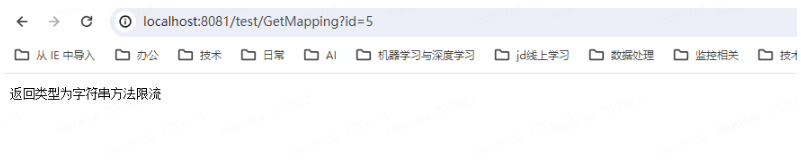
5、页面效果如下
五、springboot集成Sentinel
因为springboot集成文章较多,这里不多做赘述
Sentinel 与 Spring Boot/Spring Cloud 的整合见 Sentinel Spring Cloud Starter。
作者:京东健康 马仁喜
来源:京东云开发者社区 转载请注明来源