
xml报文
1<?xml version='1.0' encoding='utf-8'?>
2<bookstore>
3    <book id='1'>
4        <name>冰与火之歌</name>
5        <author>乔治马丁</author>
6        <year>2014</year>
7        <price>89</price>
8    </book>
9    <book id='2'>
10        <name>安徒生童话</name>
11        <author>安徒生</author>
12        <year>2014</year>
13        <price>69</price>
14    </book>
15</bookstore>
java代码:
1 1 import java.util.HashMap;
2 2 import java.util.List;
3 3 import java.util.Map;
4 4
5 5
6 6 import com.alibaba.fastjson.JSONArray;
7 7 import com.alibaba.fastjson.JSONObject;
8 8 import org.dom4j.Document;
9 9 import org.dom4j.DocumentException;
1010 import org.dom4j.DocumentHelper;
1111 import org.dom4j.Element;
1212
1313 public class XmlTest {
1414     public static Element getChildElement(Element e, String element_name) {
1515         Element returnElement = null;
1616         List<Element> elements = e.elements();
1717         if (elements != null && !elements.isEmpty()) {
1818             for (Element element : elements) {
1919                 if (element.getName().equals(element_name)) {
2020                     returnElement = element;
2121                     break;
2222                 }
2323             }
2424         }
2525         return returnElement;
2626     }
2727
2828     public static void main(String[] args) {
2929         String resp = "<?xml version='1.0' encoding='UTF-8'?><bookstore><book id='1'><name>冰与火之歌</name><author>乔治马丁</author><year>2014</year><price>89</price></book><book id='2'><name>安徒生童话</name><author>安徒生</author><year>2014</year><price>69</price></book></bookstore>";
3030
3131         try {
3232             Document doc = DocumentHelper.parseText(resp);
3333             //指向根节点
3434             Element root = doc.getRootElement();
3535             JSONObject json = null;
3636             JSONArray jsonArray = new JSONArray();
3737 //            Element book = XMLString2.getChildElement(root, "book");
3838             //获取book的属性值
3939 //            String id = book.attributeValue("id");
4040 //            kBook.setId(id);
4141             List<Element> elements = root.elements();
4242             for (Element element : elements) {
4343                 Map <String,Object> map = new HashMap<>();
4444                 map.put("name",element.element("name").getStringValue());
4545                 map.put("author", element.element("author").getStringValue());
4646                 map.put("price", element.element("price").getStringValue());
4747                 map.put("year", element.element("year").getStringValue());
4848                 json = new JSONObject(map);
4949                 jsonArray.add(json);
5050             }
5151
5252
5353         } catch (DocumentException e) {
5454             // TODO Auto-generated catch block
5555             e.printStackTrace();
5656         }
5757
5858     }
5959
6060 }
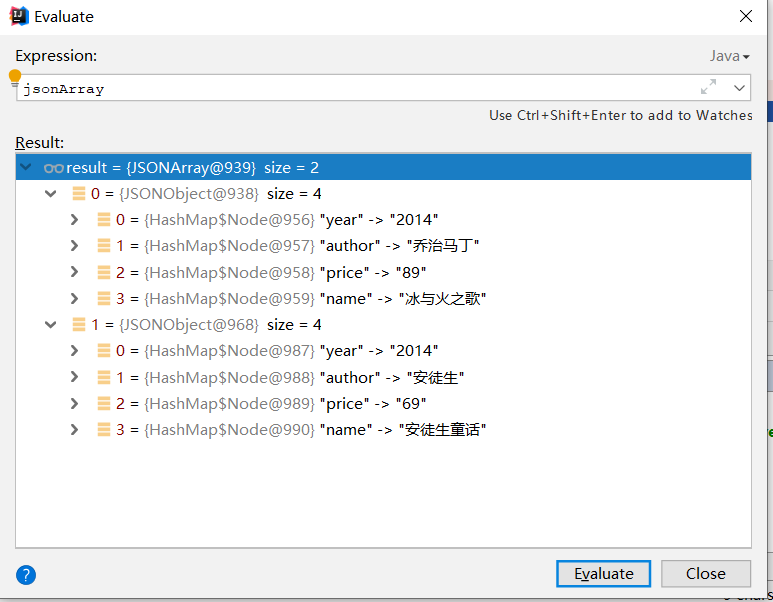
结果
参考博客:https://blog.csdn.net/zflovecf/article/details/78908788