[toc]
1. 上传页面代码
1<!DOCTYPE html>
2<html lang="en">
3<head>
4    <meta charset="UTF-8">
5    <title>webuploader文件上传</title>
6    <!--引入CSS-->
7    <link rel="stylesheet" type="text/css" href="https://my.oschina.net//u/4308120/blog/3321016/webuploader/webuploader.css">
8    <!--引入JS-->
9    <script type="text/javascript" src="https://cdn.bootcss.com/jquery/3.4.1/jquery.js"></script>
10    <script type="text/javascript" src="https://my.oschina.net//u/4308120/blog/3321016/webuploader/webuploader.js"></script>
11</head>
12<body>
13<div id="uploader" class="wu-example">
14    <!--用来存放文件信息-->
15    <div id="thelist" class="uploader-list"></div>
16    <div class="btns">
17        <div id="picker">选择文件</div>
18        <button id="ctlBtn" class="btn btn-default" onclick="upload()">开始上传</button>
19    </div>
20</div>
21
22</body>
23<script>
24    //
25    WebUploader.Uploader.register({
26            "before-send-file": "beforeSendFile",
27            "before-send": "beforeSend",
28            "after-send-file": "afterSendFile"
29        }, {
30            //在上传文件前执行,检查待文件是否存在
31            beforeSendFile: function (file) {
32                // 创建一个deffered,用于通知是否完成操作
33                var deferred = WebUploader.Deferred();
34                // 计算文件的唯一标识,用于断点续传
35                (new WebUploader.Uploader()).md5File(file)
36                    .then(function (val) {
37
38                        this.fileMd5 = val;
39                        this.uploadFile = file;
40//                alert(this.fileMd5 )
41                        //向服务端请求注册上传文件
42                        $.ajax(
43                            {
44                                type: "POST",
45                                url: "http://127.0.0.1:31400/media/upload/register",
46                                data: {
47                                    // 文件唯一表示
48                                    fileMd5: this.fileMd5,
49                                    fileName: file.name,
50                                    fileSize: file.size,
51                                    mimetype: file.type,
52                                    fileExt: file.ext
53                                },
54                                dataType: "json",
55                                success: function (response) {
56                                    if (response.success) {
57                                        //alert('上传文件注册成功开始上传');
58                                        deferred.resolve();
59                                    } else {
60                                        alert(response.message);
61                                        deferred.reject();
62                                    }
63                                }
64                            }
65                        );
66                    }.bind(this));
67
68                return deferred.promise();
69            }.bind(this),
70            //在上传分片前执行,检查分片是否已经存在
71            beforeSend: function (block) {
72                var deferred = WebUploader.Deferred();
73                // 每次上传分块前校验分块,如果已存在分块则不再上传,达到断点续传的目的
74                $.ajax(
75                    {
76                        type: "POST",
77                        url: "http://127.0.0.1:31400/media/upload/checkchunk",
78                        data: {
79                            // 文件唯一表示
80                            fileMd5: this.fileMd5,
81                            // 当前分块下标
82                            chunk: block.chunk,
83                            // 当前分块大小
84                            chunkSize: block.end - block.start
85                        },
86                        dataType: "json",
87                        success: function (response) {
88                            if (response.fileExist) {
89                                // 分块存在,跳过该分块
90                                deferred.reject();
91                            } else {
92                                // 分块不存在或不完整,重新发送
93                                deferred.resolve();
94                            }
95                        }
96                    }
97                );
98                //构建fileMd5参数,上传分块时带上fileMd5
99                this.uploader.options.formData.fileMd5 = this.fileMd5;
100                this.uploader.options.formData.chunk = block.chunk;
101                return deferred.promise();
102            }.bind(this),
103            // 在上传分片完成后触发,用于后台处理合成分片,判断上传文件是否成功以及可以携带返回上传文件成功的url
104            afterSendFile: function (file) {
105                // 合并分块
106                $.ajax(
107                    {
108                        type: "POST",
109                        url: "http://127.0.0.1:31400/media/upload/mergechunks",
110                        data: {
111                            fileMd5: this.fileMd5,
112                            fileName: file.name,
113                            fileSize: file.size,
114                            mimetype: file.type,
115                            fileExt: file.ext
116                        },
117                        success: function (response) {
118                            //在这里解析合并成功结果
119                            if (response && response.success) {
120                                alert("上传成功")
121                            } else {
122                                alert("上传失败")
123                            }
124                        }
125                    }
126                );
127            }.bind(this)
128        }
129    );
130    //创建webuploader实例
131    var uploader = WebUploader.create(
132        {
133            swf: "./webuploader/Uploader.swf",//上传文件的flash文件,浏览器不支持h5时启动flash
134            server: "http://127.0.0.1:31400/media/upload/uploadchunk",//上传分块的服务端地址,注意跨域问题
135            fileVal: "file",//文件上传域的name
136            pick: "#picker",//指定选择文件的按钮容器
137            auto: false,//手动触发上传
138            disableGlobalDnd: true,//禁掉整个页面的拖拽功能
139            chunked: true,// 是否分块上传
140            chunkSize: 1 * 1024 * 1024, // 分块大小(默认5M)
141            threads: 3, // 开启多个线程(默认3个)
142            prepareNextFile: true// 允许在文件传输时提前把下一个文件准备好
143        }
144    );
145    // 将文件添加到队列
146    uploader.on("fileQueued", function (file) {
147            this.uploadFile = file;
148            this.percentage = 0;
149
150        }.bind(this)
151    );
152    //选择文件后触发
153    uploader.on("beforeFileQueued", function (file) {
154//     this.uploader.removeFile(file)
155        //重置uploader
156        this.uploader.reset()
157        this.percentage = 0;
158    }.bind(this));
159
160    // 监控上传进度
161    // percentage:代表上传文件的百分比
162    uploader.on("uploadProgress", function (file, percentage) {
163        this.percentage = Math.ceil(percentage * 100);
164        console.log(percentage)
165    }.bind(this));
166    //上传失败触发
167    uploader.on("uploadError", function (file, reason) {
168        console.log(reason)
169        alert("上传文件失败");
170    });
171    //上传成功触发
172    uploader.on("uploadSuccess", function (file, response) {
173        console.log(response)
174//        alert("上传文件成功!");
175    });
176    //每个分块上传请求后触发
177    uploader.on('uploadAccept', function (file, response) {
178        if (!(response && response.success)) {//分块上传失败,返回false
179            return false;
180        }
181    });
182
183    //触发执行上传
184    function upload(){
185        if(this.uploadFile && this.uploadFile.id){
186            this.uploader.upload(this.uploadFile.id);
187        }else{
188            alert("请选择文件");
189        }
190    }
191
192</script>
193</html>
194
2. nginx配置
1worker_processes  1;
2
3
4events {
5    worker_connections  1024;
6}
7
8http {
9    include       mime.types;
10    default_type  application/octet-stream;
11    sendfile        on;
12    keepalive_timeout  65;
13
14    server {
15        listen 80;
16        server_name video.xuecheng.com;
17
18        location / {
19            alias  D:/test/webuploader-demo/;
20        }
21    }
22}
23
3. 后台主要代码
3.1 application.yml
1server:
2  port: 31400
3spring:
4  application:
5    name: xc-service-manage-media
6  data:
7    mongodb:
8      uri:  mongodb://root:root@localhost:27017
9      database: xc_media
10xc-service-manage-media:
11  upload-location: D:/test/video/
3.2 跨域处理
1package com.xuecheng.manage_media.config;
2
3import org.springframework.context.annotation.Bean;
4import org.springframework.context.annotation.Configuration;
5import org.springframework.web.cors.CorsConfiguration;
6import org.springframework.web.cors.UrlBasedCorsConfigurationSource;
7import org.springframework.web.filter.CorsFilter;
8
9/**
10 * @author john
11 * @date 2020/1/1 - 15:07
12 */
13@Configuration
14public class CorsConfig {
15    @Bean
16    public CorsFilter corsFilter() {
17        //1.添加CORS配置信息
18        CorsConfiguration config = new CorsConfiguration();
19        //1) 允许的域,不要写*,否则cookie就无法使用了
20        config.addAllowedOrigin("http://video.xuecheng.com");
21        //2) 是否发送Cookie信息
22        config.setAllowCredentials(true);
23        //3) 允许的请求方式
24        config.addAllowedMethod("OPTIONS");
25        config.addAllowedMethod("HEAD");
26        config.addAllowedMethod("GET");
27        config.addAllowedMethod("PUT");
28        config.addAllowedMethod("POST");
29        config.addAllowedMethod("DELETE");
30        config.addAllowedMethod("PATCH");
31        // 4)允许的头信息
32        config.addAllowedHeader("*");
33
34        //2.添加映射路径,我们拦截一切请求
35        UrlBasedCorsConfigurationSource configSource = new UrlBasedCorsConfigurationSource();
36        configSource.registerCorsConfiguration("/**", config);
37
38        //3.返回新的CorsFilter.
39        return new CorsFilter(configSource);
40    }
41}
42
3.3 控制器代码
1package com.xuecheng.manage_media.controller;
2
3import com.xuecheng.framework.domain.media.response.CheckChunkResult;
4import com.xuecheng.framework.model.response.ResponseResult;
5import com.xuecheng.manage_media.service.MediaUploadService;
6import org.springframework.beans.factory.annotation.Autowired;
7import org.springframework.web.bind.annotation.PostMapping;
8import org.springframework.web.bind.annotation.RequestMapping;
9import org.springframework.web.bind.annotation.RequestParam;
10import org.springframework.web.bind.annotation.RestController;
11import org.springframework.web.multipart.MultipartFile;
12
13/**
14 * @author john
15 * @date 2020/1/1 - 13:13
16 */
17@RestController
18@RequestMapping("/media/upload")
19public class MediaUploadController {
20    @Autowired
21    MediaUploadService mediaUploadService;
22
23    //检查文件是否已经存在
24    @PostMapping("/register")
25    public ResponseResult register(@RequestParam("fileMd5") String fileMd5,
26                                   @RequestParam("fileName") String fileName,
27                                   @RequestParam("fileSize") Long fileSize,
28                                   @RequestParam("mimetype") String mimetype,
29                                   @RequestParam("fileExt") String fileExt) {
30        return mediaUploadService.register(fileMd5, fileName, fileSize, mimetype, fileExt);
31    }
32
33    //校验文件块
34    @PostMapping("/checkchunk")
35    public CheckChunkResult checkchunk(@RequestParam("fileMd5") String fileMd5,
36                                       @RequestParam("chunk") Integer chunk,
37                                       @RequestParam("chunkSize") Integer chunkSize) {
38        return mediaUploadService.checkChunk(fileMd5, chunk, chunkSize);
39    }
40
41    //上传文件块
42    @PostMapping("/uploadchunk")
43    public ResponseResult uploadchunk(@RequestParam("file") MultipartFile file,
44                                      @RequestParam("fileMd5") String fileMd5,
45                                      @RequestParam("chunk") Integer chunk) {
46        return mediaUploadService.uploadChunk(file, fileMd5, chunk);
47    }
48
49    //合并文件块
50    @PostMapping("/mergechunks")
51    public ResponseResult mergechunks(@RequestParam("fileMd5") String fileMd5,
52                                      @RequestParam("fileName") String fileName,
53                                      @RequestParam("fileSize") Long fileSize,
54                                      @RequestParam("mimetype") String mimetype,
55                                      @RequestParam("fileExt") String fileExt) {
56        return mediaUploadService.mergeChunks(fileMd5, fileName, fileSize, mimetype, fileExt);
57    }
58}
59
3.4 service代码
1package com.xuecheng.manage_media.service;
2
3import com.xuecheng.framework.domain.media.MediaFile;
4import com.xuecheng.framework.domain.media.response.CheckChunkResult;
5import com.xuecheng.framework.domain.media.response.MediaCode;
6import com.xuecheng.framework.exception.ExceptionCast;
7import com.xuecheng.framework.model.response.CommonCode;
8import com.xuecheng.framework.model.response.ResponseResult;
9import com.xuecheng.manage_media.dao.MediaFileRepository;
10import lombok.extern.slf4j.Slf4j;
11import org.apache.commons.codec.digest.DigestUtils;
12import org.apache.commons.io.IOUtils;
13import org.apache.commons.lang3.StringUtils;
14import org.springframework.beans.factory.annotation.Autowired;
15import org.springframework.beans.factory.annotation.Value;
16import org.springframework.stereotype.Service;
17import org.springframework.web.multipart.MultipartFile;
18
19import java.io.*;
20import java.util.*;
21
22/**
23 * @author john
24 * @date 2020/1/1   -   12:07
25 */
26@Service
27@Slf4j
28public class MediaUploadService {
29    @Autowired
30    MediaFileRepository mediaFileRepository;
31
32    //上传文件的根目录
33    @Value("${xc-service-manage-media.upload-location}")
34    String uploadPath;
35
36    /**
37     * 根据文件md5得到文件路径
38     * 规则:
39     * 一级目录:md5的第一个字符
40     * 二级目录:md5的第二个字符
41     * 三级目录:md5
42     * 文件名:md5+文件扩展名
43     *
44     * @param fileMd5 文件md5值
45     * @param fileExt 文件扩展名
46     * @return 文件路径
47     */
48    private String getFilePath(String fileMd5, String fileExt) {
49        return getFileFolderPath(fileMd5) + fileMd5 + "." + fileExt;
50    }
51
52    //得到文件目录相对路径,路径中去掉根目录
53    private String getFileFolderRelativePath(String fileMd5) {
54        return fileMd5.substring(0, 1) + "/"
55                + fileMd5.substring(1, 2) + "/"
56                + fileMd5 + "/";
57    }
58
59    //得到文件所在目录
60    private String getFileFolderPath(String fileMd5) {
61        return uploadPath + getFileFolderRelativePath(fileMd5);
62    }
63
64    //创建文件目录
65    private boolean createFileFold(String fileMd5) {
66        //创建上传文件,目录
67        String fileFolderPath = getFileFolderPath(fileMd5);
68        File fileFolder = new File(fileFolderPath);
69        if (!fileFolder.exists()) {
70            //创建文件夹
71            return fileFolder.mkdirs();
72        }
73        return true;
74    }
75
76    //检查待上传文件是否存在
77    public ResponseResult register(String fileMd5, String fileName, Long fileSize, String mimetype, String fileExt) {
78        //   检查文件是否上传
79        //   1.   获取文件的路径
80        String filePath = getFilePath(fileMd5, fileExt);
81        File file = new File(filePath);
82
83        //   2.   查询数据库文件是否存在
84        Optional<MediaFile> optional = mediaFileRepository.findById(fileMd5);
85        //   文件存在直接返回
86        if (file.exists() && optional.isPresent()) {
87            ExceptionCast.cast(MediaCode.UPLOAD_FILE_REGISTER_EXIST);
88        }
89        //下面说明文件并未上传
90        boolean fileFold = createFileFold(fileMd5);
91        if (!fileFold) {
92            //上传文件目录创建失败
93            ExceptionCast.cast(MediaCode.UPLOAD_FILE_REGISTER_CREATEFOLDER_FAIL);
94        }
95        return new ResponseResult(CommonCode.SUCCESS);
96    }
97
98    //   得到块文件所在目录
99    private String getChunkFileFolderPath(String fileMd5) {
100        return getFileFolderPath(fileMd5) + "/" + "chunks" + "/";
101    }
102
103    //检查块文件
104    public CheckChunkResult checkChunk(String fileMd5, Integer chunk, Integer chunkSize) {
105        //得到块文件所在路径
106        String chunkFileFolderPath = getChunkFileFolderPath(fileMd5);
107        //块文件的文件名称以1,2,3..序号命名,没有扩展名
108        File chunkFile = new File(chunkFileFolderPath + chunk);
109        if (chunkFile.exists()) {
110            return new CheckChunkResult(MediaCode.CHUNK_FILE_EXIST_CHECK, true);
111        } else {
112            return new CheckChunkResult(MediaCode.CHUNK_FILE_EXIST_CHECK, false);
113        }
114    }
115
116    private boolean createChunkFileFolder(String fileMd5) {
117        //创建上传文件目录
118        String chunkFileFolderPath = getChunkFileFolderPath(fileMd5);
119        File chunkFileFolder = new File(chunkFileFolderPath);
120        if (!chunkFileFolder.exists()) {
121            //创建文件夹
122            return chunkFileFolder.mkdirs();
123        }
124        return true;
125    }
126
127    //块文件上传
128    public ResponseResult uploadChunk(MultipartFile file, String fileMd5, Integer chunk) {
129        if (file == null) {
130            ExceptionCast.cast(MediaCode.UPLOAD_FILE_REGISTER_ISNULL);
131        }
132        //创建块文件目录
133        boolean fileFold = createChunkFileFolder(fileMd5);
134        //块文件
135        File chunkfile = new File(getChunkFileFolderPath(fileMd5) + chunk);
136        //上传的块文件
137        InputStream inputStream = null;
138        FileOutputStream outputStream = null;
139        try {
140            inputStream = file.getInputStream();
141            outputStream = new FileOutputStream(chunkfile);
142            IOUtils.copy(inputStream, outputStream);
143        } catch (Exception e) {
144            e.printStackTrace();
145            log.error("upload         chunk         file         fail:{}", e.getMessage());
146            ExceptionCast.cast(MediaCode.CHUNK_FILE_UPLOAD_FAIL);
147        } finally {
148            try {
149                inputStream.close();
150            } catch (IOException e) {
151                e.printStackTrace();
152            }
153            try {
154                outputStream.close();
155            } catch (IOException e) {
156                e.printStackTrace();
157            }
158        }
159        return new ResponseResult(CommonCode.SUCCESS);
160    }
161
162    //合并块文件
163    public ResponseResult mergeChunks(String fileMd5, String fileName, Long fileSize, String
164            mimeType, String fileExt) {
165        //获取块文件的路径
166        String chunkFileFolderPath = getChunkFileFolderPath(fileMd5);
167        File chunkFileFolder = new File(chunkFileFolderPath);
168        if (!chunkFileFolder.exists()) {
169            chunkFileFolder.mkdirs();
170        }
171        //合并文件路径
172        File mergeFile = new File(getFilePath(fileMd5, fileExt));
173        //创建合并文件
174        //合并文件存在先删除再创建
175        if (mergeFile.exists()) {
176            mergeFile.delete();
177        }
178        boolean newFile = false;
179        try {
180            newFile = mergeFile.createNewFile();
181        } catch (IOException e) {
182            e.printStackTrace();
183            log.error("mergechunks..create mergeFile fail:{}", e.getMessage());
184        }
185        if (!newFile) {
186            ExceptionCast.cast(MediaCode.MERGE_FILE_CREATEFAIL);
187        }
188        //获取块文件,此列表是已经排好序的列表
189        List<File> chunkFiles = getChunkFiles(chunkFileFolder);
190        //合并文件
191        mergeFile = mergeFile(mergeFile, chunkFiles);
192        if (mergeFile == null) {
193            ExceptionCast.cast(MediaCode.MERGE_FILE_FAIL);
194        }
195        //校验文件
196        boolean checkResult = this.checkFileMd5(mergeFile, fileMd5);
197        if (!checkResult) {
198            ExceptionCast.cast(MediaCode.MERGE_FILE_CHECKFAIL);
199        }
200        //将文件信息保存到数据库
201        MediaFile mediaFile = new MediaFile();
202        mediaFile.setFileId(fileMd5);
203        mediaFile.setFileName(fileMd5 + "." + fileExt);
204        mediaFile.setFileOriginalName(fileName);
205        //文件路径保存相对路径
206        mediaFile.setFilePath(getFileFolderRelativePath(fileMd5));
207        mediaFile.setFileSize(fileSize);
208        mediaFile.setUploadTime(new Date());
209        mediaFile.setMimeType(mimeType);
210        mediaFile.setFileType(fileExt);
211        //状态为上传成功
212        mediaFile.setFileStatus("301002");
213        MediaFile save = mediaFileRepository.save(mediaFile);
214        return new ResponseResult(CommonCode.SUCCESS);
215    }
216
217    //校验文件的md5值
218    private boolean checkFileMd5(File mergeFile, String md5) {
219        if (mergeFile == null || StringUtils.isEmpty(md5)) {
220            return false;
221        }
222        //进行md5校验
223        FileInputStream mergeFileInputstream = null;
224        try {
225            mergeFileInputstream = new FileInputStream(mergeFile);
226            //得到文件的md5
227            String mergeFileMd5 = DigestUtils.md5Hex(mergeFileInputstream);
228            //比较md5
229            if (md5.equalsIgnoreCase(mergeFileMd5)) {
230                return true;
231            }
232        } catch (Exception e) {
233            e.printStackTrace();
234            log.error("checkFileMd5 error,file is:{},md5 is: {} ", mergeFile.getAbsoluteFile(), md5);
235        } finally {
236            try {
237                mergeFileInputstream.close();
238            } catch (IOException e) {
239                e.printStackTrace();
240            }
241        }
242        return false;
243    }
244
245    //获取所有块文件
246    private List<File> getChunkFiles(File chunkFileFolder) {
247        //获取路径下的所有块文件
248        File[] chunkFiles = chunkFileFolder.listFiles();
249        //将文件数组转成list,并排序
250        List<File> chunkFileList = new ArrayList<File>();
251        chunkFileList.addAll(Arrays.asList(chunkFiles));
252        //排序
253        Collections.sort(chunkFileList, new Comparator<File>() {
254            @Override
255            public int compare(File o1, File o2) {
256                if (Integer.parseInt(o1.getName()) > Integer.parseInt(o2.getName())) {
257                    return 1;
258                }
259                return -1;
260            }
261        });
262        return chunkFileList;
263    }
264
265    //合并文件
266    private File mergeFile(File mergeFile, List<File> chunkFiles) {
267        try {
268            //创建写文件对象
269            RandomAccessFile raf_write = new RandomAccessFile(mergeFile, "rw");
270            //遍历分块文件开始合并
271            //读取文件缓冲区
272            byte[] b = new byte[1024];
273            for (File chunkFile : chunkFiles) {
274                RandomAccessFile raf_read = new RandomAccessFile(chunkFile, "r");
275                int len = -1;
276                //读取分块文件
277                while ((len = raf_read.read(b)) != -1) {
278                    //向合并文件中写数据
279                    raf_write.write(b, 0, len);
280                }
281                raf_read.close();
282            }
283            raf_write.close();
284        } catch (Exception e) {
285            e.printStackTrace();
286            log.error("merge file error:{}", e.getMessage());
287            return null;
288        }
289        return mergeFile;
290    }
291}
292
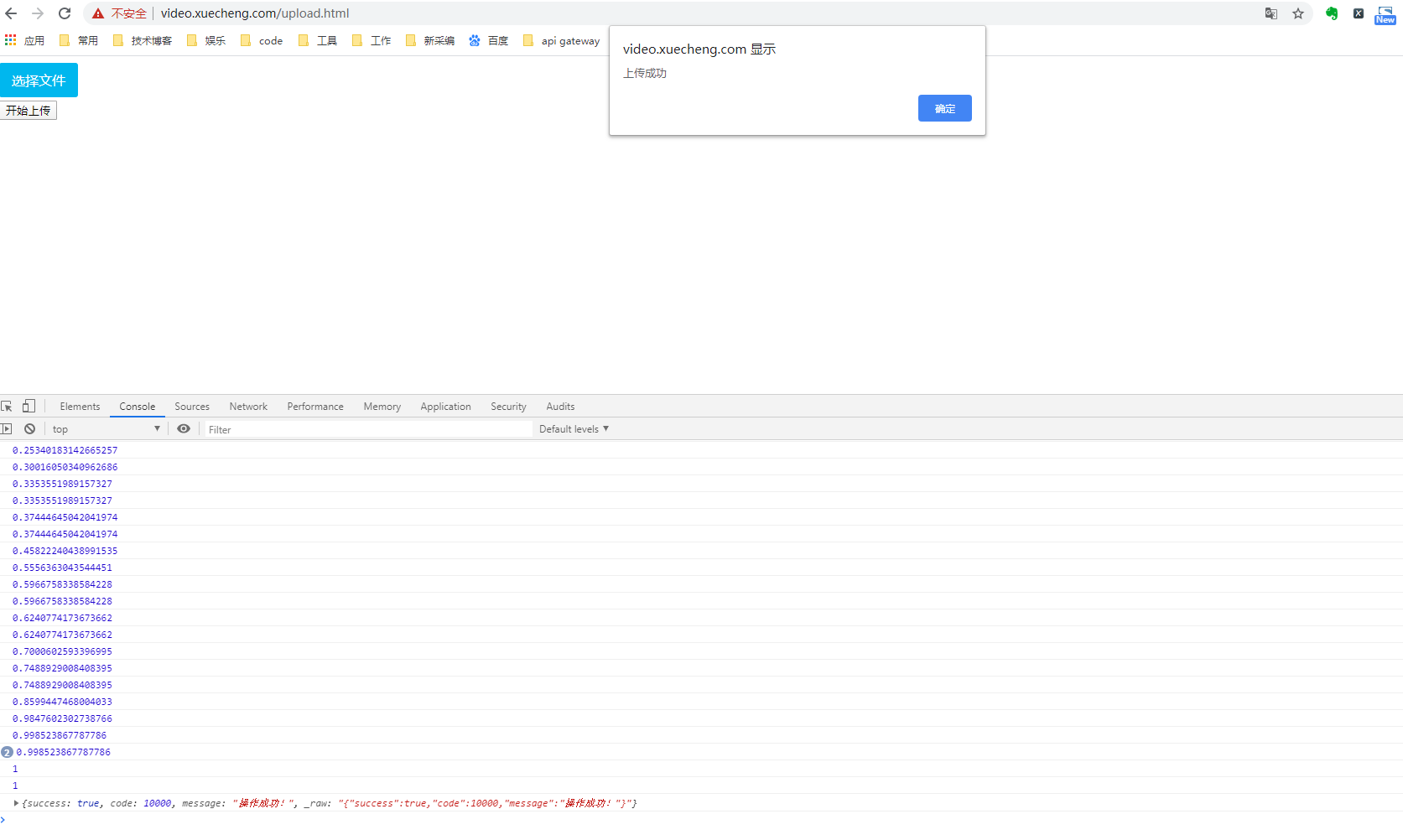
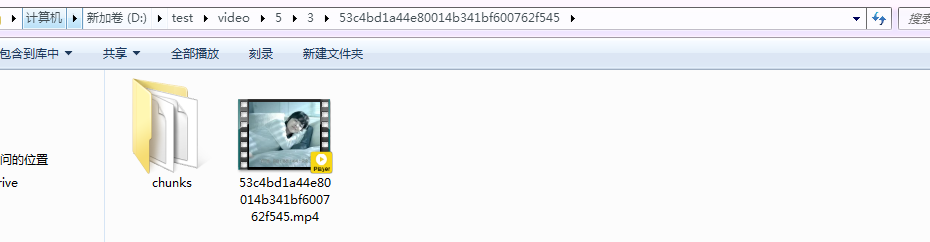
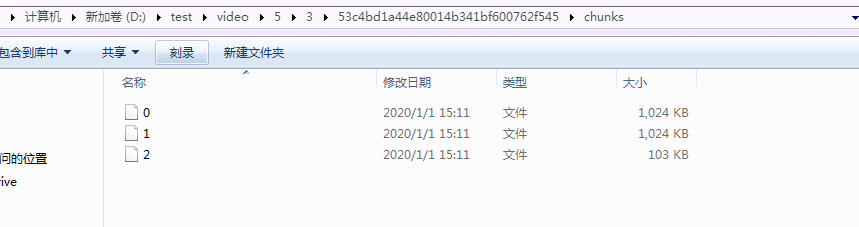
4. 执行测试