- 导入jar包
下载jacob-1.18.zip
并导入jacob.jar、json-20160810.jar、log4j-1.2.17.jar
将解压后的文件中jacob-1.18-x64.dll复制到对应的JDK中(我的是C:Program FilesJavajdk1.8.0_152jrein)
-
代码实例
package baidu.restapi.common;
import java.io.ByteArrayOutputStream; import java.io.IOException; import java.io.InputStream; import java.io.UnsupportedEncodingException; import java.net.HttpURLConnection; import java.net.URLEncoder;
/**
-
与连接相关的Util类 */ public class ConnUtil {
/**
- UrlEncode, UTF-8 编码
- @param str 原始字符串
- @return */ public static String urlEncode(String str) { String result = null; try { result = URLEncoder.encode(str, "UTF-8"); } catch (UnsupportedEncodingException e) { e.printStackTrace(); } return result; }
/**
- 从HttpURLConnection 获取返回的字符串
- @param conn
- @return
- @throws IOException
- @throws DemoException */ public static String getResponseString(HttpURLConnection conn) throws IOException, DemoException { return new String(getResponseBytes(conn)); }
/**
-
从HttpURLConnection 获取返回的bytes
-
注意 HttpURLConnection自身问题, 400类错误,会直接抛出异常。不能获取conn.getInputStream();
-
@param conn
-
@return
-
@throws IOException http请求错误
-
@throws DemoException http 的状态码不是 200 */ public static byte[] getResponseBytes(HttpURLConnection conn) throws IOException, DemoException { int responseCode = conn.getResponseCode(); if (responseCode != 200) { System.err.println("http 请求返回的状态码错误,期望200, 当前是 " + responseCode); if (responseCode == 401) { System.err.println("可能是appkey appSecret 填错"); } throw new DemoException("http response code is" + responseCode); }
InputStream inputStream = conn.getInputStream(); byte[] result = getInputStreamContent(inputStream); return result; }
/**
- 将InputStream内的内容全部读取,作为bytes返回
- @param is
- @return
- @throws IOException @see InputStream.read() */ public static byte[] getInputStreamContent(InputStream is) throws IOException { byte[] b = new byte[1024]; // 定义一个输出流存储接收到的数据 ByteArrayOutputStream byteArrayOutputStream = new ByteArrayOutputStream(); // 开始接收数据 int len = 0; while (true) { len = is.read(b); if (len == -1) { // 数据读完 break; } byteArrayOutputStream.write(b, 0, len); } return byteArrayOutputStream.toByteArray(); } }
package baidu.restapi.common;
import org.json.JSONObject;
import java.io.IOException; import java.net.HttpURLConnection; import java.net.URL;
/**
-
token的获取类
-
将apiKey和secretKey换取token,注意有效期保存在expiresAt */ public class TokenHolder {
public static final String ASR_SCOPE = "audio_voice_assistant_get";
public static final String TTS_SCOPE = "audio_tts_post";
/**
- url , Token的url,http可以改为https */ private static final String url = "http://openapi.baidu.com/oauth/2.0/token";
/**
- asr的权限 scope 是 "audio_voice_assistant_get"
- tts 的权限 scope 是 "audio_tts_post" */ private String scope;
/**
- 网页上申请语音识别应用获取的apiKey */ private String apiKey;
/**
- 网页上申请语音识别应用获取的secretKey */ private String secretKey;
/**
- 保存访问接口获取的token */ private String token;
/**
- 当前的时间戳,毫秒 */ private long expiresAt;
/**
- @param apiKey 网页上申请语音识别应用获取的apiKey
- @param secretKey 网页上申请语音识别应用获取的secretKey */ public TokenHolder(String apiKey, String secretKey, String scope) { this.apiKey = apiKey; this.secretKey = secretKey; this.scope = scope; }
/**
- 获取token,refresh 方法后调用有效
- @return */ public String getToken() { return token; }
/**
- 获取过期时间,refresh 方法后调用有效
- @return */ public long getExpiresAt() { return expiresAt; }
/**
-
获取token
-
@return
-
@throws IOException http请求错误
-
@throws DemoException http接口返回不是 200, access_token未获取 */ public void resfresh() throws Exception { String getTokenURL = url + "?grant_type=client_credentials" + "&client_id=" + ConnUtil.urlEncode(apiKey) + "&client_secret=" + ConnUtil.urlEncode(secretKey);
// 打印的url出来放到浏览器内可以复现 System.out.println("token url:" + getTokenURL);
URL url = new URL(getTokenURL); HttpURLConnection conn = (HttpURLConnection) url.openConnection(); conn.setConnectTimeout(5000); String result = ConnUtil.getResponseString(conn); System.out.println("Token result json:" + result); parseJson(result); }
/**
- @param result token接口获得的result
- @throws DemoException */ private void parseJson(String result) throws Exception { JSONObject json = new JSONObject(result); if (!json.has("access_token")) { // 返回没有access_token字段 throw new DemoException("access_token not obtained, " + result); } if (!json.has("scope")) { // 返回没有scope字段 throw new DemoException("scopenot obtained, " + result); } if (!json.getString("scope").contains(scope)) { throw new DemoException("scope not exist, " + scope + "," + result); } token = json.getString("access_token"); expiresAt = System.currentTimeMillis() + json.getLong("expires_in") * 1000; } }
package baidu.restapi.common;
public class DemoException extends Exception { public DemoException(String message) { super(message); } }
package baidu.restapi.ttsdemo;
import baidu.restapi.common.ConnUtil; import baidu.restapi.common.TokenHolder; import java.io.File; import java.io.FileOutputStream; import java.net.HttpURLConnection; import java.net.URL;
public class TtsMain {
1public static void main(String[] args) throws Exception {
2    (new TtsMain()).run();
3}
4
5//  填写网页上申请的appkey 如 $apiKey="g8eBUMSokVB1BHGmgxxxxxx"
6private final String appKey = "4E1BG9lTnlSeIf1NQFlrSq6h";
7
8// 填写网页上申请的APP SECRET 如 $secretKey="94dc99566550d87f8fa8ece112xxxxx"
9private final String secretKey = "544ca4657ba8002e3dea3ac2f5fdd241";
10
11// text 的内容为"欢迎使用百度语音合成"的urlencode,utf-8 编码
12// 可以百度搜索"urlencode"
13private final String text = "欢迎使用百度语音";
14
15// 发音人选择, 0为普通女声,1为普通男生,3为情感合成-度逍遥,4为情感合成-度丫丫,默认为普通女声
16private final int per = 0;
17// 语速,取值0-9,默认为5中语速
18private final int spd = 5;
19// 音调,取值0-9,默认为5中语调
20private final int pit = 5;
21// 音量,取值0-9,默认为5中音量
22private final int vol = 5;
23
24public final String url = "http://tsn.baidu.com/text2audio"; // 可以使用https
25
26private String cuid = "1234567JAVA";
27
28private void run() throws Exception {
29    TokenHolder holder = new TokenHolder(appKey, secretKey, TokenHolder.ASR_SCOPE);
30    holder.resfresh();
31    String token = holder.getToken();
32
33    String url2 = url + "?tex=" + ConnUtil.urlEncode(text);
34    url2 += "&per=" + per;
35    url2 += "&spd=" + spd;
36    url2 += "&pit=" + pit;
37    url2 += "&vol=" + vol;
38    url2 += "&cuid=" + cuid;
39    url2 += "&tok=" + token;
40    url2 += "&lan=zh&ctp=1";
41    // System.out.println(url2); // 反馈请带上此url,浏览器上可以测试
42    HttpURLConnection conn = (HttpURLConnection) new URL(url2).openConnection();
43    conn.setConnectTimeout(5000);
44    String contentType = conn.getContentType();
45    if (contentType.contains("mp3")) {
46        byte[] bytes = ConnUtil.getResponseBytes(conn);
47        File file = new File("result.mp3"); // 打开mp3文件即可播放
48        // System.out.println( file.getAbsolutePath());
49        FileOutputStream os = new FileOutputStream(file);
50        os.write(bytes);
51        os.close();
52        System.out.println("mp3 file write to " + file.getAbsolutePath());
53    } else {
54        System.err.println("ERROR: content-type= " + contentType);
55        String res  = ConnUtil.getResponseString(conn);
56        System.err.println(res);
57    }
58}
}
-
-
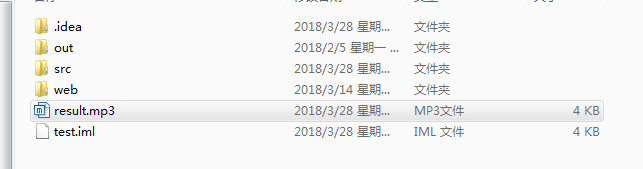
实现效果