
1.概述
这其实是我第一篇想写的博客,可能是因为我遇到了太多的坑,那个时候刚入行下了很多Demo发现怎么也改不动,可能是能力有限,这次就做一个具体的实现和彻底的封装。
上次讲了Android Studio自定义模板 做开发竟然可以如此轻松,内涵段子项目中的热吧其实还有一个广告轮播的功能没写,这里就以这个项目为例吧,附视频讲解地址:http://pan.baidu.com/s/1skOdHzn

这里写图片描述
2.ViewPager源码分析
传递数据的方式决定采用Adapter设计模式,网上很多都采用直接传String图片路径数组,但是这种方式面临很多问题如:需要将接口进行转化,别人下了我们控件用到项目中也难以自定义。至于什么是Adapter设计模式,可以去看一下我的这篇博客:Android设计模式源码解析之适配器(Adapter)模式,这里就不多讲了,至于有什么好处待会看代码每个人的体会也会不一样。下面先熟悉一下ViewPager的源码:
2.1 setAdapter方法:
调用ViewPager的setAdapter函数即可将ViewPager与PagerAdapter关联起来,我们先去查看ViewPager的setAdapter方法。
1public void setAdapter(PagerAdapter adapter) {
2    //1.如果已经设置过PagerAdapter,即mAdapter != null,
3    // 则做一些清理工作
4    if (mAdapter != null) {
5        //2.清除观察者
6        mAdapter.setViewPagerObserver(null);
7        //3.回调startUpdate函数,告诉PagerAdapter开始更新要显示的页面
8        mAdapter.startUpdate(this);
9        //4.如果之前保存有页面,则将之前所有的页面destroy掉
10        for (int i = 0; i < mItems.size(); i++) {
11            final ItemInfo ii = mItems.get(i);
12            mAdapter.destroyItem(this, ii.position, ii.object);
13        }
14        //5.回调finishUpdate,告诉PagerAdapter结束更新
15        mAdapter.finishUpdate(this);
16        //6.将所有的页面清除
17        mItems.clear();
18        //7.将所有的非Decor View移除,即将页面移除
19        removeNonDecorViews();
20        //8.当前的显示页面重置到第一个
21        mCurItem = 0;
22        //9.滑动重置到(0,0)位置
23        scrollTo(0, 0);
24    }
25
26    //10.保存上一次的PagerAdapter
27    final PagerAdapter oldAdapter = mAdapter;
28    //11.设置mAdapter为新的PagerAdapter
29    mAdapter = adapter;
30    //12.设置期望的适配器中的页面数量为0个
31    mExpectedAdapterCount = 0;
32    //13.如果设置的PagerAdapter不为null
33    if (mAdapter != null) {
34        //14.确保观察者不为null,观察者主要是用于监视数据源的内容发生变化
35        if (mObserver == null) {
36            mObserver = new PagerObserver();
37        }
38        //15.将观察者设置到PagerAdapter中
39        mAdapter.setViewPagerObserver(mObserver);
40        mPopulatePending = false;
41        //16.保存上一次是否是第一次Layout
42        final boolean wasFirstLayout = mFirstLayout;
43        //17.设定当前为第一次Layout
44        mFirstLayout = true;
45        //18.更新期望的数据源中页面个数
46        mExpectedAdapterCount = mAdapter.getCount();
47        //19.如果有数据需要恢复
48        if (mRestoredCurItem >= 0) {
49            //20.回调PagerAdapter的restoreState函数
50            mAdapter.restoreState(mRestoredAdapterState, mRestoredClassLoader);
51            setCurrentItemInternal(mRestoredCurItem, false, true);
52            //21.标记无需再恢复
53            mRestoredCurItem = -1;
54            mRestoredAdapterState = null;
55            mRestoredClassLoader = null;
56        } else if (!wasFirstLayout) {//如果在此之前不是第一次Layout
57            //22.由于ViewPager并不是将所有页面作为子View,
58            // 而是最多缓存用户指定缓存个数*2(左右两边,可能左边或右边没有那么多页面)
59            //因此需要创建和销毁页面,populate主要工作就是这些
60            populate();
61        } else {
62            //23.重新布局(Layout)
63            requestLayout();
64        }
65    }
66    //24.如果PagerAdapter发生变化,并且设置了OnAdapterChangeListener监听器
67    // 则回调OnAdapterChangeListener的onAdapterChanged函数
68    if (mAdapterChangeListener != null && oldAdapter != adapter) {
69        mAdapterChangeListener.onAdapterChanged(oldAdapter, adapter);
70    }
71}
什么观察者模式我们可以先不去管,只需要关注我们想要分析的内容即可。我们可以看到这个populate主要创建和销毁页面,里面又调用这个方法populate(int newCurrentItem) 而newCurrentItem表示当需要定位显示的页面。我们先看看源码:
2.2. populate(int newCurrentItem)方法
1 void populate(int newCurrentItem) {
2    ItemInfo oldCurInfo = null;
3    if (mCurItem != newCurrentItem) {
4        oldCurInfo = infoForPosition(mCurItem);
5        mCurItem = newCurrentItem;
6    }
7
8    if (mAdapter == null) {
9        //对子View的绘制顺序进行排序,优先绘制Decor View
10        //再按照position从小到大排序
11        sortChildDrawingOrder();
12        return;
13    }
14
15    //如果我们正在等待populate,那么在用户手指抬起切换到新的位置期间应该推迟创建子View,
16    // 直到滚动到最终位置再去创建,以免在这个期间出现差错
17    if (mPopulatePending) {
18        if (DEBUG) Log.i(TAG, "populate is pending, skipping for now...");
19        //对子View的绘制顺序进行排序,优先绘制Decor View
20        //再按照position从小到大排序
21        sortChildDrawingOrder();
22        return;
23    }
24
25    //同样,在ViewPager没有attached到window之前,不要populate.
26    // 这是因为如果我们在恢复View的层次结构之前进行populate,可能会与要恢复的内容有冲突
27    if (getWindowToken() == null) {
28        return;
29    }
30    //回调PagerAdapter的startUpdate函数,
31    // 告诉PagerAdapter开始更新要显示的页面
32    mAdapter.startUpdate(this);
33
34    final int pageLimit = mOffscreenPageLimit;
35    //确保起始位置大于等于0,如果用户设置了缓存页面数量,第一个页面为当前页面减去缓存页面数量
36    final int startPos = Math.max(0, mCurItem - pageLimit);
37    //保存数据源中的数据个数
38    final int N = mAdapter.getCount();
39    //确保最后的位置小于等于数据源中数据个数-1,
40    // 如果用户设置了缓存页面数量,第一个页面为当前页面加缓存页面数量
41    final int endPos = Math.min(N - 1, mCurItem + pageLimit);
42
43    //判断用户是否增减了数据源的元素,如果增减了且没有调用notifyDataSetChanged,则抛出异常
44    if (N != mExpectedAdapterCount) {
45        //resName用于抛异常显示
46        String resName;
47        try {
48            resName = getResources().getResourceName(getId());
49        } catch (Resources.NotFoundException e) {
50            resName = Integer.toHexString(getId());
51        }
52        throw new IllegalStateException("The application's PagerAdapter changed the adapter's" +
53                " contents without calling PagerAdapter#notifyDataSetChanged!" +
54                " Expected adapter item count: " + mExpectedAdapterCount + ", found: " + N +
55                " Pager id: " + resName +
56                " Pager class: " + getClass() +
57                " Problematic adapter: " + mAdapter.getClass());
58    }
59
60    //定位到当前获焦的页面,如果没有的话,则添加一个
61    int curIndex = -1;
62    ItemInfo curItem = null;
63    //遍历每个页面对应的ItemInfo,找出获焦页面
64    for (curIndex = 0; curIndex < mItems.size(); curIndex++) {
65        final ItemInfo ii = mItems.get(curIndex);
66        //找到当前页面对应的ItemInfo后,跳出循环
67        if (ii.position >= mCurItem) {
68            if (ii.position == mCurItem) curItem = ii;
69            break;
70        }
71    }
72    //如果没有找到获焦的页面,说明mItems列表里面没有保存获焦页面,
73    // 需要将获焦页面加入到mItems里面
74    if (curItem == null && N > 0) {
75        curItem = addNewItem(mCurItem, curIndex);
76    }
77
78    //默认缓存当前页面的左右两边的页面,如果用户设定了缓存页面数量,
79    // 则将当前页面两边都缓存用户指定的数量的页面
80    //如果当前没有页面,则我们啥也不需要做
81    if (curItem != null) {
82        float extraWidthLeft = 0.f;
83        //左边的页面
84        int itemIndex = curIndex - 1;
85        //如果当前页面左边有页面,则将左边页面对应的ItemInfo取出,否则左边页面的ItemInfo为null
86        ItemInfo ii = itemIndex >= 0 ? mItems.get(itemIndex) : null;
87        //保存显示区域的宽度
88        final int clientWidth = getClientWidth();
89        //算出左边页面需要的宽度,注意,这里的宽度是指实际宽度与可视区域宽度比例,
90        // 即实际宽度=leftWidthNeeded*clientWidth
91        final float leftWidthNeeded = clientWidth <= 0 ? 0 :
92                2.f - curItem.widthFactor + (float) getPaddingLeft() / (float) clientWidth;
93        //从当前页面左边第一个页面开始,左边的页面进行遍历
94        for (int pos = mCurItem - 1; pos >= 0; pos--) {
95            //如果左边的宽度超过了所需的宽度,并且当前当前页面位置比第一个缓存页面位置小
96            //这说明这个页面需要Destroy掉
97            if (extraWidthLeft >= leftWidthNeeded && pos < startPos) {
98                //如果左边已经没有页面了,跳出循环
99                if (ii == null) {
100                    break;
101                }
102                //将当前页面destroy掉
103                if (pos == ii.position && !ii.scrolling) {
104                    mItems.remove(itemIndex);
105                    //回调PagerAdapter的destroyItem
106                    mAdapter.destroyItem(this, pos, ii.object);
107                    if (DEBUG) {
108                        Log.i(TAG, "populate() - destroyItem() with pos: " + pos +
109                                " view: " + ((View) ii.object));
110                    }
111                    //由于mItems删除了一个元素
112                    //需要将索引减一
113                    itemIndex--;
114                    curIndex--;
115                    ii = itemIndex >= 0 ? mItems.get(itemIndex) : null;
116                }
117            } else if (ii != null && pos == ii.position) {
118                //如果当前位置是需要缓存的位置,并且这个位置上的页面已经存在
119                //则将左边宽度加上当前位置的页面
120                extraWidthLeft += ii.widthFactor;
121                //mItems往左遍历
122                itemIndex--;
123                //ii设置为当前遍历的页面的左边一个页面
124                ii = itemIndex >= 0 ? mItems.get(itemIndex) : null;
125            } else {//如果当前位置是需要缓存,并且这个位置没有页面
126                //需要添加一个ItemInfo,而addNewItem是通过PagerAdapter的instantiateItem获取对象
127                ii = addNewItem(pos, itemIndex + 1);
128                //将左边宽度加上当前位置的页面
129                extraWidthLeft += ii.widthFactor;
130                //由于新加了一个元素,当前的索引号需要加1
131                curIndex++;
132                //ii设置为当前遍历的页面的左边一个页面
133                ii = itemIndex >= 0 ? mItems.get(itemIndex) : null;
134            }
135        }
136        //同理,右边需要添加缓存的页面
137        //......
138
139       // 省略右边添加缓存页面代码
140
141       //......
142
143        calculatePageOffsets(curItem, curIndex, oldCurInfo);
144    }
145
146    if (DEBUG) {
147        Log.i(TAG, "Current page list:");
148        for (int i = 0; i < mItems.size(); i++) {
149            Log.i(TAG, "#" + i + ": page " + mItems.get(i).position);
150        }
151    }
152    //回调PagerAdapter的setPrimaryItem,告诉PagerAdapter当前显示的页面
153    mAdapter.setPrimaryItem(this, mCurItem, curItem != null ? curItem.object : null);
154    //回调PagerAdapter的finishUpdate,告诉PagerAdapter页面更新结束
155    mAdapter.finishUpdate(this);
156
157
158    //检查页面的宽度是否测量,如果页面的LayoutParams数据没有设定,则去重新设定好
159    final int childCount = getChildCount();
160    for (int i = 0; i < childCount; i++) {
161        final View child = getChildAt(i);
162        final LayoutParams lp = (LayoutParams) child.getLayoutParams();
163        lp.childIndex = i;
164        if (!lp.isDecor && lp.widthFactor == 0.f) {
165            // 0 means requery the adapter for this, it doesn't have a valid width.
166            final ItemInfo ii = infoForChild(child);
167            if (ii != null) {
168                lp.widthFactor = ii.widthFactor;
169                lp.position = ii.position;
170            }
171        }
172    }
173    //重新对页面排序
174    sortChildDrawingOrder();
175    //如果ViewPager被设定为可获焦的,则将当前显示的页面设定为获焦
176    if (hasFocus()) {
177        View currentFocused = findFocus();
178        ItemInfo ii = currentFocused != null ? infoForAnyChild(currentFocused) : null;
179        if (ii == null || ii.position != mCurItem) {
180            for (int i = 0; i < getChildCount(); i++) {
181                View child = getChildAt(i);
182                ii = infoForChild(child);
183                if (ii != null && ii.position == mCurItem) {
184                    if (child.requestFocus(View.FOCUS_FORWARD)) {
185                        break;
186                    }
187                }
188            }
189        }
190    }
191}
从这个方法可以看出,ViewPager里面有多少界面都不会卡,会不断的去销毁和创建页面,默认不光会创建当前页面,还会创建相邻的offscreenPageLimit页面,offscreenPageLimit代表相邻页面的个数,可以由用户通过setOffscreenPageLimit()方法指定,默认是1。而创建会调用PagerAdapter的instantiateItem()方法有一个过时了我们不要用过时的,而销毁会调用PagerAdapter的destroyItem()。具体的工作流程我在这里画个图:
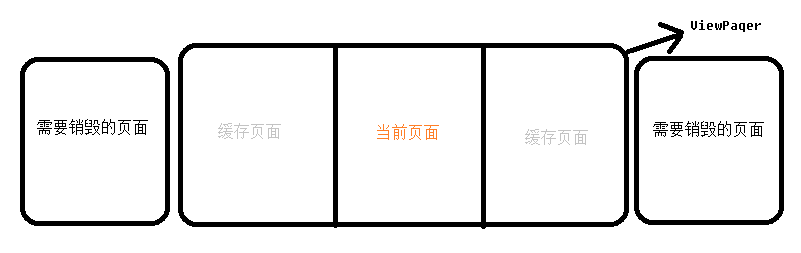
这里写图片描述
2.4. setCurrentItem(int item)方法
我们来看看这最后一个方法吧,待会我们需要去改变切换的速率,就是页面切换的速度不能太快。还是只关注需要分析的方法smoothScrollTo()。
1 /**
2     * Like {@link View#scrollBy}, but scroll smoothly instead of immediately.
3     *
4     * @param x the number of pixels to scroll by on the X axis
5     * @param y the number of pixels to scroll by on the Y axis
6     * @param velocity the velocity associated with a fling, if applicable. (0 otherwise)
7     */
8    void smoothScrollTo(int x, int y, int velocity) {
9        if (getChildCount() == 0) {
10            // Nothing to do.
11            setScrollingCacheEnabled(false);
12            return;
13        }
14
15        int sx;
16        boolean wasScrolling = (mScroller != null) && !mScroller.isFinished();
17        if (wasScrolling) {
18            // We're in the middle of a previously initiated scrolling. Check to see
19            // whether that scrolling has actually started (if we always call getStartX
20            // we can get a stale value from the scroller if it hadn't yet had its first
21            // computeScrollOffset call) to decide what is the current scrolling position.
22            sx = mIsScrollStarted ? mScroller.getCurrX() : mScroller.getStartX();
23            // And abort the current scrolling.
24            mScroller.abortAnimation();
25            setScrollingCacheEnabled(false);
26        } else {
27            sx = getScrollX();
28        }
29        int sy = getScrollY();
30        int dx = x - sx;
31        int dy = y - sy;
32        if (dx == 0 && dy == 0) {
33            completeScroll(false);
34            // 又是这个方法,又是你我认识
35            populate();
36            setScrollState(SCROLL_STATE_IDLE);
37            return;
38        }
39
40        setScrollingCacheEnabled(true);
41        setScrollState(SCROLL_STATE_SETTLING);
42
43        final int width = getClientWidth();
44        final int halfWidth = width / 2;
45        final float distanceRatio = Math.min(1f, 1.0f * Math.abs(dx) / width);
46        final float distance = halfWidth + halfWidth *
47                distanceInfluenceForSnapDuration(distanceRatio);
48        // 页面切换的持续时间
49        int duration;
50        velocity = Math.abs(velocity);
51        if (velocity > 0) {
52            duration = 4 * Math.round(1000 * Math.abs(distance / velocity));
53        } else {
54            final float pageWidth = width * mAdapter.getPageWidth(mCurItem);
55            final float pageDelta = (float) Math.abs(dx) / (pageWidth + mPageMargin);
56            duration = (int) ((pageDelta + 1) * 100);
57        }
58        // 切换页面的时间
59        duration = Math.min(duration, MAX_SETTLE_DURATION);
60
61        // Reset the "scroll started" flag. It will be flipped to true in all places
62        // where we call computeScrollOffset().
63        mIsScrollStarted = false;
64        // 切换页面最终会调用Scroller的startScroll()方法
65        mScroller.startScroll(sx, sy, dx, dy, duration);
66        ViewCompat.postInvalidateOnAnimation(this);
67    }
有了这几个方法,我们接下来就利用Adapter设计模式来实现我们的自定义无限广告轮播。为了避免博客太长大家请看Android无限广告轮播 - 自定义BannerView

这里写图片描述
如果实在还是看不太懂,可以看一下我录的频,也可以了解一下内涵段子整个项目的其他东西:http://pan.baidu.com/s/1skOdHzn 。