
EventBus 深入学习四之实例&类说明
本篇开始,则转向
greenrobot/EventBus, 之前基本上将Guava中设计的思路捋了一遍,逻辑比较简单和清晰,接下来则看下广泛运用于android的这个框架又有什么不一样的地方,有什么独特的精妙所在
一些废话
开始之前,当然是要先把代码donw下来,然后本机能跑起来才行; so,基本的环境要搞起, Android Studio 将作为主要的ide
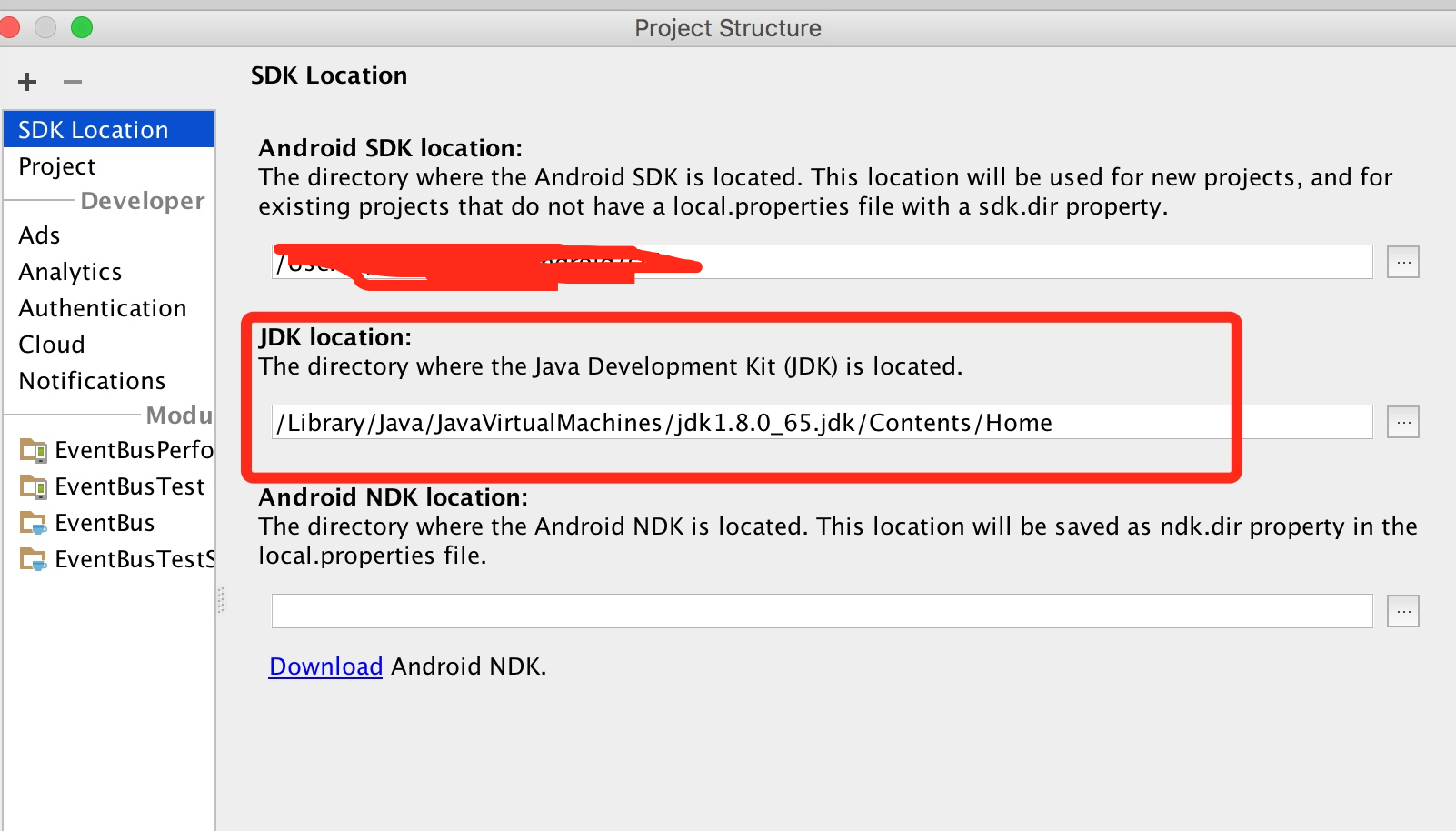
在导入工程之后,发现一直报一个 jdk版本过低的异常,解决方法是设置ide的jdk环境,如下,指定jdk为8就可以了
使用方法一览
在开始之前,先看下这个框架怎么用,会用了之后才能更好的考虑怎么去分析拆解
用法相比较Guava EventBus 差别不大, 除了支持注解方式之外,还支持非注解形式,如
1public class EventBusIndexTest {
2    private String value;
3
4    @Test
5    /** Ensures the index is actually used and no reflection fall-back kicks in. */
6    public void testManualIndexWithoutAnnotation() {
7        SubscriberInfoIndex index = new SubscriberInfoIndex() {
8
9            @Override
10            public SubscriberInfo getSubscriberInfo(Class<?> subscriberClass) {
11                Assert.assertEquals(EventBusIndexTest.class, subscriberClass);
12                SubscriberMethodInfo[] methodInfos = {
13                        new SubscriberMethodInfo("someMethodWithoutAnnotation", String.class)
14                };
15                return new SimpleSubscriberInfo(EventBusIndexTest.class, false, methodInfos);
16            }
17        };
18
19        EventBus eventBus = EventBus.builder().addIndex(index).build();
20        eventBus.register(this);
21        eventBus.post("Yepp");
22        eventBus.unregister(this);
23        Assert.assertEquals("Yepp", value);
24    }
25
26    public void someMethodWithoutAnnotation(String value) {
27        this.value = value;
28    }
29}
上面与我们之前的使用,区别主要在于 EventBus对象的获取,down下来的工程中,有一个基础的测试类,给我们演示了不少的使用方式
1@RunWith(AndroidJUnit4.class)
2public class EventBusBasicTest {
3
4    public static class WithIndex extends EventBusBasicTest {
5        @Test
6        public void dummy() {}
7
8    }
9
10    @Rule
11    public final UiThreadTestRule uiThreadTestRule = new UiThreadTestRule();
12
13    protected EventBus eventBus;
14    private String lastStringEvent;
15    private int countStringEvent;
16    private int countIntEvent;
17    private int lastIntEvent;
18    private int countMyEventExtended;
19    private int countMyEvent;
20    private int countMyEvent2;
21
22    @Before
23    public void setUp() throws Exception {
24        eventBus = new EventBus();
25    }
26
27    @Test
28    @UiThreadTest
29    public void testRegisterAndPost() {
30        // Use an activity to test real life performance
31        TestActivity testActivity = new TestActivity();
32        String event = "Hello";
33
34        long start = System.currentTimeMillis();
35        eventBus.register(testActivity);
36        long time = System.currentTimeMillis() - start;
37        Log.d(EventBus.TAG, "Registered in " + time + "ms");
38
39        eventBus.post(event);
40
41        assertEquals(event, testActivity.lastStringEvent);
42    }
43
44// 无订阅者
45    @Test
46    public void testPostWithoutSubscriber() {
47        eventBus.post("Hello");
48    }
49
50    @Test
51    public void testUnregisterWithoutRegister() {
52        // Results in a warning without throwing
53        eventBus.unregister(this);
54    }
55
56    // This will throw "out of memory" if subscribers are leaked
57    @Test
58    public void testUnregisterNotLeaking() {
59        int heapMBytes = (int) (Runtime.getRuntime().maxMemory() / (1024L * 1024L));
60        for (int i = 0; i < heapMBytes * 2; i++) {
61            EventBusBasicTest subscriber = new EventBusBasicTest() {
62                byte[] expensiveObject = new byte[1024 * 1024];
63            };
64            eventBus.register(subscriber);
65            eventBus.unregister(subscriber);
66            Log.d("Test", "Iteration " + i + " / max heap: " + heapMBytes);
67        }
68    }
69
70    @Test
71    public void testRegisterTwice() {
72        eventBus.register(this);
73        try {
74            eventBus.register(this);
75            fail("Did not throw");
76        } catch (RuntimeException expected) {
77            // OK
78        }
79    }
80
81    @Test
82    public void testIsRegistered() {
83        assertFalse(eventBus.isRegistered(this));
84        eventBus.register(this);
85        assertTrue(eventBus.isRegistered(this));
86        eventBus.unregister(this);
87        assertFalse(eventBus.isRegistered(this));
88    }
89
90    @Test
91    public void testPostWithTwoSubscriber() {
92        EventBusBasicTest test2 = new EventBusBasicTest();
93        eventBus.register(this);
94        eventBus.register(test2);
95        String event = "Hello";
96        eventBus.post(event);
97        assertEquals(event, lastStringEvent);
98        assertEquals(event, test2.lastStringEvent);
99    }
100
101    @Test
102    public void testPostMultipleTimes() {
103        eventBus.register(this);
104        MyEvent event = new MyEvent();
105        int count = 1000;
106        long start = System.currentTimeMillis();
107        // Debug.startMethodTracing("testPostMultipleTimes" + count);
108        for (int i = 0; i < count; i++) {
109            eventBus.post(event);
110        }
111        // Debug.stopMethodTracing();
112        long time = System.currentTimeMillis() - start;
113        Log.d(EventBus.TAG, "Posted " + count + " events in " + time + "ms");
114        assertEquals(count, countMyEvent);
115    }
116
117    @Test
118    public void testMultipleSubscribeMethodsForEvent() {
119        eventBus.register(this);
120        MyEvent event = new MyEvent();
121        eventBus.post(event);
122        assertEquals(1, countMyEvent);
123        assertEquals(1, countMyEvent2);
124    }
125
126    @Test
127    public void testPostAfterUnregister() {
128        eventBus.register(this);
129        eventBus.unregister(this);
130        eventBus.post("Hello");
131        assertNull(lastStringEvent);
132    }
133
134    @Test
135    public void testRegisterAndPostTwoTypes() {
136        eventBus.register(this);
137        eventBus.post(42);
138        eventBus.post("Hello");
139        assertEquals(1, countIntEvent);
140        assertEquals(1, countStringEvent);
141        assertEquals(42, lastIntEvent);
142        assertEquals("Hello", lastStringEvent);
143    }
144
145    @Test
146    public void testRegisterUnregisterAndPostTwoTypes() {
147        eventBus.register(this);
148        eventBus.unregister(this);
149        eventBus.post(42);
150        eventBus.post("Hello");
151        assertEquals(0, countIntEvent);
152        assertEquals(0, lastIntEvent);
153        assertEquals(0, countStringEvent);
154    }
155
156    @Test
157    public void testPostOnDifferentEventBus() {
158        eventBus.register(this);
159        new EventBus().post("Hello");
160        assertEquals(0, countStringEvent);
161    }
162
163    @Test
164    public void testPostInEventHandler() {
165        RepostInteger reposter = new RepostInteger();
166        eventBus.register(reposter);
167        eventBus.register(this);
168        eventBus.post(1);
169        assertEquals(10, countIntEvent);
170        assertEquals(10, lastIntEvent);
171        assertEquals(10, reposter.countEvent);
172        assertEquals(10, reposter.lastEvent);
173    }
174
175    @Test
176    public void testHasSubscriberForEvent() {
177        assertFalse(eventBus.hasSubscriberForEvent(String.class));
178
179        eventBus.register(this);
180        assertTrue(eventBus.hasSubscriberForEvent(String.class));
181
182        eventBus.unregister(this);
183        assertFalse(eventBus.hasSubscriberForEvent(String.class));
184    }
185
186    @Test
187    public void testHasSubscriberForEventSuperclass() {
188        assertFalse(eventBus.hasSubscriberForEvent(String.class));
189
190        Object subscriber = new ObjectSubscriber();
191        eventBus.register(subscriber);
192        assertTrue(eventBus.hasSubscriberForEvent(String.class));
193
194        eventBus.unregister(subscriber);
195        assertFalse(eventBus.hasSubscriberForEvent(String.class));
196    }
197
198    @Test
199    public void testHasSubscriberForEventImplementedInterface() {
200        assertFalse(eventBus.hasSubscriberForEvent(String.class));
201
202        Object subscriber = new CharSequenceSubscriber();
203        eventBus.register(subscriber);
204        assertTrue(eventBus.hasSubscriberForEvent(CharSequence.class));
205        assertTrue(eventBus.hasSubscriberForEvent(String.class));
206
207        eventBus.unregister(subscriber);
208        assertFalse(eventBus.hasSubscriberForEvent(CharSequence.class));
209        assertFalse(eventBus.hasSubscriberForEvent(String.class));
210    }
211
212    @Subscribe
213    public void onEvent(String event) {
214        lastStringEvent = event;
215        countStringEvent++;
216    }
217
218    @Subscribe
219    public void onEvent(Integer event) {
220        lastIntEvent = event;
221        countIntEvent++;
222    }
223
224    @Subscribe
225    public void onEvent(MyEvent event) {
226        countMyEvent++;
227    }
228
229    @Subscribe
230    public void onEvent2(MyEvent event) {
231        countMyEvent2++;
232    }
233
234    @Subscribe
235    public void onEvent(MyEventExtended event) {
236        countMyEventExtended++;
237    }
238
239    public static class TestActivity extends Activity {
240        public String lastStringEvent;
241
242        @Subscribe
243        public void onEvent(String event) {
244            lastStringEvent = event;
245        }
246    }
247
248    public static class CharSequenceSubscriber {
249        @Subscribe
250        public void onEvent(CharSequence event) {
251        }
252    }
253
254    public static class ObjectSubscriber {
255        @Subscribe
256        public void onEvent(Object event) {
257        }
258    }
259
260    public class MyEvent {
261    }
262
263    public class MyEventExtended extends MyEvent {
264    }
265
266    public class RepostInteger {
267        public int lastEvent;
268        public int countEvent;
269
270        @Subscribe
271        public void onEvent(Integer event) {
272            lastEvent = event;
273            countEvent++;
274            assertEquals(countEvent, event.intValue());
275
276            if (event < 10) {
277                int countIntEventBefore = countEvent;
278                eventBus.post(event + 1);
279                // All our post calls will just enqueue the event, so check count is unchanged
280                assertEquals(countIntEventBefore, countIntEventBefore);
281            }
282        }
283    }
284
285}
EventBus实例创建
提供了三中创建方式,一个是直接使用默认实例; 一个最简单普通的构造;再者使用 EventBusBuilder来构建, 下面会分别对上面的几种情况进行分析说明
1. EventBus.getDefault() 默认实例
这里使用了最常见的延迟加载的单例模式,来获取实例,注意下 snchronized 的使用位置,并没有放在方法签名上( 注意这个类不是严格意义上的单例,因为构造函数是public)
1static volatile EventBus defaultInstance;
2
3 /** Convenience singleton for apps using a process-wide EventBus instance. */
4    public static EventBus getDefault() {
5        if (defaultInstance == null) {
6            synchronized (EventBus.class) {
7                if (defaultInstance == null) {
8                    defaultInstance = new EventBus();
9                }
10            }
11        }
12        return defaultInstance;
13    }
此外另一种常见的单例模式下面也顺手贴出,主要利用静态内部类
1    private static class InnerInstance {
2        static volatile EventBus defaultInstance = new EventBus();
3    }
4
5    public static EventBus getInstance() {
6        return InnerInstance.defaultInstance;
7    }
2. new EventBus() 构造器
这个比较简单了,基本上获取实例的方法都这么玩,对于EventBus而言,把这个放开的一个关键点是再你选的系统中,不会限制你的EventBus实例个数,也就是说,你的系统可以有多个并行的消息-事务总线
3. Builder模式
这个模式也是比较常用的,对于构建复杂对象时,选择的Builder模式,对这个的分析之前,先看下 EventBus的属性
1static volatile EventBus defaultInstance;
2
3private static final EventBusBuilder DEFAULT_BUILDER = new EventBusBuilder();
4private static final Map<Class<?>, List<Class<?>>> eventTypesCache = new HashMap<>();
5
6private final Map<Class<?>, CopyOnWriteArrayList<Subscription>> subscriptionsByEventType;
7private final Map<Object, List<Class<?>>> typesBySubscriber;
8private final Map<Class<?>, Object> stickyEvents;
9
10private final ThreadLocal<PostingThreadState> currentPostingThreadState = new ThreadLocal<PostingThreadState>() {
11   @Override
12   protected PostingThreadState initialValue() {
13       return new PostingThreadState();
14   }
15};
16
17private final HandlerPoster mainThreadPoster;
18private final BackgroundPoster backgroundPoster;
19private final AsyncPoster asyncPoster;
20private final SubscriberMethodFinder subscriberMethodFinder;
21private final ExecutorService executorService;
22
23private final boolean throwSubscriberException;
24private final boolean logSubscriberExceptions;
25private final boolean logNoSubscriberMessages;
26private final boolean sendSubscriberExceptionEvent;
27private final boolean sendNoSubscriberEvent;
28private final boolean eventInheritance;
常用类分析
1. SubscriberMethod 订阅者回调方法封装类
这个类主要保存的就是订阅者的回调方法相关信息
1final Method method;
2final ThreadMode threadMode;
3// 监听的事件类型, 也就是注册方法的唯一参数类型
4final Class<?> eventType;
5// 定义监听消息的优先级
6final int priority;
7//在Android开 发中,Sticky事件只指事件消费者在事件发布之后才注册的也能接收到该事件的特殊类型
8final boolean sticky;
9/** Used for efficient comparison */
10String methodString;
ThreadMode, 区分了以下几种类型,且各自的意思如下
1   /**
2    * 和发布消息的公用一个线程
3     * Subscriber will be called in the same thread, which is posting the event. This is the default. Event delivery
4     * implies the least overhead because it avoids thread switching completely. Thus this is the recommended mode for
5     * simple tasks that are known to complete is a very short time without requiring the main thread. Event handlers
6     * using this mode must return quickly to avoid blocking the posting thread, which may be the main thread.
7     */
8    POSTING,
9
10    /**
11     * 再android的主线程下
12     * Subscriber will be called in Android's main thread (sometimes referred to as UI thread). If the posting thread is
13     * the main thread, event handler methods will be called directly. Event handlers using this mode must return
14     * quickly to avoid blocking the main thread.
15     */
16    MAIN,
17
18    /**
19     * Subscriber will be called in a background thread. If posting thread is not the main thread, event handler methods
20     * will be called directly in the posting thread. If the posting thread is the main thread, EventBus uses a single
21     * background thread, that will deliver all its events sequentially. Event handlers using this mode should try to
22     * return quickly to avoid blocking the background thread.
23     */
24    BACKGROUND,
25
26    /**
27     * Event handler methods are called in a separate thread. This is always independent from the posting thread and the
28     * main thread. Posting events never wait for event handler methods using this mode. Event handler methods should
29     * use this mode if their execution might take some time, e.g. for network access. Avoid triggering a large number
30     * of long running asynchronous handler methods at the same time to limit the number of concurrent threads. EventBus
31     * uses a thread pool to efficiently reuse threads from completed asynchronous event handler notifications.
32     */
33    ASYNC
2. Subscription 注册回调信息封装类
EventBus中维护的订阅关系, 在对象注册时注入到
EventBus, 推送消息时,则会从EventBus中获取
EventBus 中维护的订阅者关系数据结构就是 Map<Class<?>, CopyOnWriteArrayList<Subscription>>, 其中key为事件类型, value就是订阅者信息集合
1final Object subscriber;
2final SubscriberMethod subscriberMethod;
3. Subscribe 注解
注解标注在类的唯一参数的公共方法上, 表示这个方法就是我们注册的订阅者回调方法
1@Documented
2@Retention(RetentionPolicy.RUNTIME)
3@Target({ElementType.METHOD})
4public @interface Subscribe {
5    ThreadMode threadMode() default ThreadMode.POSTING;
6
7    /**
8     * If true, delivers the most recent sticky event (posted with
9     * {@link EventBus#postSticky(Object)}) to this subscriber (if event available).
10     */
11    boolean sticky() default false;
12
13    /** Subscriber priority to influence the order of event delivery.
14     * Within the same delivery thread ({@link ThreadMode}), higher priority subscribers will receive events before
15     * others with a lower priority. The default priority is 0. Note: the priority does *NOT* affect the order of
16     * delivery among subscribers with different {@link ThreadMode}s! */
17    int priority() default 0;
18}
4. SubscriberMethodFinder 辅助工具类,获取订阅者中的回调方法
顾名思义,这个就是用来获取订阅者类中的所有注册方法的,支持两种方式,一个是上面的注解方式;还有一个则是利用
SubscriberInfo
核心方法:List<SubscriberMethod> findSubscriberMethods(Class<?> subscriberClass)
5. SubscriberInfo 定义获取订阅者注册方法的接口
通常这个会和SubscriberInfoIndex 配合使用,后面这个接口专注返回 SubscriberInfo对象,其默认的实现也比较简单,基本上就是指定完整的注册方法信息(SubscriberMethodInfo)即可
1public class SubscriberMethodInfo {
2    final String methodName;
3    final ThreadMode threadMode;
4    final Class<?> eventType;
5    final int priority;
6    final boolean sticky;
7}
8
9public class SimpleSubscriberInfo implements SubscriberInfo {
10    public SimpleSubscriberInfo(Class subscriberClass, boolean shouldCheckSuperclass,SubscriberMethodInfo[] methodInfos) {
11        this.subscriberClass = subscriberClass;
12        this.superSubscriberInfoClass = null;
13        this.shouldCheckSuperclass = shouldCheckSuperclass;
14        this.methodInfos = methodInfos;
15    }
16}
6. xxxPost 发送事件的辅助类
拿一个异步的例子看一下, 里面包含两个对象, 一个 queue 消息推送的队列,一个 eventBus 实例,消息推送,则是调用 enqueue() 方法, 先将监听者 + 消息塞入队列, 然后调用 eventBus的线程池实进行实现异步的消息推送
1private final PendingPostQueue queue;
2    private final EventBus eventBus;
3
4    AsyncPoster(EventBus eventBus) {
5        this.eventBus = eventBus;
6        queue = new PendingPostQueue();
7    }
8
9    public void enqueue(Subscription subscription, Object event) {
10        PendingPost pendingPost = PendingPost.obtainPendingPost(subscription, event);
11        queue.enqueue(pendingPost);
12        eventBus.getExecutorService().execute(this);
13    }
14
15    @Override
16    public void run() {
17        PendingPost pendingPost = queue.poll();
18        if(pendingPost == null) {
19            throw new IllegalStateException("No pending post available");
20        }
21        eventBus.invokeSubscriber(pendingPost);
22    }