
1修改或找回root密码步骤1.修改MySQL的登录设置:
2# vi /etc/my.cnf
3在[mysqld]的段中加上一句:skip-grant-tables 保存并且退出vi。
42.重新启动mysqld
5# /etc/init.d/mysqld restart  ( service mysqld restart )3 mysql -uroot -p 回车
6
7mysql> USE mysql ;
8mysql> UPDATE user SET Password = password ( 'new-password' ) WHERE User = 'root' ;

运行报错
改为 update mysql.user set authentication_string=password('123456a') where user='root';

4.刷新权限
1mysql> flush privileges ;
2mysql> quit;
3
45.将MySQL的登录设置修改回来
5# vi /etc/my.cnf
6将刚才在[mysqld]的段中加上的skip-grant-tables删除
7保存并且退出vi。
86.重新启动mysqld
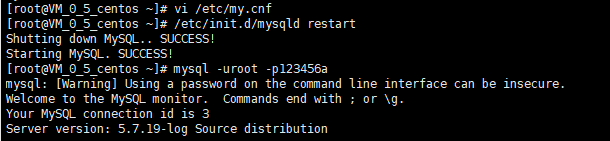
9# /etc/init.d/mysqld restart   ( service mysqld restart )重新登录成功 ,root用户设置ok。
1MySQL密码的恢复方法二
2有可能你的系统没有 safe_mysqld 程序(比如我现在用的 ubuntu操作系统, apt-get安装的mysql) , 下面方法可以恢复
31. 停止mysqld;
4/etc/init.d/mysql stop
5(您可能有其它的方法,总之停止mysqld的运行就可以了)
62. 用以下命令启动MySQL,以不检查权限的方式启动;
7mysqld --skip-grant-tables &
83. 然后用空密码方式使用root用户登录 MySQL;
9mysql -u root
104. 修改root用户的密码;
11mysql> update mysql.user set password=PASSWORD('newpassword') where User='root';
12mysql> flush privileges;
13mysql> quit
14重新启动MySQL
15/etc/init.d/mysql restart
16就可以使用新密码 newpassword 登录了。