
一、介绍
TxtFileReader提供了读取本地文件系统数据存储的能力。在底层实现上,TxtFileReader获取本地文件数据,并转换为DataX传输协议传递给Writer。
二、配置模版
1{
2    "setting": {},
3    "job": {
4        "setting": {
5            "speed": {
6                "channel": 2
7            }
8        },
9        "content": [
10            {
11                "reader": {
12                    "name": "txtfilereader",
13                    "parameter": {
14                        "path": ["/home/haiwei.luo/case00/data"],
15                        "encoding": "UTF-8",
16                        "column": [
17                            {
18                                "index": 0,
19                                "type": "long"
20                            },
21                            {
22                                "index": 1,
23                                "type": "boolean"
24                            },
25                            {
26                                "index": 2,
27                                "type": "double"
28                            },
29                            {
30                                "index": 3,
31                                "type": "string"
32                            },
33                            {
34                                "index": 4,
35                                "type": "date",
36                                "format": "yyyy.MM.dd"
37                            }
38                        ],
39                        "fieldDelimiter": ","
40                    }
41                },
42                "writer": {
43                    "name": "txtfilewriter",
44                    "parameter": {
45                        "path": "/home/haiwei.luo/case00/result",
46                        "fileName": "luohw",
47                        "writeMode": "truncate",
48                        "format": "yyyy-MM-dd"
49                    }
50                }
51            }
52        ]
53    }
54}
三、使用说明
-
支持且仅支持读取TXT的文件,且要求TXT中shema为一张二维表。
-
支持类CSV格式文件,自定义分隔符。
-
支持多种类型数据读取(使用String表示),支持列裁剪,支持列常量
四、实践
最近需要导一张表,原来的表数据是存放在hive上的,利用python脚本处理数据之后直接插入到hive的。现在是要将这张表的数据导入到greenplum中。表数据在7200万左右
方法:将hive数据导出成csv文件,利用datax导入到greenplum

开干:
配置json文件
1{
2    "content":[
3        {
4            "reader":{
5                "name":"txtfilereader",
6                "parameter":{
7                    "column":[
8                        {
9                            "format":"yyyy-MM-dd",
10                            "index":0,
11                            "type":"date"
12                        },
13                        {
14                            "index":1,
15                            "type":"string"
16                        },
17                        {
18                            "index":2,
19                            "type":"string"
20                        },
21                        {
22                            "index":3,
23                            "type":"string"
24                        },
25                        {
26                            "index":4,
27                            "type":"string"
28                        },
29                        {
30                            "index":5,
31                            "type":"long"
32                        },
33                        {
34                            "index":6,
35                            "type":"long"
36                        },
37                        {
38                            "index":7,
39                            "type":"long"
40                        },
41                        {
42                            "index":8,
43                            "type":"long"
44                        }
45                    ],
46                    "encoding":"utf-8",
47                    "fieldDelimiter":",",
48                    "path":[
49                        "/home/tianyafu/flux_timecount_action.csv"
50                    ]
51                }
52            },
53            "writer":{
54                "name":"gpdbwriter",
55                "parameter":{
56                    "column":[
57                        "record_date",
58                        "outid",
59                        "tm_type",
60                        "serv",
61                        "app",
62                        "down_flux",
63                        "up_flux",
64                        "seconds",
65                        "count"
66                    ],
67                    "connection":[
68                        {
69                            "jdbcUrl":"jdbc:postgresql://192.168.100.21:5432/ods",
70                            "table":[
71                                "ods_flux_timecount_action"
72                            ]
73                        }
74                    ],
75                    "password":"******",
76                    "segment_reject_limit":0,
77                    "username":"admin"
78                }
79            }
80        }
81    ],
82    "setting":{
83        "errorLimit":{
84            "percentage":0.02,
85            "record":0
86        },
87        "speed":{
88            "channel":"1"
89        }
90    }
91}
然后就失败了呀
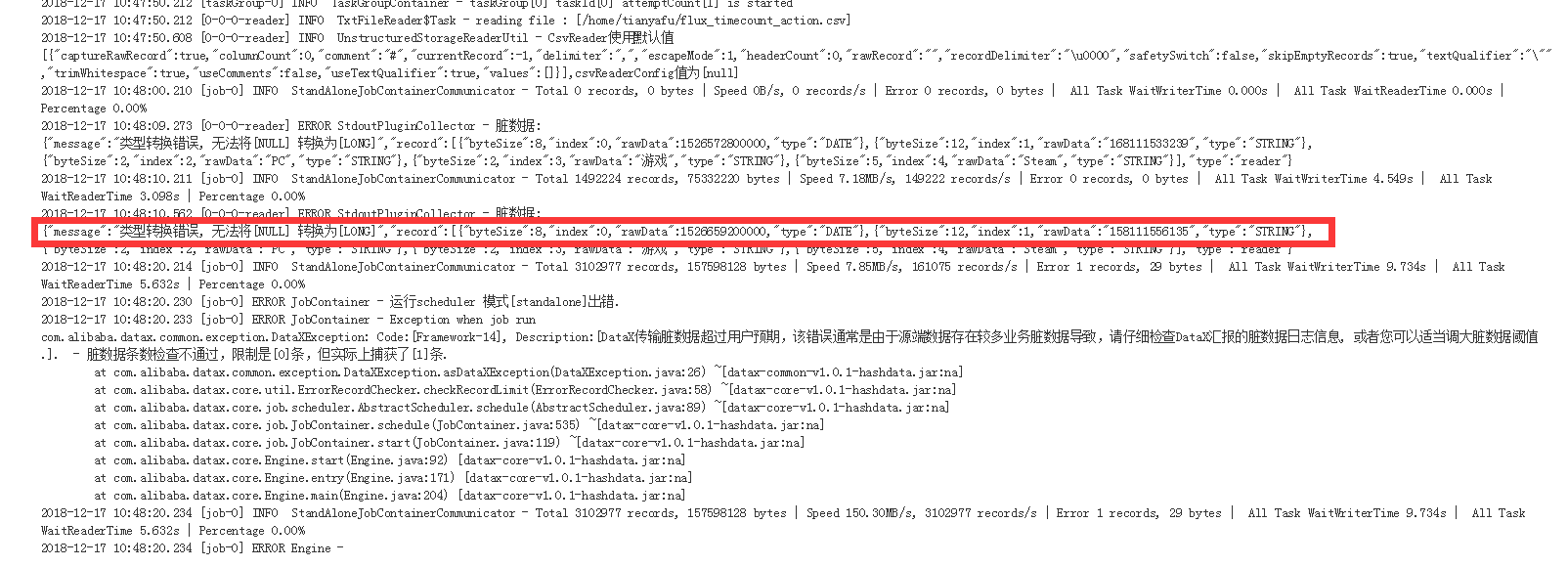
确定错误是数据中有null值,无法转换为Long类型。
查询到解决方法是添加:
nullFormat配置项
1nullFormat
2
3描述:文本文件中无法使用标准字符串定义null(空指针),DataX提供nullFormat定义哪些字符串可以表示为null。
4
5例如如果用户配置: nullFormat:"\N",那么如果源头数据是"\N",DataX视作null字段。
6
7必选:否
8
9默认值:\N
那就加上呗,
1{
2    "content":[
3        {
4            "reader":{
5                "name":"txtfilereader",
6                "parameter":{
7                    "column":[
8                        {
9                            "format":"yyyy-MM-dd",
10                            "index":0,
11                            "type":"date"
12                        },
13                        {
14                            "index":1,
15                            "type":"string"
16                        },
17                        {
18                            "index":2,
19                            "type":"string"
20                        },
21                        {
22                            "index":3,
23                            "type":"string"
24                        },
25                        {
26                            "index":4,
27                            "type":"string"
28                        },
29                        {
30                            "index":5,
31                            "type":"long"
32                        },
33                        {
34                            "index":6,
35                            "type":"long"
36                        },
37                        {
38                            "index":7,
39                            "type":"long"
40                        },
41                        {
42                            "index":8,
43                            "type":"long"
44                        }
45                    ],
46                    "csvReaderConfig":{
47                        "safetySwitch":false,
48                        "skipEmptyRecords":false,
49                        "useTextQualifier":false
50                    },
51                    "encoding":"utf-8",
52                    "fieldDelimiter":",",
53                    "nullFormat":"null",
54                    "path":[
55                        "/home/tianyafu/flux_timecount_action.csv"
56                    ]
57                }
58            },
59            "writer":{
60                "name":"gpdbwriter",
61                "parameter":{
62                    "column":[
63                        "record_date",
64                        "outid",
65                        "tm_type",
66                        "serv",
67                        "app",
68                        "down_flux",
69                        "up_flux",
70                        "seconds",
71                        "count"
72                    ],
73                    "connection":[
74                        {
75                            "jdbcUrl":"jdbc:postgresql://192.168.100.21:5432/ods",
76                            "table":[
77                                "ods_flux_timecount_action"
78                            ]
79                        }
80                    ],
81                    "password":"******",
82                    "segment_reject_limit":0,
83                    "username":"admin"
84                }
85            }
86        }
87    ],
88    "setting":{
89        "errorLimit":{
90            "percentage":0.02,
91            "record":0
92        },
93        "speed":{
94            "channel":"1"
95        }
96    }
97}
结果又失败了
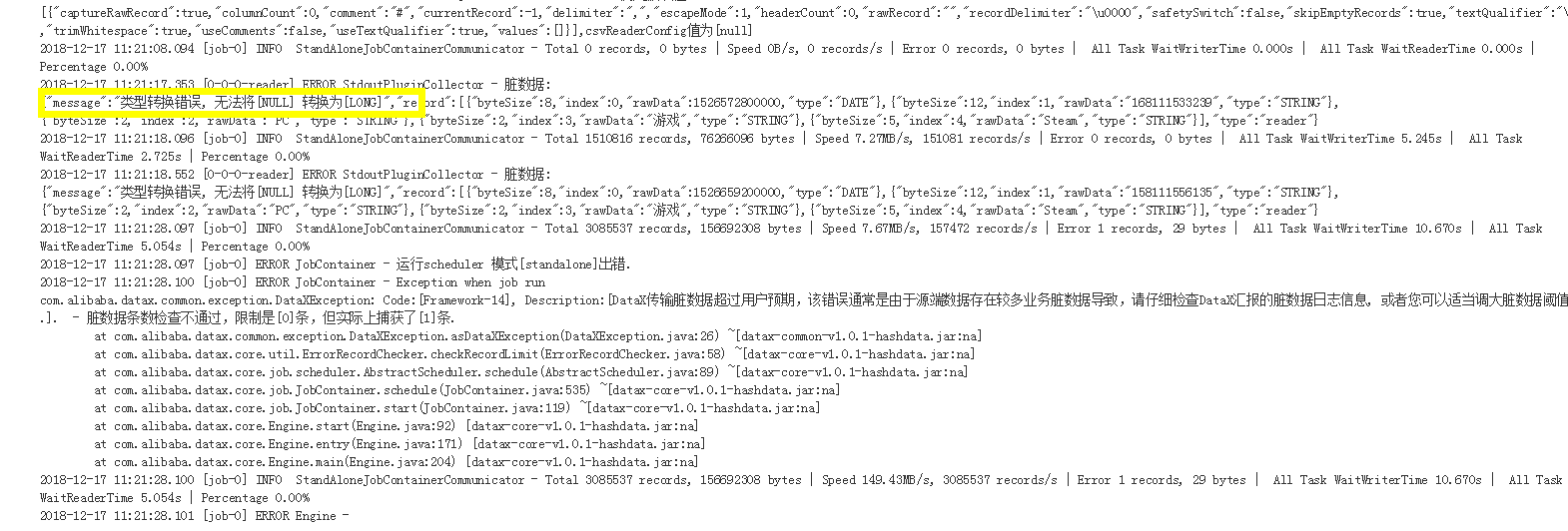
看来是大小写敏感的,继续改:
1{
2    "content":[
3        {
4            "reader":{
5                "name":"txtfilereader",
6                "parameter":{
7                    "column":[
8                        {
9                            "format":"yyyy-MM-dd",
10                            "index":0,
11                            "type":"date"
12                        },
13                        {
14                            "index":1,
15                            "type":"string"
16                        },
17                        {
18                            "index":2,
19                            "type":"string"
20                        },
21                        {
22                            "index":3,
23                            "type":"string"
24                        },
25                        {
26                            "index":4,
27                            "type":"string"
28                        },
29                        {
30                            "index":5,
31                            "type":"long"
32                        },
33                        {
34                            "index":6,
35                            "type":"long"
36                        },
37                        {
38                            "index":7,
39                            "type":"long"
40                        },
41                        {
42                            "index":8,
43                            "type":"long"
44                        }
45                    ],
46                    "csvReaderConfig":{
47                        "safetySwitch":false,
48                        "skipEmptyRecords":false,
49                        "useTextQualifier":false
50                    },
51                    "encoding":"utf-8",
52                    "fieldDelimiter":",",
53                    "nullFormat":"NULL",
54                    "path":[
55                        "/home/tianyafu/flux_timecount_action.csv"
56                    ]
57                }
58            },
59            "writer":{
60                "name":"gpdbwriter",
61                "parameter":{
62                    "column":[
63                        "record_date",
64                        "outid",
65                        "tm_type",
66                        "serv",
67                        "app",
68                        "down_flux",
69                        "up_flux",
70                        "seconds",
71                        "count"
72                    ],
73                    "connection":[
74                        {
75                            "jdbcUrl":"jdbc:postgresql://192.168.100.21:5432/ods",
76                            "table":[
77                                "ods_flux_timecount_action"
78                            ]
79                        }
80                    ],
81                    "password":"******",
82                    "segment_reject_limit":0,
83                    "username":"admin"
84                }
85            }
86        }
87    ],
88    "setting":{
89        "errorLimit":{
90            "percentage":0.02,
91            "record":0
92        },
93        "speed":{
94            "channel":"1"
95        }
96    }
97}

终于成功了
看来这个参数是大小写敏感的