
Hystrix 熔断:
首先仍然启动Eureka,这里就不说了。
OrderController.java:
1package com.tuling.cloud.study.user.controller;
2
3import org.slf4j.Logger;
4import org.slf4j.LoggerFactory;
5import org.springframework.beans.factory.annotation.Autowired;
6import org.springframework.web.bind.annotation.GetMapping;
7import org.springframework.web.bind.annotation.PathVariable;
8import org.springframework.web.bind.annotation.RestController;
9import org.springframework.web.client.RestTemplate;
10
11import com.netflix.hystrix.contrib.javanica.annotation.HystrixCommand;
12import com.tuling.cloud.study.user.entity.User;
13
14@RestController
15public class OrderController {
16  private static final Logger logger = LoggerFactory.getLogger(OrderController.class);
17  @Autowired
18  private RestTemplate restTemplate;
19
20
21  @HystrixCommand(fallbackMethod = "findByIdFallback")
22  @GetMapping("/user/{id}")
23  public User findById(@PathVariable Long id) {
24	logger.error("================请求用户中心接口,用户id:" + id + "==============");
25    return restTemplate.getForObject("http://microservice-provider-user/" + id, User.class);
26  }
27
28  //降级方法
29  public User findByIdFallback(Long id) {
30    User user = new User();
31    user.setId(-1L);
32    user.setName("默认用户");
33    return user;
34  }
35
36}
order 服务和上一章一样唯一修改的是yml文件:
1server:
2  port: 9010
3spring:
4  application:
5    name: microservice-consumer-order
6eureka:
7  client:
8    serviceUrl:
9      defaultZone: http://localhost:8761/eureka/
10  instance:
11    prefer-ip-address: true
12hystrix:
13  command:
14    default:
15      circuitBreaker:
16        requestVolumeThreshold: 3 #默认20,熔断的阈值,如何user服务报错满足3次,熔断器就会打开,就算order之后请求正确的数据也不行。
17        sleepWindowInMilliseconds: 5000 #默认5S , 等5S之后熔断器会处于半开状态,然后下一次请求的正确和错误讲决定熔断器是否真的关闭和是否继续打开
user服务修改UserController.java其余不变
1package com.tuling.cloud.study.controller;
2
3import java.util.Random;
4
5import org.apache.log4j.Logger;
6import org.springframework.beans.factory.annotation.Autowired;
7import org.springframework.cloud.client.serviceregistry.Registration;
8import org.springframework.web.bind.annotation.GetMapping;
9import org.springframework.web.bind.annotation.PathVariable;
10import org.springframework.web.bind.annotation.RestController;
11
12import com.tuling.cloud.study.entity.User;
13import com.tuling.cloud.study.repository.UserRepository;
14
15@RestController
16public class UserController {
17
18  private final Logger logger = Logger.getLogger(getClass());
19
20  @Autowired
21  private UserRepository userRepository;
22  @Autowired
23  private Registration registration;
24
25
26  @GetMapping("/{id}")
27  public User findById(@PathVariable Long id) throws Exception {
28	  logger.info("用户中心接口:查询用户"+ id +"信息");
29	  //测试熔断,传入不存在的用户id模拟异常情况
30	  if (id == 10) {
31	    throw new NullPointerException();
32	  }
33	  User findOne = userRepository.findOne(id);
34	  return findOne;
35  }
36
37  @GetMapping("/getIpAndPort")
38  public String findById() {
39	  return registration.getHost() + ":" + registration.getPort();
40  }
41}
user服务模拟接口报错,order服务在调用的时候如果id传入的是10 ,就会导致user服务报错,那么满足3次报错之后,熔断器就会打开。注意:之后在5S内浏览器继续请求order服务的findById()接口是不会进入的,hystrix会直接执行降级方法。
等5S过去之后,hytrix不会全打开,而是处于半开状态,接下来的第一个请求决定熔断器是否继续打开,还是关闭。
演示:
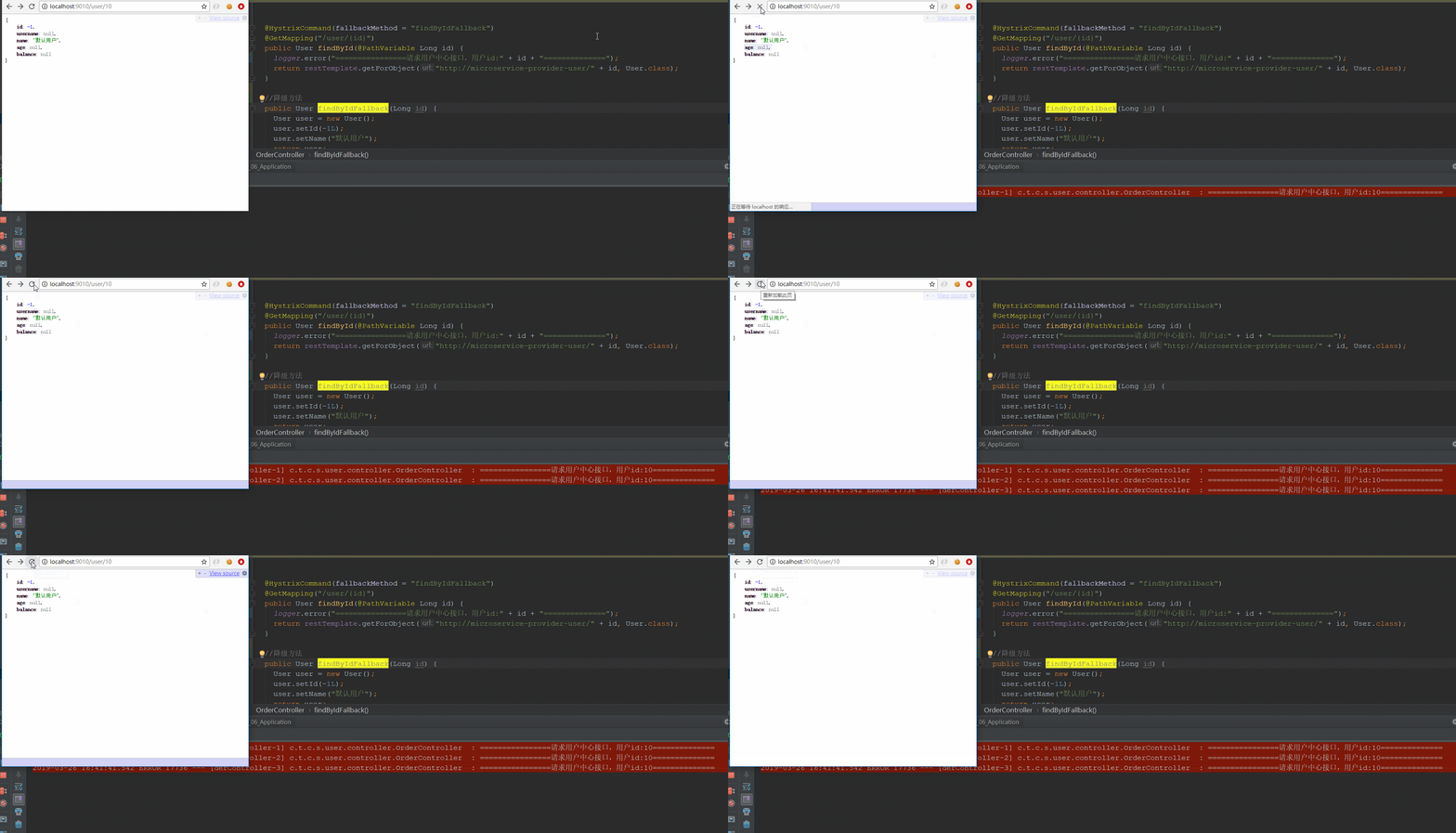
特别注意“:user服务报错满足3次,就导致调用方order的 findById() 进不去了,而是直接进入降级方法。这就是熔断。
Hystrix 限流:
Eureka 还是用同样的(略)
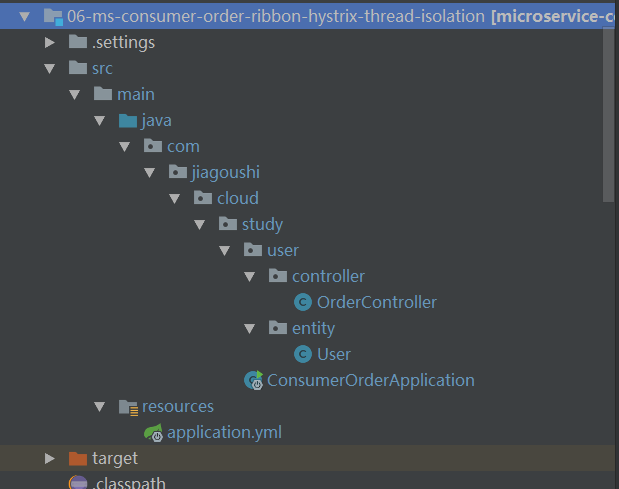
order工程截图:
pom.xml 和上一章一样(略)
OrderController.java:
1package com.jiagoushi.cloud.study.user.controller;
2
3import com.jiagoushi.cloud.study.user.entity.User;
4import org.slf4j.Logger;
5import org.slf4j.LoggerFactory;
6import org.springframework.beans.factory.annotation.Autowired;
7import org.springframework.web.bind.annotation.GetMapping;
8import org.springframework.web.bind.annotation.PathVariable;
9import org.springframework.web.bind.annotation.RestController;
10import org.springframework.web.client.RestTemplate;
11
12import com.netflix.hystrix.contrib.javanica.annotation.HystrixCommand;
13import com.netflix.hystrix.contrib.javanica.annotation.HystrixProperty;
14
15@RestController
16public class OrderController {
17
18	private static final Logger logger = LoggerFactory.getLogger(OrderController.class);
19
20	@Autowired
21	private RestTemplate restTemplate;
22
23	@HystrixCommand(fallbackMethod = "findByIdFallback",
24					groupKey = "orderUserGroup",
25					threadPoolKey = "orderUserIdThreadPool",
26					threadPoolProperties = {
27	        			@HystrixProperty(name = "coreSize", value = "2"),
28	        			@HystrixProperty(name = "maxQueueSize", value = "2"),
29	        			@HystrixProperty(name = "queueSizeRejectionThreshold", value = "1") }) //maxQueueSize和queueSizeRejectionThreshold 简单理解两者取最小值做为队列长度
30	@GetMapping("/user/{id}")
31	public User findById(@PathVariable Long id) {
32		logger.info("================请求用户中心接口,用户id:" + id + "==============");
33		return restTemplate.getForObject("http://microservice-provider-user/" + id, User.class);
34	}
35
36	@HystrixCommand(fallbackMethod = "findByIdFallback",
37			groupKey = "orderUserGroup",
38			threadPoolKey = "orderUserIdThreadPool",
39			threadPoolProperties = {
40					@HystrixProperty(name = "coreSize", value = "2"), //配置线程池线程数量
41					@HystrixProperty(name = "maxQueueSize", value = "2"),
42					@HystrixProperty(name = "queueSizeRejectionThreshold", value = "1") })
43	@GetMapping("/user/{userName}")
44	public User findByUserName(@PathVariable String userName) {
45		logger.info("================请求用户中心接口,用户userName:" + userName + "==============");
46		return restTemplate.getForObject("http://microservice-provider-user/" + userName, User.class);
47	}
48
49	//降级方法
50	public User findByIdFallback(Long id) {
51		User user = new User();
52		user.setId(-1L);
53		user.setName("默认用户");
54		return user;
55	}
56
57}
说明:
- hystix 默认线程池大小是10。
- groupKey 是 服务分组 , threadPoolKey 是 线程池标识 , 也就是说当groupKey和threadPoolKey 同时修饰findById() 和findByUserName() 时 ,他们共用一个线程池,大小共10。
- ThreadPoolProperties:配置线程池参数,coreSize配置核心线程池大小和线程池最大大 小,keepAliveTimeMinutes是线程池中空闲线程生存时间(如果不进行动态配置,那么是没 有任何作用的),maxQueueSize配置线程池队列最大大小, queueSizeRejectionThreshold限定当前队列大小,即实际队列大小由这个参数决定,通过 改变queueSizeRejectionThreshold可以实现动态队列大小调整。
applciation.xml:
1server:
2  port: 9010
3spring:
4  application:
5    name: microservice-consumer-order
6eureka:
7  client:
8    serviceUrl:
9      defaultZone: http://localhost:8761/eureka/
10  instance:
11    prefer-ip-address: true
12hystrix:
13  command:
14    default:
15      execution:
16        isolation:
17          thread:
18            timeoutInMilliseconds: 20000 #命令执行超时时间,默认1000ms,就是调接口的响应时间超过20S就执行降级,不管提供者是否挂机还是延迟超过时间就走降级
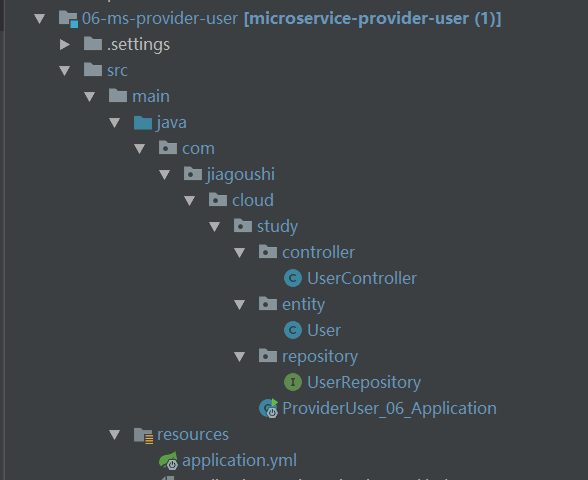
user工程截图:
pom.xml 和上一章一样(略)
UserController.java:
1package com.jiagoushi.cloud.study.controller;
2
3import com.jiagoushi.cloud.study.entity.User;
4import org.apache.log4j.Logger;
5import org.springframework.beans.factory.annotation.Autowired;
6import org.springframework.cloud.client.serviceregistry.Registration;
7import org.springframework.web.bind.annotation.GetMapping;
8import org.springframework.web.bind.annotation.PathVariable;
9import org.springframework.web.bind.annotation.RestController;
10
11import com.jiagoushi.cloud.study.repository.UserRepository;
12
13@RestController
14public class UserController {
15
16  private final Logger logger = Logger.getLogger(getClass());
17
18  @Autowired
19  private UserRepository userRepository;
20  @Autowired
21  private Registration registration;
22
23
24  @GetMapping("/{id}")
25  public User findById(@PathVariable Long id) throws Exception {
26	  logger.info("用户中心接口:查询用户"+ id +"信息");
27	  // 配合限流演示,模拟业务耗时3S
28         Thread.sleep(3000);
29	  User findOne = userRepository.findOne(id);
30	  return findOne;
31  }
32
33  @GetMapping("/getIpAndPort")
34  public String findById() {
35	  return registration.getHost() + ":" + registration.getPort();
36  }
37}
application.yml:
1server:
2  port: 8002
3spring:
4  application:
5    name: microservice-provider-user
6  jpa:
7    generate-ddl: false
8    show-sql: true
9    hibernate:
10      ddl-auto: none
11  datasource:                           # 指定数据源
12    platform: h2                        # 指定数据源类型
13    schema: classpath:schema.sql        # 指定h2数据库的建表脚本
14    data: classpath:data.sql            # 指定h2数据库的数据脚本
15logging:                                # 配置日志级别,让hibernate打印出执行的SQL
16  level:
17    root: INFO
18    org.hibernate: INFO
19    org.hibernate.type.descriptor.sql.BasicBinder: TRACE
20    org.hibernate.type.descriptor.sql.BasicExtractor: TRACE
21eureka:
22  client:
23    serviceUrl:
24      defaultZone: http://localhost:8761/eureka/
25  instance:
26    prefer-ip-address: true
使用jemeter 来演示 hystrix 的限流:
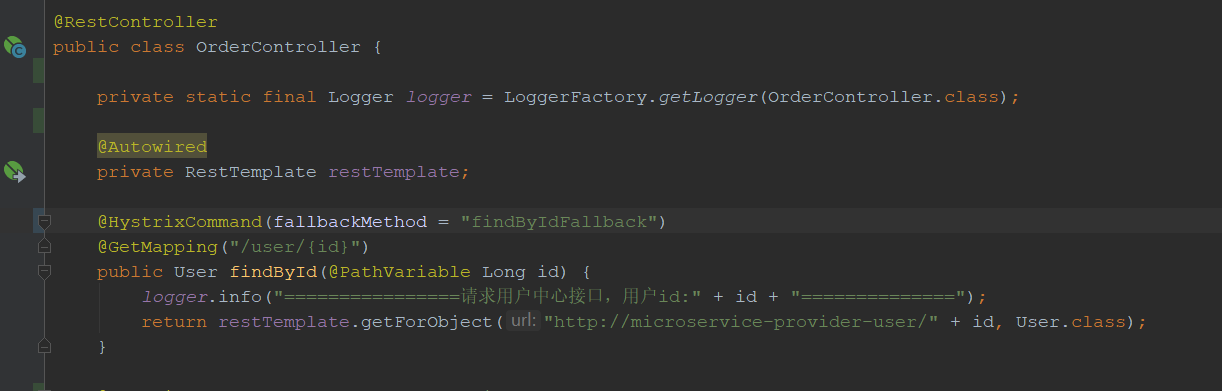
先默认order接口什么都不配置:
上图:
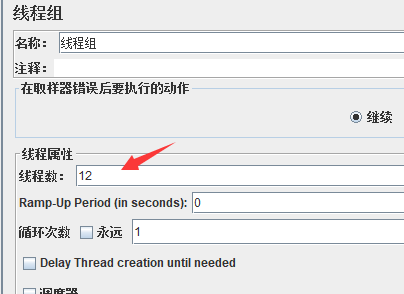
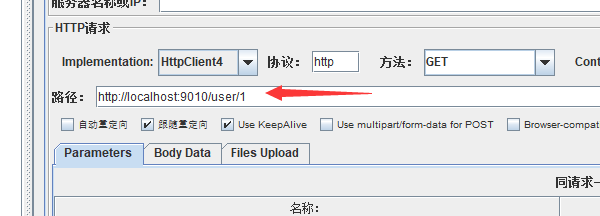
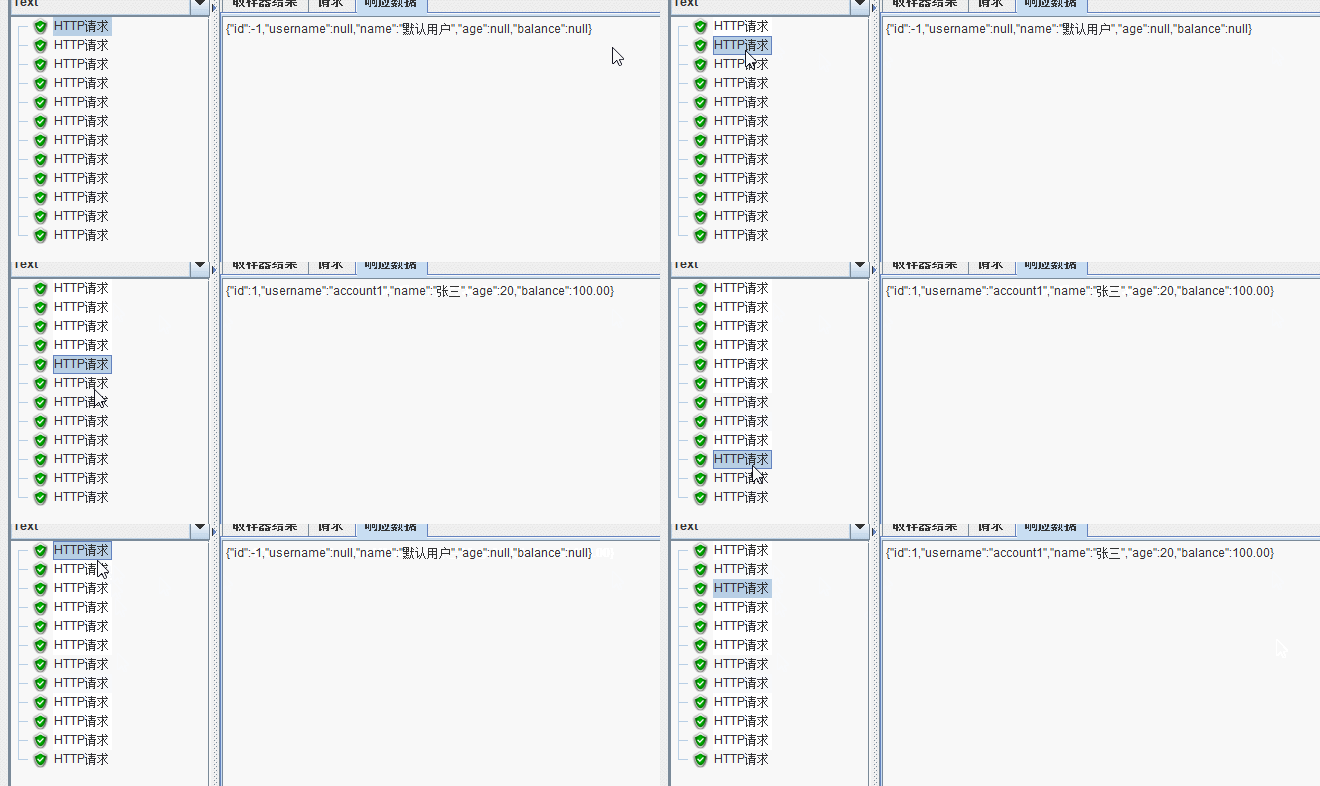
结果发现: 12个线程有10成功,2个被降级处理,说明hystrix 默认的线程池大小是10,
接下来配置一下order接口:

上图:

结果发现:12个线程访问只有3个成功,9个被降级。因为hystrix 线程池被配置成2个,队列长度1,所以9个线程立即被降级。
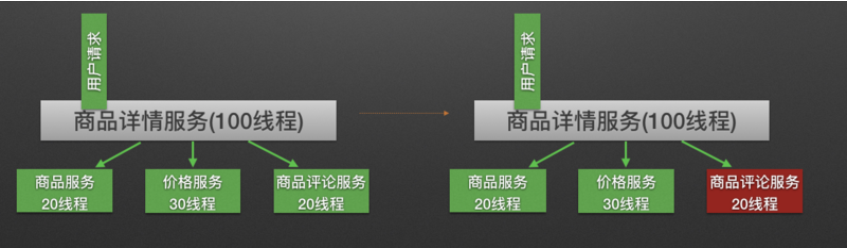 就好比商品详情服务一共100个线程,只允许20线程可以调用评论接口,如果并发是50,那么其他30就被降级,线程就立即回收,防止服务雪崩
欢迎来QQ群:592495675 搞事情