
前言
我们注意到springboot项目启动时,控制台会打印自带的banner,然后对于部分IT骚年来说,太单调太普通太一般了;所以,是时候表演真正的技术了
项目结构
我们只需要在springboot项目的resources文件夹下面创建一个banner.txt文件,springboot启动的时候会去加载这个文件,项目结构:
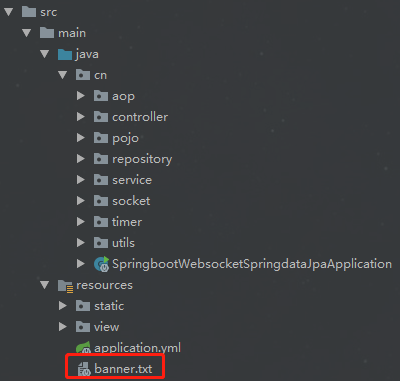
banner.txt
这里有几个定制banner的网站,文字、图片都可以秀起来,怎么秀就看你的骚操作了
http://patorjk.com/software/taag
http://www.network-science.de/ascii/
http://www.degraeve.com/img2txt.php
banner.txt的内容:
${AnsiColor.BRIGHT_YELLOW} //////////////////////////////////////////////////////////////////// // _ooOoo_ // // o8888888o // // 88" . "88 // // (| ^_^ |) // // O\ = /O // // ____/`---'\____ // // .' \\| |// `. // // / \\||| : |||// \ // // / _||||| -:- |||||- \ // // | | \\\ - /// | | // // | \_| ''\---/'' | | // // \ .-\__ `-` ___/-. / // // ___`. .' /--.--\ `. . ___ // // ."" '< `.___\_<|>_/___.' >'"". // // | | : `- \`.;`\ _ /`;.`/ - ` : | | // // \ \ `-. \_ __\ /__ _/ .-` / / // // ========`-.____`-.___\_____/___.-`____.-'======== // // `=---=' // // ^^^^^^^^^^^^^^^^^^^^^^^^^^^^^^^^^^^^^^^^^^^^^^^^^^ // // 佛祖保佑 永不宕机 永无BUG //////////////////////////////////////////////////////////////////////
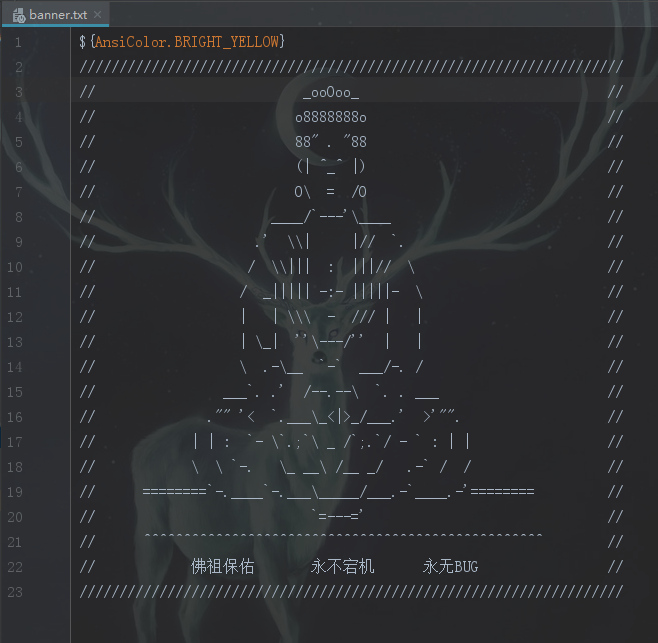
banner.txt配置
${AnsiColor.BRIGHT_RED}:设置控制台中输出内容的颜色
${application.version}:用来获取MANIFEST.MF文件中的版本号
${application.formatted-version}:格式化后的${application.version}版本信息
${spring-boot.version}:Spring Boot的版本号
${spring-boot.formatted-version}:格式化后的${spring-boot.version}版本信息
spring对banner的配置,来自springboot参考手册,Common application properties:https://docs.spring.io/spring-boot/docs/2.1.0.RELEASE/reference/htmlsingle/#common-application-properties
1# BANNER
2spring.banner.charset=UTF-8 # Banner file encoding.
3spring.banner.location=classpath:banner.txt # Banner text resource location.
4spring.banner.image.location=classpath:banner.gif # Banner image file location (jpg or png can also be used).
5spring.banner.image.width=76 # Width of the banner image in chars.
6spring.banner.image.height= # Height of the banner image in chars (default based on image height).
7spring.banner.image.margin=2 # Left hand image margin in chars.
8spring.banner.image.invert=false # Whether images should be inverted for dark terminal themes.
效果

结束语
秀儿,是你吗?
banner默认开启,如果不想让它打印怎么办?
方法1,在main的run方法设置
1/**
2 * 启动主类,springboot的入口
3 * springboot 默认扫描的类是在启动类的当前包和下级包
4 */
5@SpringBootApplication
6public class SpringbootWebsocketSpringdataJpaApplication {
7
8    public static void main(String[] args) {
9        SpringApplication springApplication = new SpringApplication(SpringbootWebsocketSpringdataJpaApplication.class);
10        //Banner.Mode.OFF 关闭
11        springApplication.setBannerMode(Banner.Mode.OFF);
12        springApplication.run(args);
13    }
14}
方法2,Edit Configurations --> 勾选Hide banner
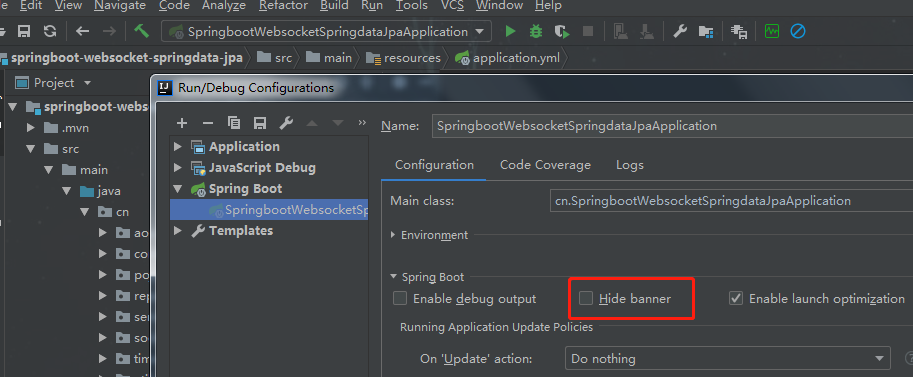
代码开源
代码已经开源、托管到我的GitHub、码云: