
1.electron架构思考
在做electron桌面开发中,Electron+vue当下算是性价比的比较高的。但是electron算是小众开发,遇到问题,基本上就是掉进深坑,爬好久才出来。
为了做一个项目,我翻遍了国内好多网站。看到一篇好的文章。Electron 应用实战 (架构篇) 这篇还是很值得好好看看
其中一句话,我觉得讲的很有道理====》数据通讯方案决定整体的架构方案。
原因:Electron 有两个进程,分别为 main 和 renderer,而两者之间需要进行通讯,通讯机制不同。
1. 方案1 只是简单的通信,没有大数据量通信。
通常采用本身的自带方案,ipc方式 main 端有 ipcMain,renderer 端有 ipcRenderer,分别用于通讯。
缺点:不支持大数据通信和复杂的业务逻辑
2.用remote模块渲染进程直接调用主进程的进程
remote模块官方文档 https://electronjs.org/docs/api/remote
例如
主进程:
1// 主进程 mapNumbers.js
2exports.withRendererCallback = (mapper) => {
3  return [1, 2, 3].map(mapper)
4}
5
6exports.withLocalCallback = () => {
7  return [1, 2, 3].map(x => x + 1)
8}
渲染进程
1// 渲染进程
2const mapNumbers = require('electron').remote.require('./mapNumbers')
3const withRendererCb = mapNumbers.withRendererCallback(x => x + 1)
4const withLocalCb = mapNumbers.withLocalCallback()
5
6console.log(withRendererCb, withLocalCb)
7// [undefined, undefined, undefined], [2, 3, 4]
3.Electron+vue一渲染进程直接调用主进程的方法
3.1创建项目
vue init simulatedgreg/electron-vue my-project
3.2安装依赖
npm install
3.3产生目录结构
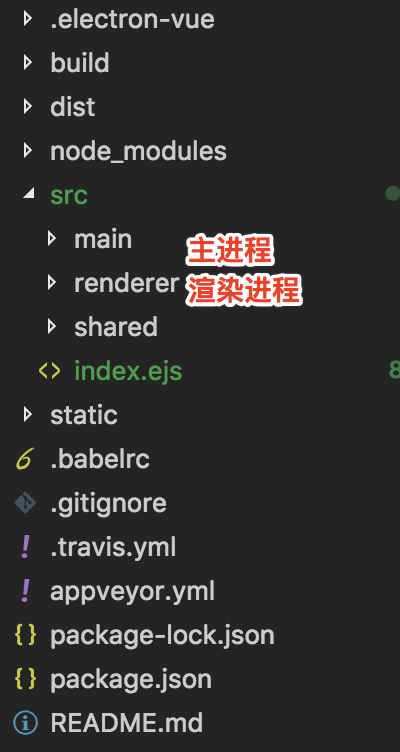
1project/
2├── main
3│   ├── foo.js
4│   └── index.js
5└── renderer
6    └── main.js
7
8└── components
9
10└── landingPage.vue
11
12└── .electron-vue
13
14└── webpack.main.config.js
3.4主进程=>创建 foo.js
1module.exports = {
2    getTest1(){
3        return 'test1';
4    },
5    getTest2(){
6        return 'test2';
7    },
8
9    }
3.4渲染进程=>main.js
1import Vue from 'vue'
2import axios from 'axios'
3import App from './App'
4import router from './router'
5import store from './store'
6
7//引入foo主进程
8const foo = require('electron').remote.require('./foo');
9
10//将 foo 挂载到 vue 的原型上
11Vue.prototype.foo = foo;
3.5 landingPage.vue
1<script>
2  export default {
3    methods: {
4      clickMethodInMainProcess() {
5
6           console.log('\n\n------ begin:  ------')
7
8           console.log(this.foo.getTest1())
9           console.log(this.foo.getTest2())
10
11           console.log('------ end:  ------\n\n')
12      }
13  }
14</script>el
3.6 webpack增加新entry
在 .electron-vue/webpack.main.config.js 添加新entry
a good solution by editing the webpack.main.config.js and manually adding every relative module as new entries.
1let mainConfig = {
2  entry: {
3    main: path.join(__dirname, '../src/main/index.js'),
4    foo: path.join(__dirname, '../src/main/foo.js')
5  },
6}
参考: